Adds "modifier key + mouse drag" move and resize to OSX
Objective-C
1,345
95 commits
updated May 11, 2026
 Easy Move+Resize
Adds easy modifier key + mouse drag move and resize to OSX
Easy Move+Resize is based on behavior found in many X11/Linux window managers
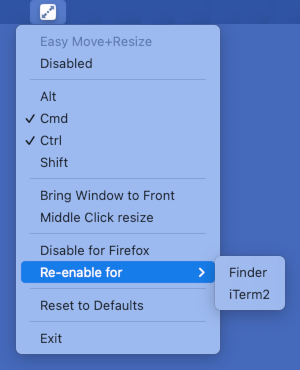
Cmd + Ctrl + Left Mouse anywhere inside a window, then drag to move.Cmd + Ctrl + Right Mouse anywhere inside a window, then drag to resize,
Middle Click resize menu item.Disabled item in the application icon menu.Bring Window to Front menu item.Reset to Defaults menu item.Disable for ... from the menu after using Easy Move+Resize on that app.brew install --cask easy-move-plus-resize
Contributions welcome!
Releases can be built, signed, notarized, and published automatically via the release workflow.
Prerequisites — the following secrets must be configured in the repository's GitHub Actions settings:
APPLE_ID — Apple ID email used for notarizationAPPLE_TEAM_ID — Apple Developer Team IDAPPLE_APP_PASSWORD — app-specific password for the Apple IDDEVELOPER_ID_APPLICATION — full name of the Developer ID Application signing identity (e.g. Developer ID Application: Your Name (TEAMID))DEVELOPER_ID_CERT_P12_BASE64 — base64-encoded .p12 export of the Developer ID Application certificateDEVELOPER_ID_CERT_PASSWORD — password for the .p12 fileSteps:
easy-move-resize/easy-move-resize-Info.plist, (example)git tag <chosen version number>git push origin --tagsv1.2.3), toggle Mark as pre-release if applicable, then click Run workflow.app with xcodebuild, signs/notarizes/staples it, creates the git tag, and publishes a GitHub Release with the signed zip attachedeasy-move-resize/easy-move-resize-Info.plist, (example)git tag <chosen version number>git push origin --tagsProduct->Archivezip -r Easy.Move+Resize.app.zip Easy\ Move+Resize.app935 followers · starred Sep 2022
316 followers · starred Dec 2023
3,952 followers · starred Nov 2021
156 followers · starred Feb 2025
Adds "modifier key + mouse drag" move and resize to OSX
Objective-C
1,345
95 commits
updated May 11, 2026
Easy Move+ResizeAdds easy modifier key + mouse drag move and resize to OSX
Easy Move+Resize is based on behavior found in many X11/Linux window managers
Cmd + Ctrl + Left Mouse anywhere inside a window, then drag to move.Cmd + Ctrl + Right Mouse anywhere inside a window, then drag to resize,
Middle Click resize menu item.Disabled item in the application icon menu.Bring Window to Front menu item.Reset to Defaults menu item.Disable for ... from the menu after using Easy Move+Resize on that app.brew install --cask easy-move-plus-resize
Contributions welcome!
Releases can be built, signed, notarized, and published automatically via the release workflow.
Prerequisites — the following secrets must be configured in the repository's GitHub Actions settings:
APPLE_ID — Apple ID email used for notarizationAPPLE_TEAM_ID — Apple Developer Team IDAPPLE_APP_PASSWORD — app-specific password for the Apple IDDEVELOPER_ID_APPLICATION — full name of the Developer ID Application signing identity (e.g. Developer ID Application: Your Name (TEAMID))DEVELOPER_ID_CERT_P12_BASE64 — base64-encoded .p12 export of the Developer ID Application certificateDEVELOPER_ID_CERT_PASSWORD — password for the .p12 fileSteps:
easy-move-resize/easy-move-resize-Info.plist, (example)git tag <chosen version number>git push origin --tagsv1.2.3), toggle Mark as pre-release if applicable, then click Run workflow.app with xcodebuild, signs/notarizes/staples it, creates the git tag, and publishes a GitHub Release with the signed zip attachedeasy-move-resize/easy-move-resize-Info.plist, (example)git tag <chosen version number>git push origin --tagsProduct->Archivezip -r Easy.Move+Resize.app.zip Easy\ Move+Resize.app935 followers · starred Sep 2022
316 followers · starred Dec 2023
3,952 followers · starred Nov 2021
156 followers · starred Feb 2025