Run coding agents across all your projects from one window. A macOS IDE built on Eclipse Theia, with agents in herdr.
TypeScript
2
149 commits
updated Oct 9, 2026

Run coding agents across all your projects from one window.
Click + on any folder to start Claude Code, Codex, Antigravity CLI or opencode there.
Public beta · 0.1.0-beta.1 · macOS on Apple silicon · free and open source (MIT)
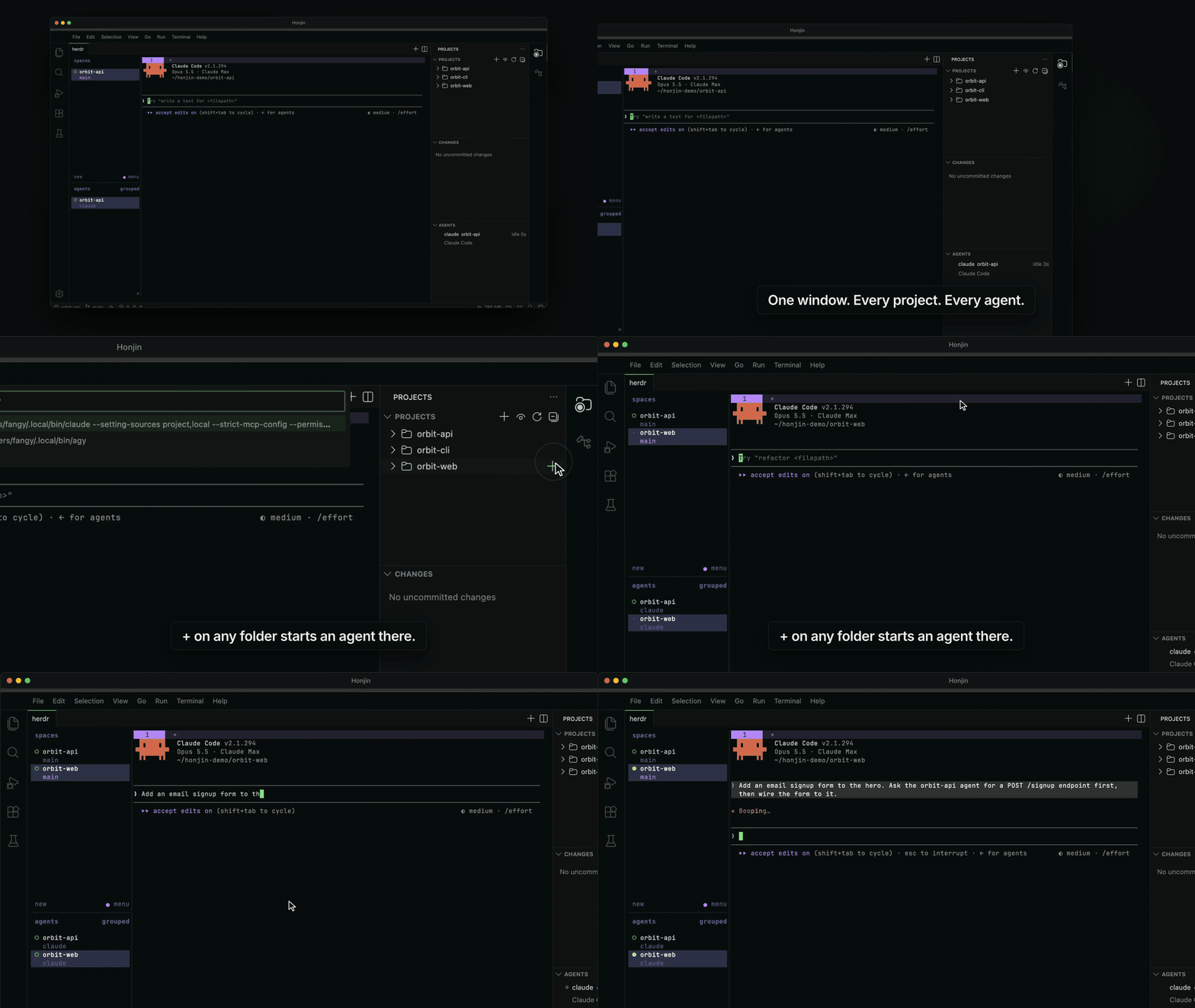
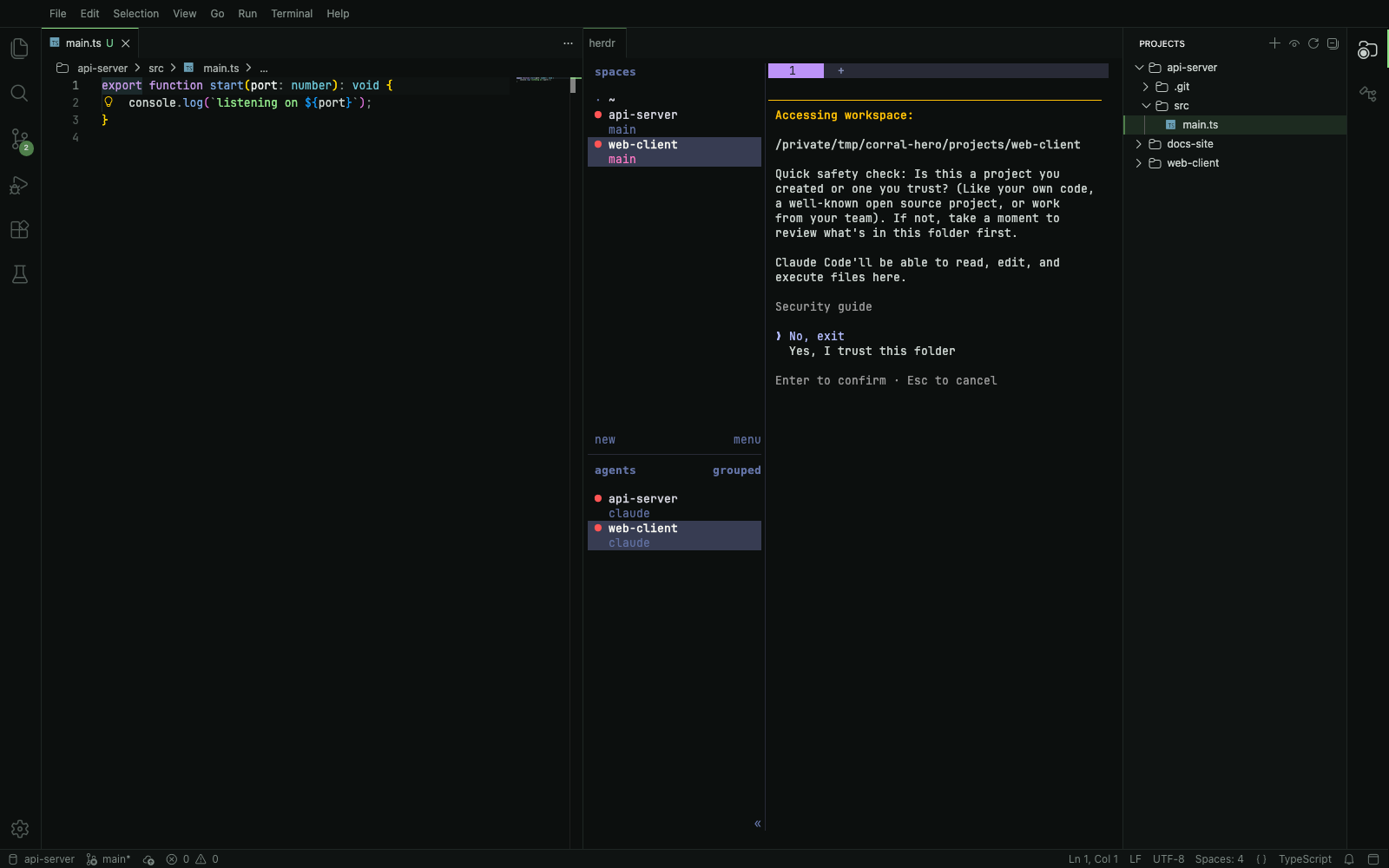
If you run several coding agents at once, you end up with a pile of terminal windows and no idea which agent is waiting for you. Honjin is a code editor that keeps all your projects in one window and runs your agents in herdr, a terminal that keeps them going in the background. One click starts an agent in any folder, and a side panel shows which agents are working, which are blocked and which are done.
Paste this into Terminal:
curl -fsSL https://raw.githubusercontent.com/dhyeys54/honjin/main/scripts/install.sh | sh
It downloads the latest release, checks it against the published SHA256SUMS, and puts Honjin.app in
/Applications. Honjin opens without a macOS security prompt, because a file downloaded by curl is not
quarantined. The script is short; read it before you run it if you like.
To update, run the same command again. It quits a running Honjin first and keeps your settings.
If /Applications isn't writable for your account, the script says so. Re-run it with sudo sh in place of sh, or
install for yourself only with HONJIN_INSTALL_DIR=$HOME/Applications (create the folder first).
Honjin-<version>-arm64-mac.zip and SHA256SUMS from the
latest release.shasum -a 256 -c SHA256SUMS --ignore-missing. It should print OK.Honjin.app into /Applications.xattr -dr com.apple.quarantine /Applications/Honjin.app.git clone https://github.com/dhyeys54/honjin && cd honjin
npm install
npm run package:mac # electron-app/dist/mac-arm64/Honjin.app
Needs Node 20 or later, npm 10 or later and the Xcode Command Line Tools. See CONTRIBUTING.md.
Quit Honjin, delete /Applications/Honjin.app and ~/.honjin. herdr keeps running in the background with your
agents; stop it with herdr server stop.
| Setting | Default | |
|---|---|---|
honjin.scanRoots | [] | Folders whose subfolders are projects |
honjin.extraProjects | [] | Projects added by hand |
honjin.hiddenProjects | [] | Hidden projects |
honjin.agentCommands | { "claude": "claude", "codex": "codex", … } | The command + types for each agent in the picker; add flags here |
honjin.projectOverrides | {} | Per-project { "startupCommand": "…" } |
honjin.updates.check | true | Ask GitHub once a day whether a newer Honjin exists (Honjin's only request of its own) |
honjin.herdr.path / honjin.herdr.session | "herdr" / "" | herdr binary, and session (empty = default) |
These are stored in ~/.honjin/settings.json, never inside your repos.
api.github.com/repos/dhyeys54/honjin/releases/latest) so it can tell you when a new build is out. It sends no
cookies, account or project information; GitHub sees your IP address and the request itself, as it would for any
download. Turn it off with honjin.updates.check: false in ~/.honjin/settings.json.open-vsx.org), which the Extensions view contacts when you browse or search it.~/.honjin/settings.json, never inside your repositories.The ones you're most likely to meet:
herdr server stop.The full list, with workarounds: docs/KNOWN-ISSUES.md.
This is a beta and feedback is the point. Help → Report an Issue opens a GitHub issue with your versions already filled in. There are also templates for install problems and ideas, and Discussions for anything else.
This repo is set up to be built by coding agents with test-driven development:
| File | Purpose |
|---|---|
AGENTS.md / CLAUDE.md | Rules, commands and workflow for agents |
docs/specs/ | The behaviour contract, one spec per area |
docs/PLAN.md | Ordered TDD tasks with tests and verify steps |
docs/DECISIONS.md | Why things are the way they are |
PRODUCT.md / DESIGN.md | Product truth and design tokens (used by the impeccable skill) |
.claude/skills/ | next-task, honjin-tdd, theia-dev, herdr-integration, honjin-polish |
With Claude Code: open this folder, then run /next-task (one task) or /loop /next-task (keeps going until a
human checkpoint). Tests: npm test (unit), npm run test:int (real herdr, isolated session), npm run test:e2e
(Playwright).
See CONTRIBUTING.md before opening a pull request.
MIT for Honjin's own code (LICENSE). Theia, Electron, Monaco and the bundled fonts keep their own licences; see THIRD_PARTY_NOTICES.md. The Honjin name and icon are not covered by the MIT licence: forks are welcome under their own name, see TRADEMARK.md.
Run coding agents across all your projects from one window. A macOS IDE built on Eclipse Theia, with agents in herdr.
TypeScript
2
149 commits
updated Oct 9, 2026
Run coding agents across all your projects from one window.
Click + on any folder to start Claude Code, Codex, Antigravity CLI or opencode there.
Public beta · 0.1.0-beta.1 · macOS on Apple silicon · free and open source (MIT)
If you run several coding agents at once, you end up with a pile of terminal windows and no idea which agent is waiting for you. Honjin is a code editor that keeps all your projects in one window and runs your agents in herdr, a terminal that keeps them going in the background. One click starts an agent in any folder, and a side panel shows which agents are working, which are blocked and which are done.
Paste this into Terminal:
curl -fsSL https://raw.githubusercontent.com/dhyeys54/honjin/main/scripts/install.sh | sh
It downloads the latest release, checks it against the published SHA256SUMS, and puts Honjin.app in
/Applications. Honjin opens without a macOS security prompt, because a file downloaded by curl is not
quarantined. The script is short; read it before you run it if you like.
To update, run the same command again. It quits a running Honjin first and keeps your settings.
If /Applications isn't writable for your account, the script says so. Re-run it with sudo sh in place of sh, or
install for yourself only with HONJIN_INSTALL_DIR=$HOME/Applications (create the folder first).
Honjin-<version>-arm64-mac.zip and SHA256SUMS from the
latest release.shasum -a 256 -c SHA256SUMS --ignore-missing. It should print OK.Honjin.app into /Applications.xattr -dr com.apple.quarantine /Applications/Honjin.app.git clone https://github.com/dhyeys54/honjin && cd honjin
npm install
npm run package:mac # electron-app/dist/mac-arm64/Honjin.app
Needs Node 20 or later, npm 10 or later and the Xcode Command Line Tools. See CONTRIBUTING.md.
Quit Honjin, delete /Applications/Honjin.app and ~/.honjin. herdr keeps running in the background with your
agents; stop it with herdr server stop.
| Setting | Default | |
|---|---|---|
honjin.scanRoots | [] | Folders whose subfolders are projects |
honjin.extraProjects | [] | Projects added by hand |
honjin.hiddenProjects | [] | Hidden projects |
honjin.agentCommands | { "claude": "claude", "codex": "codex", … } | The command + types for each agent in the picker; add flags here |
honjin.projectOverrides | {} | Per-project { "startupCommand": "…" } |
honjin.updates.check | true | Ask GitHub once a day whether a newer Honjin exists (Honjin's only request of its own) |
honjin.herdr.path / honjin.herdr.session | "herdr" / "" | herdr binary, and session (empty = default) |
These are stored in ~/.honjin/settings.json, never inside your repos.
api.github.com/repos/dhyeys54/honjin/releases/latest) so it can tell you when a new build is out. It sends no
cookies, account or project information; GitHub sees your IP address and the request itself, as it would for any
download. Turn it off with honjin.updates.check: false in ~/.honjin/settings.json.open-vsx.org), which the Extensions view contacts when you browse or search it.~/.honjin/settings.json, never inside your repositories.The ones you're most likely to meet:
herdr server stop.The full list, with workarounds: docs/KNOWN-ISSUES.md.
This is a beta and feedback is the point. Help → Report an Issue opens a GitHub issue with your versions already filled in. There are also templates for install problems and ideas, and Discussions for anything else.
This repo is set up to be built by coding agents with test-driven development:
| File | Purpose |
|---|---|
AGENTS.md / CLAUDE.md | Rules, commands and workflow for agents |
docs/specs/ | The behaviour contract, one spec per area |
docs/PLAN.md | Ordered TDD tasks with tests and verify steps |
docs/DECISIONS.md | Why things are the way they are |
PRODUCT.md / DESIGN.md | Product truth and design tokens (used by the impeccable skill) |
.claude/skills/ | next-task, honjin-tdd, theia-dev, herdr-integration, honjin-polish |
With Claude Code: open this folder, then run /next-task (one task) or /loop /next-task (keeps going until a
human checkpoint). Tests: npm test (unit), npm run test:int (real herdr, isolated session), npm run test:e2e
(Playwright).
See CONTRIBUTING.md before opening a pull request.
MIT for Honjin's own code (LICENSE). Theia, Electron, Monaco and the bundled fonts keep their own licences; see THIRD_PARTY_NOTICES.md. The Honjin name and icon are not covered by the MIT licence: forks are welcome under their own name, see TRADEMARK.md.



