
README
🪪 AgentIDE
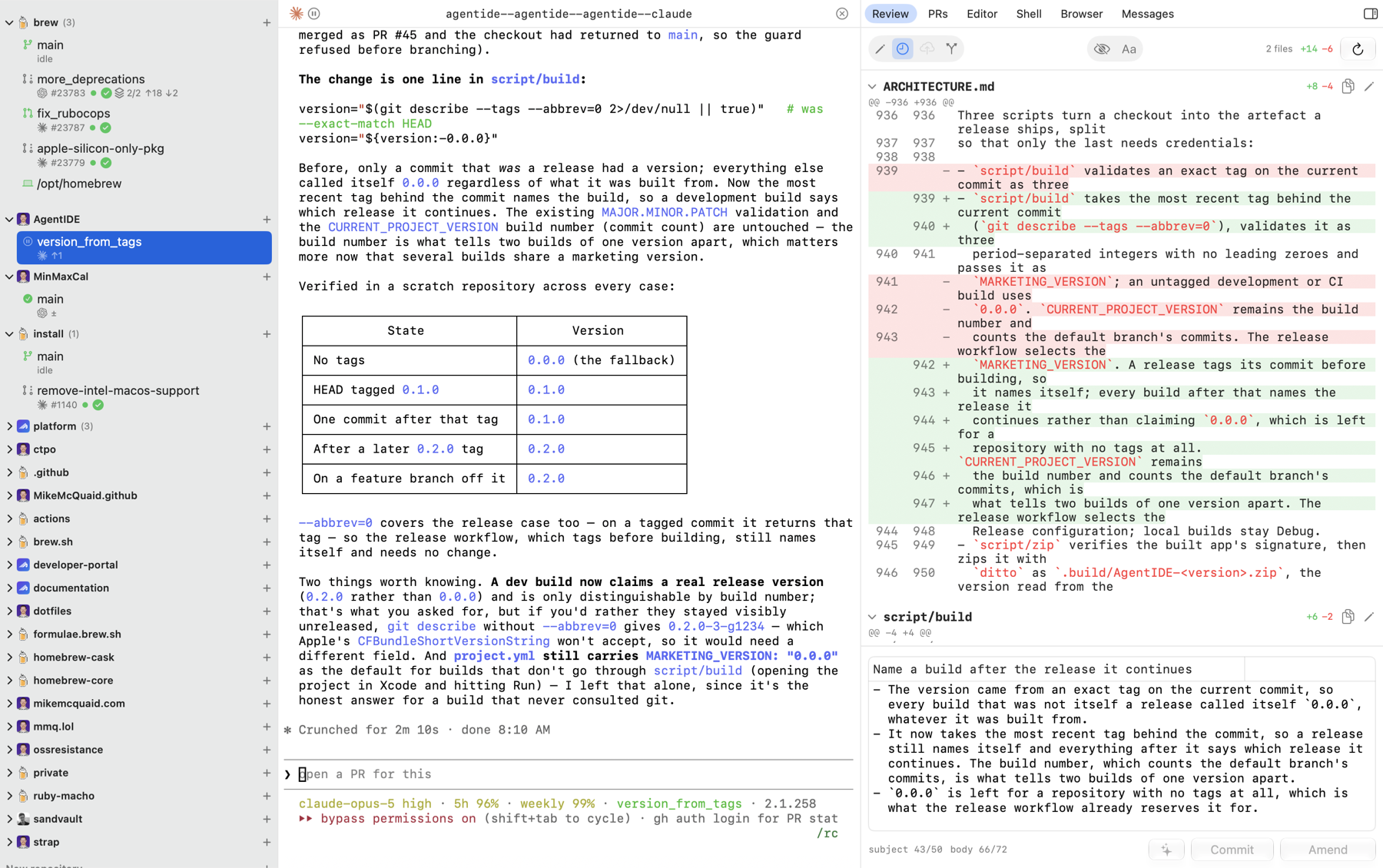
AgentIDE is a native macOS app for running, prompting and reviewing
sandboxed AI coding agents in parallel git worktrees, from prompt
to reviewed, merged pull request. Everything a task passes through,
worktree, conversation, review, pull request and CI, is one window in
one app rather than several. Built with SwiftUI on top of
sandvault,
herdr and the gh CLI.
💡 Motivation
My agentic coding setup, described in
Sandboxes and Worktrees: My secure Agentic AI Setup,
spanned four apps: an agent and worktree manager, a git GUI, a code
editor and a terminal. AgentIDE replaces all four with one app designed
around the same workflow. Agents run inside a separate, non-admin
sandvault sandboxed user with no access to sensitive files or
credentials, so they can work unattended without endangering the rest of
the machine, and their sessions live in a herdr server owned by the
same sandbox user, so nothing is lost when the app quits, crashes or
updates.
✨ Features
- Starts a worktree, a branch and an agent from a prompt, a GitHub issue or a pull request, narrating each step until the agent is up.
- Runs Claude Code or Codex CLI as a sandboxed, non-admin user, with no permission prompts necessary and no access to your admin user's files or credentials.
- Groups worktrees by repository with unread activity, agent state, open pull requests, merge conflicts, uncommitted work and drift from what was pushed, adopting worktrees made outside the app in the same locations.
- Says what a pull request is doing in GitHub's own icons, one glyph per fact, watching checks and queued merges until they settle.
- Fetch and Fetch and Reset on a repository follow its default branch when it has moved on GitHub, switching the checkout to the new one.
- Reattaches a pane that shows nothing by itself, once, and offers Reattach in the pane when that does not draw either; a right-click on the pane or on the session strip above it offers it any time.
- Asks Copilot to review a pull request, or to review it again after a push, from the Copilot icon in the conversation's header; it dims while a request is still waiting on it.
- Code reviews uncommitted work, the last commit, unpushed commits, the whole branch or any single commit, as a syntax-highlighted diff with the pull request's conversations inline under their files.
- Edits files in a built-in editor that reads
.editorconfig, comments with Cmd-/, moves and duplicates lines, guides columns 80 and 118 and bars every uncommitted line; an uncommitted file can also be put back to what HEAD has, or deleted if it was never committed, after a prompt. - Commits the files you tick rather than the worktree, or adds them to the previous commit, with the message drafted by the on-device Apple model.
- Pushes, rebases and opens pull requests as drafts or ready for review, templates filled in, labels attached, forks used where the repository is not yours, pushes following a contributor's fork back to it, and branches stacked in one worktree; an open pull request's title and body are edited in the same form, to say what was actually pushed.
- Copies unresolved review comments and failing CI logs into a prompt, resolves conversations and merges or queues, each with a click.
- Stays quiet while idle, and quieter still on battery, with agent and file changes still landing at once.
- Notifies when an agent finishes or needs input, badges the Dock, and marks a pane that has held several cores for ten minutes with what is running in it.
- Deletes a worktree and its branch once its pull request merges, and keeps every conversation browsable and resumable after the worktree is gone.
- Starts and steers work from a phone:
agentide newover SSH, Shortcuts and Siri, andherdrfor the sessions themselves.
🚫 Out of Scope
- Windows or Linux support; being a native macOS app is the point.
- Running agents without a sandboxed non-admin user.
- Team, multi-user or hosted features: one developer, one Mac.
- An agent marketplace or bundled models; bring your own agent CLI.
- A native iOS app: SSH into
herdrfrom any iOS client instead. - An updater or a Mac App Store build; Homebrew's cask upgrades it, and the App Store sandbox forbids running agents as another user.
📋 Requirements
- macOS Golden Gate (27) or later.
- Homebrew, which installs the rest.
- sandvault, which creates the sandbox user and the shared workspace.
ghauthenticated as you; it stays with your user and agents never see it.herdrandmosh, installed byscript/bootstrap;moshonly matters from a phone.- Xcode 27 or later, only to build from source.
📦 Installation
brew install --cask agentide
The agentide cask
installs the latest release, and brew upgrade updates it. Releases are
signed with a Developer ID certificate and notarised by Apple.
Without Homebrew, download AgentIDE-<version>.zip from the
releases page, unzip
it and move AgentIDE.app to /Applications.
To run the current source instead:
script/bootstrap
script/install
⚙️ Configuration
Settings (Cmd-,) controls:
- General: the agent, model and effort new sessions start on, whether commits must be signed, and the browser Cmd-click opens.
- Notifications: which events notify, badge the Dock and make a sound.
- Editor: the external editor Cmd-click runs, and the monospace font every code surface shares.
- Advanced: where repositories and worktrees live, how often the system is re-read, idle sleep and the performance log.
A shell pane sets AGENTIDE=1 and puts the bundled agentide command on
PATH, so shell files can hand editing back to the app:
if [ -n "${AGENTIDE}" ]; then
  export EDITOR="$(command -v agentide) --wait"
  export VISUAL="${EDITOR}"
fi
agentide . from any terminal switches the window to the worktree you
are in.
📱 iPhone SSH access
Agents run as the sandbox user, so anything that can SSH to that user
can start and steer them. Moshi is the iOS
client this is currently built around, because it speaks both
mosh, so a phone changing network keeps its
session rather than dropping it, and herdr, so it attaches to the same
sessions the app does.
-
Put the phone's public key in sandvault's guest template, which is what the sandbox home is built from, then rebuild it. A sandvault upgrade replaces the template, so keep this in your dotfiles:
guest_keys="$(brew --prefix sandvault)/libexec/guest/home/.ssh/authorized_keys" cat "${HOME}/Downloads/moshi.pub" >>"${guest_keys}" sv --rebuild build -
Name the shared workspace for logins from outside the sandbox, which do not inherit it, in
/etc/ssh/sshd_config.d/000-agentide.confwith your own user name and path in place of<you>, then turn on macOS's Remote Login for that account:Match User sandvault-<you> SetEnv SHARED_WORKSPACE=/Users/Shared/sv-<you> -
In the sandbox user's shell configuration, name the session and give the new-session command a short alias:
export HERDR_SESSION=agentide
alias ain='/Applications/AgentIDE.app/Contents/Resources/bin/agentide new'
Connect as sandvault-<you> and run herdr: one attach presents every
agent's workspace, and ain starts a new session, asking for repository,
agent, model, effort and prompt. A session steered from the phone is the
same session the Mac shows.
🛠️ Development
script/bootstrap: installBrewfiledependencies and generate the Xcode project with XcodeGenscript/build: build the app;AgentIDE.appin the repository root symlinks its outputscript/version: print the version and build number git says, which scripted and Xcode builds both usescript/install: build, then copy the app to /Applicationsscript/test: unit, integration and App Intents testsscript/style [--fix]: SwiftLint and SwiftFormat, every rule onscript/analyze: static analysis and dead codescript/zipandscript/package: zip, sign and notarise a releasescript/attach: attach this terminal to the sandboxedherdrsession
Releases run the Release workflow from the Actions tab on main with
a bare MAJOR.MINOR.PATCH version.
🚧 Status
Stable but changing daily. AgentIDE is being designed exclusively for @MikeMcQuaid's personal workflow; nothing here promises to suit anyone else's, interfaces and behaviour may break without notice and there is no support.
📮 Contact
📄 Licence
AGPL-3.0. If you reuse or adapt the source the AGPL terms apply, including the network-use clause.
Octicons are vendored in
App/Assets.xcassets and licensed under the
MIT License.
Contributors


See what people are saying
Hacker News (1)
Similar repos


Languages
Swift
97.8%
Shell
2.1%
README
🪪 AgentIDE
AgentIDE is a native macOS app for running, prompting and reviewing
sandboxed AI coding agents in parallel git worktrees, from prompt
to reviewed, merged pull request. Everything a task passes through,
worktree, conversation, review, pull request and CI, is one window in
one app rather than several. Built with SwiftUI on top of
sandvault,
herdr and the gh CLI.
💡 Motivation
My agentic coding setup, described in
Sandboxes and Worktrees: My secure Agentic AI Setup,
spanned four apps: an agent and worktree manager, a git GUI, a code
editor and a terminal. AgentIDE replaces all four with one app designed
around the same workflow. Agents run inside a separate, non-admin
sandvault sandboxed user with no access to sensitive files or
credentials, so they can work unattended without endangering the rest of
the machine, and their sessions live in a herdr server owned by the
same sandbox user, so nothing is lost when the app quits, crashes or
updates.
✨ Features
- Starts a worktree, a branch and an agent from a prompt, a GitHub issue or a pull request, narrating each step until the agent is up.
- Runs Claude Code or Codex CLI as a sandboxed, non-admin user, with no permission prompts necessary and no access to your admin user's files or credentials.
- Groups worktrees by repository with unread activity, agent state, open pull requests, merge conflicts, uncommitted work and drift from what was pushed, adopting worktrees made outside the app in the same locations.
- Says what a pull request is doing in GitHub's own icons, one glyph per fact, watching checks and queued merges until they settle.
- Fetch and Fetch and Reset on a repository follow its default branch when it has moved on GitHub, switching the checkout to the new one.
- Reattaches a pane that shows nothing by itself, once, and offers Reattach in the pane when that does not draw either; a right-click on the pane or on the session strip above it offers it any time.
- Asks Copilot to review a pull request, or to review it again after a push, from the Copilot icon in the conversation's header; it dims while a request is still waiting on it.
- Code reviews uncommitted work, the last commit, unpushed commits, the whole branch or any single commit, as a syntax-highlighted diff with the pull request's conversations inline under their files.
- Edits files in a built-in editor that reads
.editorconfig, comments with Cmd-/, moves and duplicates lines, guides columns 80 and 118 and bars every uncommitted line; an uncommitted file can also be put back to what HEAD has, or deleted if it was never committed, after a prompt. - Commits the files you tick rather than the worktree, or adds them to the previous commit, with the message drafted by the on-device Apple model.
- Pushes, rebases and opens pull requests as drafts or ready for review, templates filled in, labels attached, forks used where the repository is not yours, pushes following a contributor's fork back to it, and branches stacked in one worktree; an open pull request's title and body are edited in the same form, to say what was actually pushed.
- Copies unresolved review comments and failing CI logs into a prompt, resolves conversations and merges or queues, each with a click.
- Stays quiet while idle, and quieter still on battery, with agent and file changes still landing at once.
- Notifies when an agent finishes or needs input, badges the Dock, and marks a pane that has held several cores for ten minutes with what is running in it.
- Deletes a worktree and its branch once its pull request merges, and keeps every conversation browsable and resumable after the worktree is gone.
- Starts and steers work from a phone:
agentide newover SSH, Shortcuts and Siri, andherdrfor the sessions themselves.
🚫 Out of Scope
- Windows or Linux support; being a native macOS app is the point.
- Running agents without a sandboxed non-admin user.
- Team, multi-user or hosted features: one developer, one Mac.
- An agent marketplace or bundled models; bring your own agent CLI.
- A native iOS app: SSH into
herdrfrom any iOS client instead. - An updater or a Mac App Store build; Homebrew's cask upgrades it, and the App Store sandbox forbids running agents as another user.
📋 Requirements
- macOS Golden Gate (27) or later.
- Homebrew, which installs the rest.
- sandvault, which creates the sandbox user and the shared workspace.
ghauthenticated as you; it stays with your user and agents never see it.herdrandmosh, installed byscript/bootstrap;moshonly matters from a phone.- Xcode 27 or later, only to build from source.
📦 Installation
brew install --cask agentide
The agentide cask
installs the latest release, and brew upgrade updates it. Releases are
signed with a Developer ID certificate and notarised by Apple.
Without Homebrew, download AgentIDE-<version>.zip from the
releases page, unzip
it and move AgentIDE.app to /Applications.
To run the current source instead:
script/bootstrap
script/install
⚙️ Configuration
Settings (Cmd-,) controls:
- General: the agent, model and effort new sessions start on, whether commits must be signed, and the browser Cmd-click opens.
- Notifications: which events notify, badge the Dock and make a sound.
- Editor: the external editor Cmd-click runs, and the monospace font every code surface shares.
- Advanced: where repositories and worktrees live, how often the system is re-read, idle sleep and the performance log.
A shell pane sets AGENTIDE=1 and puts the bundled agentide command on
PATH, so shell files can hand editing back to the app:
if [ -n "${AGENTIDE}" ]; then
  export EDITOR="$(command -v agentide) --wait"
  export VISUAL="${EDITOR}"
fi
agentide . from any terminal switches the window to the worktree you
are in.
📱 iPhone SSH access
Agents run as the sandbox user, so anything that can SSH to that user
can start and steer them. Moshi is the iOS
client this is currently built around, because it speaks both
mosh, so a phone changing network keeps its
session rather than dropping it, and herdr, so it attaches to the same
sessions the app does.
-
Put the phone's public key in sandvault's guest template, which is what the sandbox home is built from, then rebuild it. A sandvault upgrade replaces the template, so keep this in your dotfiles:
guest_keys="$(brew --prefix sandvault)/libexec/guest/home/.ssh/authorized_keys" cat "${HOME}/Downloads/moshi.pub" >>"${guest_keys}" sv --rebuild build -
Name the shared workspace for logins from outside the sandbox, which do not inherit it, in
/etc/ssh/sshd_config.d/000-agentide.confwith your own user name and path in place of<you>, then turn on macOS's Remote Login for that account:Match User sandvault-<you> SetEnv SHARED_WORKSPACE=/Users/Shared/sv-<you> -
In the sandbox user's shell configuration, name the session and give the new-session command a short alias:
export HERDR_SESSION=agentide
alias ain='/Applications/AgentIDE.app/Contents/Resources/bin/agentide new'
Connect as sandvault-<you> and run herdr: one attach presents every
agent's workspace, and ain starts a new session, asking for repository,
agent, model, effort and prompt. A session steered from the phone is the
same session the Mac shows.
🛠️ Development
script/bootstrap: installBrewfiledependencies and generate the Xcode project with XcodeGenscript/build: build the app;AgentIDE.appin the repository root symlinks its outputscript/version: print the version and build number git says, which scripted and Xcode builds both usescript/install: build, then copy the app to /Applicationsscript/test: unit, integration and App Intents testsscript/style [--fix]: SwiftLint and SwiftFormat, every rule onscript/analyze: static analysis and dead codescript/zipandscript/package: zip, sign and notarise a releasescript/attach: attach this terminal to the sandboxedherdrsession
Releases run the Release workflow from the Actions tab on main with
a bare MAJOR.MINOR.PATCH version.
🚧 Status
Stable but changing daily. AgentIDE is being designed exclusively for @MikeMcQuaid's personal workflow; nothing here promises to suit anyone else's, interfaces and behaviour may break without notice and there is no support.
📮 Contact
📄 Licence
AGPL-3.0. If you reuse or adapt the source the AGPL terms apply, including the network-use clause.
Octicons are vendored in
App/Assets.xcassets and licensed under the
MIT License.
See what people are saying
Hacker News (1)
Similar repos
Contributors
Languages
Swift
97.8%
Shell
2.1%