devohmycode/NoteUI

A note-taking application with speech detection built with WinUI 3

C#

22

49 commits

updated Mar 30, 2026

See the code

README

NoteUI

A modern sticky notes application for Windows, built with WinUI 3 (Windows App SDK 1.8) and .NET 10.

Windows .NET 10 WinUI 3

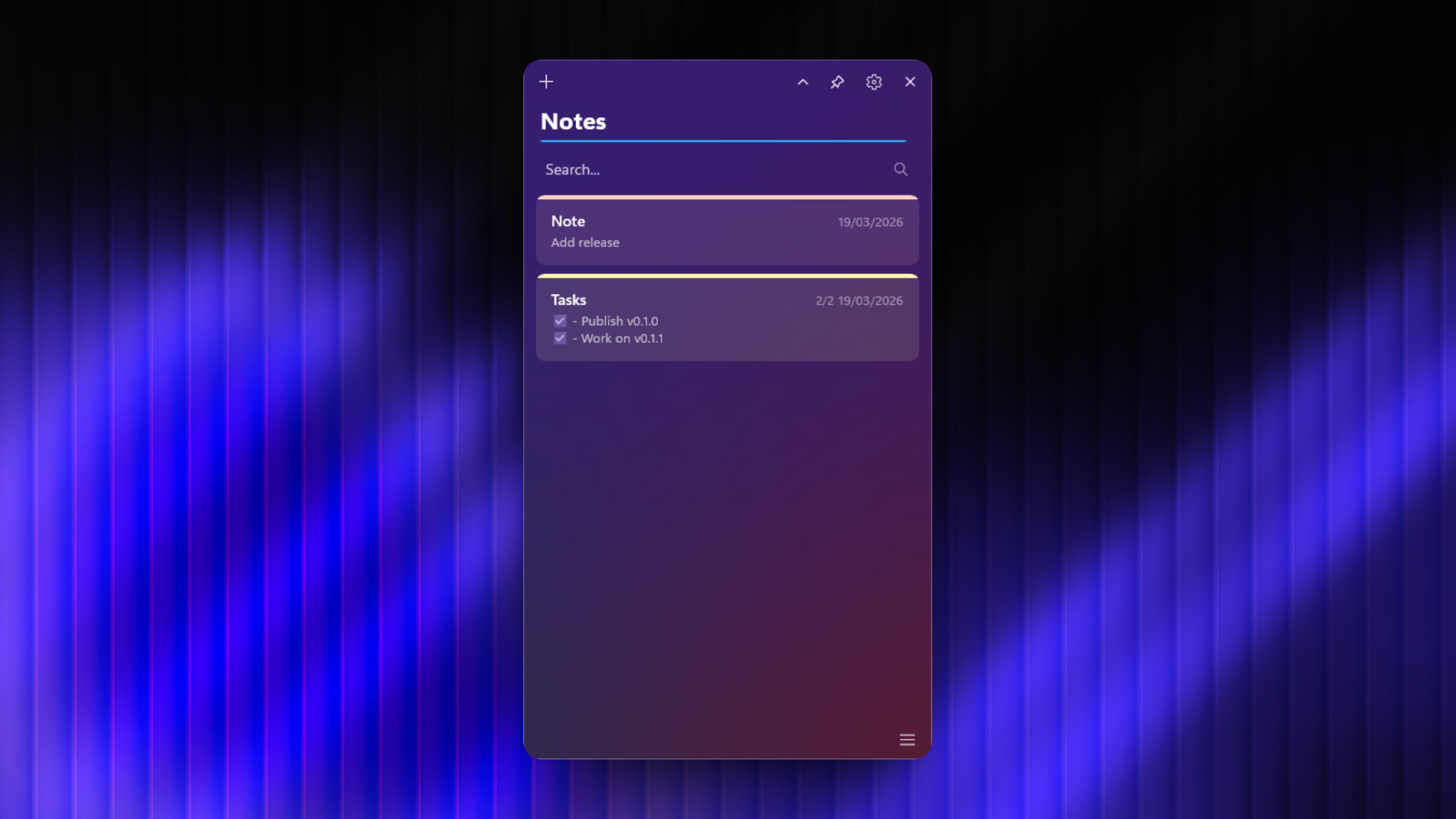
Image1

Features

Notes

  • Create, edit, delete, and duplicate notes
  • Rich text editing (bold, italic, underline, strikethrough, bullet lists, headings)
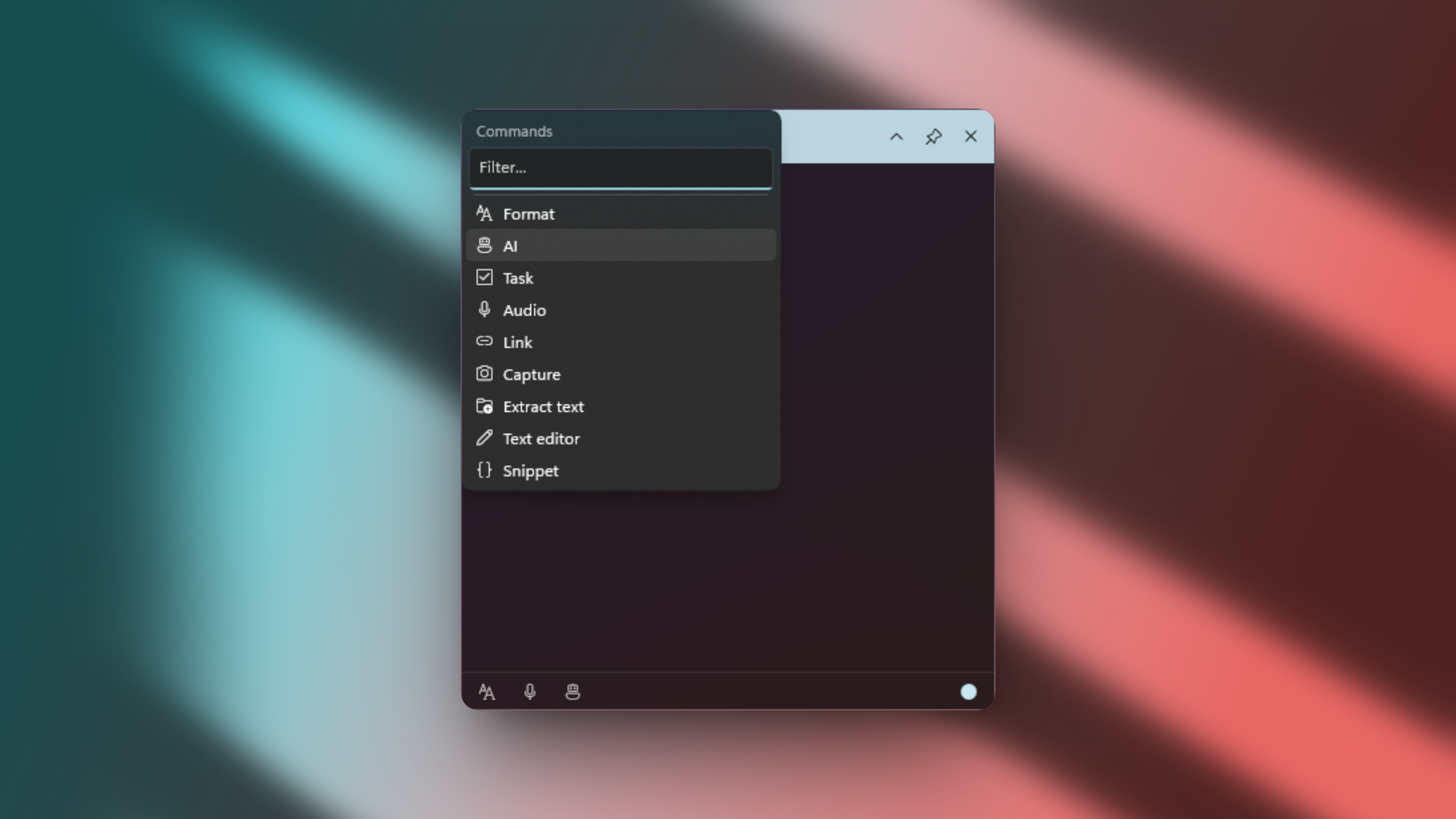
  • Slash commands (/bold, /h1, /date, /time, …) for quick formatting
  • 14 color themes (Yellow, Green, Mint, Teal, Blue, Lavender, Purple, Pink, Coral, Orange, Peach, Sand, Gray, Charcoal)
  • Pin notes to the top of the list
  • Search and filter by title or content
  • Inline title editing
  • Auto-save on every change
  • Keyboard-accessible note cards (Tab to focus, Enter to open)
  • Sort notes by recent, creation date, alphabetical, color, or size
  • Compact card view toggle
  • Clipboard monitor: automatically create a note from clipboard content

Task Lists

  • Dedicated task list note type with checkboxes
  • Add, remove, and reorder tasks
  • Task completion tracking with progress display (e.g. "3/5")
  • Per-task reminders with date and time picker
  • Enter to add a new task, Backspace on empty to delete

Reminders

  • Set reminders on notes and individual tasks with date picker and time picker
  • Windows toast notifications when a reminder fires
  • Visual bell indicator on tasks with active reminders
  • Automatic cleanup after notification

AI Integration

  • Cloud providers: OpenAI, Claude (Anthropic), Google Gemini with API key management (DPAPI encrypted)
  • Local models: LLamaSharp GGUF inference (CPU + CUDA 12 GPU acceleration)
  • Predefined models: Gemma 2 2B, Llama 3.2 3B, Llama 3.1 8B
  • Custom GGUF model download from URL
  • AI text transformations: improve writing, fix grammar, adjust tone (professional, friendly, concise)
  • Editable built-in prompts and custom user prompts
  • Accessible via slash commands (/ai) or status bar robot icon
  • Per-note and per-notepad AI actions with selection-based transformation

Notepad

  • Multi-tab text editor with add, close, and close-all operations
  • File operations: Open, Save, Save As, Save to Notes
  • Undo / Redo, Cut, Copy, Paste, Select All
  • Date/Time insertion and slash commands support
  • View options: word wrap toggle, zoom in/out
  • Markdown mode toggle
  • AI text transformations (same as notes)

Voice Notes

  • Speech-to-text recording with real-time transcription
  • Two recognition engines: Vosk (lightweight) and Whisper (OpenAI, higher accuracy)
  • French and English language support
  • In-app model download with progress tracking
  • Live audio level visualization during recording
  • Transcription is saved as a regular note

Available Models

ModelEngineSizeLanguages
Vosk smallVosk40 MBFR, EN
Whisper tinyWhisper75 MBFR, EN
Whisper baseWhisper140 MBFR, EN
Whisper smallWhisper460 MBFR, EN

OCR & Screen Capture

  • OCR: full-screen region capture overlay with drag-and-drop selection, text extraction via Windows OCR engine
  • Screenshot: triggers Windows Snipping Tool (Win+Shift+S), auto-scales and inserts the image into the current note
  • Auto-detects language (French / English) from the system profile

Cloud Sync

  • Firebase Realtime Database with email/password and Google Sign-In (OAuth 2.0 PKCE)
  • WebDAV / Nextcloud with username/password authentication
  • Notes and settings sync across devices
  • Automatic conflict resolution (most recent version wins)
  • Automatic token refresh
  • Auto-reconnect on startup from saved credentials

Localization

  • Full English and French UI (200+ translated strings)
  • Dynamic language switching from settings
  • Language preference synced to cloud

Customization

  • Light, Dark, and System theme
  • Backdrop: Acrylic, Mica, MicaAlt, Custom Acrylic, or None
  • Custom Acrylic editor with live preview (tint color, opacity, luminosity)
  • Configurable notes storage folder
  • Keyboard shortcut rebinding (Show/Hide, New Note, Flyout Back)
  • Global system hotkeys (Ctrl+Alt+N to show, Ctrl+N for new note)
  • Slash commands toggle (enable/disable)
  • Always-on-top (pin) for any window
  • Start with Windows and start minimized to tray
  • Font selection: Segoe UI, Geist, Inter, JetBrains Mono
  • Note style: title bar or full color

UI & Animations

  • Borderless custom window chrome with shadow
  • GPU-accelerated Composition animations (fade, slide, scale)
  • Smooth compact/expand transitions
  • Card shadows for depth
  • System tray icon (close to tray, reopen from tray)
  • Nested flyout navigation with configurable keyboard shortcut (Ctrl+P default)
  • About panel with version info, GitHub and Buy Me a Coffee links

Auto-Update

  • Check for updates from the About panel
  • Automatic detection of CPU/CUDA build variant
  • In-app download with progress bar and one-click install
  • Release notes link via GitHub Releases

image2

Installation

Download the latest NoteUI-Setup.exe from the Releases page and run the installer.

Options during installation:

  • Create a desktop shortcut
  • Launch at Windows startup

image3

Build from Source

Prerequisites

Build

dotnet build

Publish

dotnet publish -c Release -r win-x64 --self-contained true

Output: bin/Release/net10.0-windows10.0.19041.0/win-x64/publish/

Create Installer

Requires Inno Setup 6:

iscc installer.iss

Output: installer/NoteUI-Setup.exe

Data Storage

  • Notes: <notes_folder>/notes.json (default: %LocalAppData%/NoteUI/notes/)
  • Settings: %LocalAppData%/NoteUI/ (theme, backdrop, cloud credentials, AI settings)
  • Voice models: %LocalAppData%/NoteUI/models/<model_id>/
  • AI models: %LocalAppData%/NoteUI/ai_models/
  • Voice settings: %LocalAppData%/NoteUI/voice_settings.json

Tech Stack

  • Framework: WinUI 3 / Windows App SDK 1.8
  • Runtime: .NET 10 (self-contained, win-x64)
  • AI (local): LLamaSharp 0.26.0 (CPU + CUDA 12)
  • AI (cloud): OpenAI, Anthropic Claude, Google Gemini REST APIs
  • Audio: NAudio 2.2.1
  • Speech-to-text: Vosk 0.3.38, Whisper.net 1.7.4
  • OCR: Windows.Media.Ocr (built-in Windows OCR engine)
  • Cloud: Firebase REST API, WebDAV protocol
  • Auth: Firebase email/password, Google OAuth2 PKCE
  • Animations: Windows.UI.Composition (DirectX GPU-accelerated)
  • Installer: Inno Setup 6

License

All rights reserved.

devohmycode/NoteUI

A note-taking application with speech detection built with WinUI 3

C#

22

49 commits

updated Mar 30, 2026

See the code

README

NoteUI

A modern sticky notes application for Windows, built with WinUI 3 (Windows App SDK 1.8) and .NET 10.

Windows .NET 10 WinUI 3

Image1

Features

Notes

  • Create, edit, delete, and duplicate notes
  • Rich text editing (bold, italic, underline, strikethrough, bullet lists, headings)
  • Slash commands (/bold, /h1, /date, /time, …) for quick formatting
  • 14 color themes (Yellow, Green, Mint, Teal, Blue, Lavender, Purple, Pink, Coral, Orange, Peach, Sand, Gray, Charcoal)
  • Pin notes to the top of the list
  • Search and filter by title or content
  • Inline title editing
  • Auto-save on every change
  • Keyboard-accessible note cards (Tab to focus, Enter to open)
  • Sort notes by recent, creation date, alphabetical, color, or size
  • Compact card view toggle
  • Clipboard monitor: automatically create a note from clipboard content

Task Lists

  • Dedicated task list note type with checkboxes
  • Add, remove, and reorder tasks
  • Task completion tracking with progress display (e.g. "3/5")
  • Per-task reminders with date and time picker
  • Enter to add a new task, Backspace on empty to delete

Reminders

  • Set reminders on notes and individual tasks with date picker and time picker
  • Windows toast notifications when a reminder fires
  • Visual bell indicator on tasks with active reminders
  • Automatic cleanup after notification

AI Integration

  • Cloud providers: OpenAI, Claude (Anthropic), Google Gemini with API key management (DPAPI encrypted)
  • Local models: LLamaSharp GGUF inference (CPU + CUDA 12 GPU acceleration)
  • Predefined models: Gemma 2 2B, Llama 3.2 3B, Llama 3.1 8B
  • Custom GGUF model download from URL
  • AI text transformations: improve writing, fix grammar, adjust tone (professional, friendly, concise)
  • Editable built-in prompts and custom user prompts
  • Accessible via slash commands (/ai) or status bar robot icon
  • Per-note and per-notepad AI actions with selection-based transformation

Notepad

  • Multi-tab text editor with add, close, and close-all operations
  • File operations: Open, Save, Save As, Save to Notes
  • Undo / Redo, Cut, Copy, Paste, Select All
  • Date/Time insertion and slash commands support
  • View options: word wrap toggle, zoom in/out
  • Markdown mode toggle
  • AI text transformations (same as notes)

Voice Notes

  • Speech-to-text recording with real-time transcription
  • Two recognition engines: Vosk (lightweight) and Whisper (OpenAI, higher accuracy)
  • French and English language support
  • In-app model download with progress tracking
  • Live audio level visualization during recording
  • Transcription is saved as a regular note

Available Models

ModelEngineSizeLanguages
Vosk smallVosk40 MBFR, EN
Whisper tinyWhisper75 MBFR, EN
Whisper baseWhisper140 MBFR, EN
Whisper smallWhisper460 MBFR, EN

OCR & Screen Capture

  • OCR: full-screen region capture overlay with drag-and-drop selection, text extraction via Windows OCR engine
  • Screenshot: triggers Windows Snipping Tool (Win+Shift+S), auto-scales and inserts the image into the current note
  • Auto-detects language (French / English) from the system profile

Cloud Sync

  • Firebase Realtime Database with email/password and Google Sign-In (OAuth 2.0 PKCE)
  • WebDAV / Nextcloud with username/password authentication
  • Notes and settings sync across devices
  • Automatic conflict resolution (most recent version wins)
  • Automatic token refresh
  • Auto-reconnect on startup from saved credentials

Localization

  • Full English and French UI (200+ translated strings)
  • Dynamic language switching from settings
  • Language preference synced to cloud

Customization

  • Light, Dark, and System theme
  • Backdrop: Acrylic, Mica, MicaAlt, Custom Acrylic, or None
  • Custom Acrylic editor with live preview (tint color, opacity, luminosity)
  • Configurable notes storage folder
  • Keyboard shortcut rebinding (Show/Hide, New Note, Flyout Back)
  • Global system hotkeys (Ctrl+Alt+N to show, Ctrl+N for new note)
  • Slash commands toggle (enable/disable)
  • Always-on-top (pin) for any window
  • Start with Windows and start minimized to tray
  • Font selection: Segoe UI, Geist, Inter, JetBrains Mono
  • Note style: title bar or full color

UI & Animations

  • Borderless custom window chrome with shadow
  • GPU-accelerated Composition animations (fade, slide, scale)
  • Smooth compact/expand transitions
  • Card shadows for depth
  • System tray icon (close to tray, reopen from tray)
  • Nested flyout navigation with configurable keyboard shortcut (Ctrl+P default)
  • About panel with version info, GitHub and Buy Me a Coffee links

Auto-Update

  • Check for updates from the About panel
  • Automatic detection of CPU/CUDA build variant
  • In-app download with progress bar and one-click install
  • Release notes link via GitHub Releases
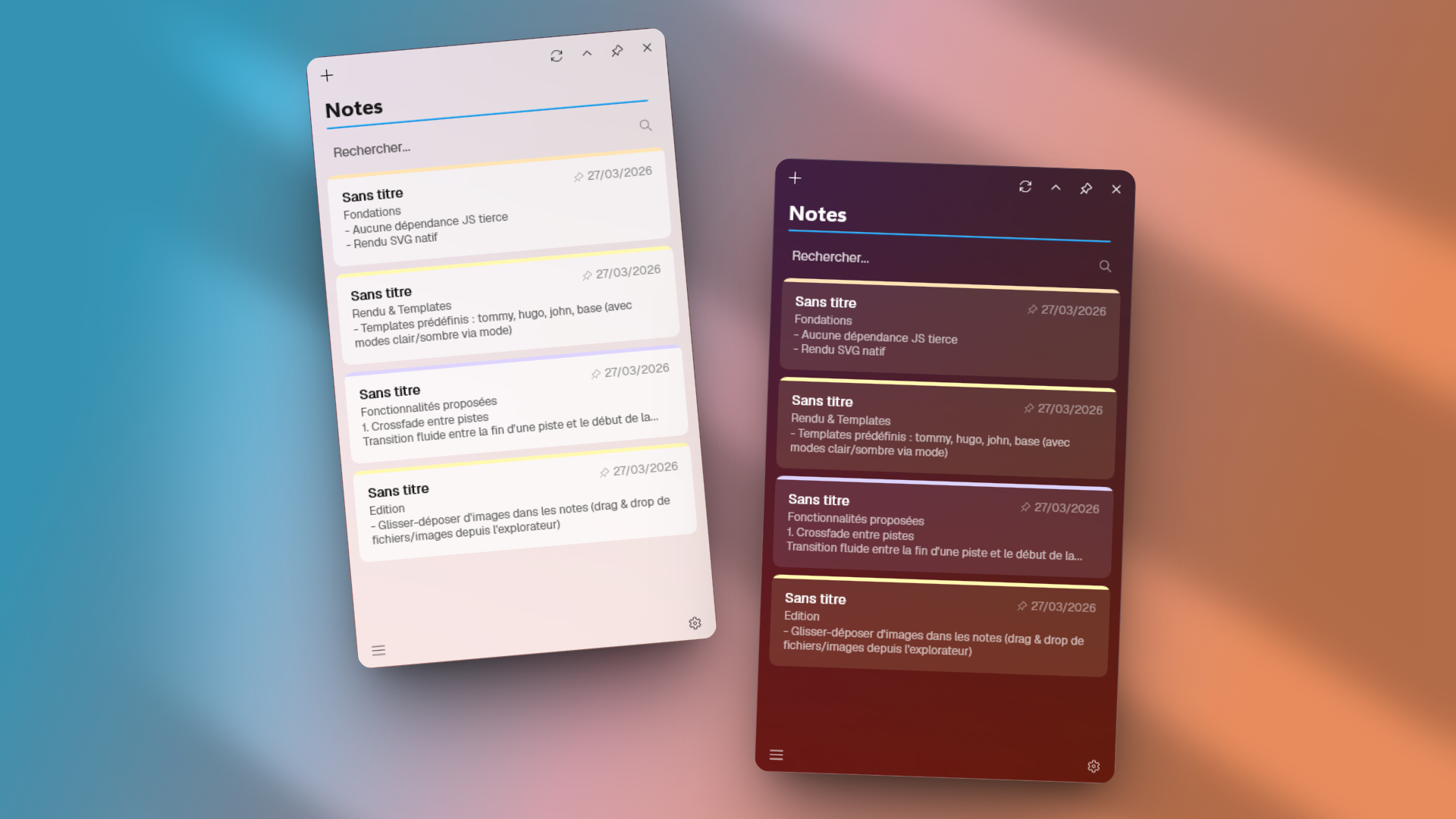
image2

Installation

Download the latest NoteUI-Setup.exe from the Releases page and run the installer.

Options during installation:

  • Create a desktop shortcut
  • Launch at Windows startup

image3

Build from Source

Prerequisites

Build

dotnet build

Publish

dotnet publish -c Release -r win-x64 --self-contained true

Output: bin/Release/net10.0-windows10.0.19041.0/win-x64/publish/

Create Installer

Requires Inno Setup 6:

iscc installer.iss

Output: installer/NoteUI-Setup.exe

Data Storage

  • Notes: <notes_folder>/notes.json (default: %LocalAppData%/NoteUI/notes/)
  • Settings: %LocalAppData%/NoteUI/ (theme, backdrop, cloud credentials, AI settings)
  • Voice models: %LocalAppData%/NoteUI/models/<model_id>/
  • AI models: %LocalAppData%/NoteUI/ai_models/
  • Voice settings: %LocalAppData%/NoteUI/voice_settings.json

Tech Stack

  • Framework: WinUI 3 / Windows App SDK 1.8
  • Runtime: .NET 10 (self-contained, win-x64)
  • AI (local): LLamaSharp 0.26.0 (CPU + CUDA 12)
  • AI (cloud): OpenAI, Anthropic Claude, Google Gemini REST APIs
  • Audio: NAudio 2.2.1
  • Speech-to-text: Vosk 0.3.38, Whisper.net 1.7.4
  • OCR: Windows.Media.Ocr (built-in Windows OCR engine)
  • Cloud: Firebase REST API, WebDAV protocol
  • Auth: Firebase email/password, Google OAuth2 PKCE
  • Animations: Windows.UI.Composition (DirectX GPU-accelerated)
  • Installer: Inno Setup 6

License

All rights reserved.