
Siegu is a privacy-first, local-only photo & video manager. Organize, search, and sync your library across your own devices — no cloud, no accounts, no telemetry. https://denzyldick.github.io/siegu/
See the codeSee what people are saying
README
Siegu
Your photo library, finally all in one place — and it stays on your device.



Learn more, browse screenshots, and support the project (Pro / Family plans) at siegu.io.
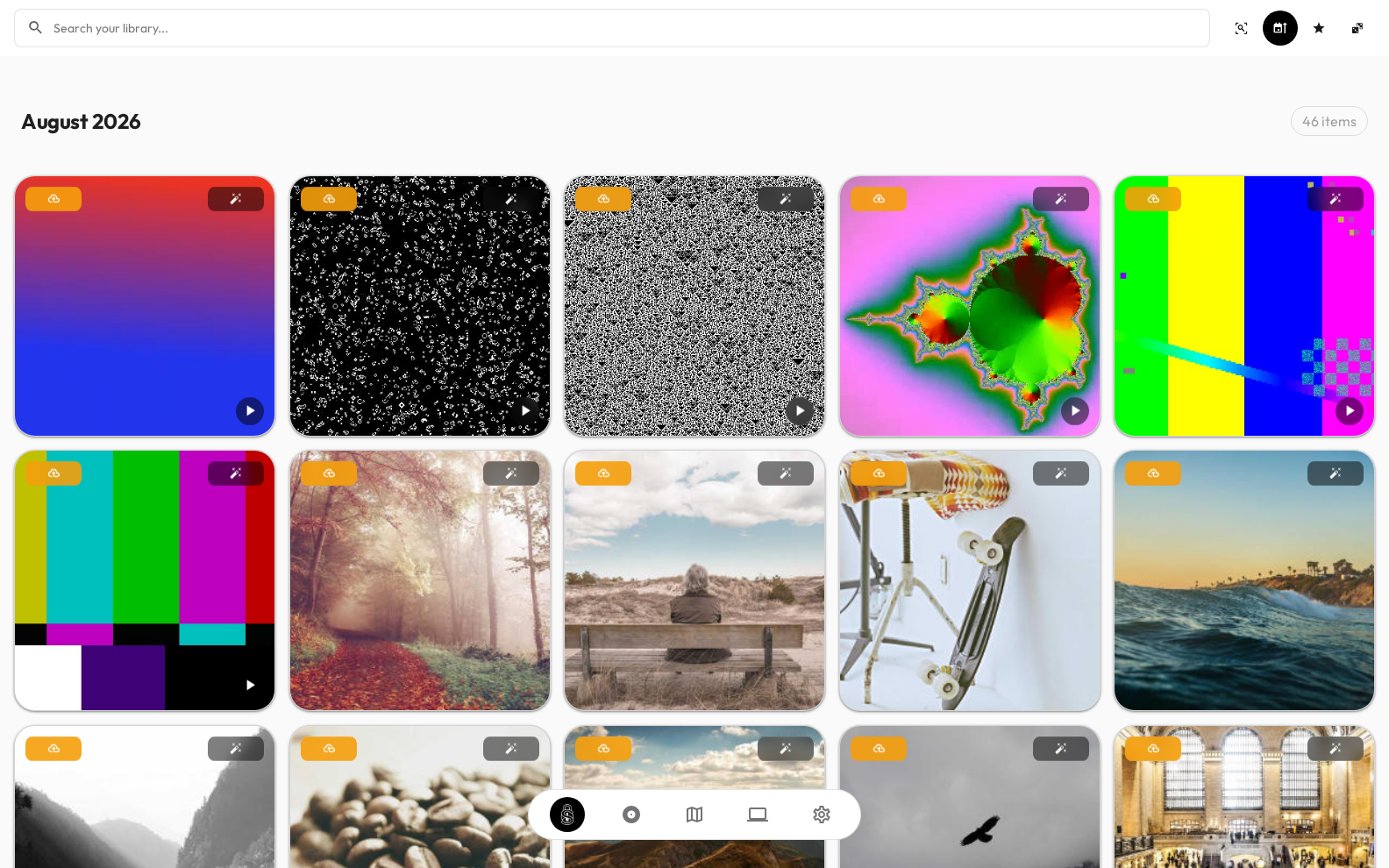
Siegu (say it see-goo) is a private, local-first photo and video manager that runs entirely on your own computer. You point it at your pictures, and it organizes them, lets you search them in plain words, finds the people in them, and keeps them in sync across your own devices — all without ever uploading anything to the cloud.
No accounts. No cloud. No ads. Your photos never leave your machine.
What does it do for me?
Siegu is built to feel obvious. Here's what you can do with it:
- Find any photo by describing it — type "sunset at the beach" or "my dog on the couch" and it finds the matching pictures, without you having to tag them all by hand.
- See where things were taken — the app reads the location stored in your photos and labels them with real city names.
- Know who's in your photos — it detects faces and groups them, so you can jump straight to every photo of a person.
- Read the text in your photos — it recognizes writing in images and documents, so you can search for that photo of a receipt or a whiteboard.
- See your best shots — it scores every photo for quality and shows the highlights of each day at a glance.
- Keep devices in sync on your own network — link your phone, tablet, and computer so your library matches everywhere, encrypted.
All of this is powered by AI models that run directly on your device — nothing is sent to a server to be processed.
What does it look like?
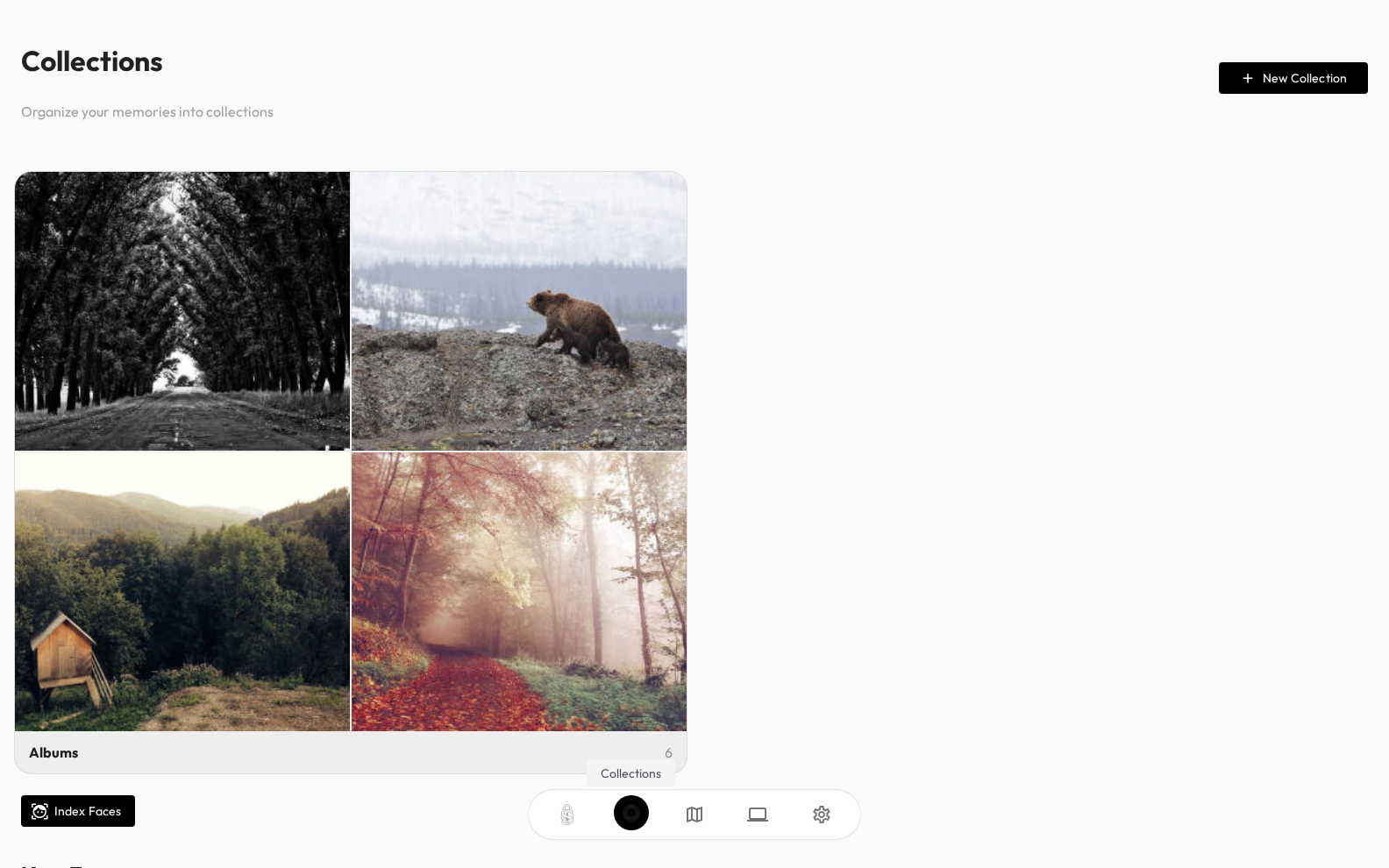
Here's the app in action.
| Your library, organized and searchable | Collections and albums |
|---|---|
|  |
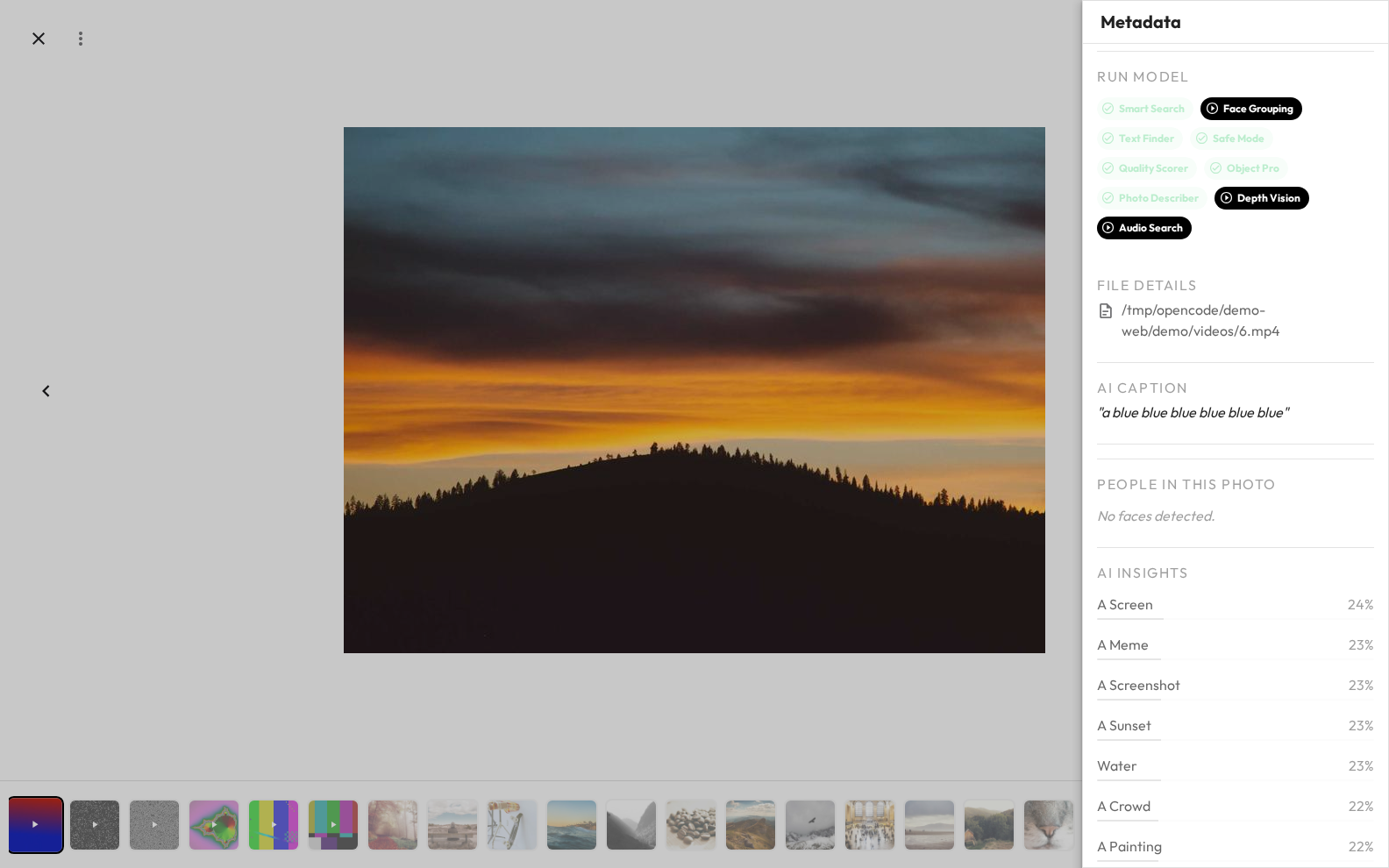
When you open any photo, you can see everything the app knows about it — its AI-written caption, the objects it found, any text it recognized, and how it scored on quality:
Where does it run?
Siegu works on the devices you already own:
- Windows (PCs and laptops)
- macOS (Apple Silicon Macs)
- Linux (desktop and laptop computers)
- Android (phones and tablets)
- iOS / iPadOS (iPhone and iPad)
And it looks for the same photos in the same ways wherever you open it.
How do I install it?
The simplest way is from source (see the full guide in Getting Started):
git clone https://github.com/denzyldick/siegu.git
cd siegu
bun install
bun run tauri dev
Prefer npm? It works too:
npm install && npm run tauri dev.You'll need: Node.js 20.19+, Bun (or npm), and Rust. Platform-specific dependencies are listed in Getting Started.
When it opens, a friendly setup wizard walks you through adding your photo folders and downloading the AI models.
First run, in five steps
- Add your folders — point Siegu at your photo and video library.
- Download a couple of AI models — the magic happens on your device.
- Let it scan — it finds and organizes your media.
- Let it analyze — it adds captions, faces, locations, and text.
- Enjoy — search, browse, and (optionally) sync your other devices.
Documentation
The docs live in the docs/ folder and cover everything from the first steps to
deep technical detail:
| For you | Docs |
|---|---|
| Contributors | CONTRIBUTING.md, Developing, End-to-End testing |
| New users | Getting Started, Configuration, Sharing with friends, Web client, NAT Traversal & TURN |
| Builders / developers | Build, Architecture, ML engine, Frontend, Backend, Database |
| Advanced | CLI, Sync, Mesh networking, Security, Android, iOS |
Privacy & license
Siegu is privacy-first by design: everything runs locally, there are no accounts, no telemetry, and no cloud uploads. The AI models are downloaded once from public sources and then run forever on your device.
Licensed under FSL-1.1-Apache-2.0 — free to use, commercially usable for non-competing products, and automatically becoming Apache 2.0 on March 9, 2028. See LICENSE.
Similar repos


Siegu is a privacy-first, local-only photo & video manager. Organize, search, and sync your library across your own devices — no cloud, no accounts, no telemetry. https://denzyldick.github.io/siegu/
See the codeSee what people are saying
README
Siegu
Your photo library, finally all in one place — and it stays on your device.
Learn more, browse screenshots, and support the project (Pro / Family plans) at siegu.io.
Siegu (say it see-goo) is a private, local-first photo and video manager that runs entirely on your own computer. You point it at your pictures, and it organizes them, lets you search them in plain words, finds the people in them, and keeps them in sync across your own devices — all without ever uploading anything to the cloud.
No accounts. No cloud. No ads. Your photos never leave your machine.
What does it do for me?
Siegu is built to feel obvious. Here's what you can do with it:
- Find any photo by describing it — type "sunset at the beach" or "my dog on the couch" and it finds the matching pictures, without you having to tag them all by hand.
- See where things were taken — the app reads the location stored in your photos and labels them with real city names.
- Know who's in your photos — it detects faces and groups them, so you can jump straight to every photo of a person.
- Read the text in your photos — it recognizes writing in images and documents, so you can search for that photo of a receipt or a whiteboard.
- See your best shots — it scores every photo for quality and shows the highlights of each day at a glance.
- Keep devices in sync on your own network — link your phone, tablet, and computer so your library matches everywhere, encrypted.
All of this is powered by AI models that run directly on your device — nothing is sent to a server to be processed.
What does it look like?
Here's the app in action.
| Your library, organized and searchable | Collections and albums |
|---|---|
| |
When you open any photo, you can see everything the app knows about it — its AI-written caption, the objects it found, any text it recognized, and how it scored on quality:
Where does it run?
Siegu works on the devices you already own:
- Windows (PCs and laptops)
- macOS (Apple Silicon Macs)
- Linux (desktop and laptop computers)
- Android (phones and tablets)
- iOS / iPadOS (iPhone and iPad)
And it looks for the same photos in the same ways wherever you open it.
How do I install it?
The simplest way is from source (see the full guide in Getting Started):
git clone https://github.com/denzyldick/siegu.git
cd siegu
bun install
bun run tauri dev
Prefer npm? It works too:
npm install && npm run tauri dev.You'll need: Node.js 20.19+, Bun (or npm), and Rust. Platform-specific dependencies are listed in Getting Started.
When it opens, a friendly setup wizard walks you through adding your photo folders and downloading the AI models.
First run, in five steps
- Add your folders — point Siegu at your photo and video library.
- Download a couple of AI models — the magic happens on your device.
- Let it scan — it finds and organizes your media.
- Let it analyze — it adds captions, faces, locations, and text.
- Enjoy — search, browse, and (optionally) sync your other devices.
Documentation
The docs live in the docs/ folder and cover everything from the first steps to
deep technical detail:
| For you | Docs |
|---|---|
| Contributors | CONTRIBUTING.md, Developing, End-to-End testing |
| New users | Getting Started, Configuration, Sharing with friends, Web client, NAT Traversal & TURN |
| Builders / developers | Build, Architecture, ML engine, Frontend, Backend, Database |
| Advanced | CLI, Sync, Mesh networking, Security, Android, iOS |
Privacy & license
Siegu is privacy-first by design: everything runs locally, there are no accounts, no telemetry, and no cloud uploads. The AI models are downloaded once from public sources and then run forever on your device.
Licensed under FSL-1.1-Apache-2.0 — free to use, commercially usable for non-competing products, and automatically becoming Apache 2.0 on March 9, 2028. See LICENSE.