AI for detecting whether the content is AI-generated or human-written.
See the codePhát hiện văn bản tiếng Việt do AI tạo ra — BamiBERT fine-tuned + FastAPI backend + React frontend + Docker.
Live Demo: ai-content-detection.vercel.app
Model accuracy: 93% (F1 score cân bằng 0.93 trên cả 2 lớp — precision 0.99 cho Human, recall 0.99 cho AI)
| Metric | Human | AI |
|---|---|---|
| Precision | 0.99 | 0.87 |
| Recall | 0.88 | 0.99 |
| F1-score | 0.93 | 0.93 |
Tính năng chính:
# Clone + setup .env
cp .env.example .env
# (cập nhật APP_GEMINI_API_KEY nếu muốn dùng giải thích AI)

# Chạy docker
docker compose up --build
Truy cập:
Lưu ý: file checkpoint models/best_model.pt phải tồn tại (mount qua volume Docker).
# Dự đoán
curl -X POST http://localhost:8000/predict \
  -H "Content-Type: application/json" \
  -d '{"text": "văn bản test..."}'

# Attribution-based giải thích (Captum, luôn có)
curl -X POST http://localhost:8000/explain \
  -H "Content-Type: application/json" \
  -d '{"text": "văn bản test..."}'

# Giải thích bằng Gemini (on-demand, khi APP_GEMINI_API_KEY được set)
curl -X POST http://localhost:8000/explain-llm \
  -H "Content-Type: application/json" \
  -d '{"text": "văn bản test..."}'
Màn hình nhập liệu:
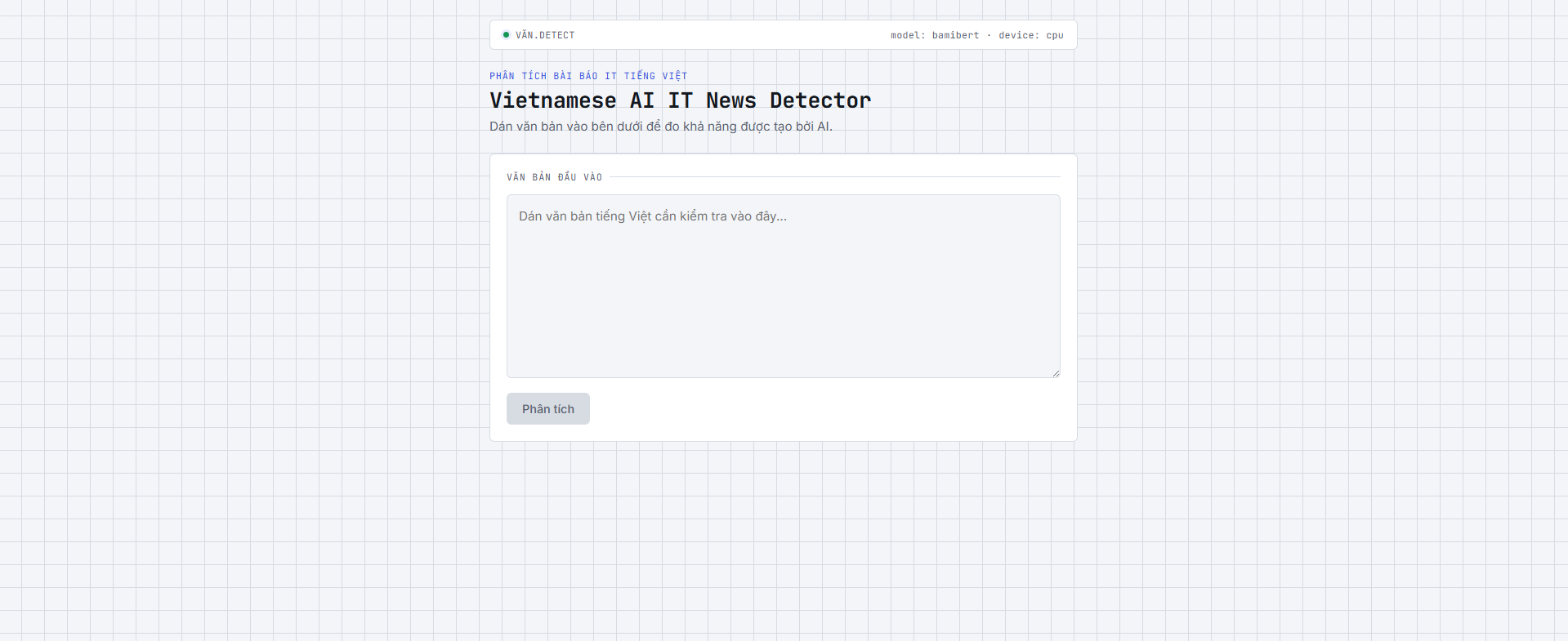
Dán văn bản tiếng Việt, bấm "Phân tích". Model sẽ dự đoán trong vài giây (CPU inference).
Kết quả dự đoán (gauge):
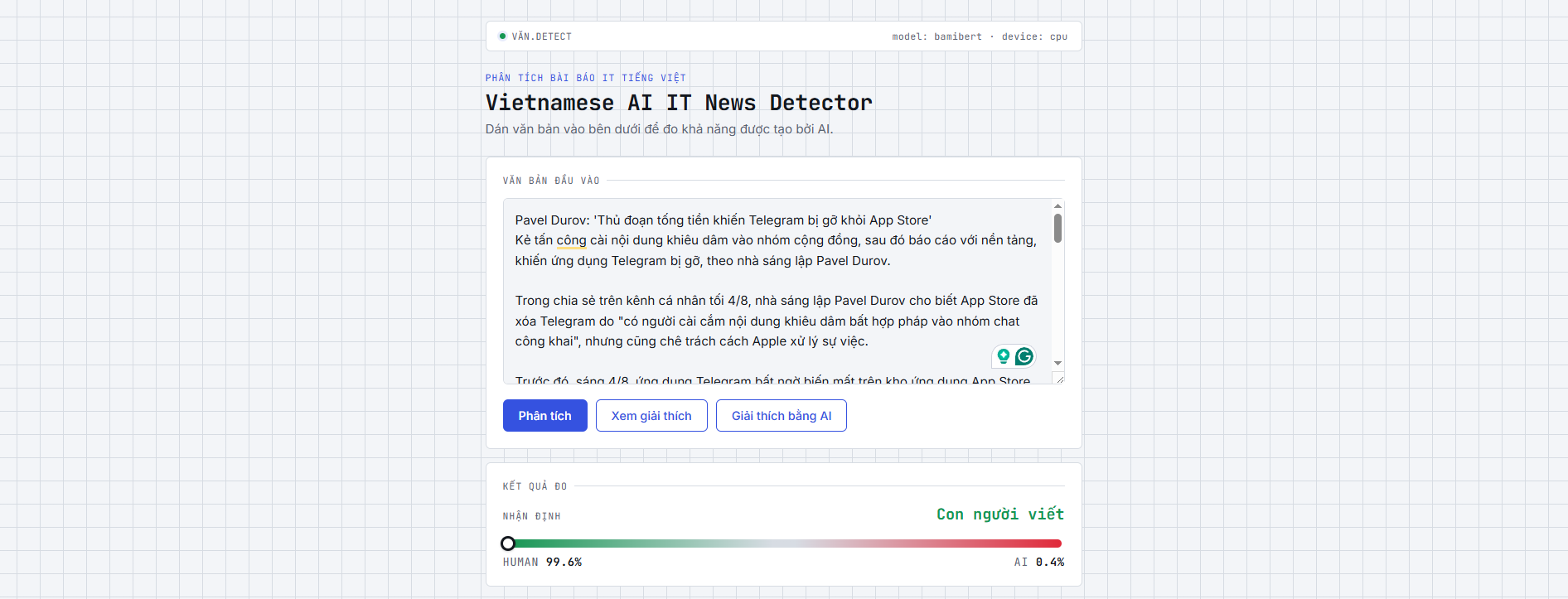
Gauge hiển thị xác suất Human/AI. Số % chính xác cộng = 100%.
Giải thích via Captum (highlight màu):
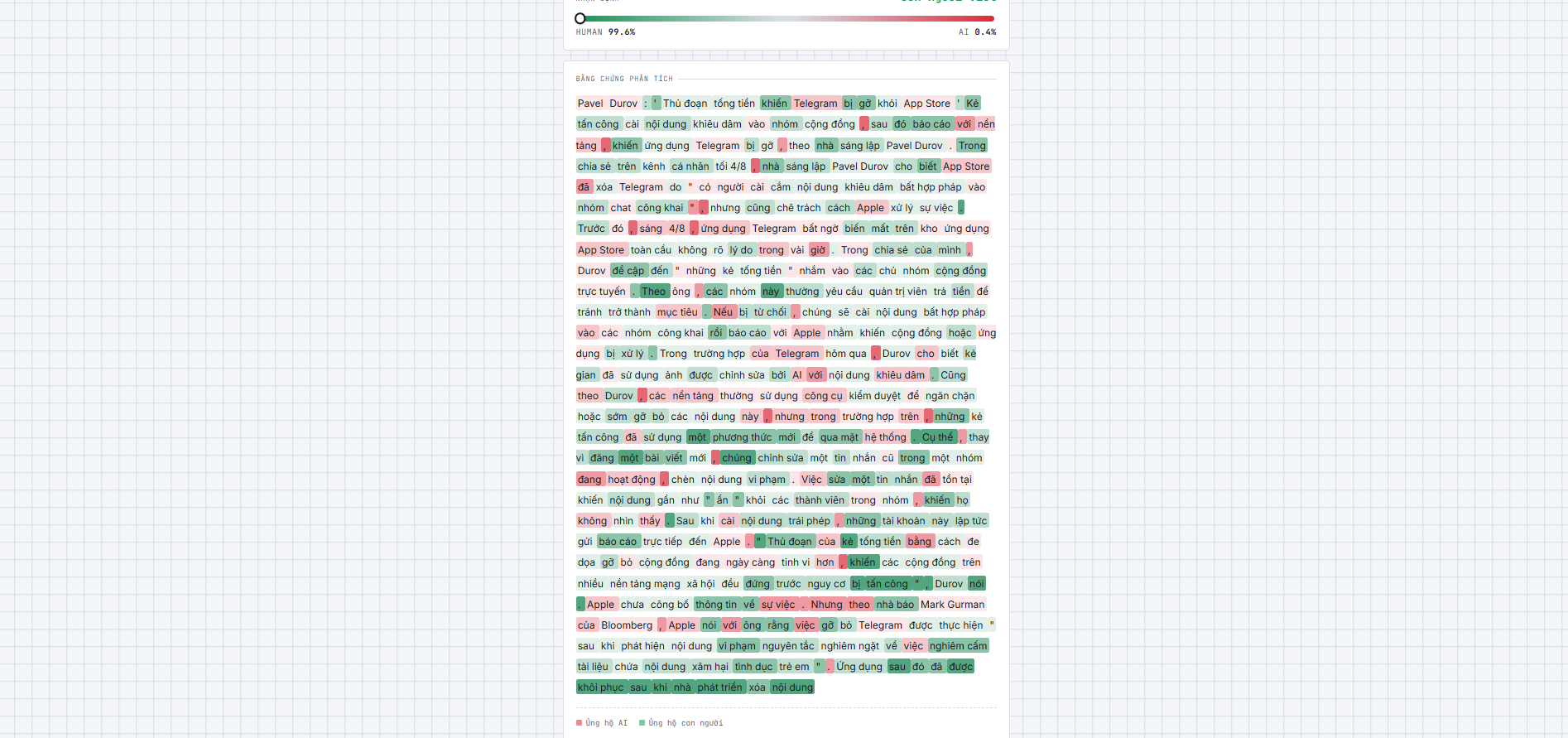
Từ nào ảnh hưởng tới AI/Human được tô màu. Đỏ = ủng hộ AI, xanh = ủng hộ Human. Độ đậm tương ứng cường độ ảnh hưởng (4 bậc rời rạc).
Giải thích via Gemini (natural language):
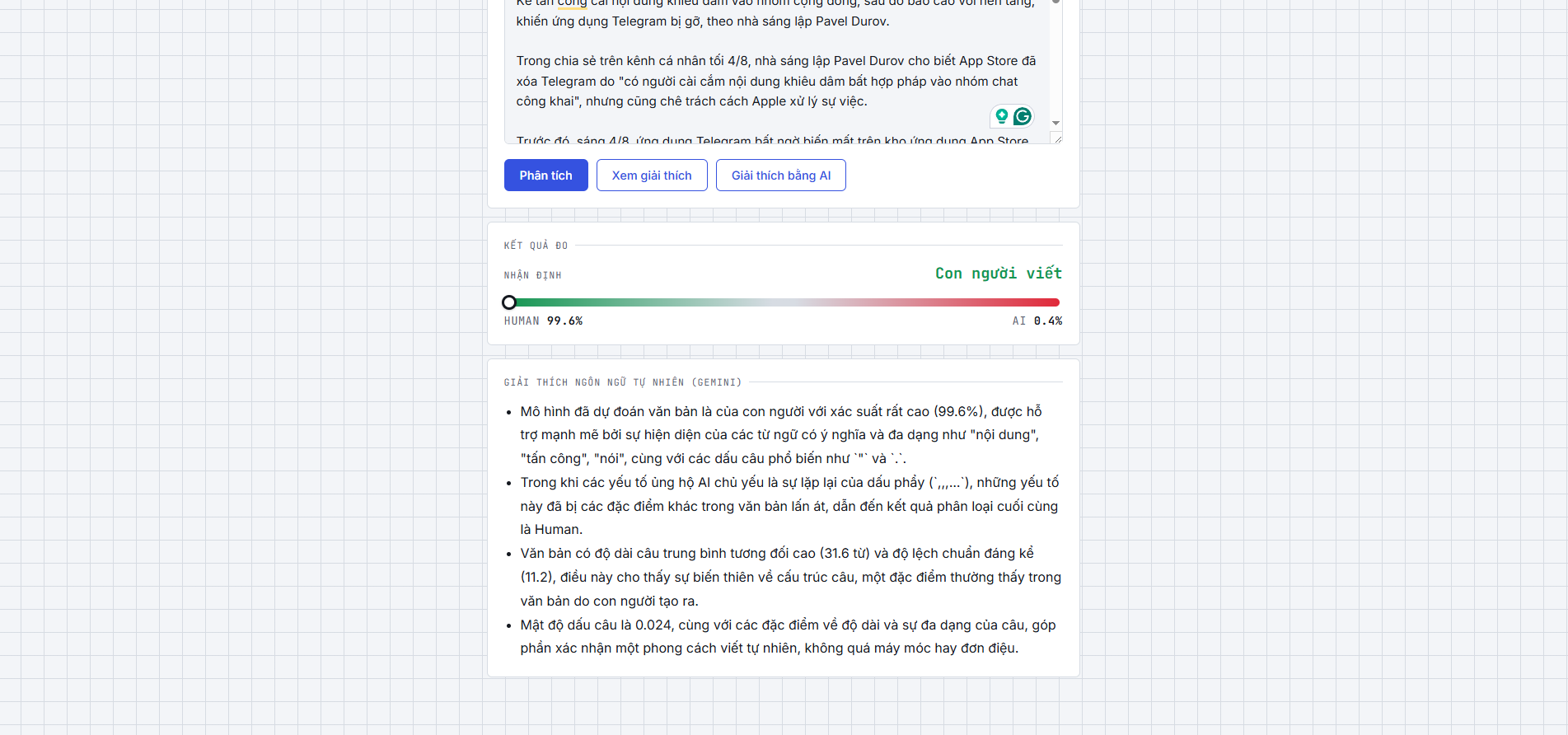
Gemini sinh 3-5 bullet giải thích lý do dựa trên bằng chứng đã tính (từ-từ attribution, thống kê câu). Tất cả ở cache để tiết kiệm quota.
graph LR
    A["Text Input"] -->|Raw text| B["Preprocessing<br/>Remove URLs, HTML<br/>Normalize whitespace"]
    B -->|Cleaned text| C["Tokenization<br/>Input IDs & attention mask"]
    C -->|Tokens| D["BamiBERT Encoder<br/>12-layer Transformer"]
    D -->|Encoded features| E["Classifier<br/>Probability score"]

    E -->|prob_human, prob_ai| F["Prediction Result<br/>Gauge UI"]

    E -->|If /explain| G["Integrated Gradients<br/>Captum Attribution"]
    G -->|Attribution Scores| H["Highlighted Text<br/>4-tier opacity<br/>Red=AI, Green=Human"]
    H -->|With scores| I["Explainability UI"]

    E -->|If /explain-llm| J["Feature Signals<br/>Sentence length<br/>Punctuation density"]
    J -->|Features + scores| K["Gemini LLM<br/>Grounded Prompting"]
    K -->|3-5 bullets| L["Natural Language<br/>Explanation"]
    L -->|Cached| I

    style A fill:#3498db,stroke:#2c3e50,stroke-width:2px,color:#fff
    style B fill:#e74c3c,stroke:#2c3e50,stroke-width:2px,color:#fff
    style C fill:#9b59b6,stroke:#2c3e50,stroke-width:2px,color:#fff
    style D fill:#f39c12,stroke:#2c3e50,stroke-width:2px,color:#fff
    style E fill:#1abc9c,stroke:#2c3e50,stroke-width:2px,color:#fff
    style F fill:#16a085,stroke:#2c3e50,stroke-width:2px,color:#fff

    style G fill:#2ecc71,stroke:#2c3e50,stroke-width:2px,color:#fff
    style H fill:#27ae60,stroke:#2c3e50,stroke-width:2px,color:#fff
    style I fill:#16a085,stroke:#2c3e50,stroke-width:2px,color:#fff

    style J fill:#2ecc71,stroke:#2c3e50,stroke-width:2px,color:#fff
    style K fill:#3498db,stroke:#2c3e50,stroke-width:2px,color:#fff
    style L fill:#27ae60,stroke:#2c3e50,stroke-width:2px,color:#fff
Sơ đồ luồng thu thập dữ liệu
flowchart LR
    Data("Data")

    subgraph AI ["AI"]
        AI_Rewritten("AI Rewritten")
        AI_Generated("AI Generated")
    end

    Human("Human")

    Data -->|AI web| AI_Rewritten
    Data -->|AI tools & API| AI_Generated
    Data -->|Crawl web| Human

    %% Styling bo tròn góc & viền nét đứt giống hình gốc
    classDef dataStyle fill:#d4edda,stroke:#28a745,stroke-width:1.5px,color:#000;
    classDef aiGroupStyle fill:#f3e5f5,stroke:#ce93d8,stroke-width:1.5px,stroke-dasharray: 5 5,color:#000;
    classDef aiRewrittenStyle fill:#e3f2fd,stroke:#90cafb,stroke-width:1.5px,stroke-dasharray: 5 5,color:#000;
    classDef aiGenStyle fill:#f3e5f5,stroke:#ab47bc,stroke-width:1.5px,stroke-dasharray: 5 5,color:#000;
    classDef humanStyle fill:#f8d7da,stroke:#f5c6cb,stroke-width:1.5px,stroke-dasharray: 5 5,color:#000;

    class Data dataStyle;
    class AI aiGroupStyle;
    class AI_Rewritten aiRewrittenStyle;
    class AI_Generated aiGenStyle;
    class Human humanStyle;
Qualcomm-AI-Research/BamiBERT — BERT tiếng Việt tiền-huấn luyện, không cần word segmentation.[CLS], fine-tuned cho binary classification.models/best_model.pt (CPU inference, không cần GPU).lifespan, không reload mỗi request.Depends(get_model_service) để inject service vào endpoint — dễ test (mock service).def (không async def), FastAPI tự chạy trong threadpool vì inference là CPU-bound.GET /health — kiểm tra server + model statusPOST /predict — dự đoán ngắn gọnPOST /explain — attribution highlightingPOST /explain-llm — Gemini giải thích (on-demand, rate-limited)GlobalRateLimiter (quota per project, không per key) — mặc định 10 req/phút.ai-content-detection/
├── .env.example ← Copy → .env, set APP_GEMINI_API_KEY
├── notebooks/ ← EDA, train, eval, XAI (chạy offline)
├── src/ ← Dùng chung notebook + backend
│ ├── preprocessing/cleaner.py, tokenizer.py
│ ├── training/model.py, dataset.py, trainer.py, data_loader.py
│ ├── evaluation/inference.py
│ └── explainability/attribution.py (Captum), features.py, visualizer.py
├── models/best_model.pt ← Mount qua volume Docker
├── backend/
│ ├── Dockerfile (Python slim, torch CPU-only)
│ ├── requirements.txt (rút gọn: FastAPI, transformers, captum, google-generativeai)
│ └── app/main.py, services/, schemas/, routers/
├── frontend/
│ ├── Dockerfile (multi-stage: Node build → Nginx)
│ └── src/App.jsx, components/, styles.css
├── requirements-dev.txt ← Đầy đủ cho notebook (torch+cu118, jupyter, matplotlib, sklearn)
└── docker-compose.yml ← Chạy backend + frontend cùng lúc
max_length=512 đủ cho hầu hết case.Xem .env.example:
cp .env.example .env
# Sửa lại tuỳ ý, chủ yếu là APP_GEMINI_API_KEY nếu muốn dùng giải thích AI
# Backend
pip install -r requirements.txt
uvicorn backend.app.main:app --reload --port 8000

# Frontend (terminal khác)
cd frontend
npm install
npm run dev
docker compose up --build
pip install -r requirements-dev.txt
jupyter notebook
# Mở notebooks/03_model_training.ipynb rồi chạy các cell
pytest)/explain-llm)AI for detecting whether the content is AI-generated or human-written.
See the codePhát hiện văn bản tiếng Việt do AI tạo ra — BamiBERT fine-tuned + FastAPI backend + React frontend + Docker.
Live Demo: ai-content-detection.vercel.app
Model accuracy: 93% (F1 score cân bằng 0.93 trên cả 2 lớp — precision 0.99 cho Human, recall 0.99 cho AI)
| Metric | Human | AI |
|---|---|---|
| Precision | 0.99 | 0.87 |
| Recall | 0.88 | 0.99 |
| F1-score | 0.93 | 0.93 |
Tính năng chính:
# Clone + setup .env
cp .env.example .env
# (cập nhật APP_GEMINI_API_KEY nếu muốn dùng giải thích AI)

# Chạy docker
docker compose up --build
Truy cập:
Lưu ý: file checkpoint models/best_model.pt phải tồn tại (mount qua volume Docker).
# Dự đoán
curl -X POST http://localhost:8000/predict \
  -H "Content-Type: application/json" \
  -d '{"text": "văn bản test..."}'

# Attribution-based giải thích (Captum, luôn có)
curl -X POST http://localhost:8000/explain \
  -H "Content-Type: application/json" \
  -d '{"text": "văn bản test..."}'

# Giải thích bằng Gemini (on-demand, khi APP_GEMINI_API_KEY được set)
curl -X POST http://localhost:8000/explain-llm \
  -H "Content-Type: application/json" \
  -d '{"text": "văn bản test..."}'
Màn hình nhập liệu:
Dán văn bản tiếng Việt, bấm "Phân tích". Model sẽ dự đoán trong vài giây (CPU inference).
Kết quả dự đoán (gauge):
Gauge hiển thị xác suất Human/AI. Số % chính xác cộng = 100%.
Giải thích via Captum (highlight màu):
Từ nào ảnh hưởng tới AI/Human được tô màu. Đỏ = ủng hộ AI, xanh = ủng hộ Human. Độ đậm tương ứng cường độ ảnh hưởng (4 bậc rời rạc).
Giải thích via Gemini (natural language):
Gemini sinh 3-5 bullet giải thích lý do dựa trên bằng chứng đã tính (từ-từ attribution, thống kê câu). Tất cả ở cache để tiết kiệm quota.
graph LR
    A["Text Input"] -->|Raw text| B["Preprocessing<br/>Remove URLs, HTML<br/>Normalize whitespace"]
    B -->|Cleaned text| C["Tokenization<br/>Input IDs & attention mask"]
    C -->|Tokens| D["BamiBERT Encoder<br/>12-layer Transformer"]
    D -->|Encoded features| E["Classifier<br/>Probability score"]

    E -->|prob_human, prob_ai| F["Prediction Result<br/>Gauge UI"]

    E -->|If /explain| G["Integrated Gradients<br/>Captum Attribution"]
    G -->|Attribution Scores| H["Highlighted Text<br/>4-tier opacity<br/>Red=AI, Green=Human"]
    H -->|With scores| I["Explainability UI"]

    E -->|If /explain-llm| J["Feature Signals<br/>Sentence length<br/>Punctuation density"]
    J -->|Features + scores| K["Gemini LLM<br/>Grounded Prompting"]
    K -->|3-5 bullets| L["Natural Language<br/>Explanation"]
    L -->|Cached| I

    style A fill:#3498db,stroke:#2c3e50,stroke-width:2px,color:#fff
    style B fill:#e74c3c,stroke:#2c3e50,stroke-width:2px,color:#fff
    style C fill:#9b59b6,stroke:#2c3e50,stroke-width:2px,color:#fff
    style D fill:#f39c12,stroke:#2c3e50,stroke-width:2px,color:#fff
    style E fill:#1abc9c,stroke:#2c3e50,stroke-width:2px,color:#fff
    style F fill:#16a085,stroke:#2c3e50,stroke-width:2px,color:#fff

    style G fill:#2ecc71,stroke:#2c3e50,stroke-width:2px,color:#fff
    style H fill:#27ae60,stroke:#2c3e50,stroke-width:2px,color:#fff
    style I fill:#16a085,stroke:#2c3e50,stroke-width:2px,color:#fff

    style J fill:#2ecc71,stroke:#2c3e50,stroke-width:2px,color:#fff
    style K fill:#3498db,stroke:#2c3e50,stroke-width:2px,color:#fff
    style L fill:#27ae60,stroke:#2c3e50,stroke-width:2px,color:#fff
Sơ đồ luồng thu thập dữ liệu
flowchart LR
    Data("Data")

    subgraph AI ["AI"]
        AI_Rewritten("AI Rewritten")
        AI_Generated("AI Generated")
    end

    Human("Human")

    Data -->|AI web| AI_Rewritten
    Data -->|AI tools & API| AI_Generated
    Data -->|Crawl web| Human

    %% Styling bo tròn góc & viền nét đứt giống hình gốc
    classDef dataStyle fill:#d4edda,stroke:#28a745,stroke-width:1.5px,color:#000;
    classDef aiGroupStyle fill:#f3e5f5,stroke:#ce93d8,stroke-width:1.5px,stroke-dasharray: 5 5,color:#000;
    classDef aiRewrittenStyle fill:#e3f2fd,stroke:#90cafb,stroke-width:1.5px,stroke-dasharray: 5 5,color:#000;
    classDef aiGenStyle fill:#f3e5f5,stroke:#ab47bc,stroke-width:1.5px,stroke-dasharray: 5 5,color:#000;
    classDef humanStyle fill:#f8d7da,stroke:#f5c6cb,stroke-width:1.5px,stroke-dasharray: 5 5,color:#000;

    class Data dataStyle;
    class AI aiGroupStyle;
    class AI_Rewritten aiRewrittenStyle;
    class AI_Generated aiGenStyle;
    class Human humanStyle;
Qualcomm-AI-Research/BamiBERT — BERT tiếng Việt tiền-huấn luyện, không cần word segmentation.[CLS], fine-tuned cho binary classification.models/best_model.pt (CPU inference, không cần GPU).lifespan, không reload mỗi request.Depends(get_model_service) để inject service vào endpoint — dễ test (mock service).def (không async def), FastAPI tự chạy trong threadpool vì inference là CPU-bound.GET /health — kiểm tra server + model statusPOST /predict — dự đoán ngắn gọnPOST /explain — attribution highlightingPOST /explain-llm — Gemini giải thích (on-demand, rate-limited)GlobalRateLimiter (quota per project, không per key) — mặc định 10 req/phút.ai-content-detection/
├── .env.example ← Copy → .env, set APP_GEMINI_API_KEY
├── notebooks/ ← EDA, train, eval, XAI (chạy offline)
├── src/ ← Dùng chung notebook + backend
│ ├── preprocessing/cleaner.py, tokenizer.py
│ ├── training/model.py, dataset.py, trainer.py, data_loader.py
│ ├── evaluation/inference.py
│ └── explainability/attribution.py (Captum), features.py, visualizer.py
├── models/best_model.pt ← Mount qua volume Docker
├── backend/
│ ├── Dockerfile (Python slim, torch CPU-only)
│ ├── requirements.txt (rút gọn: FastAPI, transformers, captum, google-generativeai)
│ └── app/main.py, services/, schemas/, routers/
├── frontend/
│ ├── Dockerfile (multi-stage: Node build → Nginx)
│ └── src/App.jsx, components/, styles.css
├── requirements-dev.txt ← Đầy đủ cho notebook (torch+cu118, jupyter, matplotlib, sklearn)
└── docker-compose.yml ← Chạy backend + frontend cùng lúc
max_length=512 đủ cho hầu hết case.Xem .env.example:
cp .env.example .env
# Sửa lại tuỳ ý, chủ yếu là APP_GEMINI_API_KEY nếu muốn dùng giải thích AI
# Backend
pip install -r requirements.txt
uvicorn backend.app.main:app --reload --port 8000

# Frontend (terminal khác)
cd frontend
npm install
npm run dev
docker compose up --build
pip install -r requirements-dev.txt
jupyter notebook
# Mở notebooks/03_model_training.ipynb rồi chạy các cell
pytest)/explain-llm)


