a playful combination of "AI", "Authentic" and "Cat" as in catching fakes
TypeScript
0
19 commits
updated Apr 1, 2024
 AIthentiCat
a playful combination of "AI", "Authentic" and "Cat" as in catching fakes
需要python版本3.10
注:建议先安装好CUDA并且在GPU显存大于4GB的机器上运行后端来获得更快的运行速度。
cd backend
pip install -r requirements.txt
第一个终端窗口
cd backend
python api1.py
第二个终端窗口
cd backend
python api2.py
打开 http://127.0.0.1:6001/docs 以及 http://127.0.0.1:6002/docs 可以看到自动生成的API文档
fetch('http://127.0.0.1:6001/v1/predict_zh/', {
  method: 'POST',
  headers: {
    'accept': 'application/json',
    'Content-Type': 'application/json'
  },
  body: JSON.stringify({
    "data": "这句话有多大可能是ChatGPT生成的?"
  })
})
.then(response => response.json())
.then(data => console.log(data))
.catch(error => console.error(error));
输出:
{
  "GLTR_prob": 0.5345993670734212,
  "PPL_prob": 0.42452311927798436
}
解释:
GLTR模型认为有53%的可能性是ChatGPT生成的。
PPL模型认为有42%的可能性是ChatGPT生成的,也就是说它认为这句话是人类创作的。
fetch('http://127.0.0.1:6002/v2/predict_zh/', {
  method: 'POST',
  headers: {
    'accept': 'application/json',
    'Content-Type': 'application/json'
  },
  body: JSON.stringify({
    "data": "这句话有多大可能是ChatGPT生成的?"
  })
})
.then(response => response.json())
.then(data => console.log(data))
.catch(error => console.error(error));
输出:
{
  "PTM_prob": 0.03212100267410278
}
解释:
PTM模型认为有3%的可能性是ChatGPT生成的,也就是说它认为这句话是人类创作的。
cd frontend
npm install
注:如果 npm install 报错“400 Bad Request”,可以尝试这个教程
cd frontend
npm start
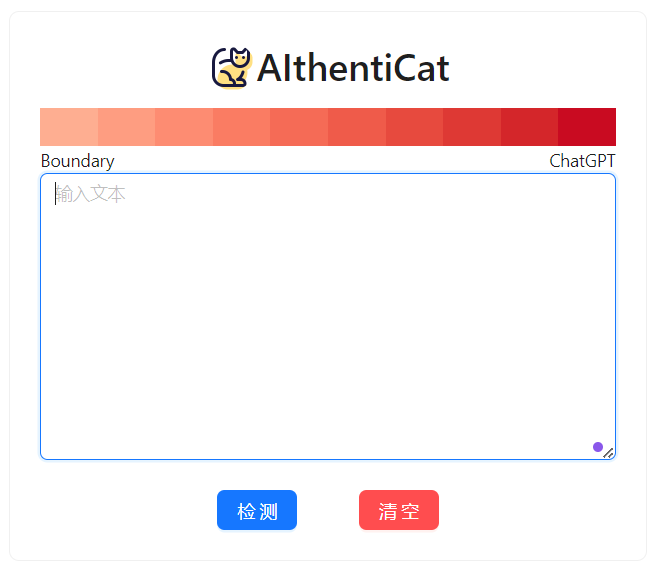
你将能看到这样的界面:
a playful combination of "AI", "Authentic" and "Cat" as in catching fakes
TypeScript
0
19 commits
updated Apr 1, 2024
AIthentiCata playful combination of "AI", "Authentic" and "Cat" as in catching fakes
需要python版本3.10
注:建议先安装好CUDA并且在GPU显存大于4GB的机器上运行后端来获得更快的运行速度。
cd backend
pip install -r requirements.txt
第一个终端窗口
cd backend
python api1.py
第二个终端窗口
cd backend
python api2.py
打开 http://127.0.0.1:6001/docs 以及 http://127.0.0.1:6002/docs 可以看到自动生成的API文档
fetch('http://127.0.0.1:6001/v1/predict_zh/', {
  method: 'POST',
  headers: {
    'accept': 'application/json',
    'Content-Type': 'application/json'
  },
  body: JSON.stringify({
    "data": "这句话有多大可能是ChatGPT生成的?"
  })
})
.then(response => response.json())
.then(data => console.log(data))
.catch(error => console.error(error));
输出:
{
  "GLTR_prob": 0.5345993670734212,
  "PPL_prob": 0.42452311927798436
}
解释:
GLTR模型认为有53%的可能性是ChatGPT生成的。
PPL模型认为有42%的可能性是ChatGPT生成的,也就是说它认为这句话是人类创作的。
fetch('http://127.0.0.1:6002/v2/predict_zh/', {
  method: 'POST',
  headers: {
    'accept': 'application/json',
    'Content-Type': 'application/json'
  },
  body: JSON.stringify({
    "data": "这句话有多大可能是ChatGPT生成的?"
  })
})
.then(response => response.json())
.then(data => console.log(data))
.catch(error => console.error(error));
输出:
{
  "PTM_prob": 0.03212100267410278
}
解释:
PTM模型认为有3%的可能性是ChatGPT生成的,也就是说它认为这句话是人类创作的。
cd frontend
npm install
注:如果 npm install 报错“400 Bad Request”,可以尝试这个教程
cd frontend
npm start
你将能看到这样的界面:



