
SuperAnnotate HTTP service for Generated Text Detection
See the codeREADME

SuperAnnotate
Generated Text Detection


This repository contains the HTTP service for the Generated Text Detector.
To integrate the detector with your project on the SuperAnnotate platform, please follow the instructions provided in our Tutorial
How it works
Model
The Generated Text Detection model is built on a fine-tuned RoBERTa Large architecture. It has been extensively trained on a diverse dataset that includes internal generation and subset of RAID train dataset, enabling it to accurately classify text as either generated (synthetic) or human-written.
This model is optimized for robust detection, offering two configurations based on specific needs:
- Optimized for Low False Positive Rate (FPR): AI Detector Low FPR
- Optimized for High Overall Prediction Accuracy: AI Detector
For more details and access to the model weights, please refer to the links above on the Hugging Face Model Hub.
How to run it
API Service Configuration
You can deploy the service wherever it is convenient; one of the basic options is on a created EC2 instance. Learn about instance creation and setup here.
Hardware requirements will depend on your on your deployment type. Recommended ec2 instances for deployment type 2:
- GPU: g4dn.xlarge
- CPU: a1.large
NOTES:
- To verify that everything is functioning correctly, try calling the healthcheck endpoint.
- Also, ensure that the port on which your service is deployed (8080 by default) is open to the global network. Refer to this tutorial for guidance on opening a port on an EC2 instance.
General Pre-requirements
- Clone this repo and move to root folder
- Create SSL sertificate. It is necessary to create certificates to make the connection secure, this is mandatory for integration with the SuperAnnotate platform.
- Generate self-signed SSL certificate by following command:
openssl req -x509 -newkey rsa:4096 -keyout key.pem -out cert.pem -days 365 -nodes
- Install necessary dependencies
- For running as Python file: Pyhon3.11
- GPU inference: Nvidia drivers and CUDA toolkit
- For running as Docker: Docker
- GPU inference: Nvidia drivers; CUDA toolkit; NVIDIA Container Toolkit.
As python file
- Install requirements:
pip install -r generated_text_detector/requirements.txt - Set the Python path variable:
export PYTHONPATH="."export DETECTOR_CONFIG_PATH="etc/configs/detector_config.json"
- Run the API:
uvicorn --host 0.0.0.0 --port 8080 --ssl-keyfile=./key.pem --ssl-certfile=./cert.pem generated_text_detector.fastapi_app:app
As docker containers
GPU Version
- Build image:
sudo docker build -t generated_text_detector:GPU -f Dockerfile_GPU . - Run container:
sudo docker run --gpus all -e DETECTOR_CONFIG_PATH="etc/configs/detector_config.json" -p 8080:8080 -d generated_text_detector:GPU
CPU Version
- Build image:
sudo docker build -t generated_text_detector:CPU -f Dockerfile_CPU . - Run container:
sudo docker run -e DETECTOR_CONFIG_PATH="etc/configs/detector_config.json" -p 8080:8080 -d generated_text_detector:CPU
Performance
Benchmark
This solution has been validated using the RAID benchmark, which includes a diverse dataset covering:
- 11 LLM models
- 11 adversarial attacks
- 8 domains
The performance of Binoculars is compared to other detectors on the RAID leaderboard.
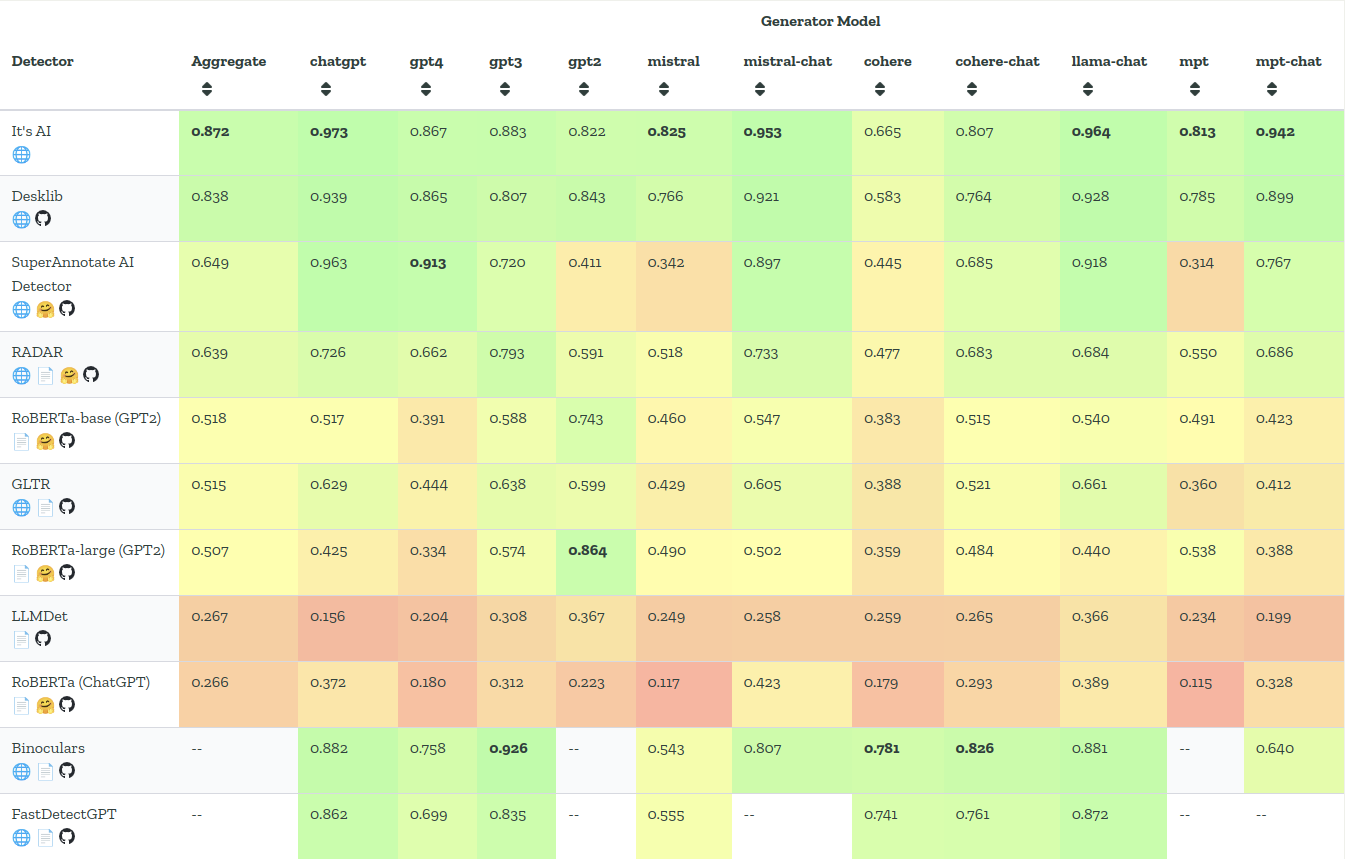
This is a snapshot of the leaderboard for October 2024
Time performance
There are 2 inference modes available on CPU and GPU. In the table below you can see the time performance of the service deployed in the appropriate mode
| Method | RPS |
|---|---|
| GPU | 10 |
| CPU | 0.9 |
*In this test, request texts average 500 tokens
Endpoints
The following endpoints are available in the Generated Text Detection service:
-
GET /healthcheck:
- Summary: Ping
- Description: Alive method
- Input Type: None
- Output Type: JSON
- Output Values:
{"healthy": True}
- Status Codes:
200: Successful Response
-
POST /detect:
- Summary: Main endpoint of detection
- Description: Detection generated text and return report with Generated Score and Predicted Author
- Input Type: JSON. With string filed
text - Input Value Example:
{"text": "some text"} - Output Type: JSON. With 2 fileds:
generated_score: float values from 0 to 1author: one of the following string values:- LLM Generated
- Probably LLM Generated
- Not sure
- Probably human written
- Human
- Output Value Example:
{"generated_score": 0, "author": "Human"}
- Status Codes:
200: Successful Response
Similar repos




Languages
Python
100.0%
SuperAnnotate HTTP service for Generated Text Detection
See the codeREADME
SuperAnnotate
Generated Text Detection
This repository contains the HTTP service for the Generated Text Detector.
To integrate the detector with your project on the SuperAnnotate platform, please follow the instructions provided in our Tutorial
How it works
Model
The Generated Text Detection model is built on a fine-tuned RoBERTa Large architecture. It has been extensively trained on a diverse dataset that includes internal generation and subset of RAID train dataset, enabling it to accurately classify text as either generated (synthetic) or human-written.
This model is optimized for robust detection, offering two configurations based on specific needs:
- Optimized for Low False Positive Rate (FPR): AI Detector Low FPR
- Optimized for High Overall Prediction Accuracy: AI Detector
For more details and access to the model weights, please refer to the links above on the Hugging Face Model Hub.
How to run it
API Service Configuration
You can deploy the service wherever it is convenient; one of the basic options is on a created EC2 instance. Learn about instance creation and setup here.
Hardware requirements will depend on your on your deployment type. Recommended ec2 instances for deployment type 2:
- GPU: g4dn.xlarge
- CPU: a1.large
NOTES:
- To verify that everything is functioning correctly, try calling the healthcheck endpoint.
- Also, ensure that the port on which your service is deployed (8080 by default) is open to the global network. Refer to this tutorial for guidance on opening a port on an EC2 instance.
General Pre-requirements
- Clone this repo and move to root folder
- Create SSL sertificate. It is necessary to create certificates to make the connection secure, this is mandatory for integration with the SuperAnnotate platform.
- Generate self-signed SSL certificate by following command:
openssl req -x509 -newkey rsa:4096 -keyout key.pem -out cert.pem -days 365 -nodes
- Install necessary dependencies
- For running as Python file: Pyhon3.11
- GPU inference: Nvidia drivers and CUDA toolkit
- For running as Docker: Docker
- GPU inference: Nvidia drivers; CUDA toolkit; NVIDIA Container Toolkit.
As python file
- Install requirements:
pip install -r generated_text_detector/requirements.txt - Set the Python path variable:
export PYTHONPATH="."export DETECTOR_CONFIG_PATH="etc/configs/detector_config.json"
- Run the API:
uvicorn --host 0.0.0.0 --port 8080 --ssl-keyfile=./key.pem --ssl-certfile=./cert.pem generated_text_detector.fastapi_app:app
As docker containers
GPU Version
- Build image:
sudo docker build -t generated_text_detector:GPU -f Dockerfile_GPU . - Run container:
sudo docker run --gpus all -e DETECTOR_CONFIG_PATH="etc/configs/detector_config.json" -p 8080:8080 -d generated_text_detector:GPU
CPU Version
- Build image:
sudo docker build -t generated_text_detector:CPU -f Dockerfile_CPU . - Run container:
sudo docker run -e DETECTOR_CONFIG_PATH="etc/configs/detector_config.json" -p 8080:8080 -d generated_text_detector:CPU
Performance
Benchmark
This solution has been validated using the RAID benchmark, which includes a diverse dataset covering:
- 11 LLM models
- 11 adversarial attacks
- 8 domains
The performance of Binoculars is compared to other detectors on the RAID leaderboard.
This is a snapshot of the leaderboard for October 2024
Time performance
There are 2 inference modes available on CPU and GPU. In the table below you can see the time performance of the service deployed in the appropriate mode
| Method | RPS |
|---|---|
| GPU | 10 |
| CPU | 0.9 |
*In this test, request texts average 500 tokens
Endpoints
The following endpoints are available in the Generated Text Detection service:
-
GET /healthcheck:
- Summary: Ping
- Description: Alive method
- Input Type: None
- Output Type: JSON
- Output Values:
{"healthy": True}
- Status Codes:
200: Successful Response
-
POST /detect:
- Summary: Main endpoint of detection
- Description: Detection generated text and return report with Generated Score and Predicted Author
- Input Type: JSON. With string filed
text - Input Value Example:
{"text": "some text"} - Output Type: JSON. With 2 fileds:
generated_score: float values from 0 to 1author: one of the following string values:- LLM Generated
- Probably LLM Generated
- Not sure
- Probably human written
- Human
- Output Value Example:
{"generated_score": 0, "author": "Human"}
- Status Codes:
200: Successful Response
Similar repos
Languages
Python
100.0%