
See what people are saying
README




-8f74ff)


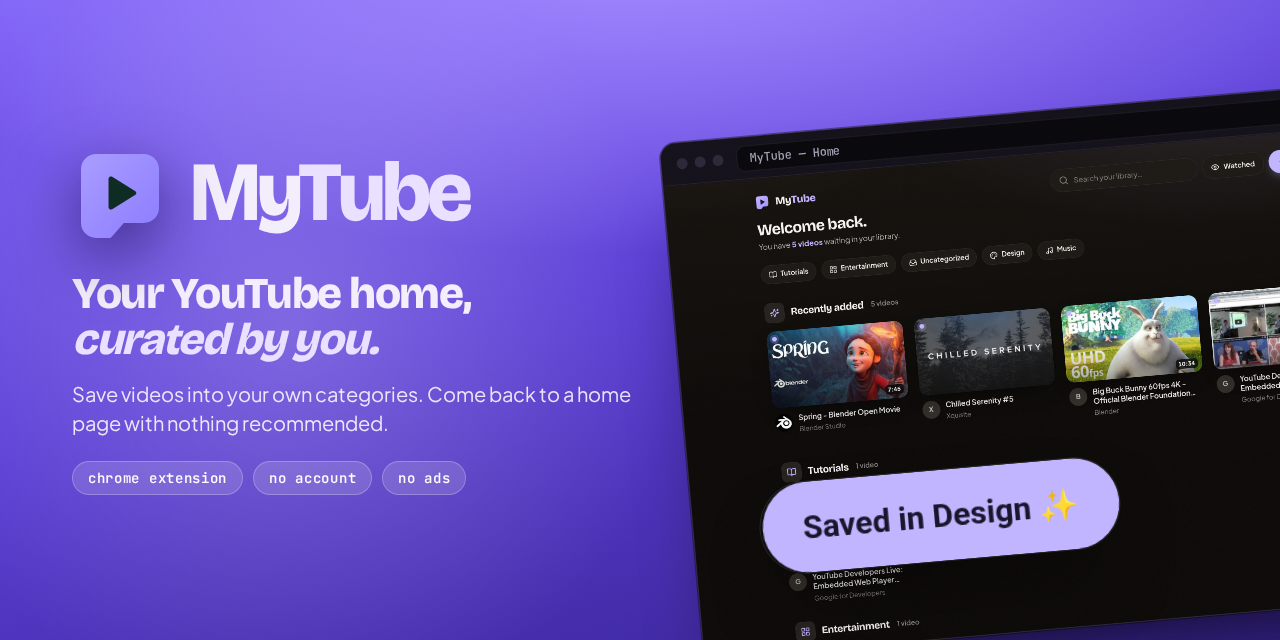
Watch Later became a graveyard. MyTube is a Chrome extension that gives you a YouTube home page you actually curate: save videos straight from YouTube into categories you define, then come back to a clean library with nothing recommended and nothing autoplaying.
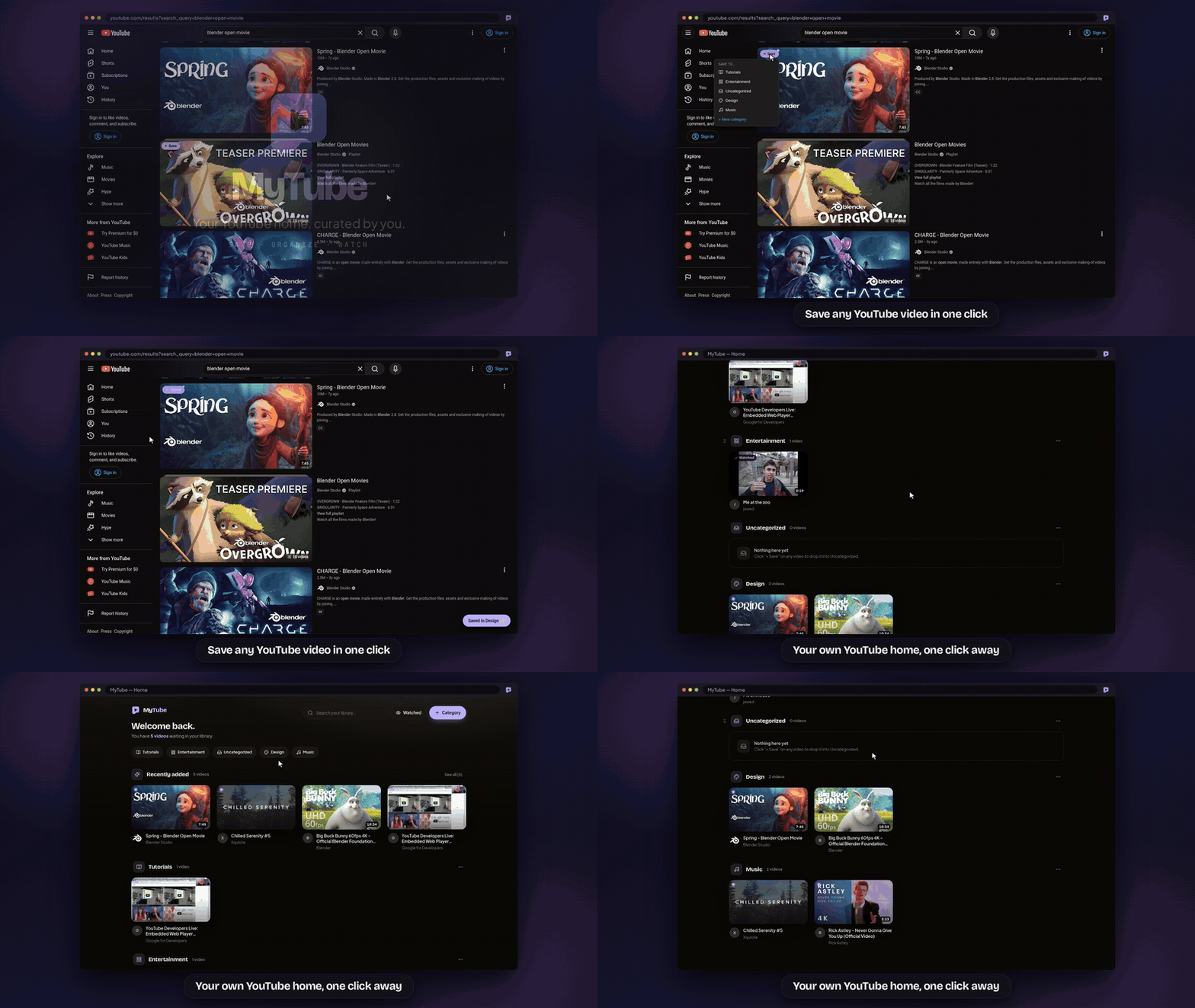
A quick tour
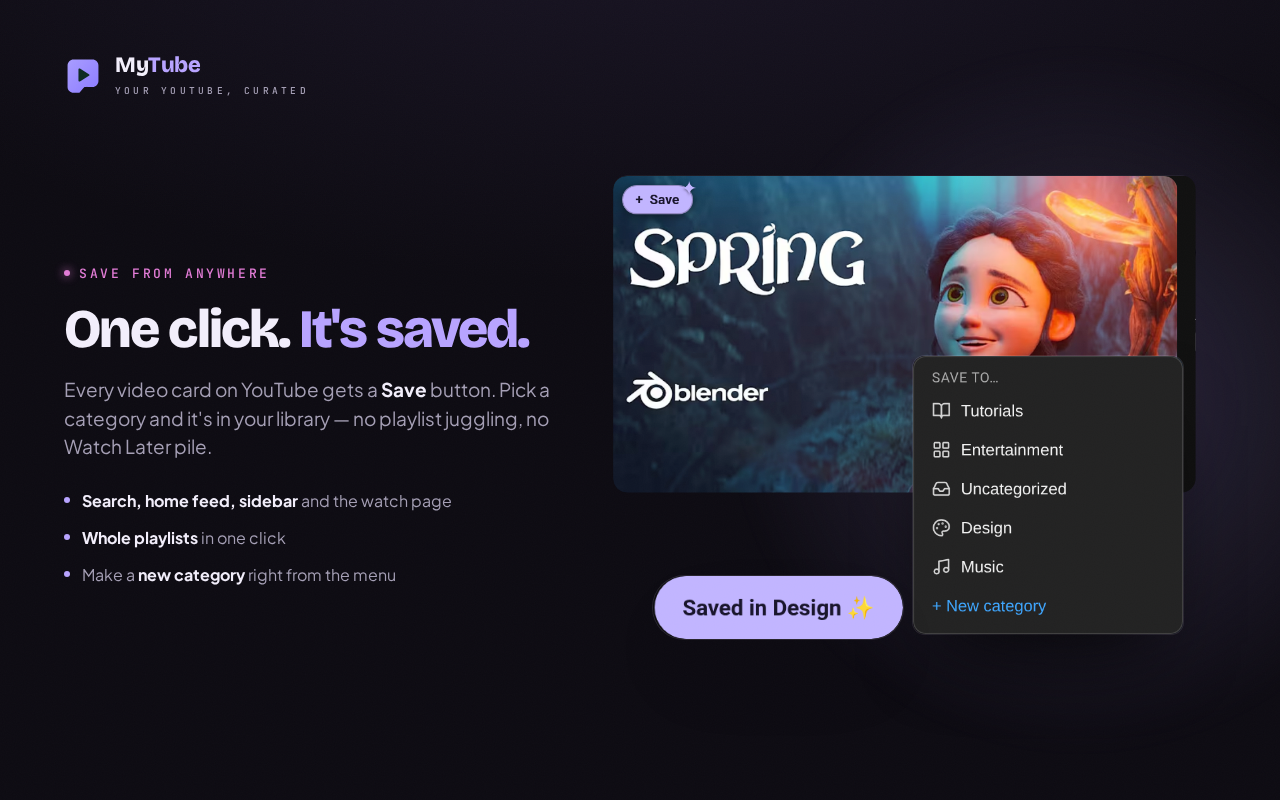 | 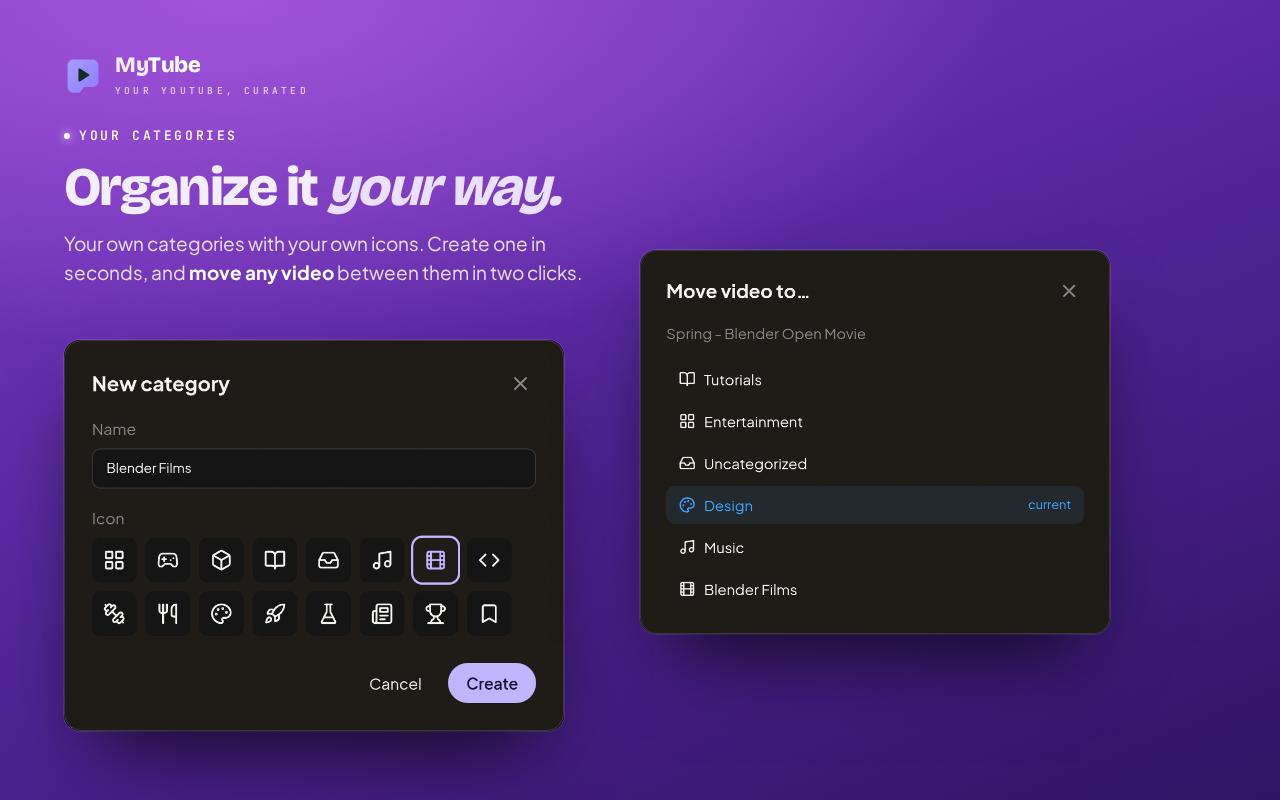 |
| Save from anywhere. Every video card on YouTube gets a Save button: pick a category, or make a new one right from the menu. | Organize it your way. Your own categories with your own icons; move any video between them in two clicks. |
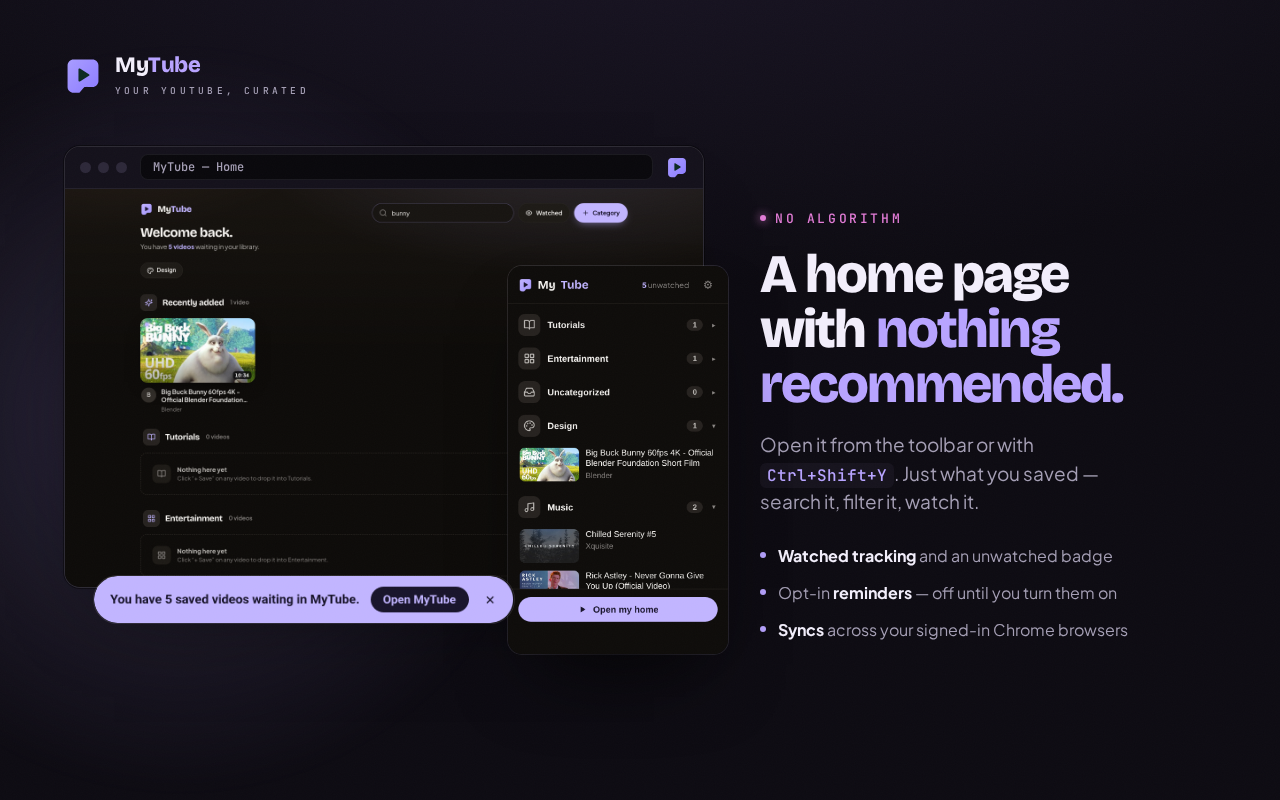 | 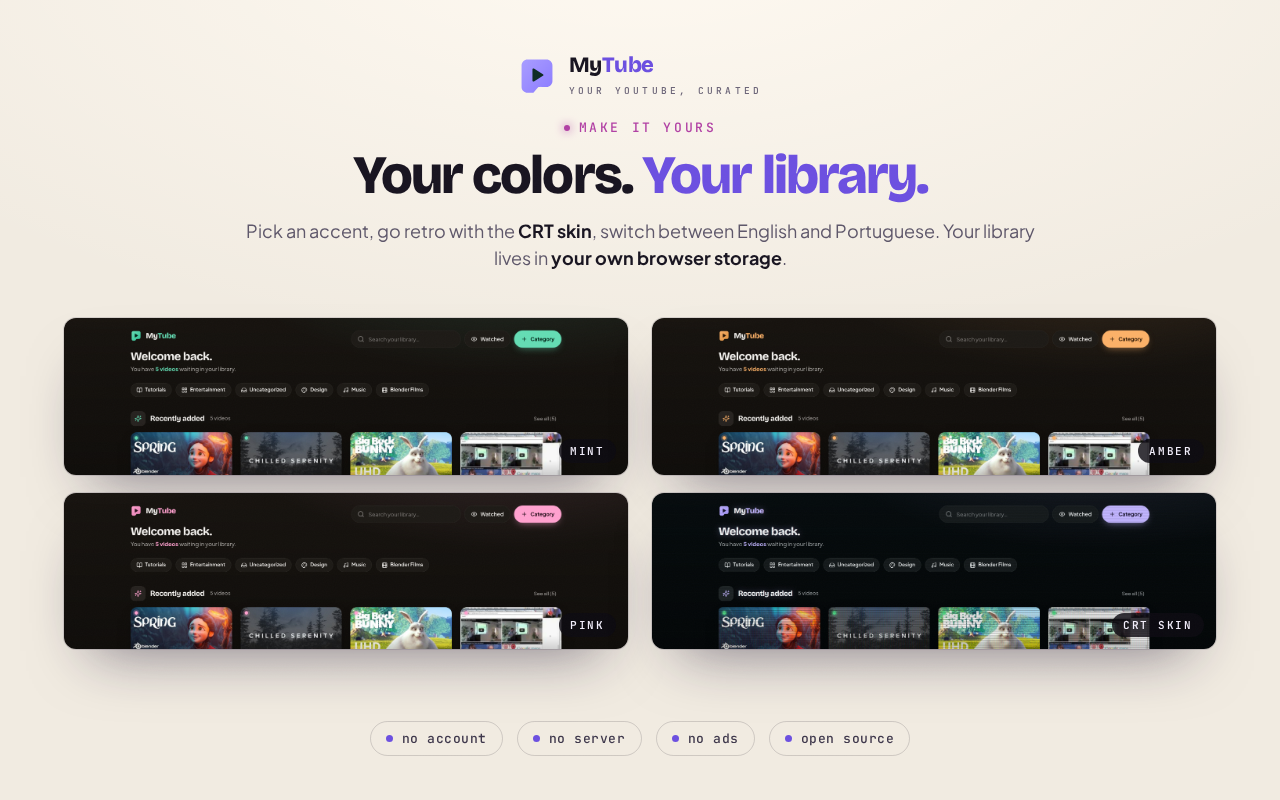 |
| Nothing recommended. Search and filter what you saved, from the home page or the toolbar popup. | Make it yours. Accent colors, a retro CRT skin, and English or Portuguese. |
Features
- Save from anywhere on YouTube. A "+ Save" button on home-feed, search, channel and sidebar cards, a pill on the watch page, and an Import button on playlist pages that brings a whole playlist into a category in one go. Re-saving a video moves it instead of duplicating it.
- A curated home. A grid per category, plus smart sections: Recently added, and Gathering dust for unwatched videos older than 21 days. Category chips jump to a section, search filters by title or channel, and drag & drop reorders both videos and categories. Cards show the duration, the channel avatar, and a menu to move, mark watched, or remove.
- The toolbar popup. Your categories and videos at a glance, the unwatched count, and a shortcut to the home.
- Watched tracking. Mark videos watched; the toolbar badge shows how many are still waiting.
- Optional reminders, both off on a fresh install: open the home when the browser starts, or show a dismissible nudge on the YouTube home page.
- Make it yours. Six accent colors, the retro CRT skin, sound effects, and the interface in English or Portuguese (Brazil).
- Syncs across your signed-in Chrome browsers through
chrome.storage.sync.
The home is not a new-tab override. Overriding the new tab hijacks every tab and triggers Chrome's "keep this page?" prompt, so the home is a normal page you open on demand: from the toolbar popup, or with Ctrl+Shift+Y (Cmd+Shift+Y on Mac). See src/home-page.ts.
Install
From the Chrome Web Store (recommended): MyTube on the Chrome Web Store → Add to Chrome.
From source:
npm install && npm run build- Open
chrome://extensionsand enable Developer mode - Load unpacked → select the
dist/folder - Browse YouTube, click "+ Save" on a video, then open your home from the toolbar icon or with Ctrl+Shift+Y
Privacy & permissions
MyTube asks for exactly storage plus access to https://www.youtube.com/*:
no tabs, no history. There is no server, no account, no ads and no
analytics. Your library lives in your own browser storage and never reaches the
developer.
The one request the extension makes on its own is a best-effort lookup to YouTube's public oEmbed endpoint, to fill in a title or channel name it couldn't read from the page. A failed lookup never blocks a save.
See docs/PRIVACY.md for the full policy, and specs/security-hardening.spec.md for the message-validation, CSP and least-privilege rules.
Development
Built with Vite + CRXJS, React 18, TypeScript, Tailwind
CSS, Lucide icons and @dnd-kit for drag & drop.
npm install
npm run dev          # Vite with HMR — load dist/ in Chrome as above
npm run build        # tsc --noEmit && vite build → dist/
Tests
npm test             # Vitest: reducer, content-script helpers, popup, home, tooling
npm run test:watch
npm run test:e2e     # Playwright: loads the built extension in headed Chromium
npm run test:e2e needs npx playwright install chromium once. CI runs
npm test and the build on every pull request.
How the service worker is organized
The service worker owns storage and validates every message at the trust
boundary before it reaches the MyTubeStore reducer. The typed contract is the
Message union and the StorageData schema in src/types.ts;
tests inject a fake storage backend, so they never need a Chrome runtime.
Store & promo assets
Every image and video of the extension is generated from the real packaged extension, driven by Playwright, so it stays in sync with the UI:
| Command | Produces |
|---|---|
npm run store:promo | Designed store listing images, in English and Portuguese (docs/store-assets/listing/); the YouTube thumbnail and the Shorts cover (docs/promo-video/); the support-form header; this README's banner |
npm run promo:video | The promo video, landscape 1080p and vertical 1080×1920, silent so music and narration can be added (docs/promo-video/NARRATION.md) |
node scripts/make-promo-video.mjs gif | This README's demo GIF, cut from the 1080p video |
npm run store:assets | Raw UI screenshots of every surface (docs/store-assets/) |
Localization
Interface text lives in one catalog, src/i18n.ts, keyed by the saved language setting, so you can switch language without changing your browser locale. English is the default; Portuguese (Brazil) is picked automatically on a Portuguese browser and can be switched in Settings.
The store-facing manifest strings live separately in _locales/
and follow the browser language, which is what the Chrome Web Store and
chrome://extensions display.
Contributing
Work is spec-first for anything beyond a trivial fix. Each feature owns one
specs/<feature>.spec.md with a table of stable, observable acceptance criteria
(SAVE-3, DUR-1, …), and every criterion is bound to a test named after its
ID, so grepping an ID shows spec ↔ test in one shot.
- specs/WORKFLOW.md: the tiered process, step by step
- specs/CAPABILITIES.md: a living index of what the extension does today
- CLAUDE.md: code style and conventions
openspec/ is frozen, read-only history; new behavior is specced only in
specs/*.spec.md.
Publishing
docs/chrome-web-store-submission.md holds the listing copy (English and Portuguese), the permission justifications, and the packaging checklist for the Chrome Web Store.
Roadmap
- Export and back up your library
License
MIT © Danilo Mikhael da Silva Melo
MyTube is an independent project, not affiliated with, sponsored by, or endorsed by YouTube or Google LLC. YouTube is a trademark of Google LLC.
Similar repos


Languages
TypeScript
68.6%
JavaScript
25.3%
CSS
5.5%
See what people are saying
README
Watch Later became a graveyard. MyTube is a Chrome extension that gives you a YouTube home page you actually curate: save videos straight from YouTube into categories you define, then come back to a clean library with nothing recommended and nothing autoplaying.
A quick tour
| |
| Save from anywhere. Every video card on YouTube gets a Save button: pick a category, or make a new one right from the menu. | Organize it your way. Your own categories with your own icons; move any video between them in two clicks. |
| |
| Nothing recommended. Search and filter what you saved, from the home page or the toolbar popup. | Make it yours. Accent colors, a retro CRT skin, and English or Portuguese. |
Features
- Save from anywhere on YouTube. A "+ Save" button on home-feed, search, channel and sidebar cards, a pill on the watch page, and an Import button on playlist pages that brings a whole playlist into a category in one go. Re-saving a video moves it instead of duplicating it.
- A curated home. A grid per category, plus smart sections: Recently added, and Gathering dust for unwatched videos older than 21 days. Category chips jump to a section, search filters by title or channel, and drag & drop reorders both videos and categories. Cards show the duration, the channel avatar, and a menu to move, mark watched, or remove.
- The toolbar popup. Your categories and videos at a glance, the unwatched count, and a shortcut to the home.
- Watched tracking. Mark videos watched; the toolbar badge shows how many are still waiting.
- Optional reminders, both off on a fresh install: open the home when the browser starts, or show a dismissible nudge on the YouTube home page.
- Make it yours. Six accent colors, the retro CRT skin, sound effects, and the interface in English or Portuguese (Brazil).
- Syncs across your signed-in Chrome browsers through
chrome.storage.sync.
The home is not a new-tab override. Overriding the new tab hijacks every tab and triggers Chrome's "keep this page?" prompt, so the home is a normal page you open on demand: from the toolbar popup, or with Ctrl+Shift+Y (Cmd+Shift+Y on Mac). See src/home-page.ts.
Install
From the Chrome Web Store (recommended): MyTube on the Chrome Web Store → Add to Chrome.
From source:
npm install && npm run build- Open
chrome://extensionsand enable Developer mode - Load unpacked → select the
dist/folder - Browse YouTube, click "+ Save" on a video, then open your home from the toolbar icon or with Ctrl+Shift+Y
Privacy & permissions
MyTube asks for exactly storage plus access to https://www.youtube.com/*:
no tabs, no history. There is no server, no account, no ads and no
analytics. Your library lives in your own browser storage and never reaches the
developer.
The one request the extension makes on its own is a best-effort lookup to YouTube's public oEmbed endpoint, to fill in a title or channel name it couldn't read from the page. A failed lookup never blocks a save.
See docs/PRIVACY.md for the full policy, and specs/security-hardening.spec.md for the message-validation, CSP and least-privilege rules.
Development
Built with Vite + CRXJS, React 18, TypeScript, Tailwind
CSS, Lucide icons and @dnd-kit for drag & drop.
npm install
npm run dev          # Vite with HMR — load dist/ in Chrome as above
npm run build        # tsc --noEmit && vite build → dist/
Tests
npm test             # Vitest: reducer, content-script helpers, popup, home, tooling
npm run test:watch
npm run test:e2e     # Playwright: loads the built extension in headed Chromium
npm run test:e2e needs npx playwright install chromium once. CI runs
npm test and the build on every pull request.
How the service worker is organized
The service worker owns storage and validates every message at the trust
boundary before it reaches the MyTubeStore reducer. The typed contract is the
Message union and the StorageData schema in src/types.ts;
tests inject a fake storage backend, so they never need a Chrome runtime.
Store & promo assets
Every image and video of the extension is generated from the real packaged extension, driven by Playwright, so it stays in sync with the UI:
| Command | Produces |
|---|---|
npm run store:promo | Designed store listing images, in English and Portuguese (docs/store-assets/listing/); the YouTube thumbnail and the Shorts cover (docs/promo-video/); the support-form header; this README's banner |
npm run promo:video | The promo video, landscape 1080p and vertical 1080×1920, silent so music and narration can be added (docs/promo-video/NARRATION.md) |
node scripts/make-promo-video.mjs gif | This README's demo GIF, cut from the 1080p video |
npm run store:assets | Raw UI screenshots of every surface (docs/store-assets/) |
Localization
Interface text lives in one catalog, src/i18n.ts, keyed by the saved language setting, so you can switch language without changing your browser locale. English is the default; Portuguese (Brazil) is picked automatically on a Portuguese browser and can be switched in Settings.
The store-facing manifest strings live separately in _locales/
and follow the browser language, which is what the Chrome Web Store and
chrome://extensions display.
Contributing
Work is spec-first for anything beyond a trivial fix. Each feature owns one
specs/<feature>.spec.md with a table of stable, observable acceptance criteria
(SAVE-3, DUR-1, …), and every criterion is bound to a test named after its
ID, so grepping an ID shows spec ↔ test in one shot.
- specs/WORKFLOW.md: the tiered process, step by step
- specs/CAPABILITIES.md: a living index of what the extension does today
- CLAUDE.md: code style and conventions
openspec/ is frozen, read-only history; new behavior is specced only in
specs/*.spec.md.
Publishing
docs/chrome-web-store-submission.md holds the listing copy (English and Portuguese), the permission justifications, and the packaging checklist for the Chrome Web Store.
Roadmap
- Export and back up your library
License
MIT © Danilo Mikhael da Silva Melo
MyTube is an independent project, not affiliated with, sponsored by, or endorsed by YouTube or Google LLC. YouTube is a trademark of Google LLC.
Similar repos
Languages
TypeScript
68.6%
JavaScript
25.3%
CSS
5.5%