
A private, local-first map of how your sounds and documents relate.
Drop in clips, loops or whole sample packs and get a graph of what sounds alike, shares a tempo or key, uses the same instruments, and mixes well together. Drop in PDFs, Markdown, Office files or a source repository and the same graph links them by topic, citation and meaning. Everything is analyzed in your browser; nothing is uploaded unless you turn on a cloud AI provider.
Try the live app · User guide · Audio analysis in depth · Download a release · Security model





[!NOTE] This repository is still named document-graph-explorer, and packaged desktop builds and older releases carry the name Document Graph Explorer. The app itself, its installable web manifest and its exports now call themselves Resonance. Same project, one name going forward.
[!IMPORTANT] Your files stay on your device by default. Decoding, tempo/key/instrument detection, parsing, OCR, embeddings, similarity, clustering, search and rendering all run client-side. The only ways data can leave the browser are ones you switch on: an OpenRouter key for document AI, a local Ollama server (stays on your machine), a collaboration session you start, a share link you copy, or the developer-only OpenAI sound assistant that exists solely under
npm run dev. For an enforced guarantee rather than a toggle,npm run build:airgapproduces a build whose browser policy permits no external hosts. SECURITY.md has the exact data-flow table.
For sounds. Add a sample pack and every clip becomes a node. Resonance decodes each file locally, estimates tempo, key (with Camelot code), genre and energy, finds mix points (intro, build, drop, breakdown, outro), and tags what it hears: instruments, production type and sound character from a 199-label DJ vocabulary. Clips are then linked by what they share, so you can see at a glance which loops sound alike, which one-shots share an instrument, and which tracks will mix in key and tempo.
For documents. Add a folder of notes, papers, contracts or a whole source repository. Resonance parses the text, works out topics, names and places, and semantic similarity with a self-hosted embedding model, follows cross-references and code imports, and groups the result into named clusters. Click any node to read it, search by meaning, ask questions, and trace why two documents are connected.
Both at once. Sounds and documents live in the same graph and the same saved workspace, so a sample library and the notes about it can sit side by side.
| Capability | What you get |
|---|---|
| Local audio intelligence | FFmpeg decoding, Essentia tempo and key, bundled tempo and key networks, AudioSet AST instruments, MTG-Jamendo, a music-trained CLAP encoder and a trained sound tagger, all run on your device. Details in docs/audio-analysis.md. |
| Relationship types | Instruments, sound properties, sounds alike, tempo, key, versions (same recording or another version of the song), same genre, shared title, similar meaning, keywords, names and places, and explicit links. Each one can be switched on or off in the filter sidebar. |
| Explain every link | Pick a clip or document and the inspector lists why each neighbour is connected, with a strength bar for every piece of evidence. |
| Sample assistant | Filter your library by label, BPM range, length and confirmed tags; find similar sounds; audition them; build and export crates; correct tags with the sound-category picker. |
| Document readers and search | PDF, Markdown, HTML, CSV, JSON, YAML, code and plain-text readers with passage highlighting; ⌘K search by meaning and title; side-by-side compare; shortest path between two documents. |
| Insights and change tracking | Orphans, possible duplicates, bridge and hub documents, stale files; named snapshots with visual compare; notes, tags and pins on any node. |
| Chat | Ask about your library. Answers come from your own passages and sample labels by default, with optional OpenRouter or Ollama models for richer replies. |
| Workspaces | Multiple named corpora saved in the browser, a watched folder that keeps the graph in sync while the app is open, and a saved library that skips unchanged files on re-import. |
| Export and share | Rekordbox collection XML, PNG, graph JSON backup and restore, a sanitized share link, and an OpenUSD scene for 3D tools. |
| Runs anywhere | Static web app, local launcher, Electron desktop app for macOS, Windows and Linux, runtime offline mode, or a sealed air-gapped build. |
Once a graph is ready, the screen has four parts:
The Library tab is a keyboard-driven list of everything in the graph. The Export tab holds every export and import action.
Open the live app and choose Load demo corpus to explore immediately, or Add files / Add a folder to use your own. Processing happens in that browser tab; adding files does not upload them to the host. Workspaces, notes and tags are saved locally and reopen after a reload.
npm install      # install dependencies
npm run dev      # start the Vite dev server at http://localhost:5173
Node 24 is the supported runtime (.nvmrc); Node 22.13 or newer also works, except Node 23, which
the locked dependencies do not support. The first
npm run dev or npm run build needs network access: a pre-script downloads about 632 MB of
checksum-verified audio-model weights from Hugging Face into public/ (not stored in Git). Later
runs reuse the local files. Run npm run setup:music once while online to work offline afterwards.
Open the printed URL, then drag clips, sample packs, documents or folders onto the window. Whole
source repositories are supported and .gitignore rules are honoured.
Download the latest artifacts from
GitHub Releases, or build
a target yourself with the commands under Builds. Published releases can trail main; the
live app and the current source tree have the newest changes. Use npm run build:airgap when the
distribution must enforce zero external destinations.
Add and play. Add audio with Add files, Import a folder or drag and drop. Select a clip to play it in the inspector; Prepare playback converts formats your browser cannot play, using the bundled FFmpeg decoder on your device.
Analysis. New audio is analyzed during import, with a background status card you can minimize or stop. Settings → Music analysis mode chooses between Full — whole track and Quick → Full in background, which shows early estimates and then verifies the whole track. Reanalyze a single track from Full details → Track actions, or a whole library from Settings → Data (Update older tracks, Re-analyze all tracks).
What the track panel shows. Length; tempo and key, marking values that came from the file or folder name and showing the audio estimate when it differs; genre and energy; mix points with play-from buttons; same recording and other versions of the song; detected sounds marked likely, maybe or possible; compatible tracks to mix with; and, under technical details, each model's guesses, scan coverage and Listen at buttons that jump to the strongest passage for each instrument.
Name clues win. Tags in file or folder names such as Dm, 140bpm, Dm_140 or Synths take
precedence over audio estimates, and confirmed labels take precedence over both. The evidence always
says which source a value came from.
Sample assistant. Opens from the top bar once audio is loaded. My library filters by labels or filename phrases, BPM range, maximum length and confirmed labels; Find similar sounds compares labels, tempo and key (not waveforms); results can be auditioned, added to a crate, or corrected with More → Correct tags. Your crate collects picks and Export crate downloads them as an importable graph subset (no audio files). Upload overview summarizes what came in and groups it.
Developer-only AI for sounds. Under npm run dev with an OPENAI_API_KEY in a local .env,
the dev server adds natural-language library search, an AI crate builder, Copilot review of up
to five sounds, vocal transcription, upload summaries, voice input and an AI search for free sample
packs. The key stays in the Node process, and none of this ships in npm run build, the desktop apps
or the air-gapped build, where the local filters, similarity search, crates and tag correction keep
working. See docs/dj-sample-assistant.md and
docs/music-copilot-integration.md.
Rekordbox. Export → Export for Rekordbox (XML) writes a Rekordbox collection with each track's BPM, key, Camelot code and sound tags in one playlist named "Resonance". The browser only knows folder names, so the dialog asks where each imported folder lives on disk. No beat-grid markers are written; Rekordbox draws its own. In Rekordbox, point Preferences → Advanced → Database → rekordbox xml at the file and import the playlist from the rekordbox xml tree. Serato has no import file for BPM or key, so there is no Serato export.
The full model list, thresholds and limits are in docs/audio-analysis.md.
.gitignore is honoured, generated and vendor directories
are skipped, symbols are extracted, and relative imports and includes become reference edges.| Kind | Formats |
|---|---|
| Audio | MP3, WAV, FLAC, AIFF, Ogg, Opus, M4A, AAC, WMA, WebM, AMR, AU, AC3, DTS, APE, WavPack, CAF, ALAC, MKA, DSF and other containers; any audio/* type the browser reports. |
| Documents | Plain text, Markdown, PDF (with link annotations; scanned pages fall back to bundled Tesseract OCR), HTML, DOCX, PPTX, XLSX, EPUB, RTF, OpenDocument text, spreadsheets, presentations and drawings. |
| Data | CSV, TSV, JSON, JSON Lines, GeoJSON, YAML, Jupyter notebooks. |
| Code | About 120 languages by extension or filename, including TypeScript, JavaScript, Python, Go, Rust, C and C++, C#, Java, Kotlin, Swift, Ruby, PHP, shell, SQL, CSS, TOML, Dockerfile and Makefile. |
Unknown non-binary files are treated as text. Files are capped at 64 MB each.
All of these live on the Export tab.
| Action | What it produces |
|---|---|
| Export image PNG | The current scene as an image. |
| Export for Rekordbox (XML) | A Rekordbox collection with BPM, key and sound tags (audio only). |
| Copy shareable URL | A link whose fragment carries titles, summaries, topics, entities, clusters and connection evidence. It excludes full text, original bytes, local paths, embeddings, handles and settings, and shows a confirmation listing exactly that before copying. |
| Export graph JSON / Copy graph JSON | A backup of the graph: nodes, links, clusters, summaries, notes, tags and audio analysis, with document embeddings optional under Settings → Advanced. It omits full text and original files, so an imported graph reads and searches at reduced fidelity; keep the originals. |
| Import graph JSON | Restore a backup or open a crate someone exported. Also available as Import a graph on the welcome screen. |
| Export 3D scene (USD) | One self-contained .usda stage with documents as prims, relationships as curves, cluster hulls, a docGraph: attribute schema and a graphView variant set, openable in usdview, NVIDIA Omniverse and Apple Reality Composer Pro. |
Pixar Storm (usdrecord), detailed view | Pixar Storm, summary variant | Apple Reality Composer Pro |
|---|---|---|
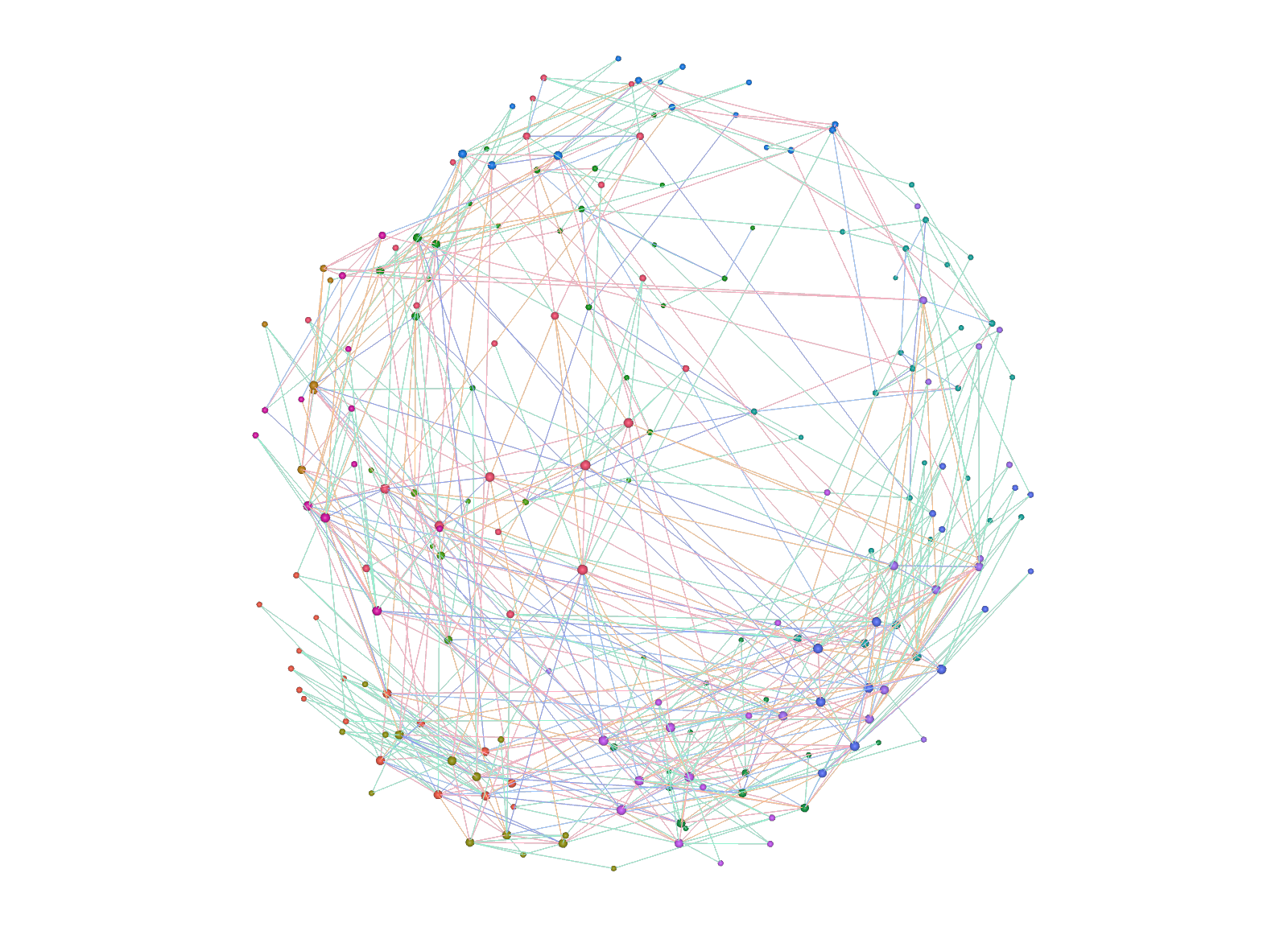 | 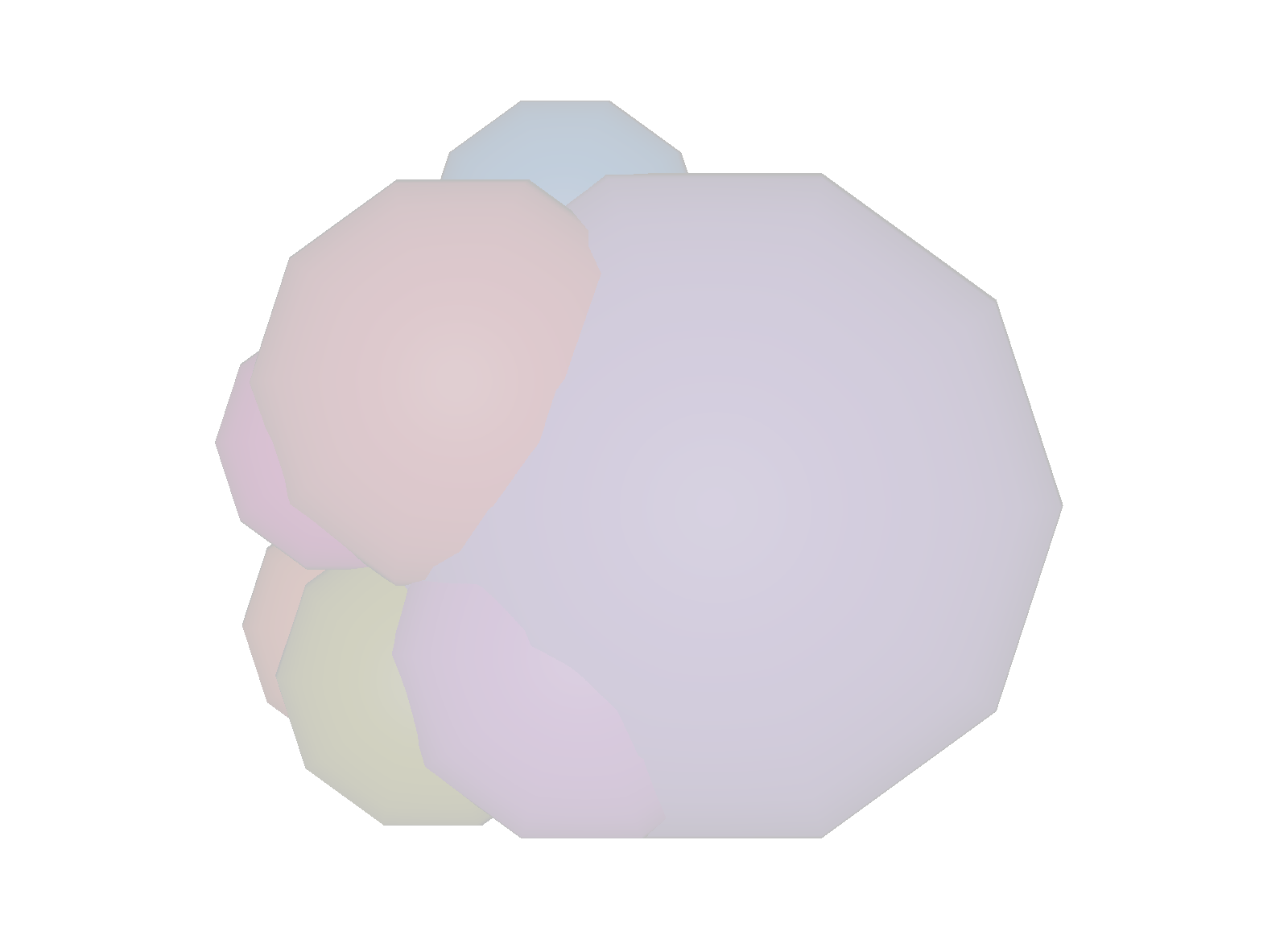 | 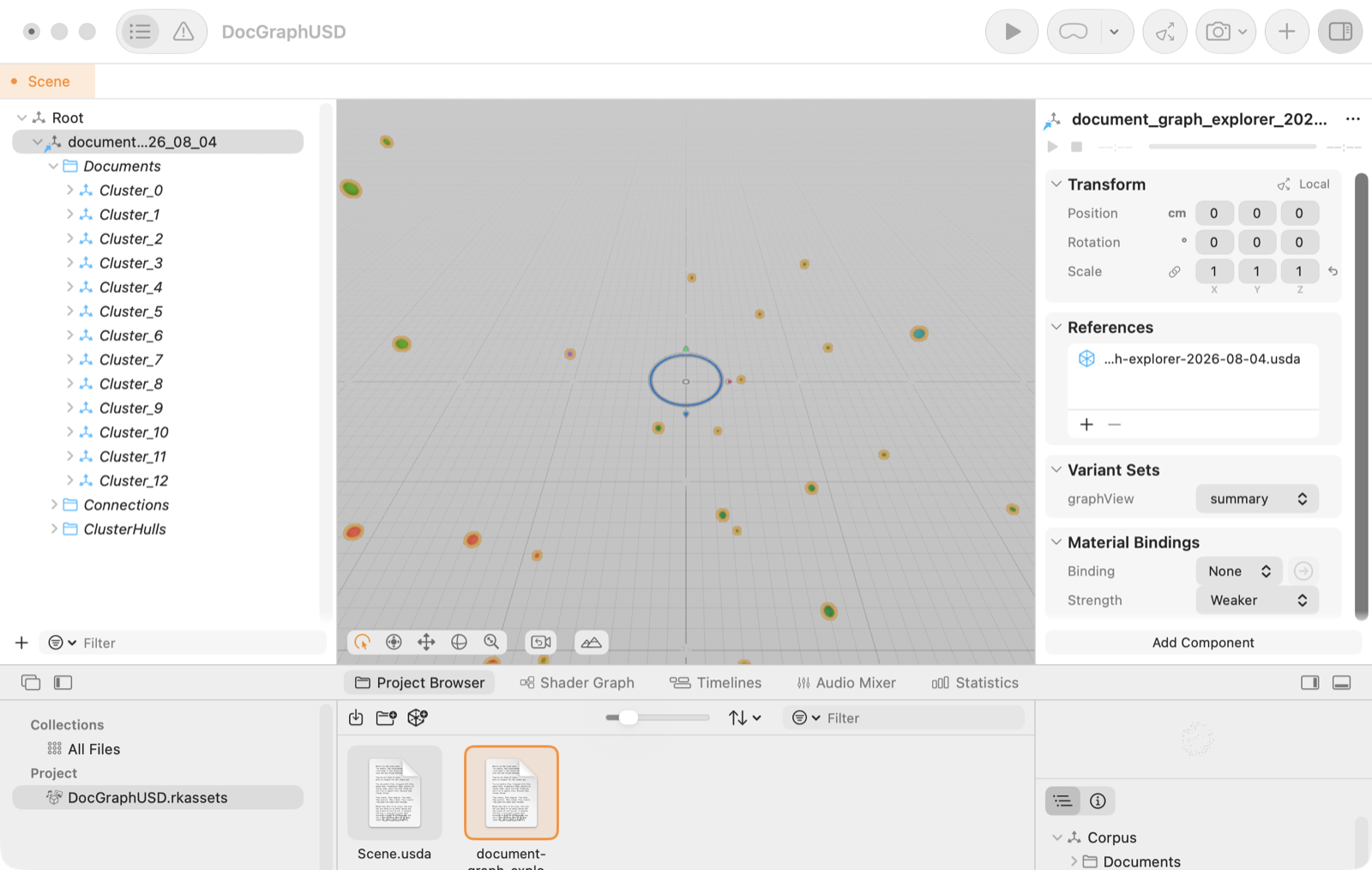 |
The OpenUSD path has a companion Python CLI that validates and packages exported stages, and an LLM agent that answers questions about a stage by querying it. Both are documented in docs/openusd-pipeline.md.
Ingestion is an off-main-thread pipeline coordinated by src/pipeline/coordinator.ts:
parse or decode → analyze → chunk and embed → link → Louvain clustering → topic synthesis
public/*-model/: tempo and key networks, the
AudioSet AST instrument detector, MTG-Jamendo, a music-trained CLAP encoder, a trained sound
tagger and a fusion step. docs/tag-decision-map.md records which model
decides each tag.bge-small-en-v1.5 model from public/models/ via transformers.js,
FP16 on WebGPU with a quantized WASM fallback.Measured on an Apple M5 Max: the 100-PDF demo corpus ingests end to end in about 9 seconds, a 2,000-node layout settles in under 6 seconds, and the settled scene holds the display's 120 Hz cap. Methodology and caveats are in docs/benchmarks.md.
| Script | What it does |
|---|---|
npm run dev | Start the Vite development server with HMR (also hosts the developer-only sound assistant) |
npm run build | Type-check, build the production app, verify runtime assets, and enforce the bundle budget |
npm run build:airgap | Build and verify the sealed zero-external-host distribution |
npm run setup:music | Download and verify the audio-model weights ahead of offline work |
npm run typecheck | Run TypeScript over the app and the e2e suite without emitting files |
npm run lint | Run ESLint across the repository |
npm test / npm run test:watch | Run the Vitest suite once, or in watch mode |
npm run preview | Preview the production build locally |
npm run check:bundle | Enforce eager-JavaScript limits for normal and air-gapped builds |
npm run bench:layout | Layout-convergence benchmark against the production worker |
npm run bench:import, bench:dj:*, test:benchmarks | Audio import and tag-accuracy benchmarks (docs/audio-evaluation-infrastructure.md) |
npm run review:sounds | Start the local Python sound reviewer used by Find free packs |
npm run agent | Run the standalone read-only repo agent (agent/README.md) |
| Command | Output | Network behaviour |
|---|---|---|
npm run build | dist/ | Fully local by default; optional OpenRouter, local Ollama, or an explicitly started collaboration session |
npm run build:airgap | dist-airgap/ | Zero external destinations enforced by CSP, runtime refusal, sanitization and a post-build verification gate |
npm run build:desktop | release/mac-arm64/*.app, copied to /Applications | Local macOS desktop app (run on a Mac) |
npm run dist:mac | DMG and ZIP under release/ | macOS installer images; ad-hoc signed, not notarized, Apple Silicon by default |
npm run dist:win | Portable Electron executable under release/ | Windows desktop build |
npm run build:exe | release/win/run.exe plus staged dist/ | Standalone Windows localhost server as a Node single executable |
npm run dist:linux | AppImage under release/ | Linux desktop package; not signed |
After npm run build, the launchers run.cmd (Windows), run.command (macOS) and run.sh
(Linux) start a dependency-free localhost server and open the app without the dev tools; pass
--airgap to serve the sealed build. On Windows, npm run install:desktop adds a desktop shortcut
to that launcher. The production shell lazy-loads the renderer, pipeline, audio models, chat, readers
and settings; npm run build enforces an 80 kB entry and 280 kB total eager-JavaScript budget.
npm test                 # Vitest: pipeline, parsers, graph, audio, UI, persistence, exports
npm run build && npx playwright test   # browser smoke suite against the built app
Vitest covers pipeline modules, parsers, graph algorithms, audio analysis and tagging, semantic
indexing, search, import validation and sanitization, persistence, collaboration, scene helpers, UI
components, packaging helpers, offline and air-gap safeguards, exports and the standalone agent. Some
audio tag-head regressions run in Python and need Python 3.11+ with NumPy (CI uses Python 3.12 and
numpy==2.3.5); create a virtual environment and install NumPy before npm test to include them.
The Playwright suite loads the demo corpus and audio fixtures end to end in headless Chromium against
vite preview, so it exercises the real worker pipeline. Never point it at the dev server. Set
PLAYWRIGHT_CHANNEL=chrome to use an installed Chrome with native GPU, and PLAYWRIGHT_PORT when
the default 4173 is busy. Browser tests take several minutes while the local models process the
fixtures.
CI runs lint, type-check, both builds, bundle-budget enforcement, unit and browser tests, Windows executable validation, a Docker image build and a container smoke test.
Production hosting must send the security headers used in Vite development and preview
(X-Frame-Options, X-Content-Type-Options, Referrer-Policy, Permissions-Policy) and should
send the Content-Security-Policy as a response header. The checked-in Vercel and Docker
configurations are the current examples; see DEPLOYMENT.md and
SECURITY.md.
React 19 · React Three Fiber · Three.js · TypeScript 6 · Vite · Zustand · Web Workers · transformers.js · ONNX Runtime Web · Essentia.js · FFmpeg (WASM) · graphology/Louvain · IndexedDB/idb · Yjs/WebRTC · Vitest · Playwright · Electron.
The app is GPL-3.0 (LICENSE). Bundled audio dependencies keep their own terms:
Essentia.js is AGPL-3.0, the FFmpeg core is GPL-2.0-or-later, the AudioSet AST model is BSD-3-Clause,
the CLAP model is Apache-2.0, and the MTG-Jamendo models and the trained sound tagger carry non-commercial
(CC BY-NC-SA) terms that the app licence does not override. Keep the bundled notices when
distributing builds; commercial use of the MTG models needs separate permission. Provenance notices
live in public/jamendo-model/NOTICE, public/music-model/NOTICE.md, public/sound-model/NOTICE
and the generated audio-runtime/NOTICE.txt.
A private, local-first map of how your sounds and documents relate.
Drop in clips, loops or whole sample packs and get a graph of what sounds alike, shares a tempo or key, uses the same instruments, and mixes well together. Drop in PDFs, Markdown, Office files or a source repository and the same graph links them by topic, citation and meaning. Everything is analyzed in your browser; nothing is uploaded unless you turn on a cloud AI provider.
Try the live app · User guide · Audio analysis in depth · Download a release · Security model
[!NOTE] This repository is still named document-graph-explorer, and packaged desktop builds and older releases carry the name Document Graph Explorer. The app itself, its installable web manifest and its exports now call themselves Resonance. Same project, one name going forward.
[!IMPORTANT] Your files stay on your device by default. Decoding, tempo/key/instrument detection, parsing, OCR, embeddings, similarity, clustering, search and rendering all run client-side. The only ways data can leave the browser are ones you switch on: an OpenRouter key for document AI, a local Ollama server (stays on your machine), a collaboration session you start, a share link you copy, or the developer-only OpenAI sound assistant that exists solely under
npm run dev. For an enforced guarantee rather than a toggle,npm run build:airgapproduces a build whose browser policy permits no external hosts. SECURITY.md has the exact data-flow table.
For sounds. Add a sample pack and every clip becomes a node. Resonance decodes each file locally, estimates tempo, key (with Camelot code), genre and energy, finds mix points (intro, build, drop, breakdown, outro), and tags what it hears: instruments, production type and sound character from a 199-label DJ vocabulary. Clips are then linked by what they share, so you can see at a glance which loops sound alike, which one-shots share an instrument, and which tracks will mix in key and tempo.
For documents. Add a folder of notes, papers, contracts or a whole source repository. Resonance parses the text, works out topics, names and places, and semantic similarity with a self-hosted embedding model, follows cross-references and code imports, and groups the result into named clusters. Click any node to read it, search by meaning, ask questions, and trace why two documents are connected.
Both at once. Sounds and documents live in the same graph and the same saved workspace, so a sample library and the notes about it can sit side by side.
| Capability | What you get |
|---|---|
| Local audio intelligence | FFmpeg decoding, Essentia tempo and key, bundled tempo and key networks, AudioSet AST instruments, MTG-Jamendo, a music-trained CLAP encoder and a trained sound tagger, all run on your device. Details in docs/audio-analysis.md. |
| Relationship types | Instruments, sound properties, sounds alike, tempo, key, versions (same recording or another version of the song), same genre, shared title, similar meaning, keywords, names and places, and explicit links. Each one can be switched on or off in the filter sidebar. |
| Explain every link | Pick a clip or document and the inspector lists why each neighbour is connected, with a strength bar for every piece of evidence. |
| Sample assistant | Filter your library by label, BPM range, length and confirmed tags; find similar sounds; audition them; build and export crates; correct tags with the sound-category picker. |
| Document readers and search | PDF, Markdown, HTML, CSV, JSON, YAML, code and plain-text readers with passage highlighting; ⌘K search by meaning and title; side-by-side compare; shortest path between two documents. |
| Insights and change tracking | Orphans, possible duplicates, bridge and hub documents, stale files; named snapshots with visual compare; notes, tags and pins on any node. |
| Chat | Ask about your library. Answers come from your own passages and sample labels by default, with optional OpenRouter or Ollama models for richer replies. |
| Workspaces | Multiple named corpora saved in the browser, a watched folder that keeps the graph in sync while the app is open, and a saved library that skips unchanged files on re-import. |
| Export and share | Rekordbox collection XML, PNG, graph JSON backup and restore, a sanitized share link, and an OpenUSD scene for 3D tools. |
| Runs anywhere | Static web app, local launcher, Electron desktop app for macOS, Windows and Linux, runtime offline mode, or a sealed air-gapped build. |
Once a graph is ready, the screen has four parts:
The Library tab is a keyboard-driven list of everything in the graph. The Export tab holds every export and import action.
Open the live app and choose Load demo corpus to explore immediately, or Add files / Add a folder to use your own. Processing happens in that browser tab; adding files does not upload them to the host. Workspaces, notes and tags are saved locally and reopen after a reload.
npm install      # install dependencies
npm run dev      # start the Vite dev server at http://localhost:5173
Node 24 is the supported runtime (.nvmrc); Node 22.13 or newer also works, except Node 23, which
the locked dependencies do not support. The first
npm run dev or npm run build needs network access: a pre-script downloads about 632 MB of
checksum-verified audio-model weights from Hugging Face into public/ (not stored in Git). Later
runs reuse the local files. Run npm run setup:music once while online to work offline afterwards.
Open the printed URL, then drag clips, sample packs, documents or folders onto the window. Whole
source repositories are supported and .gitignore rules are honoured.
Download the latest artifacts from
GitHub Releases, or build
a target yourself with the commands under Builds. Published releases can trail main; the
live app and the current source tree have the newest changes. Use npm run build:airgap when the
distribution must enforce zero external destinations.
Add and play. Add audio with Add files, Import a folder or drag and drop. Select a clip to play it in the inspector; Prepare playback converts formats your browser cannot play, using the bundled FFmpeg decoder on your device.
Analysis. New audio is analyzed during import, with a background status card you can minimize or stop. Settings → Music analysis mode chooses between Full — whole track and Quick → Full in background, which shows early estimates and then verifies the whole track. Reanalyze a single track from Full details → Track actions, or a whole library from Settings → Data (Update older tracks, Re-analyze all tracks).
What the track panel shows. Length; tempo and key, marking values that came from the file or folder name and showing the audio estimate when it differs; genre and energy; mix points with play-from buttons; same recording and other versions of the song; detected sounds marked likely, maybe or possible; compatible tracks to mix with; and, under technical details, each model's guesses, scan coverage and Listen at buttons that jump to the strongest passage for each instrument.
Name clues win. Tags in file or folder names such as Dm, 140bpm, Dm_140 or Synths take
precedence over audio estimates, and confirmed labels take precedence over both. The evidence always
says which source a value came from.
Sample assistant. Opens from the top bar once audio is loaded. My library filters by labels or filename phrases, BPM range, maximum length and confirmed labels; Find similar sounds compares labels, tempo and key (not waveforms); results can be auditioned, added to a crate, or corrected with More → Correct tags. Your crate collects picks and Export crate downloads them as an importable graph subset (no audio files). Upload overview summarizes what came in and groups it.
Developer-only AI for sounds. Under npm run dev with an OPENAI_API_KEY in a local .env,
the dev server adds natural-language library search, an AI crate builder, Copilot review of up
to five sounds, vocal transcription, upload summaries, voice input and an AI search for free sample
packs. The key stays in the Node process, and none of this ships in npm run build, the desktop apps
or the air-gapped build, where the local filters, similarity search, crates and tag correction keep
working. See docs/dj-sample-assistant.md and
docs/music-copilot-integration.md.
Rekordbox. Export → Export for Rekordbox (XML) writes a Rekordbox collection with each track's BPM, key, Camelot code and sound tags in one playlist named "Resonance". The browser only knows folder names, so the dialog asks where each imported folder lives on disk. No beat-grid markers are written; Rekordbox draws its own. In Rekordbox, point Preferences → Advanced → Database → rekordbox xml at the file and import the playlist from the rekordbox xml tree. Serato has no import file for BPM or key, so there is no Serato export.
The full model list, thresholds and limits are in docs/audio-analysis.md.
.gitignore is honoured, generated and vendor directories
are skipped, symbols are extracted, and relative imports and includes become reference edges.| Kind | Formats |
|---|---|
| Audio | MP3, WAV, FLAC, AIFF, Ogg, Opus, M4A, AAC, WMA, WebM, AMR, AU, AC3, DTS, APE, WavPack, CAF, ALAC, MKA, DSF and other containers; any audio/* type the browser reports. |
| Documents | Plain text, Markdown, PDF (with link annotations; scanned pages fall back to bundled Tesseract OCR), HTML, DOCX, PPTX, XLSX, EPUB, RTF, OpenDocument text, spreadsheets, presentations and drawings. |
| Data | CSV, TSV, JSON, JSON Lines, GeoJSON, YAML, Jupyter notebooks. |
| Code | About 120 languages by extension or filename, including TypeScript, JavaScript, Python, Go, Rust, C and C++, C#, Java, Kotlin, Swift, Ruby, PHP, shell, SQL, CSS, TOML, Dockerfile and Makefile. |
Unknown non-binary files are treated as text. Files are capped at 64 MB each.
All of these live on the Export tab.
| Action | What it produces |
|---|---|
| Export image PNG | The current scene as an image. |
| Export for Rekordbox (XML) | A Rekordbox collection with BPM, key and sound tags (audio only). |
| Copy shareable URL | A link whose fragment carries titles, summaries, topics, entities, clusters and connection evidence. It excludes full text, original bytes, local paths, embeddings, handles and settings, and shows a confirmation listing exactly that before copying. |
| Export graph JSON / Copy graph JSON | A backup of the graph: nodes, links, clusters, summaries, notes, tags and audio analysis, with document embeddings optional under Settings → Advanced. It omits full text and original files, so an imported graph reads and searches at reduced fidelity; keep the originals. |
| Import graph JSON | Restore a backup or open a crate someone exported. Also available as Import a graph on the welcome screen. |
| Export 3D scene (USD) | One self-contained .usda stage with documents as prims, relationships as curves, cluster hulls, a docGraph: attribute schema and a graphView variant set, openable in usdview, NVIDIA Omniverse and Apple Reality Composer Pro. |
Pixar Storm (usdrecord), detailed view | Pixar Storm, summary variant | Apple Reality Composer Pro |
|---|---|---|
| | |
The OpenUSD path has a companion Python CLI that validates and packages exported stages, and an LLM agent that answers questions about a stage by querying it. Both are documented in docs/openusd-pipeline.md.
Ingestion is an off-main-thread pipeline coordinated by src/pipeline/coordinator.ts:
parse or decode → analyze → chunk and embed → link → Louvain clustering → topic synthesis
public/*-model/: tempo and key networks, the
AudioSet AST instrument detector, MTG-Jamendo, a music-trained CLAP encoder, a trained sound
tagger and a fusion step. docs/tag-decision-map.md records which model
decides each tag.bge-small-en-v1.5 model from public/models/ via transformers.js,
FP16 on WebGPU with a quantized WASM fallback.Measured on an Apple M5 Max: the 100-PDF demo corpus ingests end to end in about 9 seconds, a 2,000-node layout settles in under 6 seconds, and the settled scene holds the display's 120 Hz cap. Methodology and caveats are in docs/benchmarks.md.
| Script | What it does |
|---|---|
npm run dev | Start the Vite development server with HMR (also hosts the developer-only sound assistant) |
npm run build | Type-check, build the production app, verify runtime assets, and enforce the bundle budget |
npm run build:airgap | Build and verify the sealed zero-external-host distribution |
npm run setup:music | Download and verify the audio-model weights ahead of offline work |
npm run typecheck | Run TypeScript over the app and the e2e suite without emitting files |
npm run lint | Run ESLint across the repository |
npm test / npm run test:watch | Run the Vitest suite once, or in watch mode |
npm run preview | Preview the production build locally |
npm run check:bundle | Enforce eager-JavaScript limits for normal and air-gapped builds |
npm run bench:layout | Layout-convergence benchmark against the production worker |
npm run bench:import, bench:dj:*, test:benchmarks | Audio import and tag-accuracy benchmarks (docs/audio-evaluation-infrastructure.md) |
npm run review:sounds | Start the local Python sound reviewer used by Find free packs |
npm run agent | Run the standalone read-only repo agent (agent/README.md) |
| Command | Output | Network behaviour |
|---|---|---|
npm run build | dist/ | Fully local by default; optional OpenRouter, local Ollama, or an explicitly started collaboration session |
npm run build:airgap | dist-airgap/ | Zero external destinations enforced by CSP, runtime refusal, sanitization and a post-build verification gate |
npm run build:desktop | release/mac-arm64/*.app, copied to /Applications | Local macOS desktop app (run on a Mac) |
npm run dist:mac | DMG and ZIP under release/ | macOS installer images; ad-hoc signed, not notarized, Apple Silicon by default |
npm run dist:win | Portable Electron executable under release/ | Windows desktop build |
npm run build:exe | release/win/run.exe plus staged dist/ | Standalone Windows localhost server as a Node single executable |
npm run dist:linux | AppImage under release/ | Linux desktop package; not signed |
After npm run build, the launchers run.cmd (Windows), run.command (macOS) and run.sh
(Linux) start a dependency-free localhost server and open the app without the dev tools; pass
--airgap to serve the sealed build. On Windows, npm run install:desktop adds a desktop shortcut
to that launcher. The production shell lazy-loads the renderer, pipeline, audio models, chat, readers
and settings; npm run build enforces an 80 kB entry and 280 kB total eager-JavaScript budget.
npm test                 # Vitest: pipeline, parsers, graph, audio, UI, persistence, exports
npm run build && npx playwright test   # browser smoke suite against the built app
Vitest covers pipeline modules, parsers, graph algorithms, audio analysis and tagging, semantic
indexing, search, import validation and sanitization, persistence, collaboration, scene helpers, UI
components, packaging helpers, offline and air-gap safeguards, exports and the standalone agent. Some
audio tag-head regressions run in Python and need Python 3.11+ with NumPy (CI uses Python 3.12 and
numpy==2.3.5); create a virtual environment and install NumPy before npm test to include them.
The Playwright suite loads the demo corpus and audio fixtures end to end in headless Chromium against
vite preview, so it exercises the real worker pipeline. Never point it at the dev server. Set
PLAYWRIGHT_CHANNEL=chrome to use an installed Chrome with native GPU, and PLAYWRIGHT_PORT when
the default 4173 is busy. Browser tests take several minutes while the local models process the
fixtures.
CI runs lint, type-check, both builds, bundle-budget enforcement, unit and browser tests, Windows executable validation, a Docker image build and a container smoke test.
Production hosting must send the security headers used in Vite development and preview
(X-Frame-Options, X-Content-Type-Options, Referrer-Policy, Permissions-Policy) and should
send the Content-Security-Policy as a response header. The checked-in Vercel and Docker
configurations are the current examples; see DEPLOYMENT.md and
SECURITY.md.
React 19 · React Three Fiber · Three.js · TypeScript 6 · Vite · Zustand · Web Workers · transformers.js · ONNX Runtime Web · Essentia.js · FFmpeg (WASM) · graphology/Louvain · IndexedDB/idb · Yjs/WebRTC · Vitest · Playwright · Electron.
The app is GPL-3.0 (LICENSE). Bundled audio dependencies keep their own terms:
Essentia.js is AGPL-3.0, the FFmpeg core is GPL-2.0-or-later, the AudioSet AST model is BSD-3-Clause,
the CLAP model is Apache-2.0, and the MTG-Jamendo models and the trained sound tagger carry non-commercial
(CC BY-NC-SA) terms that the app licence does not override. Keep the bundled notices when
distributing builds; commercial use of the MTG models needs separate permission. Provenance notices
live in public/jamendo-model/NOTICE, public/music-model/NOTICE.md, public/sound-model/NOTICE
and the generated audio-runtime/NOTICE.txt.



