
Browse. Inspect. Tag. All without leaving your machine.
I built this because I kept running into the same problem: a large folder of audio files, a need to spot-check a handful of them, and absolutely no desire to upload 40GB to a web service just to look at three spectrograms.
SpecView Local is a lightweight, local-first audio browser. Drag in files or folders, navigate a tree view, render spectrograms only for what you're actively viewing, and optionally run CED-Tiny audio tagging on the current file — on demand, not in bulk.
Having written my own audio visualization tools before, I took what I liked from SpecView's interaction design and rebuilt it with my own UI framework and color scheme.
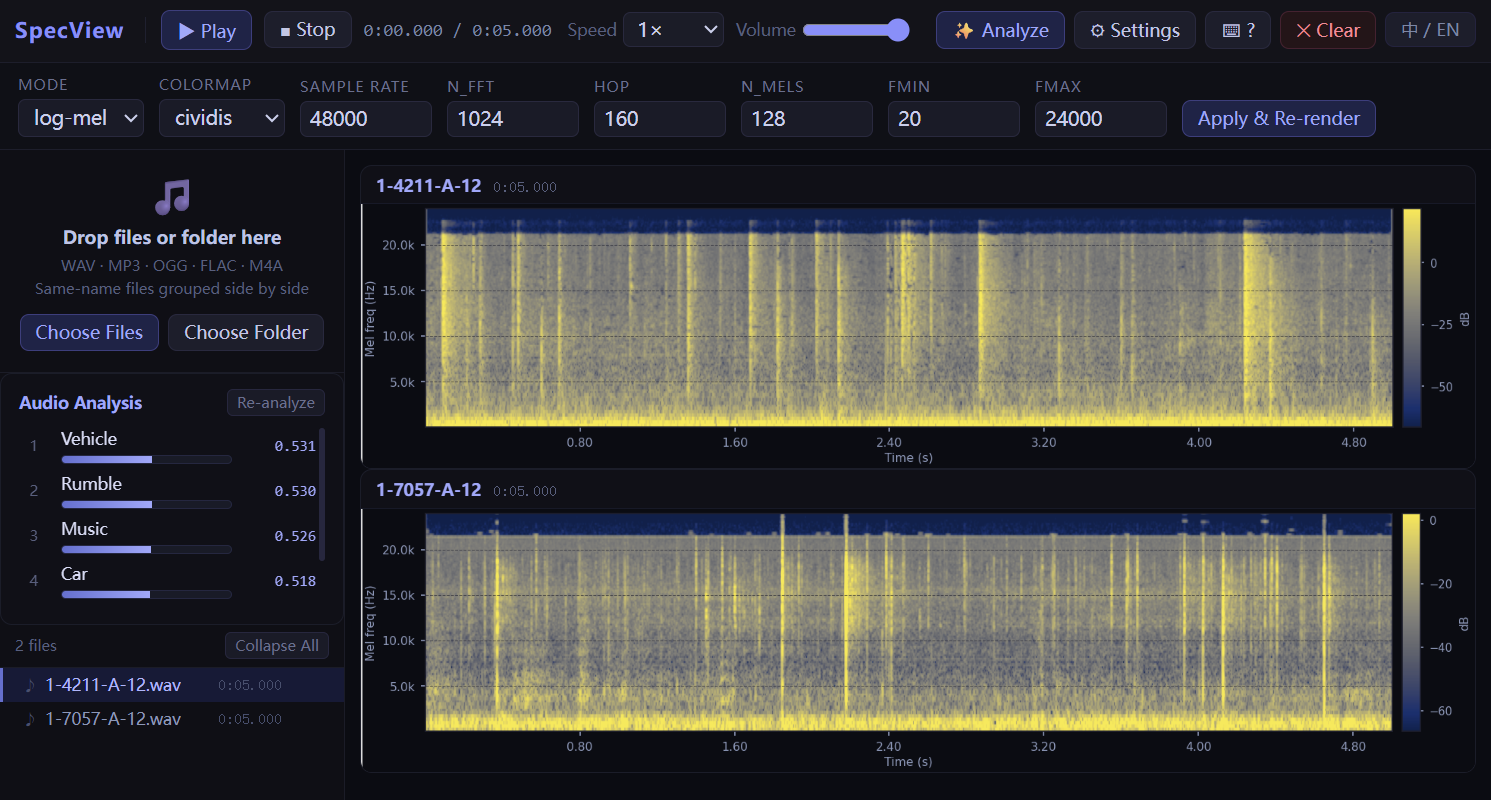
Most audio tools want to ingest your whole dataset upfront. This one doesn't. Files stay on your disk; the app only reads what you're looking at right now. That makes it fast to start, easy on memory, and well-suited for the kind of open-ended, exploratory inspection that doesn't fit neatly into a pipeline.
🗂️ Lazy local workflow Files are referenced, not uploaded. Only the currently viewed file is ever read or rendered.
📊 On-demand spectrogram rendering Click a file, get a spectrogram — no batch pre-rendering. Fully adjustable parameters:
log-mel, log-spec, mel, specsample_rate, n_fft, hop_length, n_mels, fmin, fmaxmagma, inferno, viridis, plasma, cividis📁 Built for large collections Folder tree navigation and automatic grouping of same-name files with different extensions keep things manageable even when you have thousands of files.
🏷️ Audio tagging with CED-Tiny
Click Analyze (or press Enter) on any file to run lightweight audio classification and get Top-K labels with confidence scores. Nothing runs in the background unless you ask for it.
🌐 English / Chinese UI
Switch between English and Chinese at any time with the 中 / EN toggle in the toolbar — preference is saved across sessions.
⌨️ Keyboard-first navigation
Every common action has a shortcut. Press ? anytime to see the full list.
git clone https://github.com/Abusir/SpecViewLocal.git
cd SpecViewLocal
conda create -n specview python=3.10 -y
conda activate specview
python -m pip install --upgrade pip
python -m pip install -r requirements.txt
If you run into ONNX issues with the analysis feature:
python -m pip install -U "optimum-onnx[onnxruntime]"
python app.py --host 127.0.0.1 --port 8000
Open http://127.0.0.1:8000 and you're in.
Drag files or a folder into the left panel, or use the file/folder picker. The app keeps local references only — no full-folder upload.
Click any file in the tree to load it. Keyboard shortcuts:
| Key | Action |
|---|---|
Space | Play / Pause |
Shift + Space | Play from start |
← / → | Previous / Next file |
Esc | Stop |
Enter | Analyze current file |
? | Toggle shortcuts panel |
Click a file to render its spectrogram. Open the Settings panel to adjust rendering parameters. Click anywhere on the spectrogram to jump to that playback position.
Click Analyze on the current file to run CED-Tiny and see Top-K audio tags. The first run may download the model from Hugging Face — subsequent runs are fast.
.
├── app.py
├── requirements.txt
├── templates/
│   └── index.html
└── static/
    ├── app.js
    └── styles.css
The interaction design and spectrogram browser concept are heavily inspired by SpecView by RicherMans. If you like this tool, go star the original.
Audio analysis is powered by CED-Tiny, a compact audio tagging model from the CED family. Impressively capable for its size.
MIT — do whatever you want with it, just keep the attribution.
Browse. Inspect. Tag. All without leaving your machine.
I built this because I kept running into the same problem: a large folder of audio files, a need to spot-check a handful of them, and absolutely no desire to upload 40GB to a web service just to look at three spectrograms.
SpecView Local is a lightweight, local-first audio browser. Drag in files or folders, navigate a tree view, render spectrograms only for what you're actively viewing, and optionally run CED-Tiny audio tagging on the current file — on demand, not in bulk.
Having written my own audio visualization tools before, I took what I liked from SpecView's interaction design and rebuilt it with my own UI framework and color scheme.
Most audio tools want to ingest your whole dataset upfront. This one doesn't. Files stay on your disk; the app only reads what you're looking at right now. That makes it fast to start, easy on memory, and well-suited for the kind of open-ended, exploratory inspection that doesn't fit neatly into a pipeline.
🗂️ Lazy local workflow Files are referenced, not uploaded. Only the currently viewed file is ever read or rendered.
📊 On-demand spectrogram rendering Click a file, get a spectrogram — no batch pre-rendering. Fully adjustable parameters:
log-mel, log-spec, mel, specsample_rate, n_fft, hop_length, n_mels, fmin, fmaxmagma, inferno, viridis, plasma, cividis📁 Built for large collections Folder tree navigation and automatic grouping of same-name files with different extensions keep things manageable even when you have thousands of files.
🏷️ Audio tagging with CED-Tiny
Click Analyze (or press Enter) on any file to run lightweight audio classification and get Top-K labels with confidence scores. Nothing runs in the background unless you ask for it.
🌐 English / Chinese UI
Switch between English and Chinese at any time with the 中 / EN toggle in the toolbar — preference is saved across sessions.
⌨️ Keyboard-first navigation
Every common action has a shortcut. Press ? anytime to see the full list.
git clone https://github.com/Abusir/SpecViewLocal.git
cd SpecViewLocal
conda create -n specview python=3.10 -y
conda activate specview
python -m pip install --upgrade pip
python -m pip install -r requirements.txt
If you run into ONNX issues with the analysis feature:
python -m pip install -U "optimum-onnx[onnxruntime]"
python app.py --host 127.0.0.1 --port 8000
Open http://127.0.0.1:8000 and you're in.
Drag files or a folder into the left panel, or use the file/folder picker. The app keeps local references only — no full-folder upload.
Click any file in the tree to load it. Keyboard shortcuts:
| Key | Action |
|---|---|
Space | Play / Pause |
Shift + Space | Play from start |
← / → | Previous / Next file |
Esc | Stop |
Enter | Analyze current file |
? | Toggle shortcuts panel |
Click a file to render its spectrogram. Open the Settings panel to adjust rendering parameters. Click anywhere on the spectrogram to jump to that playback position.
Click Analyze on the current file to run CED-Tiny and see Top-K audio tags. The first run may download the model from Hugging Face — subsequent runs are fast.
.
├── app.py
├── requirements.txt
├── templates/
│   └── index.html
└── static/
    ├── app.js
    └── styles.css
The interaction design and spectrogram browser concept are heavily inspired by SpecView by RicherMans. If you like this tool, go star the original.
Audio analysis is powered by CED-Tiny, a compact audio tagging model from the CED family. Impressively capable for its size.
MIT — do whatever you want with it, just keep the attribution.



