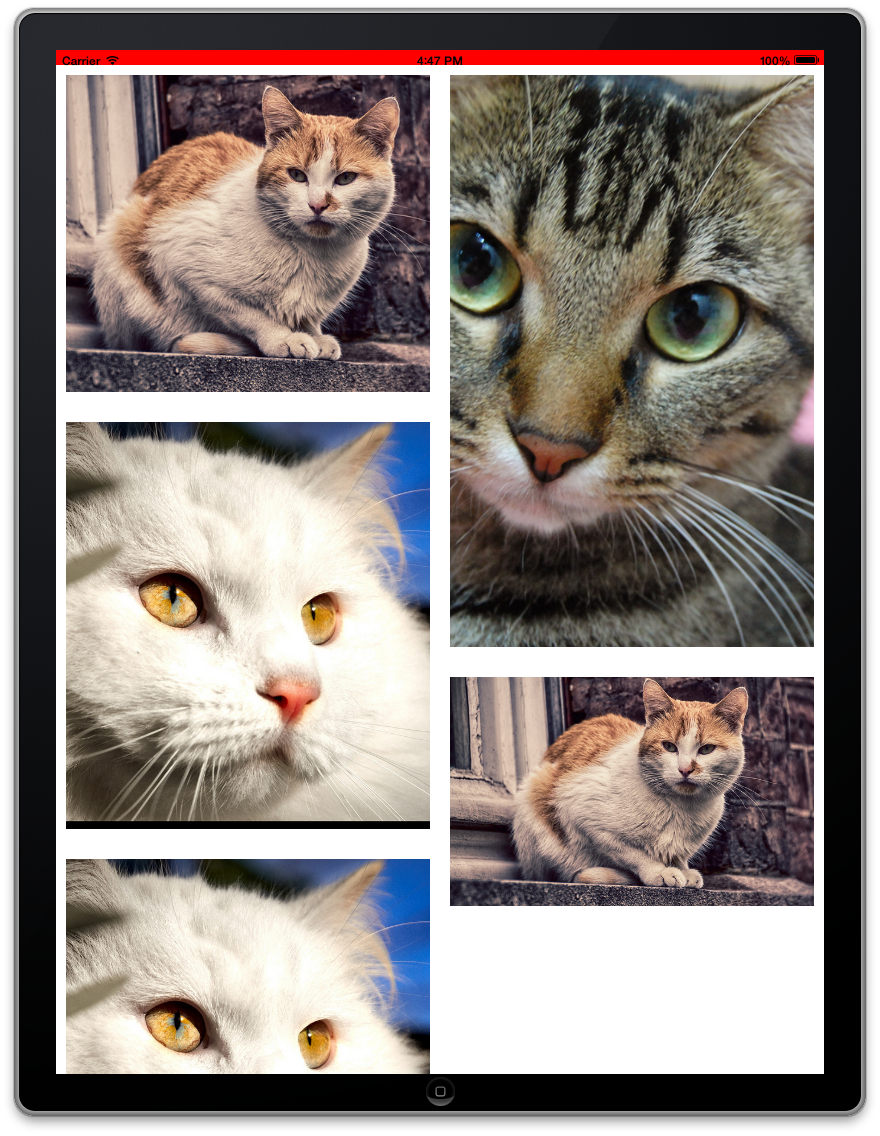
The waterfall (i.e., Pinterest-like) layout for UICollectionView.
Objective-C
4,605
260 commits
updated Mar 18, 2026




CHTCollectionViewWaterfallLayout is a subclass of UICollectionViewLayout, and it tries to imitate UICollectionViewFlowLayout's usage as much as possible.
This layout is inspired by Pinterest.

Add it to the dependencies value of your Package.swift:
dependencies: [
  .package(url: "https://github.com/chiahsien/CHTCollectionViewWaterfallLayout.git", from: "1.0.0")
]
Two library products are available:
CHTCollectionViewWaterfallLayout — Swift implementationCHTCollectionViewWaterfallLayoutObjC — Objective-C implementationNote: CocoaPods trunk will become read-only on December 2, 2026 and no new versions will be published after that date. We recommend migrating to Swift Package Manager.
Add the following to your Podfile:
pod 'CHTCollectionViewWaterfallLayout'           # Swift (default)
pod 'CHTCollectionViewWaterfallLayout/ObjC'      # Objective-C
Copy CHTCollectionViewWaterfallLayout.swift (Swift) or CHTCollectionViewWaterfallLayout.h/.m (Objective-C) to your project.
v1.0.0 includes a full rewrite of the Swift implementation. The Objective-C implementation is unchanged. If you are using the Swift version, please review the following breaking changes.
The minimum deployment target is now iOS 13 / tvOS 13 (was iOS 9 / tvOS 9). Projects targeting earlier versions cannot adopt this release.
swift-tools-version is now 5.9 (was 5.0). Xcode 15+ is required to resolve this package via SPM.
Headers and footers are now created with custom element kind strings (CHTCollectionElementKindSectionHeader / CHTCollectionElementKindSectionFooter) to match the Objective-C implementation. In 0.9.x these constants were marked @available(*, unavailable) and redirected to UICollectionView.elementKindSectionHeader/Footer.
If you register supplementary views, update the element kind:
// Before (0.9.x)
collectionView.register(HeaderView.self,
                        forSupplementaryViewOfKind: UICollectionView.elementKindSectionHeader,
                        withReuseIdentifier: "Header")

// After (1.0.0)
collectionView.register(HeaderView.self,
                        forSupplementaryViewOfKind: CHTCollectionElementKindSectionHeader,
                        withReuseIdentifier: "Header")
layoutAttributesForSupplementaryView(ofKind:at:)accepts both variants, so layout queries work either way. ButlayoutAttributesForElements(in:)returns attributes with theCHT-prefixed kind, so any code filtering byrepresentedElementKindmust match accordingly.
layoutAttributesForSupplementaryView(ofKind:at:) now returns UICollectionViewLayoutAttributes? (optional) instead of a non-optional value. It returns nil for unknown element kinds instead of an empty attributes object.
delegate PropertyThe delegate computed property is now private. Access the delegate through collectionView.delegate instead.
The following @available(*, unavailable, renamed:) declarations from 0.9.x have been removed. If your code still references the old names, rename them:
| Removed | Replacement |
|---|---|
sizeForItemAtIndexPath: | sizeForItemAt: |
heightForHeaderInSection: | heightForHeaderIn: |
heightForFooterInSection: | heightForFooterIn: |
insetForSectionAtIndex: | insetsFor: |
minimumInteritemSpacingForSectionAtIndex: | minimumInteritemSpacingFor: |
columnCountForSection: | columnCountFor: |
CHTCollectionViewWaterfallLayoutItemRenderDirection | CHTCollectionViewWaterfallLayout.ItemRenderDirection |
The following are additive (non-breaking) but worth noting:
headerInset, footerInset, minimumContentHeightinsetsForHeaderIn:, insetsForFooterIn:, minimumColumnSpacingFor:All have sensible defaults and do not require adoption.
Both Swift and Objective-C demo projects are included in the Demo/ directory. Read the demo code and the source headers for more information.
Below are the properties available for customizing the layout. Although they have default values, it is strongly recommended to set at least columnCount to suit your needs.
The itemRenderDirection property controls the order in which items are rendered in subsequent rows: left-to-right, right-to-left, or shortest column first.
let layout = CHTCollectionViewWaterfallLayout()
layout.columnCount = 2
layout.minimumColumnSpacing = 10
layout.minimumInteritemSpacing = 10
layout.headerHeight = 0
layout.footerHeight = 0
layout.headerInset = .zero
layout.footerInset = .zero
layout.sectionInset = UIEdgeInsets(top: 10, left: 10, bottom: 10, right: 10)
layout.itemRenderDirection = .shortestFirst
layout.minimumContentHeight = 0
CHTCollectionViewWaterfallLayout *layout = [[CHTCollectionViewWaterfallLayout alloc] init];
layout.columnCount = 2;
layout.minimumColumnSpacing = 10;
layout.minimumInteritemSpacing = 10;
layout.headerHeight = 0;
layout.footerHeight = 0;
layout.headerInset = UIEdgeInsetsZero;
layout.footerInset = UIEdgeInsetsZero;
layout.sectionInset = UIEdgeInsetsMake(10, 10, 10, 10);
layout.itemRenderDirection = CHTCollectionViewWaterfallLayoutItemRenderDirectionShortestFirst;
layout.minimumContentHeight = 0;
Your collection view's delegate (typically your view controller) must conform to CHTCollectionViewDelegateWaterfallLayout and implement the required method. Return the original size of each item:
func collectionView(_ collectionView: UICollectionView,
                    layout collectionViewLayout: UICollectionViewLayout,
                    sizeForItemAt indexPath: IndexPath) -> CGSize {
  return CGSize(width: imageWidth, height: imageHeight)
}
- (CGSize)collectionView:(UICollectionView *)collectionView
                  layout:(UICollectionViewLayout *)collectionViewLayout
  sizeForItemAtIndexPath:(NSIndexPath *)indexPath {
  return CGSizeMake(imageWidth, imageHeight);
}
Please let me know if your app is using this library. I'm glad to put your app on the list :-)
CHTCollectionViewWaterfallLayout is available under the MIT license. See the LICENSE file for more info.
Refer to the Releases page.
2,020 followers · starred Nov 2012
256 followers · starred Jan 2014
211 followers · starred Jun 2014
250 followers · starred Feb 2013
The waterfall (i.e., Pinterest-like) layout for UICollectionView.
Objective-C
4,605
260 commits
updated Mar 18, 2026
CHTCollectionViewWaterfallLayout is a subclass of UICollectionViewLayout, and it tries to imitate UICollectionViewFlowLayout's usage as much as possible.
This layout is inspired by Pinterest.
Add it to the dependencies value of your Package.swift:
dependencies: [
  .package(url: "https://github.com/chiahsien/CHTCollectionViewWaterfallLayout.git", from: "1.0.0")
]
Two library products are available:
CHTCollectionViewWaterfallLayout — Swift implementationCHTCollectionViewWaterfallLayoutObjC — Objective-C implementationNote: CocoaPods trunk will become read-only on December 2, 2026 and no new versions will be published after that date. We recommend migrating to Swift Package Manager.
Add the following to your Podfile:
pod 'CHTCollectionViewWaterfallLayout'           # Swift (default)
pod 'CHTCollectionViewWaterfallLayout/ObjC'      # Objective-C
Copy CHTCollectionViewWaterfallLayout.swift (Swift) or CHTCollectionViewWaterfallLayout.h/.m (Objective-C) to your project.
v1.0.0 includes a full rewrite of the Swift implementation. The Objective-C implementation is unchanged. If you are using the Swift version, please review the following breaking changes.
The minimum deployment target is now iOS 13 / tvOS 13 (was iOS 9 / tvOS 9). Projects targeting earlier versions cannot adopt this release.
swift-tools-version is now 5.9 (was 5.0). Xcode 15+ is required to resolve this package via SPM.
Headers and footers are now created with custom element kind strings (CHTCollectionElementKindSectionHeader / CHTCollectionElementKindSectionFooter) to match the Objective-C implementation. In 0.9.x these constants were marked @available(*, unavailable) and redirected to UICollectionView.elementKindSectionHeader/Footer.
If you register supplementary views, update the element kind:
// Before (0.9.x)
collectionView.register(HeaderView.self,
                        forSupplementaryViewOfKind: UICollectionView.elementKindSectionHeader,
                        withReuseIdentifier: "Header")

// After (1.0.0)
collectionView.register(HeaderView.self,
                        forSupplementaryViewOfKind: CHTCollectionElementKindSectionHeader,
                        withReuseIdentifier: "Header")
layoutAttributesForSupplementaryView(ofKind:at:)accepts both variants, so layout queries work either way. ButlayoutAttributesForElements(in:)returns attributes with theCHT-prefixed kind, so any code filtering byrepresentedElementKindmust match accordingly.
layoutAttributesForSupplementaryView(ofKind:at:) now returns UICollectionViewLayoutAttributes? (optional) instead of a non-optional value. It returns nil for unknown element kinds instead of an empty attributes object.
delegate PropertyThe delegate computed property is now private. Access the delegate through collectionView.delegate instead.
The following @available(*, unavailable, renamed:) declarations from 0.9.x have been removed. If your code still references the old names, rename them:
| Removed | Replacement |
|---|---|
sizeForItemAtIndexPath: | sizeForItemAt: |
heightForHeaderInSection: | heightForHeaderIn: |
heightForFooterInSection: | heightForFooterIn: |
insetForSectionAtIndex: | insetsFor: |
minimumInteritemSpacingForSectionAtIndex: | minimumInteritemSpacingFor: |
columnCountForSection: | columnCountFor: |
CHTCollectionViewWaterfallLayoutItemRenderDirection | CHTCollectionViewWaterfallLayout.ItemRenderDirection |
The following are additive (non-breaking) but worth noting:
headerInset, footerInset, minimumContentHeightinsetsForHeaderIn:, insetsForFooterIn:, minimumColumnSpacingFor:All have sensible defaults and do not require adoption.
Both Swift and Objective-C demo projects are included in the Demo/ directory. Read the demo code and the source headers for more information.
Below are the properties available for customizing the layout. Although they have default values, it is strongly recommended to set at least columnCount to suit your needs.
The itemRenderDirection property controls the order in which items are rendered in subsequent rows: left-to-right, right-to-left, or shortest column first.
let layout = CHTCollectionViewWaterfallLayout()
layout.columnCount = 2
layout.minimumColumnSpacing = 10
layout.minimumInteritemSpacing = 10
layout.headerHeight = 0
layout.footerHeight = 0
layout.headerInset = .zero
layout.footerInset = .zero
layout.sectionInset = UIEdgeInsets(top: 10, left: 10, bottom: 10, right: 10)
layout.itemRenderDirection = .shortestFirst
layout.minimumContentHeight = 0
CHTCollectionViewWaterfallLayout *layout = [[CHTCollectionViewWaterfallLayout alloc] init];
layout.columnCount = 2;
layout.minimumColumnSpacing = 10;
layout.minimumInteritemSpacing = 10;
layout.headerHeight = 0;
layout.footerHeight = 0;
layout.headerInset = UIEdgeInsetsZero;
layout.footerInset = UIEdgeInsetsZero;
layout.sectionInset = UIEdgeInsetsMake(10, 10, 10, 10);
layout.itemRenderDirection = CHTCollectionViewWaterfallLayoutItemRenderDirectionShortestFirst;
layout.minimumContentHeight = 0;
Your collection view's delegate (typically your view controller) must conform to CHTCollectionViewDelegateWaterfallLayout and implement the required method. Return the original size of each item:
func collectionView(_ collectionView: UICollectionView,
                    layout collectionViewLayout: UICollectionViewLayout,
                    sizeForItemAt indexPath: IndexPath) -> CGSize {
  return CGSize(width: imageWidth, height: imageHeight)
}
- (CGSize)collectionView:(UICollectionView *)collectionView
                  layout:(UICollectionViewLayout *)collectionViewLayout
  sizeForItemAtIndexPath:(NSIndexPath *)indexPath {
  return CGSizeMake(imageWidth, imageHeight);
}
Please let me know if your app is using this library. I'm glad to put your app on the list :-)
CHTCollectionViewWaterfallLayout is available under the MIT license. See the LICENSE file for more info.
Refer to the Releases page.
2,020 followers · starred Nov 2012
256 followers · starred Jan 2014
211 followers · starred Jun 2014
250 followers · starred Feb 2013