Fold papers, web pages, files, and AI replies into five levels of detail. Zoom from an overview to the original text.
See the code
Fold any text, from a one-screen map to every word
Formerly PaperFold



English · 简体中文

Paste a link: any web page · arXiv · PubMed Central · bioRxiv · medRxiv · Wikipedia · GitHub
Drop a file: PDF · Word · PowerPoint · Excel · EPUB · HTML · CSV · pictures · Markdown · text
Try the demo → or install it ↓ · What's new ↓
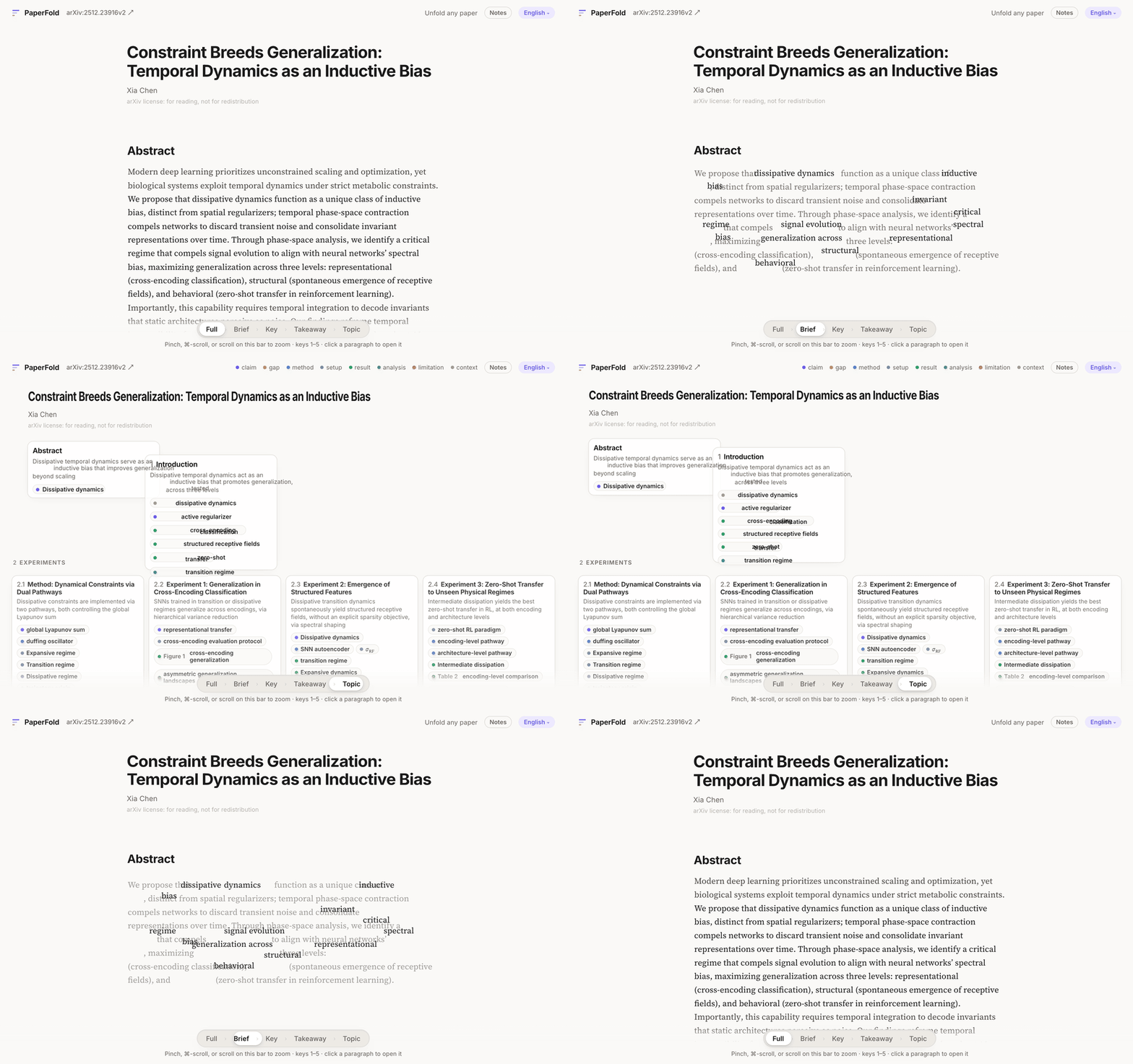
Choose the level of detail you need, and lower your cognitive load.
| Level | Each paragraph becomes | In whose words | |
|---|---|---|---|
| 1 | Full | the paragraph as written | the author's |
| 2 | Brief | its one to three key sentences, verbatim | the author's |
| 3 | Key | its point and the reason for it | AI, resting on the Brief sentences |
| 4 | Takeaway | one line on the spine of its section | AI |
| 5 | Topic | a few words; the text becomes a map of section cards | AI |
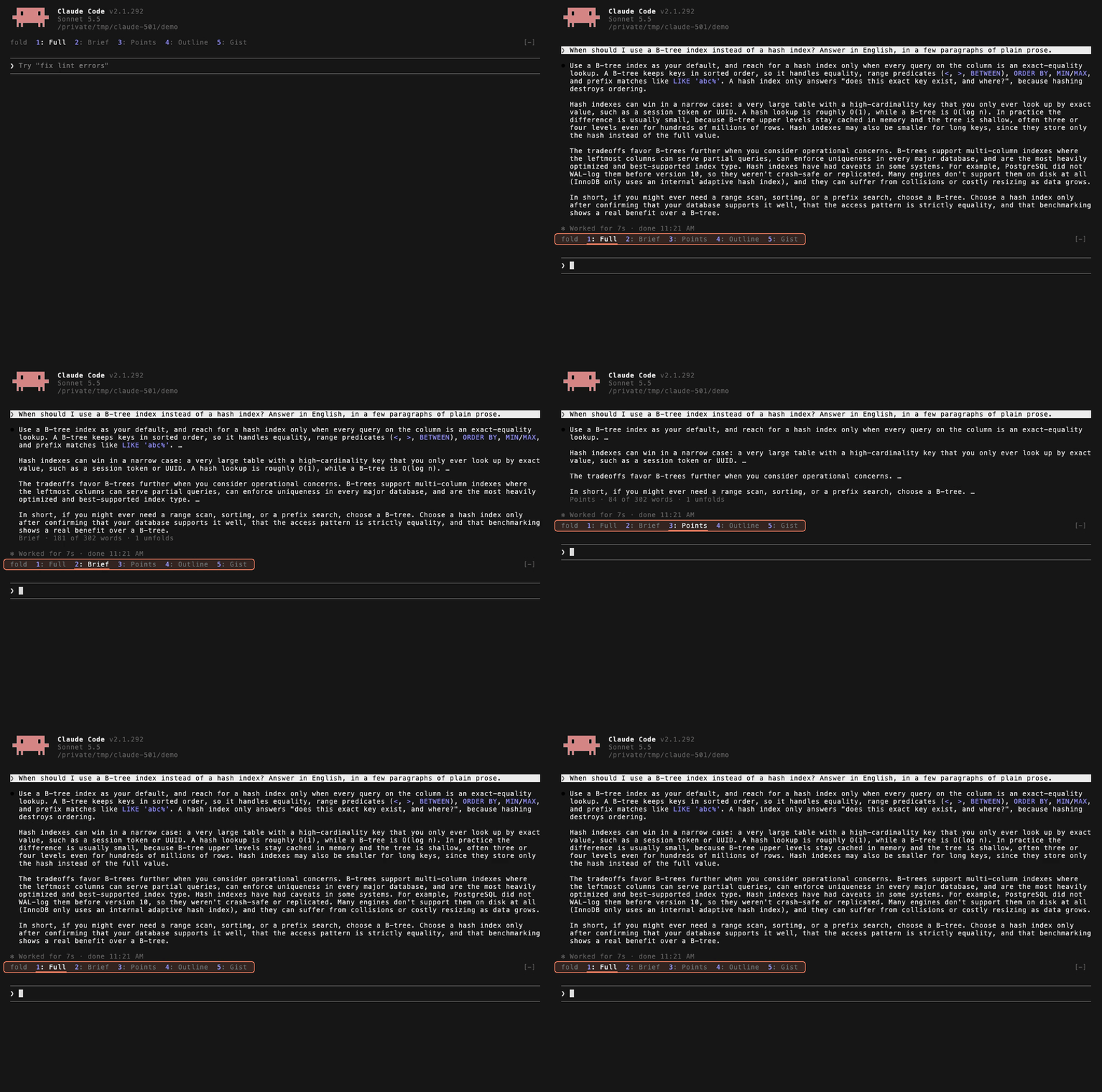
Your agent writes more than you have time to read. A Claude Code mod folds every reply the same way, one key per level. More ↓
python3 -m textfold get hands your agent or script a document one level at a time, and an open format lets any program read and write folded text. For agents ↓Words that travel. As you zoom, every word that stays slides to its new place and the rest fade around it.
Zoom under your fingers. Stop halfway, turn back, or open one paragraph alone.
Beside the original. Open a paper's or a PDF's own pages next to the text, each paragraph shown where it stands on its page.
Ask AI about exactly what you read. Select a passage, or ask about the whole text. The answer comes structured: the short answer first, then the evidence, each point citing the paragraph it rests on, one click away.
Notes that zoom with the text. Highlight and write in the margin; what you marked stays as you zoom out, and is saved with the page.
Your language. Twelve languages, translated sentence by sentence, with every formula as typeset.
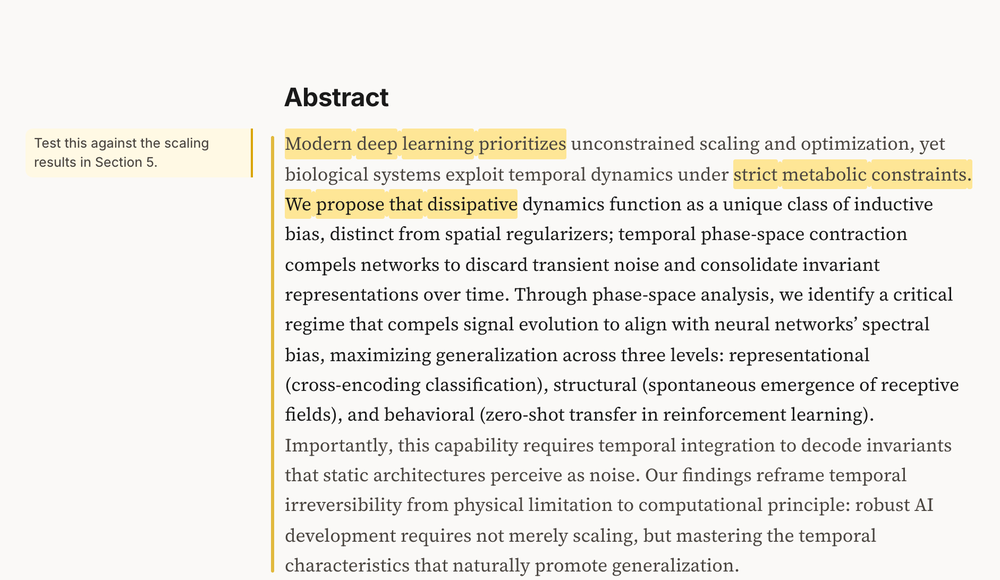 | 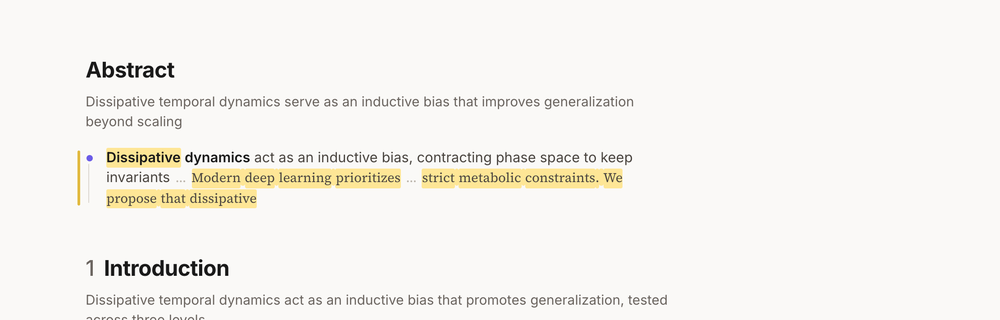 |
| Highlight and write in the margin… | …and keep what you marked as you zoom out. |
Click Zotero library, under the drop zone, and your library is there as Zotero shows it: your collections, your group libraries, a search. Read opens any item.
To turn it on, in Zotero 7: Settings › Advanced › Allow other applications on this computer to communicate with Zotero.
python3 -m pip install textfold
python3 -m textfold serve
Open http://localhost:3017. The first time, connect a model; then paste a link or drop a file, and pick a language. You need Python 3.9 or newer (the one macOS ships with works).
| Paste or drop | What TextFold reads |
|---|---|
| A paper's link or DOI: arXiv, PubMed Central, bioRxiv, medRxiv | its text as the site structures it (an arXiv paper needs its HTML version, as most since late 2023 have; another DOI needs an open full text in Europe PMC) |
| Any other web page | its article, without the menus, the adverts, or the text it hides from its readers |
| A Wikipedia article, a GitHub repository | the article; the README, with its pictures |
| A PDF | the paper online when the PDF names one, with your file beside it; any other PDF, converted on your computer by the PDF engine (MinerU, about 3.4 GB, installed once from the landing) |
| A Word, PowerPoint or Excel file, a CSV, an EPUB, a saved web page | the document with its headings, tables, pictures and formulas: read by TextFold itself, or more completely by the PDF engine once it is installed |
| A picture | its text, read by the PDF engine |
| An item of your Zotero library | its arXiv paper, else its PDF or other file, else its DOI. Works on your Zotero ↑ |
| A Markdown or text file | the file as written |
What you read is kept in your system's folder for app data, shared with the desktop app.
git clone https://github.com/chenxiachan/textfold.git
cd textfold
python3 -m pip install -r requirements.txt
python3 -m textfold serve
What you read is then kept in the clone.
TextFold uses a model you already have, and there is no account to create. It looks for one when it starts; if it finds none, the first page offers the ways in.
| You have | What to do |
|---|---|
| Claude Code, Codex or Pi | Nothing. TextFold finds it and uses it. |
| A ChatGPT plan | Click Use my ChatGPT plan. A small bridge starts on your computer and signs in with your account (needs Node.js). |
| Nothing yet | Click OpenRouter in one click. Authorize once, and free models are ready. |
| An API key | Settings › Add provider: Anthropic, OpenAI, DeepSeek, Qwen, Zhipu GLM, Kimi, MiniMax, Google, Ollama, or any OpenAI-compatible endpoint. |
| Do | To |
|---|---|
| Pinch, or ⌘ / Ctrl + scroll | zoom around the pointer |
1 to 5 | jump to a level |
| Click a paragraph | open just that paragraph |
| Click a figure | see it enlarged |
| Original, at the top | read beside the paper's PDF |
| Save, at the top | keep the page as one file, or only your notes |
| Select text | highlight, write a note, or ask |
| Ask the paper, bottom right | ask about the whole text |
L | next language |
python3 -m textfold get gives a document one level at a time, coarsest first, so an agent reads the map before it spends its context on the whole text:
python3 -m textfold get https://arxiv.org/abs/2201.11903        # the map: every section's topic
python3 -m textfold get 2201.11903 --level key --section 3      # one section: its points, each with its reason
python3 -m textfold get report.pdf --json                       # the whole document, in the TextFold format
A document not folded yet is folded first, with the model you connected. Every line a model wrote is marked as such and anchored to the author's sentences it rests on: docs/format.md describes the format, for any program that reads or writes folded text.
Save, at the top of the reader, keeps a page as one HTML file that opens anywhere without a server: its levels, the notes you choose and, if you like, its original PDF to read beside it. It can also keep only your notes, as a page, a PDF, Markdown for Obsidian or JSON. From the command line, the page without your notes:
python3 -m textfold export 2201.11903
TextFold is a tool, and its license covers its code. When you share a file, follow the terms of the original text, shown under its title.
TextFold puts the five levels on every reply in Claude Code. Press 5 for the answer in one sentence, 3 for the point of every paragraph, 1 for every word. Nothing is paraphrased, so at every level you read exactly what Claude said.
It needs Claude Code 2.1.287 or later, in the terminal or in the Code tab of the Desktop app.
claude plugin marketplace add chenxiachan/textfold
claude plugin install textfold@textfold
| Key | Level | What you get |
|---|---|---|
| 1 | Full | every word Claude wrote |
| 2 | Brief | each point, with the reason behind it |
| 3 | Points | just the points, at a glance |
| 4 | Outline | the map of a long reply: its sections, and what each one says |
| 5 | Gist | the answer, in one sentence |
Type the digit while the prompt is empty, or pick a level in the row above the prompt. Short replies stay whole: one under about 80 words, or one a fold would barely shorten, always shows as written.
Start folded. A session starts at Full. To start at another level, run /config and set Starting level; in the session, the row above the prompt and the keys 1 to 5 still change it.
Why you can trust a fold. TextFold asks Claude to lead with the point: the answer first in every reply, the key sentence first in every paragraph. A fold keeps what Claude put first. There is no second model and no summary, so a fold costs nothing and takes no time.
More in plugins/textfold.
python3 -m textfold get <link> --level topic prints a document's map, and --section unfolds the part that matters. More ↓

Contributions are welcome: start with CONTRIBUTING.md.
If TextFold helps you read, ⭐ star it so others can find it.
Built on trafilatura, which finds the article on a web page, MinerU, which converts PDFs, and mammoth, which reads Word files; PDFs are shown with PDF.js and formulas with KaTeX. Thanks to their authors.
Apache 2.0 © 2026 Xia Chen · Development · Format · Contributing · Security · Feedback
Fold papers, web pages, files, and AI replies into five levels of detail. Zoom from an overview to the original text.
See the code
Fold any text, from a one-screen map to every word
Formerly PaperFold
English · 简体中文
Paste a link: any web page · arXiv · PubMed Central · bioRxiv · medRxiv · Wikipedia · GitHub
Drop a file: PDF · Word · PowerPoint · Excel · EPUB · HTML · CSV · pictures · Markdown · text
Try the demo → or install it ↓ · What's new ↓
Choose the level of detail you need, and lower your cognitive load.
| Level | Each paragraph becomes | In whose words | |
|---|---|---|---|
| 1 | Full | the paragraph as written | the author's |
| 2 | Brief | its one to three key sentences, verbatim | the author's |
| 3 | Key | its point and the reason for it | AI, resting on the Brief sentences |
| 4 | Takeaway | one line on the spine of its section | AI |
| 5 | Topic | a few words; the text becomes a map of section cards | AI |
Your agent writes more than you have time to read. A Claude Code mod folds every reply the same way, one key per level. More ↓
python3 -m textfold get hands your agent or script a document one level at a time, and an open format lets any program read and write folded text. For agents ↓Words that travel. As you zoom, every word that stays slides to its new place and the rest fade around it.
Zoom under your fingers. Stop halfway, turn back, or open one paragraph alone.
Beside the original. Open a paper's or a PDF's own pages next to the text, each paragraph shown where it stands on its page.
Ask AI about exactly what you read. Select a passage, or ask about the whole text. The answer comes structured: the short answer first, then the evidence, each point citing the paragraph it rests on, one click away.
Notes that zoom with the text. Highlight and write in the margin; what you marked stays as you zoom out, and is saved with the page.
Your language. Twelve languages, translated sentence by sentence, with every formula as typeset.
| |
| Highlight and write in the margin… | …and keep what you marked as you zoom out. |
Click Zotero library, under the drop zone, and your library is there as Zotero shows it: your collections, your group libraries, a search. Read opens any item.
To turn it on, in Zotero 7: Settings › Advanced › Allow other applications on this computer to communicate with Zotero.
python3 -m pip install textfold
python3 -m textfold serve
Open http://localhost:3017. The first time, connect a model; then paste a link or drop a file, and pick a language. You need Python 3.9 or newer (the one macOS ships with works).
| Paste or drop | What TextFold reads |
|---|---|
| A paper's link or DOI: arXiv, PubMed Central, bioRxiv, medRxiv | its text as the site structures it (an arXiv paper needs its HTML version, as most since late 2023 have; another DOI needs an open full text in Europe PMC) |
| Any other web page | its article, without the menus, the adverts, or the text it hides from its readers |
| A Wikipedia article, a GitHub repository | the article; the README, with its pictures |
| A PDF | the paper online when the PDF names one, with your file beside it; any other PDF, converted on your computer by the PDF engine (MinerU, about 3.4 GB, installed once from the landing) |
| A Word, PowerPoint or Excel file, a CSV, an EPUB, a saved web page | the document with its headings, tables, pictures and formulas: read by TextFold itself, or more completely by the PDF engine once it is installed |
| A picture | its text, read by the PDF engine |
| An item of your Zotero library | its arXiv paper, else its PDF or other file, else its DOI. Works on your Zotero ↑ |
| A Markdown or text file | the file as written |
What you read is kept in your system's folder for app data, shared with the desktop app.
git clone https://github.com/chenxiachan/textfold.git
cd textfold
python3 -m pip install -r requirements.txt
python3 -m textfold serve
What you read is then kept in the clone.
TextFold uses a model you already have, and there is no account to create. It looks for one when it starts; if it finds none, the first page offers the ways in.
| You have | What to do |
|---|---|
| Claude Code, Codex or Pi | Nothing. TextFold finds it and uses it. |
| A ChatGPT plan | Click Use my ChatGPT plan. A small bridge starts on your computer and signs in with your account (needs Node.js). |
| Nothing yet | Click OpenRouter in one click. Authorize once, and free models are ready. |
| An API key | Settings › Add provider: Anthropic, OpenAI, DeepSeek, Qwen, Zhipu GLM, Kimi, MiniMax, Google, Ollama, or any OpenAI-compatible endpoint. |
| Do | To |
|---|---|
| Pinch, or ⌘ / Ctrl + scroll | zoom around the pointer |
1 to 5 | jump to a level |
| Click a paragraph | open just that paragraph |
| Click a figure | see it enlarged |
| Original, at the top | read beside the paper's PDF |
| Save, at the top | keep the page as one file, or only your notes |
| Select text | highlight, write a note, or ask |
| Ask the paper, bottom right | ask about the whole text |
L | next language |
python3 -m textfold get gives a document one level at a time, coarsest first, so an agent reads the map before it spends its context on the whole text:
python3 -m textfold get https://arxiv.org/abs/2201.11903        # the map: every section's topic
python3 -m textfold get 2201.11903 --level key --section 3      # one section: its points, each with its reason
python3 -m textfold get report.pdf --json                       # the whole document, in the TextFold format
A document not folded yet is folded first, with the model you connected. Every line a model wrote is marked as such and anchored to the author's sentences it rests on: docs/format.md describes the format, for any program that reads or writes folded text.
Save, at the top of the reader, keeps a page as one HTML file that opens anywhere without a server: its levels, the notes you choose and, if you like, its original PDF to read beside it. It can also keep only your notes, as a page, a PDF, Markdown for Obsidian or JSON. From the command line, the page without your notes:
python3 -m textfold export 2201.11903
TextFold is a tool, and its license covers its code. When you share a file, follow the terms of the original text, shown under its title.
TextFold puts the five levels on every reply in Claude Code. Press 5 for the answer in one sentence, 3 for the point of every paragraph, 1 for every word. Nothing is paraphrased, so at every level you read exactly what Claude said.
It needs Claude Code 2.1.287 or later, in the terminal or in the Code tab of the Desktop app.
claude plugin marketplace add chenxiachan/textfold
claude plugin install textfold@textfold
| Key | Level | What you get |
|---|---|---|
| 1 | Full | every word Claude wrote |
| 2 | Brief | each point, with the reason behind it |
| 3 | Points | just the points, at a glance |
| 4 | Outline | the map of a long reply: its sections, and what each one says |
| 5 | Gist | the answer, in one sentence |
Type the digit while the prompt is empty, or pick a level in the row above the prompt. Short replies stay whole: one under about 80 words, or one a fold would barely shorten, always shows as written.
Start folded. A session starts at Full. To start at another level, run /config and set Starting level; in the session, the row above the prompt and the keys 1 to 5 still change it.
Why you can trust a fold. TextFold asks Claude to lead with the point: the answer first in every reply, the key sentence first in every paragraph. A fold keeps what Claude put first. There is no second model and no summary, so a fold costs nothing and takes no time.
More in plugins/textfold.
python3 -m textfold get <link> --level topic prints a document's map, and --section unfolds the part that matters. More ↓
Contributions are welcome: start with CONTRIBUTING.md.
If TextFold helps you read, ⭐ star it so others can find it.
Built on trafilatura, which finds the article on a web page, MinerU, which converts PDFs, and mammoth, which reads Word files; PDFs are shown with PDF.js and formulas with KaTeX. Thanks to their authors.
Apache 2.0 © 2026 Xia Chen · Development · Format · Contributing · Security · Feedback



