
Read research PDFs with local model explanations and visible source pages
JavaScript
0
2 commits
updated Oct 1, 2026
See what people are saying
README
Paper Margins
Read a research PDF and check each answer against the page text it used.
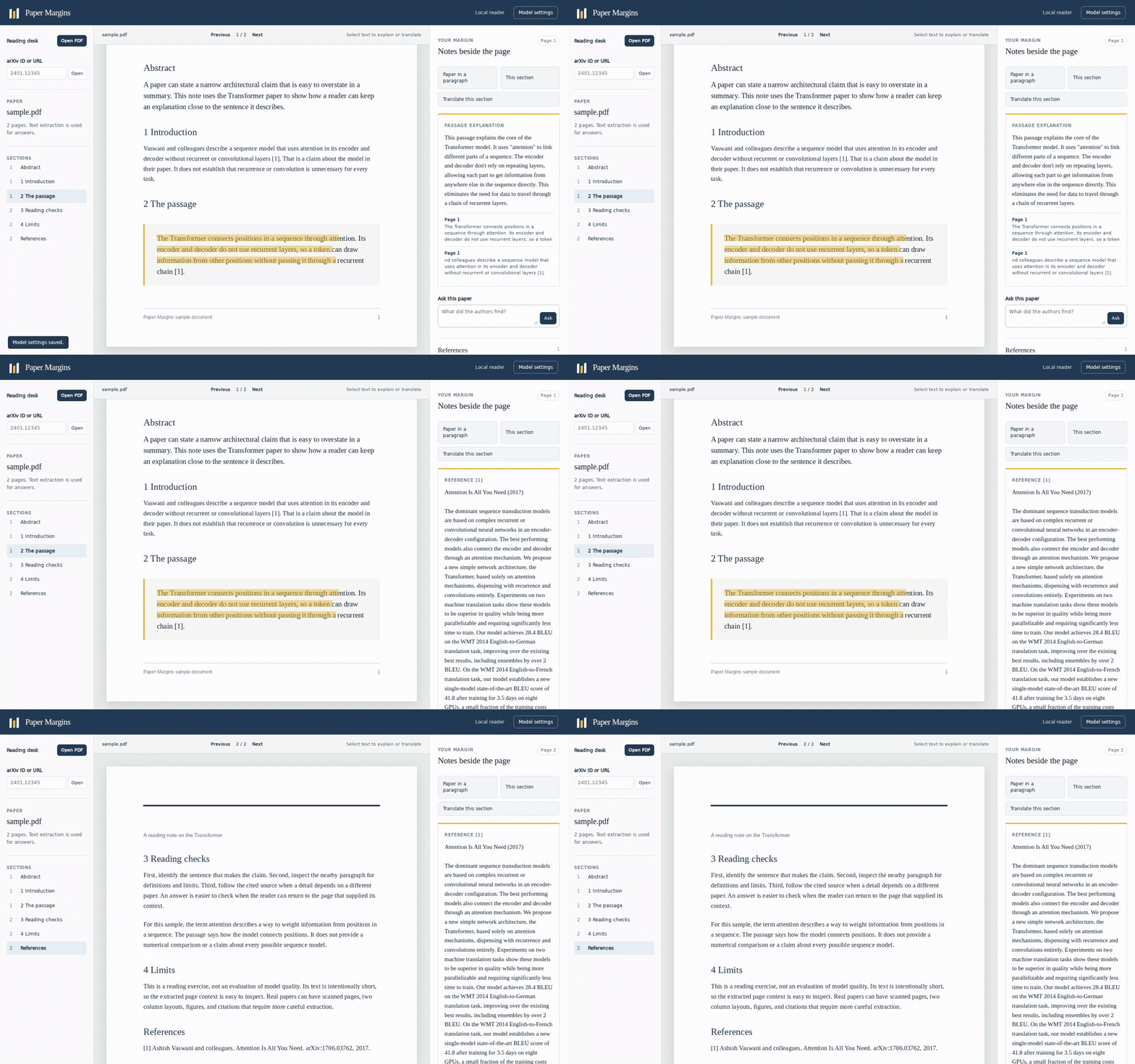
The demo uses the original sample PDF included in this repository.
From a checkout, install in one command with npm install -g . on Node.js 22.13 or newer. Start the local reader with paper-margins 1706.03762, then open http://127.0.0.1:4177.
npm install -g .
paper-margins 1706.03762
# Open http://127.0.0.1:4177
# Select PDF text and choose Explain or Translate.
# Ask a question and open the page excerpts beside its answer.
You can also run paper-margins ./paper.pdf, or start with paper-margins and use Open PDF or an arXiv ID in the reader. The PDF stays on your computer when you open a local file. arXiv downloads and citation lookups need a network connection.
What you can do
- Select text in the PDF and ask for a plain language explanation or a translation. You can also translate the extracted text from the current section. Traditional Chinese is the initial translation language; change it in Model settings.
- Summarize the current section or ask for a short paper summary. Section headings come from extracted PDF text and may be incomplete on unusual layouts.
- Ask a question about the paper. The reader shows the page excerpts sent to the model under its answer. Click an excerpt to return to that page.
- Zoom the PDF when its text is too small, including on a phone where the page can be panned horizontally.
- Click a numbered reference in the margin to request its title and abstract from arXiv when it contains an arXiv ID, or from Semantic Scholar for DOI and title lookups. A title search can return a possible match, so check it against the printed reference.
The default model address is Ollama on 127.0.0.1:11434, using llama3.2. Install Ollama and pull a model separately, or set the name of a model you already have. Model settings also accept a compatible chat endpoint with a base URL ending in /v1 and an optional API key. The key is held in this browser tab and is not written to local storage.
For example, after starting Ollama and pulling llama3.2:
ollama pull llama3.2
paper-margins 1706.03762
The server binds to 127.0.0.1. For explanations, summaries, translations, and chat, it sends selected page excerpts to the model address you configure. A remote model address sends those excerpts off your computer. A reference lookup sends that reference entry or its arXiv ID to the metadata service. It does not upload the complete PDF to either service.
Scope
The answer and its displayed page excerpts are separate: the excerpts show what the model received, but a model may still make a mistake. Scanned PDFs without an embedded text layer need OCR before these reading actions work. The reader accepts recent numeric arXiv IDs, PDFs up to 30 MB, and up to 180 pages. Section detection and numbered reference extraction depend on how the PDF stores its text. Section actions use up to five extracted pages, so long sections are partial. The reader shows one paper at a time and keeps it in memory until you close the process.
This project is a compact single paper reader. Paperview and Open Paper offer broader research workspaces; paper-qa2 is a document question answering backend. Paper Margins keeps the PDF, selected passage, and page excerpts together in one local view.
Development
Run npm ci, then npm test for the parser, citation lookup, and HTTP service tests. Run npm start for the local reader. The browser uses PDF.js, which is licensed under Apache 2.0. The project code is MIT licensed. See CONTRIBUTING.md for bug report and contribution guidance.
Similar repos


Languages
JavaScript
84.0%
HTML
16.0%
Read research PDFs with local model explanations and visible source pages
JavaScript
0
2 commits
updated Oct 1, 2026
See what people are saying
README
Paper Margins
Read a research PDF and check each answer against the page text it used.
The demo uses the original sample PDF included in this repository.
From a checkout, install in one command with npm install -g . on Node.js 22.13 or newer. Start the local reader with paper-margins 1706.03762, then open http://127.0.0.1:4177.
npm install -g .
paper-margins 1706.03762
# Open http://127.0.0.1:4177
# Select PDF text and choose Explain or Translate.
# Ask a question and open the page excerpts beside its answer.
You can also run paper-margins ./paper.pdf, or start with paper-margins and use Open PDF or an arXiv ID in the reader. The PDF stays on your computer when you open a local file. arXiv downloads and citation lookups need a network connection.
What you can do
- Select text in the PDF and ask for a plain language explanation or a translation. You can also translate the extracted text from the current section. Traditional Chinese is the initial translation language; change it in Model settings.
- Summarize the current section or ask for a short paper summary. Section headings come from extracted PDF text and may be incomplete on unusual layouts.
- Ask a question about the paper. The reader shows the page excerpts sent to the model under its answer. Click an excerpt to return to that page.
- Zoom the PDF when its text is too small, including on a phone where the page can be panned horizontally.
- Click a numbered reference in the margin to request its title and abstract from arXiv when it contains an arXiv ID, or from Semantic Scholar for DOI and title lookups. A title search can return a possible match, so check it against the printed reference.
The default model address is Ollama on 127.0.0.1:11434, using llama3.2. Install Ollama and pull a model separately, or set the name of a model you already have. Model settings also accept a compatible chat endpoint with a base URL ending in /v1 and an optional API key. The key is held in this browser tab and is not written to local storage.
For example, after starting Ollama and pulling llama3.2:
ollama pull llama3.2
paper-margins 1706.03762
The server binds to 127.0.0.1. For explanations, summaries, translations, and chat, it sends selected page excerpts to the model address you configure. A remote model address sends those excerpts off your computer. A reference lookup sends that reference entry or its arXiv ID to the metadata service. It does not upload the complete PDF to either service.
Scope
The answer and its displayed page excerpts are separate: the excerpts show what the model received, but a model may still make a mistake. Scanned PDFs without an embedded text layer need OCR before these reading actions work. The reader accepts recent numeric arXiv IDs, PDFs up to 30 MB, and up to 180 pages. Section detection and numbered reference extraction depend on how the PDF stores its text. Section actions use up to five extracted pages, so long sections are partial. The reader shows one paper at a time and keeps it in memory until you close the process.
This project is a compact single paper reader. Paperview and Open Paper offer broader research workspaces; paper-qa2 is a document question answering backend. Paper Margins keeps the PDF, selected passage, and page excerpts together in one local view.
Development
Run npm ci, then npm test for the parser, citation lookup, and HTTP service tests. Run npm start for the local reader. The browser uses PDF.js, which is licensed under Apache 2.0. The project code is MIT licensed. See CONTRIBUTING.md for bug report and contribution guidance.
Similar repos
Languages
JavaScript
84.0%
HTML
16.0%