Evaluate local and frontier LLMs on your own questions: accuracy, speed, tokens and PASS/FAIL verdicts, in the terminal.
Python
6
76 commits
updated Oct 19, 2026
Run the same eval packs against local models (llama.cpp GGUFs, LM Studio, Ollama, vLLM; tiny, dense or MoE) and against any frontier model on OpenRouter, side by side.
tuieval measures accuracy, speed and token use together, and gives a PASS / FAIL / INCONCLUSIVE verdict per use case. Grading is automatic; there's no LLM judge.
You know your workload better than anyone. tuieval ships with no built-in benchmark. Instead you build eval packs from what you actually do: questions with checkable answers, in your domain, with your rules Then you get an answer to the questions that matter:
pipx install tuieval          # or: uv tool install tuieval, or pip install tuieval   (Python 3.11+)
tuieval init my-evals          # guided: finds models already running (LM Studio, Ollama, vLLM…),
                               # adds a starter pack and runs a 3-question check
cd my-evals && tuieval         # open the TUI (? explains any screen)
Whatever runs your models, the first steps are short:
| You have | Do this |
|---|---|
| LM Studio, Ollama or vLLM | Start its server and load a model, then tuieval init my-evals: it finds the model. Later: tuieval add lists new ones. |
| GGUF files | Install llama.cpp (brew install llama.cpp, or a CUDA/ROCm build on Linux), then tuieval add ~/models/Some-Model-Q4_K_M.gguf. tuieval starts llama-server for it, sized to your Mac's memory or your Nvidia/AMD card's VRAM. |
| An OpenRouter key | export OPENROUTER_API_KEY=…, then tuieval run --tier smoke --only openrouter:<model id>. |
Stuck? tuieval doctor checks servers, models, packs and keys, and says what to fix.
pip install tuieval gets the latest release. Every change on main is also published as a dev build (X.Y.0.devN); get it with pipx install --pip-args=--pre tuieval or pip install --pre tuieval.
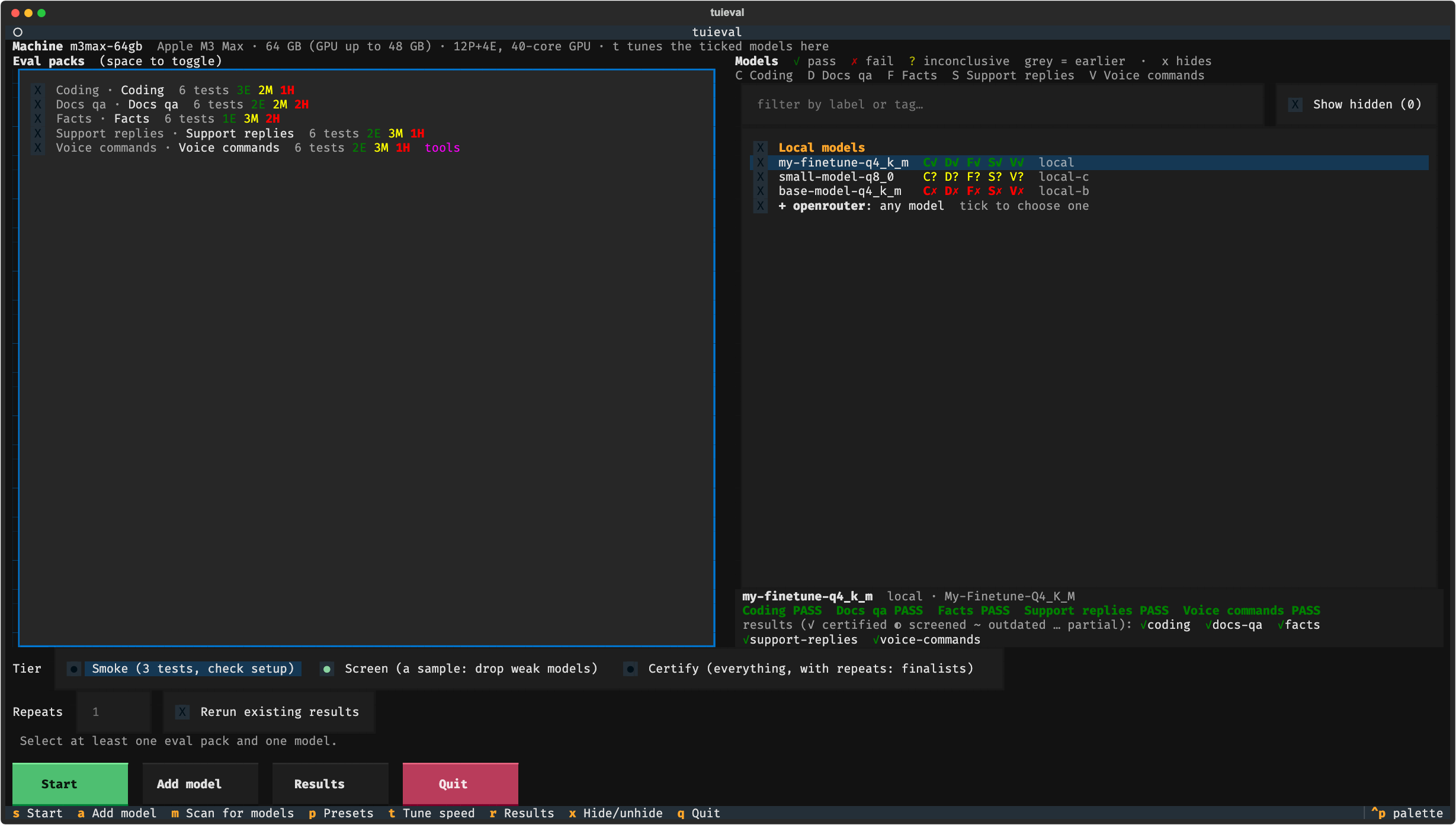
Once you've added your own packs and models, the setup screen looks like this (packs on the left, models with a verdict code per use case on the right, the highlighted model's details below):
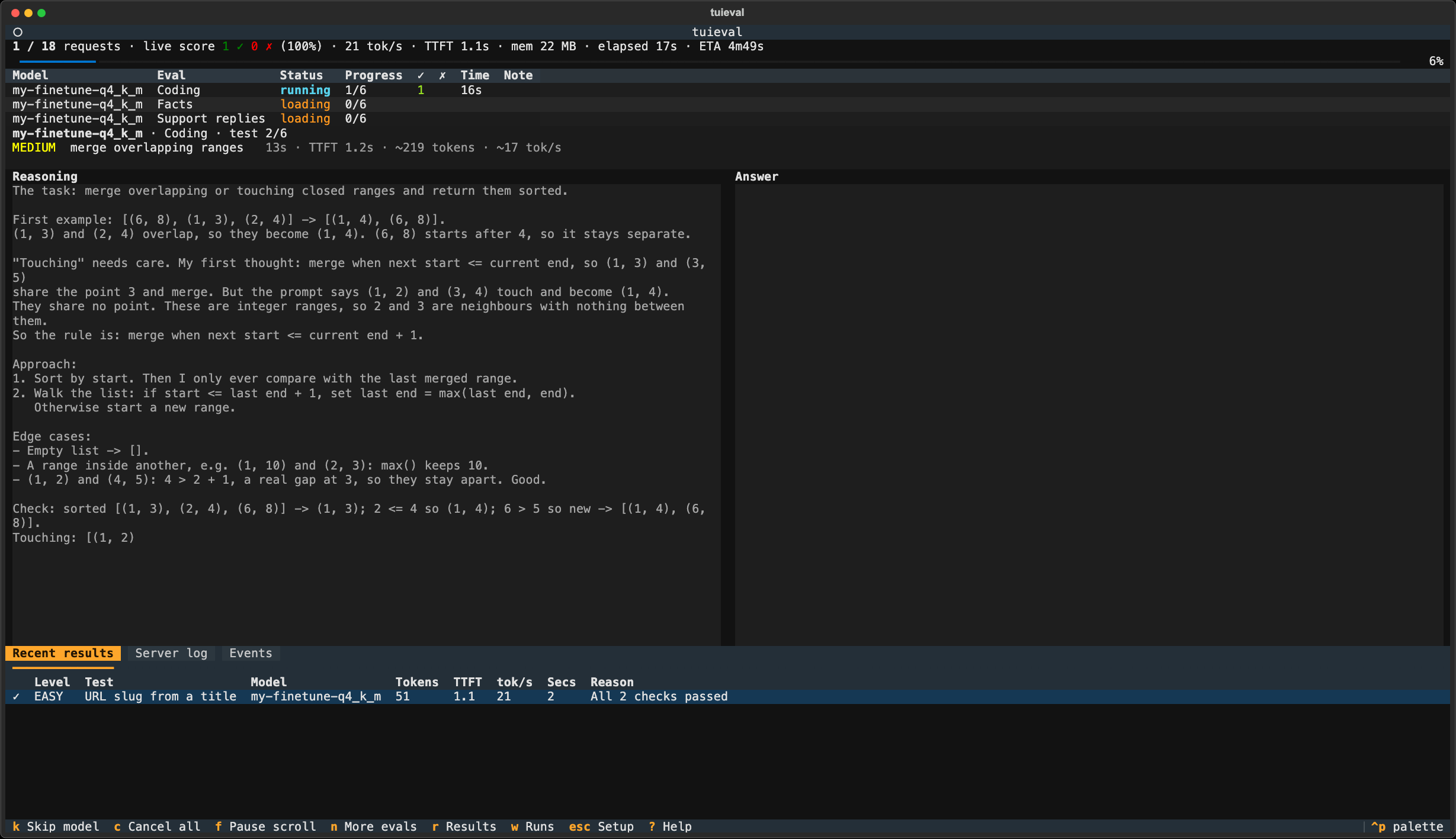
While a run goes, you watch each question's reasoning and answer stream in:
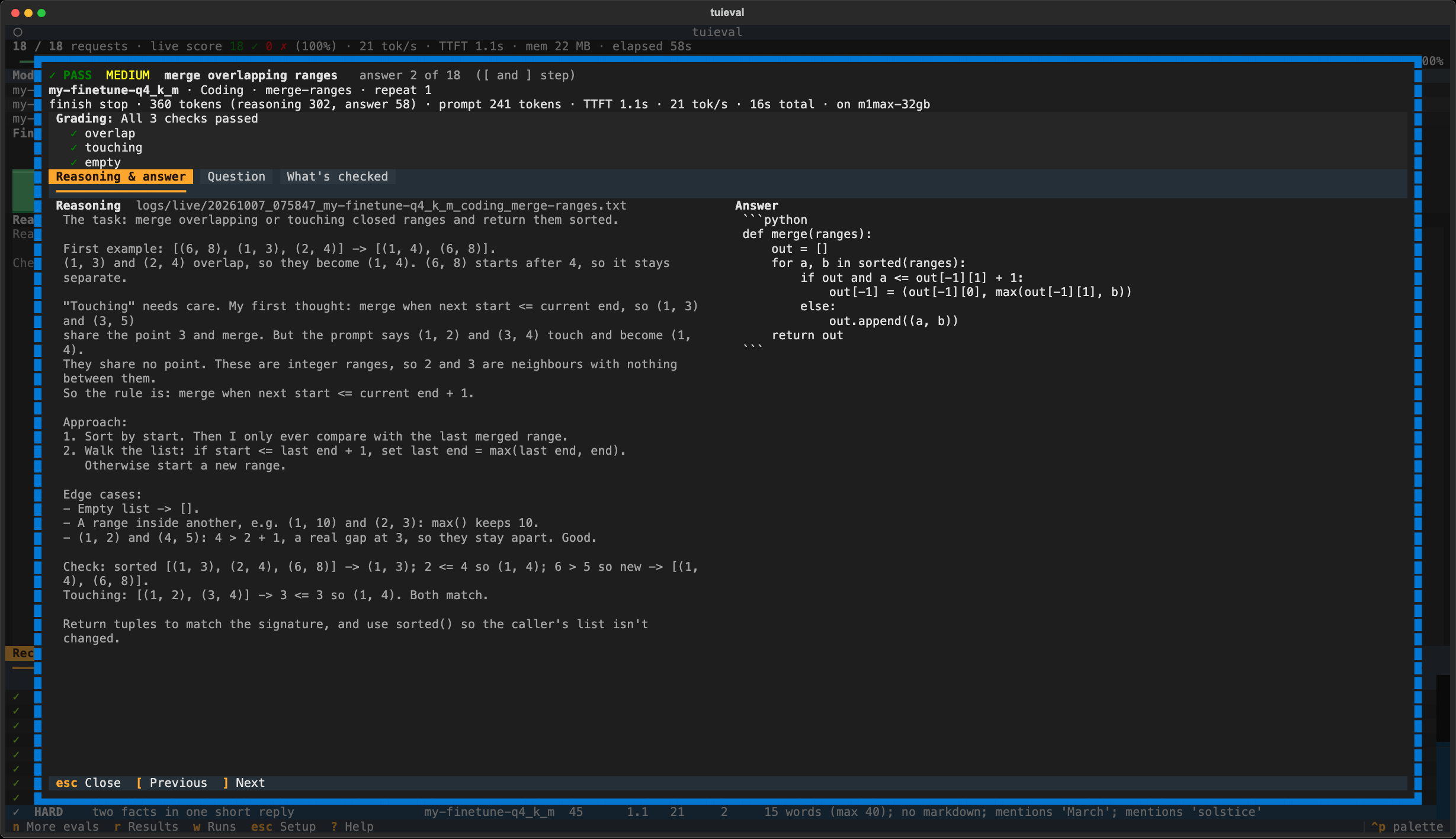
Afterwards, every answer keeps its reasoning. Enter on a result opens it with the grade and each check, the full reasoning and the answer; [ and ] step through the others:
tuieval tune finds the fastest speed-only server flags (with a guard that rejects flags that change answers), and readiness includes a Fast enough? table per machine, measured or projected.tuieval selftest checks the grader accepts the first and rejects the second, and that each gate is reachable at all.results/verdicts.jsonl, and replaced results are moved to history/, never overwritten.tuieval new-pack shows the format). tuieval selftest checks every test's reference answer passes and every known-wrong answer fails, so a bad generated question is caught before it fails a good model.tuieval watch (a proxy in front of your model server), and every exchange is logged. When a model gets something wrong, tuieval capture <log> --pack <name> turns that exchange into a test skeleton, with the bad answer kept as a known-wrong answer. Fill in the expected answer, and that failure becomes a regression test for every model you try.Any model on OpenRouter runs with no setup beyond OPENROUTER_API_KEY, e.g. tuieval run --only openrouter:<model id>, or pick it in the TUI. Each model is pinned to one provider endpoint, so its answers aren't a mix of providers and quantizations. Frontier and local models get the same tests, gates and verdicts.
A pack is a folder in your workspace's packs/:
packs/support-bot/
  pack.toml       label, use case, grader, gate (what PASS means)
  system.txt      the system prompt
  tests.yaml      the questions, with expected answers, references and known-wrong answers
- id: refund-window
  difficulty: medium
  input: A customer bought shoes 20 days ago and wants a refund. Our policy allows 30 days. Can they get one?
  max_words: 40
  must_include: ["yes|can"]
  reference: "Yes, they're within the 30-day window, so they can get a refund."
  wrong: ["No, the refund window has passed."]
Built-in graders: answer (a number or word on an ANSWER: line, or a correct refusal when the data isn't there), rag (grounded answers with citations), reply (free-form replies against rules), tool_call (the right tool with the right arguments, or rightly none) and code (Python run against hidden tests). Your own grader is one Python file in the workspace's graders/ folder.
tuieval new-pack <name> --grader <grader> creates a pack with working examples for any grader. See docs/writing-packs.md for every field, gates, critical failures, difficulty labels, custom graders and how to write tests that separate good models from weak ones.
Your packs, models and results live in a workspace folder, apart from the tool:
my-evals/
  models.toml      your servers and models
  packs/           your eval packs
  graders/         your own graders (optional)
  results/ logs/ tuning/ reports/ presets.toml     written by tuieval
tuieval uses the current folder, or --workspace DIR / TUIEVAL_HOME. Keep it in git or a synced folder: results from one machine count on another when the answer-changing settings match, so you can Certify on your fastest machine.
tuieval add ~/models/Some-Model-Q4_K_M.gguf --tags 9b,dense,q4     # llama.cpp (llama-server on PATH)
tuieval add ~/models/VL-Q4.gguf --mmproj ~/models/VL-mmproj.gguf   # vision
tuieval add                                                         # pick from the models on running servers
tuieval add qwen3:8b                                                # finds the running server that has it
tuieval run --tier smoke --only openrouter:qwen/qwen3-32b           # any OpenRouter model, no config needed
See docs/models.md for servers, OpenRouter endpoint pinning, machines, tuning and every option.
C✓ S? (✓ pass, ✗ fail, ? inconclusive; grey = from earlier results). To run only some tests of a pack, highlight it and press e. Runs of different tests add up, and the pack can PASS once all its tests have run.s. The line above the buttons shows how many answers that is and roughly how long it will take. For each model, tuieval starts its server (or uses a running one), checks the right model is loaded, runs every selected pack, then stops it.k skips a model, c cancels (finished work is kept and resumes next time). n sets up more evals while it runs: add them to this run (same tier) or queue them as the next run.r for results: the PTA index (parsimony (tokens), time and accuracy as bars), production readiness, per question, and failures. tuieval compare, tuieval history and tuieval items have the rest: whether a difference is real, verdict history and test quality.Other keys: t tunes the ticked models' speed flags, a adds a model, m scans for GGUFs, p saves or loads a preset, x hides a model. ? explains any screen.
tuieval run                                   # Screen every model on every pack
tuieval run --tier certify --only a,b --packs support-bot,coding
tuieval run --packs coding --tests parse-dates,fix-bug   # only these tests (or --tests coding:parse-dates)
tuieval run --dry-run                         # the plan and server commands
tuieval doctor                                # check servers, models, packs and keys, and what to fix
tuieval verdict                               # PASS / FAIL / INCONCLUSIVE per model and use case
tuieval report                                # the same with evidence, as a markdown file
tuieval history                               # every verdict change over time
tuieval compare --speed --pairwise --failures # scorecards
tuieval selftest                              # check every test's reference and wrong answers
tuieval items                                 # tests that don't separate models or look broken
tuieval capture logs/live/<file> --pack X     # turn a real failure into a new test
tuieval regrade                               # re-score stored answers after changing a grader
tuieval regrade --only <model> --packs X      # just one model's results (and packs)
tuieval machines                              # this machine and others, fit and tuning per model
tuieval tune <model>                          # fastest speed flags for a model on this machine
tuieval export pi <model>                     # serve it in the pi coding agent with those flags
tuieval watch --upstream http://localhost:8080   # show the reasoning of any app using your server
tuieval help
tuieval report list exactly which answers failed.tuieval compare --pairwise over raw percentages. Differences of one or two tests are usually noise.trunc before accuracy. A model that runs out of tokens isn't wrong; it's thinking too long for the budget.⚠️ The code grader executes model-written code on your machine. Run code packs inside a container or VM with no credentials in the environment.
git clone https://github.com/ashe-wb/tuieval && cd tuieval
python -m venv .venv && .venv/bin/pip install -e .
.venv/bin/python -m unittest discover -s tests    # uses a mock server; no model needed
MIT. See LICENSE.
Evaluate local and frontier LLMs on your own questions: accuracy, speed, tokens and PASS/FAIL verdicts, in the terminal.
Python
6
76 commits
updated Oct 19, 2026
Run the same eval packs against local models (llama.cpp GGUFs, LM Studio, Ollama, vLLM; tiny, dense or MoE) and against any frontier model on OpenRouter, side by side.
tuieval measures accuracy, speed and token use together, and gives a PASS / FAIL / INCONCLUSIVE verdict per use case. Grading is automatic; there's no LLM judge.
You know your workload better than anyone. tuieval ships with no built-in benchmark. Instead you build eval packs from what you actually do: questions with checkable answers, in your domain, with your rules Then you get an answer to the questions that matter:
pipx install tuieval          # or: uv tool install tuieval, or pip install tuieval   (Python 3.11+)
tuieval init my-evals          # guided: finds models already running (LM Studio, Ollama, vLLM…),
                               # adds a starter pack and runs a 3-question check
cd my-evals && tuieval         # open the TUI (? explains any screen)
Whatever runs your models, the first steps are short:
| You have | Do this |
|---|---|
| LM Studio, Ollama or vLLM | Start its server and load a model, then tuieval init my-evals: it finds the model. Later: tuieval add lists new ones. |
| GGUF files | Install llama.cpp (brew install llama.cpp, or a CUDA/ROCm build on Linux), then tuieval add ~/models/Some-Model-Q4_K_M.gguf. tuieval starts llama-server for it, sized to your Mac's memory or your Nvidia/AMD card's VRAM. |
| An OpenRouter key | export OPENROUTER_API_KEY=…, then tuieval run --tier smoke --only openrouter:<model id>. |
Stuck? tuieval doctor checks servers, models, packs and keys, and says what to fix.
pip install tuieval gets the latest release. Every change on main is also published as a dev build (X.Y.0.devN); get it with pipx install --pip-args=--pre tuieval or pip install --pre tuieval.
Once you've added your own packs and models, the setup screen looks like this (packs on the left, models with a verdict code per use case on the right, the highlighted model's details below):
While a run goes, you watch each question's reasoning and answer stream in:
Afterwards, every answer keeps its reasoning. Enter on a result opens it with the grade and each check, the full reasoning and the answer; [ and ] step through the others:
tuieval tune finds the fastest speed-only server flags (with a guard that rejects flags that change answers), and readiness includes a Fast enough? table per machine, measured or projected.tuieval selftest checks the grader accepts the first and rejects the second, and that each gate is reachable at all.results/verdicts.jsonl, and replaced results are moved to history/, never overwritten.tuieval new-pack shows the format). tuieval selftest checks every test's reference answer passes and every known-wrong answer fails, so a bad generated question is caught before it fails a good model.tuieval watch (a proxy in front of your model server), and every exchange is logged. When a model gets something wrong, tuieval capture <log> --pack <name> turns that exchange into a test skeleton, with the bad answer kept as a known-wrong answer. Fill in the expected answer, and that failure becomes a regression test for every model you try.Any model on OpenRouter runs with no setup beyond OPENROUTER_API_KEY, e.g. tuieval run --only openrouter:<model id>, or pick it in the TUI. Each model is pinned to one provider endpoint, so its answers aren't a mix of providers and quantizations. Frontier and local models get the same tests, gates and verdicts.
A pack is a folder in your workspace's packs/:
packs/support-bot/
  pack.toml       label, use case, grader, gate (what PASS means)
  system.txt      the system prompt
  tests.yaml      the questions, with expected answers, references and known-wrong answers
- id: refund-window
  difficulty: medium
  input: A customer bought shoes 20 days ago and wants a refund. Our policy allows 30 days. Can they get one?
  max_words: 40
  must_include: ["yes|can"]
  reference: "Yes, they're within the 30-day window, so they can get a refund."
  wrong: ["No, the refund window has passed."]
Built-in graders: answer (a number or word on an ANSWER: line, or a correct refusal when the data isn't there), rag (grounded answers with citations), reply (free-form replies against rules), tool_call (the right tool with the right arguments, or rightly none) and code (Python run against hidden tests). Your own grader is one Python file in the workspace's graders/ folder.
tuieval new-pack <name> --grader <grader> creates a pack with working examples for any grader. See docs/writing-packs.md for every field, gates, critical failures, difficulty labels, custom graders and how to write tests that separate good models from weak ones.
Your packs, models and results live in a workspace folder, apart from the tool:
my-evals/
  models.toml      your servers and models
  packs/           your eval packs
  graders/         your own graders (optional)
  results/ logs/ tuning/ reports/ presets.toml     written by tuieval
tuieval uses the current folder, or --workspace DIR / TUIEVAL_HOME. Keep it in git or a synced folder: results from one machine count on another when the answer-changing settings match, so you can Certify on your fastest machine.
tuieval add ~/models/Some-Model-Q4_K_M.gguf --tags 9b,dense,q4     # llama.cpp (llama-server on PATH)
tuieval add ~/models/VL-Q4.gguf --mmproj ~/models/VL-mmproj.gguf   # vision
tuieval add                                                         # pick from the models on running servers
tuieval add qwen3:8b                                                # finds the running server that has it
tuieval run --tier smoke --only openrouter:qwen/qwen3-32b           # any OpenRouter model, no config needed
See docs/models.md for servers, OpenRouter endpoint pinning, machines, tuning and every option.
C✓ S? (✓ pass, ✗ fail, ? inconclusive; grey = from earlier results). To run only some tests of a pack, highlight it and press e. Runs of different tests add up, and the pack can PASS once all its tests have run.s. The line above the buttons shows how many answers that is and roughly how long it will take. For each model, tuieval starts its server (or uses a running one), checks the right model is loaded, runs every selected pack, then stops it.k skips a model, c cancels (finished work is kept and resumes next time). n sets up more evals while it runs: add them to this run (same tier) or queue them as the next run.r for results: the PTA index (parsimony (tokens), time and accuracy as bars), production readiness, per question, and failures. tuieval compare, tuieval history and tuieval items have the rest: whether a difference is real, verdict history and test quality.Other keys: t tunes the ticked models' speed flags, a adds a model, m scans for GGUFs, p saves or loads a preset, x hides a model. ? explains any screen.
tuieval run                                   # Screen every model on every pack
tuieval run --tier certify --only a,b --packs support-bot,coding
tuieval run --packs coding --tests parse-dates,fix-bug   # only these tests (or --tests coding:parse-dates)
tuieval run --dry-run                         # the plan and server commands
tuieval doctor                                # check servers, models, packs and keys, and what to fix
tuieval verdict                               # PASS / FAIL / INCONCLUSIVE per model and use case
tuieval report                                # the same with evidence, as a markdown file
tuieval history                               # every verdict change over time
tuieval compare --speed --pairwise --failures # scorecards
tuieval selftest                              # check every test's reference and wrong answers
tuieval items                                 # tests that don't separate models or look broken
tuieval capture logs/live/<file> --pack X     # turn a real failure into a new test
tuieval regrade                               # re-score stored answers after changing a grader
tuieval regrade --only <model> --packs X      # just one model's results (and packs)
tuieval machines                              # this machine and others, fit and tuning per model
tuieval tune <model>                          # fastest speed flags for a model on this machine
tuieval export pi <model>                     # serve it in the pi coding agent with those flags
tuieval watch --upstream http://localhost:8080   # show the reasoning of any app using your server
tuieval help
tuieval report list exactly which answers failed.tuieval compare --pairwise over raw percentages. Differences of one or two tests are usually noise.trunc before accuracy. A model that runs out of tokens isn't wrong; it's thinking too long for the budget.⚠️ The code grader executes model-written code on your machine. Run code packs inside a container or VM with no credentials in the environment.
git clone https://github.com/ashe-wb/tuieval && cd tuieval
python -m venv .venv && .venv/bin/pip install -e .
.venv/bin/python -m unittest discover -s tests    # uses a mock server; no model needed
MIT. See LICENSE.



