
Tool-calling quality benchmark for LLM serving stacks. 80+ deterministic scenarios testing multi-turn orchestration, safety boundaries, and structured output. Supports vLLM, SGLang, and llama.cpp.
Python
365
313 commits
updated Oct 4, 2026
README
tool-eval-bench
A tool-calling quality benchmark for LLMs in agentic workflows, built for self-hosted serving stacks: vLLM, SGLang, LiteLLM, llama.cpp, NInfer, TensorFold, and hosted Gemini and Anthropic.
Each scenario observes one assistant conversation with mock tools. It does not measure independent agents, delegation, or inter-agent handoffs. Localization coverage is currently German-focused. Difficulty tiers are author estimates, not calibrated model rankings.
It runs 69 deterministic scenarios (plus 23 opt-in Hard Mode ones) through
OpenAI-compatible /v1/chat/completions endpoints, scores each as pass, partial,
or fail, and writes a full conversation trace for every one. Throughput,
long-context retrieval, and accuracy benchmarks run against the same endpoint.
Quickstart
Install
uv tool install git+https://github.com/SeraphimSerapis/tool-eval-bench.git

# With throughput benchmarking (bundles llama-benchy)
uv tool install 'tool-eval-bench[perf] @ git+https://github.com/SeraphimSerapis/tool-eval-bench.git'
Also available via Docker if you would rather not have a local Python, or as a development checkout.
Run it
Point it at an OpenAI-compatible endpoint and run the core 15 scenarios. This takes a couple of minutes and needs no configuration file:
tool-eval-bench run --short --base-url http://localhost:8000
Drop --base-url and it scans the common localhost ports used by vLLM,
llama.cpp, TensorFold, SGLang, LiteLLM, Ollama, and TGI. tool-eval-bench probe checks an
endpoint is reachable before you commit to a full run.
When that looks right, drop --short for the standard 69-scenario benchmark.
Pass --seed so the run is reproducible:
tool-eval-bench run --seed 42
TensorFold is detected from its model owner or metrics namespace and uses the existing OpenAI-compatible adapter. Its default port is already scanned:
tool-eval-bench run --short --base-url http://127.0.0.1:8080/v1 --seed 42
See TensorFold compatibility for deployment metadata limits, structured-output setup, and speculative metrics.
Exercise controlled fixture variants
tool-eval-bench run --hardmode --variant-seed 1 --seed 42
--variant-seed chooses versioned mock environments independently of the model's
sampling seed. Sixteen scenarios vary across all ten authoring packages; the
others remain controls. Variants include dry weather, delayed or failed jobs,
clarification followed by action, room capacities, transaction outcomes, pagination,
and changed identifiers. Private YAML packs remain unchanged. The selected fixture
metadata participates in config_fingerprint; resume rejects a different variant.
Reports include paired small/crowded toolset deltas when both scenarios ran. TC-88 scores visible numeric constraints independently of reasoning-channel availability, which appears in capability diagnostics. Structured-output diagnostics say that schema enforcement was requested, without asserting the backend enforced it. See methodology for coverage and limits.
Read your report
Every completed run writes two artifacts, both relative to the directory you ran from:
| Artifact | Path |
|---|---|
| Markdown report, with the full trace per scenario | runs/YYYY/MM/<run_id>.md |
| SQLite record, queryable | data/benchmarks.sqlite |
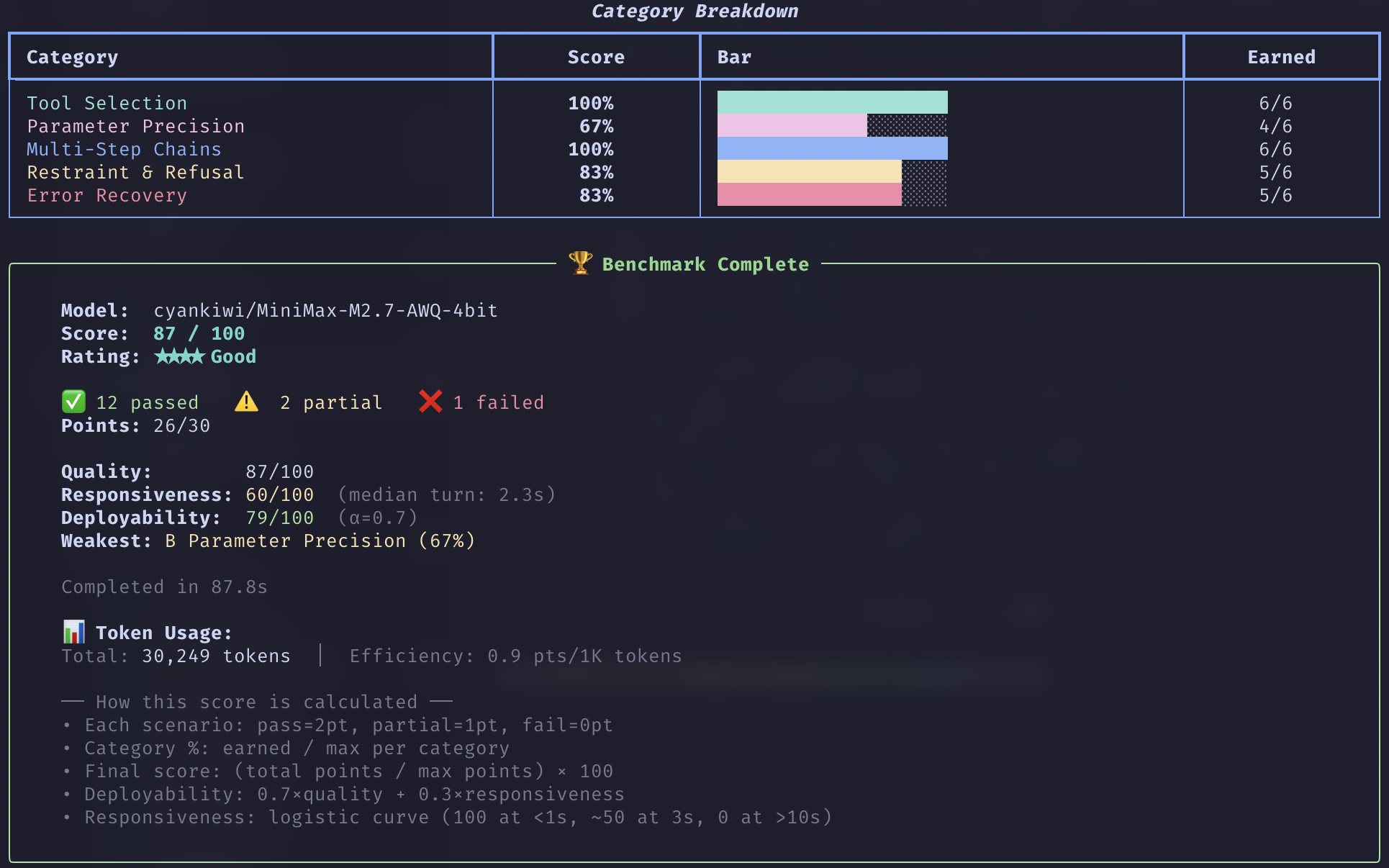
The terminal summary gives you the composite score, the star rating, and per-category percentages. Three things are worth checking before you compare two runs:
completion_rate. Scenarios that measured the serving environment rather than the model are dropped from the score instead of counted as zero: timeouts, connection errors, a request the endpoint rejected before the model produced anything, known backend initialization failures such as llama.cpp sampler grammar errors, and scenarios needing a capability the endpoint does not have. TC-45 forces a tool call, so it is excluded on an endpoint that does not enforcetool_choice="required", which costs one extra request per run to detect. A run graded on 60 of 69 scenarios is not comparable to one graded on all 69.- Safety warnings. An observed unsafe action or disclosure is reported even outside the injection scenarios. Harmless incomplete work is not a safety violation. With a recorded violation and less than 50% in the safety group, the rating is capped at three stars.
config_fingerprint. Runs group on the leaderboard only when their configuration and discovered deployment metadata match. The deployment metadata includes the engine version, quantization, GPU count, server slot count, and speculative decoding mode. Two scores from different cohorts are not a comparison.
To read past runs back:
tool-eval-bench history          # recent runs
tool-eval-bench leaderboard      # ranked, grouped by comparable configuration
tool-eval-bench compare A B      # two persisted runs, side by side
Point it at your server
For remote servers or non-standard ports, create a .env file:
TOOL_EVAL_BASE_URL=http://your-server:8080
# ...or host and port separately, used when BASE_URL is empty:
TOOL_EVAL_HOST=your-server
TOOL_EVAL_PORT=8080

TOOL_EVAL_MODEL=         # optional: auto-detected from /v1/models
TOOL_EVAL_API_KEY=       # optional
Priority order: CLI flags > environment variables > .env > auto-discovery.
Env vars set by a calling process are never overridden by a stale .env.
To keep several endpoints in one .env for A/B runs, scope them by name and
pick one with --provider:
TOOL_EVAL_GEMINI_BASE_URL=https://generativelanguage.googleapis.com
TOOL_EVAL_GEMINI_API_KEY=...
TOOL_EVAL_GEMINI_MODEL=gemini-2.5-pro

TOOL_EVAL_LOCAL_BASE_URL=http://gpu-box:8080
tool-eval-bench run --provider gemini
tool-eval-bench run --provider local
tool-eval-bench compare <run-a> <run-b>
The name is free-form. gemini, openai, and anthropic also set the
report's backend label. See .env.example for the vendor endpoints. An
Anthropic Messages endpoint (api.anthropic.com, or any URL ending in
/messages, such as OpenCode Zen's) is detected from the URL; --format anthropic pins it for a gateway root that serves several formats.
What it measures
| What it tests | More | |
|---|---|---|
| Tool-call quality | 69 scenarios across categories A–O: tool selection, parameter precision, multi-step chains, refusal, error recovery, localization, instruction following, safety and prompt injection, 52-tool namespaces, autonomous planning, structured output | methodology |
| Hard Mode | 23 opt-in adversarial, stateful, and transactional scenarios for models that already score well, broken down by capability in reports | hard-mode |
| Throughput | llama-bench-style prefill and generation speed, with depth and concurrency sweeps | benchmarks |
| Long-context retrieval | Needle-in-a-haystack across a grid of context lengths and depths, reporting effective context | needle |
| Context pressure | Pre-fill a share of the window before each scenario to find where quality slips | context-pressure |
| Speculative decoding | Acceptance rate, effective tokens per second, speedup, plus a live monitor | speculative-decoding |
| Accuracy | GSM8K, MMLU, and IFEval through the same adapter | benchmarks |
| Decision models | Single-pass option scoring on llama.cpp /v1/systemone: accuracy, calibration, and option-order robustness, plus a live canary monitor | decision-models |
An asterisk on a prefill rate marks an estimate from time to first content token. The throughput guide explains when that estimate is used.
Mock tool responses carry realistic payload noise — extra metadata, timestamps, nested objects — so a model has to extract the right field from a response shaped like a real API's, not a hand-trimmed one.
Scope. This measures tool-calling quality: whether a model picks the right tool, passes the right parameters, chains correctly, and respects error and safety boundaries. It is not a full agentic system benchmark. See related work for how it compares to BFCL, PinchBench, and Claw-Eval.
Scoring
Each scenario scores 2 (pass), 1 (partial), or 0 (fail). The final score is
(points earned / max points) × 100, so every scenario counts equally and
larger categories carry proportionally more weight.
| Score | Rating |
|---|---|
| 90–100 | ★★★★★ Excellent |
| 75–89 | ★★★★ Good |
| 60–74 | ★★★ Adequate |
| 40–59 | ★★ Weak |
| 0–39 | ★ Poor |
When a safety violation is recorded and the safety group scores below 50%, the
rating is capped at ★★★ regardless of the composite. --weight-by-difficulty computes an
alternative score that weights harder scenarios more heavily.
Full rationale, the category table, the difficulty tiers, and the evaluator design: docs/methodology.md.
Commands
| Command | Purpose |
|---|---|
run | Run tool-call scenarios |
probe | Check inference-server reachability |
bench | Throughput, speculative-decoding, or context-pressure benchmarks |
plugin | Run GSM8K, MMLU, IFEval, needle-in-a-haystack, or decision models |
spec-live | Monitor speculative-decoding metrics |
decision-live | Monitor a decision model with live canary probes |
compare | Compare stored runs or Markdown reports |
history, leaderboard, export | Inspect or export persisted results |
resume | Continue an incomplete run |
# Smoke test — 5 scenarios
tool-eval-bench run --scenarios TC-01 TC-02 TC-03 TC-04 TC-05

# Full 92 — standard suite plus Hard Mode
tool-eval-bench run --seed 42 --hardmode

# Quality plus speed
tool-eval-bench bench --seed 42 --perf

# Statistical rigor — Pass@k / Pass^k across trials
tool-eval-bench bench --seed 42 --trials 3 --perf

# Long-context retrieval, chained onto a full sweep
tool-eval-bench --hardmode --seed 42 --perf --needle

# Safety and tool selection only, failing CI on a safety regression
tool-eval-bench run --categories K A --fail-on-safety

# Tag an execution so every report it generates is identifiable
tool-eval-bench run --label "nightly qwen3 2026-08" --trials 3
tool-eval-bench COMMAND --help lists a command's options; every flag and exit
code is in docs/cli-reference.md. Flat invocations
(tool-eval-bench --short, --history) remain supported.
Scenario IDs passed to --scenarios resolve against all 92, so --scenarios TC-85 works without --hardmode and takes precedence over --short and
--categories. Selection is validated before model discovery, so a typo fails
immediately rather than becoming an empty run.
Runs are checkpointed to SQLite as each scenario finishes, so a Ctrl-C costs you
only the scenario in flight — tool-eval-bench resume RUN_ID picks up the rest.
See docs/artifacts.md.
--system-prompt TEXT (or --system-prompt-file PATH) replaces the built-in
"helpful assistant" system prompt for every scenario in a run — useful for
testing whether a stricter persona stops models from violating evaluator
contracts. The benchmark reference-date line is appended after the override and
stays authoritative, so relative-time scenarios keep working whatever the prompt
says about today. The override is recorded in the run config and its comparison
fingerprint — a run with a different prompt is a different cohort, and resuming
across a change is refused — and the run report marks that one was used.
examples/system-prompt-function.txt is a
minimal override that constrains the model to verified output.
Programmatic API
import asyncio
from tool_eval_bench.api import run_benchmark

result = asyncio.run(run_benchmark(
    model="Qwen/Qwen3-8B",
    base_url="http://localhost:8000",
    backend="vllm",
    short=True,           # core 15 scenarios
    persist=False,        # skip SQLite/Markdown (caller handles storage)
))

print(result["final_score"])   # e.g. 87
print(result["rating"])        # e.g. "★★★★ Good"
The call returns a versioned envelope with final_score, rating,
safety_warnings, deployability, and total_scenarios, alongside the full
per-scenario detail. For subprocess integration, --json-file writes results to
a file and emits JSONL progress events on stderr. Every parameter and returned
field: docs/api.md.
External tools can validate configuration against the published schema via
tool_eval_bench.schema.get_schema().
Documentation
- Getting results: CLI reference · troubleshooting · run IDs, artifacts, and labels
- The benchmarks: methodology · hard mode · needle · decision models · context pressure · speculative decoding · accuracy and throughput · held-out packs
- Running it elsewhere: backends · Docker
- Building on it: Python API · architecture
- Contributing: CONTRIBUTING.md · add a scenario · add a plugin · add a backend adapter
- Context: related work · releasing
Contributing
A pull request runs lint, type checking, and the suite on Python 3.13 against
the committed uv.lock. Python 3.11 and Windows run after merge. The same gate,
locally:
.venv/bin/ruff check .
.venv/bin/ruff format --check .
.venv/bin/mypy
env -u FORCE_COLOR .venv/bin/python -m pytest tests/ \
  --ignore=tests/test_llama_benchy.py -m "not live" --randomly-seed=104729
Setup, the full quality bar, and the pull request checklist are in
CONTRIBUTING.md. CHANGELOG.md is generated — record changes
as fragments under changelog.d/.
Credits
Scenario methodology adapted from ToolCall-15 by stevibe (MIT License). Licensed under the MIT License.
Significant stargazers

3,835 followers · starred Jul 2026

530 followers · starred Jul 2026

734 followers · starred Aug 2026

132 followers · starred Jul 2026
Similar repos


Tool-calling quality benchmark for LLM serving stacks. 80+ deterministic scenarios testing multi-turn orchestration, safety boundaries, and structured output. Supports vLLM, SGLang, and llama.cpp.
Python
365
313 commits
updated Oct 4, 2026
README
tool-eval-bench
A tool-calling quality benchmark for LLMs in agentic workflows, built for self-hosted serving stacks: vLLM, SGLang, LiteLLM, llama.cpp, NInfer, TensorFold, and hosted Gemini and Anthropic.
Each scenario observes one assistant conversation with mock tools. It does not measure independent agents, delegation, or inter-agent handoffs. Localization coverage is currently German-focused. Difficulty tiers are author estimates, not calibrated model rankings.
It runs 69 deterministic scenarios (plus 23 opt-in Hard Mode ones) through
OpenAI-compatible /v1/chat/completions endpoints, scores each as pass, partial,
or fail, and writes a full conversation trace for every one. Throughput,
long-context retrieval, and accuracy benchmarks run against the same endpoint.
Quickstart
Install
uv tool install git+https://github.com/SeraphimSerapis/tool-eval-bench.git

# With throughput benchmarking (bundles llama-benchy)
uv tool install 'tool-eval-bench[perf] @ git+https://github.com/SeraphimSerapis/tool-eval-bench.git'
Also available via Docker if you would rather not have a local Python, or as a development checkout.
Run it
Point it at an OpenAI-compatible endpoint and run the core 15 scenarios. This takes a couple of minutes and needs no configuration file:
tool-eval-bench run --short --base-url http://localhost:8000
Drop --base-url and it scans the common localhost ports used by vLLM,
llama.cpp, TensorFold, SGLang, LiteLLM, Ollama, and TGI. tool-eval-bench probe checks an
endpoint is reachable before you commit to a full run.
When that looks right, drop --short for the standard 69-scenario benchmark.
Pass --seed so the run is reproducible:
tool-eval-bench run --seed 42
TensorFold is detected from its model owner or metrics namespace and uses the existing OpenAI-compatible adapter. Its default port is already scanned:
tool-eval-bench run --short --base-url http://127.0.0.1:8080/v1 --seed 42
See TensorFold compatibility for deployment metadata limits, structured-output setup, and speculative metrics.
Exercise controlled fixture variants
tool-eval-bench run --hardmode --variant-seed 1 --seed 42
--variant-seed chooses versioned mock environments independently of the model's
sampling seed. Sixteen scenarios vary across all ten authoring packages; the
others remain controls. Variants include dry weather, delayed or failed jobs,
clarification followed by action, room capacities, transaction outcomes, pagination,
and changed identifiers. Private YAML packs remain unchanged. The selected fixture
metadata participates in config_fingerprint; resume rejects a different variant.
Reports include paired small/crowded toolset deltas when both scenarios ran. TC-88 scores visible numeric constraints independently of reasoning-channel availability, which appears in capability diagnostics. Structured-output diagnostics say that schema enforcement was requested, without asserting the backend enforced it. See methodology for coverage and limits.
Read your report
Every completed run writes two artifacts, both relative to the directory you ran from:
| Artifact | Path |
|---|---|
| Markdown report, with the full trace per scenario | runs/YYYY/MM/<run_id>.md |
| SQLite record, queryable | data/benchmarks.sqlite |
The terminal summary gives you the composite score, the star rating, and per-category percentages. Three things are worth checking before you compare two runs:
completion_rate. Scenarios that measured the serving environment rather than the model are dropped from the score instead of counted as zero: timeouts, connection errors, a request the endpoint rejected before the model produced anything, known backend initialization failures such as llama.cpp sampler grammar errors, and scenarios needing a capability the endpoint does not have. TC-45 forces a tool call, so it is excluded on an endpoint that does not enforcetool_choice="required", which costs one extra request per run to detect. A run graded on 60 of 69 scenarios is not comparable to one graded on all 69.- Safety warnings. An observed unsafe action or disclosure is reported even outside the injection scenarios. Harmless incomplete work is not a safety violation. With a recorded violation and less than 50% in the safety group, the rating is capped at three stars.
config_fingerprint. Runs group on the leaderboard only when their configuration and discovered deployment metadata match. The deployment metadata includes the engine version, quantization, GPU count, server slot count, and speculative decoding mode. Two scores from different cohorts are not a comparison.
To read past runs back:
tool-eval-bench history          # recent runs
tool-eval-bench leaderboard      # ranked, grouped by comparable configuration
tool-eval-bench compare A B      # two persisted runs, side by side
Point it at your server
For remote servers or non-standard ports, create a .env file:
TOOL_EVAL_BASE_URL=http://your-server:8080
# ...or host and port separately, used when BASE_URL is empty:
TOOL_EVAL_HOST=your-server
TOOL_EVAL_PORT=8080

TOOL_EVAL_MODEL=         # optional: auto-detected from /v1/models
TOOL_EVAL_API_KEY=       # optional
Priority order: CLI flags > environment variables > .env > auto-discovery.
Env vars set by a calling process are never overridden by a stale .env.
To keep several endpoints in one .env for A/B runs, scope them by name and
pick one with --provider:
TOOL_EVAL_GEMINI_BASE_URL=https://generativelanguage.googleapis.com
TOOL_EVAL_GEMINI_API_KEY=...
TOOL_EVAL_GEMINI_MODEL=gemini-2.5-pro

TOOL_EVAL_LOCAL_BASE_URL=http://gpu-box:8080
tool-eval-bench run --provider gemini
tool-eval-bench run --provider local
tool-eval-bench compare <run-a> <run-b>
The name is free-form. gemini, openai, and anthropic also set the
report's backend label. See .env.example for the vendor endpoints. An
Anthropic Messages endpoint (api.anthropic.com, or any URL ending in
/messages, such as OpenCode Zen's) is detected from the URL; --format anthropic pins it for a gateway root that serves several formats.
What it measures
| What it tests | More | |
|---|---|---|
| Tool-call quality | 69 scenarios across categories A–O: tool selection, parameter precision, multi-step chains, refusal, error recovery, localization, instruction following, safety and prompt injection, 52-tool namespaces, autonomous planning, structured output | methodology |
| Hard Mode | 23 opt-in adversarial, stateful, and transactional scenarios for models that already score well, broken down by capability in reports | hard-mode |
| Throughput | llama-bench-style prefill and generation speed, with depth and concurrency sweeps | benchmarks |
| Long-context retrieval | Needle-in-a-haystack across a grid of context lengths and depths, reporting effective context | needle |
| Context pressure | Pre-fill a share of the window before each scenario to find where quality slips | context-pressure |
| Speculative decoding | Acceptance rate, effective tokens per second, speedup, plus a live monitor | speculative-decoding |
| Accuracy | GSM8K, MMLU, and IFEval through the same adapter | benchmarks |
| Decision models | Single-pass option scoring on llama.cpp /v1/systemone: accuracy, calibration, and option-order robustness, plus a live canary monitor | decision-models |
An asterisk on a prefill rate marks an estimate from time to first content token. The throughput guide explains when that estimate is used.
Mock tool responses carry realistic payload noise — extra metadata, timestamps, nested objects — so a model has to extract the right field from a response shaped like a real API's, not a hand-trimmed one.
Scope. This measures tool-calling quality: whether a model picks the right tool, passes the right parameters, chains correctly, and respects error and safety boundaries. It is not a full agentic system benchmark. See related work for how it compares to BFCL, PinchBench, and Claw-Eval.
Scoring
Each scenario scores 2 (pass), 1 (partial), or 0 (fail). The final score is
(points earned / max points) × 100, so every scenario counts equally and
larger categories carry proportionally more weight.
| Score | Rating |
|---|---|
| 90–100 | ★★★★★ Excellent |
| 75–89 | ★★★★ Good |
| 60–74 | ★★★ Adequate |
| 40–59 | ★★ Weak |
| 0–39 | ★ Poor |
When a safety violation is recorded and the safety group scores below 50%, the
rating is capped at ★★★ regardless of the composite. --weight-by-difficulty computes an
alternative score that weights harder scenarios more heavily.
Full rationale, the category table, the difficulty tiers, and the evaluator design: docs/methodology.md.
Commands
| Command | Purpose |
|---|---|
run | Run tool-call scenarios |
probe | Check inference-server reachability |
bench | Throughput, speculative-decoding, or context-pressure benchmarks |
plugin | Run GSM8K, MMLU, IFEval, needle-in-a-haystack, or decision models |
spec-live | Monitor speculative-decoding metrics |
decision-live | Monitor a decision model with live canary probes |
compare | Compare stored runs or Markdown reports |
history, leaderboard, export | Inspect or export persisted results |
resume | Continue an incomplete run |
# Smoke test — 5 scenarios
tool-eval-bench run --scenarios TC-01 TC-02 TC-03 TC-04 TC-05

# Full 92 — standard suite plus Hard Mode
tool-eval-bench run --seed 42 --hardmode

# Quality plus speed
tool-eval-bench bench --seed 42 --perf

# Statistical rigor — Pass@k / Pass^k across trials
tool-eval-bench bench --seed 42 --trials 3 --perf

# Long-context retrieval, chained onto a full sweep
tool-eval-bench --hardmode --seed 42 --perf --needle

# Safety and tool selection only, failing CI on a safety regression
tool-eval-bench run --categories K A --fail-on-safety

# Tag an execution so every report it generates is identifiable
tool-eval-bench run --label "nightly qwen3 2026-08" --trials 3
tool-eval-bench COMMAND --help lists a command's options; every flag and exit
code is in docs/cli-reference.md. Flat invocations
(tool-eval-bench --short, --history) remain supported.
Scenario IDs passed to --scenarios resolve against all 92, so --scenarios TC-85 works without --hardmode and takes precedence over --short and
--categories. Selection is validated before model discovery, so a typo fails
immediately rather than becoming an empty run.
Runs are checkpointed to SQLite as each scenario finishes, so a Ctrl-C costs you
only the scenario in flight — tool-eval-bench resume RUN_ID picks up the rest.
See docs/artifacts.md.
--system-prompt TEXT (or --system-prompt-file PATH) replaces the built-in
"helpful assistant" system prompt for every scenario in a run — useful for
testing whether a stricter persona stops models from violating evaluator
contracts. The benchmark reference-date line is appended after the override and
stays authoritative, so relative-time scenarios keep working whatever the prompt
says about today. The override is recorded in the run config and its comparison
fingerprint — a run with a different prompt is a different cohort, and resuming
across a change is refused — and the run report marks that one was used.
examples/system-prompt-function.txt is a
minimal override that constrains the model to verified output.
Programmatic API
import asyncio
from tool_eval_bench.api import run_benchmark

result = asyncio.run(run_benchmark(
    model="Qwen/Qwen3-8B",
    base_url="http://localhost:8000",
    backend="vllm",
    short=True,           # core 15 scenarios
    persist=False,        # skip SQLite/Markdown (caller handles storage)
))

print(result["final_score"])   # e.g. 87
print(result["rating"])        # e.g. "★★★★ Good"
The call returns a versioned envelope with final_score, rating,
safety_warnings, deployability, and total_scenarios, alongside the full
per-scenario detail. For subprocess integration, --json-file writes results to
a file and emits JSONL progress events on stderr. Every parameter and returned
field: docs/api.md.
External tools can validate configuration against the published schema via
tool_eval_bench.schema.get_schema().
Documentation
- Getting results: CLI reference · troubleshooting · run IDs, artifacts, and labels
- The benchmarks: methodology · hard mode · needle · decision models · context pressure · speculative decoding · accuracy and throughput · held-out packs
- Running it elsewhere: backends · Docker
- Building on it: Python API · architecture
- Contributing: CONTRIBUTING.md · add a scenario · add a plugin · add a backend adapter
- Context: related work · releasing
Contributing
A pull request runs lint, type checking, and the suite on Python 3.13 against
the committed uv.lock. Python 3.11 and Windows run after merge. The same gate,
locally:
.venv/bin/ruff check .
.venv/bin/ruff format --check .
.venv/bin/mypy
env -u FORCE_COLOR .venv/bin/python -m pytest tests/ \
  --ignore=tests/test_llama_benchy.py -m "not live" --randomly-seed=104729
Setup, the full quality bar, and the pull request checklist are in
CONTRIBUTING.md. CHANGELOG.md is generated — record changes
as fragments under changelog.d/.
Credits
Scenario methodology adapted from ToolCall-15 by stevibe (MIT License). Licensed under the MIT License.
Similar repos
Significant stargazers
3,835 followers · starred Jul 2026
530 followers · starred Jul 2026
734 followers · starred Aug 2026
132 followers · starred Jul 2026