Autonomous, offline, on-board Artificial Intelligence assistant designed to track, guide, and deterministically validate procedural experiments inside the science modules (BAS-03/BAS-04) of the upcoming Bharatiya Antariksh Station.
Python
3
74 commits
updated Sep 29, 2026




Autonomous, offline, on-board Artificial Intelligence assistant designed to track, guide, and deterministically validate procedural experiments inside the science modules (BAS-03/BAS-04) of the upcoming Bharatiya Antariksh Station.
🔗 Models & Datasets: Download from Google Drive
We have performed all under mention operations with no dedicated GPU and purely based on CPU performance. If you can use a dedicated GPU to run this project you will get more FPS.
To adapt this Multi-Agent system for a new, custom experiment, follow this step-by-step procedure:
Define the New Experiment's Procedure (FSM)
configs/ folder (e.g., configs/new_experiment_fsm.json).configs/experiment_fsm.json and modify the states, expected_events, and anomalies for your new experiment's logic.Update the Object Classes (Zero Code Changes)
configs/classes.json and add your new experiment's object classes (e.g., "tool_wrench": 5, "solar_panel": 6).Generate the Synthetic Dataset
python tools/generate_synthetic_data.py --dataset to generate a domain-randomized synthetic YOLO dataset in the dataset/ directory.(Optional) Augment with Real-World Data
python tools/webcam_annotator.py to record yourself interacting with physical mock-ups of your experiment's objects and annotate the frames with the new class labels.Train the Object Detection Model (YOLOv8)
yolov8n.pt) to recognize the new dataset using Ultralytics YOLO:
yolo detect train data=dataset/data.yaml model=yolov8n.pt epochs=100 imgsz=640.pt weights file into the models/ directory.Update the Agents for the New Logic
models/new_experiment_model.pt) in main.py or your configuration.src/agents/har_agent.py (and potentially src/agents/spatial_agent.py) to recognize Human-Object Interactions (HOIs) associated with your new objects.Run the New Experiment
python main.py --config configs/new_experiment_fsm.jsonThe system is engineered as an Optimized On-Board Multi-Agentic System (MAS) collaborating asynchronously over a thread-safe Digital Twin Memory Blackboard:
                    +──────────────────────────────────────────────+
                    │      SHARED STATE (DIGITAL TWIN MEMORY)      │
                    │  • Fused 3D Astronaut Kinematics in Frame R  │
                    │  • Object States: DOCKED / GRASPED / EXTRACT │
                    │  • Active HOI Spatial Distance Matrix        │
                    │  • FSM Step (S0-S3) & 15-Frame Debounce      │
                    │  • Anomaly Diagnostics & Health Telemetry    │
                    +───────▲──────────────▲──────────────▲────────+
                            │              │              │
     [Inbound Perception]   │              │ [Validation] │ [Egress Output]
  ┌─────────────────────────┴──┐   ┌───────┴──────┐   ┌───┴────────────────────────┐
  │ 1. Perception Agent        │   │ 5. DT Agent  │   │ 7. Reasoning Agent         │
  │    (YOLOv8n + 3D HMR)      │   │    (3D Sync) │   │    (Next-Step Guidance)    │
  │ 2. IMU Agent               │   │ 6. Validation│   │ 8. Monitoring Agent        │
  │    (128Hz + ZUPT Filter)   │   │    Agent     │   │    (GUI + Offline TTS +    │
  │ 3. Fusion Agent            │   │    (Det. FSM)│   │     RTSP + JSONL Telemetry)│
  │    (Constrained UKF)       │   └──────────────┘   └────────────────────────────┘
  │ 4. HAR Agent               │
  │    (AdaSpot + HOI Engine)  │
  └────────────────────────────┘
| Requirement | Implementation in System | Technical Approach |
|---|---|---|
| Track Sequence of Experiment | Perception + Fusion + HAR + Validation Agents | Multi-threaded 30 FPS video ingest, YOLOv8n, 3D pose, HOI metrics, and deterministic state transitions. |
| Suggest Next Step | Reasoning & Guidance Agent | Automatically produces proactive voice and on-screen instructions upon each state entry. |
| Voice-based Alerts | Validation Agent + Monitoring Agent (TTS) | Anomaly detector flags ERROR_SEQ / ERROR_SKIP $\to$ offline neural TTS speaks urgent warnings. |
| Timestamped Structured Telemetry | Monitoring Agent (jsonl_logger.py) | Serializes states and events into structured .jsonl lines, achieving a 3,000,000:1 compression ratio (<15 KB per 30-min run). |
| Dual Video Output | Monitoring Agent (video_pipeline.py) | Concurrent local H.264 video recording (experiments/*.mp4) + real-time RTSP/HTTP network streaming (port 8080). |
| Mission Control GUI | Monitoring Agent + Web Viewer | Unified Mission Console displaying live stream with 2D/3D overlays, 3D Digital Twin, and step checklist. |
| Synthetic Dataset Generation | tools/generate_synthetic_data.py | Domain-randomized 3D generator (inverted $0G$ angles, space shadows, lighting) with pixel-perfect YOLO labels. |
| Orientation-Agnostic 3D Tracking | perception_agent.py + fusion_agent.py | Decouples floating body tilt via Canonical Orientation Constraint (COC) and transforms into rigid Rack Frame $\mathcal{R}$. |
| Offline Standalone System | Master Orchestrator (main.py) | 100% self-contained Python architecture with zero cloud dependencies. Runs on standard PCs and Windows 11. |
Configured for the ISRO benchmark experiment:
"You are given a box that contains two smaller boxes of color red and yellow."
stateDiagram-v2
    [*] --> State_0_Idle: System Initialized

    State_0_Idle --> State_1_Container_Open: Lid Opened (angle >= 40 deg, >= 15 frames)
    State_0_Idle --> State_0_Idle: Voice: "Please open container box"

    State_1_Container_Open --> State_2_Red_Extracted: Red Box extracted outside container (>= 15 frames)
    State_1_Container_Open --> State_1_Container_Open: Voice: "Next step: Please extract the red box"
    State_1_Container_Open --> ERROR_SEQ_YellowFirst: Yellow Box touched or extracted

    State_2_Red_Extracted --> State_3_Complete: Yellow Box extracted outside container (>= 15 frames)
    State_2_Red_Extracted --> State_2_Red_Extracted: Voice: "Next step: Please extract the yellow box"
    State_2_Red_Extracted --> ERROR_SKIP_PrematureClose: Container closed before yellow extracted

    State_3_Complete --> [*]: Voice: "Experiment successfully completed"

    ERROR_SEQ_YellowFirst --> State_1_Container_Open: Voice Alert + Return to Red step
    ERROR_SKIP_PrematureClose --> State_2_Red_Extracted: Voice Alert + Resume Yellow step
Create and activate a virtual environment, then install the required packages:
# Windows (PowerShell)
python -m venv .venv
.\.venv\Scripts\Activate.ps1

# For GPU & CUDA acceleration (e.g. NVIDIA RTX series with CUDA 12.x):
pip install torch torchvision --index-url https://download.pytorch.org/whl/cu124
pip install -r requirements.txt
[!TIP] Once both terminals are running, open your web browser to
http://localhost:5173/. The frontend automatically connects to the backend streaming athttp://localhost:8080/to display live camera feeds, 3D digital twins, telemetry, and FSM checklists.
npm)All frontend commands should be executed from within the [frontend/]
directory:
# Navigate to the frontend directory
cd frontend

# 1. Install all required dependencies (React 19, Vite, Tailwind CSS v4, Lucide icons, Three.js)
npm install

# 2. Start the local Vite development server with Hot Module Replacement (HMR)
npm run dev

# 3. Build the production-optimized static bundle into frontend/dist/
npm run build

# 4. Preview the production build locally (before deployment)
npm run preview

# 5. Run static lint checks using Oxlint
npm run lint
python main.py
http://localhost:8080/.jsonl telemetry.python main.py --source 0
#0 for interactive testing.python main.py --desktop-gui
python main.py --source experiments/anomaly_out_of_order_experiment.mp4
ERROR_SEQ and triggers the priority voice alert:
"Warning: Procedural error. Red box must be extracted before yellow box."python tools/generate_synthetic_data.py --dataset
dataset/images/ and dataset/labels/.python -m unittest discover -s tests -p "test_*.py" -v
In a separate terminal:
cd frontend
npm install
npm run dev
http://localhost:5173/http://localhost:8080/.realtime-work-detection/
├── configs/
│ ├── experiment_fsm.json # FSM state definitions, debouncing rules & spoken prompts
│ └── camera_calib.json # Intrinsics K and extrinsic transform [R | T] to Rack Frame R
├── docs/
│ ├── videos/ # Demonstration video assets (HMR & Structure Detection)
│ ├── BAS_SYSTEM_DOCUMENTATION.pdf
│ └── system_documentation.md
├── src/
│ ├── core/
│ │ ├── types.py # Shared data contracts (Vector3D, BBox2D, HOIInteraction, Relation)
│ │ └── shared_memory.py # Thread-safe Digital Twin Blackboard memory
│ ├── agents/
│ │ ├── perception_agent.py # YOLOv8 + PhysAstro-Pose HMR + RelSGG scene graph engine
│ │ ├── imu_agent.py # 128Hz IMU ingestion, ZUPT & synthetic kinematics
│ │ ├── fusion_agent.py # Constrained UKF + Biomechanical ROM boundary projection
│ │ ├── har_agent.py # AdaSpot RoI cropper + HOI metrics (Approach, Grasp, Extract)
│ │ ├── digital_twin_agent.py # 3D virtual rack and astronaut scene synchronizer
│ │ ├── validation_agent.py # Authoritative deterministic FSM validator (15-frame debounce)
│ │ ├── reasoning_agent.py # Procedural guidance, context generator & recovery planner
│ │ └── monitoring_agent.py # Dual video, offline TTS, JSONL telemetry & GUI coordinator
│ ├── multihmr2/ # Multi-HMR 2: Multi-person 3D Human Mesh Recovery pipeline
│ ├── ml_distance/ # Metric 3D distance and closest-grid computation
│ ├── audio/
│ │ └── offline_tts.py # Sub-100ms non-blocking offline speech synthesizer
│ ├── streaming/
│ │ └── video_pipeline.py # Local H.264 video recorder + HTTP/MJPEG broadcast server
│ ├── telemetry/
│ │ └── jsonl_logger.py # 3,000,000:1 structured telemetry compressor
│ └── gui/
│ ├── mission_gui.py # Native Tkinter spaceflight mission control dashboard
│ └── web_twin/
│ └── index.html # Modern web-based Mission Control & 3D Digital Twin console
├── relsgg/ # Visual Relationship & Structure Detection (Scene Graph Generation)
├── frontend/ # Modern Mission Control Console (React 19 + TypeScript + Vite)
│ ├── src/
│ │ ├── components/ # Camera1 (HAR), Camera2 (Twin), Timeline, Anomaly, Logs
│ │ ├── hooks/ # useTelemetry (25Hz), useDigitalTwin (10Hz), useSessionActions
│ │ ├── services/api.ts # Python backend endpoint definitions (Port 8080)
│ │ └── types/api.ts # Shared data contracts (TelemetryData, DigitalTwinData)
│ ├── package.json # Frontend dependencies (Lucide, Tailwind CSS v4)
│ └── vite.config.ts # Vite build & proxy configuration
├── tools/
│ ├── generate_synthetic_data.py # Procedural 3D microgravity dataset generator & animator
│ └── webcam_annotator.py # Interactive webcam recorder with color-assisted annotation
├── tests/
│ ├── test_fsm_debouncing.py # Tests 15-frame debounce, ERROR_SEQ, and ERROR_SKIP
│ ├── test_telemetry_ratio.py # Mathematically audits 3,000,000:1 compression ratio
│ └── test_multi_agent_flow.py # End-to-end integration test of all 8 agents
├── experiments/ # Generated test videos, telemetry logs and recordings
├── main.py # Single unified launcher executing the entire multi-agent system
├── requirements.txt # Dependencies specification
└── README.md # System documentation
In general we are generating human mess recovery using the telimentry data from the live video feed .
In space station laboratory environments (such as BAS-03/BAS-04), astronauts frequently handle both standardized and novel scientific payloads, tools, and containers under zero-gravity dynamics. Because multi-camera rigs and bulky LiDAR hardware impose prohibitive launch weight and power burdens, our system adapts the state-of-the-art RHINO paradigm: jointly reconstructing 3D human body mesh, hand articulation, and novel object geometry directly from monocular RGB video.
Combined with 3D Human Mesh Recovery (Multi-HMR) and Visual Relationship & Structure Detection (RelSGG), this framework enables contact-aware, metric spatial understanding and real-time Digital Twin synchronization.
📹 Video 1: 3D Human Mesh Recovery (Multi-HMR & RHINO), RHINO: Reconstructing Human Interactions with Novel Objects from Monocular VideosMonocular 3D Human Body Mesh, Joint Articulation & Object Contact Modeling |
📹 Video 2: AgentSTAR: Agentic Shape Tracking and Reconstruction from Monocular Videos".Hierarchical Hardware Parsing & Dynamic Relationship Triplet Extraction |
|---|---|
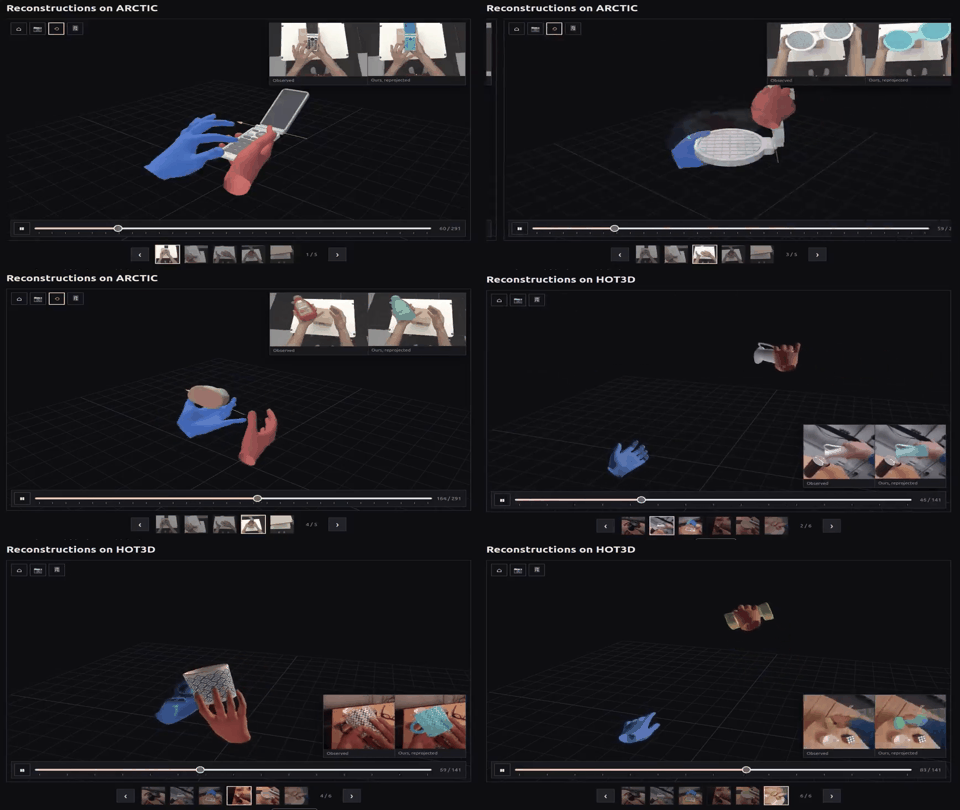
▶️ Live Preview: Full 3D joint kinematic estimation & dense surface mesh tracking in microgravity. 📥 [Click here to view/download full HD MP4] |

▶️ Live Preview: Real-time visual relationship graph [Subject → Predicate → Object] predicting task topology. 📥 [Click here to view/download full HD MP4] |
Core Technical Capabilities:
|
Core Technical Capabilities:
|
flowchart TD
    A["Monocular Video Stream (RGB Camera)"] --> B["Perception Agent"]
    B --> C["RHINO & Multi-HMR Pipeline<br/>(3D Human Mesh + Novel Object Reconstruction)"]
    B --> D["RelSGG Structure Detection<br/>(Dynamic Scene Graph Generation)"]
    C --> E["Metric 3D Spatial Distance & Contact Estimation"]
    D --> F["Semantic Relationship Triplets<br/>(e.g., hand touching lid, box inside container)"]
    E --> G["Shared Digital Twin Memory Blackboard"]
    F --> G
    G --> H["Deterministic Validation Agent (FSM)"]
    H --> I["Real-Time 3D Digital Twin GUI"]
    H --> J["Proactive Guidance & Offline Audio Alerts"]
$$ \mathcal{L}{\mathrm{total}} = \mathcal{L}{\mathrm{reproj}} + \lambda_{\mathrm{contact}}\mathcal{L}{\mathrm{contact}} + \lambda{\mathrm{pen}}\mathcal{L}{\mathrm{penetration}} + \lambda{\mathrm{smooth}}\mathcal{L}_{\mathrm{temporal}} $$
$$ \mathbf{P}{\mathcal{R}} = \mathbf{R}{\mathrm{ext}} \cdot \mathbf{P}{\mathcal{C}} + \mathbf{T}{\mathrm{ext}} $$
This enables calculating millimeter-accurate Euclidean clearances between astronaut fingertips and experiment handles without requiring active LiDAR sensors.
maelic/relsgg-vits16plus): Uses vision transformers to evaluate pairwise spatial and semantic interactions across detected entities.$$ \langle \text{operator_hand} \xrightarrow{\text{touching}} \text{container_lid} \rangle \quad\longrightarrow\quad \langle \text{red_box} \xrightarrow{\text{extracted from}} \text{container_box} \rangle $$
$$ \mathcal{T}_{\mathrm{state}} = \left\langle \text{Subject} \xrightarrow{\text{Predicate}} \text{Object} \right\rangle $$
src/core/shared_memory.py), triggering deterministic procedural transitions or urgent spoken voice alerts (ERROR_SEQ, ERROR_SKIP) when anomalies occur.The system features a custom mission-grade ground and on-board console located in the frontend/ directory. Built with React 19, TypeScript, Vite, and Tailwind CSS v4, the interface mirrors real space telemetry dashboards deployed for ISRO flight monitoring.
The frontend connects to the Python 8-agent backend through 5 specialized, decoupled streaming and REST pipelines hosted by DualVideoPipeline on port 8080:
flowchart LR
    subgraph PythonBackend["Python Multi-Agent Backend (main.py)"]
        direction TB
        Agents["8-Agent Blackboard Engine<br/>(Perception, Fusion, HAR, FSM)"]
        SharedMem["Shared Digital Twin Memory<br/>(src/core/shared_memory.py)"]
        VideoPipe["DualVideoPipeline Server<br/>(src/streaming/video_pipeline.py:8080)"]
        SessionLog["Session Action Logger<br/>(experiments/session_actions.json)"]
        Agents --> SharedMem
        SharedMem --> VideoPipe
        Agents --> SessionLog
    end

    subgraph FrontendApp["React 19 Frontend (frontend/)"]
        direction TB
        HookTelem["useTelemetry.ts (25 Hz)"]
        HookTwin["useDigitalTwin.ts (10 Hz)"]
        HookAction["useSessionActions.ts"]
        C2Controls["HumanConsentModal.tsx"]
        Cam1["Camera 01 (HAR View)"]
        Cam2["Camera 02 (Twin View)"]
        Timeline["Process Timeline & Anomaly"]
    end

    VideoPipe -- "MJPEG Stream (/stream)" --> Cam1
    VideoPipe -- "MJPEG Stream (/twin_stream)" --> Cam2
    VideoPipe -- "JSON Telemetry (/telemetry)" --> HookTelem
    VideoPipe -- "JSON Scene Graph (/api/digital_twin)" --> HookTwin
    SessionLog -. "JSON File Read (/api/session_actions)" .-> VideoPipe
    VideoPipe -- "JSON Actions" --> HookAction
    HookTelem --> Cam1 & Timeline
    HookTwin --> Cam2
    HookAction --> Timeline
    C2Controls -- "POST /reset, /start, /api/source, /api/experiment" --> VideoPipe
    VideoPipe -- "Dynamic Switch Flags" --> Agents
/stream & /twin_stream):
MonitoringAgent composites 2D bounding boxes, 3D joints, and metric labels onto the raw frame, encodes it to JPEG (cv2.imencode), and buffers it. The threaded HTTP server streams multipart boundary frames at 30 FPS.<img> elements (API.STREAM and API.TWIN_STREAM). An event-driven fallback automatically initiates snapshot polling if the stream disconnects./telemetry at 25 Hz / 40ms):
DigitalTwinMemory (FPS, latency, step ID, step name, verdict, anomaly code, lid angle, debounce counts).useTelemetry.ts at 40ms. Includes request deduplication (inFlightRef) to avoid overlapping HTTP requests and a custom shallow equality comparator (shallowTelemetryEqual) to prevent unnecessary React re-renders when values are steady./api/digital_twin at 10 Hz / 100ms):
DigitalTwinAgent synchronizes 3D bounding boxes, entity poses in rack frame $\mathcal{R}$, container lid angles, and astronaut joint vectors.useDigitalTwin.ts at 100ms to update virtual entity representations without loading the 25 Hz video bus./api/session_actions):
ActionSessionLogger writes finalized step intervals, durations, and anomaly incidents into experiments/session_actions.json.useSessionActions.ts to populate the historical incident table and compliance statistics in AnomalyDetection.tsx.GET /reset: Signals the Validation Agent to reset the FSM to State 0.GET /start: Resumes or starts the experiment sequence.GET /api/source?set=<source>: Dynamically hot-swaps input feeds (e.g. 0 for live webcam, c1.mp4 for recorded clip, red_yellow.mp4 for benchmark simulation) without restarting the Python process.GET /api/experiment?set=<config>: Switches the active procedural JSON protocol on the fly.GET /api/analyze: Triggers the asynchronous offline LLM mission debriefing engine (offline_llm_analyzer.py).Autonomous, offline, on-board Artificial Intelligence assistant designed to track, guide, and deterministically validate procedural experiments inside the science modules (BAS-03/BAS-04) of the upcoming Bharatiya Antariksh Station.
Python
3
74 commits
updated Sep 29, 2026
Autonomous, offline, on-board Artificial Intelligence assistant designed to track, guide, and deterministically validate procedural experiments inside the science modules (BAS-03/BAS-04) of the upcoming Bharatiya Antariksh Station.
🔗 Models & Datasets: Download from Google Drive
We have performed all under mention operations with no dedicated GPU and purely based on CPU performance. If you can use a dedicated GPU to run this project you will get more FPS.
To adapt this Multi-Agent system for a new, custom experiment, follow this step-by-step procedure:
Define the New Experiment's Procedure (FSM)
configs/ folder (e.g., configs/new_experiment_fsm.json).configs/experiment_fsm.json and modify the states, expected_events, and anomalies for your new experiment's logic.Update the Object Classes (Zero Code Changes)
configs/classes.json and add your new experiment's object classes (e.g., "tool_wrench": 5, "solar_panel": 6).Generate the Synthetic Dataset
python tools/generate_synthetic_data.py --dataset to generate a domain-randomized synthetic YOLO dataset in the dataset/ directory.(Optional) Augment with Real-World Data
python tools/webcam_annotator.py to record yourself interacting with physical mock-ups of your experiment's objects and annotate the frames with the new class labels.Train the Object Detection Model (YOLOv8)
yolov8n.pt) to recognize the new dataset using Ultralytics YOLO:
yolo detect train data=dataset/data.yaml model=yolov8n.pt epochs=100 imgsz=640.pt weights file into the models/ directory.Update the Agents for the New Logic
models/new_experiment_model.pt) in main.py or your configuration.src/agents/har_agent.py (and potentially src/agents/spatial_agent.py) to recognize Human-Object Interactions (HOIs) associated with your new objects.Run the New Experiment
python main.py --config configs/new_experiment_fsm.jsonThe system is engineered as an Optimized On-Board Multi-Agentic System (MAS) collaborating asynchronously over a thread-safe Digital Twin Memory Blackboard:
                    +──────────────────────────────────────────────+
                    │      SHARED STATE (DIGITAL TWIN MEMORY)      │
                    │  • Fused 3D Astronaut Kinematics in Frame R  │
                    │  • Object States: DOCKED / GRASPED / EXTRACT │
                    │  • Active HOI Spatial Distance Matrix        │
                    │  • FSM Step (S0-S3) & 15-Frame Debounce      │
                    │  • Anomaly Diagnostics & Health Telemetry    │
                    +───────▲──────────────▲──────────────▲────────+
                            │              │              │
     [Inbound Perception]   │              │ [Validation] │ [Egress Output]
  ┌─────────────────────────┴──┐   ┌───────┴──────┐   ┌───┴────────────────────────┐
  │ 1. Perception Agent        │   │ 5. DT Agent  │   │ 7. Reasoning Agent         │
  │    (YOLOv8n + 3D HMR)      │   │    (3D Sync) │   │    (Next-Step Guidance)    │
  │ 2. IMU Agent               │   │ 6. Validation│   │ 8. Monitoring Agent        │
  │    (128Hz + ZUPT Filter)   │   │    Agent     │   │    (GUI + Offline TTS +    │
  │ 3. Fusion Agent            │   │    (Det. FSM)│   │     RTSP + JSONL Telemetry)│
  │    (Constrained UKF)       │   └──────────────┘   └────────────────────────────┘
  │ 4. HAR Agent               │
  │    (AdaSpot + HOI Engine)  │
  └────────────────────────────┘
| Requirement | Implementation in System | Technical Approach |
|---|---|---|
| Track Sequence of Experiment | Perception + Fusion + HAR + Validation Agents | Multi-threaded 30 FPS video ingest, YOLOv8n, 3D pose, HOI metrics, and deterministic state transitions. |
| Suggest Next Step | Reasoning & Guidance Agent | Automatically produces proactive voice and on-screen instructions upon each state entry. |
| Voice-based Alerts | Validation Agent + Monitoring Agent (TTS) | Anomaly detector flags ERROR_SEQ / ERROR_SKIP $\to$ offline neural TTS speaks urgent warnings. |
| Timestamped Structured Telemetry | Monitoring Agent (jsonl_logger.py) | Serializes states and events into structured .jsonl lines, achieving a 3,000,000:1 compression ratio (<15 KB per 30-min run). |
| Dual Video Output | Monitoring Agent (video_pipeline.py) | Concurrent local H.264 video recording (experiments/*.mp4) + real-time RTSP/HTTP network streaming (port 8080). |
| Mission Control GUI | Monitoring Agent + Web Viewer | Unified Mission Console displaying live stream with 2D/3D overlays, 3D Digital Twin, and step checklist. |
| Synthetic Dataset Generation | tools/generate_synthetic_data.py | Domain-randomized 3D generator (inverted $0G$ angles, space shadows, lighting) with pixel-perfect YOLO labels. |
| Orientation-Agnostic 3D Tracking | perception_agent.py + fusion_agent.py | Decouples floating body tilt via Canonical Orientation Constraint (COC) and transforms into rigid Rack Frame $\mathcal{R}$. |
| Offline Standalone System | Master Orchestrator (main.py) | 100% self-contained Python architecture with zero cloud dependencies. Runs on standard PCs and Windows 11. |
Configured for the ISRO benchmark experiment:
"You are given a box that contains two smaller boxes of color red and yellow."
stateDiagram-v2
    [*] --> State_0_Idle: System Initialized

    State_0_Idle --> State_1_Container_Open: Lid Opened (angle >= 40 deg, >= 15 frames)
    State_0_Idle --> State_0_Idle: Voice: "Please open container box"

    State_1_Container_Open --> State_2_Red_Extracted: Red Box extracted outside container (>= 15 frames)
    State_1_Container_Open --> State_1_Container_Open: Voice: "Next step: Please extract the red box"
    State_1_Container_Open --> ERROR_SEQ_YellowFirst: Yellow Box touched or extracted

    State_2_Red_Extracted --> State_3_Complete: Yellow Box extracted outside container (>= 15 frames)
    State_2_Red_Extracted --> State_2_Red_Extracted: Voice: "Next step: Please extract the yellow box"
    State_2_Red_Extracted --> ERROR_SKIP_PrematureClose: Container closed before yellow extracted

    State_3_Complete --> [*]: Voice: "Experiment successfully completed"

    ERROR_SEQ_YellowFirst --> State_1_Container_Open: Voice Alert + Return to Red step
    ERROR_SKIP_PrematureClose --> State_2_Red_Extracted: Voice Alert + Resume Yellow step
Create and activate a virtual environment, then install the required packages:
# Windows (PowerShell)
python -m venv .venv
.\.venv\Scripts\Activate.ps1

# For GPU & CUDA acceleration (e.g. NVIDIA RTX series with CUDA 12.x):
pip install torch torchvision --index-url https://download.pytorch.org/whl/cu124
pip install -r requirements.txt
[!TIP] Once both terminals are running, open your web browser to
http://localhost:5173/. The frontend automatically connects to the backend streaming athttp://localhost:8080/to display live camera feeds, 3D digital twins, telemetry, and FSM checklists.
npm)All frontend commands should be executed from within the [frontend/]
directory:
# Navigate to the frontend directory
cd frontend

# 1. Install all required dependencies (React 19, Vite, Tailwind CSS v4, Lucide icons, Three.js)
npm install

# 2. Start the local Vite development server with Hot Module Replacement (HMR)
npm run dev

# 3. Build the production-optimized static bundle into frontend/dist/
npm run build

# 4. Preview the production build locally (before deployment)
npm run preview

# 5. Run static lint checks using Oxlint
npm run lint
python main.py
http://localhost:8080/.jsonl telemetry.python main.py --source 0
#0 for interactive testing.python main.py --desktop-gui
python main.py --source experiments/anomaly_out_of_order_experiment.mp4
ERROR_SEQ and triggers the priority voice alert:
"Warning: Procedural error. Red box must be extracted before yellow box."python tools/generate_synthetic_data.py --dataset
dataset/images/ and dataset/labels/.python -m unittest discover -s tests -p "test_*.py" -v
In a separate terminal:
cd frontend
npm install
npm run dev
http://localhost:5173/http://localhost:8080/.realtime-work-detection/
├── configs/
│ ├── experiment_fsm.json # FSM state definitions, debouncing rules & spoken prompts
│ └── camera_calib.json # Intrinsics K and extrinsic transform [R | T] to Rack Frame R
├── docs/
│ ├── videos/ # Demonstration video assets (HMR & Structure Detection)
│ ├── BAS_SYSTEM_DOCUMENTATION.pdf
│ └── system_documentation.md
├── src/
│ ├── core/
│ │ ├── types.py # Shared data contracts (Vector3D, BBox2D, HOIInteraction, Relation)
│ │ └── shared_memory.py # Thread-safe Digital Twin Blackboard memory
│ ├── agents/
│ │ ├── perception_agent.py # YOLOv8 + PhysAstro-Pose HMR + RelSGG scene graph engine
│ │ ├── imu_agent.py # 128Hz IMU ingestion, ZUPT & synthetic kinematics
│ │ ├── fusion_agent.py # Constrained UKF + Biomechanical ROM boundary projection
│ │ ├── har_agent.py # AdaSpot RoI cropper + HOI metrics (Approach, Grasp, Extract)
│ │ ├── digital_twin_agent.py # 3D virtual rack and astronaut scene synchronizer
│ │ ├── validation_agent.py # Authoritative deterministic FSM validator (15-frame debounce)
│ │ ├── reasoning_agent.py # Procedural guidance, context generator & recovery planner
│ │ └── monitoring_agent.py # Dual video, offline TTS, JSONL telemetry & GUI coordinator
│ ├── multihmr2/ # Multi-HMR 2: Multi-person 3D Human Mesh Recovery pipeline
│ ├── ml_distance/ # Metric 3D distance and closest-grid computation
│ ├── audio/
│ │ └── offline_tts.py # Sub-100ms non-blocking offline speech synthesizer
│ ├── streaming/
│ │ └── video_pipeline.py # Local H.264 video recorder + HTTP/MJPEG broadcast server
│ ├── telemetry/
│ │ └── jsonl_logger.py # 3,000,000:1 structured telemetry compressor
│ └── gui/
│ ├── mission_gui.py # Native Tkinter spaceflight mission control dashboard
│ └── web_twin/
│ └── index.html # Modern web-based Mission Control & 3D Digital Twin console
├── relsgg/ # Visual Relationship & Structure Detection (Scene Graph Generation)
├── frontend/ # Modern Mission Control Console (React 19 + TypeScript + Vite)
│ ├── src/
│ │ ├── components/ # Camera1 (HAR), Camera2 (Twin), Timeline, Anomaly, Logs
│ │ ├── hooks/ # useTelemetry (25Hz), useDigitalTwin (10Hz), useSessionActions
│ │ ├── services/api.ts # Python backend endpoint definitions (Port 8080)
│ │ └── types/api.ts # Shared data contracts (TelemetryData, DigitalTwinData)
│ ├── package.json # Frontend dependencies (Lucide, Tailwind CSS v4)
│ └── vite.config.ts # Vite build & proxy configuration
├── tools/
│ ├── generate_synthetic_data.py # Procedural 3D microgravity dataset generator & animator
│ └── webcam_annotator.py # Interactive webcam recorder with color-assisted annotation
├── tests/
│ ├── test_fsm_debouncing.py # Tests 15-frame debounce, ERROR_SEQ, and ERROR_SKIP
│ ├── test_telemetry_ratio.py # Mathematically audits 3,000,000:1 compression ratio
│ └── test_multi_agent_flow.py # End-to-end integration test of all 8 agents
├── experiments/ # Generated test videos, telemetry logs and recordings
├── main.py # Single unified launcher executing the entire multi-agent system
├── requirements.txt # Dependencies specification
└── README.md # System documentation
In general we are generating human mess recovery using the telimentry data from the live video feed .
In space station laboratory environments (such as BAS-03/BAS-04), astronauts frequently handle both standardized and novel scientific payloads, tools, and containers under zero-gravity dynamics. Because multi-camera rigs and bulky LiDAR hardware impose prohibitive launch weight and power burdens, our system adapts the state-of-the-art RHINO paradigm: jointly reconstructing 3D human body mesh, hand articulation, and novel object geometry directly from monocular RGB video.
Combined with 3D Human Mesh Recovery (Multi-HMR) and Visual Relationship & Structure Detection (RelSGG), this framework enables contact-aware, metric spatial understanding and real-time Digital Twin synchronization.
📹 Video 1: 3D Human Mesh Recovery (Multi-HMR & RHINO), RHINO: Reconstructing Human Interactions with Novel Objects from Monocular VideosMonocular 3D Human Body Mesh, Joint Articulation & Object Contact Modeling |
📹 Video 2: AgentSTAR: Agentic Shape Tracking and Reconstruction from Monocular Videos".Hierarchical Hardware Parsing & Dynamic Relationship Triplet Extraction |
|---|---|
|
▶️ Live Preview: Full 3D joint kinematic estimation & dense surface mesh tracking in microgravity. 📥 [Click here to view/download full HD MP4] |
▶️ Live Preview: Real-time visual relationship graph [Subject → Predicate → Object] predicting task topology. 📥 [Click here to view/download full HD MP4] |
Core Technical Capabilities:
|
Core Technical Capabilities:
|
flowchart TD
    A["Monocular Video Stream (RGB Camera)"] --> B["Perception Agent"]
    B --> C["RHINO & Multi-HMR Pipeline<br/>(3D Human Mesh + Novel Object Reconstruction)"]
    B --> D["RelSGG Structure Detection<br/>(Dynamic Scene Graph Generation)"]
    C --> E["Metric 3D Spatial Distance & Contact Estimation"]
    D --> F["Semantic Relationship Triplets<br/>(e.g., hand touching lid, box inside container)"]
    E --> G["Shared Digital Twin Memory Blackboard"]
    F --> G
    G --> H["Deterministic Validation Agent (FSM)"]
    H --> I["Real-Time 3D Digital Twin GUI"]
    H --> J["Proactive Guidance & Offline Audio Alerts"]
$$ \mathcal{L}{\mathrm{total}} = \mathcal{L}{\mathrm{reproj}} + \lambda_{\mathrm{contact}}\mathcal{L}{\mathrm{contact}} + \lambda{\mathrm{pen}}\mathcal{L}{\mathrm{penetration}} + \lambda{\mathrm{smooth}}\mathcal{L}_{\mathrm{temporal}} $$
$$ \mathbf{P}{\mathcal{R}} = \mathbf{R}{\mathrm{ext}} \cdot \mathbf{P}{\mathcal{C}} + \mathbf{T}{\mathrm{ext}} $$
This enables calculating millimeter-accurate Euclidean clearances between astronaut fingertips and experiment handles without requiring active LiDAR sensors.
maelic/relsgg-vits16plus): Uses vision transformers to evaluate pairwise spatial and semantic interactions across detected entities.$$ \langle \text{operator_hand} \xrightarrow{\text{touching}} \text{container_lid} \rangle \quad\longrightarrow\quad \langle \text{red_box} \xrightarrow{\text{extracted from}} \text{container_box} \rangle $$
$$ \mathcal{T}_{\mathrm{state}} = \left\langle \text{Subject} \xrightarrow{\text{Predicate}} \text{Object} \right\rangle $$
src/core/shared_memory.py), triggering deterministic procedural transitions or urgent spoken voice alerts (ERROR_SEQ, ERROR_SKIP) when anomalies occur.The system features a custom mission-grade ground and on-board console located in the frontend/ directory. Built with React 19, TypeScript, Vite, and Tailwind CSS v4, the interface mirrors real space telemetry dashboards deployed for ISRO flight monitoring.
The frontend connects to the Python 8-agent backend through 5 specialized, decoupled streaming and REST pipelines hosted by DualVideoPipeline on port 8080:
flowchart LR
    subgraph PythonBackend["Python Multi-Agent Backend (main.py)"]
        direction TB
        Agents["8-Agent Blackboard Engine<br/>(Perception, Fusion, HAR, FSM)"]
        SharedMem["Shared Digital Twin Memory<br/>(src/core/shared_memory.py)"]
        VideoPipe["DualVideoPipeline Server<br/>(src/streaming/video_pipeline.py:8080)"]
        SessionLog["Session Action Logger<br/>(experiments/session_actions.json)"]
        Agents --> SharedMem
        SharedMem --> VideoPipe
        Agents --> SessionLog
    end

    subgraph FrontendApp["React 19 Frontend (frontend/)"]
        direction TB
        HookTelem["useTelemetry.ts (25 Hz)"]
        HookTwin["useDigitalTwin.ts (10 Hz)"]
        HookAction["useSessionActions.ts"]
        C2Controls["HumanConsentModal.tsx"]
        Cam1["Camera 01 (HAR View)"]
        Cam2["Camera 02 (Twin View)"]
        Timeline["Process Timeline & Anomaly"]
    end

    VideoPipe -- "MJPEG Stream (/stream)" --> Cam1
    VideoPipe -- "MJPEG Stream (/twin_stream)" --> Cam2
    VideoPipe -- "JSON Telemetry (/telemetry)" --> HookTelem
    VideoPipe -- "JSON Scene Graph (/api/digital_twin)" --> HookTwin
    SessionLog -. "JSON File Read (/api/session_actions)" .-> VideoPipe
    VideoPipe -- "JSON Actions" --> HookAction
    HookTelem --> Cam1 & Timeline
    HookTwin --> Cam2
    HookAction --> Timeline
    C2Controls -- "POST /reset, /start, /api/source, /api/experiment" --> VideoPipe
    VideoPipe -- "Dynamic Switch Flags" --> Agents
/stream & /twin_stream):
MonitoringAgent composites 2D bounding boxes, 3D joints, and metric labels onto the raw frame, encodes it to JPEG (cv2.imencode), and buffers it. The threaded HTTP server streams multipart boundary frames at 30 FPS.<img> elements (API.STREAM and API.TWIN_STREAM). An event-driven fallback automatically initiates snapshot polling if the stream disconnects./telemetry at 25 Hz / 40ms):
DigitalTwinMemory (FPS, latency, step ID, step name, verdict, anomaly code, lid angle, debounce counts).useTelemetry.ts at 40ms. Includes request deduplication (inFlightRef) to avoid overlapping HTTP requests and a custom shallow equality comparator (shallowTelemetryEqual) to prevent unnecessary React re-renders when values are steady./api/digital_twin at 10 Hz / 100ms):
DigitalTwinAgent synchronizes 3D bounding boxes, entity poses in rack frame $\mathcal{R}$, container lid angles, and astronaut joint vectors.useDigitalTwin.ts at 100ms to update virtual entity representations without loading the 25 Hz video bus./api/session_actions):
ActionSessionLogger writes finalized step intervals, durations, and anomaly incidents into experiments/session_actions.json.useSessionActions.ts to populate the historical incident table and compliance statistics in AnomalyDetection.tsx.GET /reset: Signals the Validation Agent to reset the FSM to State 0.GET /start: Resumes or starts the experiment sequence.GET /api/source?set=<source>: Dynamically hot-swaps input feeds (e.g. 0 for live webcam, c1.mp4 for recorded clip, red_yellow.mp4 for benchmark simulation) without restarting the Python process.GET /api/experiment?set=<config>: Switches the active procedural JSON protocol on the fly.GET /api/analyze: Triggers the asynchronous offline LLM mission debriefing engine (offline_llm_analyzer.py).


