This is the official impletations of the EMNLP Findings paper, VideoINSTA: Zero-shot Long-Form Video Understanding via Informative Spatial-Temporal Reasoning
See the codeThis is the official implementation of the paper VideoINSTA: Zero-shot Long-Form Video Understanding via Informative Spatial-Temporal Reasoning.
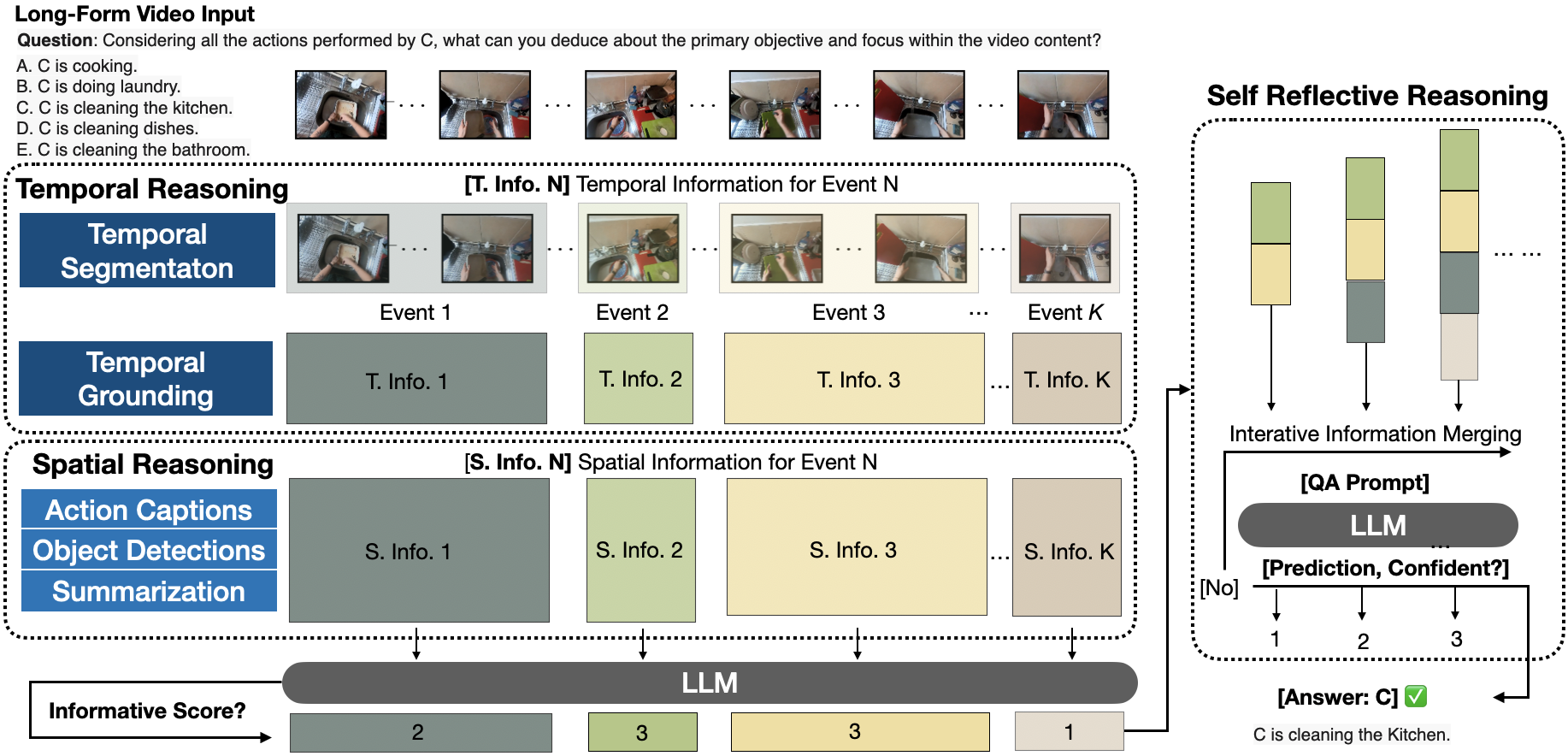
The configuration of an experiment is done in a YAML file. Since there are lots of parameters that can be configured, these will not be described in detail.
However, there are different existing configurations in the config/ folder that can be used as a references.
Moreover, reading through the following sections will give a good overview of the whole framework with all its
configuration parameters.
The entry point to the framework is the run_experiment.py script together with the video_reasoning_experiment
package.
The run_experiment.py script just calls the video_reasoning_experiment.main module.
The video_reasoning_experiment.main module is responsible for creating the necessary experiment environment.
This includes the setup of the experiment directories for saving the results, the reading of the experiment
configuration, the setup of the global logger and the creation of a specific experiment instance.
The classes for such an experiment instance are located in the video_reasoning_experiment.experiment module.
The default for using the VideoINSTA structure is the VideoReasoningVideoINSTAExperiment class.
Further classes for different experiment types could be added to this module.
The VideoReasoningVideoINSTAExperiment class is responsible for parsing the provided configuration, read all required files
from the dataset (e.g. tasks and videos), create the initial setup for the video reasoning process and iterate through
the provided video dataset.
The initial setup includes the following steps that are configured in the configuration file:
ClipStateWithoutConditionedSpatialState)DPCKNNSplit as the split operation)api.api module)The orchestration of the VideoINSTA video reasoning process is implemented in video_reasoning.controller.
This can be thought of as the main handling point for the reasoning process.
The modelling of the VideoINSTA structure is implemented in video_reasoning.structure.videoinsta.
Other structures could be implemented in the package video_reasoning.structure.
The state of a clip represents a combination of a video clip, a temporal, a spatial and a universal state. The clip simply represents a clip in the VideoINSTA structure, whereas the state represents the video reasoning state of the clip. That reasoning state combines perceptual information with reasoning information.
The modelling of a clip state and its corresponding utilities are implemented in video_reasoning.state.
The modelling of the video clip associated with a clip and its corresponding utilities are implemented in
video_reasoning.state.video. Note that such a video clip can also be a single frame or the whole video.
The clip state can be thought of as the fusion point of the video clip, the temporal state, the spatial state and the
universal state.
The modelling of that clip state and its corresponding utilities are implemented in video_reasoning.state.clip.
The spatial state represents the spatial information of the clip, i.e. action captions and object detections.
The modelling of that spatial state and its corresponding utilities are implemented in video_reasoning.state.spatial.
The temporal state represents the temporal information of the clip, i.e. the temporal grounding of the clip.
The modelling of that temporal state and its corresponding utilities are implemented
in video_reasoning.state.temporal.
The universal state represents the universal information of VideoINSTA, i.e. the summary of the action captions of the
whole video.
There should be only one universal state for the whole VideoINSTA structure, can be thought of as a singleton in the reasoning process.
The modelling of that universal state and its corresponding utilities are implemented
in video_reasoning.state.universal.
The package api contains machine-learning-model-based functionalities combined with algorithmic tools that are used
during the video reasoning process. A cool name for that is "neural modules", where lots of "AI" is used. 😉
The module api.api contains a class API that provides different public functions.
For each function, this class has a configuration for the hyperparameters of the function.
The public functions use the interfaces of the machine-learning-models in the toolbox package.
Their usage is currently statically defined in the derive functions of the video_reasoning.state.DerivableState
child-classes, but this architecture opens the possibility to dynamically define the usage of the API functions.
The package toolbox provides the different machine-learning-models that are used as tools in the "neural modules".
As you already know, these tools are composed in a reasonable way to solve higher level problems in the api.
The modules itself are only capable of solving low level problems like object detection in images, video clip captioning
or language completion, but together with the api they can solve higher level problems that occur during video
reasoning.
The sub-packages of toolbox are the different tools that are used on the "neural modules" of the api.
Some of them may contain machine-learning model implementations themselves, others may contain interfaces to libraries
or remote APIs, e.g. HuggingFace or OpenAI.
The specific tools are described in the following.
An open-world object detection model. Please note that we did not use this model in our paper. However, it can still be used for further experiments in the domain of video question answering.
toolbox.GroundingDINOtoolbox.GroundingDINO.object_detector_inferencepython -m toolbox.GroundingDINO.object_detector_inference (adapt parameters in main call of the
module)python demo/inference_on_a_image.py -c "groundingdino/config/GroundingDINO_SwinB_cfg.py" -p "weights/groundingdino_swinb_cogcoor.pth" -i "weights/10206.png" -o "./outputs" -t "the sink . the pan . the handle . the right hand"A video captioning model.
toolbox.lavila_video_captionertoolbox.lavila_video_captioner.narrator_inferencepython demo_narrator.py --video-path "../ma-nlq-vid-temp-win-mirror/data/egoschema/001d2d1b-d2f9-4c39-810e-6e2087ff9d5a.mp4A visual language model.
A video temporal grounding model.
toolbox.UniVTGtoolbox.UniVTG.temporal_grounding_inferencepython -m toolbox.UniVTG.temporal_grounding_inference (adapt parameters in main call of the module)Large language models. 🦜 There are local and remote ones. Note that the local ones are integrated via the remote HuggingFace model hub.
toolbox.llm.local.env fileimport toolbox.llm.local and use the classes in the module (compare test_llama.py script).meta-llama/Llama-2-13b-hf (see https://huggingface.co/meta-llama/Llama-2-13b-hf)meta-llama/Llama-2-7b-hf (see https://huggingface.co/meta-llama/Llama-2-7b-hf)meta-llama/Llama-2-70b-chat-hf (see https://huggingface.co/meta-llama/Llama-2-70b-chat-hf)Meta-Llama-3-8B-Instruct (see https://huggingface.co/meta-llama/Meta-Llama-3-8B-Instruct)google/gemma-7b-it (see https://huggingface.co/google/gemma-7b-it)toolbox.llm.localtoolbox.llm.remote.env fileimport toolbox.llm.remote and use the classes in the module (compare test_chat_gpt.py script).The package datasets provides the utilities for loading datasets that are used in our experiments.
New datasets can be added easily by adding a new case to the load_data function in the datasets.load module.
Please follow for the data representation of the new datasets as for the other current datasets.
If required, you can normalize the data (i.e. making the first char uppercase and assuring a question mark at the end of
the question).
meta-llama/Meta-Llama-3-8B-Instruct, please make sure to use at least 40 GB of GPU memory.Please download the following datasets and save them in your machines data mount directory, denoted as /PATH/TO/DATA.
subset_answers.json are required.val.csv are required (which contains 4,969 tasks).test.csv are required (which contains 2,134 tasks).test_q.json are required (which contains 8,000 tasks).Please download the following model checkpoints and save them in your machines data mount directory or working directory, whatever suits you best.
The directory for model checkpoints is denoted as /PATH/TO/MODEL_CHECKPOINTS.
setup_python_environment.sh installs all the required python packages using pip in a conda environment.setup.sh to create symbolic links to the required datasets and model checkpoints.start_split_slurm_jobs_from_single_config.py is used to create temporary SBATCH files that will be executed and deleted afterward.conda activate videoinstacd ./scriptssh setup.sh (Warning: please make sure to adjust the paths in this script to your needs before execution!)nano .env (three lines: HUGGINGFACE_API_KEY="YOUR_HUGGINGFACE_API_KEY_HERE"
and OPENAI_API_KEY="YOUR_OPENAI_API_KEY_HERE" and linebreak at the end of the file (i.e. "third line")!!!)python run_experiment.py --conf ./config/YOUR_CONFIG_HERE.yamlpython start_split_slurm_jobs_from_single_config.py "./config/YOUR_CONFIG_HERE.yaml" "YOUR_UNIQUE_JOB_NAME_HERE" "[(SPLIT_0_START_INDEX, SPLIT_1_END_INDEX), (SPLIT_1_START_INDEX, SPLIT_1_END_INDEX), ...]" NUM_CPU_PER_SPLIT NUM_GPU_PER_SPLIT "WORKERS_TO_INCLUDE" "WORKERS_TO_EXCLUDE"tail -f slurm/YOUR_UNIQUE_JOB_NAME_HERE_START_END.err (e.g. tail -f slurm/best_c_rp_0_50.err for the split from the task indices 0 to 50 of the EgoSchema dataset)tail -f EXPERIMENT_PATH_FROM_CONFIG/eval/CONFIG_FILE_NAME_START_END/TIMESTAMP_OF_EXECUTION/out.log (feel free to explore to output directory structure after the experiment execution).aggregate_experiment_results.py to merge the results of multiple splits into one file. Note that you cannot only get the merged accuracy, but also the following results and data:
python aggregate_experiment_results.py "action_captions" "experiments/exp3/best/eval" "extract_action_captions_egoschema_lavila_t10" "./"python aggregate_experiment_results.py "object_detections" "experiments/exp3/best/eval" "extract_object_detections_egoschema_cogagent_n3_t0" "./"python aggregate_experiment_results.py "summaries" "experiments/exp3/best/eval" "best_05_02_chatgpt35-1106" "./"python aggregate_experiment_results.py "accuracy" "experiments/exp3/best/eval" "best_05_02_chatgpt35-1106" "./"python aggregate_experiment_results.py "merged_clips" "experiments/exp3/best/eval" "best_05_02_chatgpt35-1106" "./"python aggregate_experiment_results.py "temporal_grounding_variance" "experiments/exp3/best/eval" "best_05_02_chatgpt35-1106" "./"python start_split_slurm_jobs_from_single_config.py "./config/egoschema/exp3/best/best_05_01_chatgpt35-1106.yaml" "best_c_rp" "[(0, 50), (50, 100), (100, 150), (150, 200), (200, 250), (250, 300), (300, 350), (350, 400), (400, 450), (450, 500)]" 8 1 "" "worker-1,worker-2,worker-3,worker-4,worker-7"
accuracy.json file. Moreover, you can also find it in the end of the
log file.The following configuration files were used for the experiments in the paper. For the results, please refer to the paper.
./config/egoschema/exp6/exp6_chatgpt35-1106_4clips_top2int_replace_after_sum.yaml./config/egoschema/exp6/exp6_chatgpt4-1106-preview_4clips_top2int_replace_after_sum.yaml./config/egoschema/exp6/exp6_llama3_4clips_top2int.yaml./config/egoschema/exp6/llovi_llama3_sumqa_baseline_temp0.yaml./config/nextqa/exp6/exp6_chatgpt35-1106_4clips_top2int_10wevents.yaml./config/nextqa/exp6/exp6_chatgpt4-1106-preview_4clips_top2int_10wevents_no_sums_normalize_data.yaml./config/nextqa/exp6/exp6_llama3_4clips_top2int_10wevents.yaml./config/nextqa/exp6/llovi_llama3_sumqa_baseline_temp0.yaml./config/intentqa/exp6/exp6_chatgpt35-1106_4clips_top2int_10wevents.yaml./config/intentqa/exp6/exp6_chatgpt4-1106-preview_4clips_top2int_10wevents.yaml./config/intentqa/exp6/exp6_llama3_4clips_top2int_10wevents.yaml./config/intentqa/exp6/llovi_llama3_sumqa_baseline_temp0.yaml./config/egoschema/exp6/exp6_chatgpt35-1106_4clips_top2int_replace_after_sum.yaml./config/egoschema/ablation/state_information/exp6_A_chatgpt3.5.yaml./config/egoschema/ablation/state_information/exp6_B_chatgpt3.5.yaml./config/egoschema/ablation/state_information/exp6_C_chatgpt3.5.yaml./config/egoschema/ablation/state_information/exp6_D_chatgpt3.5.yaml./config/egoschema/ablation/state_information/exp6_E_chatgpt3.5.yaml./config/egoschema/ablation/number_of_splits/exp6_2_chatgpt3.5.yaml./config/egoschema/exp6/exp6_chatgpt35-1106_4clips_top2int_replace_after_sum.yaml./config/egoschema/ablation/number_of_splits/exp6_8_chatgpt3.5.yaml./config/egoschema/ablation/state_information/exp6_B_chatgpt3.5.yaml./config/egoschema/ablation/segmentation_technique/exp6_chatgpt35-1106_4clips_top2int_replace_after_sum_KNN.yaml./config/egoschema/ablation/segmentation_technique/exp6_chatgpt35-1106_4clips_top2int_replace_after_sum_DPCKNN.yaml./config/egoschema/exp6/exp6_chatgpt35-1106_4clips_top2int_replace_after_sum.yaml./config/nextqa/ablation/state_information/exp6_B_chatgpt3.5.yaml (and others)./config/nextqa/ablation/segmentation_technique/exp6_chatgpt35-1106_4clips_top2int_10wevents_KNN.yaml./config/nextqa/ablation/segmentation_technique/exp6_chatgpt35-1106_4clips_top2int_10wevents_DPCKNN.yaml./config/nextqa/exp6/exp6_chatgpt35-1106_4clips_top2int_10wevents.yaml./config/nextqa/exp6/exp6_chatgpt35-1106_4clips_top2int_10wevents.yaml./config/nextqa/ablation/captioner/exp6_chatgpt35-1106_4clips_top2int_10wevents_LLAVA1.5.yaml./config/activitynetqa/free-form-template_modified.yaml./config/activitynetqa/llovi_llama3_baseline.yamlIf you use our framework or parts of it, please cite our paper:
@inproceedings{liao-etal-2024-videoinsta,
    title = "{V}ideo{INSTA}: Zero-shot Long Video Understanding via Informative Spatial-Temporal Reasoning with {LLM}s",
    author = "Liao, Ruotong  and
      Erler, Max  and
      Wang, Huiyu  and
      Zhai, Guangyao  and
      Zhang, Gengyuan  and
      Ma, Yunpu  and
      Tresp, Volker",
    editor = "Al-Onaizan, Yaser  and
      Bansal, Mohit  and
      Chen, Yun-Nung",
    booktitle = "Findings of the Association for Computational Linguistics: EMNLP 2024",
    month = nov,
    year = "2024",
    address = "Miami, Florida, USA",
    publisher = "Association for Computational Linguistics",
    url = "https://aclanthology.org/2024.findings-emnlp.384",
    pages = "6577--6602",
    abstract = "In the video-language domain, recent works in leveraging zero-shot Large Language Model-based reasoning for video understanding have become competitive challengers to previous end-to-end models. However, long video understanding presents unique challenges due to the complexity of reasoning over extended timespans, even for zero-shot LLM-based approaches. The challenge of information redundancy in long videos prompts the question of what specific information is essential for large language models (LLMs) and how to leverage them for complex spatial-temporal reasoning in long-form video analysis. We propose a framework VideoINSTA , i.e. INformative Spatial-TemporAl Reasoning for zero-shot long-form video understanding.VideoINSTA contributes (1) a zero-shot framework for long video understanding using LLMs; (2) an event-based temporalreasoning and content-based spatial reasoning approach for LLMs to reason over spatial-temporal information in videos; (3) a self-reflective information reasoning scheme based on information sufficiency and prediction confidence while balancing temporal factors.Our model significantly improves the state-of-the-art on three long video question-answering benchmarks: EgoSchema, NextQA, and IntentQA, and the open question answering dataset ActivityNetQA. Code is released: https://github.com/mayhugotong/VideoINSTA.",
}
This is the official impletations of the EMNLP Findings paper, VideoINSTA: Zero-shot Long-Form Video Understanding via Informative Spatial-Temporal Reasoning
See the codeThis is the official implementation of the paper VideoINSTA: Zero-shot Long-Form Video Understanding via Informative Spatial-Temporal Reasoning.
The configuration of an experiment is done in a YAML file. Since there are lots of parameters that can be configured, these will not be described in detail.
However, there are different existing configurations in the config/ folder that can be used as a references.
Moreover, reading through the following sections will give a good overview of the whole framework with all its
configuration parameters.
The entry point to the framework is the run_experiment.py script together with the video_reasoning_experiment
package.
The run_experiment.py script just calls the video_reasoning_experiment.main module.
The video_reasoning_experiment.main module is responsible for creating the necessary experiment environment.
This includes the setup of the experiment directories for saving the results, the reading of the experiment
configuration, the setup of the global logger and the creation of a specific experiment instance.
The classes for such an experiment instance are located in the video_reasoning_experiment.experiment module.
The default for using the VideoINSTA structure is the VideoReasoningVideoINSTAExperiment class.
Further classes for different experiment types could be added to this module.
The VideoReasoningVideoINSTAExperiment class is responsible for parsing the provided configuration, read all required files
from the dataset (e.g. tasks and videos), create the initial setup for the video reasoning process and iterate through
the provided video dataset.
The initial setup includes the following steps that are configured in the configuration file:
ClipStateWithoutConditionedSpatialState)DPCKNNSplit as the split operation)api.api module)The orchestration of the VideoINSTA video reasoning process is implemented in video_reasoning.controller.
This can be thought of as the main handling point for the reasoning process.
The modelling of the VideoINSTA structure is implemented in video_reasoning.structure.videoinsta.
Other structures could be implemented in the package video_reasoning.structure.
The state of a clip represents a combination of a video clip, a temporal, a spatial and a universal state. The clip simply represents a clip in the VideoINSTA structure, whereas the state represents the video reasoning state of the clip. That reasoning state combines perceptual information with reasoning information.
The modelling of a clip state and its corresponding utilities are implemented in video_reasoning.state.
The modelling of the video clip associated with a clip and its corresponding utilities are implemented in
video_reasoning.state.video. Note that such a video clip can also be a single frame or the whole video.
The clip state can be thought of as the fusion point of the video clip, the temporal state, the spatial state and the
universal state.
The modelling of that clip state and its corresponding utilities are implemented in video_reasoning.state.clip.
The spatial state represents the spatial information of the clip, i.e. action captions and object detections.
The modelling of that spatial state and its corresponding utilities are implemented in video_reasoning.state.spatial.
The temporal state represents the temporal information of the clip, i.e. the temporal grounding of the clip.
The modelling of that temporal state and its corresponding utilities are implemented
in video_reasoning.state.temporal.
The universal state represents the universal information of VideoINSTA, i.e. the summary of the action captions of the
whole video.
There should be only one universal state for the whole VideoINSTA structure, can be thought of as a singleton in the reasoning process.
The modelling of that universal state and its corresponding utilities are implemented
in video_reasoning.state.universal.
The package api contains machine-learning-model-based functionalities combined with algorithmic tools that are used
during the video reasoning process. A cool name for that is "neural modules", where lots of "AI" is used. 😉
The module api.api contains a class API that provides different public functions.
For each function, this class has a configuration for the hyperparameters of the function.
The public functions use the interfaces of the machine-learning-models in the toolbox package.
Their usage is currently statically defined in the derive functions of the video_reasoning.state.DerivableState
child-classes, but this architecture opens the possibility to dynamically define the usage of the API functions.
The package toolbox provides the different machine-learning-models that are used as tools in the "neural modules".
As you already know, these tools are composed in a reasonable way to solve higher level problems in the api.
The modules itself are only capable of solving low level problems like object detection in images, video clip captioning
or language completion, but together with the api they can solve higher level problems that occur during video
reasoning.
The sub-packages of toolbox are the different tools that are used on the "neural modules" of the api.
Some of them may contain machine-learning model implementations themselves, others may contain interfaces to libraries
or remote APIs, e.g. HuggingFace or OpenAI.
The specific tools are described in the following.
An open-world object detection model. Please note that we did not use this model in our paper. However, it can still be used for further experiments in the domain of video question answering.
toolbox.GroundingDINOtoolbox.GroundingDINO.object_detector_inferencepython -m toolbox.GroundingDINO.object_detector_inference (adapt parameters in main call of the
module)python demo/inference_on_a_image.py -c "groundingdino/config/GroundingDINO_SwinB_cfg.py" -p "weights/groundingdino_swinb_cogcoor.pth" -i "weights/10206.png" -o "./outputs" -t "the sink . the pan . the handle . the right hand"A video captioning model.
toolbox.lavila_video_captionertoolbox.lavila_video_captioner.narrator_inferencepython demo_narrator.py --video-path "../ma-nlq-vid-temp-win-mirror/data/egoschema/001d2d1b-d2f9-4c39-810e-6e2087ff9d5a.mp4A visual language model.
A video temporal grounding model.
toolbox.UniVTGtoolbox.UniVTG.temporal_grounding_inferencepython -m toolbox.UniVTG.temporal_grounding_inference (adapt parameters in main call of the module)Large language models. 🦜 There are local and remote ones. Note that the local ones are integrated via the remote HuggingFace model hub.
toolbox.llm.local.env fileimport toolbox.llm.local and use the classes in the module (compare test_llama.py script).meta-llama/Llama-2-13b-hf (see https://huggingface.co/meta-llama/Llama-2-13b-hf)meta-llama/Llama-2-7b-hf (see https://huggingface.co/meta-llama/Llama-2-7b-hf)meta-llama/Llama-2-70b-chat-hf (see https://huggingface.co/meta-llama/Llama-2-70b-chat-hf)Meta-Llama-3-8B-Instruct (see https://huggingface.co/meta-llama/Meta-Llama-3-8B-Instruct)google/gemma-7b-it (see https://huggingface.co/google/gemma-7b-it)toolbox.llm.localtoolbox.llm.remote.env fileimport toolbox.llm.remote and use the classes in the module (compare test_chat_gpt.py script).The package datasets provides the utilities for loading datasets that are used in our experiments.
New datasets can be added easily by adding a new case to the load_data function in the datasets.load module.
Please follow for the data representation of the new datasets as for the other current datasets.
If required, you can normalize the data (i.e. making the first char uppercase and assuring a question mark at the end of
the question).
meta-llama/Meta-Llama-3-8B-Instruct, please make sure to use at least 40 GB of GPU memory.Please download the following datasets and save them in your machines data mount directory, denoted as /PATH/TO/DATA.
subset_answers.json are required.val.csv are required (which contains 4,969 tasks).test.csv are required (which contains 2,134 tasks).test_q.json are required (which contains 8,000 tasks).Please download the following model checkpoints and save them in your machines data mount directory or working directory, whatever suits you best.
The directory for model checkpoints is denoted as /PATH/TO/MODEL_CHECKPOINTS.
setup_python_environment.sh installs all the required python packages using pip in a conda environment.setup.sh to create symbolic links to the required datasets and model checkpoints.start_split_slurm_jobs_from_single_config.py is used to create temporary SBATCH files that will be executed and deleted afterward.conda activate videoinstacd ./scriptssh setup.sh (Warning: please make sure to adjust the paths in this script to your needs before execution!)nano .env (three lines: HUGGINGFACE_API_KEY="YOUR_HUGGINGFACE_API_KEY_HERE"
and OPENAI_API_KEY="YOUR_OPENAI_API_KEY_HERE" and linebreak at the end of the file (i.e. "third line")!!!)python run_experiment.py --conf ./config/YOUR_CONFIG_HERE.yamlpython start_split_slurm_jobs_from_single_config.py "./config/YOUR_CONFIG_HERE.yaml" "YOUR_UNIQUE_JOB_NAME_HERE" "[(SPLIT_0_START_INDEX, SPLIT_1_END_INDEX), (SPLIT_1_START_INDEX, SPLIT_1_END_INDEX), ...]" NUM_CPU_PER_SPLIT NUM_GPU_PER_SPLIT "WORKERS_TO_INCLUDE" "WORKERS_TO_EXCLUDE"tail -f slurm/YOUR_UNIQUE_JOB_NAME_HERE_START_END.err (e.g. tail -f slurm/best_c_rp_0_50.err for the split from the task indices 0 to 50 of the EgoSchema dataset)tail -f EXPERIMENT_PATH_FROM_CONFIG/eval/CONFIG_FILE_NAME_START_END/TIMESTAMP_OF_EXECUTION/out.log (feel free to explore to output directory structure after the experiment execution).aggregate_experiment_results.py to merge the results of multiple splits into one file. Note that you cannot only get the merged accuracy, but also the following results and data:
python aggregate_experiment_results.py "action_captions" "experiments/exp3/best/eval" "extract_action_captions_egoschema_lavila_t10" "./"python aggregate_experiment_results.py "object_detections" "experiments/exp3/best/eval" "extract_object_detections_egoschema_cogagent_n3_t0" "./"python aggregate_experiment_results.py "summaries" "experiments/exp3/best/eval" "best_05_02_chatgpt35-1106" "./"python aggregate_experiment_results.py "accuracy" "experiments/exp3/best/eval" "best_05_02_chatgpt35-1106" "./"python aggregate_experiment_results.py "merged_clips" "experiments/exp3/best/eval" "best_05_02_chatgpt35-1106" "./"python aggregate_experiment_results.py "temporal_grounding_variance" "experiments/exp3/best/eval" "best_05_02_chatgpt35-1106" "./"python start_split_slurm_jobs_from_single_config.py "./config/egoschema/exp3/best/best_05_01_chatgpt35-1106.yaml" "best_c_rp" "[(0, 50), (50, 100), (100, 150), (150, 200), (200, 250), (250, 300), (300, 350), (350, 400), (400, 450), (450, 500)]" 8 1 "" "worker-1,worker-2,worker-3,worker-4,worker-7"
accuracy.json file. Moreover, you can also find it in the end of the
log file.The following configuration files were used for the experiments in the paper. For the results, please refer to the paper.
./config/egoschema/exp6/exp6_chatgpt35-1106_4clips_top2int_replace_after_sum.yaml./config/egoschema/exp6/exp6_chatgpt4-1106-preview_4clips_top2int_replace_after_sum.yaml./config/egoschema/exp6/exp6_llama3_4clips_top2int.yaml./config/egoschema/exp6/llovi_llama3_sumqa_baseline_temp0.yaml./config/nextqa/exp6/exp6_chatgpt35-1106_4clips_top2int_10wevents.yaml./config/nextqa/exp6/exp6_chatgpt4-1106-preview_4clips_top2int_10wevents_no_sums_normalize_data.yaml./config/nextqa/exp6/exp6_llama3_4clips_top2int_10wevents.yaml./config/nextqa/exp6/llovi_llama3_sumqa_baseline_temp0.yaml./config/intentqa/exp6/exp6_chatgpt35-1106_4clips_top2int_10wevents.yaml./config/intentqa/exp6/exp6_chatgpt4-1106-preview_4clips_top2int_10wevents.yaml./config/intentqa/exp6/exp6_llama3_4clips_top2int_10wevents.yaml./config/intentqa/exp6/llovi_llama3_sumqa_baseline_temp0.yaml./config/egoschema/exp6/exp6_chatgpt35-1106_4clips_top2int_replace_after_sum.yaml./config/egoschema/ablation/state_information/exp6_A_chatgpt3.5.yaml./config/egoschema/ablation/state_information/exp6_B_chatgpt3.5.yaml./config/egoschema/ablation/state_information/exp6_C_chatgpt3.5.yaml./config/egoschema/ablation/state_information/exp6_D_chatgpt3.5.yaml./config/egoschema/ablation/state_information/exp6_E_chatgpt3.5.yaml./config/egoschema/ablation/number_of_splits/exp6_2_chatgpt3.5.yaml./config/egoschema/exp6/exp6_chatgpt35-1106_4clips_top2int_replace_after_sum.yaml./config/egoschema/ablation/number_of_splits/exp6_8_chatgpt3.5.yaml./config/egoschema/ablation/state_information/exp6_B_chatgpt3.5.yaml./config/egoschema/ablation/segmentation_technique/exp6_chatgpt35-1106_4clips_top2int_replace_after_sum_KNN.yaml./config/egoschema/ablation/segmentation_technique/exp6_chatgpt35-1106_4clips_top2int_replace_after_sum_DPCKNN.yaml./config/egoschema/exp6/exp6_chatgpt35-1106_4clips_top2int_replace_after_sum.yaml./config/nextqa/ablation/state_information/exp6_B_chatgpt3.5.yaml (and others)./config/nextqa/ablation/segmentation_technique/exp6_chatgpt35-1106_4clips_top2int_10wevents_KNN.yaml./config/nextqa/ablation/segmentation_technique/exp6_chatgpt35-1106_4clips_top2int_10wevents_DPCKNN.yaml./config/nextqa/exp6/exp6_chatgpt35-1106_4clips_top2int_10wevents.yaml./config/nextqa/exp6/exp6_chatgpt35-1106_4clips_top2int_10wevents.yaml./config/nextqa/ablation/captioner/exp6_chatgpt35-1106_4clips_top2int_10wevents_LLAVA1.5.yaml./config/activitynetqa/free-form-template_modified.yaml./config/activitynetqa/llovi_llama3_baseline.yamlIf you use our framework or parts of it, please cite our paper:
@inproceedings{liao-etal-2024-videoinsta,
    title = "{V}ideo{INSTA}: Zero-shot Long Video Understanding via Informative Spatial-Temporal Reasoning with {LLM}s",
    author = "Liao, Ruotong  and
      Erler, Max  and
      Wang, Huiyu  and
      Zhai, Guangyao  and
      Zhang, Gengyuan  and
      Ma, Yunpu  and
      Tresp, Volker",
    editor = "Al-Onaizan, Yaser  and
      Bansal, Mohit  and
      Chen, Yun-Nung",
    booktitle = "Findings of the Association for Computational Linguistics: EMNLP 2024",
    month = nov,
    year = "2024",
    address = "Miami, Florida, USA",
    publisher = "Association for Computational Linguistics",
    url = "https://aclanthology.org/2024.findings-emnlp.384",
    pages = "6577--6602",
    abstract = "In the video-language domain, recent works in leveraging zero-shot Large Language Model-based reasoning for video understanding have become competitive challengers to previous end-to-end models. However, long video understanding presents unique challenges due to the complexity of reasoning over extended timespans, even for zero-shot LLM-based approaches. The challenge of information redundancy in long videos prompts the question of what specific information is essential for large language models (LLMs) and how to leverage them for complex spatial-temporal reasoning in long-form video analysis. We propose a framework VideoINSTA , i.e. INformative Spatial-TemporAl Reasoning for zero-shot long-form video understanding.VideoINSTA contributes (1) a zero-shot framework for long video understanding using LLMs; (2) an event-based temporalreasoning and content-based spatial reasoning approach for LLMs to reason over spatial-temporal information in videos; (3) a self-reflective information reasoning scheme based on information sufficiency and prediction confidence while balancing temporal factors.Our model significantly improves the state-of-the-art on three long video question-answering benchmarks: EgoSchema, NextQA, and IntentQA, and the open question answering dataset ActivityNetQA. Code is released: https://github.com/mayhugotong/VideoINSTA.",
}



