
A pixel-art office where your Claude Code sessions come to life as coworkers
JavaScript
1
3 commits
updated Sep 28, 2026
See what people are saying
README
Agent Office
A pixel-art office where your Claude Code sessions come to life as coworkers.
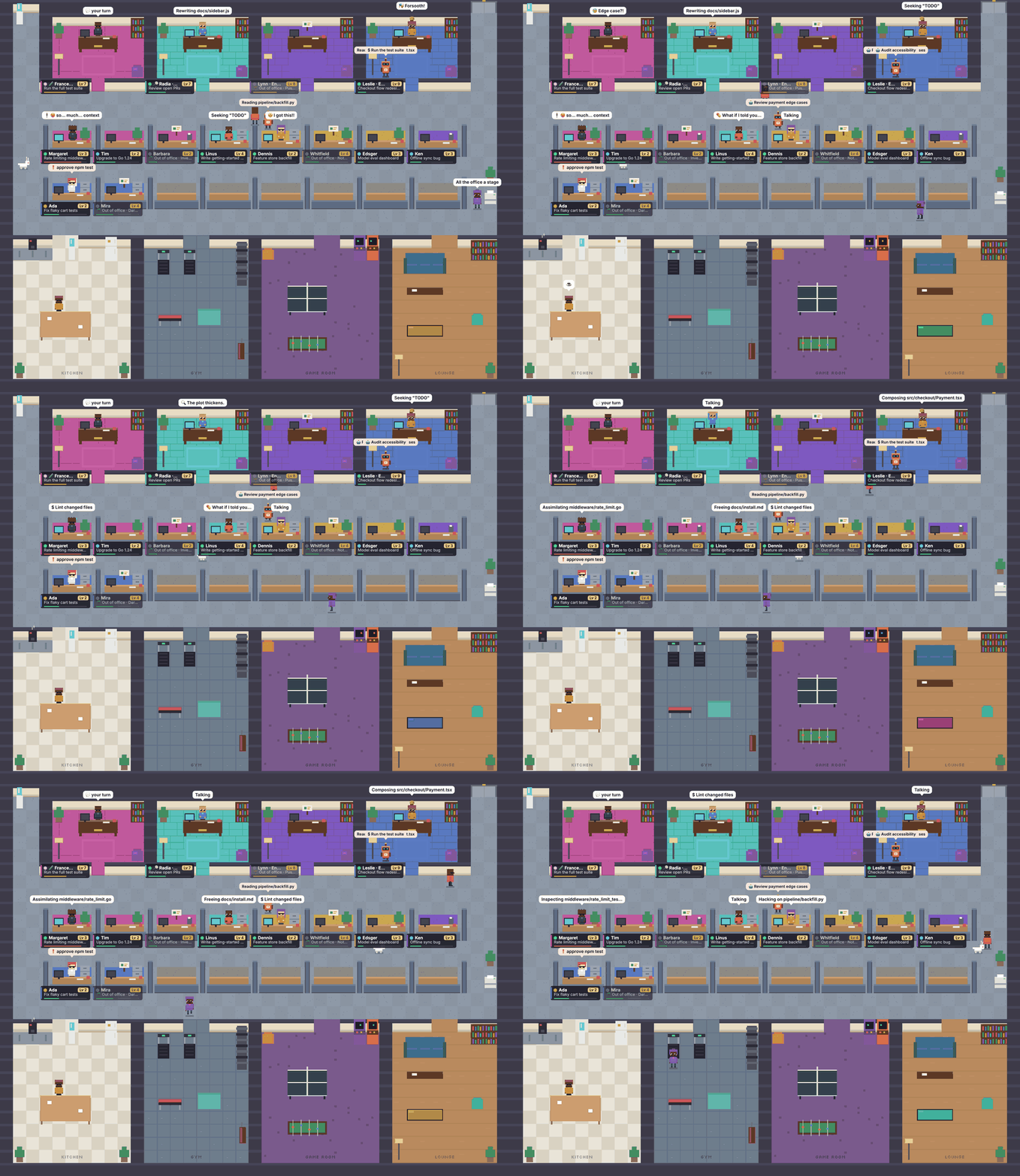
When you run several Claude Code sessions at once, it gets hard to keep track of them: which one is busy, which one is waiting for your permission, which one finished ten minutes ago and is waiting on you. Agent Office reads the session data Claude Code already keeps on your machine and turns every session into a little pixel-art employee with a desk, a status, a personality and a career. You can see at a glance who needs you, jump back into any session with one click, and have some fun along the way.
It is a single zero-dependency Node server plus a canvas front end. Every sprite is drawn procedurally in code; there are no image assets.
Features
Office
- Every recent Claude Code session gets its own cubicle, grouped by project (the coloured stripe on a nameplate marks the project).
- A kitchen, gym, game room and lounge where agents spend their breaks.
- Agents arrive and leave through the elevator.
- Zoom in and out, or fit the whole office to the window.
Agents & status
Live status comes from ~/.claude/sessions:
- Busy: typing at their desk; the speech bubble shows the current tool ("Editing Cart.tsx", "$ Run the test suite").
- Waiting: hand raised, needs your permission or input.
- Your turn: just replied (idle for under 10 minutes, configurable) and sitting at their desk waiting for you.
- Idle: on a break: coffee in the kitchen, the gym, ping pong or the arcade, the sofa, chatting with each other, or peeking into a busy colleague's cubicle.
- Offline: out of office with an empty chair. Hide them with the Show offline toggle.
- Subagents show up as little helper robots that ride the elevator and stand at the parent's desk until their job is done.
Progress & gamification
- XP from hands-on work time, tool calls, lines changed, prompts, helpers spawned and pull requests.
- Levels with ranks from Intern to Legend, 12 achievements, and a 👑 for the top agent.
- At level 5 an agent is promoted out of their cubicle into a private office in the executive wing.
- A context bar under every nameplate shows context window usage. Above 80% the agent starts sweating and mutters "maybe /compact?".
Personalities
- Presets such as Grizzled Senior, Hype Intern, Zen Monk, Sarcastic Wit, Pirate Captain, Nervous Perfectionist, Noir Detective, Shakespearean Bard, Gym Coach, Neo, Morpheus and Agent Smith.
- A personality changes how an agent types, fidgets, walks, talks and where they hang out.
- Customise name, traits, favourite hangout and look (skin, hair, clothes, hair style, glasses), or let Claude generate quirks for them.
- Bring this personality to work: when you start or resume a session from the office, the personality's work style is passed to Claude via
--append-system-prompt(a Perfectionist tests everything, a Detective finds the root cause first, a Senior keeps diffs minimal).
Roles & background agents
- Hire a PR Reviewer, QA Tester, Bug Hunter, Security Auditor or Docs Reviewer from New session.
- Run them interactively in a terminal, or inside the office: a background
claude -prun with read-only tools that hands in a 📋 report, shown in the agent's panel.
Dashboard
Press D for the office dashboard:
- Overview: total spend, spend per hour of work, hands-on work time, lines changed, PRs, office motivation, spend and work time by project, who's working right now and who needs you.
- Employees: a sortable table with status, what they're doing now, motivation, level, cost, context usage and last activity.
- Leaderboard and Settings.
Session control
- Click an agent to copy
cd <project> && claude --resume <id>and open their panel:- Work: latest report, level, XP, context gauge, achievements, stats, latest replies, prompts and files touched.
- Ask: ask the agent a question. ⚡ Quick answers in seconds from a briefing of the session; 🧠 Deep memory asks a forked copy of the full conversation. The real session is never touched.
- Personality: name, preset, traits, hangout and look.
- New session: opens iTerm or Terminal running
claude --session-id <new id>in the chosen folder, with the personality and role pre-assigned. - Open in terminal: resume a session in a new terminal window.
- End session: stops a running
claudeprocess with SIGTERM (two-step confirm; the transcript is kept). - Hide: remove a cubicle from the office (bring it back later from Settings).
Easter eggs
- Type
matrix(or click the white rabbit that sometimes hops by) for digital rain and trench coats; typebluepillto leave. The Konami code works too. - A black cat walks by twice. Déjà vu.
- Agent Smith occasionally copies himself onto a coworker.
Screenshots
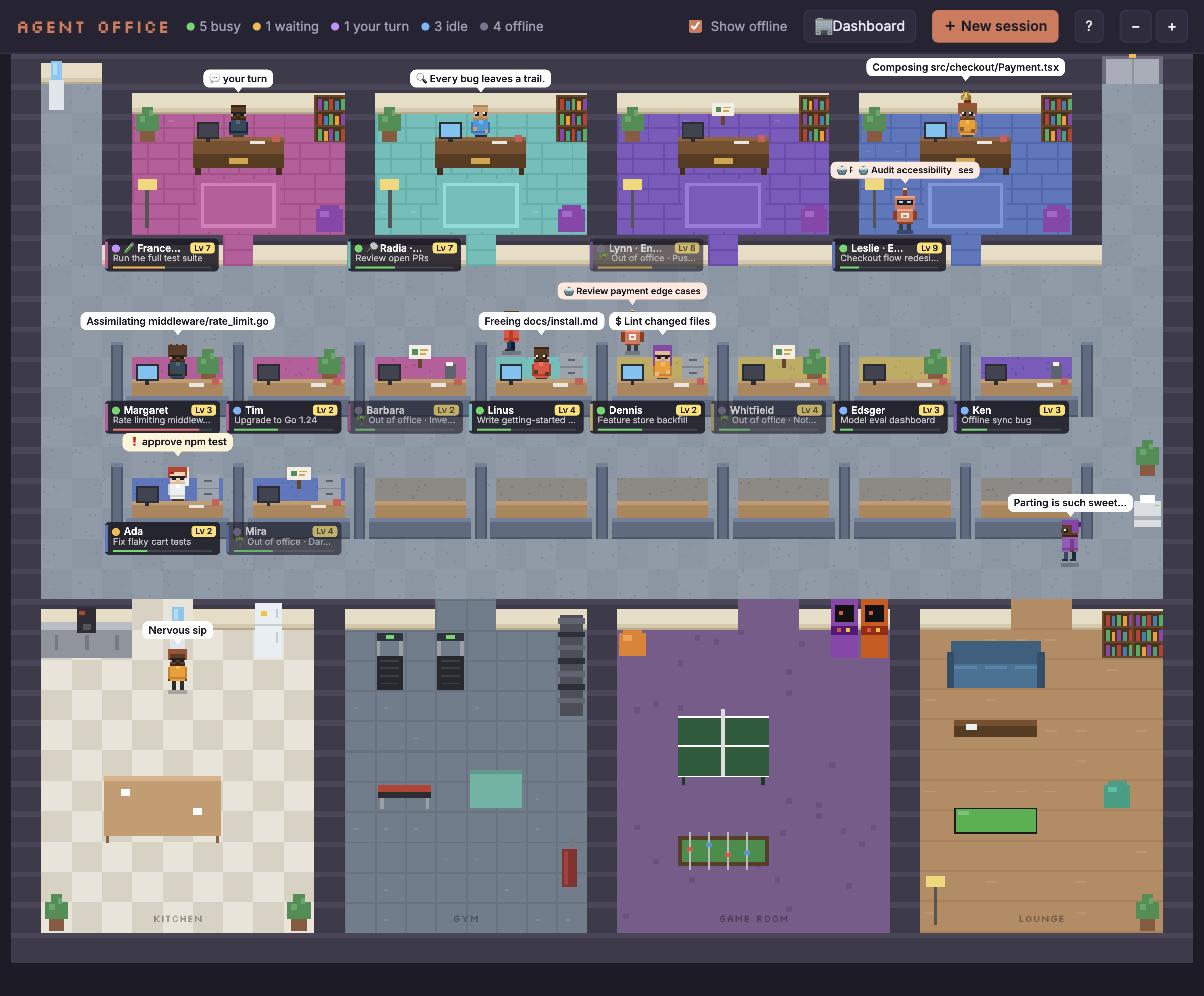 The office. Cubicles grouped by project, private offices up top, break rooms below. | 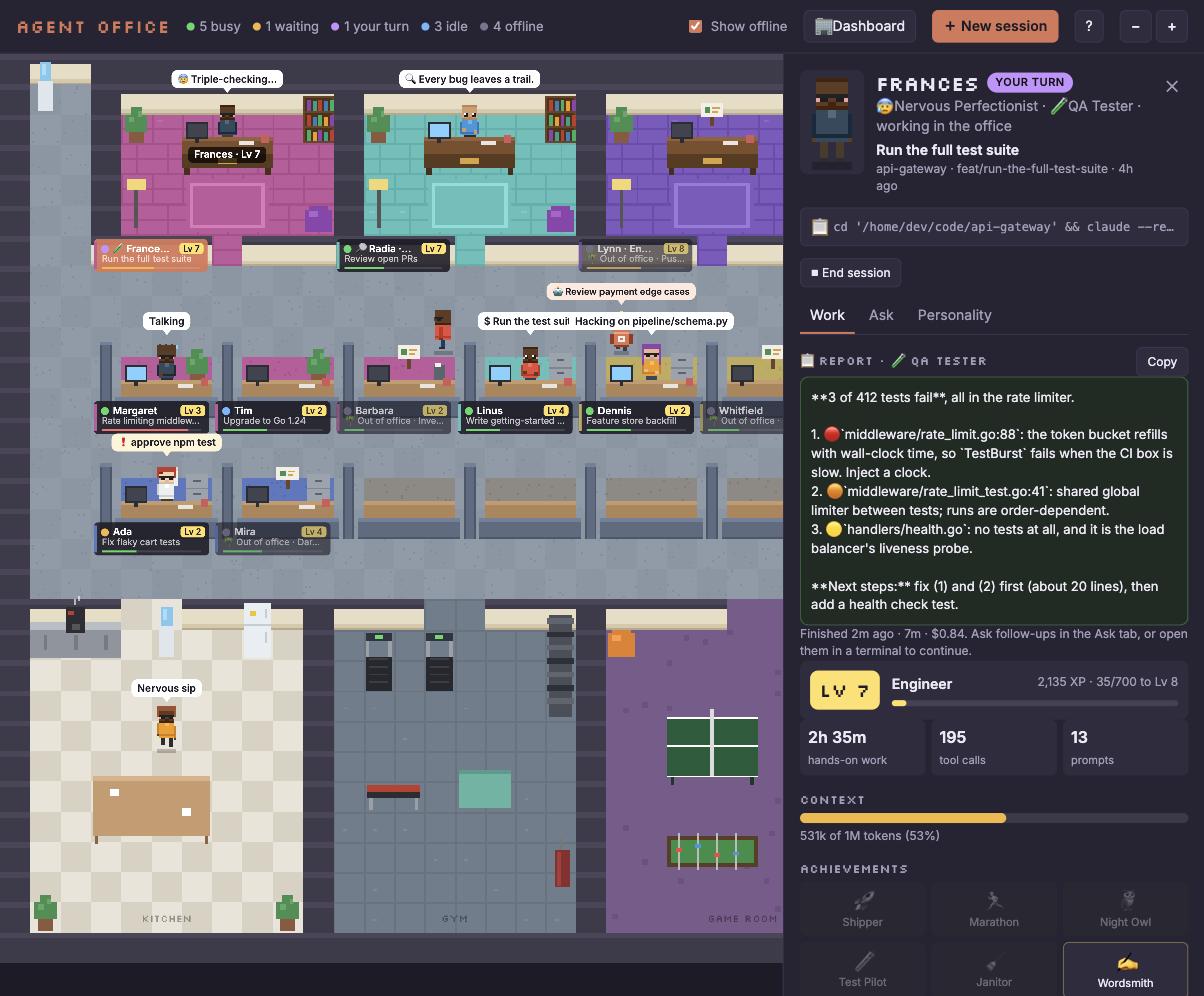 Agent panel. A QA Tester that ran in the background and handed in a report. |
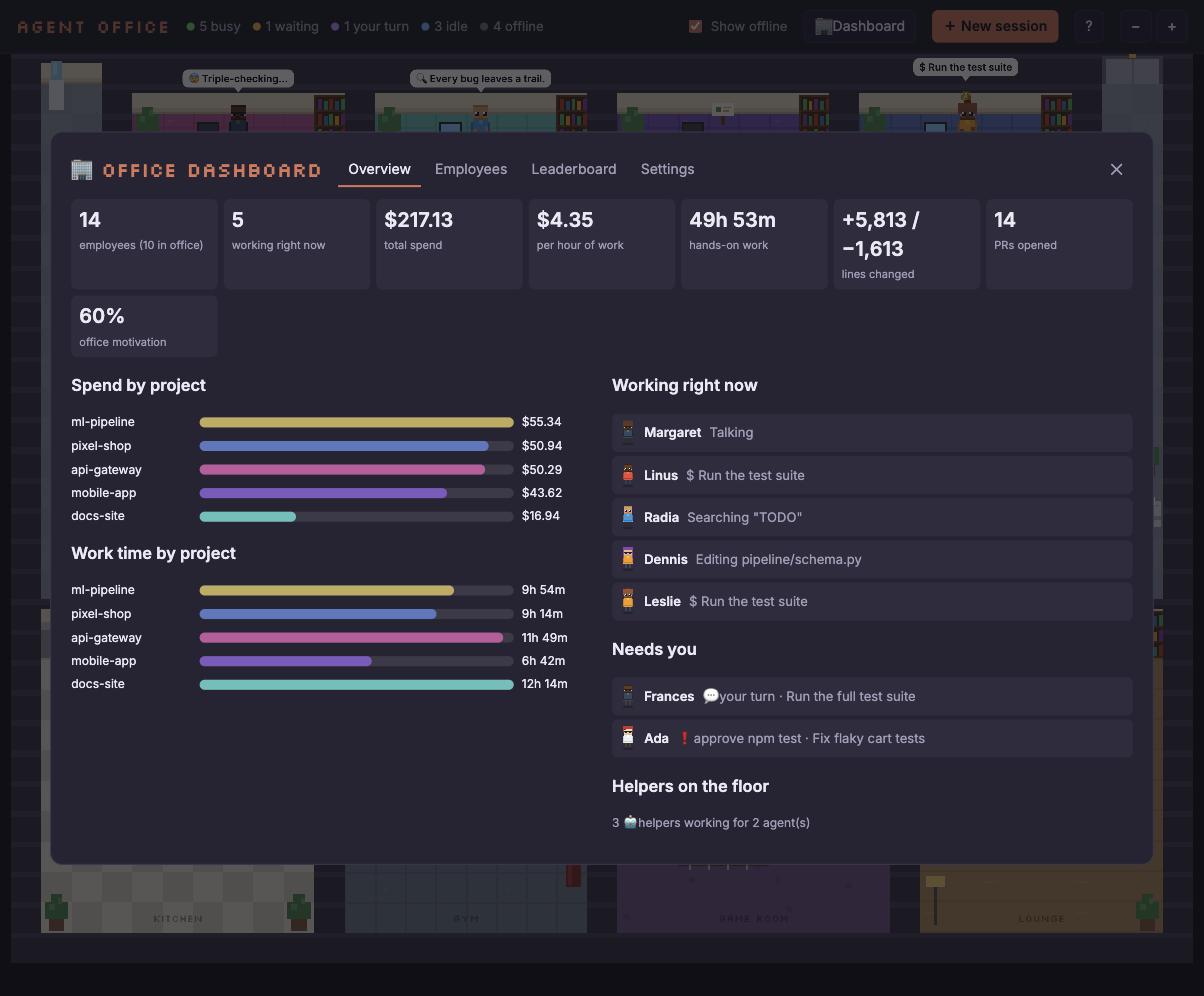 Dashboard. Spend, work time and who needs you. | 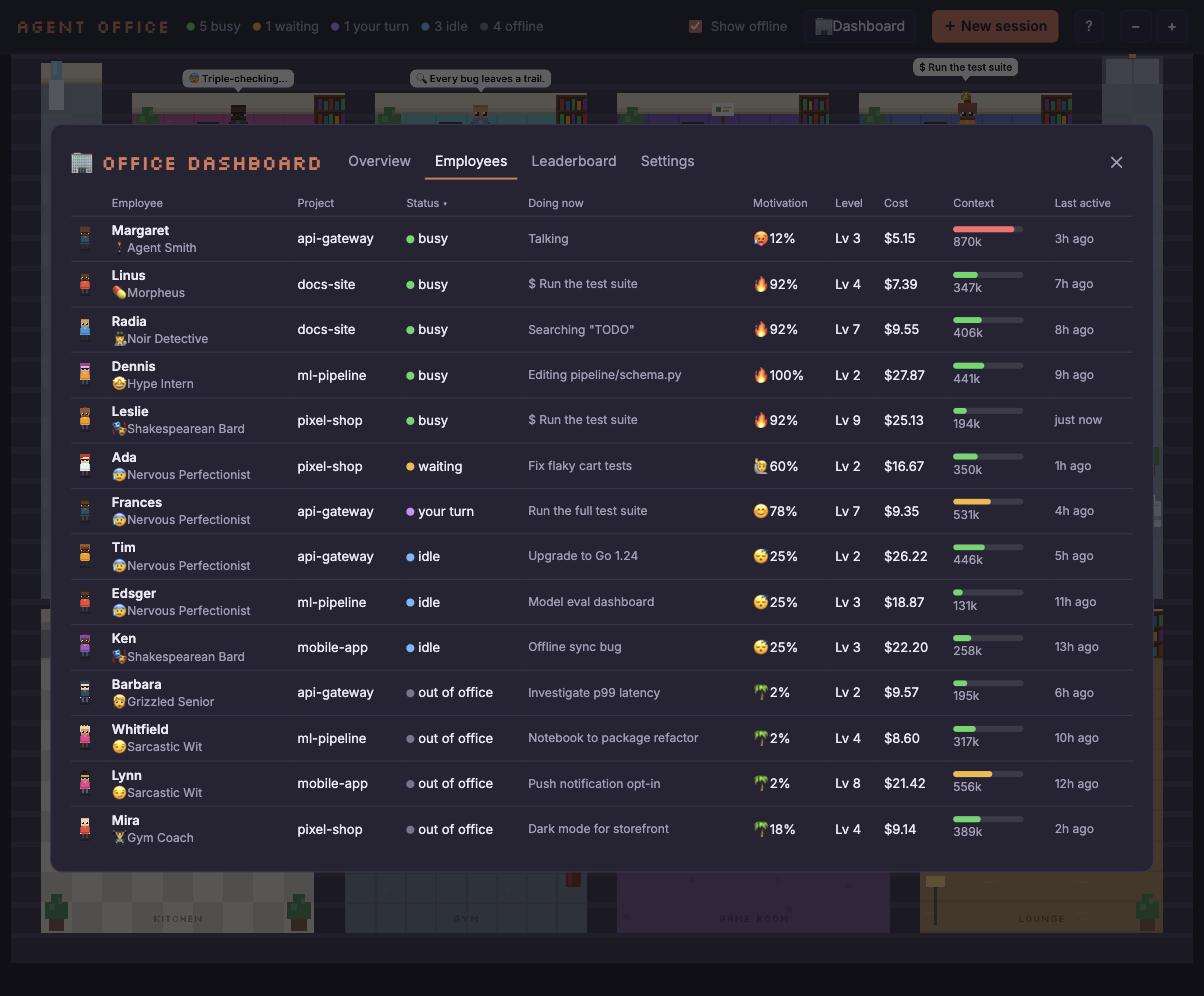 Employees. Status, motivation, level, cost and context for everyone. |
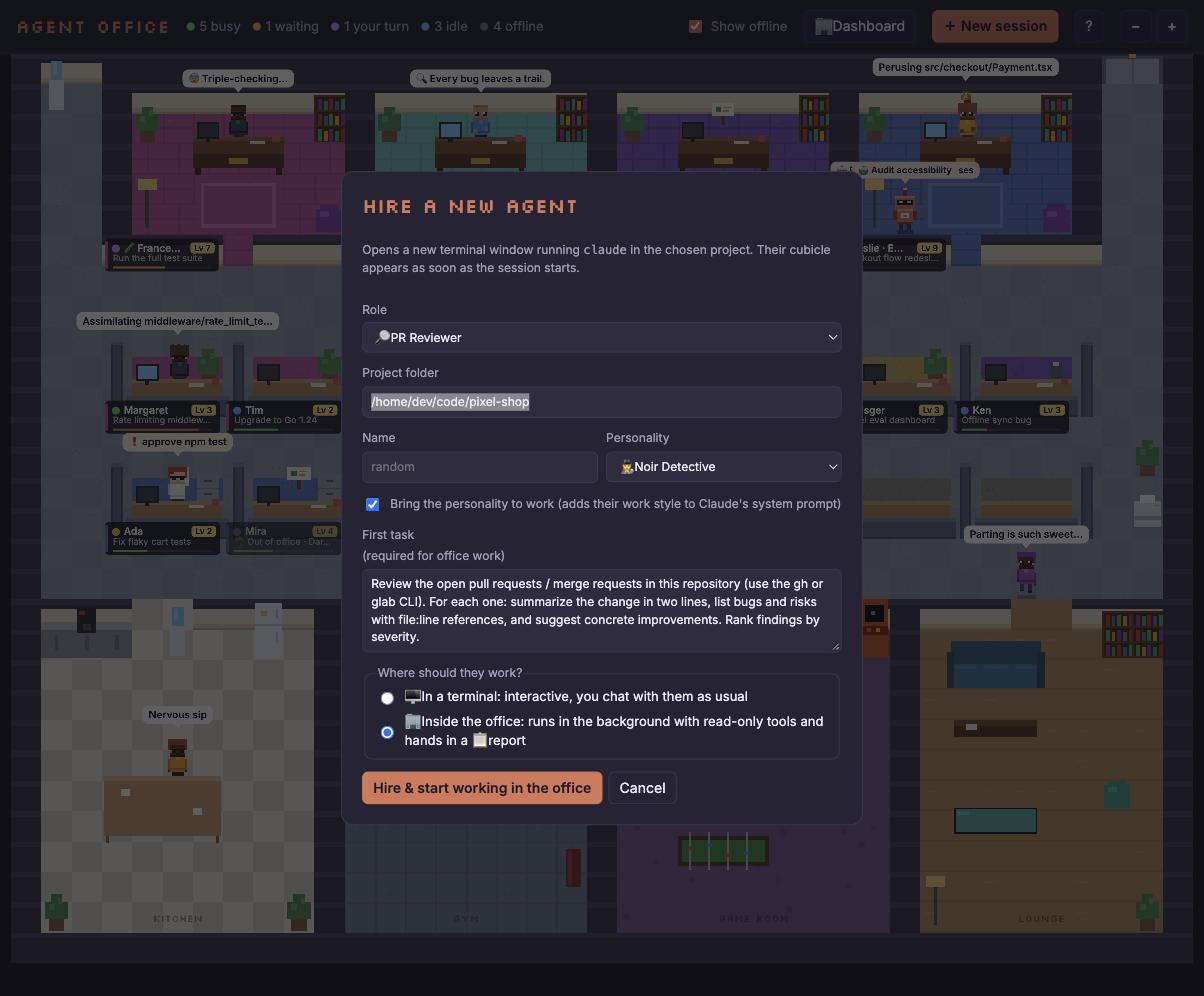 Hire a new agent. Pick a role, a personality and where they should work. | 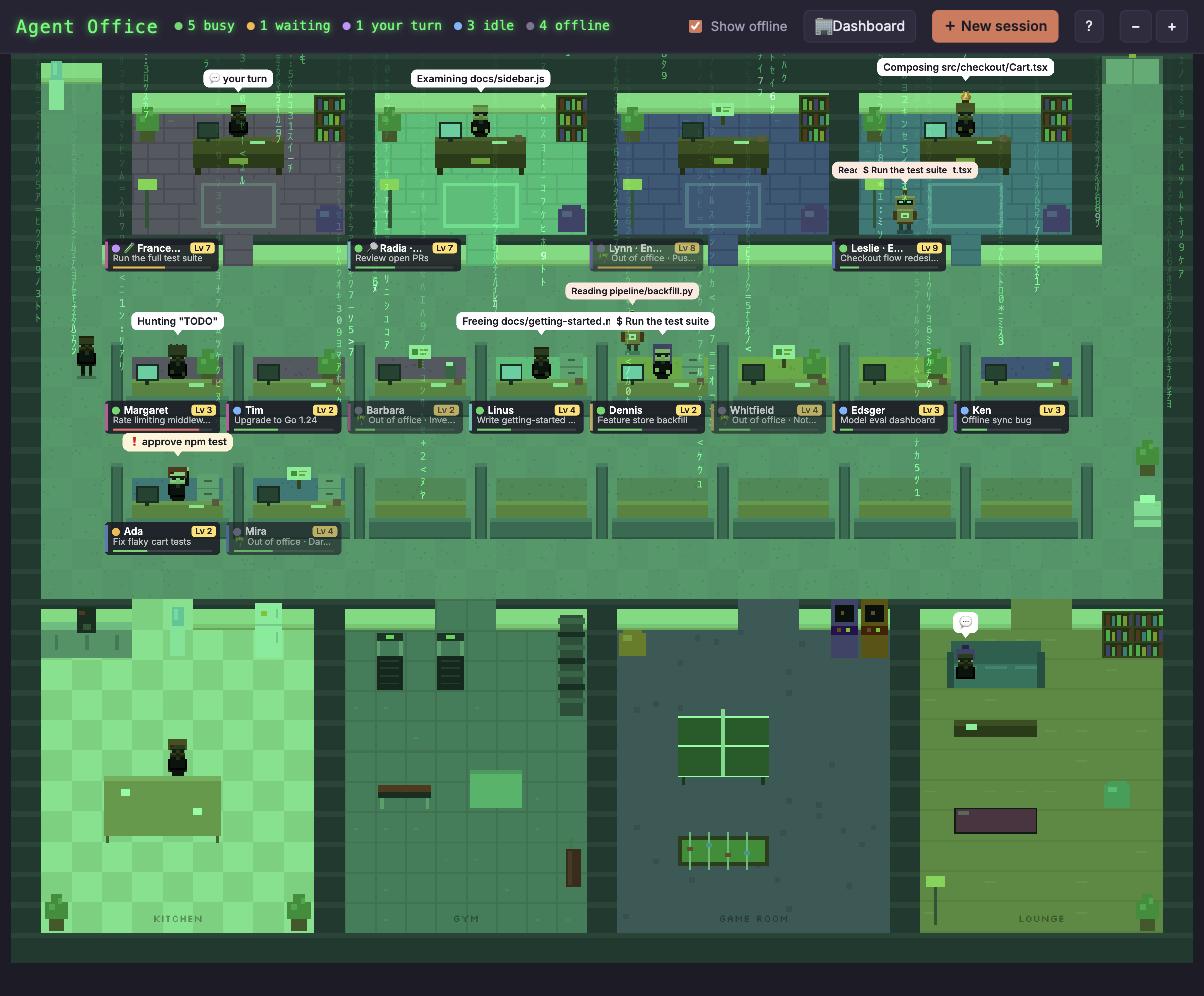 Matrix mode. Follow the white rabbit. |
All screenshots use demo mode: the agents, projects and numbers are made up.
Quick start
git clone https://github.com/alminisl/agent-office && cd agent-office && npm start
Then open http://localhost:4747. Press ? in the app for the legend and shortcuts.
Want to try it without touching your own sessions, or show it in a talk?
npm run demo
Demo mode serves a completely made-up office. Nothing is read from ~/.claude.
There is nothing to install: no dependencies, no build step.
How it works
-
Sessions come from the transcripts in
~/.claude/projects/**.jsonl(the last 14 days, up to 20 cubicles; running sessions are always shown). Transcripts are parsed for titles, prompts, replies, tool calls, files, lines changed, PRs, cost and context usage, and cached by modification time. -
Live status comes from
~/.claude/sessions, which tells the office which sessions are running, busy or waiting. -
Helpers are the subagent transcripts of a running session that were touched in the last 45 seconds.
-
Ask has two modes, and both stream the answer word by word:
- ⚡ Quick (default): the server builds a short briefing from the transcript (task, recent prompts and replies, files touched, current activity) and asks a fast model (
ASK_MODEL, defaulthaiku) in character. It takes a few seconds whatever the session size. - 🧠 Deep memory:
claude -p --resume <id> --fork-session --no-session-persistence --tools "", a throwaway fork of the full conversation with no tools. It has complete memory, but it re-reads the whole context, so it is slow and costs more on big sessions (the Ask tab shows how many tokens).
- ⚡ Quick (default): the server builds a short briefing from the transcript (task, recent prompts and replies, files touched, current activity) and asks a fast model (
-
Quirks are generated with a small
claude -p --model haiku --tools ""call. -
Background roles run
claude -pwith--allowedToolsdecided on the server per role, never taken from the browser. Anything not on the list is denied automatically in print mode, so these agents can read and inspect, but not edit, push or merge:- All roles:
Read,Grep,Glob, andgit log / diff / show / status / branch / fetch / blame,ls. - PR Reviewer: also
gh pr list / view / diff / checksandglab mr list / view / diff. - QA Tester and Bug Hunter: also common test runners (
npm test,vitest,jest,pytest,go test,cargo test,make test,rspec, Django tests, ...).
The final report is saved to
data/reports/and shown in the agent's panel. - All roles:
-
Personalities and hidden cubicles are stored locally in
data/(ignored by git).
Configuration
All settings are optional environment variables:
| Variable | Default | Description |
|---|---|---|
PORT | 4747 | Port to serve the office on |
MAX_DAYS | 14 | How many days back to look for sessions |
MAX_ROOMS | 20 | Maximum number of cubicles |
CLAUDE_DIR | ~/.claude | Where Claude Code keeps its data |
CLAUDE_BIN | claude | The Claude Code executable |
OFFICE_TERMINAL | iTerm if you run inside iTerm, else Terminal | Terminal app for New session / Open in terminal (iTerm or Terminal) |
ASK_MODEL | haiku | Model used by Quick mode in the Ask tab |
CONTEXT_WINDOW | 200000 (or 1M for [1m] models) | Context window size used for the context bar |
DEMO | unset | Set to 1 for demo mode (same as --demo) |
Example: PORT=8080 MAX_DAYS=7 npm start
Keyboard shortcuts
| Key | Action |
|---|---|
| ? | Help |
| N | New session (hire an agent) |
| D | Office dashboard |
| S | Show / hide offline agents |
| Tab / Shift+Tab | Cycle through agents |
| O | Open the selected agent in a terminal |
| C | Copy the resume command |
| A | Ask the selected agent a question |
| H | Hide the selected cubicle |
| + / - | Zoom in / out |
| 0 | Fit to window |
| Esc | Close panel / dialogs |
Privacy & safety
- The server listens on
127.0.0.1only and reads your Claude Code data locally. Your transcripts are never uploaded anywhere by Agent Office. - The only things that leave your machine are what Claude Code itself sends when you use Ask, Generate quirks or a background role, all of which run the regular
claudeCLI with your account. The page also loads its fonts from Google Fonts. - Ask never writes to your session: Quick mode uses a separate, non-persistent prompt, and Deep mode uses a forked, non-persistent copy. Both run with all tools disabled.
- Background roles get a fixed, read-only tool allowlist chosen on the server.
- End session asks twice before sending SIGTERM, and only to a
claudeprocess. - Personal settings live in
data/, which is git-ignored. - Use
npm run demofor screenshots, recordings and talks so no real session data is shown.
Requirements
- Node.js 18 or newer
- Claude Code installed and used at least once (so
~/.claudeexists) - macOS for the terminal features (New session, Open in terminal), which use AppleScript to drive iTerm or Terminal. Everything else works wherever Node and Claude Code run.
Project structure
server.mjs          Local HTTP server: parses ~/.claude, live status, XP, Ask, roles, terminal control
demo.mjs            Made-up agents and projects for demo mode
public/
  index.html        UI shell: header, side panel, dialogs, dashboard, help
  app.js            Simulation, rendering, agents' behaviour, panel, dashboard, easter eggs
  world.js          Office layout: cubicles, private offices, break rooms
  sprites.js        Procedurally drawn pixel-art characters and furniture
  personas.js       Personality presets, names, looks and quirks
  style.css         Styles
docs/               Screenshots and the GIF used in this README
data/               Your personalities, hidden cubicles and reports (git-ignored)
Contributing
Issues and pull requests are welcome. The project deliberately has no dependencies and no build step, so please keep it that way. Some ideas:
- Linux and Windows terminal support for New session / Open in terminal
- More personalities, break-room activities and achievements
- More background roles
- Sound effects (optional, off by default)
Disclaimer
Agent Office is an unofficial fan project. It is not affiliated with, endorsed by or supported by Anthropic. "Claude" and "Claude Code" are trademarks of Anthropic.
License
TBD
Similar repos


Languages
JavaScript
86.2%
HTML
7.3%
CSS
6.5%
A pixel-art office where your Claude Code sessions come to life as coworkers
JavaScript
1
3 commits
updated Sep 28, 2026
See what people are saying
README
Agent Office
A pixel-art office where your Claude Code sessions come to life as coworkers.
When you run several Claude Code sessions at once, it gets hard to keep track of them: which one is busy, which one is waiting for your permission, which one finished ten minutes ago and is waiting on you. Agent Office reads the session data Claude Code already keeps on your machine and turns every session into a little pixel-art employee with a desk, a status, a personality and a career. You can see at a glance who needs you, jump back into any session with one click, and have some fun along the way.
It is a single zero-dependency Node server plus a canvas front end. Every sprite is drawn procedurally in code; there are no image assets.
Features
Office
- Every recent Claude Code session gets its own cubicle, grouped by project (the coloured stripe on a nameplate marks the project).
- A kitchen, gym, game room and lounge where agents spend their breaks.
- Agents arrive and leave through the elevator.
- Zoom in and out, or fit the whole office to the window.
Agents & status
Live status comes from ~/.claude/sessions:
- Busy: typing at their desk; the speech bubble shows the current tool ("Editing Cart.tsx", "$ Run the test suite").
- Waiting: hand raised, needs your permission or input.
- Your turn: just replied (idle for under 10 minutes, configurable) and sitting at their desk waiting for you.
- Idle: on a break: coffee in the kitchen, the gym, ping pong or the arcade, the sofa, chatting with each other, or peeking into a busy colleague's cubicle.
- Offline: out of office with an empty chair. Hide them with the Show offline toggle.
- Subagents show up as little helper robots that ride the elevator and stand at the parent's desk until their job is done.
Progress & gamification
- XP from hands-on work time, tool calls, lines changed, prompts, helpers spawned and pull requests.
- Levels with ranks from Intern to Legend, 12 achievements, and a 👑 for the top agent.
- At level 5 an agent is promoted out of their cubicle into a private office in the executive wing.
- A context bar under every nameplate shows context window usage. Above 80% the agent starts sweating and mutters "maybe /compact?".
Personalities
- Presets such as Grizzled Senior, Hype Intern, Zen Monk, Sarcastic Wit, Pirate Captain, Nervous Perfectionist, Noir Detective, Shakespearean Bard, Gym Coach, Neo, Morpheus and Agent Smith.
- A personality changes how an agent types, fidgets, walks, talks and where they hang out.
- Customise name, traits, favourite hangout and look (skin, hair, clothes, hair style, glasses), or let Claude generate quirks for them.
- Bring this personality to work: when you start or resume a session from the office, the personality's work style is passed to Claude via
--append-system-prompt(a Perfectionist tests everything, a Detective finds the root cause first, a Senior keeps diffs minimal).
Roles & background agents
- Hire a PR Reviewer, QA Tester, Bug Hunter, Security Auditor or Docs Reviewer from New session.
- Run them interactively in a terminal, or inside the office: a background
claude -prun with read-only tools that hands in a 📋 report, shown in the agent's panel.
Dashboard
Press D for the office dashboard:
- Overview: total spend, spend per hour of work, hands-on work time, lines changed, PRs, office motivation, spend and work time by project, who's working right now and who needs you.
- Employees: a sortable table with status, what they're doing now, motivation, level, cost, context usage and last activity.
- Leaderboard and Settings.
Session control
- Click an agent to copy
cd <project> && claude --resume <id>and open their panel:- Work: latest report, level, XP, context gauge, achievements, stats, latest replies, prompts and files touched.
- Ask: ask the agent a question. ⚡ Quick answers in seconds from a briefing of the session; 🧠 Deep memory asks a forked copy of the full conversation. The real session is never touched.
- Personality: name, preset, traits, hangout and look.
- New session: opens iTerm or Terminal running
claude --session-id <new id>in the chosen folder, with the personality and role pre-assigned. - Open in terminal: resume a session in a new terminal window.
- End session: stops a running
claudeprocess with SIGTERM (two-step confirm; the transcript is kept). - Hide: remove a cubicle from the office (bring it back later from Settings).
Easter eggs
- Type
matrix(or click the white rabbit that sometimes hops by) for digital rain and trench coats; typebluepillto leave. The Konami code works too. - A black cat walks by twice. Déjà vu.
- Agent Smith occasionally copies himself onto a coworker.
Screenshots
The office. Cubicles grouped by project, private offices up top, break rooms below. | Agent panel. A QA Tester that ran in the background and handed in a report. |
Dashboard. Spend, work time and who needs you. | Employees. Status, motivation, level, cost and context for everyone. |
Hire a new agent. Pick a role, a personality and where they should work. | Matrix mode. Follow the white rabbit. |
All screenshots use demo mode: the agents, projects and numbers are made up.
Quick start
git clone https://github.com/alminisl/agent-office && cd agent-office && npm start
Then open http://localhost:4747. Press ? in the app for the legend and shortcuts.
Want to try it without touching your own sessions, or show it in a talk?
npm run demo
Demo mode serves a completely made-up office. Nothing is read from ~/.claude.
There is nothing to install: no dependencies, no build step.
How it works
-
Sessions come from the transcripts in
~/.claude/projects/**.jsonl(the last 14 days, up to 20 cubicles; running sessions are always shown). Transcripts are parsed for titles, prompts, replies, tool calls, files, lines changed, PRs, cost and context usage, and cached by modification time. -
Live status comes from
~/.claude/sessions, which tells the office which sessions are running, busy or waiting. -
Helpers are the subagent transcripts of a running session that were touched in the last 45 seconds.
-
Ask has two modes, and both stream the answer word by word:
- ⚡ Quick (default): the server builds a short briefing from the transcript (task, recent prompts and replies, files touched, current activity) and asks a fast model (
ASK_MODEL, defaulthaiku) in character. It takes a few seconds whatever the session size. - 🧠 Deep memory:
claude -p --resume <id> --fork-session --no-session-persistence --tools "", a throwaway fork of the full conversation with no tools. It has complete memory, but it re-reads the whole context, so it is slow and costs more on big sessions (the Ask tab shows how many tokens).
- ⚡ Quick (default): the server builds a short briefing from the transcript (task, recent prompts and replies, files touched, current activity) and asks a fast model (
-
Quirks are generated with a small
claude -p --model haiku --tools ""call. -
Background roles run
claude -pwith--allowedToolsdecided on the server per role, never taken from the browser. Anything not on the list is denied automatically in print mode, so these agents can read and inspect, but not edit, push or merge:- All roles:
Read,Grep,Glob, andgit log / diff / show / status / branch / fetch / blame,ls. - PR Reviewer: also
gh pr list / view / diff / checksandglab mr list / view / diff. - QA Tester and Bug Hunter: also common test runners (
npm test,vitest,jest,pytest,go test,cargo test,make test,rspec, Django tests, ...).
The final report is saved to
data/reports/and shown in the agent's panel. - All roles:
-
Personalities and hidden cubicles are stored locally in
data/(ignored by git).
Configuration
All settings are optional environment variables:
| Variable | Default | Description |
|---|---|---|
PORT | 4747 | Port to serve the office on |
MAX_DAYS | 14 | How many days back to look for sessions |
MAX_ROOMS | 20 | Maximum number of cubicles |
CLAUDE_DIR | ~/.claude | Where Claude Code keeps its data |
CLAUDE_BIN | claude | The Claude Code executable |
OFFICE_TERMINAL | iTerm if you run inside iTerm, else Terminal | Terminal app for New session / Open in terminal (iTerm or Terminal) |
ASK_MODEL | haiku | Model used by Quick mode in the Ask tab |
CONTEXT_WINDOW | 200000 (or 1M for [1m] models) | Context window size used for the context bar |
DEMO | unset | Set to 1 for demo mode (same as --demo) |
Example: PORT=8080 MAX_DAYS=7 npm start
Keyboard shortcuts
| Key | Action |
|---|---|
| ? | Help |
| N | New session (hire an agent) |
| D | Office dashboard |
| S | Show / hide offline agents |
| Tab / Shift+Tab | Cycle through agents |
| O | Open the selected agent in a terminal |
| C | Copy the resume command |
| A | Ask the selected agent a question |
| H | Hide the selected cubicle |
| + / - | Zoom in / out |
| 0 | Fit to window |
| Esc | Close panel / dialogs |
Privacy & safety
- The server listens on
127.0.0.1only and reads your Claude Code data locally. Your transcripts are never uploaded anywhere by Agent Office. - The only things that leave your machine are what Claude Code itself sends when you use Ask, Generate quirks or a background role, all of which run the regular
claudeCLI with your account. The page also loads its fonts from Google Fonts. - Ask never writes to your session: Quick mode uses a separate, non-persistent prompt, and Deep mode uses a forked, non-persistent copy. Both run with all tools disabled.
- Background roles get a fixed, read-only tool allowlist chosen on the server.
- End session asks twice before sending SIGTERM, and only to a
claudeprocess. - Personal settings live in
data/, which is git-ignored. - Use
npm run demofor screenshots, recordings and talks so no real session data is shown.
Requirements
- Node.js 18 or newer
- Claude Code installed and used at least once (so
~/.claudeexists) - macOS for the terminal features (New session, Open in terminal), which use AppleScript to drive iTerm or Terminal. Everything else works wherever Node and Claude Code run.
Project structure
server.mjs          Local HTTP server: parses ~/.claude, live status, XP, Ask, roles, terminal control
demo.mjs            Made-up agents and projects for demo mode
public/
  index.html        UI shell: header, side panel, dialogs, dashboard, help
  app.js            Simulation, rendering, agents' behaviour, panel, dashboard, easter eggs
  world.js          Office layout: cubicles, private offices, break rooms
  sprites.js        Procedurally drawn pixel-art characters and furniture
  personas.js       Personality presets, names, looks and quirks
  style.css         Styles
docs/               Screenshots and the GIF used in this README
data/               Your personalities, hidden cubicles and reports (git-ignored)
Contributing
Issues and pull requests are welcome. The project deliberately has no dependencies and no build step, so please keep it that way. Some ideas:
- Linux and Windows terminal support for New session / Open in terminal
- More personalities, break-room activities and achievements
- More background roles
- Sound effects (optional, off by default)
Disclaimer
Agent Office is an unofficial fan project. It is not affiliated with, endorsed by or supported by Anthropic. "Claude" and "Claude Code" are trademarks of Anthropic.
License
TBD
Similar repos
Languages
JavaScript
86.2%
HTML
7.3%
CSS
6.5%