Listen to YouTube & Bilibili. Anywhere.
See the code
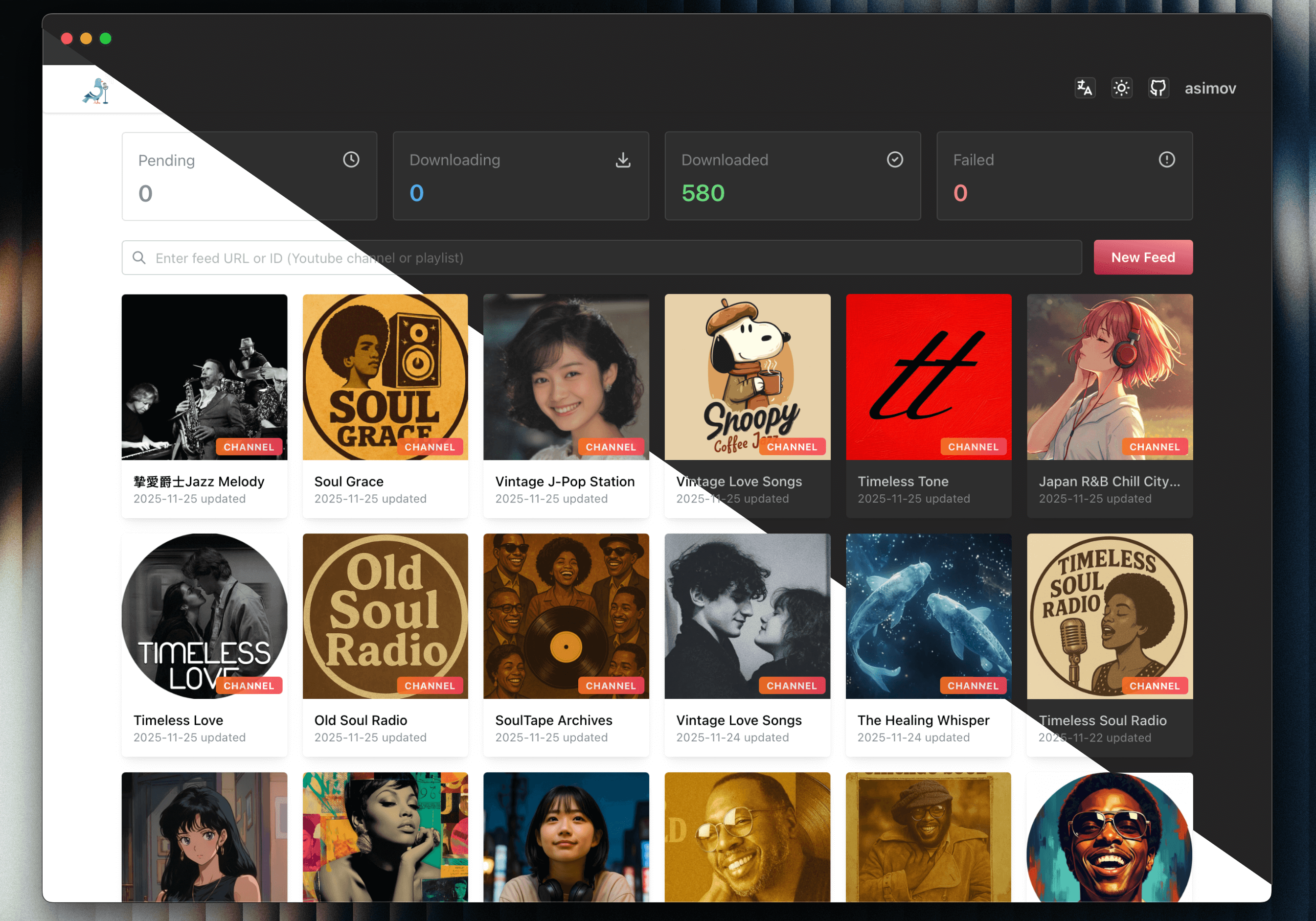
Channel list
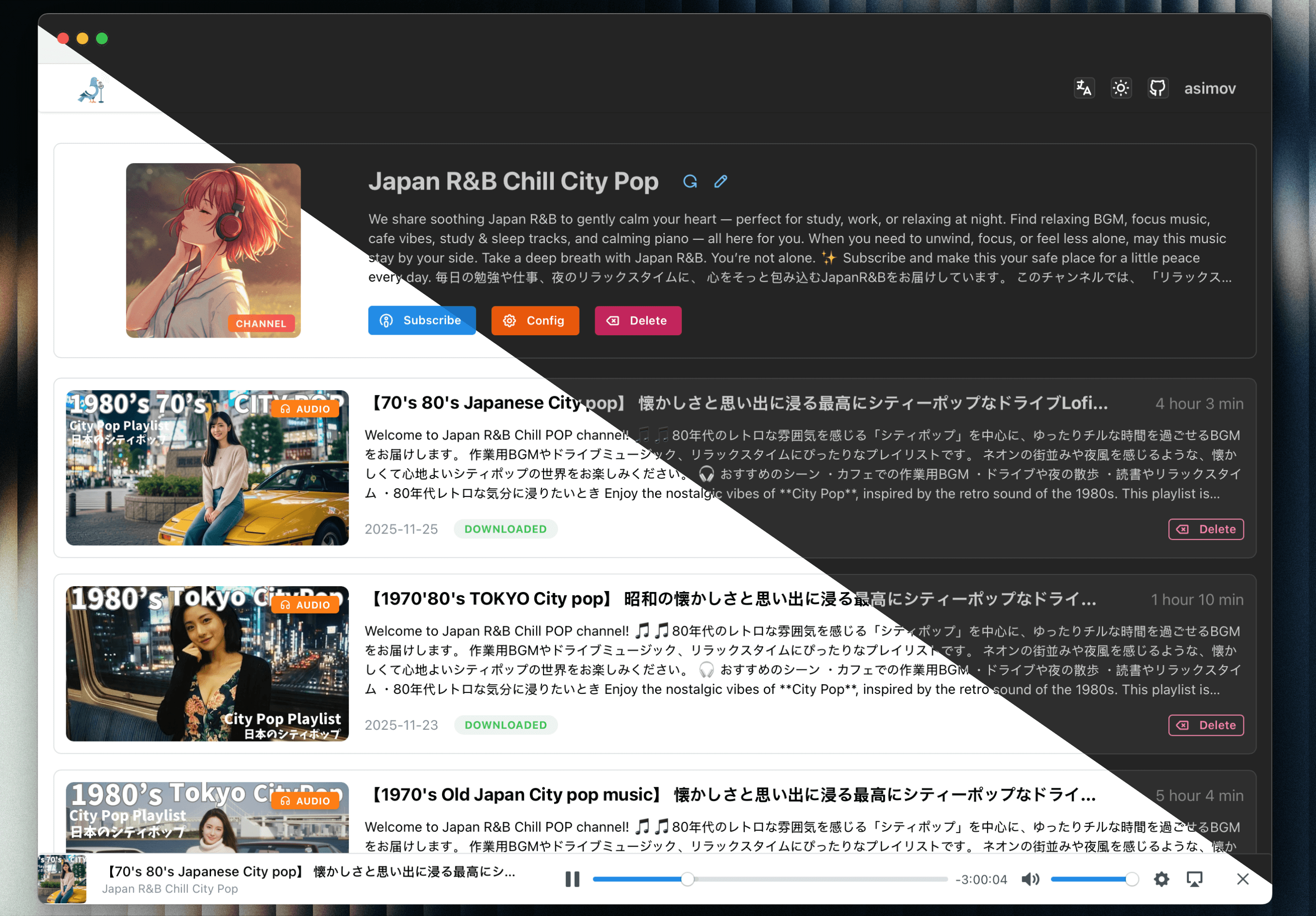
Channel detail
Make sure you have Docker and Docker Compose installed on your machine.
services:
  pigeon-pod:
    image: 'ghcr.io/aizhimou/pigeon-pod:latest'
    restart: unless-stopped
    container_name: pigeon-pod
    ports:
      - '8834:8080'
    environment:
      - SPRING_DATASOURCE_URL=jdbc:sqlite:/data/pigeon-pod.db # set to your database path
      # Optional: disable PigeonPod built-in auth when running behind another auth layer
      # - PIGEON_AUTH_ENABLED=false
    volumes:
      # Application data: SQLite database, logs, runtime configurations
      - ./data:/data
      # Optional: Separate media storage (audio & video) onto a different disk or media share
      # - /path/to/media/audio:/data/audio
      # - /path/to/media/video:/data/video
[!TIP] Storage & Directory Separation:
- By default,
./data:/datamounts application data (SQLite database, logs, runtime configs) to the local host directory for easy management and lightweight backup.- To store large downloaded media files on a dedicated bulk storage disk or NAS share, uncomment the
/data/audioand/data/videovolume mappings.- If upgrading from an older version using a named volume (
data:/data), you can keep using your named volume or copy existing data to the host (docker cp pigeon-pod:/data ./data) before switching to bind mounts.
[!WARNING]
PIGEON_AUTH_ENABLEDdefaults totrue. Set it tofalseonly if another trusted layer already protects the web UI, such as an auth proxy, reverse proxy access control, VPN, or private network.If you disable built-in auth, you must secure PigeonPod by other means. Do not expose an auth-disabled instance directly to the public Internet.
docker compose up -d
http://localhost:8834 with default username: root and default password: Root@123Make sure you have Java 17+ and yt-dlp installed on your machine.
Download the latest release JAR from Releases
Create data directory in the same directory as the JAR file.
mkdir -p data
java -jar -Dspring.datasource.url=jdbc:sqlite:/path/to/your/pigeon-pod.db \  # set to your database path
           pigeon-pod-x.x.x.jar
http://localhost:8080 with default username: root and default password: Root@123LOCAL and S3 storage modes.| Mode | Pros | Cons |
|---|---|---|
LOCAL | Easy setup, no external dependency | Uses local disk, harder to scale |
S3 | Better scalability, suitable for cloud deployment | Requires object storage setup and credentials |
git clone https://github.com/aizhimou/PigeonPod.git
cd PigeonPod
# Create data directory
mkdir -p data/audio

# Database file will be created automatically on first startup
Configure YouTube API
Start backend
cd backend
mvn spring-boot:run
cd frontend
npm install
npm run dev
http://localhost:5173http://localhost:8080Made with ❤️ for podcast enthusiasts!
⭐ If you like PigeonPod, give us a star on GitHub!
42 followers · starred Sep 2025
16 followers · starred Aug 2026
25 followers · starred Jul 2026
16 followers · starred Oct 2025
Listen to YouTube & Bilibili. Anywhere.
See the code
Channel list
Channel detail
Make sure you have Docker and Docker Compose installed on your machine.
services:
  pigeon-pod:
    image: 'ghcr.io/aizhimou/pigeon-pod:latest'
    restart: unless-stopped
    container_name: pigeon-pod
    ports:
      - '8834:8080'
    environment:
      - SPRING_DATASOURCE_URL=jdbc:sqlite:/data/pigeon-pod.db # set to your database path
      # Optional: disable PigeonPod built-in auth when running behind another auth layer
      # - PIGEON_AUTH_ENABLED=false
    volumes:
      # Application data: SQLite database, logs, runtime configurations
      - ./data:/data
      # Optional: Separate media storage (audio & video) onto a different disk or media share
      # - /path/to/media/audio:/data/audio
      # - /path/to/media/video:/data/video
[!TIP] Storage & Directory Separation:
- By default,
./data:/datamounts application data (SQLite database, logs, runtime configs) to the local host directory for easy management and lightweight backup.- To store large downloaded media files on a dedicated bulk storage disk or NAS share, uncomment the
/data/audioand/data/videovolume mappings.- If upgrading from an older version using a named volume (
data:/data), you can keep using your named volume or copy existing data to the host (docker cp pigeon-pod:/data ./data) before switching to bind mounts.
[!WARNING]
PIGEON_AUTH_ENABLEDdefaults totrue. Set it tofalseonly if another trusted layer already protects the web UI, such as an auth proxy, reverse proxy access control, VPN, or private network.If you disable built-in auth, you must secure PigeonPod by other means. Do not expose an auth-disabled instance directly to the public Internet.
docker compose up -d
http://localhost:8834 with default username: root and default password: Root@123Make sure you have Java 17+ and yt-dlp installed on your machine.
Download the latest release JAR from Releases
Create data directory in the same directory as the JAR file.
mkdir -p data
java -jar -Dspring.datasource.url=jdbc:sqlite:/path/to/your/pigeon-pod.db \  # set to your database path
           pigeon-pod-x.x.x.jar
http://localhost:8080 with default username: root and default password: Root@123LOCAL and S3 storage modes.| Mode | Pros | Cons |
|---|---|---|
LOCAL | Easy setup, no external dependency | Uses local disk, harder to scale |
S3 | Better scalability, suitable for cloud deployment | Requires object storage setup and credentials |
git clone https://github.com/aizhimou/PigeonPod.git
cd PigeonPod
# Create data directory
mkdir -p data/audio

# Database file will be created automatically on first startup
Configure YouTube API
Start backend
cd backend
mvn spring-boot:run
cd frontend
npm install
npm run dev
http://localhost:5173http://localhost:8080Made with ❤️ for podcast enthusiasts!
⭐ If you like PigeonPod, give us a star on GitHub!
42 followers · starred Sep 2025
16 followers · starred Aug 2026
25 followers · starred Jul 2026
16 followers · starred Oct 2025



