
A self-hosted video discovery, download, and library experience that turns online finds into a permanent local collection.
See the codeSee what people are saying
README

VidArch
A self-hosted video discovery, download, and library experience built for permanent local ownership.
Website · Live demo · Documentation



Overview
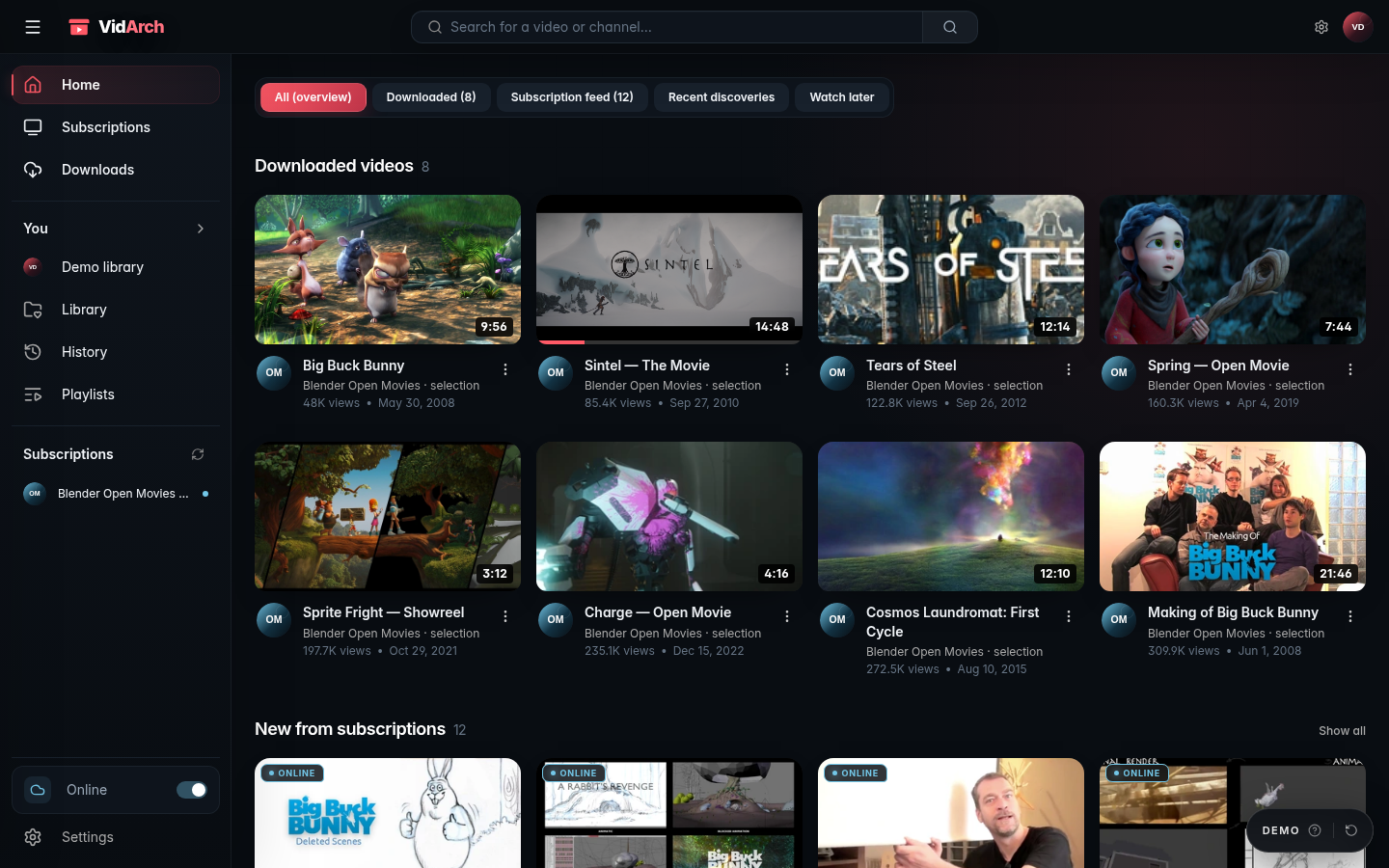
VidArch keeps familiar video-discovery patterns while adding a durable local layer. Browse subscriptions and online results, choose what matters, follow downloads, and return later from a private library backed by ordinary files and SQLite.
It remains one product across online and local use: discovery becomes download, download becomes archived media, and archived media stays browsable when network-dependent features are unavailable.
Product preview
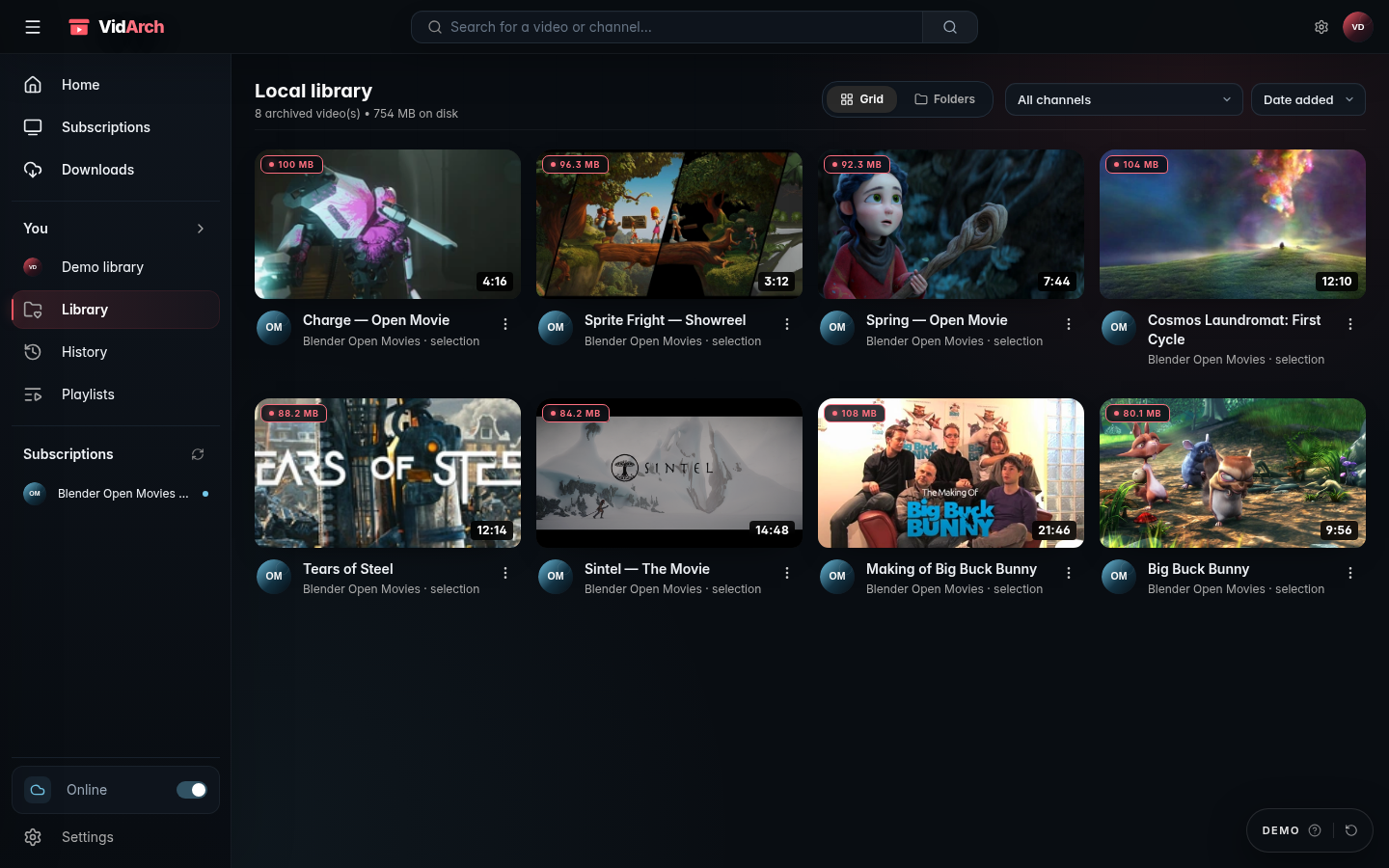
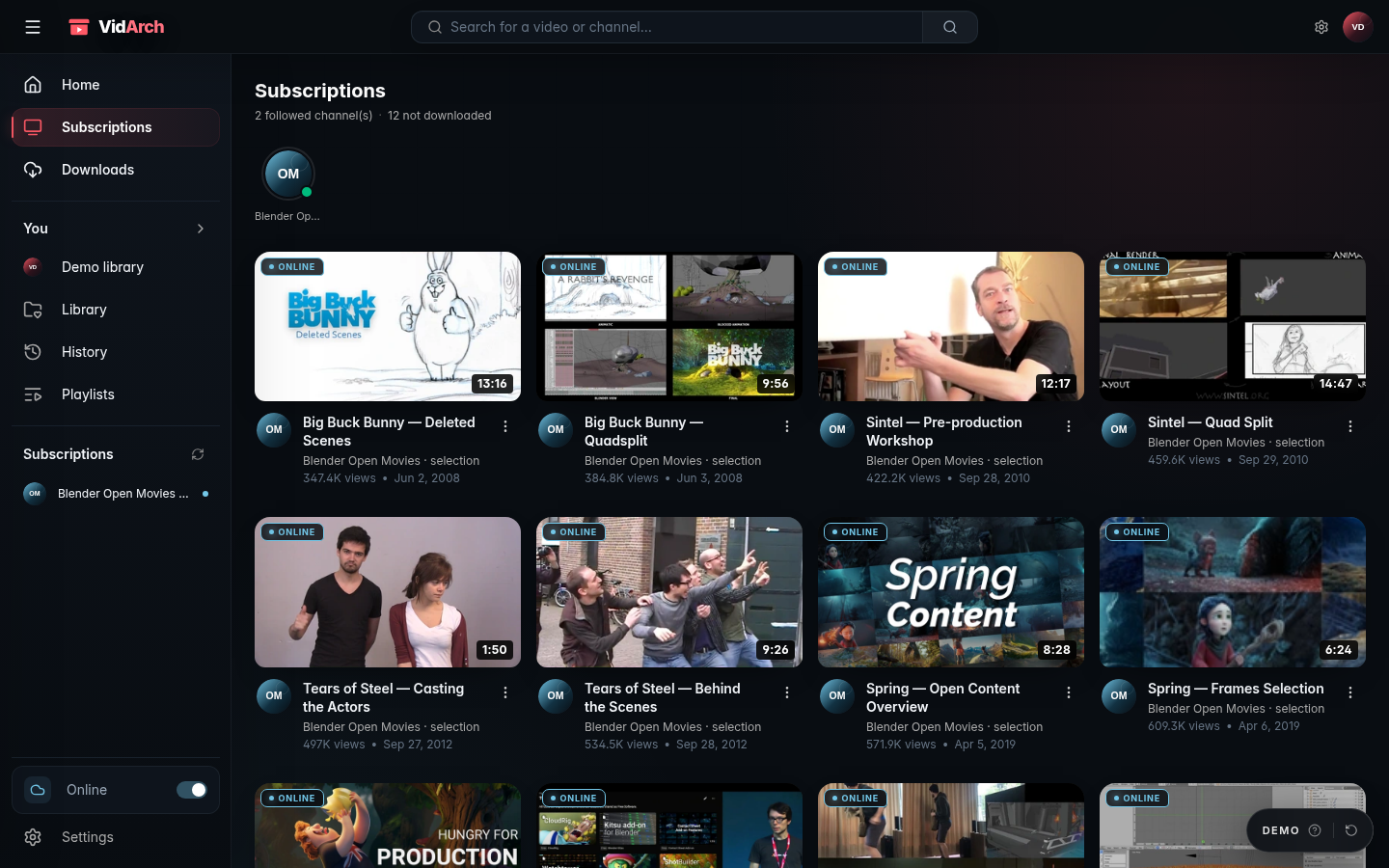
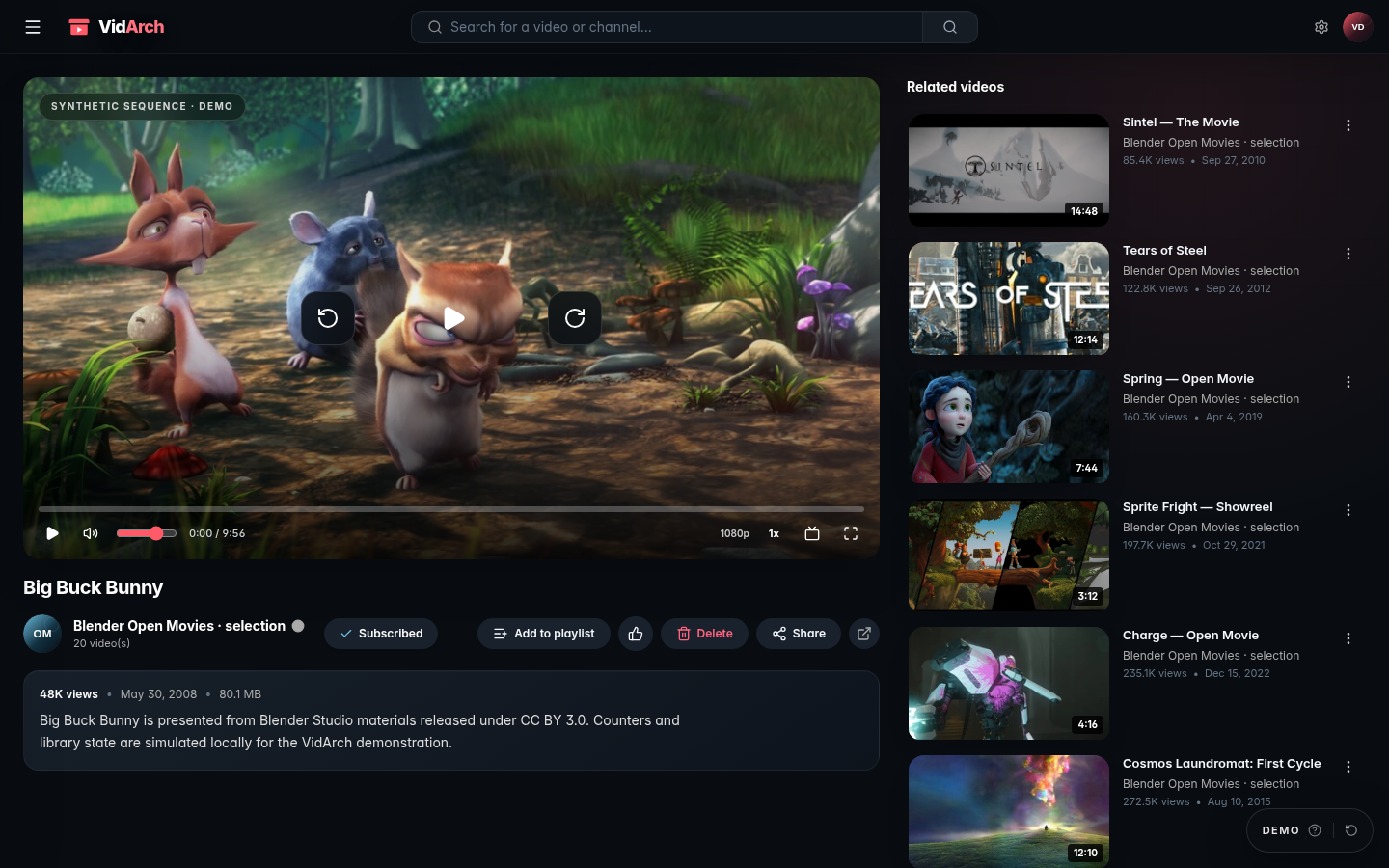
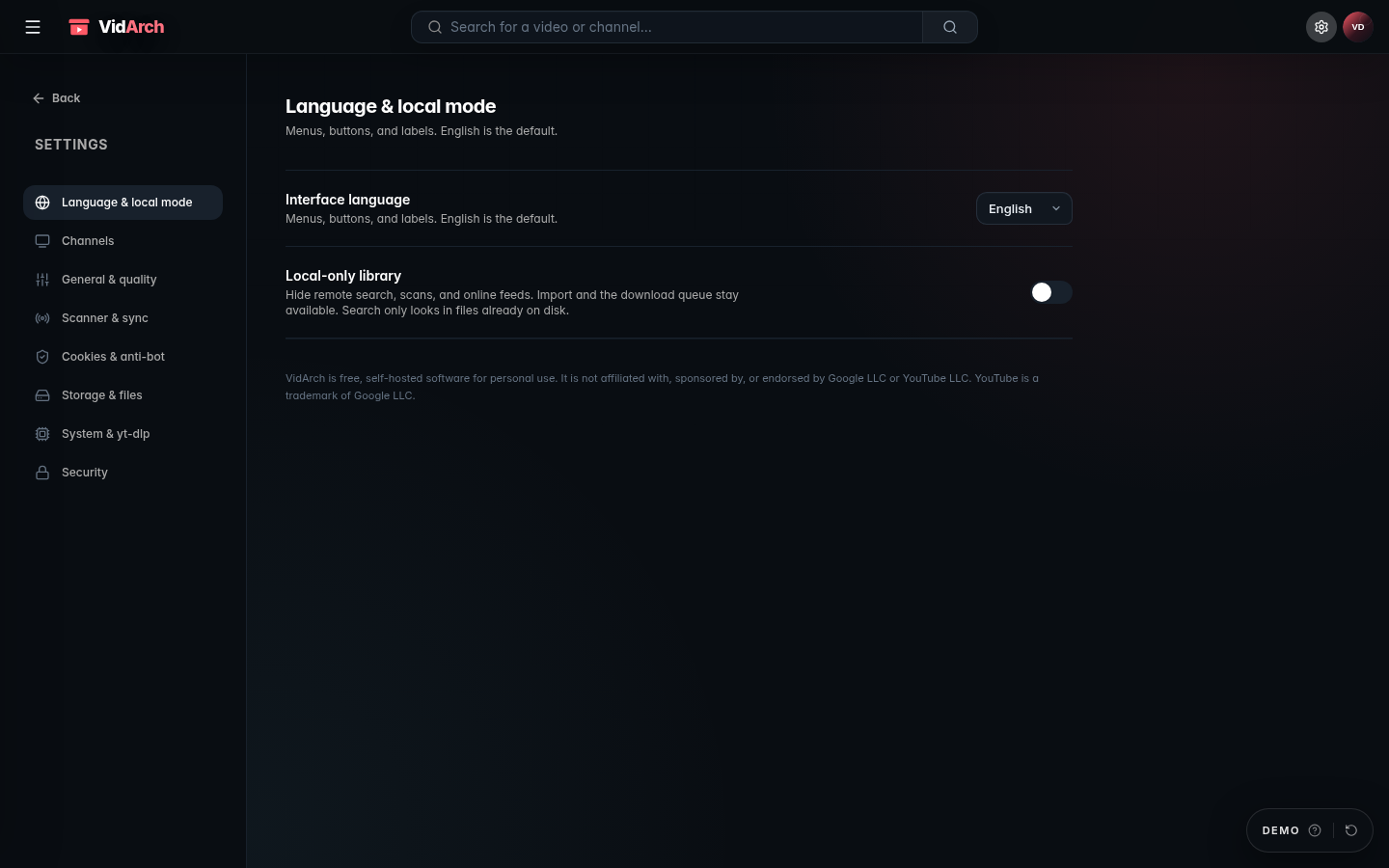
Home, library, subscriptions, and playback below use locally bundled Blender Open Movie stills and simulated account state. Screenshots use the English interface with the demo intro dialog closed.
| Permanent local library | Subscriptions |
|---|---|
| Filter archived files, inspect disk usage, and keep channel spaces on the server. | Follow a creator space and move between downloaded and discoverable titles. |
 |  |
| Local playback | Settings |
|---|---|
| Play archived media with seeking, playback speed, and related titles in the same workspace. | Choose the interface language and keep remote discovery optional. |
 |  |
Highlights
- Unified search across local media, subscriptions, channels, and supported online results.
- Automatic or on-demand archiving with selectable quality or audio-only output.
- Download queue, progress, history, and subscription checks.
- Physical folder view matching files stored under
downloads/. - Local playback with HTTP range requests, seeking, playback speed, theater mode, and picture-in-picture.
- Playlists, history, creator spaces, banners, avatars, and imported MP4/WebM files.
- Explicit online/local mode rather than a separate reduced application.
- Optional password lock, constrained paths, request throttling, and security headers.
Quick start
Docker Compose
Requirements: Docker Engine with Compose 2.24.0 or newer, and host port 2508.
Create docker-compose.yml:
services:
  vidarch:
    image: ghcr.io/lucas-lepajollec/vidarch:latest
    ports:
      - "2508:2508"
    env_file:
      - path: .env
        required: false
    volumes:
      - ./data:/app/data
      - ./downloads:/app/downloads
    init: true
    restart: unless-stopped
mkdir -p data downloads
sudo chown -R 1000:1000 data downloads
docker compose up -d
Open http://<server-ip>:2508 from the LAN, or http://localhost:2508 on the Docker host. VidArch uses port 2508 both on the Docker host and inside the production container. No .env is required. On first start, set a password in Settings → Security before making the service reachable outside a trusted LAN. Advanced unattended deployments may provide AUTH_PASSWORD through the optional untracked .env file or a platform secret.
The ownership preparation is required for Linux bind mounts because the image runs as UID/GID 1000:1000; Docker Desktop normally handles host-file sharing itself. When mounting an existing shared media library instead of ./downloads, follow the ACL method below rather than changing all files to world-writable mode.
Before an update, stop VidArch, back up ./data and ./downloads together, and record the current image digest. Pull, recreate, and verify /api/health plus representative local playback. Roll back by restoring the matching pair of backups and changing the image: line to the previous version or sha-<full-commit> tag. Removing the container is safe; deleting either persistent directory is not. VidArch records its SQLite schema and refuses to open data created by a newer unsupported application version rather than attempting an unsafe downgrade.
To build the current checkout:
git clone https://github.com/lucas-lepajollec/vidarch.git
cd vidarch
cp .env.example .env
docker compose -f docker-compose.yml -f docker-compose.build.yml up -d --build
Local development
Requirements: Node.js 22, Python 3.10+ with current yt-dlp, and FFmpeg/FFprobe on PATH.
npm ci
npm --prefix client ci
npm run dev
The frontend uses http://127.0.0.1:2499 and the development API http://127.0.0.1:2498. Use npm run dev:lan only on a trusted network with authentication configured.
Configuration and persistence
| Variable | Default | Purpose |
|---|---|---|
PORT | 2498 for the development API, 2508 in production | Express listening port. |
DATA_DIR | ./data | SQLite, sessions, configuration, and optional cookies.txt. |
DOWNLOADS_DIR | ./downloads | Archived video, thumbnails, and metadata. |
YT_DLP_PATH | Auto-detected | Override the yt-dlp executable. |
AUTH_PASSWORD | Unset | Require a password for the UI and API. |
SESSION_SECRET | Generated and persisted | Sign session cookies. |
Back up DATA_DIR and DOWNLOADS_DIR together while VidArch is stopped: the database describes the library while the download directory contains its media, so a mismatched pair is not a complete recovery point.
The published image runs as UID/GID 1000:1000. When replacing ./downloads with an existing host media directory, grant that identity read/write access with ownership or POSIX ACLs; do not solve bind-mount errors with chmod 777. The storage documentation includes copy-ready checks and permission commands.
Security, privacy, and limitations
- Set a password in Settings → Security, or supply
AUTH_PASSWORDthrough your deployment platform, before exposing VidArch beyond a trusted LAN. - Use HTTPS and a trusted reverse proxy for remote access.
- Keep
cookies.txt, SQLite, session secrets, and downloaded media out of public static paths. - Treat imported cookies as account credentials and rotate them if exposure is suspected.
- Review filesystem ownership instead of granting world-writable permissions.
- Supported sources and metadata behavior can change when third-party sites or
yt-dlpchange. - Published containers use the verified yt-dlp build shipped in the image; update it by pulling a newer VidArch image. Direct yt-dlp self-update remains available only in writable source installations.
- Keep download targets and media use within applicable law, licenses, terms, and access restrictions.
VidArch applies content-security policy, rate limiting, path confinement, restricted remote-image handling, and optional password sessions. These controls reduce risk; they do not make an internet-exposed personal media server maintenance-free.
VidArch is independent and is not affiliated with, endorsed by, or sponsored by Google LLC or YouTube LLC. The presence of a technical download path does not grant permission to copy or redistribute content.
Architecture
| Layer | Technology |
|---|---|
| Frontend | React 19, TypeScript, Vite, Tailwind CSS |
| Backend | Node.js 22, Express 5, TypeScript |
| Persistence | SQLite via better-sqlite3, WAL mode |
| Media | yt-dlp, FFmpeg, FFprobe |
| Deployment | Docker, Docker Compose, GHCR |
client/       # React application and isolated demo
server/src/   # API, library, download, search, and security logic
data/         # Private persistent runtime state
downloads/    # Private persistent archived media
scripts/      # Development and operational helpers
Development and quality
| Command | Purpose |
|---|---|
npm run build | Build the client and server. |
npm test | Run server utility and security-focused tests. |
npm run build:demo | Build the isolated client demo. |
npm --prefix client run lint | Run the client linter. |
Validated main and release workflows build the application before publishing container images.
Public demo
The public demo runs the real interface with a curated Blender Open Movies dataset. Actions are simulated, external services are disabled, and state resets. Artwork comes from Blender Studio projects released under Creative Commons licenses with attribution in the demo entries.
The demo is not connected to a private library, cookies file, downloader, or personal account.
Documentation and community
Third-party tools and demo media retain their own licenses.
Contributors

38 commits
Similar repos


Languages
TypeScript
96.5%
CSS
2.0%
JavaScript
1.2%
A self-hosted video discovery, download, and library experience that turns online finds into a permanent local collection.
See the codeSee what people are saying
README
VidArch
A self-hosted video discovery, download, and library experience built for permanent local ownership.
Website · Live demo · Documentation
Overview
VidArch keeps familiar video-discovery patterns while adding a durable local layer. Browse subscriptions and online results, choose what matters, follow downloads, and return later from a private library backed by ordinary files and SQLite.
It remains one product across online and local use: discovery becomes download, download becomes archived media, and archived media stays browsable when network-dependent features are unavailable.
Product preview
Home, library, subscriptions, and playback below use locally bundled Blender Open Movie stills and simulated account state. Screenshots use the English interface with the demo intro dialog closed.
| Permanent local library | Subscriptions |
|---|---|
| Filter archived files, inspect disk usage, and keep channel spaces on the server. | Follow a creator space and move between downloaded and discoverable titles. |
| |
| Local playback | Settings |
|---|---|
| Play archived media with seeking, playback speed, and related titles in the same workspace. | Choose the interface language and keep remote discovery optional. |
| |
Highlights
- Unified search across local media, subscriptions, channels, and supported online results.
- Automatic or on-demand archiving with selectable quality or audio-only output.
- Download queue, progress, history, and subscription checks.
- Physical folder view matching files stored under
downloads/. - Local playback with HTTP range requests, seeking, playback speed, theater mode, and picture-in-picture.
- Playlists, history, creator spaces, banners, avatars, and imported MP4/WebM files.
- Explicit online/local mode rather than a separate reduced application.
- Optional password lock, constrained paths, request throttling, and security headers.
Quick start
Docker Compose
Requirements: Docker Engine with Compose 2.24.0 or newer, and host port 2508.
Create docker-compose.yml:
services:
  vidarch:
    image: ghcr.io/lucas-lepajollec/vidarch:latest
    ports:
      - "2508:2508"
    env_file:
      - path: .env
        required: false
    volumes:
      - ./data:/app/data
      - ./downloads:/app/downloads
    init: true
    restart: unless-stopped
mkdir -p data downloads
sudo chown -R 1000:1000 data downloads
docker compose up -d
Open http://<server-ip>:2508 from the LAN, or http://localhost:2508 on the Docker host. VidArch uses port 2508 both on the Docker host and inside the production container. No .env is required. On first start, set a password in Settings → Security before making the service reachable outside a trusted LAN. Advanced unattended deployments may provide AUTH_PASSWORD through the optional untracked .env file or a platform secret.
The ownership preparation is required for Linux bind mounts because the image runs as UID/GID 1000:1000; Docker Desktop normally handles host-file sharing itself. When mounting an existing shared media library instead of ./downloads, follow the ACL method below rather than changing all files to world-writable mode.
Before an update, stop VidArch, back up ./data and ./downloads together, and record the current image digest. Pull, recreate, and verify /api/health plus representative local playback. Roll back by restoring the matching pair of backups and changing the image: line to the previous version or sha-<full-commit> tag. Removing the container is safe; deleting either persistent directory is not. VidArch records its SQLite schema and refuses to open data created by a newer unsupported application version rather than attempting an unsafe downgrade.
To build the current checkout:
git clone https://github.com/lucas-lepajollec/vidarch.git
cd vidarch
cp .env.example .env
docker compose -f docker-compose.yml -f docker-compose.build.yml up -d --build
Local development
Requirements: Node.js 22, Python 3.10+ with current yt-dlp, and FFmpeg/FFprobe on PATH.
npm ci
npm --prefix client ci
npm run dev
The frontend uses http://127.0.0.1:2499 and the development API http://127.0.0.1:2498. Use npm run dev:lan only on a trusted network with authentication configured.
Configuration and persistence
| Variable | Default | Purpose |
|---|---|---|
PORT | 2498 for the development API, 2508 in production | Express listening port. |
DATA_DIR | ./data | SQLite, sessions, configuration, and optional cookies.txt. |
DOWNLOADS_DIR | ./downloads | Archived video, thumbnails, and metadata. |
YT_DLP_PATH | Auto-detected | Override the yt-dlp executable. |
AUTH_PASSWORD | Unset | Require a password for the UI and API. |
SESSION_SECRET | Generated and persisted | Sign session cookies. |
Back up DATA_DIR and DOWNLOADS_DIR together while VidArch is stopped: the database describes the library while the download directory contains its media, so a mismatched pair is not a complete recovery point.
The published image runs as UID/GID 1000:1000. When replacing ./downloads with an existing host media directory, grant that identity read/write access with ownership or POSIX ACLs; do not solve bind-mount errors with chmod 777. The storage documentation includes copy-ready checks and permission commands.
Security, privacy, and limitations
- Set a password in Settings → Security, or supply
AUTH_PASSWORDthrough your deployment platform, before exposing VidArch beyond a trusted LAN. - Use HTTPS and a trusted reverse proxy for remote access.
- Keep
cookies.txt, SQLite, session secrets, and downloaded media out of public static paths. - Treat imported cookies as account credentials and rotate them if exposure is suspected.
- Review filesystem ownership instead of granting world-writable permissions.
- Supported sources and metadata behavior can change when third-party sites or
yt-dlpchange. - Published containers use the verified yt-dlp build shipped in the image; update it by pulling a newer VidArch image. Direct yt-dlp self-update remains available only in writable source installations.
- Keep download targets and media use within applicable law, licenses, terms, and access restrictions.
VidArch applies content-security policy, rate limiting, path confinement, restricted remote-image handling, and optional password sessions. These controls reduce risk; they do not make an internet-exposed personal media server maintenance-free.
VidArch is independent and is not affiliated with, endorsed by, or sponsored by Google LLC or YouTube LLC. The presence of a technical download path does not grant permission to copy or redistribute content.
Architecture
| Layer | Technology |
|---|---|
| Frontend | React 19, TypeScript, Vite, Tailwind CSS |
| Backend | Node.js 22, Express 5, TypeScript |
| Persistence | SQLite via better-sqlite3, WAL mode |
| Media | yt-dlp, FFmpeg, FFprobe |
| Deployment | Docker, Docker Compose, GHCR |
client/       # React application and isolated demo
server/src/   # API, library, download, search, and security logic
data/         # Private persistent runtime state
downloads/    # Private persistent archived media
scripts/      # Development and operational helpers
Development and quality
| Command | Purpose |
|---|---|
npm run build | Build the client and server. |
npm test | Run server utility and security-focused tests. |
npm run build:demo | Build the isolated client demo. |
npm --prefix client run lint | Run the client linter. |
Validated main and release workflows build the application before publishing container images.
Public demo
The public demo runs the real interface with a curated Blender Open Movies dataset. Actions are simulated, external services are disabled, and state resets. Artwork comes from Blender Studio projects released under Creative Commons licenses with attribution in the demo entries.
The demo is not connected to a private library, cookies file, downloader, or personal account.
Documentation and community
Third-party tools and demo media retain their own licenses.
Similar repos
Contributors
38 commits
Languages
TypeScript
96.5%
CSS
2.0%
JavaScript
1.2%