
Easy to use image comparison based auto splitter for speedrunning on console or PC.
Python
328
771 commits
updated Sep 29, 2026
README
 AutoSplit




 (tip: table of content button here ↗️)
Easy to use image comparison based auto splitter for speedrunning on console or PC.
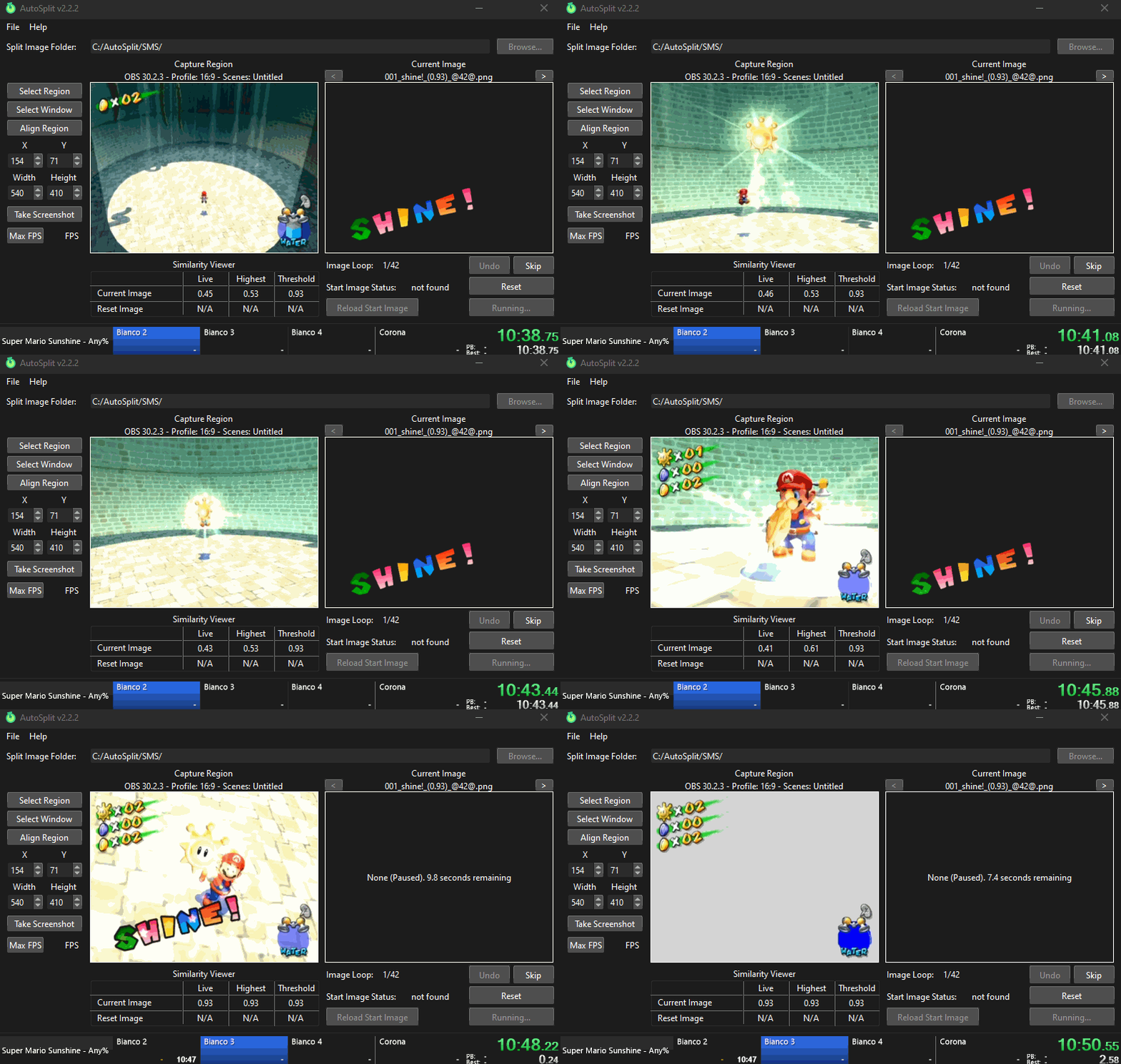
This program can be used to automatically start, split, and reset your preferred speedrun timer by comparing images to a capture region. This allows you to focus more on your speedrun and less on managing your timer. It also improves the accuracy of your splits. It can be used in tandem with any speedrun timer that accepts hotkeys (LiveSplit, WSplit, etc.), and can be integrated with LiveSplit.
Tutorial
To understand how to use AutoSplit and how it works in-depth, please read the tutorial.
Download and open
-
Download the latest version
-
You can also check out the latest dev builds (requires a GitHub account)
(If you don't have a GitHub account, you can try nightly.link) -
Linux users must ensure they are in the
ttyandinputgroups and have write access to/dev/uinput. You can run the following commands to do so:sudo usermod -a -G tty,input $USER sudo touch /dev/uinput sudo chmod +0666 /dev/uinput echo 'KERNEL=="uinput", TAG+="uaccess"' | sudo tee /etc/udev/rules.d/50-uinput.rules echo 'SUBSYSTEM=="input", MODE="0666" GROUP="plugdev"' | sudo tee /etc/udev/rules.d/12-input.rules echo 'SUBSYSTEM=="misc", MODE="0666" GROUP="plugdev"' | sudo tee -a /etc/udev/rules.d/12-input.rules echo 'SUBSYSTEM=="tty", MODE="0666" GROUP="plugdev"' | sudo tee -a /etc/udev/rules.d/12-input.rules loginctl terminate-user $USERAll screen capture method are incompatible with Wayland. Follow this guide to disable it.
Compatibility
- Windows 10 and 11.
- Wine 10.1+ or 11.3+ (very limited)
- Useful if you want to use Desktop version of LiveSplit on Linux
- Linux
- Should work on Ubuntu 24.04+ (glibc 2.39) (tested on Kubuntu 26.04)
- Wayland is not currently supported
- WSL2/WSLg requires an additional Desktop Environment, external X11 server, and/or systemd
- x64 and ARM64 architectures
- Native ARM64 builds go completely untested. There may be unforeseen issues.
- If you'd like to run the project directly in Python from the source code, refer to the build instructions.
Timer Integration
Timer Global Hotkeys
Out of the box, AutoSplit works by listening for keyboard events and sending virtual keystrokes. This makes AutoSplit compatible with any timer by configuring your hotkeys to be the same. See the Timer Global Hotkeys Tutorial.
LiveSplit Integration
The AutoSplit LiveSplit Component will directly connect AutoSplit with LiveSplit. LiveSplit integration is only supported in AutoSplit v1.6.0 or higher. This integration will allow you to:
- Use hotkeys directly from LiveSplit to control AutoSplit and LiveSplit together
- Load AutoSplit and any AutoSplit profile automatically when opening a LiveSplit layout.
See the installation instructions.
Linux users, note that LiveSplit Desktop, with additional components, is only available on Windows. Whilst it can work through Wine, support is very limited. You may want to consider an alternative timer.
Known Limitations
- For many games, it will be difficult to find a split image for the last split of the run.
- The window of the capture region cannot be minimized.
- Linux support has feature-parity but is less performant. We're looking for contributors.
- Incompatible with LiveSplitOne on Linux (see https://github.com/LiveSplit/LiveSplitOne/issues/1025)
- Antivirus false positives. Please read https://github.com/pyinstaller/pyinstaller/blob/develop/.github/ISSUE_TEMPLATE/antivirus.md
Wine Limitations
- Only the BitBlt Capture method is supported. Wine does not support
CreateDirect3D11DeviceFromDXGIDevice - No Video Capture Device (ie Webcam, OBS Virtual Cam). Wine does not support DirectShow Device Enumeration
- Requires Wine 10.1+ / Steam Proton 11+ (due to added
crealfimplementation) - Wine 10.1 to 11.2 must use the
WineCompatversion of the Windows build (same build but without UPX compression) as Wine hadn't stubbedPssQuerySnapshotyet. - Wine 11.3+ can use the regular Windows build.
- Only applications running within the same wineserver instance can be recorded. Which means that if you want to record a Steam Game for example, you would need to run AutoSplit through the same Proton version as the target game, targetting the game's Wine prefix.
- For steam games, this can be made a lot easier using
protontricks:protontricks-launch --appid <YOUR_STEAM_GAME> </path/to/autosplit.exe> - For regular Wine it would look something like this:
WINEPREFIX="</path/to/game/prefix>" wine </path/to/autosplit.exe>
- For steam games, this can be made a lot easier using
Resources
Still need help?
- Check if your issue already exists
- If it does, upvote it 👍
- If it doesn't, create a new one
- Join the AutoSplit Discord
Contributing
See CONTRIBUTING.md for our contributing standards.
Refer to the build instructions if you're interested in building the application yourself or running it in Python.
Not a developer? You can still help through the following methods:
- Donating (see link below)
- Upvoting 👍 feature requests you are interested in
- Sharing AutoSplit with other speedrunners
- Starring the repository

- Upvoting 👍 the following upstream issues in libraries and tools we use:
- https://bugs.winehq.org/show_bug.cgi?id=52487
- https://qt-project.atlassian.net/browse/QTBUG-114436
- https://qt-project.atlassian.net/browse/PYSIDE-2541
- https://qt-project.atlassian.net/browse/PYSIDE-2542
- https://github.com/opencv/opencv/issues?q=is%3Aissue+is%3Aopen+involves%3AAvasam+sort%3Areactions-%2B1-asc+
- https://github.com/mypyc/mypyc/issues?q=sort%3Areactions-%2B1%20is%3Aissue%20is%3Aopen%20%20involves%3AAvasam%20
- https://github.com/microsoft/vscode/issues/40239
- https://github.com/microsoft/vscode/issues/168411
- https://github.com/python/mypy/issues/4409
- https://github.com/python/mypy/issues/10149
- https://github.com/boppreh/keyboard/issues/171
- https://github.com/boppreh/keyboard/issues/516
- https://github.com/boppreh/keyboard/issues/216
- https://github.com/boppreh/keyboard/issues/161
- https://github.com/asweigart/pyautogui/issues/663
- https://github.com/asweigart/pyautogui/pull/911
- https://github.com/astral-sh/ruff/issues?q=is%3Aissue+is%3Aopen+involves%3AAvasam+sort%3Areactions-%2B1-asc+
Credits
- Created by Toufool and Faschz.
- Harutaka Kawamura for the snipping tool code that I used to integrate into the autosplitter.
- amaringos for the icon.
- Zana_G for motivating me to start this project back up and for all of the time spent testing and suggesting improvements.
- Avasam for their continued work on making an incredible amount of improvements and changes to AutoSplit while I have not had the time/motivation to do so.
- KaDiWa for the LiveSplit integration.
- Tyron18 for assisting with Windows 11 testing.
Donate
If you enjoy using the program, please consider donating. Thank you!

Significant stargazers

80 followers · starred Jun 2020

24 followers · starred Jun 2021
Similar repos


Languages
Python
93.6%
PowerShell
6.4%
Easy to use image comparison based auto splitter for speedrunning on console or PC.
Python
328
771 commits
updated Sep 29, 2026
README
AutoSplit
(tip: table of content button here ↗️)
Easy to use image comparison based auto splitter for speedrunning on console or PC.
This program can be used to automatically start, split, and reset your preferred speedrun timer by comparing images to a capture region. This allows you to focus more on your speedrun and less on managing your timer. It also improves the accuracy of your splits. It can be used in tandem with any speedrun timer that accepts hotkeys (LiveSplit, WSplit, etc.), and can be integrated with LiveSplit.
Tutorial
To understand how to use AutoSplit and how it works in-depth, please read the tutorial.
Download and open
-
Download the latest version
-
You can also check out the latest dev builds (requires a GitHub account)
(If you don't have a GitHub account, you can try nightly.link) -
Linux users must ensure they are in the
ttyandinputgroups and have write access to/dev/uinput. You can run the following commands to do so:sudo usermod -a -G tty,input $USER sudo touch /dev/uinput sudo chmod +0666 /dev/uinput echo 'KERNEL=="uinput", TAG+="uaccess"' | sudo tee /etc/udev/rules.d/50-uinput.rules echo 'SUBSYSTEM=="input", MODE="0666" GROUP="plugdev"' | sudo tee /etc/udev/rules.d/12-input.rules echo 'SUBSYSTEM=="misc", MODE="0666" GROUP="plugdev"' | sudo tee -a /etc/udev/rules.d/12-input.rules echo 'SUBSYSTEM=="tty", MODE="0666" GROUP="plugdev"' | sudo tee -a /etc/udev/rules.d/12-input.rules loginctl terminate-user $USERAll screen capture method are incompatible with Wayland. Follow this guide to disable it.
Compatibility
- Windows 10 and 11.
- Wine 10.1+ or 11.3+ (very limited)
- Useful if you want to use Desktop version of LiveSplit on Linux
- Linux
- Should work on Ubuntu 24.04+ (glibc 2.39) (tested on Kubuntu 26.04)
- Wayland is not currently supported
- WSL2/WSLg requires an additional Desktop Environment, external X11 server, and/or systemd
- x64 and ARM64 architectures
- Native ARM64 builds go completely untested. There may be unforeseen issues.
- If you'd like to run the project directly in Python from the source code, refer to the build instructions.
Timer Integration
Timer Global Hotkeys
Out of the box, AutoSplit works by listening for keyboard events and sending virtual keystrokes. This makes AutoSplit compatible with any timer by configuring your hotkeys to be the same. See the Timer Global Hotkeys Tutorial.
LiveSplit Integration
The AutoSplit LiveSplit Component will directly connect AutoSplit with LiveSplit. LiveSplit integration is only supported in AutoSplit v1.6.0 or higher. This integration will allow you to:
- Use hotkeys directly from LiveSplit to control AutoSplit and LiveSplit together
- Load AutoSplit and any AutoSplit profile automatically when opening a LiveSplit layout.
See the installation instructions.
Linux users, note that LiveSplit Desktop, with additional components, is only available on Windows. Whilst it can work through Wine, support is very limited. You may want to consider an alternative timer.
Known Limitations
- For many games, it will be difficult to find a split image for the last split of the run.
- The window of the capture region cannot be minimized.
- Linux support has feature-parity but is less performant. We're looking for contributors.
- Incompatible with LiveSplitOne on Linux (see https://github.com/LiveSplit/LiveSplitOne/issues/1025)
- Antivirus false positives. Please read https://github.com/pyinstaller/pyinstaller/blob/develop/.github/ISSUE_TEMPLATE/antivirus.md
Wine Limitations
- Only the BitBlt Capture method is supported. Wine does not support
CreateDirect3D11DeviceFromDXGIDevice - No Video Capture Device (ie Webcam, OBS Virtual Cam). Wine does not support DirectShow Device Enumeration
- Requires Wine 10.1+ / Steam Proton 11+ (due to added
crealfimplementation) - Wine 10.1 to 11.2 must use the
WineCompatversion of the Windows build (same build but without UPX compression) as Wine hadn't stubbedPssQuerySnapshotyet. - Wine 11.3+ can use the regular Windows build.
- Only applications running within the same wineserver instance can be recorded. Which means that if you want to record a Steam Game for example, you would need to run AutoSplit through the same Proton version as the target game, targetting the game's Wine prefix.
- For steam games, this can be made a lot easier using
protontricks:protontricks-launch --appid <YOUR_STEAM_GAME> </path/to/autosplit.exe> - For regular Wine it would look something like this:
WINEPREFIX="</path/to/game/prefix>" wine </path/to/autosplit.exe>
- For steam games, this can be made a lot easier using
Resources
Still need help?
- Check if your issue already exists
- If it does, upvote it 👍
- If it doesn't, create a new one
- Join the AutoSplit Discord
Contributing
See CONTRIBUTING.md for our contributing standards.
Refer to the build instructions if you're interested in building the application yourself or running it in Python.
Not a developer? You can still help through the following methods:
- Donating (see link below)
- Upvoting 👍 feature requests you are interested in
- Sharing AutoSplit with other speedrunners
- Starring the repository
- Upvoting 👍 the following upstream issues in libraries and tools we use:
- https://bugs.winehq.org/show_bug.cgi?id=52487
- https://qt-project.atlassian.net/browse/QTBUG-114436
- https://qt-project.atlassian.net/browse/PYSIDE-2541
- https://qt-project.atlassian.net/browse/PYSIDE-2542
- https://github.com/opencv/opencv/issues?q=is%3Aissue+is%3Aopen+involves%3AAvasam+sort%3Areactions-%2B1-asc+
- https://github.com/mypyc/mypyc/issues?q=sort%3Areactions-%2B1%20is%3Aissue%20is%3Aopen%20%20involves%3AAvasam%20
- https://github.com/microsoft/vscode/issues/40239
- https://github.com/microsoft/vscode/issues/168411
- https://github.com/python/mypy/issues/4409
- https://github.com/python/mypy/issues/10149
- https://github.com/boppreh/keyboard/issues/171
- https://github.com/boppreh/keyboard/issues/516
- https://github.com/boppreh/keyboard/issues/216
- https://github.com/boppreh/keyboard/issues/161
- https://github.com/asweigart/pyautogui/issues/663
- https://github.com/asweigart/pyautogui/pull/911
- https://github.com/astral-sh/ruff/issues?q=is%3Aissue+is%3Aopen+involves%3AAvasam+sort%3Areactions-%2B1-asc+
Credits
- Created by Toufool and Faschz.
- Harutaka Kawamura for the snipping tool code that I used to integrate into the autosplitter.
- amaringos for the icon.
- Zana_G for motivating me to start this project back up and for all of the time spent testing and suggesting improvements.
- Avasam for their continued work on making an incredible amount of improvements and changes to AutoSplit while I have not had the time/motivation to do so.
- KaDiWa for the LiveSplit integration.
- Tyron18 for assisting with Windows 11 testing.
Donate
If you enjoy using the program, please consider donating. Thank you!
Similar repos
Significant stargazers
80 followers · starred Jun 2020
24 followers · starred Jun 2021
Languages
Python
93.6%
PowerShell
6.4%