
Video creation tool: Video editing (with extensive AI-assisted features), screen recording, streaming, and screen sharing. 视频编辑(大量AI辅助功能)、录屏、推流、屏幕共享。
Rust
64
233 commits
updated Sep 17, 2026
README
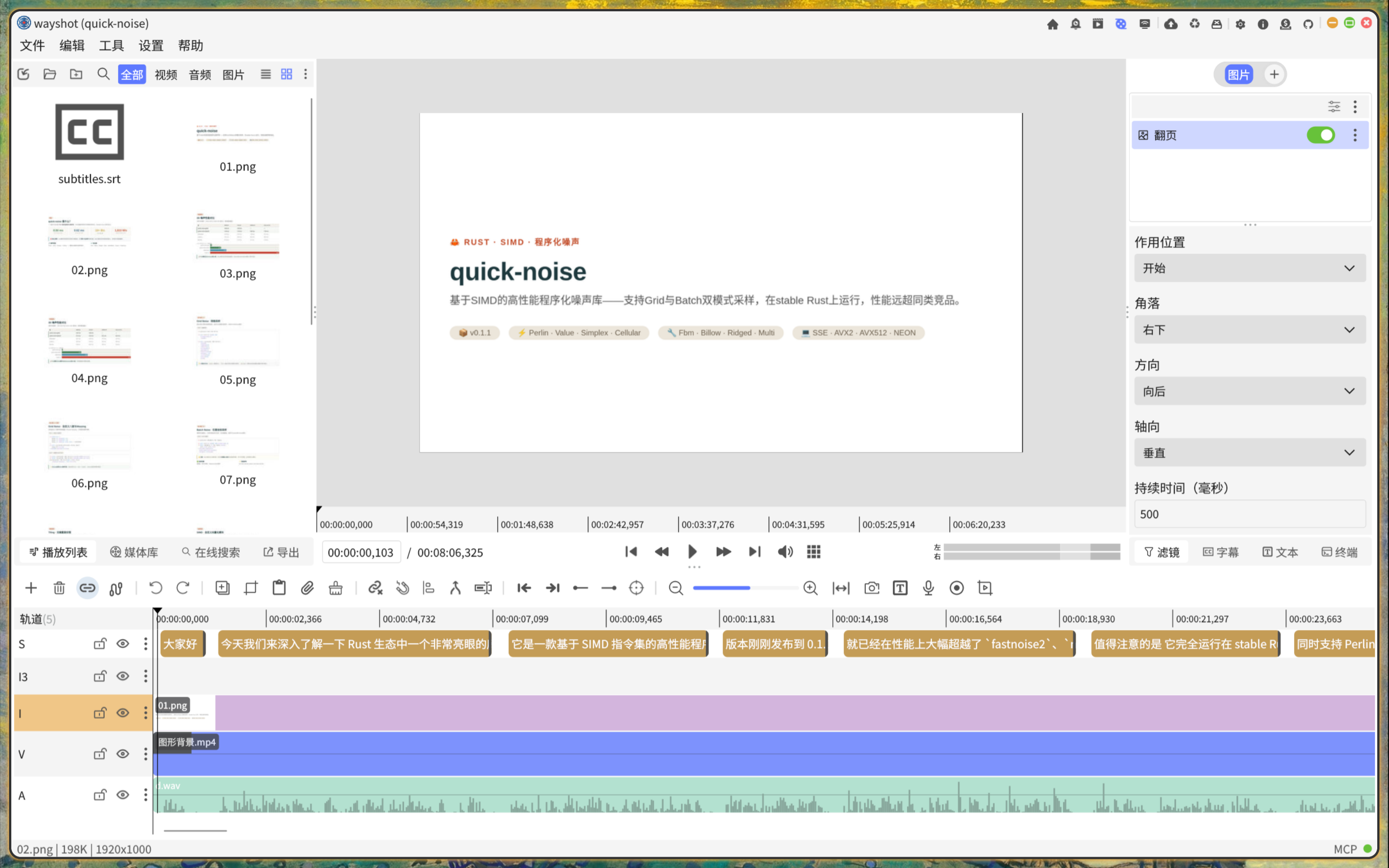
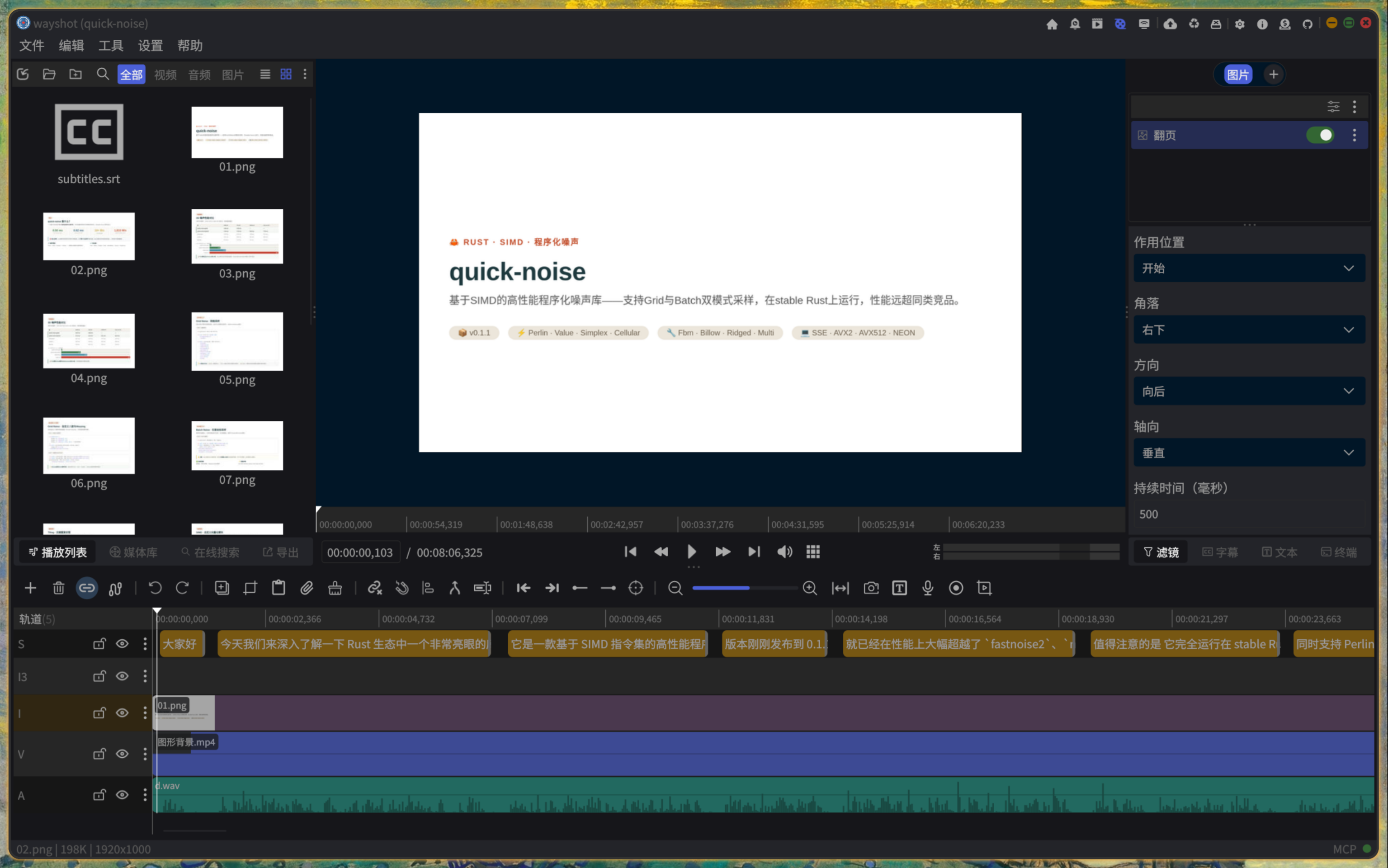





Video creation tool: Video editing (with extensive AI-assisted features), screen recording, streaming, and screen sharing.
Introduction
This is a video editing, screen recording, streaming, and screen sharing tool. Built with Rust and the Slint GUI framework. Supported operating systems: Linux and Windows.
Features
Recording
- Screen recording, cursor tracking, audio recording (with noise reduction), desktop audio capture, camera capture, camera background removal, and real-time image filters
- Manage and play recorded videos
- Screen sharing (WebRTC) and RTMP streaming
Video Editing
Timeline & Tracks
- Multi-track timeline with 5 track types: Video, Audio, Subtitle, Image, Text
- Automatic track priority ordering: Subtitle > Text > Video/Image > Audio
- Segment operations: Add, insert, move, copy, delete, split, merge
- Segment trimming: Drag left/right edges to trim, stretch to extend
- Track operations: Add, delete, move, copy, lock, hide, mute
- Smart snapping: Auto-snap to segment edges and playhead position
- Link mode: Single-track link, all-tracks link
- One-click gap removal: Remove gaps between segments (left/right/all)
- Detach audio/subtitle: Extract audio or subtitle from video segment to a separate track
Undo & Redo
- Full undo/redo system based on the Command Pattern
- Batch operations (atomic multi-command composition)
- Configurable history limit (default 1000 steps)
Video Filters (46 types)
| Category | Filters |
|---|---|
| Transform | Transform (position/scale/rotation), Crop, Flip, Zoom, Speed, Frame Extract |
| Transition | Fly In (8 directions), Fade In/Out, Slide (4 directions), Wipe (4 directions), Genie, Page Flip, Split |
| Mask | Linear Mask, Circle Mask, Rectangle Mask, Mirror Mask |
| Effect | Chroma Key (green screen), Vignette, Fisheye, Wave, Grain, Old Film, Sketch, Grayscale, Edge Detect, Sharpen, Directional Blur, Gaussian Blur, Breathing, Lighting |
| Overlay | Mosaic, Draw Circle, Draw Rectangle, Local Magnify, Magnifier, Text Highlight, Border, Background, Shadow, Grid, Device Frame, Opacity |
| AI/Advanced | Focus, Live2D Animation Overlay, HSL Adjust |
Audio Filters (12 types)
- Gain, Fade In, Fade Out, Normalize, Mute (left/right/both channels), Copy Channel, Limiter, Noise Gate, Compressor, Voice Changer, Speed
- AI Denoising (DeepFilter)
Global Filters (5 types)
- Progress Bar, Global Rotation, Timer/Clock, Global Speed, Danmaku (bullet comments) Overlay
Keyframe Animation
- Add keyframe animations to filter properties
- Value types: Float, Float2 (position/scale), Color (RGBA), Bool
- Keyframe operations: Add, delete, move, update
- Visual keyframe markers on the timeline, drag to adjust timing
Subtitle Editing
- Manually add/modify/delete subtitle entries
- Subtitle style system: Font, size, color, border, border radius, alignment, margins, padding, etc.
- Export subtitles: SRT, VTT, ASS formats
- AI subtitle translation
- AI subtitle removal (based on LaMa inpainting model)
Text Overlay
- Text overlay editor: Content, position, rotation, opacity
- Font selection, size, color, outline, background, border, alignment
- Keyframe animation for position/rotation/opacity
- Preset text style save and load
Export
- Video Export: MP4 (H.264 encoding), supports x264/openh264/ffmpeg backends
- Resolution: Original, 480P-4K, Portrait, Square, Instagram Portrait
- Frame rate: 24/25/30/60 FPS
- Quality presets: Low/Medium/High/Ultra (CRF 28/23/18/15)
- Audio: Configurable channels and sample rate
- Low memory mode
- Subtitle burning
- Audio Export: AAC, FLAC, MP3, OGG, WAV
- Subtitle Export: SRT, VTT, ASS
- Export queue: Multiple export tasks in parallel, progress display, cancellable
Project Management
- Project file save/load (JSON format)
- Auto-save and crash recovery
- Recent projects list
- Project notes (Memo)
- Chapter markers
AI Tools
| Tool | Description |
|---|---|
| Smart Clip | AI identifies highlights and auto-clips |
| Smart Mix | Three-phase AI pipeline: Speech transcription → Visual recognition → Semantic matching, auto-combines audio and video |
| Scene Detection | Auto-detect video scene boundaries |
| Transcription | FunASR speech-to-text |
| Subtitle Translation | AI subtitle translation |
| Subtitle Remover | AI removal of hardcoded subtitles/watermarks |
| Background Remover | AI background removal |
| Cutout | AI object cutout/segmentation |
| Dewatermark | AI watermark removal |
| Clear Vision | AI super-resolution enhancement (SwinIR) |
| Deep Filter | DeepFilter audio denoising |
| Stem Splitter | AI music stem separation (vocals/drums/bass etc.) |
| Speakers | AI speaker diarization |
| OCR | Optical character recognition |
| TTS | VoxCPM text-to-speech synthesis |
| Music Generation | MusicGen music generation |
| Similar Video Segment | Embedding-based similar video segment detection |
| Chapter Summary | AI-generated video chapter summary generation |
Other Tools
- Background animations (18 types): Black Hole, Bokeh, Flow Field, Fluid, Galaxy, Glitch, Grid, Ink, Kaleidoscope, Light Effects, Matrix Rain, Noise Flow, Particle Life, Particle Network, Shape, Triangle, Wave, etc.
- Image animations: Arrow, Grade Mark, Rectangle Draw, Scroll
- Code to Image: Syntax-highlighted code screenshots
- Pure Color Image generation
- Long Screenshot stitching
- Online search for images and audio
- In-editor audio recording
- Metadata viewer
- MCP Server: Exposes 50+ editor operations via Model Context Protocol, enabling AI agent control of the editor (AI operation results are not great, currently incomplete)
Keyboard Shortcuts
- Project: Ctrl+N/O/S/W/Q (New/Open/Save/Close/Quit)
- Edit: Ctrl+Z/Shift+Z (Undo/Redo), Ctrl+C/X/V (Copy/Cut/Paste)
- Timeline: Space (Play/Pause), S (Split), M (Merge), Delete (Remove), Home/End (Jump)
- Tools: 30+ shortcuts covering all AI tools
- Panels: Alt+1/2/3/4 to switch left panel tabs
How to Build?
- Install
Rust,Cargo, andqt6 - Run
make debugto debug the desktop platform application - Run
make build-releaseto build a release version desktop application for Wayland wlr. E.g.:SwayandHyprland. - Run
make build-release features=wayland-portalto build a release version desktop application for Wayland XDG Desktop Portal. E.g.:UbuntuandKDE. - Run
make build-release features=windowsto build a release version desktop application forWindows. - Run
make cursor-releaseto build the program for fetching the cursor position. This program needs to be used together with theportalversion ofwayshot. - Refer to Makefile for more information
Slint Version Upgrade
Dynamic z support patches are applied to the components in the vendor directory. The patches live in ./patches/slint-dynamic-z/patches, so do not upgrade the Slint version casually. The Slint version is also pinned in Cargo. If you need a newer Slint version, you can use AI to regenerate suitable patches. Then run ./patches/slint-dynamic-z/patches/vendor.sh wayshot to apply the updated patches to the Slint dependencies in the vendor directory.
Alternatively, if you upgrade to the latest Slint and do not need dynamic z support, comment out the patched libraries in the [patch.crates-io] section of Cargo.toml:
i-slint-core = { path = "vendor/i-slint-core" }
i-slint-compiler = { path = "vendor/i-slint-compiler" }
i-slint-backend-qt = { path = "vendor/i-slint-backend-qt" }
Troubleshooting
-
Using the
Qt backendcan resolve the issue of fuzzy fonts on the Windows platform. It is also recommended to prioritize theQt backendto maintain a consistent build environment with the developers. -
Check program output log information:
RUST_LOG=debug wayshot. Available log levels:debug,info,warn,error -
To use the cursor tracking feature with the
Wayland xdg portalversion, it needs to be used together with thewayshot-cursorprogram. The program can be downloaded from the Github page. The program must be run with administrator privileges:sudo -E wayshot-cursor. If you need to view logs, you can use:RUST_LOG=debug sudo -E wayshot-cursor. Available log levels:debug,info,warn,error -
Program version selection:
portalversion:UbuntuandKDE, etc.wlrversion:SwayandHyprland, etc.
-
Install build dependencies on
Ubuntu:sudo apt install \ libxcb-composite0-dev imagemagick libasound2-dev libpipewire-0.3-dev libx11-dev pkg-config \ libxi-dev libxtst-dev libevdev-dev libfontconfig-dev libavcodec-dev libavformat-dev libavutil-dev \ libswscale-dev libavfilter-dev libavdevice-dev libssl-dev clang libclang-dev libx264-dev libx265-dev \ libfdk-aac-dev libmp3lame-dev libopus-dev libvpx-dev libvorbis-dev qt6-base-dev qt6-tools-dev qt6-tools-dev-tools -
Windowsbuild dependencies:-
Windowscompilesffmpeg-next- Install LLVM (through official installer, Visual Studio, Chocolatey, or any other means), and add LLVM's bin path to PATH, or set LIBCLANG_PATH to that (see clang-sys documentation for additional info).
- Download ffmpeg and x264.dll
- Install FFmpeg (complete with headers) through any means, e.g. downloading a pre-built "full_build-shared" version from https://ffmpeg.org/download.html. Set FFMPEG_DIR to the directory containing include and lib.
- Add FFmpeg's
binpath to thePATHenvironment variable. git bashexample:
export FFMPEG_DIR=C:/ffmpeg-8.0.1-full_build-shared export LIBCLANG_PATH="C:/Program Files/Microsoft Visual Studio/2022/Community/VC/Tools/Llvm/x64/bin" export PATH=$PATH:"C:/ffmpeg-8.0.1-full_build-shared/bin":"/path/to/x264.dll" make build-release features=windows -
Set up Qt dependencies
- How to find Qt
- Install
Qt6, and add the directory containingqmaketoPATH:export PATH=$PATH:"C:/Qt/6.11.1/msvc2022_64/bin"
-
How to Configure STUN and TURN Servers
-
Download and install coturn
-
Generate certificate and key:
openssl req -x509 -newkey rsa:1024 -keyout /tmp/turn_key.pem -out /tmp/turn_cert.pem -days 9999 -nodes -
Edit the configuration.
-
Default location:
/etc/turnserver.confor/etc/coturn/turnserver.conf -
Example configuration:
listening-ip=0.0.0.0 listening-port=3478 relay-ip=192.168.10.8 external-ip=192.168.10.8 tls-listening-port=5349 cert=/tmp/turn_cert.pem pkey=/tmp/turn_key.pem realm=example.com lt-cred-mech user=foo:123456 # no-auth no-cli verbose -
-
Testing
turnserver -c /etc/turnserver.conf- Test using Trickle ICE
TURNserver address format:turn:192.168.10.1:3478
Reference
- Slint Language Documentation
- github/slint-ui
- Viewer for Slint
- LSP (Language Server Protocol) Server for Slint
- How to Deploy Rust Binaries with GitHub Actions
Donate
 Wechat Pay |
 MetaMask |
Star History
Contributors

233 commits
Similar repos


Languages
Rust
75.5%
Slint
23.5%
Video creation tool: Video editing (with extensive AI-assisted features), screen recording, streaming, and screen sharing. 视频编辑(大量AI辅助功能)、录屏、推流、屏幕共享。
Rust
64
233 commits
updated Sep 17, 2026
README
Video creation tool: Video editing (with extensive AI-assisted features), screen recording, streaming, and screen sharing.
Introduction
This is a video editing, screen recording, streaming, and screen sharing tool. Built with Rust and the Slint GUI framework. Supported operating systems: Linux and Windows.
Features
Recording
- Screen recording, cursor tracking, audio recording (with noise reduction), desktop audio capture, camera capture, camera background removal, and real-time image filters
- Manage and play recorded videos
- Screen sharing (WebRTC) and RTMP streaming
Video Editing
Timeline & Tracks
- Multi-track timeline with 5 track types: Video, Audio, Subtitle, Image, Text
- Automatic track priority ordering: Subtitle > Text > Video/Image > Audio
- Segment operations: Add, insert, move, copy, delete, split, merge
- Segment trimming: Drag left/right edges to trim, stretch to extend
- Track operations: Add, delete, move, copy, lock, hide, mute
- Smart snapping: Auto-snap to segment edges and playhead position
- Link mode: Single-track link, all-tracks link
- One-click gap removal: Remove gaps between segments (left/right/all)
- Detach audio/subtitle: Extract audio or subtitle from video segment to a separate track
Undo & Redo
- Full undo/redo system based on the Command Pattern
- Batch operations (atomic multi-command composition)
- Configurable history limit (default 1000 steps)
Video Filters (46 types)
| Category | Filters |
|---|---|
| Transform | Transform (position/scale/rotation), Crop, Flip, Zoom, Speed, Frame Extract |
| Transition | Fly In (8 directions), Fade In/Out, Slide (4 directions), Wipe (4 directions), Genie, Page Flip, Split |
| Mask | Linear Mask, Circle Mask, Rectangle Mask, Mirror Mask |
| Effect | Chroma Key (green screen), Vignette, Fisheye, Wave, Grain, Old Film, Sketch, Grayscale, Edge Detect, Sharpen, Directional Blur, Gaussian Blur, Breathing, Lighting |
| Overlay | Mosaic, Draw Circle, Draw Rectangle, Local Magnify, Magnifier, Text Highlight, Border, Background, Shadow, Grid, Device Frame, Opacity |
| AI/Advanced | Focus, Live2D Animation Overlay, HSL Adjust |
Audio Filters (12 types)
- Gain, Fade In, Fade Out, Normalize, Mute (left/right/both channels), Copy Channel, Limiter, Noise Gate, Compressor, Voice Changer, Speed
- AI Denoising (DeepFilter)
Global Filters (5 types)
- Progress Bar, Global Rotation, Timer/Clock, Global Speed, Danmaku (bullet comments) Overlay
Keyframe Animation
- Add keyframe animations to filter properties
- Value types: Float, Float2 (position/scale), Color (RGBA), Bool
- Keyframe operations: Add, delete, move, update
- Visual keyframe markers on the timeline, drag to adjust timing
Subtitle Editing
- Manually add/modify/delete subtitle entries
- Subtitle style system: Font, size, color, border, border radius, alignment, margins, padding, etc.
- Export subtitles: SRT, VTT, ASS formats
- AI subtitle translation
- AI subtitle removal (based on LaMa inpainting model)
Text Overlay
- Text overlay editor: Content, position, rotation, opacity
- Font selection, size, color, outline, background, border, alignment
- Keyframe animation for position/rotation/opacity
- Preset text style save and load
Export
- Video Export: MP4 (H.264 encoding), supports x264/openh264/ffmpeg backends
- Resolution: Original, 480P-4K, Portrait, Square, Instagram Portrait
- Frame rate: 24/25/30/60 FPS
- Quality presets: Low/Medium/High/Ultra (CRF 28/23/18/15)
- Audio: Configurable channels and sample rate
- Low memory mode
- Subtitle burning
- Audio Export: AAC, FLAC, MP3, OGG, WAV
- Subtitle Export: SRT, VTT, ASS
- Export queue: Multiple export tasks in parallel, progress display, cancellable
Project Management
- Project file save/load (JSON format)
- Auto-save and crash recovery
- Recent projects list
- Project notes (Memo)
- Chapter markers
AI Tools
| Tool | Description |
|---|---|
| Smart Clip | AI identifies highlights and auto-clips |
| Smart Mix | Three-phase AI pipeline: Speech transcription → Visual recognition → Semantic matching, auto-combines audio and video |
| Scene Detection | Auto-detect video scene boundaries |
| Transcription | FunASR speech-to-text |
| Subtitle Translation | AI subtitle translation |
| Subtitle Remover | AI removal of hardcoded subtitles/watermarks |
| Background Remover | AI background removal |
| Cutout | AI object cutout/segmentation |
| Dewatermark | AI watermark removal |
| Clear Vision | AI super-resolution enhancement (SwinIR) |
| Deep Filter | DeepFilter audio denoising |
| Stem Splitter | AI music stem separation (vocals/drums/bass etc.) |
| Speakers | AI speaker diarization |
| OCR | Optical character recognition |
| TTS | VoxCPM text-to-speech synthesis |
| Music Generation | MusicGen music generation |
| Similar Video Segment | Embedding-based similar video segment detection |
| Chapter Summary | AI-generated video chapter summary generation |
Other Tools
- Background animations (18 types): Black Hole, Bokeh, Flow Field, Fluid, Galaxy, Glitch, Grid, Ink, Kaleidoscope, Light Effects, Matrix Rain, Noise Flow, Particle Life, Particle Network, Shape, Triangle, Wave, etc.
- Image animations: Arrow, Grade Mark, Rectangle Draw, Scroll
- Code to Image: Syntax-highlighted code screenshots
- Pure Color Image generation
- Long Screenshot stitching
- Online search for images and audio
- In-editor audio recording
- Metadata viewer
- MCP Server: Exposes 50+ editor operations via Model Context Protocol, enabling AI agent control of the editor (AI operation results are not great, currently incomplete)
Keyboard Shortcuts
- Project: Ctrl+N/O/S/W/Q (New/Open/Save/Close/Quit)
- Edit: Ctrl+Z/Shift+Z (Undo/Redo), Ctrl+C/X/V (Copy/Cut/Paste)
- Timeline: Space (Play/Pause), S (Split), M (Merge), Delete (Remove), Home/End (Jump)
- Tools: 30+ shortcuts covering all AI tools
- Panels: Alt+1/2/3/4 to switch left panel tabs
How to Build?
- Install
Rust,Cargo, andqt6 - Run
make debugto debug the desktop platform application - Run
make build-releaseto build a release version desktop application for Wayland wlr. E.g.:SwayandHyprland. - Run
make build-release features=wayland-portalto build a release version desktop application for Wayland XDG Desktop Portal. E.g.:UbuntuandKDE. - Run
make build-release features=windowsto build a release version desktop application forWindows. - Run
make cursor-releaseto build the program for fetching the cursor position. This program needs to be used together with theportalversion ofwayshot. - Refer to Makefile for more information
Slint Version Upgrade
Dynamic z support patches are applied to the components in the vendor directory. The patches live in ./patches/slint-dynamic-z/patches, so do not upgrade the Slint version casually. The Slint version is also pinned in Cargo. If you need a newer Slint version, you can use AI to regenerate suitable patches. Then run ./patches/slint-dynamic-z/patches/vendor.sh wayshot to apply the updated patches to the Slint dependencies in the vendor directory.
Alternatively, if you upgrade to the latest Slint and do not need dynamic z support, comment out the patched libraries in the [patch.crates-io] section of Cargo.toml:
i-slint-core = { path = "vendor/i-slint-core" }
i-slint-compiler = { path = "vendor/i-slint-compiler" }
i-slint-backend-qt = { path = "vendor/i-slint-backend-qt" }
Troubleshooting
-
Using the
Qt backendcan resolve the issue of fuzzy fonts on the Windows platform. It is also recommended to prioritize theQt backendto maintain a consistent build environment with the developers. -
Check program output log information:
RUST_LOG=debug wayshot. Available log levels:debug,info,warn,error -
To use the cursor tracking feature with the
Wayland xdg portalversion, it needs to be used together with thewayshot-cursorprogram. The program can be downloaded from the Github page. The program must be run with administrator privileges:sudo -E wayshot-cursor. If you need to view logs, you can use:RUST_LOG=debug sudo -E wayshot-cursor. Available log levels:debug,info,warn,error -
Program version selection:
portalversion:UbuntuandKDE, etc.wlrversion:SwayandHyprland, etc.
-
Install build dependencies on
Ubuntu:sudo apt install \ libxcb-composite0-dev imagemagick libasound2-dev libpipewire-0.3-dev libx11-dev pkg-config \ libxi-dev libxtst-dev libevdev-dev libfontconfig-dev libavcodec-dev libavformat-dev libavutil-dev \ libswscale-dev libavfilter-dev libavdevice-dev libssl-dev clang libclang-dev libx264-dev libx265-dev \ libfdk-aac-dev libmp3lame-dev libopus-dev libvpx-dev libvorbis-dev qt6-base-dev qt6-tools-dev qt6-tools-dev-tools -
Windowsbuild dependencies:-
Windowscompilesffmpeg-next- Install LLVM (through official installer, Visual Studio, Chocolatey, or any other means), and add LLVM's bin path to PATH, or set LIBCLANG_PATH to that (see clang-sys documentation for additional info).
- Download ffmpeg and x264.dll
- Install FFmpeg (complete with headers) through any means, e.g. downloading a pre-built "full_build-shared" version from https://ffmpeg.org/download.html. Set FFMPEG_DIR to the directory containing include and lib.
- Add FFmpeg's
binpath to thePATHenvironment variable. git bashexample:
export FFMPEG_DIR=C:/ffmpeg-8.0.1-full_build-shared export LIBCLANG_PATH="C:/Program Files/Microsoft Visual Studio/2022/Community/VC/Tools/Llvm/x64/bin" export PATH=$PATH:"C:/ffmpeg-8.0.1-full_build-shared/bin":"/path/to/x264.dll" make build-release features=windows -
Set up Qt dependencies
- How to find Qt
- Install
Qt6, and add the directory containingqmaketoPATH:export PATH=$PATH:"C:/Qt/6.11.1/msvc2022_64/bin"
-
How to Configure STUN and TURN Servers
-
Download and install coturn
-
Generate certificate and key:
openssl req -x509 -newkey rsa:1024 -keyout /tmp/turn_key.pem -out /tmp/turn_cert.pem -days 9999 -nodes -
Edit the configuration.
-
Default location:
/etc/turnserver.confor/etc/coturn/turnserver.conf -
Example configuration:
listening-ip=0.0.0.0 listening-port=3478 relay-ip=192.168.10.8 external-ip=192.168.10.8 tls-listening-port=5349 cert=/tmp/turn_cert.pem pkey=/tmp/turn_key.pem realm=example.com lt-cred-mech user=foo:123456 # no-auth no-cli verbose -
-
Testing
turnserver -c /etc/turnserver.conf- Test using Trickle ICE
TURNserver address format:turn:192.168.10.1:3478
Reference
- Slint Language Documentation
- github/slint-ui
- Viewer for Slint
- LSP (Language Server Protocol) Server for Slint
- How to Deploy Rust Binaries with GitHub Actions
Donate
|
Wechat Pay |
MetaMask |
Star History
Similar repos
Contributors
233 commits
Languages
Rust
75.5%
Slint
23.5%