A small, local-first AI chat workspace for any OpenAI-compatible model. Cache-efficient conversations, MCP tools, web search and persistent memory.
See the code
A small, local-first chat workspace for any OpenAI-compatible model, with MCP tools.
Part of TinySuite. Comes with TinySearch and TinyContext already connected.









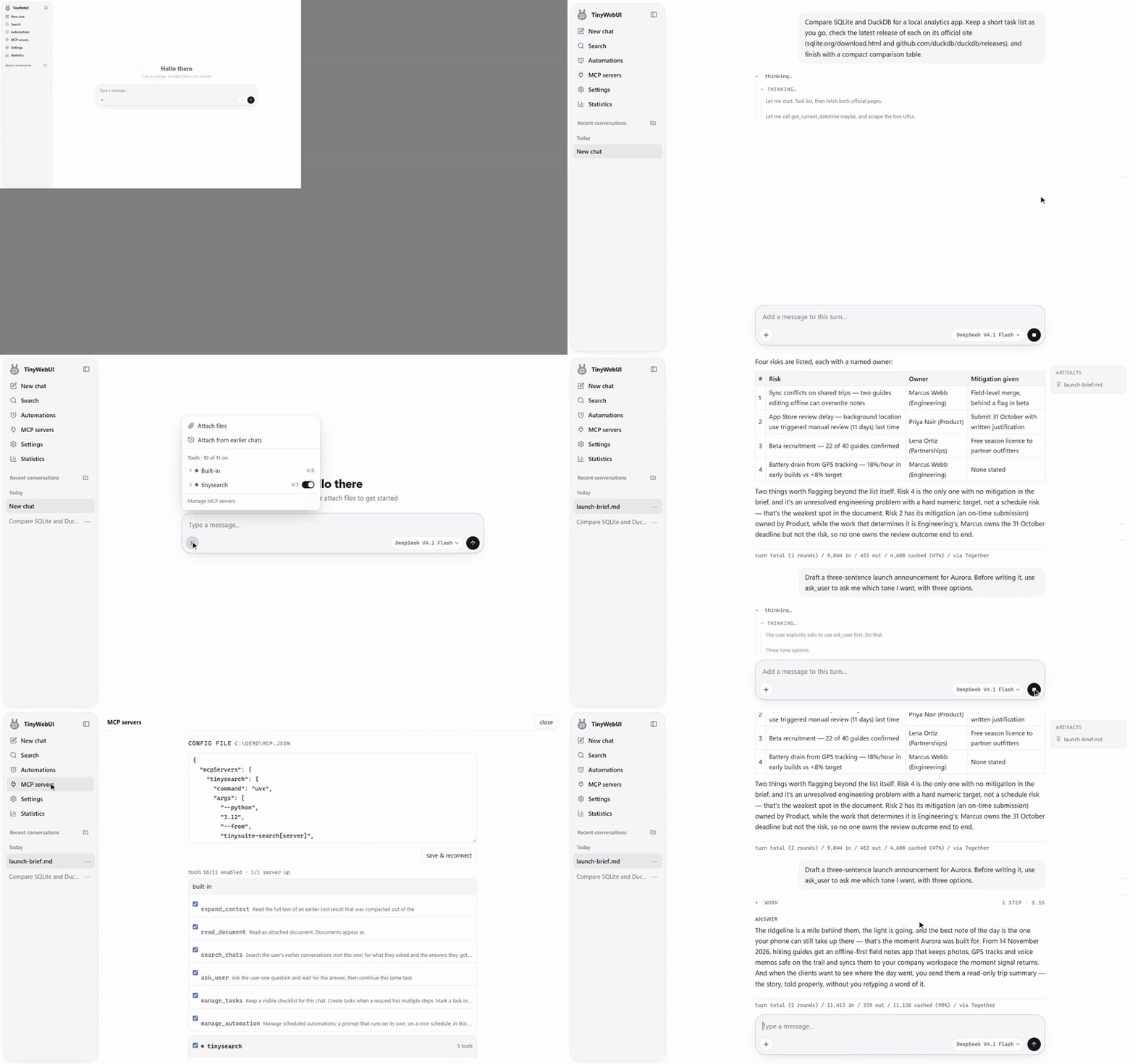
From a fresh start, using DeepSeek V4.1 Flash through OpenRouter. The wait during the research turn is shown at 4× speed. Full-resolution video.
TinyWebUI is the chat interface of TinySuite, a set of small, local-first tools for AI agents. Bring an endpoint (OpenRouter, OpenAI, Groq, Ollama, vLLM, LM Studio, or anything else that speaks the OpenAI API), pick a model and a system prompt, and start working. Chats, documents and tool output stay in one SQLite file on your machine. There is no hosted backend, no account to create, no build step and no frontend framework.
It comes pre-loaded with two TinySuite MCP servers, so a new install can already search the web and remember things:
Requires Node.js 22.13 or later. The bundled TinySearch and TinyContext servers also need uv, which fetches them the first time they start.
npx tinywebui
The first run asks you to create an owner password of at least 15 characters. Open http://127.0.0.1:7777, sign in, then connect a model. Put an endpoint and key in tinywebui.config.json (start from example.tinywebui.config.json) or use the Settings panel:
{
  "baseUrl": "https://openrouter.ai/api/v1",
  "apiKey": "sk-or-...",
  "model": "deepseek/deepseek-v4.1-flash"
}
tinywebui.config.json holds your password hash and API keys and is gitignored. Keep it that way. Use npx tinywebui set-password to change the password later.
npx tinywebui uses keyword search until you run npx tinywebui models pull fast (about 90 MB) to enable hybrid search.
From a clone, run npm install && npm start. With Docker, create the owner password in the persistent volume before starting the service:
docker compose build
docker compose run --rm -it tinywebui set-password
docker compose up -d
The Compose example publishes port 7777 on the host's loopback interface. The Docker image also accepts TINYWEBUI_PASSWORD for a headless first start; use a password of at least 15 characters and keep the container's data volume. Without credentials, a headless start exits before opening a port. The runtime images contain Node.js but no npm/npx; connect MCP servers over HTTP or include their executables in a custom image.
The Compose example now stores config in its named data volume. If you used the previous bind-mounted tinywebui.config.json, copy its settings into the volume before starting, then run set-password there.
The full reference lives at tinysuite.dev/docs/tinywebui:
| Topic | Covers |
|---|---|
| Quick start | npx, clone, Docker |
| Configuration | Environment variables, every setting, the model catalog |
| MCP tools | Adding servers, tool approval, built-in tools |
| Chats and attachments | Documents, images, steering a turn |
| Search | Hybrid retrieval, embedding models, tuning |
| Automations | Scheduled prompts |
| Long chats | Caching and compaction |
| Usage statistics | Token use and attribution |
| Access | Just you, a password, or a team behind SSO |
| Deployment as code | JavaScript config, locked settings, roles and features |
| CLI | Every command |
| Security and limits | Exposure, MCP trust, what isn't included |
In this repository: docs/deploy.md is a scripted container deployment, and docs/config.schema.json is the config schema (also tinywebui schema).
npm test        # the whole suite, about 10 seconds
npm run dev     # restart on changes in src/ and bin/
AGENTS.md maps the codebase and says where new code goes. npm run eval runs model-behaviour evals from evals/tasks/ and makes real API calls, so it costs money.
GNU Affero General Public License v3.0 or later. If you run a modified version for users over a network, you must offer them the corresponding source code for that version.
A small, local-first AI chat workspace for any OpenAI-compatible model. Cache-efficient conversations, MCP tools, web search and persistent memory.
See the code
A small, local-first chat workspace for any OpenAI-compatible model, with MCP tools.
Part of TinySuite. Comes with TinySearch and TinyContext already connected.
From a fresh start, using DeepSeek V4.1 Flash through OpenRouter. The wait during the research turn is shown at 4× speed. Full-resolution video.
TinyWebUI is the chat interface of TinySuite, a set of small, local-first tools for AI agents. Bring an endpoint (OpenRouter, OpenAI, Groq, Ollama, vLLM, LM Studio, or anything else that speaks the OpenAI API), pick a model and a system prompt, and start working. Chats, documents and tool output stay in one SQLite file on your machine. There is no hosted backend, no account to create, no build step and no frontend framework.
It comes pre-loaded with two TinySuite MCP servers, so a new install can already search the web and remember things:
Requires Node.js 22.13 or later. The bundled TinySearch and TinyContext servers also need uv, which fetches them the first time they start.
npx tinywebui
The first run asks you to create an owner password of at least 15 characters. Open http://127.0.0.1:7777, sign in, then connect a model. Put an endpoint and key in tinywebui.config.json (start from example.tinywebui.config.json) or use the Settings panel:
{
  "baseUrl": "https://openrouter.ai/api/v1",
  "apiKey": "sk-or-...",
  "model": "deepseek/deepseek-v4.1-flash"
}
tinywebui.config.json holds your password hash and API keys and is gitignored. Keep it that way. Use npx tinywebui set-password to change the password later.
npx tinywebui uses keyword search until you run npx tinywebui models pull fast (about 90 MB) to enable hybrid search.
From a clone, run npm install && npm start. With Docker, create the owner password in the persistent volume before starting the service:
docker compose build
docker compose run --rm -it tinywebui set-password
docker compose up -d
The Compose example publishes port 7777 on the host's loopback interface. The Docker image also accepts TINYWEBUI_PASSWORD for a headless first start; use a password of at least 15 characters and keep the container's data volume. Without credentials, a headless start exits before opening a port. The runtime images contain Node.js but no npm/npx; connect MCP servers over HTTP or include their executables in a custom image.
The Compose example now stores config in its named data volume. If you used the previous bind-mounted tinywebui.config.json, copy its settings into the volume before starting, then run set-password there.
The full reference lives at tinysuite.dev/docs/tinywebui:
| Topic | Covers |
|---|---|
| Quick start | npx, clone, Docker |
| Configuration | Environment variables, every setting, the model catalog |
| MCP tools | Adding servers, tool approval, built-in tools |
| Chats and attachments | Documents, images, steering a turn |
| Search | Hybrid retrieval, embedding models, tuning |
| Automations | Scheduled prompts |
| Long chats | Caching and compaction |
| Usage statistics | Token use and attribution |
| Access | Just you, a password, or a team behind SSO |
| Deployment as code | JavaScript config, locked settings, roles and features |
| CLI | Every command |
| Security and limits | Exposure, MCP trust, what isn't included |
In this repository: docs/deploy.md is a scripted container deployment, and docs/config.schema.json is the config schema (also tinywebui schema).
npm test        # the whole suite, about 10 seconds
npm run dev     # restart on changes in src/ and bin/
AGENTS.md maps the codebase and says where new code goes. npm run eval runs model-behaviour evals from evals/tasks/ and makes real API calls, so it costs money.
GNU Affero General Public License v3.0 or later. If you run a modified version for users over a network, you must offer them the corresponding source code for that version.



