A local-first AI chat workspace for models, agents, skills, plugins, search, RAG, voice, memory, and artifacts.
See the code

Your models. Your knowledge. Your workspace.
English · 简体中文


Neo Chat brings multi-model chat, agents, and deep research into a self-hostable workspace. Connect your own model providers, work with your files, and keep your conversation history in your browser by default.
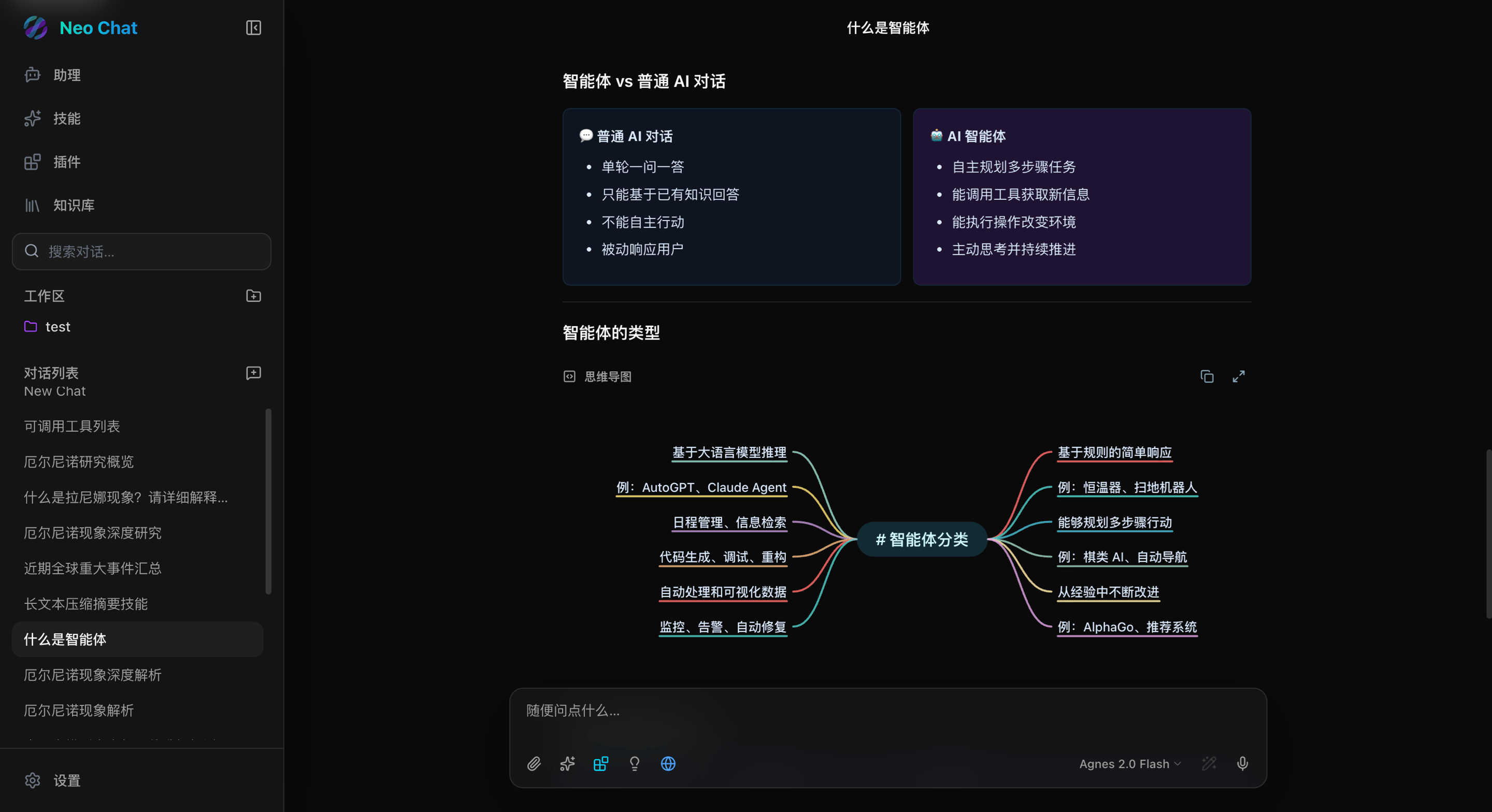
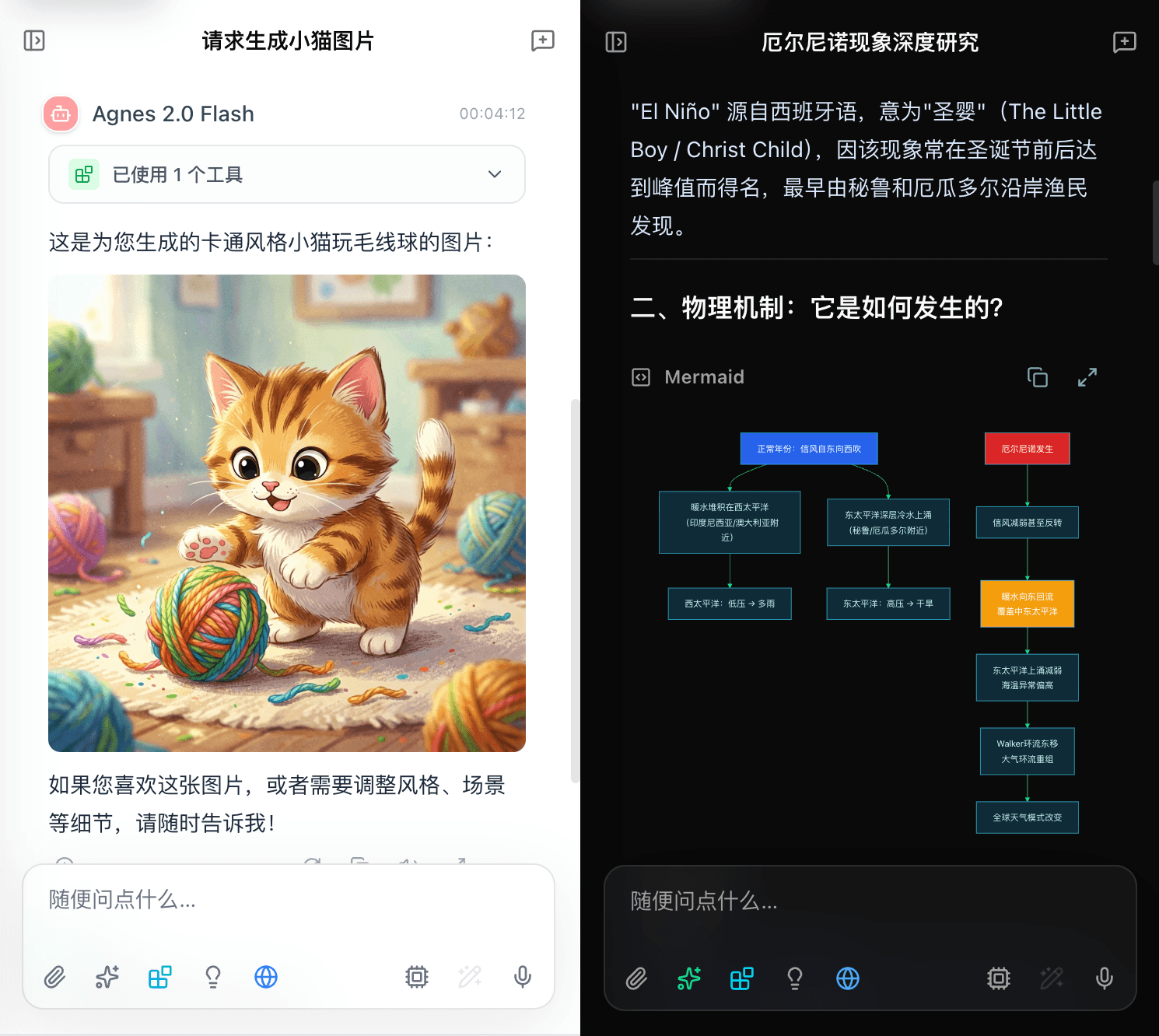
The interface supports English, Simplified Chinese, and Japanese, with responsive desktop and mobile layouts.
See the changelog for release notes and the roadmap for planned work.
Requires Node.js 24 and pnpm 10.30.3 (via Corepack).
git clone https://github.com/u14app/neo-chat.git
cd neo-chat
corepack pnpm install --frozen-lockfile
corepack pnpm dev
Open localhost:3000, add a model provider and API key in Settings, then start a conversation.
Most options are available in the app. To configure deployment-wide defaults, copy .env.example to .env.local and follow the environment variable reference.
Run the official image without a source checkout:
docker run --rm -p 127.0.0.1:3000:3000 \
  -e ACCESS_PASSWORD='replace-with-a-strong-password' \
  -e BYOK_ALLOW_EPHEMERAL_KEY=true \
  ghcr.io/u14app/neo-chat:latest
Open localhost:3000 and enter your access password. This local example uses ephemeral credential-encryption keys; configure stable BYOK keys before production use to avoid key rollover across restarts and replicas.
| Platform | Getting started |
|---|---|
| Docker | Use the official image; see the Compose setup. |
| Vercel | Import the repository with the Next.js preset and the default output directory. |
| Cloudflare Workers | Run corepack pnpm build:worker, then corepack pnpm deploy:worker. The deploy script preserves dashboard variables with --keep-vars. |
Before production deployment, follow the deployment guide to configure stable BYOK keys, access protection, and shared runtime stores. A single hosted process has temporary-key and in-memory rate-limit fallbacks; public multi-instance deployments should use stable keys and shared stores.
Conversations and workspace files stay in browser storage by default. Requests send the necessary content to the model providers and services you use, usually through the app's API routes. Local-first storage does not mean inference runs offline.
Encrypted sync is optional. Backups exclude credentials and external service data; Research extensions such as custom templates, steering, and report Q&A are currently browser-local and excluded from both ZIP backups and encrypted sync.
Agent and Research runs are orchestrated in the foreground. Closing the page interrupts execution; saved runs require explicit resume. The deployment password is an access gate, not a multi-user account system.
Read more about privacy and local data, encrypted sync, and security.
Browse the documentation hub, or jump to a guide below.
| Guide | What you'll find |
|---|---|
| Configuration | Model providers, search, RAG, voice, and server defaults |
| Deployment | Docker, Vercel, Cloudflare Workers, and production setup |
| Agent runtime | Tools, permissions, workspaces, and execution recovery |
| Deep Research | Templates, sources, steering, and report Q&A |
| Plugin development | Build and integrate tools |
| Local MCP bridge | Connect allowlisted stdio servers through Docker |
| Conversation sharing | Publish, update, expire, and revoke read-only snapshots |
| Offline mode | PWA installation and available offline features |
| Reliability and safety | Runtime boundaries, failure handling, and recovery |
Contributions, bug reports, and focused improvements are welcome. Start with CONTRIBUTING.md for setup, checks, and pull request guidance. Please follow the Code of Conduct, and report vulnerabilities through the Security Policy.
Built with Next.js, React, TypeScript, and Zustand. Common development commands:
corepack pnpm dev        # Start the development server
corepack pnpm lint       # Run ESLint
corepack pnpm typecheck  # Check TypeScript
corepack pnpm test       # Run Vitest
corepack pnpm build      # Create a production build
Join the conversation on LinuxDo, or open an issue for a bug report or feature request.
Looking for the original Gemini-only project? It is archived on the gemini-next-chat branch.
892 followers · starred May 2024
1 followers · starred May 2024
59 followers · starred Jul 2026
79 followers · starred May 2025
A local-first AI chat workspace for models, agents, skills, plugins, search, RAG, voice, memory, and artifacts.
See the code
Your models. Your knowledge. Your workspace.
English · 简体中文
Neo Chat brings multi-model chat, agents, and deep research into a self-hostable workspace. Connect your own model providers, work with your files, and keep your conversation history in your browser by default.
The interface supports English, Simplified Chinese, and Japanese, with responsive desktop and mobile layouts.
See the changelog for release notes and the roadmap for planned work.
Requires Node.js 24 and pnpm 10.30.3 (via Corepack).
git clone https://github.com/u14app/neo-chat.git
cd neo-chat
corepack pnpm install --frozen-lockfile
corepack pnpm dev
Open localhost:3000, add a model provider and API key in Settings, then start a conversation.
Most options are available in the app. To configure deployment-wide defaults, copy .env.example to .env.local and follow the environment variable reference.
Run the official image without a source checkout:
docker run --rm -p 127.0.0.1:3000:3000 \
  -e ACCESS_PASSWORD='replace-with-a-strong-password' \
  -e BYOK_ALLOW_EPHEMERAL_KEY=true \
  ghcr.io/u14app/neo-chat:latest
Open localhost:3000 and enter your access password. This local example uses ephemeral credential-encryption keys; configure stable BYOK keys before production use to avoid key rollover across restarts and replicas.
| Platform | Getting started |
|---|---|
| Docker | Use the official image; see the Compose setup. |
| Vercel | Import the repository with the Next.js preset and the default output directory. |
| Cloudflare Workers | Run corepack pnpm build:worker, then corepack pnpm deploy:worker. The deploy script preserves dashboard variables with --keep-vars. |
Before production deployment, follow the deployment guide to configure stable BYOK keys, access protection, and shared runtime stores. A single hosted process has temporary-key and in-memory rate-limit fallbacks; public multi-instance deployments should use stable keys and shared stores.
Conversations and workspace files stay in browser storage by default. Requests send the necessary content to the model providers and services you use, usually through the app's API routes. Local-first storage does not mean inference runs offline.
Encrypted sync is optional. Backups exclude credentials and external service data; Research extensions such as custom templates, steering, and report Q&A are currently browser-local and excluded from both ZIP backups and encrypted sync.
Agent and Research runs are orchestrated in the foreground. Closing the page interrupts execution; saved runs require explicit resume. The deployment password is an access gate, not a multi-user account system.
Read more about privacy and local data, encrypted sync, and security.
Browse the documentation hub, or jump to a guide below.
| Guide | What you'll find |
|---|---|
| Configuration | Model providers, search, RAG, voice, and server defaults |
| Deployment | Docker, Vercel, Cloudflare Workers, and production setup |
| Agent runtime | Tools, permissions, workspaces, and execution recovery |
| Deep Research | Templates, sources, steering, and report Q&A |
| Plugin development | Build and integrate tools |
| Local MCP bridge | Connect allowlisted stdio servers through Docker |
| Conversation sharing | Publish, update, expire, and revoke read-only snapshots |
| Offline mode | PWA installation and available offline features |
| Reliability and safety | Runtime boundaries, failure handling, and recovery |
Contributions, bug reports, and focused improvements are welcome. Start with CONTRIBUTING.md for setup, checks, and pull request guidance. Please follow the Code of Conduct, and report vulnerabilities through the Security Policy.
Built with Next.js, React, TypeScript, and Zustand. Common development commands:
corepack pnpm dev        # Start the development server
corepack pnpm lint       # Run ESLint
corepack pnpm typecheck  # Check TypeScript
corepack pnpm test       # Run Vitest
corepack pnpm build      # Create a production build
Join the conversation on LinuxDo, or open an issue for a bug report or feature request.
Looking for the original Gemini-only project? It is archived on the gemini-next-chat branch.
892 followers · starred May 2024
1 followers · starred May 2024
59 followers · starred Jul 2026
79 followers · starred May 2025



