Jupyter Notebook
0
1 commits
updated May 31, 2025
A Jupyter notebook-based project (code.ipynb) that implements a multi-agent system using AutoGen to analyze chart images. The system performs three key tasks: answering questions about charts, converting charts into tabular data, and verifying chart captions. It leverages pre-trained models from Hugging Face and supports GPU acceleration for efficient processing.
The Automatic-Understanding-Chart-Agent project is centered around code.ipynb, a Jupyter notebook that demonstrates a multi-agent system for chart analysis. Powered by the AutoGen framework, the system coordinates agents (Boss, Planner, QAAgent, ConversionAgent, FactCheckAgent, Executor) to perform:
ahmed-masry/ChartInstruct-LLama2.google/deplot and khhuang/chart-to-table.khhuang/chartve.The notebook includes code to download a sample chart (chart_example_1.png), process it with pre-trained models, and execute tasks via agent collaboration. It is ideal for data scientists and developers exploring automated chart analysis.
Key dependencies from requirements.txt:
autogen-agentchat==0.2.39transformers==4.46.3torch==2.5.1pandas==2.2.3pillow==11.0.0requirements.txtRequires Google Gemini API (gemini-1.5-flash-latest) with an API key.
Clone the Repository:
git clone https://github.com/your-username/Automatic-Understanding-Chart-Agent.git
cd Automatic-Understanding-Chart-Agent
Set Up Virtual Environment:
python -m venv venv
source venv/bin/activate  # Windows: venv\Scripts\activate
Install Dependencies:
pip install -r requirements.txt
Install AutoGen:
pip install git+https://github.com/microsoft/[email protected]
Configure API Key:
OAI_CONFIG_LIST in the project root or MyAgent/:
[
    {
        "model": "gemini-1.5-flash-latest",
        "api_key": "YOUR_API_KEY",
        "base_url": "https://generativelanguage.googleapis.com/v1beta",
        "api_type": "custom",
        "tags": ["gemini", "google"]
    }
]
Prepare Chart Images:
chart_example_1.png. Alternatively, place custom images in the project directory and update image_path.GPU Support (optional):
import torch
print(torch.cuda.is_available())
The code.ipynb notebook is the primary interface, containing cells for chart downloading, individual task implementations, and the AutoGen multi-agent system.
Launch Jupyter:
jupyter notebook
Open code.ipynb.
Execute Cells:
chart_example_1.png, test individual tasks, and execute the multi-agent system.message variables to change tasks or images.Tasks:
ChartInstruct-LLama2 (Cell 22).khhuang/chart-to-table (Cell 23) and google/deplot (Cell 25).khhuang/chartve (Cell 26).Automatic-Understanding-Chart-Agent/
├── code.ipynb # Core notebook with chart analysis tasks
├── ChartVE.py # Chart fact-checking script
├── Chart-To-Table.py # Chart-to-table conversion script
├── dePlot.py # Alternative chart-to-table script
├── UnderstandChartAgent.py # Multi-agent script
├── OAI_CONFIG_LIST # API key configuration
├── requirements.txt # Dependencies
├── LICENSE # Apache License 2.0
├── README.md # Documentation
└── MyAgent/ # Configuration/workspace
├── coding/ # Code execution directory
└── Chart/ # Chart images
The project follows a multi-agent architecture where each agent has a specific role in processing chart analysis tasks. The diagram below illustrates the flow of interactions among agents:
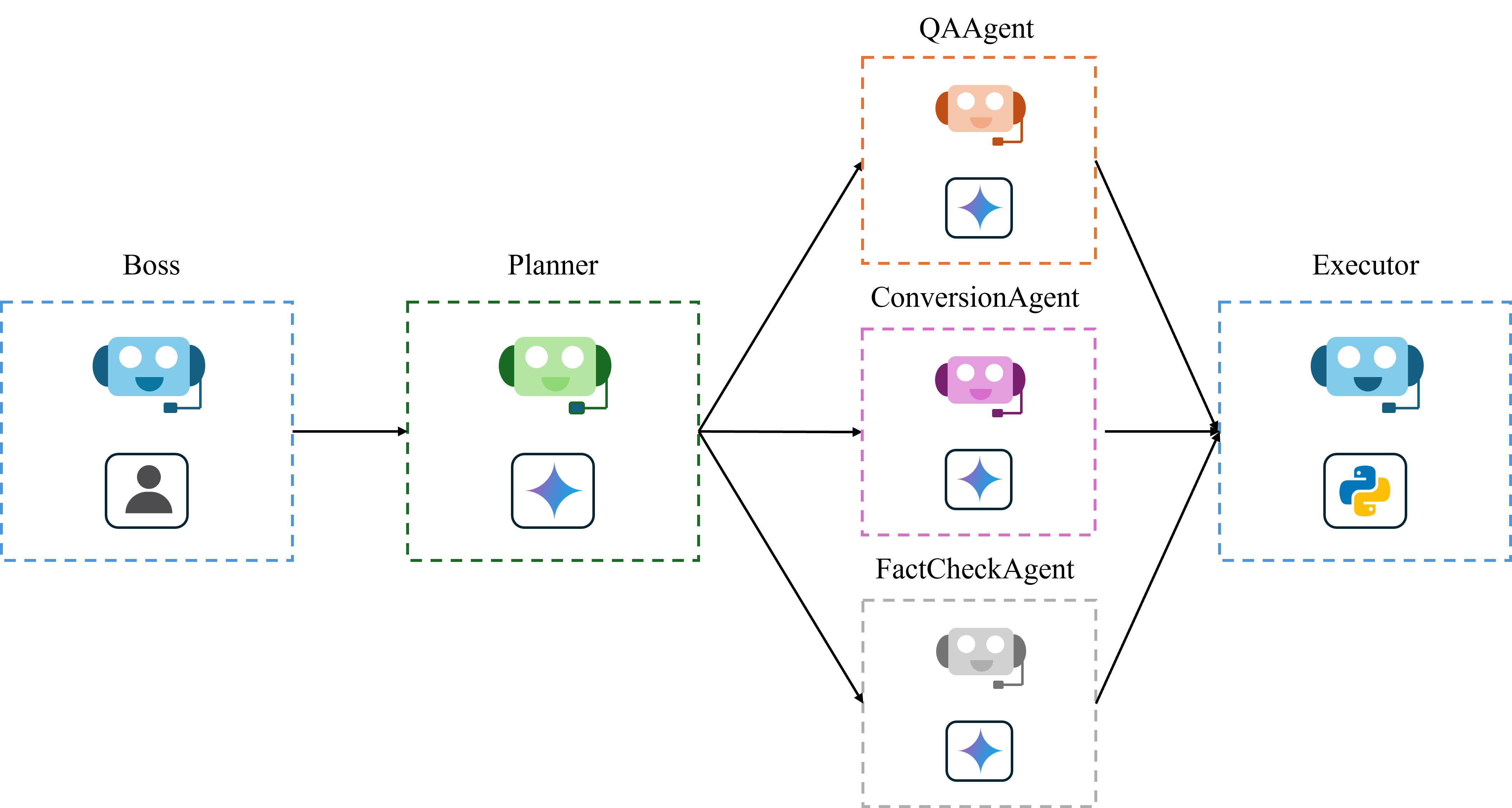
[User Input]
      |
      v
[Boss] ----> Initiates task by sending a message
      |
      v
[Planner] ----> Classifies the task (Question Answering, Table Conversion, Fact-Checking)
      |
      v
[Specialized Agent] ----> Handles the task:
   - QAAgent (for Chart Question Answering)
   - ConversionAgent (for Chart-to-Table Conversion)
   - FactCheckAgent (for Chart Fact-Checking)
      |
      v
[Executor] ----> Executes the generated code and returns the result
      |
      v
[Boss] <---- Returns to Boss for further instructions or task completion
Input:
message = "Use image in '/kaggle/working/chart_example_1.png' chart_example_1.png and generate underlying data table of the figure"
Agent Chat:
Boss (to chat_manager):
Use image in '/kaggle/working/chart_example_1.png' chart_example_1.png and generate underlying data table of the figure
--------------------------------------------------------------------------------
Next speaker: Planner

[autogen.oai.client: 12-17 14:07:25] {351} WARNING - Model gemini-1.5-flash-latest is not found. The cost will be 0. In your config_list, add field {"price" : [prompt_price_per_1k, completion_token_price_per_1k]} for customized pricing.
Planner (to chat_manager):
Chart-to-Table Conversion
--------------------------------------------------------------------------------
Next speaker: ConversionAgent

[autogen.oai.client: 12-17 14:07:28] {351} WARNING - Model gemini-1.5-flash-latest is not found. The cost will be 0. In your config_list, add field {"price" : [prompt_price_per_1k, completion_token_price_per_1k]} for customized pricing.
ConversionAgent (to chat_manager):
[Generated Code]:
    from PIL import Image
    from transformers import Pix2StructProcessor, Pix2StructForConditionalGeneration
    import pandas as pd

    # Load the image
    image = Image.open("/kaggle/working/chart_example_1.png")

    # Load the pre-trained model and processor
    processor = Pix2StructProcessor.from_pretrained("google/deplot")
    model = Pix2StructForConditionalGeneration.from_pretrained("google/deplot")

    # Prepare the input
    inputs = processor(images=image, text="Generate underlying data table of the figure below:", return_tensors="pt")

    # Generate the data table
    out = model.generate(**inputs, max_new_tokens=512)
    data_string = processor.decode(out[0], skip_special_tokens=True)
    data_string = data_string.replace('<0x0A>', '\n')
    lines = data_string.split('\n')
    has_title = "TITLE" in data_string
    header_lines = [line.split(' | ') for line in lines if '|' in line][:2 if has_title else 1]
    header_length = len(header_lines[-1])
    lines = lines[2:] if has_title else lines[1:]
    data = []
    for line in lines:
        parts = line.split(' | ')
        data.append(parts)

    df = pd.DataFrame(data, columns=header_lines[-1])
    print(df)

TERMINATE
--------------------------------------------------------------------------------
Next speaker: Executor

[Executing Code Block]:
Executor (to chat_manager):
exitcode: 0 (execution succeeded)
Code output:
  Characteristic Facebook Messenger WhatsApp
0          18-29                73%      30%
1          30-59                66%      25%
2            60+                43%        6%
--------------------------------------------------------------------------------
Next speaker: Boss

Boss (to chat_manager):
save to data.csv
--------------------------------------------------------------------------------
Next speaker: Planner

[autogen.oai.client: 12-17 14:08:21] {351} WARNING - Model gemini-1.5-flash-latest is not found. The cost will be 0. In your config_list, add field {"price" : [prompt_price_per_1k, completion_token_price_per_1k]} for customized pricing.
Planner (to chat_manager):
Chart-to-Table Conversion
--------------------------------------------------------------------------------
Next speaker: ConversionAgent

[autogen.oai.client: 12-17 14:08:24] {351} WARNING - Model gemini-1.5-flash-latest is not found. The cost will be 0. In your config_list, add field {"price" : [prompt_price_per_1k, completion_token_price_per_1k]} for customized pricing.
ConversionAgent (to chat_manager):
[Generated Code]:
    from PIL import Image
    from transformers import Pix2StructProcessor, Pix2StructForConditionalGeneration
    import pandas as pd

    # Load the image
    image = Image.open("/kaggle/working/chart_example_1.png")

    # Load the pre-trained model and processor
    processor = Pix2StructProcessor.from_pretrained("google/deplot")
    model = Pix2StructForConditionalGeneration.from_pretrained("google/deplot")

    # Prepare the input
    inputs = processor(images=image, text="Generate underlying data table of the figure below:", return_tensors="pt")

    # Generate the data table
    out = model.generate(**inputs, max_new_tokens=512)
    data_string = processor.decode(out[0], skip_special_tokens=True)
    data_string = data_string.replace('<0x0A>', '\n')
    lines = data_string.split('\n')
    has_title = "TITLE" in data_string
    header_lines = [line.split(' | ') for line in lines if '|' in line][:2 if has_title else 1]
    header_length = len(header_lines[-1])
    lines = lines[2:] if has_title else lines[1:]
    data = []
    for line in lines:
        parts = line.split(' | ')
        data.append(parts)

    df = pd.DataFrame(data, columns=header_lines[-1])

    # Save to CSV
    df.to_csv("data.csv", index=False)

    print("Data saved to data.csv")

TERMINATE
--------------------------------------------------------------------------------
Next speaker: Executor

[Executing Code Block]:
Executor (to chat_manager):
exitcode: 0 (execution succeeded)
Code output:
Data saved to data.csv
Input:
message = "Use image in '/kaggle/working/chart_example_1.png' chart_example_1.png and answer the question: What is the share of respondants who prefer Whatsapp in the 30-59 age group?"
Agent Chat:
Boss (to chat_manager):
Use image in '/kaggle/working/chart_example_1.png' chart_example_1.png and answer the question: What is the share of respondants who prefer Whatsapp in the 30-59 age group?
--------------------------------------------------------------------------------
Next speaker: Planner

Planner (to chat_manager):
Chart Question Answering
--------------------------------------------------------------------------------
Next speaker: QAAgent

[autogen.oai.client: 12-17 14:38:32] {351} WARNING - Model gemini-1.5-flash-latest is not found. The cost will be 0. In your config_list, add field {"price" : [prompt_price_per_1k, completion_token_price_per_1k]} for customized pricing.
QAAgent (to chat_manager):
[Generated Code]:
    from PIL import Image
    import torch
    from transformers import AutoProcessor, LlavaForConditionalGeneration

    # Load the pre-trained model
    model = LlavaForConditionalGeneration.from_pretrained("ahmed-masry/ChartInstruct-LLama2", torch_dtype=torch.float16)
    processor = AutoProcessor.from_pretrained("ahmed-masry/ChartInstruct-LLama2")

    # Prepare the device (GPU if available, otherwise CPU)
    device = torch.device("cuda" if torch.cuda.is_available() else "cpu")
    model.to(device)

    # Load the image
    image_path = "/kaggle/working/chart_example_1.png"
    image = Image.open(image_path).convert("RGB")

    # Input question
    input_text = "What is the share of respondants who prefer Whatsapp in the 30-59 age group?"

    # Prepare the input prompt
    input_prompt = f"<image>\nQuestion: {input_text} Answer: "

    # Process the input
    inputs = processor(text=input_prompt, images=image, return_tensors="pt")
    inputs = {k: v.to(device) for k, v in inputs.items()}
    inputs['pixel_values'] = inputs['pixel_values'].to(torch.float16)
    prompt_length = inputs['input_ids'].shape[1]

    # Generate the answer using beam search
    generate_ids = model.generate(**inputs, num_beams=4, max_new_tokens=512)

    # Decode the output
    output_text = processor.batch_decode(generate_ids[:, prompt_length:], skip_special_tokens=True, clean_up_tokenization_spaces=False)[0]

    # Print the result
    print(output_text)

TERMINATE
--------------------------------------------------------------------------------
Next speaker: Executor

[Executing Code Block]:
Executor (to chat_manager):
exitcode: 0 (execution succeeded)
Code output:
25%
--------------------------------------------------------------------------------
Next speaker: Boss

Boss (to chat_manager):
What is the share of responders who prefer Facebook Messenger in the 18-29 age group?
--------------------------------------------------------------------------------
Next speaker: Planner

[autogen.oai.client: 12-17 14:39:49] {351} WARNING - Model gemini-1.5-flash-latest is not found. The cost will be 0. In your config_list, add field {"price" : [prompt_price_per_1k, completion_token_price_per_1k]} for customized pricing.
Planner (to chat_manager):
Chart Question Answering
--------------------------------------------------------------------------------
Next speaker: QAAgent

[autogen.oai.client: 12-17 14:39:53] {351} WARNING - Model gemini-1.5-flash-latest is not found. The cost will be 0. In your config_list, add field {"price" : [prompt_price_per_1k, completion_token_price_per_1k]} for customized pricing.
QAAgent (to chat_manager):
[Generated Code]:
    from PIL import Image
    import torch
    from transformers import AutoProcessor, LlavaForConditionalGeneration

    # Load the pre-trained model
    model = LlavaForConditionalGeneration.from_pretrained("ahmed-masry/ChartInstruct-LLama2", torch_dtype=torch.float16)
    processor = AutoProcessor.from_pretrained("ahmed-masry/ChartInstruct-LLama2")

    # Prepare the device (GPU if available, otherwise CPU)
    device = torch.device("cuda" if torch.cuda.is_available() else "cpu")
    model.to(device)

    # Load the image
    image_path = "/kaggle/working/chart_example_1.png"
    image = Image.open(image_path).convert("RGB")

    # Input question
    input_text = "What is the share of responders who prefer Facebook Messenger in the 18-29 age group?"

    # Prepare the input prompt
    input_prompt = f"<image>\nQuestion: {input_text} Answer: "

    # Process the input
    inputs = processor(text=input_prompt, images=image, return_tensors="pt")
    inputs = {k: v.to(device) for k, v in inputs.items()}
    inputs['pixel_values'] = inputs['pixel_values'].to(torch.float16)
    prompt_length = inputs['input_ids'].shape[1]

    # Generate the answer using beam search
    generate_ids = model.generate(**inputs, num_beams=4, max_new_tokens=512)

    # Decode the output
    output_text = processor.batch_decode(generate_ids[:, prompt_length:], skip_special_tokens=True, clean_up_tokenization_spaces=False)[0]

    # Print the result
    print(output_text)

TERMINATE
--------------------------------------------------------------------------------
Next speaker: Executor

[Executing Code Block]:
Executor (to chat_manager):
exitcode: 0 (execution succeeded)
Code output:
73%
Input:
message = "Use image in '/kaggle/working/chart_example_1.png' chart_example_1.png and caption: Share of Facebook Messenger users in the United States as of January 2018, by age group. Check if the caption matches the chart or not?"
Agent Chat:
Boss (to chat_manager):
Use image in '/kaggle/working/chart_example_1.png' chart_example_1.png and caption: Share of Facebook Messenger users in the United States as of January 2018, by age group. Check if the caption matches the chart or not?
--------------------------------------------------------------------------------
Next speaker: Planner

Planner (to chat_manager):
Chart Fact-Checking
--------------------------------------------------------------------------------
Next speaker: FactCheckAgent

[autogen.oai.client: 12-17 15:18:32] {351} WARNING - Model gemini-1.5-flash-latest is not found. The cost will be 0. In your config_list, add field {"price" : [prompt_price_per_1k, completion_token_price_per_1k]} for customized pricing.
FactCheckAgent (to chat_manager):
[Generated Code]:
    from PIL import Image
    from transformers import VisionEncoderDecoderModel, DonutProcessor
    import torch

    # Load the pre-trained model and processor
    processor = DonutProcessor.from_pretrained("khhuang/chartve")
    model = VisionEncoderDecoderModel.from_pretrained("khhuang/chartve").cuda()

    def format_query(sentence):
        return f"Does the image entails this statement: \"{sentence}\"?"

    CAPTION_SENTENCE = "Share of Facebook Messenger users in the United States as of January 2018, by age group."
    query = format_query(CAPTION_SENTENCE)

    img = Image.open("/kaggle/working/chart_example_1.png")
    pixel_values = processor(img.convert("RGB"), random_padding=False, return_tensors="pt").pixel_values
    pixel_values = pixel_values.cuda()
    decoder_input_ids = processor.tokenizer(query, add_special_tokens=False, return_tensors="pt", max_length=510).input_ids.cuda()

    outputs = model(pixel_values, decoder_input_ids=decoder_input_ids)
    binary_entail_prob_positive = torch.nn.functional.softmax(outputs['logits'].squeeze()[-1,[2334, 49922]])[1].item()

    print(f"Probability that the caption matches the chart: {binary_entail_prob_positive}")

TERMINATE
--------------------------------------------------------------------------------
Next speaker: Executor

[Executing Code Block]:
Executor (to chat_manager):
exitcode: 0 (execution succeeded)
Code output:
Probability that the caption matches the chart: 0.9958046078681946
--------------------------------------------------------------------------------
Next speaker: Boss

Boss (to chat_manager):
change caption to a chart of NVDA and TESLA stock price change YTD and check
--------------------------------------------------------------------------------
Next speaker: Planner

[autogen.oai.client: 12-17 15:19:16] {351} WARNING - Model gemini-1.5-flash-latest is not found. The cost will be 0. In your config_list, add field {"price" : [prompt_price_per_1k, completion_token_price_per_1k]} for customized pricing.
Planner (to chat_manager):
Chart Fact-Checking
--------------------------------------------------------------------------------
Next speaker: FactCheckAgent

[autogen.oai.client: 12-17 15:19:19] {351} WARNING - Model gemini-1.5-flash-latest is not found. The cost will be 0. In your config_list, add field {"price" : [prompt_price_per_1k, completion_token_price_per_1k]} for customized pricing.
FactCheckAgent (to chat_manager):
[Generated Code]:
    from PIL import Image
    from transformers import VisionEncoderDecoderModel, DonutProcessor
    import torch

    # Load the pre-trained model and processor
    processor = DonutProcessor.from_pretrained("khhuang/chartve")
    model = VisionEncoderDecoderModel.from_pretrained("khhuang/chartve").cuda()

    def format_query(sentence):
        return f"Does the image entails this statement: \"{sentence}\"?"

    CAPTION_SENTENCE = "A chart of NVDA and TESLA stock price change YTD"
    query = format_query(CAPTION_SENTENCE)

    img = Image.open("/kaggle/working/chart_example_1.png")
    pixel_values = processor(img.convert("RGB"), random_padding=False, return_tensors="pt").pixel_values
    pixel_values = pixel_values.cuda()
    decoder_input_ids = processor.tokenizer(query, add_special_tokens=False, return_tensors="pt", max_length=510).input_ids.cuda()

    outputs = model(pixel_values, decoder_input_ids=decoder_input_ids)
    binary_entail_prob_positive = torch.nn.functional.softmax(outputs['logits'].squeeze()[-1,[2334, 49922]])[1].item()

    print(f"Probability that the caption matches the chart: {binary_entail_prob_positive}")

**Before running:** Replace `/kaggle/working/chart_example_1.png` with the actual path to your image file containing the NVDA and TESLA stock price chart. If the image is not a chart showing NVDA and TESLA stock prices YTD, the probability will likely be low.
TERMINATE
--------------------------------------------------------------------------------
Next speaker: Executor

[Executing Code Block]:
Executor (to chat_manager):
exitcode: 0 (execution succeeded)
Code output:
Probability that the caption matches the chart: 0.04390009492635727
Jupyter Notebook
0
1 commits
updated May 31, 2025
A Jupyter notebook-based project (code.ipynb) that implements a multi-agent system using AutoGen to analyze chart images. The system performs three key tasks: answering questions about charts, converting charts into tabular data, and verifying chart captions. It leverages pre-trained models from Hugging Face and supports GPU acceleration for efficient processing.
The Automatic-Understanding-Chart-Agent project is centered around code.ipynb, a Jupyter notebook that demonstrates a multi-agent system for chart analysis. Powered by the AutoGen framework, the system coordinates agents (Boss, Planner, QAAgent, ConversionAgent, FactCheckAgent, Executor) to perform:
ahmed-masry/ChartInstruct-LLama2.google/deplot and khhuang/chart-to-table.khhuang/chartve.The notebook includes code to download a sample chart (chart_example_1.png), process it with pre-trained models, and execute tasks via agent collaboration. It is ideal for data scientists and developers exploring automated chart analysis.
Key dependencies from requirements.txt:
autogen-agentchat==0.2.39transformers==4.46.3torch==2.5.1pandas==2.2.3pillow==11.0.0requirements.txtRequires Google Gemini API (gemini-1.5-flash-latest) with an API key.
Clone the Repository:
git clone https://github.com/your-username/Automatic-Understanding-Chart-Agent.git
cd Automatic-Understanding-Chart-Agent
Set Up Virtual Environment:
python -m venv venv
source venv/bin/activate  # Windows: venv\Scripts\activate
Install Dependencies:
pip install -r requirements.txt
Install AutoGen:
pip install git+https://github.com/microsoft/[email protected]
Configure API Key:
OAI_CONFIG_LIST in the project root or MyAgent/:
[
    {
        "model": "gemini-1.5-flash-latest",
        "api_key": "YOUR_API_KEY",
        "base_url": "https://generativelanguage.googleapis.com/v1beta",
        "api_type": "custom",
        "tags": ["gemini", "google"]
    }
]
Prepare Chart Images:
chart_example_1.png. Alternatively, place custom images in the project directory and update image_path.GPU Support (optional):
import torch
print(torch.cuda.is_available())
The code.ipynb notebook is the primary interface, containing cells for chart downloading, individual task implementations, and the AutoGen multi-agent system.
Launch Jupyter:
jupyter notebook
Open code.ipynb.
Execute Cells:
chart_example_1.png, test individual tasks, and execute the multi-agent system.message variables to change tasks or images.Tasks:
ChartInstruct-LLama2 (Cell 22).khhuang/chart-to-table (Cell 23) and google/deplot (Cell 25).khhuang/chartve (Cell 26).Automatic-Understanding-Chart-Agent/
├── code.ipynb # Core notebook with chart analysis tasks
├── ChartVE.py # Chart fact-checking script
├── Chart-To-Table.py # Chart-to-table conversion script
├── dePlot.py # Alternative chart-to-table script
├── UnderstandChartAgent.py # Multi-agent script
├── OAI_CONFIG_LIST # API key configuration
├── requirements.txt # Dependencies
├── LICENSE # Apache License 2.0
├── README.md # Documentation
└── MyAgent/ # Configuration/workspace
├── coding/ # Code execution directory
└── Chart/ # Chart images
The project follows a multi-agent architecture where each agent has a specific role in processing chart analysis tasks. The diagram below illustrates the flow of interactions among agents:
[User Input]
      |
      v
[Boss] ----> Initiates task by sending a message
      |
      v
[Planner] ----> Classifies the task (Question Answering, Table Conversion, Fact-Checking)
      |
      v
[Specialized Agent] ----> Handles the task:
   - QAAgent (for Chart Question Answering)
   - ConversionAgent (for Chart-to-Table Conversion)
   - FactCheckAgent (for Chart Fact-Checking)
      |
      v
[Executor] ----> Executes the generated code and returns the result
      |
      v
[Boss] <---- Returns to Boss for further instructions or task completion
Input:
message = "Use image in '/kaggle/working/chart_example_1.png' chart_example_1.png and generate underlying data table of the figure"
Agent Chat:
Boss (to chat_manager):
Use image in '/kaggle/working/chart_example_1.png' chart_example_1.png and generate underlying data table of the figure
--------------------------------------------------------------------------------
Next speaker: Planner

[autogen.oai.client: 12-17 14:07:25] {351} WARNING - Model gemini-1.5-flash-latest is not found. The cost will be 0. In your config_list, add field {"price" : [prompt_price_per_1k, completion_token_price_per_1k]} for customized pricing.
Planner (to chat_manager):
Chart-to-Table Conversion
--------------------------------------------------------------------------------
Next speaker: ConversionAgent

[autogen.oai.client: 12-17 14:07:28] {351} WARNING - Model gemini-1.5-flash-latest is not found. The cost will be 0. In your config_list, add field {"price" : [prompt_price_per_1k, completion_token_price_per_1k]} for customized pricing.
ConversionAgent (to chat_manager):
[Generated Code]:
    from PIL import Image
    from transformers import Pix2StructProcessor, Pix2StructForConditionalGeneration
    import pandas as pd

    # Load the image
    image = Image.open("/kaggle/working/chart_example_1.png")

    # Load the pre-trained model and processor
    processor = Pix2StructProcessor.from_pretrained("google/deplot")
    model = Pix2StructForConditionalGeneration.from_pretrained("google/deplot")

    # Prepare the input
    inputs = processor(images=image, text="Generate underlying data table of the figure below:", return_tensors="pt")

    # Generate the data table
    out = model.generate(**inputs, max_new_tokens=512)
    data_string = processor.decode(out[0], skip_special_tokens=True)
    data_string = data_string.replace('<0x0A>', '\n')
    lines = data_string.split('\n')
    has_title = "TITLE" in data_string
    header_lines = [line.split(' | ') for line in lines if '|' in line][:2 if has_title else 1]
    header_length = len(header_lines[-1])
    lines = lines[2:] if has_title else lines[1:]
    data = []
    for line in lines:
        parts = line.split(' | ')
        data.append(parts)

    df = pd.DataFrame(data, columns=header_lines[-1])
    print(df)

TERMINATE
--------------------------------------------------------------------------------
Next speaker: Executor

[Executing Code Block]:
Executor (to chat_manager):
exitcode: 0 (execution succeeded)
Code output:
  Characteristic Facebook Messenger WhatsApp
0          18-29                73%      30%
1          30-59                66%      25%
2            60+                43%        6%
--------------------------------------------------------------------------------
Next speaker: Boss

Boss (to chat_manager):
save to data.csv
--------------------------------------------------------------------------------
Next speaker: Planner

[autogen.oai.client: 12-17 14:08:21] {351} WARNING - Model gemini-1.5-flash-latest is not found. The cost will be 0. In your config_list, add field {"price" : [prompt_price_per_1k, completion_token_price_per_1k]} for customized pricing.
Planner (to chat_manager):
Chart-to-Table Conversion
--------------------------------------------------------------------------------
Next speaker: ConversionAgent

[autogen.oai.client: 12-17 14:08:24] {351} WARNING - Model gemini-1.5-flash-latest is not found. The cost will be 0. In your config_list, add field {"price" : [prompt_price_per_1k, completion_token_price_per_1k]} for customized pricing.
ConversionAgent (to chat_manager):
[Generated Code]:
    from PIL import Image
    from transformers import Pix2StructProcessor, Pix2StructForConditionalGeneration
    import pandas as pd

    # Load the image
    image = Image.open("/kaggle/working/chart_example_1.png")

    # Load the pre-trained model and processor
    processor = Pix2StructProcessor.from_pretrained("google/deplot")
    model = Pix2StructForConditionalGeneration.from_pretrained("google/deplot")

    # Prepare the input
    inputs = processor(images=image, text="Generate underlying data table of the figure below:", return_tensors="pt")

    # Generate the data table
    out = model.generate(**inputs, max_new_tokens=512)
    data_string = processor.decode(out[0], skip_special_tokens=True)
    data_string = data_string.replace('<0x0A>', '\n')
    lines = data_string.split('\n')
    has_title = "TITLE" in data_string
    header_lines = [line.split(' | ') for line in lines if '|' in line][:2 if has_title else 1]
    header_length = len(header_lines[-1])
    lines = lines[2:] if has_title else lines[1:]
    data = []
    for line in lines:
        parts = line.split(' | ')
        data.append(parts)

    df = pd.DataFrame(data, columns=header_lines[-1])

    # Save to CSV
    df.to_csv("data.csv", index=False)

    print("Data saved to data.csv")

TERMINATE
--------------------------------------------------------------------------------
Next speaker: Executor

[Executing Code Block]:
Executor (to chat_manager):
exitcode: 0 (execution succeeded)
Code output:
Data saved to data.csv
Input:
message = "Use image in '/kaggle/working/chart_example_1.png' chart_example_1.png and answer the question: What is the share of respondants who prefer Whatsapp in the 30-59 age group?"
Agent Chat:
Boss (to chat_manager):
Use image in '/kaggle/working/chart_example_1.png' chart_example_1.png and answer the question: What is the share of respondants who prefer Whatsapp in the 30-59 age group?
--------------------------------------------------------------------------------
Next speaker: Planner

Planner (to chat_manager):
Chart Question Answering
--------------------------------------------------------------------------------
Next speaker: QAAgent

[autogen.oai.client: 12-17 14:38:32] {351} WARNING - Model gemini-1.5-flash-latest is not found. The cost will be 0. In your config_list, add field {"price" : [prompt_price_per_1k, completion_token_price_per_1k]} for customized pricing.
QAAgent (to chat_manager):
[Generated Code]:
    from PIL import Image
    import torch
    from transformers import AutoProcessor, LlavaForConditionalGeneration

    # Load the pre-trained model
    model = LlavaForConditionalGeneration.from_pretrained("ahmed-masry/ChartInstruct-LLama2", torch_dtype=torch.float16)
    processor = AutoProcessor.from_pretrained("ahmed-masry/ChartInstruct-LLama2")

    # Prepare the device (GPU if available, otherwise CPU)
    device = torch.device("cuda" if torch.cuda.is_available() else "cpu")
    model.to(device)

    # Load the image
    image_path = "/kaggle/working/chart_example_1.png"
    image = Image.open(image_path).convert("RGB")

    # Input question
    input_text = "What is the share of respondants who prefer Whatsapp in the 30-59 age group?"

    # Prepare the input prompt
    input_prompt = f"<image>\nQuestion: {input_text} Answer: "

    # Process the input
    inputs = processor(text=input_prompt, images=image, return_tensors="pt")
    inputs = {k: v.to(device) for k, v in inputs.items()}
    inputs['pixel_values'] = inputs['pixel_values'].to(torch.float16)
    prompt_length = inputs['input_ids'].shape[1]

    # Generate the answer using beam search
    generate_ids = model.generate(**inputs, num_beams=4, max_new_tokens=512)

    # Decode the output
    output_text = processor.batch_decode(generate_ids[:, prompt_length:], skip_special_tokens=True, clean_up_tokenization_spaces=False)[0]

    # Print the result
    print(output_text)

TERMINATE
--------------------------------------------------------------------------------
Next speaker: Executor

[Executing Code Block]:
Executor (to chat_manager):
exitcode: 0 (execution succeeded)
Code output:
25%
--------------------------------------------------------------------------------
Next speaker: Boss

Boss (to chat_manager):
What is the share of responders who prefer Facebook Messenger in the 18-29 age group?
--------------------------------------------------------------------------------
Next speaker: Planner

[autogen.oai.client: 12-17 14:39:49] {351} WARNING - Model gemini-1.5-flash-latest is not found. The cost will be 0. In your config_list, add field {"price" : [prompt_price_per_1k, completion_token_price_per_1k]} for customized pricing.
Planner (to chat_manager):
Chart Question Answering
--------------------------------------------------------------------------------
Next speaker: QAAgent

[autogen.oai.client: 12-17 14:39:53] {351} WARNING - Model gemini-1.5-flash-latest is not found. The cost will be 0. In your config_list, add field {"price" : [prompt_price_per_1k, completion_token_price_per_1k]} for customized pricing.
QAAgent (to chat_manager):
[Generated Code]:
    from PIL import Image
    import torch
    from transformers import AutoProcessor, LlavaForConditionalGeneration

    # Load the pre-trained model
    model = LlavaForConditionalGeneration.from_pretrained("ahmed-masry/ChartInstruct-LLama2", torch_dtype=torch.float16)
    processor = AutoProcessor.from_pretrained("ahmed-masry/ChartInstruct-LLama2")

    # Prepare the device (GPU if available, otherwise CPU)
    device = torch.device("cuda" if torch.cuda.is_available() else "cpu")
    model.to(device)

    # Load the image
    image_path = "/kaggle/working/chart_example_1.png"
    image = Image.open(image_path).convert("RGB")

    # Input question
    input_text = "What is the share of responders who prefer Facebook Messenger in the 18-29 age group?"

    # Prepare the input prompt
    input_prompt = f"<image>\nQuestion: {input_text} Answer: "

    # Process the input
    inputs = processor(text=input_prompt, images=image, return_tensors="pt")
    inputs = {k: v.to(device) for k, v in inputs.items()}
    inputs['pixel_values'] = inputs['pixel_values'].to(torch.float16)
    prompt_length = inputs['input_ids'].shape[1]

    # Generate the answer using beam search
    generate_ids = model.generate(**inputs, num_beams=4, max_new_tokens=512)

    # Decode the output
    output_text = processor.batch_decode(generate_ids[:, prompt_length:], skip_special_tokens=True, clean_up_tokenization_spaces=False)[0]

    # Print the result
    print(output_text)

TERMINATE
--------------------------------------------------------------------------------
Next speaker: Executor

[Executing Code Block]:
Executor (to chat_manager):
exitcode: 0 (execution succeeded)
Code output:
73%
Input:
message = "Use image in '/kaggle/working/chart_example_1.png' chart_example_1.png and caption: Share of Facebook Messenger users in the United States as of January 2018, by age group. Check if the caption matches the chart or not?"
Agent Chat:
Boss (to chat_manager):
Use image in '/kaggle/working/chart_example_1.png' chart_example_1.png and caption: Share of Facebook Messenger users in the United States as of January 2018, by age group. Check if the caption matches the chart or not?
--------------------------------------------------------------------------------
Next speaker: Planner

Planner (to chat_manager):
Chart Fact-Checking
--------------------------------------------------------------------------------
Next speaker: FactCheckAgent

[autogen.oai.client: 12-17 15:18:32] {351} WARNING - Model gemini-1.5-flash-latest is not found. The cost will be 0. In your config_list, add field {"price" : [prompt_price_per_1k, completion_token_price_per_1k]} for customized pricing.
FactCheckAgent (to chat_manager):
[Generated Code]:
    from PIL import Image
    from transformers import VisionEncoderDecoderModel, DonutProcessor
    import torch

    # Load the pre-trained model and processor
    processor = DonutProcessor.from_pretrained("khhuang/chartve")
    model = VisionEncoderDecoderModel.from_pretrained("khhuang/chartve").cuda()

    def format_query(sentence):
        return f"Does the image entails this statement: \"{sentence}\"?"

    CAPTION_SENTENCE = "Share of Facebook Messenger users in the United States as of January 2018, by age group."
    query = format_query(CAPTION_SENTENCE)

    img = Image.open("/kaggle/working/chart_example_1.png")
    pixel_values = processor(img.convert("RGB"), random_padding=False, return_tensors="pt").pixel_values
    pixel_values = pixel_values.cuda()
    decoder_input_ids = processor.tokenizer(query, add_special_tokens=False, return_tensors="pt", max_length=510).input_ids.cuda()

    outputs = model(pixel_values, decoder_input_ids=decoder_input_ids)
    binary_entail_prob_positive = torch.nn.functional.softmax(outputs['logits'].squeeze()[-1,[2334, 49922]])[1].item()

    print(f"Probability that the caption matches the chart: {binary_entail_prob_positive}")

TERMINATE
--------------------------------------------------------------------------------
Next speaker: Executor

[Executing Code Block]:
Executor (to chat_manager):
exitcode: 0 (execution succeeded)
Code output:
Probability that the caption matches the chart: 0.9958046078681946
--------------------------------------------------------------------------------
Next speaker: Boss

Boss (to chat_manager):
change caption to a chart of NVDA and TESLA stock price change YTD and check
--------------------------------------------------------------------------------
Next speaker: Planner

[autogen.oai.client: 12-17 15:19:16] {351} WARNING - Model gemini-1.5-flash-latest is not found. The cost will be 0. In your config_list, add field {"price" : [prompt_price_per_1k, completion_token_price_per_1k]} for customized pricing.
Planner (to chat_manager):
Chart Fact-Checking
--------------------------------------------------------------------------------
Next speaker: FactCheckAgent

[autogen.oai.client: 12-17 15:19:19] {351} WARNING - Model gemini-1.5-flash-latest is not found. The cost will be 0. In your config_list, add field {"price" : [prompt_price_per_1k, completion_token_price_per_1k]} for customized pricing.
FactCheckAgent (to chat_manager):
[Generated Code]:
    from PIL import Image
    from transformers import VisionEncoderDecoderModel, DonutProcessor
    import torch

    # Load the pre-trained model and processor
    processor = DonutProcessor.from_pretrained("khhuang/chartve")
    model = VisionEncoderDecoderModel.from_pretrained("khhuang/chartve").cuda()

    def format_query(sentence):
        return f"Does the image entails this statement: \"{sentence}\"?"

    CAPTION_SENTENCE = "A chart of NVDA and TESLA stock price change YTD"
    query = format_query(CAPTION_SENTENCE)

    img = Image.open("/kaggle/working/chart_example_1.png")
    pixel_values = processor(img.convert("RGB"), random_padding=False, return_tensors="pt").pixel_values
    pixel_values = pixel_values.cuda()
    decoder_input_ids = processor.tokenizer(query, add_special_tokens=False, return_tensors="pt", max_length=510).input_ids.cuda()

    outputs = model(pixel_values, decoder_input_ids=decoder_input_ids)
    binary_entail_prob_positive = torch.nn.functional.softmax(outputs['logits'].squeeze()[-1,[2334, 49922]])[1].item()

    print(f"Probability that the caption matches the chart: {binary_entail_prob_positive}")

**Before running:** Replace `/kaggle/working/chart_example_1.png` with the actual path to your image file containing the NVDA and TESLA stock price chart. If the image is not a chart showing NVDA and TESLA stock prices YTD, the probability will likely be low.
TERMINATE
--------------------------------------------------------------------------------
Next speaker: Executor

[Executing Code Block]:
Executor (to chat_manager):
exitcode: 0 (execution succeeded)
Code output:
Probability that the caption matches the chart: 0.04390009492635727