Official implementation of 'A knowledge-based Multi-agent approach for Vietnamese VQA with rationale explanations' (AICI 2026).
Jupyter Notebook
9
78 commits
updated Sep 7, 2025



This is the official implementation of the paper "A knowledge-based multi-agent approach for Vietnamese VQA with rationale explanations".
Visual Question Answering with Natural Language Explanations (VQA-NLE) is a major challenge for AI, especially for the Vietnamese language due to a lack of specialized datasets and methods.
VMARC-QA (Vietnamese Multi-Agent Rationale-driven Consensus for Question Answering) is a framework designed to solve this problem. Our system uses a team of AI agents working in parallel to gather evidence, form a logical explanation, and ultimately derive a final answer.
The core features of VMARC-QA include:
On the ViVQA-X benchmark, VMARC-QA sets a new standard for answer accuracy while maintaining top-tier explanation quality:
The overall architecture of VMARC-QA is shown in the figure below:
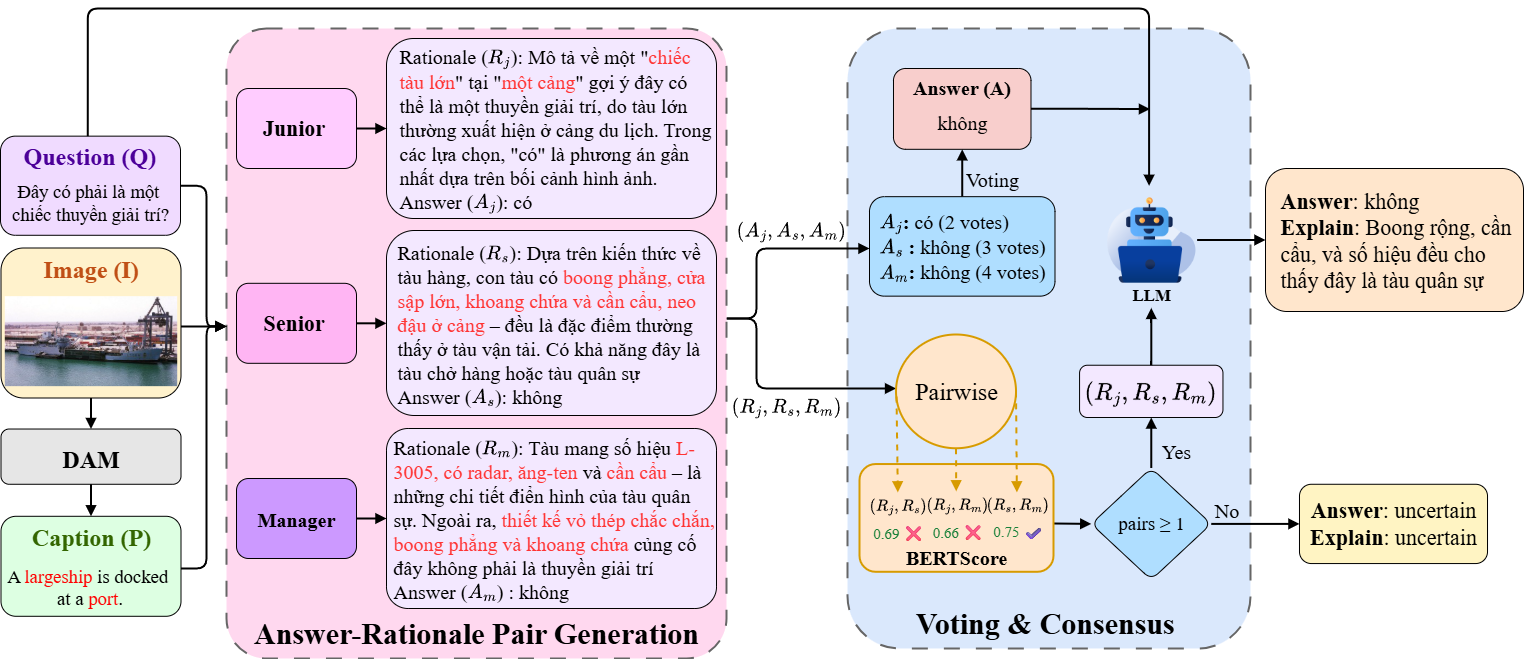 Figure 1: Overview of the VMARC-QA Framework. Three agents independently generate answer-rationale pairs, which are then aggregated by a dual-stream consensus mechanism to produce the final output.
VMARC-QA/
├── src/                 # Main framework source code
│   ├── agents/          # Logic for Junior, Senior, and Manager agents
│   ├── core/            # LangGraph multi-agent graph implementation
│   ├── models/          # Pydantic models for state management
│   ├── tools/           # VQA and knowledge retrieval tools
│   └── utils/           # Utility functions
│
├── api/                 # FastAPI server providing the VQA tool
│
├── ViVQA-X/             # Git submodule for the base ViVQA model and data
│
├── data/                # (To be created) Stores COCO images and ViVQA-X annotations
│
├── assets/              # Contains images and assets for the README
│
├── notebooks/           # Jupyter notebooks for data exploration or analysis
│
├── results/             # Directory to save experiment outputs
│
├── experiments/         # Contains experiment configurations and logs
│
├── scripts/             # Scripts for setup and running experiments
│
├── .env.example         # Example environment file
├── main.py              # Main entry point for the application
├── requirements.txt     # Python dependencies for the main environment
└── README.md            # This file
This project requires two separate Conda environments due to dependency conflicts between the main LangGraph framework and the legacy ViVQA-X model used for the VQA tool.
.env.example file to .env and add your API keys (e.g., OPENAI_API_KEY).You can use the automated setup script:
bash scripts/setup.sh
This will create both environments and install all dependencies.
If you prefer manual setup, follow these steps:
a. Main Environment (vmarc-qa)
This environment runs the core multi-agent framework.
conda create -n vmarc-qa python=3.10 -y
conda activate vmarc-qa
pip install -r requirements.txt
b. Tool Environment (vmarc-qa-tool)
This environment runs a FastAPI server that provides the Aligned Candidate Generator tool, based on the original ViVQA-X LSTM-Generative model.
# From the project root
cd ViVQA-X
conda create -n vmarc-qa-tool python=3.10 -y
conda activate vmarc-qa-tool
pip install -r requirements.txt
pip install fastapi uvicorn[standard] python-multipart
cd ..
VMARC-QA is evaluated on the ViVQA-X dataset, which uses images from MS COCO 2014.
Create a data directory and download the val2014 image set:
# Create the directory structure
mkdir -p data/COCO_Images data/ViVQA-X

# Download and unzip the Validation 2014 images (~6GB)
wget http://images.cocodataset.org/zips/val2014.zip -P data/
unzip data/val2014.zip -d data/COCO_Images/
rm data/val2014.zip
Copy the required annotation files from the submodule into your data directory:
# Copy the annotation file from the submodule
cp ViVQA-X/data/final/ViVQA-X_test.json data/ViVQA-X/
Your data directory structure should look like this when you're done:
VMARC-QA/
├── data/
│   ├── COCO_Images/
│   │   └── val2014/
│   │       ├── COCO_val2014_000000000042.jpg
│   │       └── ...
│   └── ViVQA-X/
│       └── ViVQA-X_test.json
The VMARC-QA system consists of multiple components. Follow these steps to run a full experiment.
Open a terminal, activate the vmarc-qa-tool environment, and start the API server from the ViVQA-X submodule directory.
conda activate vmarc-qa-tool
cd ViVQA-X/api
python main.py
This server provides the Aligned Candidate Generator tool to the agents.
If you are using a local LLM with VLLM, open a new terminal, activate the vmarc-qa environment, and start the server. The following is an example for the Qwen model:
conda activate vmarc-qa

# Command to serve a local LLM with VLLM
vllm serve Qwen/Qwen2-1.5B \
    --port 1234 \
    --dtype auto \
    --gpu-memory-utilization 0.5 \
    --max-model-len 4096 \
    --trust-remote-code
Once the servers are ready, open another new terminal, activate the vmarc-qa environment, and run the main experiment script.
Configuration: Open the scripts/full_system.sh file to customize your run:
0 to run on the entire test set.data/ directory. You can uncomment and modify these paths if your data is stored elsewhere.Execution:
conda activate vmarc-qa
bash scripts/full_system.sh
Performance comparison on the ViVQA-X test set. Our method establishes a new state-of-the-art in answer accuracy while maintaining highly competitive explanation quality.
| Method | B1 | B2 | B3 | B4 | M | R-L | C | S | BS | Acc |
|---|---|---|---|---|---|---|---|---|---|---|
| Heuristic Baseline | 8.46 | 3.0 | 1.3 | 0.6 | 8.5 | 7.9 | 0.5 | 0.6 | 70.8 | 10.1 |
| LSTM-Generative | 22.6 | 11.7 | 6.2 | 3.2 | 16.4 | 23.7 | 34.1 | 4.3 | 72.2 | 53.8 |
| NLX-GPT | 42.4 | 27.8 | 18.5 | 12.4 | 20.4 | 32.8 | 51.4 | 5.0 | 76.3 | 53.7 |
| OFA-X | 30.1 | 22.5 | 10.9 | 9.2 | 17.6 | 25.4 | 25.7 | 3.9 | 68.9 | 50.5 |
| ReRe | 34.0 | 21.2 | 13.8 | 9.0 | 20.8 | 29.4 | 35.5 | 4.2 | 74.9 | 47.5 |
| VMARC-QA (ours) | 27.5 | 14.8 | 8.1 | 4.4 | 17.6 | 22.4 | 23.6 | 4.0 | 76.0 | 64.8 |
If you use the code or methods from this work in your research, please cite our paper:
This project is licensed under the MIT License. See the LICENSE file for details.
Official implementation of 'A knowledge-based Multi-agent approach for Vietnamese VQA with rationale explanations' (AICI 2026).
Jupyter Notebook
9
78 commits
updated Sep 7, 2025
This is the official implementation of the paper "A knowledge-based multi-agent approach for Vietnamese VQA with rationale explanations".
Visual Question Answering with Natural Language Explanations (VQA-NLE) is a major challenge for AI, especially for the Vietnamese language due to a lack of specialized datasets and methods.
VMARC-QA (Vietnamese Multi-Agent Rationale-driven Consensus for Question Answering) is a framework designed to solve this problem. Our system uses a team of AI agents working in parallel to gather evidence, form a logical explanation, and ultimately derive a final answer.
The core features of VMARC-QA include:
On the ViVQA-X benchmark, VMARC-QA sets a new standard for answer accuracy while maintaining top-tier explanation quality:
The overall architecture of VMARC-QA is shown in the figure below:
Figure 1: Overview of the VMARC-QA Framework. Three agents independently generate answer-rationale pairs, which are then aggregated by a dual-stream consensus mechanism to produce the final output.
VMARC-QA/
├── src/                 # Main framework source code
│   ├── agents/          # Logic for Junior, Senior, and Manager agents
│   ├── core/            # LangGraph multi-agent graph implementation
│   ├── models/          # Pydantic models for state management
│   ├── tools/           # VQA and knowledge retrieval tools
│   └── utils/           # Utility functions
│
├── api/                 # FastAPI server providing the VQA tool
│
├── ViVQA-X/             # Git submodule for the base ViVQA model and data
│
├── data/                # (To be created) Stores COCO images and ViVQA-X annotations
│
├── assets/              # Contains images and assets for the README
│
├── notebooks/           # Jupyter notebooks for data exploration or analysis
│
├── results/             # Directory to save experiment outputs
│
├── experiments/         # Contains experiment configurations and logs
│
├── scripts/             # Scripts for setup and running experiments
│
├── .env.example         # Example environment file
├── main.py              # Main entry point for the application
├── requirements.txt     # Python dependencies for the main environment
└── README.md            # This file
This project requires two separate Conda environments due to dependency conflicts between the main LangGraph framework and the legacy ViVQA-X model used for the VQA tool.
.env.example file to .env and add your API keys (e.g., OPENAI_API_KEY).You can use the automated setup script:
bash scripts/setup.sh
This will create both environments and install all dependencies.
If you prefer manual setup, follow these steps:
a. Main Environment (vmarc-qa)
This environment runs the core multi-agent framework.
conda create -n vmarc-qa python=3.10 -y
conda activate vmarc-qa
pip install -r requirements.txt
b. Tool Environment (vmarc-qa-tool)
This environment runs a FastAPI server that provides the Aligned Candidate Generator tool, based on the original ViVQA-X LSTM-Generative model.
# From the project root
cd ViVQA-X
conda create -n vmarc-qa-tool python=3.10 -y
conda activate vmarc-qa-tool
pip install -r requirements.txt
pip install fastapi uvicorn[standard] python-multipart
cd ..
VMARC-QA is evaluated on the ViVQA-X dataset, which uses images from MS COCO 2014.
Create a data directory and download the val2014 image set:
# Create the directory structure
mkdir -p data/COCO_Images data/ViVQA-X

# Download and unzip the Validation 2014 images (~6GB)
wget http://images.cocodataset.org/zips/val2014.zip -P data/
unzip data/val2014.zip -d data/COCO_Images/
rm data/val2014.zip
Copy the required annotation files from the submodule into your data directory:
# Copy the annotation file from the submodule
cp ViVQA-X/data/final/ViVQA-X_test.json data/ViVQA-X/
Your data directory structure should look like this when you're done:
VMARC-QA/
├── data/
│   ├── COCO_Images/
│   │   └── val2014/
│   │       ├── COCO_val2014_000000000042.jpg
│   │       └── ...
│   └── ViVQA-X/
│       └── ViVQA-X_test.json
The VMARC-QA system consists of multiple components. Follow these steps to run a full experiment.
Open a terminal, activate the vmarc-qa-tool environment, and start the API server from the ViVQA-X submodule directory.
conda activate vmarc-qa-tool
cd ViVQA-X/api
python main.py
This server provides the Aligned Candidate Generator tool to the agents.
If you are using a local LLM with VLLM, open a new terminal, activate the vmarc-qa environment, and start the server. The following is an example for the Qwen model:
conda activate vmarc-qa

# Command to serve a local LLM with VLLM
vllm serve Qwen/Qwen2-1.5B \
    --port 1234 \
    --dtype auto \
    --gpu-memory-utilization 0.5 \
    --max-model-len 4096 \
    --trust-remote-code
Once the servers are ready, open another new terminal, activate the vmarc-qa environment, and run the main experiment script.
Configuration: Open the scripts/full_system.sh file to customize your run:
0 to run on the entire test set.data/ directory. You can uncomment and modify these paths if your data is stored elsewhere.Execution:
conda activate vmarc-qa
bash scripts/full_system.sh
Performance comparison on the ViVQA-X test set. Our method establishes a new state-of-the-art in answer accuracy while maintaining highly competitive explanation quality.
| Method | B1 | B2 | B3 | B4 | M | R-L | C | S | BS | Acc |
|---|---|---|---|---|---|---|---|---|---|---|
| Heuristic Baseline | 8.46 | 3.0 | 1.3 | 0.6 | 8.5 | 7.9 | 0.5 | 0.6 | 70.8 | 10.1 |
| LSTM-Generative | 22.6 | 11.7 | 6.2 | 3.2 | 16.4 | 23.7 | 34.1 | 4.3 | 72.2 | 53.8 |
| NLX-GPT | 42.4 | 27.8 | 18.5 | 12.4 | 20.4 | 32.8 | 51.4 | 5.0 | 76.3 | 53.7 |
| OFA-X | 30.1 | 22.5 | 10.9 | 9.2 | 17.6 | 25.4 | 25.7 | 3.9 | 68.9 | 50.5 |
| ReRe | 34.0 | 21.2 | 13.8 | 9.0 | 20.8 | 29.4 | 35.5 | 4.2 | 74.9 | 47.5 |
| VMARC-QA (ours) | 27.5 | 14.8 | 8.1 | 4.4 | 17.6 | 22.4 | 23.6 | 4.0 | 76.0 | 64.8 |
If you use the code or methods from this work in your research, please cite our paper:
This project is licensed under the MIT License. See the LICENSE file for details.