
A native macOS app that runs Claude Code as a city of robot-staffed offices. Every project is a building, every floor a team, and every animation a real CLI event.
See the codeSee what people are saying
README

The City
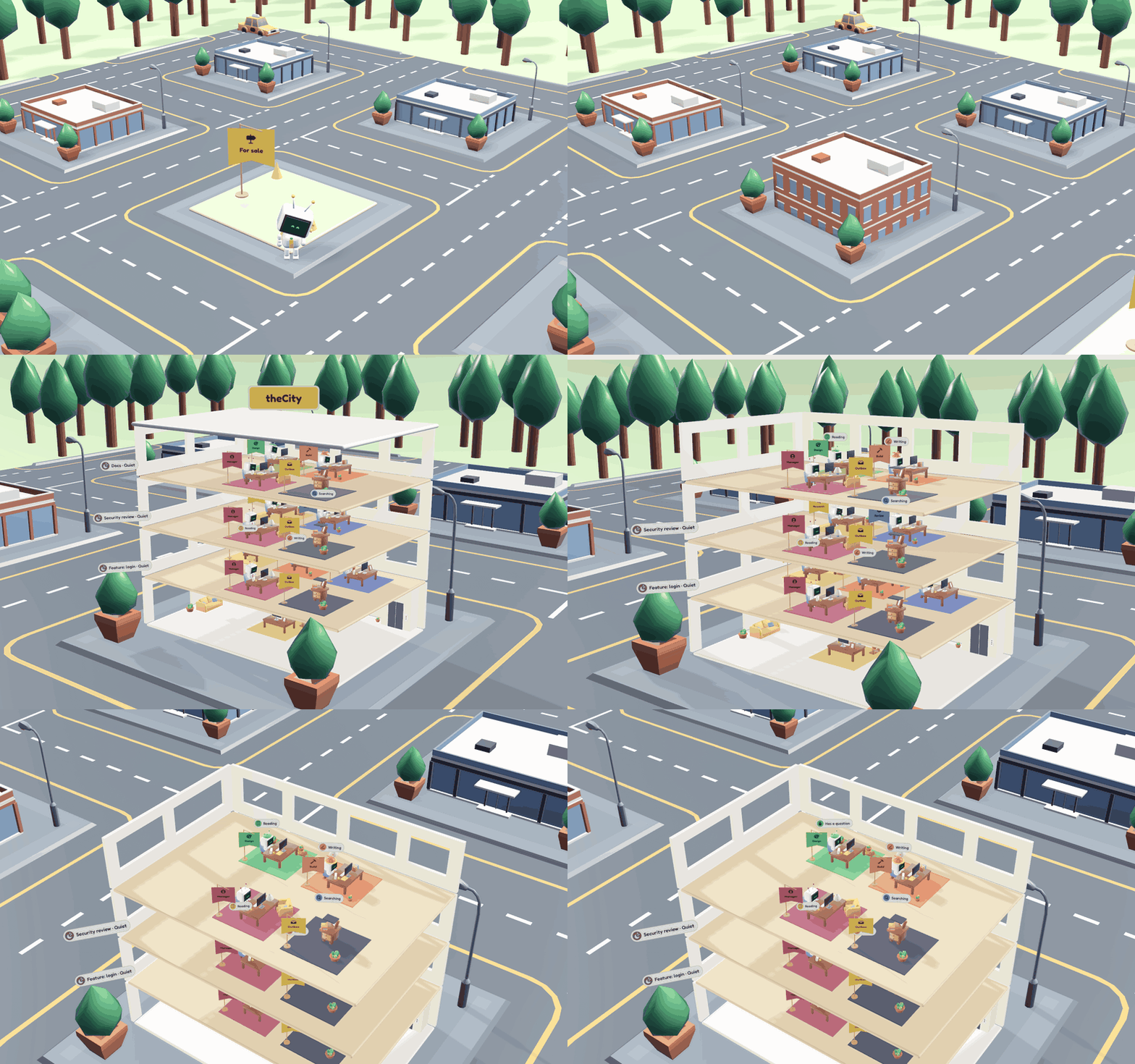
A macOS app that shows Claude Code runs as a city of robot-staffed offices. Every project folder is a building, every building has floors of robots, and every animation comes from a real event in the claude CLI's stream.
The City starts its own Claude Code runs using the claude you already have installed, and they count towards your plan as usual. It doesn't show sessions you started in a terminal.
Requirements
- macOS 26 or later.
- Claude Code 2.1.163 or later, installed and signed in. Older versions have known security issues and the app won't run jobs with them. The app looks for
claudeon yourPATHand in~/.local/bin,/opt/homebrew/bin,/usr/local/binand~/.claude/local. You can also point it at the binary in Settings. Before each job it checks that Claude Code is installed and signed in, and offers Install…, Locate… or Sign In… if not. - Apple Intelligence enabled, for the on-device model that picks departments and routes work. A word-overlap check is used as a fallback.
Install
-
Download the latest
.dmgor.zipfrom Releases. -
Drag TheCity.app into Applications.
-
The build is not notarised, so macOS blocks the first launch with "Apple could not verify…". Click Done, then open System Settings › Privacy & Security, scroll down and click Open Anyway. Or run:
xattr -dr com.apple.quarantine /Applications/TheCity.app
Updates
The app uses Sparkle to check for new releases and install them. To check straight away, choose The City › Check for Updates….
How it works
- City: each project folder is a building (File › New Project…, ⇧⌘N). Beacons show which buildings are working or need you, and a "Needs you" list jumps to the waiting floor. ⌘0 returns to the city.
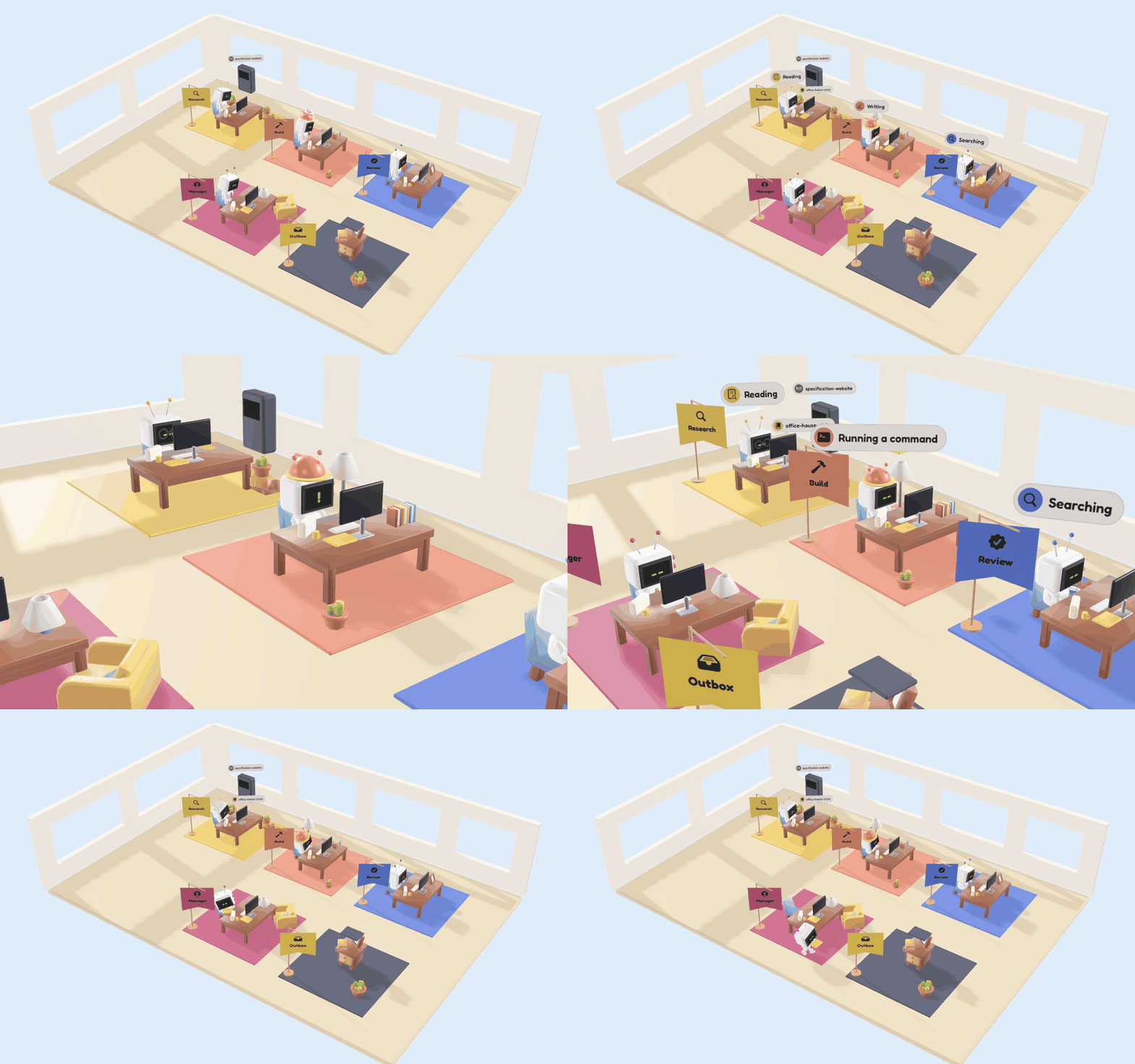
- Reception: tell the receptionist what you need. It sends the job to the floor whose team fits, taking into account work already running on other floors, or proposes a new floor. A busy floor queues the job.
- Hiring: a new floor's departments are picked from the project's
.claude/agents/*.md. You can hire or release any of them. - Floor: a saved team (departments, model, budget, allowed services and skills) with its own Claude session and job history. Floors run in parallel.
- Office: the floor runs
claude -pin stream-JSON mode. Subagents work at their department's desk; anything the plan didn't hire sits at the Contractor desk. - Questions and approvals appear as cards at the robot's desk. Use ⌘1–⌘9 to pick an option, ⌘↩ to send or allow, and ⌘⌫ to deny. Always allow saves the CLI's suggested rule to the project's
.claude/settings.local.json. - Outbox: the Delivered card has the summary, every file the run wrote or edited, and a follow-up field that resumes the same session.
- Plan limits: 5-hour and weekly usage from the latest job appear top right.
- When the app needs you while it's in the background, it posts a notification and badges the Dock icon.
Settings (⌘,) holds the defaults for new jobs (account, model, budget), the theme, notifications, sounds and the location of claude. View › Show Raw Log (⌥⌘L) opens the raw CLI stream.
The city is saved in ~/Library/Application Support/The City/.
Bugs and ideas
The backlog lives in GitHub Issues, so you can see what's planned and what's already known. If something breaks or you have an idea, open an issue. Rough reports are fine. Issues labelled good first issue are a good place to start contributing. See CONTRIBUTING.md for details.
Building from source
Needs Xcode 27 and XcodeGen (brew install xcodegen).
make run       # generate the project, build, and open against SampleWorkspace/
make install   # build and copy to /Applications/TheCity.app
make test      # OfficeCore unit tests against fixtures/
make replay    # open and replay fixtures/three-rooms.jsonl (no API calls)
make clean     # remove build output and the generated project
Releasing
CI runs the tests and builds the app on every push and pull request. Pushing a tag such as v0.2.0 also builds a release with that version and publishes the .dmg, .zip and Sparkle appcast.xml to GitHub Releases, using the tag's section of CHANGELOG.md as the notes. Updates are signed with the EdDSA key in the SPARKLE_ED_PRIVATE_KEY repository secret, which must match SUPublicEDKey in project.yml.
In Claude Code, /release does the whole thing: it checks main is clean and green, writes the CHANGELOG section from what changed since the last tag, then tags, pushes and checks the published release.
Tools/Dev/readme-gifs.sh re-renders the GIFs in this README from scripted scenes (needs make build, ffmpeg and gifsicle). TheCity -render-icon <file.png> renders the app icon at 1024 px.
make project regenerates TheCity.xcodeproj from project.yml on its own. In debug builds, Debug › Replay Fixture… (⇧⌘R) replays any saved stream.
Layout
Packages/OfficeCore: stream parser, control protocol, reducer, process layer and agent catalogue. No UI imports.App/: SwiftUI screens, RealityKit scenes, on-device routing and hiring, theme and brands.fixtures/: recorded CLI streams used by the tests and the replay mode.SampleWorkspace/: a throwaway project with a few example agents.
Launch arguments
-workspace <dir>, -request <text>, -model <alias>, -theme light|dark, -replay <file.jsonl>, -cli <path>.
Credits
The initial concept and visual design were inspired by AI Office. I wanted to flesh it out into something that fits my own workflow and taste.
3D models are KayKit (CC0), sounds are Kenney (CC0) and lighting uses Poly Haven HDRIs (CC0). Fredoka and Lexend are under the SIL Open Font Licence. See the credit files in App/.
Licence
MIT. See LICENSE.
Contributors

14 commits
Similar repos


Languages
Swift
93.7%
Python
6.0%
A native macOS app that runs Claude Code as a city of robot-staffed offices. Every project is a building, every floor a team, and every animation a real CLI event.
See the codeSee what people are saying
README
The City
A macOS app that shows Claude Code runs as a city of robot-staffed offices. Every project folder is a building, every building has floors of robots, and every animation comes from a real event in the claude CLI's stream.
The City starts its own Claude Code runs using the claude you already have installed, and they count towards your plan as usual. It doesn't show sessions you started in a terminal.
Requirements
- macOS 26 or later.
- Claude Code 2.1.163 or later, installed and signed in. Older versions have known security issues and the app won't run jobs with them. The app looks for
claudeon yourPATHand in~/.local/bin,/opt/homebrew/bin,/usr/local/binand~/.claude/local. You can also point it at the binary in Settings. Before each job it checks that Claude Code is installed and signed in, and offers Install…, Locate… or Sign In… if not. - Apple Intelligence enabled, for the on-device model that picks departments and routes work. A word-overlap check is used as a fallback.
Install
-
Download the latest
.dmgor.zipfrom Releases. -
Drag TheCity.app into Applications.
-
The build is not notarised, so macOS blocks the first launch with "Apple could not verify…". Click Done, then open System Settings › Privacy & Security, scroll down and click Open Anyway. Or run:
xattr -dr com.apple.quarantine /Applications/TheCity.app
Updates
The app uses Sparkle to check for new releases and install them. To check straight away, choose The City › Check for Updates….
How it works
- City: each project folder is a building (File › New Project…, ⇧⌘N). Beacons show which buildings are working or need you, and a "Needs you" list jumps to the waiting floor. ⌘0 returns to the city.
- Reception: tell the receptionist what you need. It sends the job to the floor whose team fits, taking into account work already running on other floors, or proposes a new floor. A busy floor queues the job.
- Hiring: a new floor's departments are picked from the project's
.claude/agents/*.md. You can hire or release any of them. - Floor: a saved team (departments, model, budget, allowed services and skills) with its own Claude session and job history. Floors run in parallel.
- Office: the floor runs
claude -pin stream-JSON mode. Subagents work at their department's desk; anything the plan didn't hire sits at the Contractor desk. - Questions and approvals appear as cards at the robot's desk. Use ⌘1–⌘9 to pick an option, ⌘↩ to send or allow, and ⌘⌫ to deny. Always allow saves the CLI's suggested rule to the project's
.claude/settings.local.json. - Outbox: the Delivered card has the summary, every file the run wrote or edited, and a follow-up field that resumes the same session.
- Plan limits: 5-hour and weekly usage from the latest job appear top right.
- When the app needs you while it's in the background, it posts a notification and badges the Dock icon.
Settings (⌘,) holds the defaults for new jobs (account, model, budget), the theme, notifications, sounds and the location of claude. View › Show Raw Log (⌥⌘L) opens the raw CLI stream.
The city is saved in ~/Library/Application Support/The City/.
Bugs and ideas
The backlog lives in GitHub Issues, so you can see what's planned and what's already known. If something breaks or you have an idea, open an issue. Rough reports are fine. Issues labelled good first issue are a good place to start contributing. See CONTRIBUTING.md for details.
Building from source
Needs Xcode 27 and XcodeGen (brew install xcodegen).
make run       # generate the project, build, and open against SampleWorkspace/
make install   # build and copy to /Applications/TheCity.app
make test      # OfficeCore unit tests against fixtures/
make replay    # open and replay fixtures/three-rooms.jsonl (no API calls)
make clean     # remove build output and the generated project
Releasing
CI runs the tests and builds the app on every push and pull request. Pushing a tag such as v0.2.0 also builds a release with that version and publishes the .dmg, .zip and Sparkle appcast.xml to GitHub Releases, using the tag's section of CHANGELOG.md as the notes. Updates are signed with the EdDSA key in the SPARKLE_ED_PRIVATE_KEY repository secret, which must match SUPublicEDKey in project.yml.
In Claude Code, /release does the whole thing: it checks main is clean and green, writes the CHANGELOG section from what changed since the last tag, then tags, pushes and checks the published release.
Tools/Dev/readme-gifs.sh re-renders the GIFs in this README from scripted scenes (needs make build, ffmpeg and gifsicle). TheCity -render-icon <file.png> renders the app icon at 1024 px.
make project regenerates TheCity.xcodeproj from project.yml on its own. In debug builds, Debug › Replay Fixture… (⇧⌘R) replays any saved stream.
Layout
Packages/OfficeCore: stream parser, control protocol, reducer, process layer and agent catalogue. No UI imports.App/: SwiftUI screens, RealityKit scenes, on-device routing and hiring, theme and brands.fixtures/: recorded CLI streams used by the tests and the replay mode.SampleWorkspace/: a throwaway project with a few example agents.
Launch arguments
-workspace <dir>, -request <text>, -model <alias>, -theme light|dark, -replay <file.jsonl>, -cli <path>.
Credits
The initial concept and visual design were inspired by AI Office. I wanted to flesh it out into something that fits my own workflow and taste.
3D models are KayKit (CC0), sounds are Kenney (CC0) and lighting uses Poly Haven HDRIs (CC0). Fredoka and Lexend are under the SIL Open Font Licence. See the credit files in App/.
Licence
MIT. See LICENSE.
Similar repos
Contributors
14 commits
Languages
Swift
93.7%
Python
6.0%