
A persistent, observable, and collaborative memory infrastructure
See the codeREADME
Clumsies

English · 简体中文 · Documentation


A macOS preview installer is available. Download the DMG, with no build tools needed. The preview is not notarized by Apple; see the first-open instructions below.
Clumsies helps teams maintain shared Markdown guidance for coding agents: architecture decisions, project constraints, and procedures. The organization keeps published Memory; each Project selects the Memory it uses and connects it to local repositories. Agents retrieve relevant guidance while they work and can propose changes when a user asks.
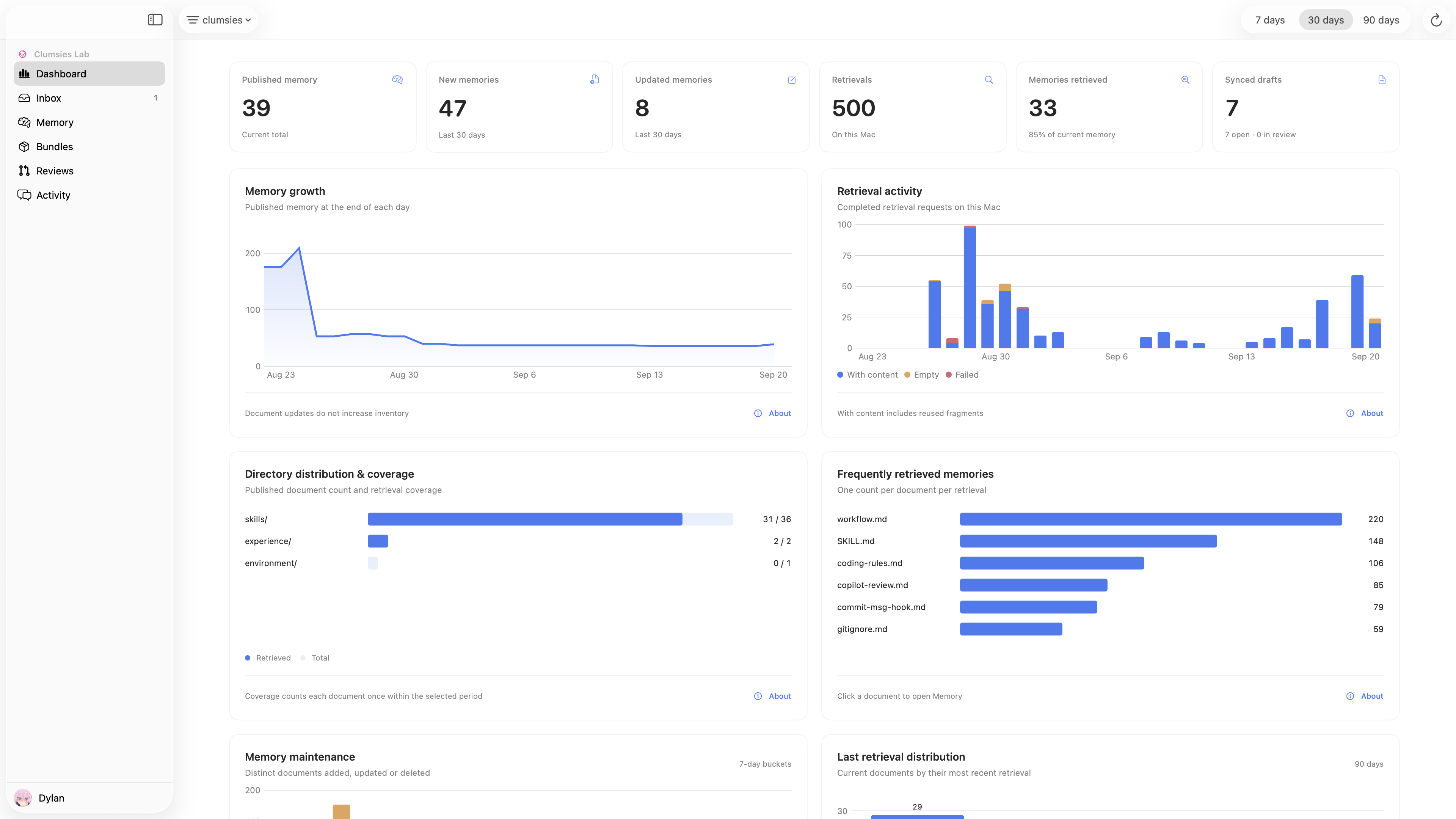
The macOS dashboard brings together memory growth, retrieval activity, and coverage.
How you use it
The quickstart follows one workflow:
- Create a Project and bind your working repository.
- Select the Memory that Project needs from the organization.
- Work in Codex with the Clumsies integration enabled; it retrieves relevant Memory as part of the task.
- Explicitly ask Codex to update Memory when a rule or procedure needs to change.
- Inspect the resulting Draft in Clumsies and submit a Review. An organization owner or administrator approves and publishes it.
Retrieval does not automatically rewrite Memory. A saved Draft is a proposal, and publication requires human review. Drafts can affect that Project's local Memory view before publication.
Install and get started
Supports macOS 14 or later on Apple Silicon Macs (M1 or newer). No Xcode, Rust, or other build tools are needed to install the DMG.
- Open GitHub Releases and download
Clumsies-*-macos-arm64.dmgfrom the newest Clumsies macOS Preview. - Open the DMG, drag Clumsies.app into Applications, eject the disk image, and open the installed App.
- The preview is not notarized by Apple. If macOS blocks the first launch, confirm the file came from this repository, then use System Settings → Privacy & Security → Open Anyway. Managed Macs may restrict this exception. Apple's instructions
- Keep the default Server address
https://app.clumsies.aiand sign in with an account admitted by that organization. Use your team's Server address for another deployment.
Continue with the quickstart to connect your organization, create a Project, and connect your agent. To update a preview, quit the App, download a newer DMG, and replace the existing application; accounts, Memory, and settings are retained.
If you previously installed ~/Applications/Clumsies.app, quit it and replace it there to avoid keeping two copies. For source installation, see the source installation guide.
Ask an agent to install it
Install Clumsies from:
https://github.com/lilhammerfun/clumsies/releases

Download the DMG from the newest Clumsies macOS Preview and install its
Clumsies.app in Applications. If already installed, quit it and replace it
in its existing location. Preserve accounts, Memory, and settings.
Use the built-in Server address. Do not create a Dev Instance or start a
local Server. Tell me when macOS first-open approval or sign-in needs me.
Then guide me through the Clumsies quickstart to connect my organization,
create a Project, and connect my agent.
Agent support and limits
Clumsies includes integrations for the macOS Codex App, Claude Code, opencode, DeepSeek Harness (dsh), and Google Antigravity. Install the agent host separately. Adapters are configured once per Mac user for all projects; Codex is selected by default during first-time setup. Repository bindings determine which Project's Memory an agent can use.
After changing the Codex integration, restart Codex and start a new task. Retrieval needs the local daemon and a ready index; first use downloads the retrieval models. Host-specific requirements are documented in Agent integration.
Teams can deploy the Rust Server and PostgreSQL with their own OIDC identity provider. See organization deployment.
Understand the project
Overview · Architecture · Data model · Domain interfaces · Development workflow
License
MIT © 2026 Clumsies Lab
Contributors

1,017 commits

3 commits
Similar repos


Languages
Rust
62.3%
Swift
32.2%
Shell
3.0%
Python
1.7%
A persistent, observable, and collaborative memory infrastructure
See the codeREADME
Clumsies
English · 简体中文 · Documentation
A macOS preview installer is available. Download the DMG, with no build tools needed. The preview is not notarized by Apple; see the first-open instructions below.
Clumsies helps teams maintain shared Markdown guidance for coding agents: architecture decisions, project constraints, and procedures. The organization keeps published Memory; each Project selects the Memory it uses and connects it to local repositories. Agents retrieve relevant guidance while they work and can propose changes when a user asks.
The macOS dashboard brings together memory growth, retrieval activity, and coverage.
How you use it
The quickstart follows one workflow:
- Create a Project and bind your working repository.
- Select the Memory that Project needs from the organization.
- Work in Codex with the Clumsies integration enabled; it retrieves relevant Memory as part of the task.
- Explicitly ask Codex to update Memory when a rule or procedure needs to change.
- Inspect the resulting Draft in Clumsies and submit a Review. An organization owner or administrator approves and publishes it.
Retrieval does not automatically rewrite Memory. A saved Draft is a proposal, and publication requires human review. Drafts can affect that Project's local Memory view before publication.
Install and get started
Supports macOS 14 or later on Apple Silicon Macs (M1 or newer). No Xcode, Rust, or other build tools are needed to install the DMG.
- Open GitHub Releases and download
Clumsies-*-macos-arm64.dmgfrom the newest Clumsies macOS Preview. - Open the DMG, drag Clumsies.app into Applications, eject the disk image, and open the installed App.
- The preview is not notarized by Apple. If macOS blocks the first launch, confirm the file came from this repository, then use System Settings → Privacy & Security → Open Anyway. Managed Macs may restrict this exception. Apple's instructions
- Keep the default Server address
https://app.clumsies.aiand sign in with an account admitted by that organization. Use your team's Server address for another deployment.
Continue with the quickstart to connect your organization, create a Project, and connect your agent. To update a preview, quit the App, download a newer DMG, and replace the existing application; accounts, Memory, and settings are retained.
If you previously installed ~/Applications/Clumsies.app, quit it and replace it there to avoid keeping two copies. For source installation, see the source installation guide.
Ask an agent to install it
Install Clumsies from:
https://github.com/lilhammerfun/clumsies/releases

Download the DMG from the newest Clumsies macOS Preview and install its
Clumsies.app in Applications. If already installed, quit it and replace it
in its existing location. Preserve accounts, Memory, and settings.
Use the built-in Server address. Do not create a Dev Instance or start a
local Server. Tell me when macOS first-open approval or sign-in needs me.
Then guide me through the Clumsies quickstart to connect my organization,
create a Project, and connect my agent.
Agent support and limits
Clumsies includes integrations for the macOS Codex App, Claude Code, opencode, DeepSeek Harness (dsh), and Google Antigravity. Install the agent host separately. Adapters are configured once per Mac user for all projects; Codex is selected by default during first-time setup. Repository bindings determine which Project's Memory an agent can use.
After changing the Codex integration, restart Codex and start a new task. Retrieval needs the local daemon and a ready index; first use downloads the retrieval models. Host-specific requirements are documented in Agent integration.
Teams can deploy the Rust Server and PostgreSQL with their own OIDC identity provider. See organization deployment.
Understand the project
Overview · Architecture · Data model · Domain interfaces · Development workflow
License
MIT © 2026 Clumsies Lab
Similar repos
Contributors
1,017 commits
3 commits
Languages
Rust
62.3%
Swift
32.2%
Shell
3.0%
Python
1.7%