
README
Harness-mem
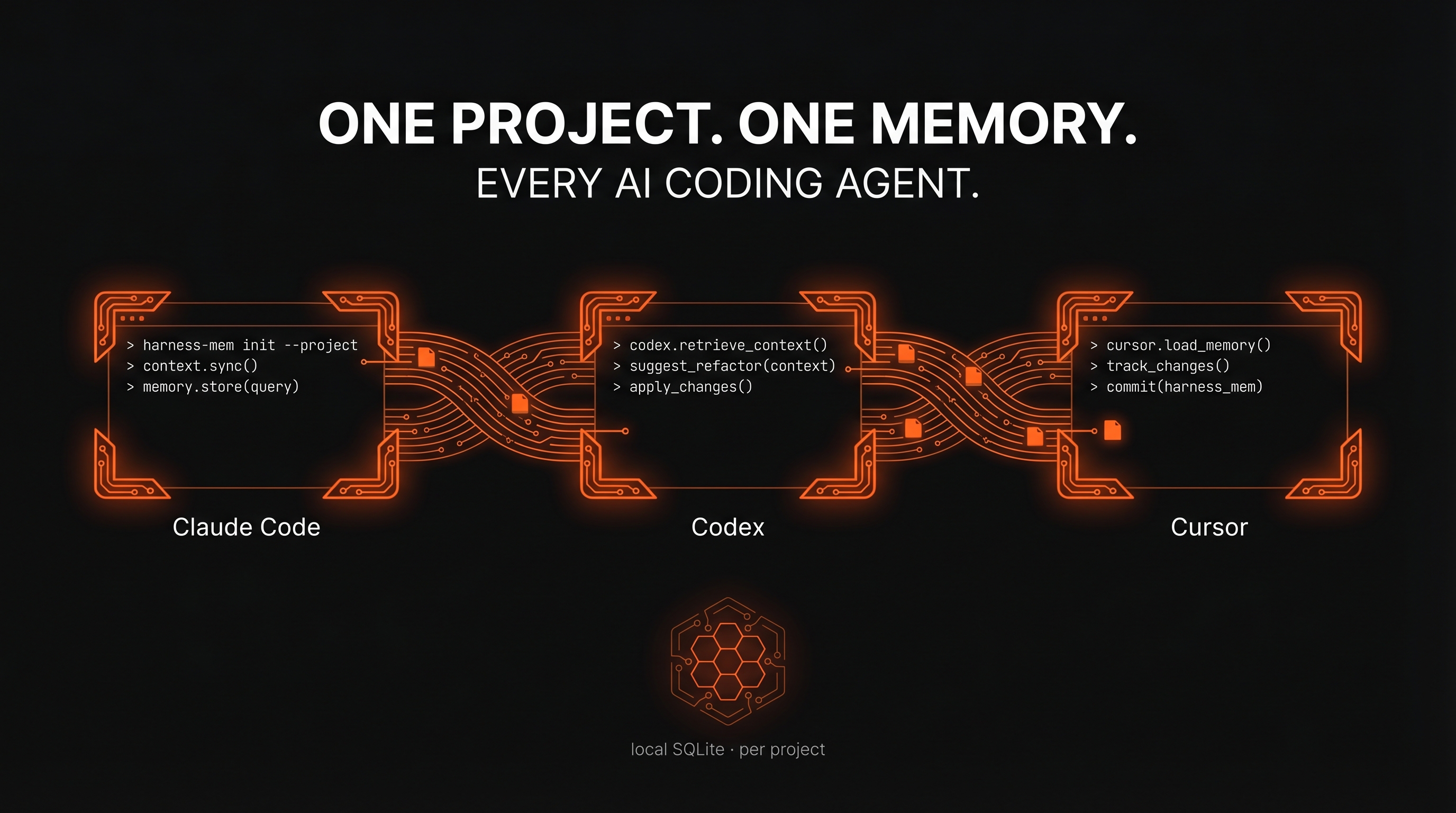
Local project memory for AI coding sessions — a continuity runtime for Claude Code, Codex, Cursor, and Hermes.
Harness-mem keeps one local SQLite memory per project, so the next agent opens on the thread you were already working on instead of a blank slate. Claude Code and Codex get first-turn continuity; Cursor and Hermes can join the same memory lane through MCP and MemoryProvider integrations. ~5ms MCP cold start. Local-first by default.






English | 日本語
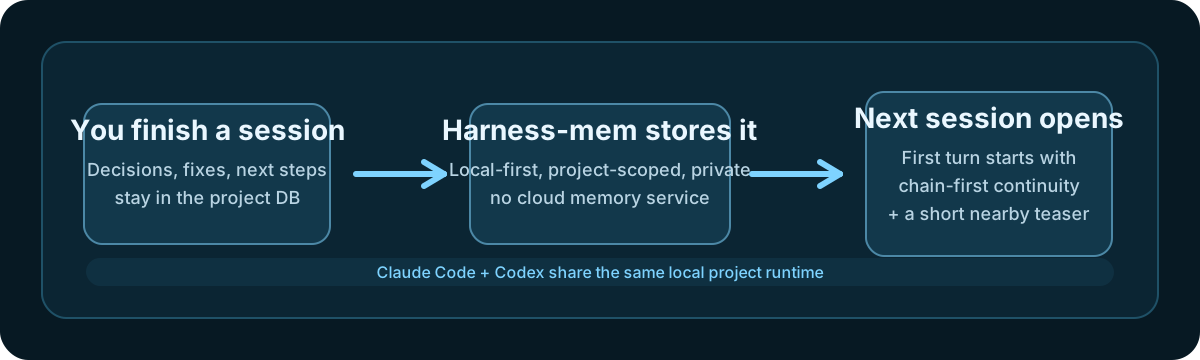
Table of Contents
- What changes
- Measured
- Install
- How it works
- Hermes + local LLM fact extraction
- Compare with alternatives
- Adaptive Retrieval Engine
- Measured Proof — full benchmark gate
- Core Commands
- Supported Tools
- Dual-Agent Coordination
- Troubleshooting
- Release Reproducibility
- Documentation
- License
What changes
30-second version
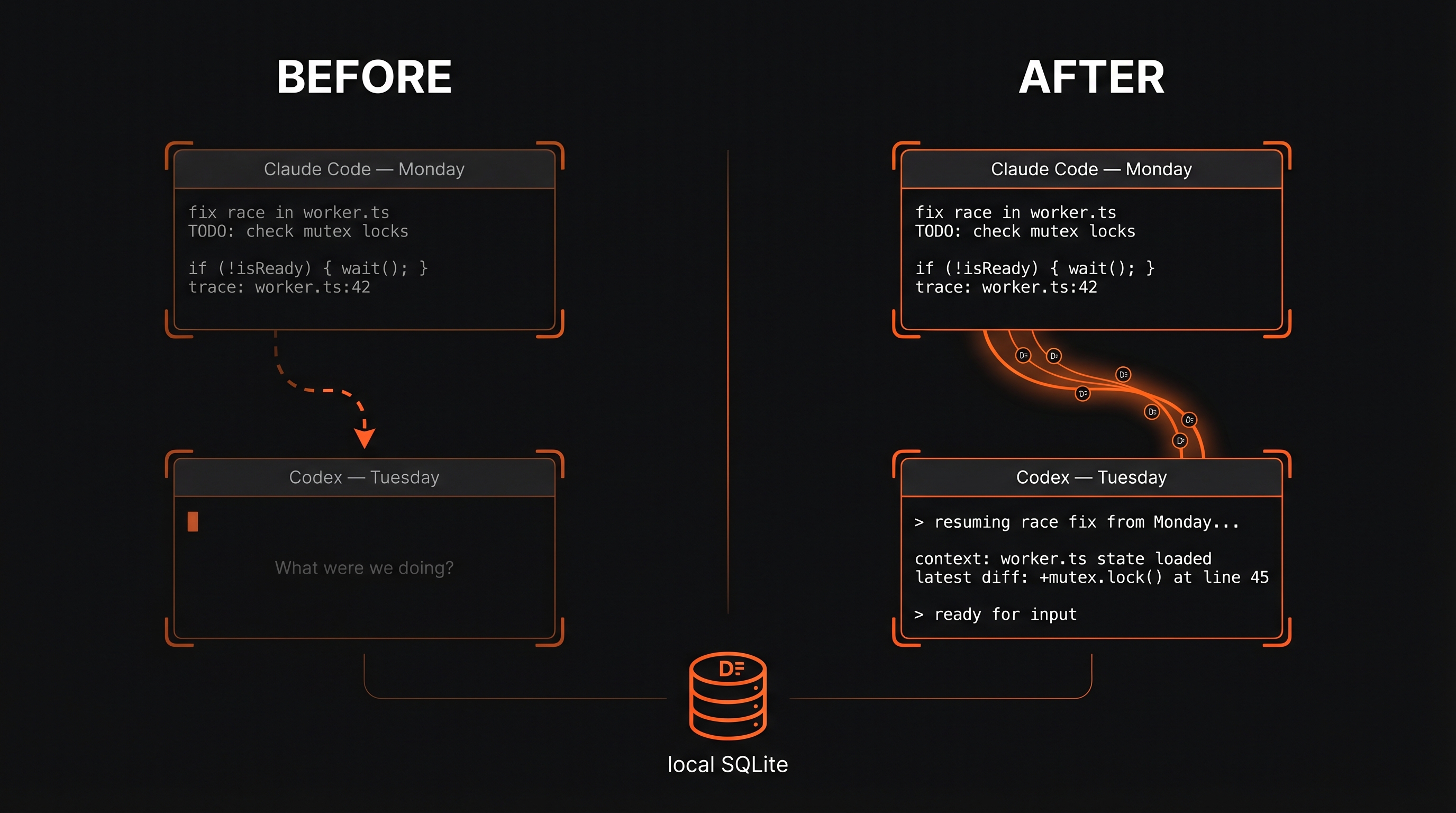
Harness-mem gives your AI coding tools the same local project memory. Claude Code and Codex get the strongest continuity path: a fresh session can start from the chain you were already working on. Cursor can join through user-scoped hooks and MCP search. Hermes can join through MCP tools and an optional MemoryProvider plugin, so the command tower can see the same developer-workflow memory without replacing its own built-in memories.
Why people install it
- Resume the actual thread: the next Claude Code or Codex turn can start from the current project chain, not a generic memory dump.
- Share one memory lane across agents: Claude Code, Codex, Cursor, OpenCode, and Hermes can read the same project-scoped observations through one daemon.
- Keep memory local: project data stays in local SQLite unless you explicitly configure an external integration.
- Use local LLMs safely: fact extraction defaults to
heuristic; when you opt into LLM extraction, Ollama is loopback-only by default and cloud providers require an explicit allow flag plus credentials. - Stay honest about scope: Claude Code + Codex are Tier 1; Cursor is Tier 2; Hermes and OpenCode are experimental / opt-in paths.
3-minute setup path
- Run
npx -y --package @chachamaru127/harness-mem harness-mem setup --platform codex,claude. - Run
npx -y --package @chachamaru127/harness-mem harness-mem doctor --platform codex,claude. - Confirm both clients are green and point at the current checkout or install path.
- Start a fresh Claude Code or Codex CLI session and check that the first turn already knows the current thread.
If Cursor is part of your workflow, use --platform codex,claude,cursor or run a separate harness-mem setup --platform cursor followed by harness-mem doctor --platform cursor. Cursor may need an MCP reload or a new Cursor session before the harness-mem server appears.
Trust block
- Local-first: the database lives on your machine at
~/.harness-mem/harness-mem.db. - Privacy: there is no cloud memory service, no API keys, and no off-machine upload just to remember context.
- Private tags: wrap any text in
<private>...</private>and it is automatically stripped before storage — use this to keep secrets out of memory without disabling memory entirely. - Local LLM guardrails:
HARNESS_MEM_FACT_EXTRACTOR_MODE=llmuses loopback Ollama unless you deliberately opt into a cloud provider. Non-loopback Ollama is rejected. - Project isolation: each project keeps its own memory lane, so one repo does not bleed into another.
Support tiers
- Strongest path: Claude Code + Codex: this is the main experience we optimize for. Shared local runtime, first-turn continuity, and the clearest install / doctor flow.
- Supported path: Cursor:
setup --platform cursorwires user-scoped~/.cursor/hooks.jsonand~/.cursor/mcp.json(mcpServers.harness-mem) for hook ingest and MCP search. It is supported, but not a Tier 1 continuity parity claim. - Command-tower path: Hermes Agent: Hermes can use Layer 1 MCP tools for explicit search/record calls and Layer 2 MemoryProvider for turn sync + prefetch. This is an opt-in experimental integration, not a replacement for Hermes' built-in
MEMORY.md,USER.md, or skills. - Experimental path: OpenCode: usable, but not the same parity promise.
- Codex App dogfood: this maintainer setup also works from Codex App through the same local Codex config path. That is recorded as local dogfood, not a blanket Tier 1 App claim.
What this means in practice
- You use Claude Code and Codex → harness-mem gives both tools the same local project runtime. On supported hook paths, the first turn stays chain-first (
what we were just doing) and can also surface a shortAlso Recently in This Projectteaser for nearby context. - You care about privacy → everything stays in
~/.harness-mem/harness-mem.db. Zero cloud calls. No API keys required. - You also use Cursor → run Cursor setup/doctor to enable hook ingest and MCP search. Cursor remains tier 2 rather than the main continuity path.
- You run Hermes as a local command tower → add the Hermes MCP config or MemoryProvider plugin so Hermes can search the same project memory while keeping Hermes' own built-in memory layer intact.
- You want better fact extraction without cloud egress → keep the default
heuristicmode for zero-LLM extraction, or explicitly enable local Ollama for consolidation when you want richer facts.
Measured
All numbers below come from committed artifacts you can rerun yourself — no marketing approximations.
| Metric | Value | Where it lives |
|---|---|---|
| MCP cold start | ~5ms (median, n=10) | bench JSON · scripts/bench-go-mcp.sh |
| Single Go binary | 7.04MB stripped · 4 platforms | macOS arm64/amd64 · Linux amd64 · Windows amd64 |
| Memory (RSS) | ~13MB after initialize + tools/list | bench JSON, measured on Apple M1 |
| LoCoMo F1 | 0.6138 (120 QA · 3-run PASS) | run-ci manifest |
| Search p95 | 38.35ms | same manifest |
| Bilingual recall@10 | 0.8200 | same manifest |
The MCP frontend is the layer Claude Code and Codex actually talk to. The Go binary is the fast preferred path; if it is missing, a wrapper script transparently falls back to the Node.js build — you still get every feature, just at Node.js cold start.
What these numbers mean for you
- ~5ms cold start means the memory layer should feel instant when you open or resume work.
- Bilingual recall@10 means mixed Japanese, English, and code notes are still findable instead of splitting into separate piles.
- Freshness@K = 0.99 means updated facts should replace stale ones instead of competing with them. This is the flagship KPI (Bilingual Coding-Memory Freshness@k); its green threshold is fixed at ≥ 0.95.
- Developer-workflow recall is the real user value: yesterday's migration, bug fix, or deployment decision should be recoverable when you need it again.
harness-mem's target domain is developer workflow memory
Memory benchmarks cluster into two domains:
- General lifelog — remembering a fictional person's everyday life ("when did Caroline go to the support group?"). This is what LoCoMo, LongMemEval, and most of Mem0/MemPalace/SuperMemory evaluate.
- Developer workflow — remembering yesterday's race fix, the tech-stack decisions, the half-done migration, the deploy recipe. This is what harness-mem actually serves.
For commercial-safe external benchmarking, we keep τ³-bench and SWE-bench Pro in the first-line portfolio and keep NoLiMa in a separate research-only lane because its evaluation code and needle set are not licensed for commercial use.
Where harness-mem actually competes
Our release gate lives in ci-run-manifest-latest.json on the developer-workflow domain:
| Metric | Current | Target (main gate) | Measures |
|---|---|---|---|
knowledge-update freshness@K — flagship: Bilingual Coding-Memory Freshness@k | 0.99 | ≥ 0.95 ✓ | Supersede stale facts when content is updated |
dev-workflow recall@10 | 0.77 | ≥ 0.70 ✓ | Developer-style file/decision jump queries |
bilingual recall@10 | 0.82 | ≥ 0.82 ✓ | Mixed JA/EN/code retrieval |
temporal ordering score | 0.86 | ≥ 0.70 ✓ | "When did X happen relative to Y?" on project history |
These are self-seeded measurements reproduced with the same runner — they confirm implementation health, not superiority over competitors.
For general-lifelog comparisons (LoCoMo, LongMemEval, etc.), see each competitor's own published numbers — they target that domain and we do not.
Raw data of the general-lifelog landscape (source URLs, fetched dates, per-row notes for competitor scores) is kept as a machine-readable audit trail at docs/benchmarks/competitors-2026-04.json.
Full benchmark gate (primary ship gate + Japanese companion + historical baseline) is in the Measured Proof section below.
Install
Pick the path that matches your stack. That's the whole decision.
| You use... | Run this |
|---|---|
| Only Claude Code | /plugin marketplace add Chachamaru127/harness-mem → /plugin install harness-mem@chachamaru127 |
| Claude Code + Codex (recommended first run) | npx -y --package @chachamaru127/harness-mem harness-mem setup --platform codex,claude → npx -y --package @chachamaru127/harness-mem harness-mem doctor --platform codex,claude |
| Claude Code + Codex (persistent CLI) | npm install -g @chachamaru127/harness-mem → harness-mem setup --platform codex,claude → harness-mem doctor --platform codex,claude |
| Cursor as an additional local client | harness-mem setup --platform cursor → harness-mem doctor --platform cursor → reload/restart Cursor if MCP discovery is cached |
| Hermes Agent as a command tower | harness-mem mcp-config --transport http --client hermes --write for Layer 1 MCP, or follow integrations/hermes/ for the optional MemoryProvider plugin |
If periodic ingest reports dedupe_claims_rebuild_required, ordinary daemon
restarts intentionally keep writes blocked. After resolving the underlying
observation or schema drift, run the explicit audited repair:
harness-mem admin-rebuild-dedupe-claims --execute
Scheduled consolidation and the five-minute PASSIVE WAL checkpoint share one
persistent maintenance child, so their synchronous SQLite work does not run on
the daemon HTTP event loop or overlap each other. Manual consolidation still
waits for a complete response. Operational bounds are configurable with
HARNESS_MEM_CONSOLIDATION_WORKER_TIMEOUT_MS (default 120000),
HARNESS_MEM_WAL_AUTOCHECKPOINT_PAGES (default 1000), and
HARNESS_MEM_WAL_MAX_BYTES (default 512 MiB, soft telemetry). Explicit cores
whose maintenance/provider configuration differs from the daemon environment
keep maintenance local so the child cannot silently replace caller settings.
Busy/error/active-frame checkpoint retries use exponential backoff controlled
by HARNESS_MEM_WAL_CHECKPOINT_RETRY_BASE_MS (default 10000) and stop after
HARNESS_MEM_WAL_CHECKPOINT_RETRY_MAX_ATTEMPTS (default 3) until the next
normal checkpoint timer.
Offloaded search records audit and access-count side effects in a private,
bounded SQLite spool before returning. The maintenance child then applies them
to the main database in FIFO order with idempotent crash replay. This keeps a
cache miss from waiting on a contended main-database audit commit without
weakening the durable audit contract. Spool backpressure fails closed with a
fixed error and never emits query, project, identifier, or path data in worker
progress telemetry. A failed flush retries with finite coalesced exponential
backoff; acknowledged intents remain in the durable spool for later recovery.
Normal search traffic batches main-database application after two idle seconds
once eight intents are pending. A 30-second-old intent makes the flush
non-cancelable, but it waits for all in-flight searches to finish and dispatches
immediately afterward. Each batch is limited to 100 intents and uses three transactions total (main apply,
sidecar delete, claim cleanup), rather than up to three commits per intent.
Startup and graceful shutdown still drain immediately.
Cache-miss responses include fixed scalar search_phase_timing fields for
watermark/cache lookup, retrieval, durable spool append/commit, worker, total,
and audit-flush overlap attribution. These fields contain no request-derived
identifiers and do not change durability behavior. A worker timeout preserves
the completed retrieval time and marks the reported spool elapsed time as
incomplete instead of discarding the phase evidence.
Retrieval timing is further split into scope resolution, latest interaction,
lexical candidates (including bounded-recent/FTS strategy, SQL fallback, and
rows examined), vector, load/hydration, facts/tags, route, ranking/rerank,
privacy/boundary, audit-intent build, and an explicit unattributed remainder.
Latest interaction separates SQL from materialization; facts/tags separates
tokenization, observation-indexed active-fact loading, and tag/fact scoring.
Repeat-recall cache watermarks use transactionally maintained project, session,
and global retrieval-auxiliary generations. Ready databases read three primary
keys instead of scanning observations; a missing marker or trigger falls back
to the legacy watermark scan until one atomic migration repairs readiness.
Latest-interaction context keeps the same search/resume-pack response shape while
excluding archived and expired turns through the indexed newest-first lookup.
Its event-type lookup is covering, and active facts are loaded through the
observation-first index instead of a project-wide fact scan.
Scheduled consolidation processes one durable queue job per tick by default to
bound same-database contention with search. Set
HARNESS_MEM_CONSOLIDATION_SCHEDULER_BATCH_SIZE to 1–10 only after measuring
the production search latency impact; manual consolidation limits are unchanged.
Empty queues stay idle, a SQLite constraint coalesces duplicate
pending work across processes, unchanged observations do not repeat relation or
LLM existing-fact scans, and the scheduler is phase-offset from minute-based
ingest ticks.
Claude-harness companion mode
Claude-harness can manage harness-mem as an external companion instead of embedding memory internals. In that mode Claude-harness may call:
harness-mem setup --platform codex,claude --skip-quality --auto-update enable
harness-mem doctor --json --platform codex,claude
harness-mem recall off
harness-mem uninstall --platform codex,claude --purge-db
Local data stays in ~/.harness-mem/harness-mem.db, and the runtime copy lives at ~/.harness-mem/runtime/harness-mem. Purge is always explicit; automatic setup must never delete the DB. See docs/claude-harness-companion-contract.md.
Other Agent Integrations
Beyond Claude Code / Codex / Cursor, harness-mem ships ready-to-use integrations for other agent frameworks:
| Integration | Type | Path |
|---|---|---|
| LangChain | Python adapter | integrations/langchain/ |
| CrewAI | Python adapter | python-sdk/harness_mem/crewai_memory.py |
| Vercel AI SDK | TypeScript adapter | sdk/src/vercel-ai.ts |
| Hermes Agent (Nous Research) | MCP tools + optional MemoryProvider plugin (experimental, tier 3 — tier 昇格 criteria) | integrations/hermes/ |
The Hermes integration has two layers:
- Layer 1 — MCP: expose
harness_mem_search,harness_mem_timeline,harness_mem_get_observations, and record/checkpoint tools to Hermes as explicit tool calls. - Layer 2 — MemoryProvider: install
integrations/hermes/provider/so Hermes can sync turns, prefetch project context, and expose lightweight provider tools.
Important: this is a cross-tool continuity bridge, not a replacement for Hermes' built-in MEMORY.md / USER.md / skills/ memory layer. Hermes' built-in memory continues to work; harness-mem adds the shared developer-workflow memory used by Claude Code, Codex, Cursor, and other clients. See integrations/hermes/README.md for the quickstart and docs/integrations/hermes.md for setup, rollback, and troubleshooting.
About harness-mem setup
harness-mem setup is interactive. It asks which tools to wire up:
[harness-mem] Select setup targets (multiple allowed)
  1) codex        (global: ~/.codex/config.toml)
  2) cursor       (global: ~/.cursor/hooks.json + ~/.cursor/mcp.json)
  3) opencode     (global: ~/.config/opencode/opencode.json)
  4) claude       (global: ~/.claude.json mcpServers)
  5) antigravity  (experimental workspace scanning)
  a) all
Example: 1,2   (Enter=1,2)
No --platform flag is required. For CI / scripted installs you can still pass --platform codex,claude,cursor to skip the prompt.
Verify
harness-mem doctor
All green = ready. If something is off:
harness-mem doctor --fix
A green doctor plus active SessionStart, UserPromptSubmit, and Stop hooks is the runtime contract for first-turn continuity on Claude Code and Codex. For Cursor, green doctor means user-scoped hooks and mcpServers.harness-mem are wired; verify the first real Cursor session by checking that prompt and assistant events ingest/search for the current project.
Update
harness-mem update
Prompts for auto-update opt-in only when auto-update is currently disabled, then updates the global package. After a successful update, it also runs a quiet doctor --fix for remembered client platforms so stale wiring can self-heal.
Windows (Git Bash / WSL2)
If you are on Windows, there are now practical paths:
- Claude plugin route: best option for Claude Code users on Windows.
- Git Bash + global install: preferred native route for manual
setup/doctor. - MCP-only route: if you only want Claude / Codex MCP wiring, run:
harness-mem mcp-config --write --client claude,codex
- WSL2: still the most reliable full-lifecycle route.
If you use the Git Bash route, treat these as required prerequisites on Windows:
nodeandnpmcurljqbunrg(ripgrep)
Current validation status:
- Claude Code on Windows: validated with Git Bash
- Codex on Windows: Git Bash route validated for
setup --platform codex,doctor --platform codex, exact hook commands, notify, and MCP connection mcp-configon Windows: available for MCP-only config updates; it does not validate the Codex hook lifecycle
Running from a repo checkout (contributors)
If you are running from a repo checkout and want a reproducible Codex-only bootstrap, use:
bash scripts/setup-codex-memory.sh
npm run codex:doctor
setup writes into user config locations like ~/.harness-mem, ~/.codex, ~/.claude*, and ~/.cursor. Running it as root can create the wrong ownership and wire the wrong home directory — do not use sudo.
For Codex specifically, the critical user-scoped files are ~/.codex/config.toml, ~/.codex/hooks.json, and the two skills under ~/.codex/skills/ (harness-mem and harness-recall). doctor now checks that those files still point at the current harness-mem checkout instead of an older absolute path or stale skill bundle.
Manual MCP sanity check:
Run from the harness-mem repo root when using the local checkout binary. For a global install, use harness-mcp-server instead of ./bin/harness-mcp-server.
./bin/harness-mcp-server <<< '{"jsonrpc":"2.0","id":1,"method":"initialize","params":{"protocolVersion":"2024-11-05","capabilities":{},"clientInfo":{"name":"manual-check","version":"1"}}}'
codex mcp list
codex mcp get harness
That command starts the stdio MCP frontend for one request. In normal client use,
each open Claude Code, Codex, Cursor, or Hermes session may have its own stdio
MCP frontend process. When the Go binary is available it is usually visible as
harness-mcp-*; otherwise the wrapper can fall back to the Node.js MCP server.
Those frontend processes proxy to the shared memory daemon; they are not extra
SQLite owners.
How it works
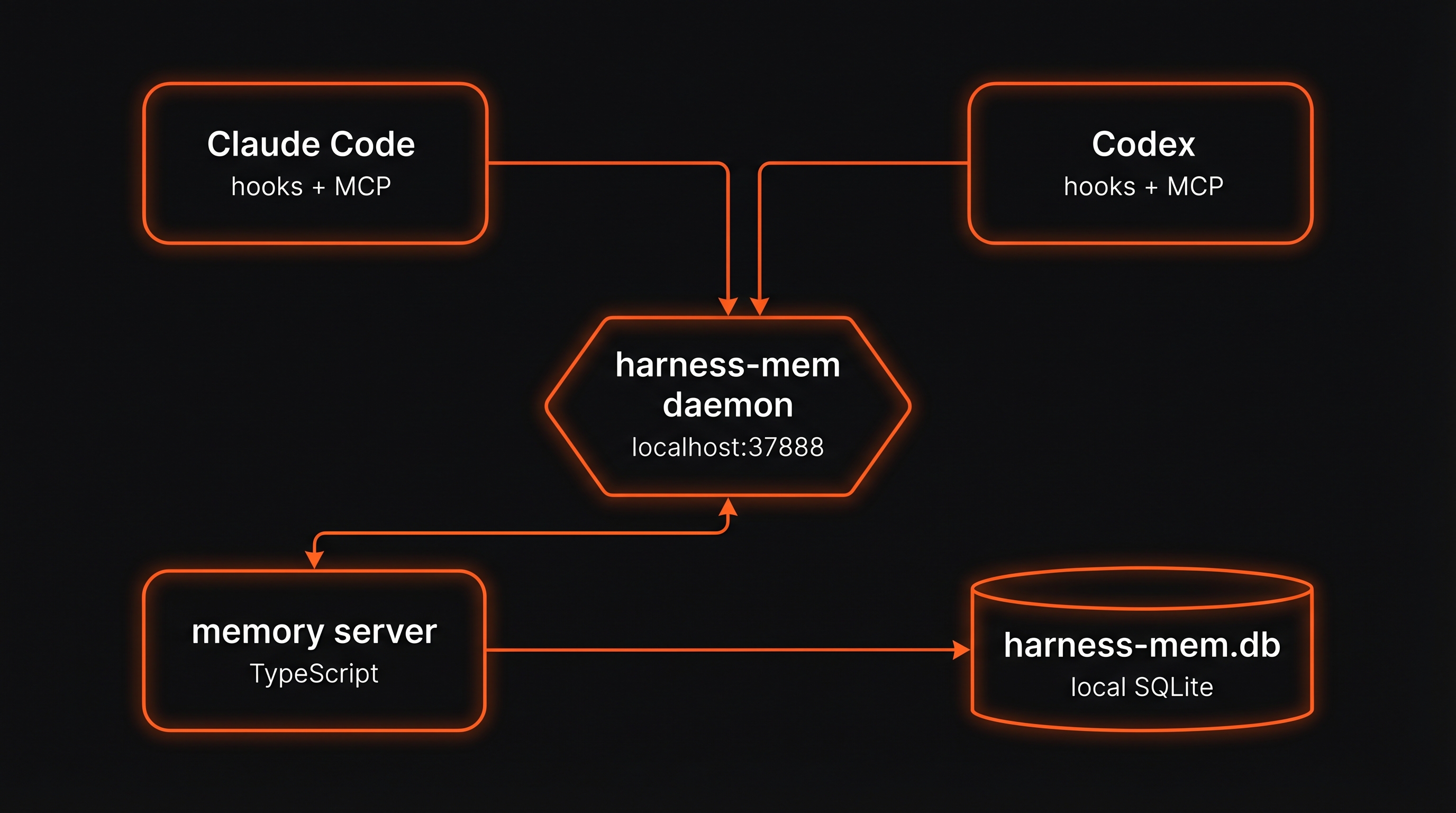
- One memory daemon (
harness-memd) listens on127.0.0.1:37888. It is the TypeScript/Bun HTTP memory server that owns the SQLite connection and runtime APIs. - One local SQLite database at
~/.harness-mem/harness-mem.dbstores every observation, session thread, embedding, and fact chain. - Per-client stdio MCP frontends are launched by the MCP client.
bin/harness-mcp-serverprefersbin/harness-mcp-{os}-{arch}for the Go frontend, but can fall back tomcp-server/dist/index.js; either frontend speaks stdio to the client, then proxies requests to the daemon on:37888. - Three hook paths wire the tools in:
SessionStart(first-turn continuity),UserPromptSubmit(contextual recall), andStop(session finalization). - The memory server (TypeScript) does embeddings, hybrid search, rerank, adaptive JA/EN/code routing, and consolidation. Fact extraction is local-first:
heuristicby default, optional loopback Ollama for richer extraction, cloud only with explicit allow + credentials. - Hermes can join at two layers: MCP tools for explicit search/record calls, or the MemoryProvider plugin for turn sync and prefetch. Both layers use the same daemon and SQLite DB as Claude Code / Codex.
Large MCP search responses now also return structuredContent, so newer Claude / Codex clients can consume machine-readable results instead of only long JSON text.
MCP transport and process topology
stdio means the MCP client starts a server subprocess and talks to it over
standard input/output. Because of that contract, multiple open Claude Code,
Codex, Cursor, or Hermes sessions can legitimately show multiple stdio MCP
frontend processes, often as harness-mcp-darwin-arm64 / harness-mcp-* when
the Go binary path is active. That is process fan-out at the MCP frontend layer,
not memory daemon split-brain.
What should stay singleton is the memory daemon on 127.0.0.1:37888 and the
SQLite owner behind it. Cleanup should target stale or orphaned MCP children
whose parent client is gone, or a true daemon split-brain where more than one
memory daemon is fighting for the same runtime state.
Do not try to solve this by turning stdio into a shared singleton broker. That
works against the way stdio MCP clients launch and supervise local servers, and
it creates harder lifecycle and security failure modes. Since v0.25.0, new
Claude Code and Codex setup defaults to the local-only Streamable HTTP MCP
gateway at
http://127.0.0.1:37889/mcp, with the existing stdio path kept as the
compatibility and rollback fallback.
harness-mem setup --platform claude,codex
harness-mem doctor --platform claude,codex
Setup creates or reuses a local token file under HARNESS_MEM_HOME with
owner-only permissions. Client config stores only HARNESS_MEM_MCP_TOKEN or
Bearer ${HARNESS_MEM_MCP_TOKEN} placeholders, not the token value. To roll
back a client to stdio:
harness-mem mcp-config --transport stdio --client claude,codex --write
Hermes remains explicit opt-in: use
harness-mem mcp-config --transport http --client hermes --write when you want
Hermes YAML generated.
Current behavior today
- Claude Code and Codex share one local daemon and one local SQLite database.
- First-turn continuity is supported on the Claude Code and Codex hook paths after
harness-mem setupandharness-mem doctorare green. - Codex CLI is the Tier 1 Codex target. Codex App is local-dogfood green in this maintainer setup when it uses the same user-scoped Codex config path, but App-specific parity is not claimed without a reproducible App smoke.
- On those supported hook paths, the default SessionStart artifact is hybrid: chain-first continuity stays on top, and a short recent-project teaser may appear second when there is distinct nearby work worth surfacing.
- If hook wiring or the local runtime is stale, search and recall can still work while the "open a fresh session and it already remembers" UX degrades.
- Experimental or maintenance-tier clients can still ingest/search, but parity with Claude Code and Codex is not claimed.
What this does not claim
- Perfect automatic understanding for every brand-new session on every client.
- Parity on unsupported clients, broken hook wiring, or unhealthy local runtime.
- Perfect chain selection in every long-lived project with multiple mixed threads.
- A full project digest on every fresh session. The recent-project portion is intentionally capped to a few low-noise bullets.
Inject actionability
A memory hint that the agent never acts on is just noise. harness-mem packages every inject (recall chain, contradiction warning, risk warning, skill suggestion) as a small InjectEnvelope with a signals[] list, persists each firing into a local inject_traces table, and reports delivered_rate and consumed_rate per session via the harness_mem_observability MCP tool. The CI tier gate blocks release when delivered_rate < 95% or consumed_rate < 30%, warns in the 30–60% band, and stays green at consumed_rate ≥ 60%. See docs/inject-envelope.md for the contract, the four inject paths, and known limits (substring grep, no synonym resolution, single-turn span).
Hermes + local LLM fact extraction
Hermes support is now visible in the main path because it solves a different problem than Claude Code / Codex hooks: it lets a local command-tower agent query and contribute to the same developer-workflow memory without giving up Hermes' own built-in memory.
| Layer | What Hermes gets | When to use it |
|---|---|---|
| Layer 1 — MCP | Explicit harness_mem_* tools for search, timeline, observation details, resume packs, and checkpoint records | You want Hermes to look things up or save a checkpoint when the model chooses a tool call |
| Layer 2 — MemoryProvider | Turn sync, prefetch injection, harness_mem_search, harness_mem_record, and harness_mem_status provider tools | You want Hermes sessions to participate in the same project memory lifecycle |
Fact extraction is controlled by the harness-mem daemon, not by the Hermes plugin. The safe default is heuristic. If you explicitly enable LLM extraction, the default provider is local Ollama on loopback:
export HARNESS_MEM_FACT_EXTRACTOR_MODE=llm
export HARNESS_MEM_FACT_LLM_PROVIDER=ollama
export HARNESS_MEM_OLLAMA_HOST=http://127.0.0.1:11434
Cloud LLM extraction is locked behind two gates: HARNESS_MEM_ALLOW_EXTERNAL_LLM=1 and the relevant provider credential. Non-loopback Ollama is rejected even if an allow flag is present. The loopback Ollama live smoke for Hermes MemoryProvider was run against an isolated daemon and temporary DB: record → consolidation → fact extraction → search passed, with external LLM egress audit at 0.
Start here:
integrations/hermes/README.md— quickstart, Layer 1 vs Layer 2, smoke checklistdocs/integrations/hermes.md— architecture, rollback, troubleshootingdocs/environment-variables.md— fact extraction and local/cloud LLM policy
Compare with alternatives
Claude's built-in memory only works inside Claude. claude-mem adds persistence but is still locked to Claude Code. Mem0 offers cross-app memory but requires cloud infrastructure and custom API integration. harness-mem takes a different path: one local project-scoped runtime, one SQLite database, and first-turn continuity across Claude Code and Codex with no cloud dependency.
| harness-mem | Claude built-in | claude-mem | Mem0 | |
|---|---|---|---|---|
| Domain | developer-workflow | generic-agent | generic-agent | general-lifelog |
| Works across Claude Code + Codex | ✓ | — | — | Manual per-app wiring |
| Local-only, no cloud | ✓ | — | ✓ | Cloud / paid self-host |
| Setup | 1 command (setup) | Built-in | npm install + config | SDK integration required |
| MCP cold start | ~5ms (Go binary) | — | — | — |
| Cost | Free | Included in plan | Free | $99+/mo (cloud) |
Domain note:
developer-workflow= coding-session memory (harness-mem's target).general-lifelog= fictional daily-life conversation memory (LoCoMo / LongMemEval territory).generic-agent= general agent memory without strong domain focus. LoCoMo scores reflectgeneral-lifelogperformance and are not a direct comparison for developer-workflow tools.
Full comparison (all dimensions)
| harness-mem | Claude built-in memory | claude-mem | Mem0 | |
|---|---|---|---|---|
| Domain | developer-workflow | generic-agent | generic-agent | general-lifelog |
| Supported tools | Claude Code, Codex (Tier 1) · Cursor (Tier 2) · Hermes and OpenCode (experimental) | Claude only | Claude only | Custom API integration |
| Data storage | Local SQLite | Anthropic cloud | Local SQLite + Chroma | Cloud (self-host on paid plan) |
| Cross-tool memory | Shared project-scoped local runtime + first-turn continuity on supported hook paths + Hermes MCP/MemoryProvider bridge | N/A | N/A | Manual wiring per app |
| Setup | harness-mem setup (1 command) | Built-in | npm install + config | SDK integration required |
| Search | Hybrid (lexical + vector + nugget + recency + tag + graph + fact chain) | Undisclosed | FTS5 + Chroma vector | Vector-centric |
| MCP server cold start | ~5ms median (Go binary, measured) | — | — | — |
| External dependencies | Node.js + Bun (Go binary auto-downloaded) | None | Node.js + Python + uv + Chroma | Python + API keys |
| Migration path | import-claude-mem → verify → cutover | — | — | — |
| Workspace isolation | Strict (symlink-resolved paths) | Global | Basename only | Per-user / per-agent |
| Benchmark (F1) | 0.6138 (LoCoMo 120Q, 3-run PASS, p95 38.35ms) (general-lifelog reference, not target) | — | — | — |
| Cross-tool transfer | Recall@10: 0.60 | N/A | N/A | N/A |
| Cost | Free (local) | Included in Claude plan | Free | $99+/mo (cloud) |
Domain note:
developer-workflow= coding-session memory (harness-mem's target).general-lifelog= fictional daily-life conversation memory (LoCoMo / LongMemEval territory).generic-agent= general agent memory without strong domain focus. LoCoMo scores reflectgeneral-lifelogperformance and are not a direct comparison for developer-workflow tools.
Adaptive Retrieval Engine
Harness-mem also includes an adaptive embedding mode for teams that mix Japanese, English, and code in the same project.
Fresh setup prepares the pinned Granite default (granite-embedding-311m-r2@384) when the network is available. Offline/CI/sandbox installs skip the pull with a warning and keep running through the fallback chain; use --skip-model-pull to opt out explicitly. Existing installs are not auto-flipped: /health, doctor, and startup logs show a dismissible migration notice instead. See docs/guides/embedding-migration-granite.md.
What it does:
- Route A: Japanese-heavy queries go to the Japanese model.
- Route B: English-heavy or code-heavy queries go to the general model.
- Route C: Mixed queries search both routes and fuse the scores.
- Query expansion adds a few controlled synonyms, so
本番反映can still find notes written asdeploy.
Why this exists:
- A single embedding model is usually a compromise.
- Japanese-focused models are often better for Japanese nuance.
- General-purpose models are often better for English API names, logs, and code-like text.
- Adaptive routing lets harness-mem choose the better path per query instead of forcing one model to do everything.
Free path vs Pro path:
- Free path: local Japanese route + local or fallback general route. No external API required.
- Pro path: set
HARNESS_MEM_PRO_API_KEYandHARNESS_MEM_PRO_API_URLto enable the remote general route. If that route becomes unhealthy, harness-mem automatically falls back to the free path and retries with exponential backoff.
Quick example:
export HARNESS_MEM_EMBEDDING_PROVIDER=adaptive
export HARNESS_MEM_ADAPTIVE_JA_THRESHOLD=0.85
export HARNESS_MEM_ADAPTIVE_CODE_THRESHOLD=0.50

# optional: enable Pro path
export HARNESS_MEM_PRO_API_KEY=your-token
export HARNESS_MEM_PRO_API_URL=https://example.com/embeddings
Useful commands:
npm run benchmark
npm run benchmark:tune-adaptive
More detail:
Measured Proof
Primary release gate, current Japanese companion, and historical baseline are intentionally separated.
Primary release gate (run-ci, current latest)
Source:
memory-server/src/benchmark/results/ci-run-manifest-latest.jsondocs/benchmarks/japanese-release-proof-bar.md
Current latest run:
- generated_at:
2026-05-27T07:20:23.753Z - git_sha:
eb88c96 - embedding:
onnx
| Metric | Value |
|---|---|
| LoCoMo F1 | 0.6138 |
| Bilingual recall@10 | 0.8200 |
| Freshness | 0.9900 |
| Temporal | 0.8575 |
| Search p95 | 38.35ms |
| Token avg | 462.98 |
Verdict: PASS
Latest onnx run passed the current release gate. The companion Japanese proof remains a separate artifact-backed evidence pack rather than a replacement for run-ci.
Japanese companion gate (96 QA, current claim source)
Source:
docs/benchmarks/japanese-release-proof-bar.mddocs/benchmarks/artifacts/s43-ja-release-v2-latest/summary.jsondocs/benchmarks/artifacts/s43-ja-release-v2-latest/run3/companion-gate.json
| Metric | Value |
|---|---|
| Overall F1 mean | 0.6580 |
| Cross-lingual F1 mean | 0.6850 |
| Zero-F1 count | 16 / 96 |
| 3-run span | 0.0000 |
| Current slice F1 | 0.8171 |
| Exact slice F1 | 0.5628 |
| Why slice F1 | 0.9008 |
| List slice F1 | 0.7564 |
| Temporal slice F1 | 0.6776 |
Verdict: PASS as companion gate
Residual risks that stay visible:
current_vs_previous,relative_temporal,yes_no,entity, andlocationremain watch slices.- This companion gate supports README-safe Japanese claims, but it does not replace
run-ci.
Historical baseline (32 QA, historical only)
Source:
docs/benchmarks/artifacts/s40-ja-baseline-latest/summary.jsondocs/benchmarks/artifacts/s40-ja-baseline-latest/repro-report.json
| Metric | Value |
|---|---|
| Overall F1 mean | 0.8020 |
| Cross-lingual F1 mean | 0.7563 |
| Zero-F1 count | 1 / 32 |
| 3-run span | 0.0000 |
This baseline shows where the earlier README proof bar landed, but it is not the current Japanese claim source.
What this supports:
- Cross-lingual EN<->JA retrieval is benchmarked.
- Japanese short-answer quality is measured on dedicated release packs.
why,current,list, andtemporalare all measured with artifact-backed slice reports.
What this does not claim:
- Native-level Japanese quality
- Perfect Japanese temporal reasoning
- A replacement for the main
run-ciship gate
Sample Japanese queries
今、使っている CI は何ですか?email だけの運用をやめた理由は何ですか?Q2 に出した admin 向け機能をすべて挙げてください。最後に出た機能は何ですか?
Core Commands
| Command | Purpose |
|---|---|
setup | Configure tool wiring, prepare the Granite default model when available, and start daemon + Mem UI (interactive by default) |
doctor | Validate wiring/health and optionally repair with --fix |
recall | Switch contextual recall mode (on, quiet, off, status) |
versions | Snapshot local vs upstream tool versions |
update | Update global package; prompt auto-update opt-in only if currently disabled |
smoke | Run isolated privacy/search sanity checks |
uninstall | Remove wiring and optional local DB (--purge-db) |
import-claude-mem + verify-import + cutover-claude-mem | Safe migration from Claude-mem |
doctor --json emits the doctor.v2 schema. It keeps the old top-level fields while adding overall_status, per-check result (pass, warn, fail, skip), and a repair plan. Useful modes:
harness-mem doctor --json --read-only
harness-mem doctor --json --strict-exit
harness-mem doctor --fix --plan
Existing installs that still use the incumbent embedding default may report embedding_model.status="warn:granite_migration_available". That is degraded guidance with a migration command, not a broken install.
Release-readiness helpers:
scripts/s105-retrieval-ab-gate.sh
scripts/s105-proof-bundle.sh --isolated-home --out-dir artifacts/s105-proof-bundle
Contextual recall ("Banto mode")
UserPromptSubmit can surface a short memory whisper when the prompt looks like a file-path jump, error investigation, or decision point.
harness-mem recall status
harness-mem recall quiet
harness-mem recall on
harness-mem recall off
quietis the default. It is conservative: high rerank threshold when reranking is available, otherwise only the top recall item.onis more proactive: lower rerank threshold and up to 3 fallback items when reranking is unavailable.offdisables contextual recall while keeping normal search and SessionStart continuity intact.HARNESS_MEM_WHISPER_MAX_TOKENScontrols the per-prompt recall budget. Seedocs/environment-variables.md.
/harness-recall Skill (Claude Code, since v0.15.0)
Claude Code users get a Skill that auto-fires when you naturally ask to recall something. Trigger phrases include 思い出して / 覚えてる / 前回 / 続き / 直近 / 最後に / 先ほど / さっき / resume / recall.
The Skill routes your intent to the right memory source so you don't have to pick:
- continuation / resume →
harness_mem_resume_pack - decisions / methodology →
.claude/memory/decisions.md+patterns.md(SSOT) - same problem seen before →
harness_cb_recall - recent session list →
harness_mem_sessions_list - specific keyword →
harness_mem_search
Output always starts with a source: line so you can judge freshness (auto-memory is marked point-in-time; live decisions come from SSOT). No user-side configuration required — scripts/userprompt-inject-policy.sh detects RECALL_KEYWORDS and promotes Skill invocation on every matching UserPromptSubmit.
This is orthogonal to "Banto mode" above: Banto runs on every prompt (advisory whisper), /harness-recall only runs on explicit recall intent (directed query).
Mem UI
open 'http://127.0.0.1:37901'
The Mem UI includes an Environment tab that explains internal servers, installed languages/runtimes, CLI tools, and AI/MCP wiring status. Read-only in V1, sensitive values are masked before rendering.
Supported Tools
| Tier | Tool | Tested With | Notes |
|---|---|---|---|
| Tier 1 | Claude Code | v2.1.80 | Full hook lifecycle (18 events incl. StopFailure), MCP, plugin marketplace, --channels push, --inline-plugin setup |
| Tier 1 | Codex CLI | v0.116.0+; verified through v0.130.0 | SessionStart + UserPromptSubmit + Stop hooks, MCP, memory citation, structured MCP result, rules. v0.130.0 additive metadata and paged thread summary ingest are tolerated; remote-control and plugin sharing remain Codex-owned |
| Dogfood | Codex App | Maintainer local setup | Uses the same local Codex config path in this setup. Kept as dogfood until an App-specific reproducible smoke exists |
| Tier 2 | Cursor | Latest | User-scoped ~/.cursor/hooks.json + ~/.cursor/mcp.json (mcpServers.harness-mem), hook spool ingest, MCP search, and setup/doctor support. May require Cursor MCP reload/new session after setup |
| Tier 3 | Hermes Agent | Docs-backed integration | MCP tools + optional MemoryProvider plugin. Experimental command-tower bridge; not a replacement for Hermes built-in memory |
| Tier 3 | Grok Bot | MCP contract / experimental | Optional Layer 1 search / timeline / get / resume / record; no lifecycle hooks or Tier 1 continuity. Integration |
| Tier 3 | OpenCode | Latest | Experimental. Community-contributed |
Grok Bot (Tier 3 / experimental)
harness-mem setup --platform grok-bot generates an optional Layer 1 MCP export; harness-mem doctor --platform grok-bot checks its structure only. Import the JSON into the client explicitly. No lifecycle hooks or automatic first-turn continuity are claimed. See local / Tailscale setup and tool contract.
Dual-Agent Coordination
Running Claude Code and Codex CLI side-by-side on the same repo works out of
the box: both agents see the same memory via harness-mem, and two coordination
primitives keep them from stepping on each other.
Lease — claim a file, an action, or any key for a bounded TTL. A second
agent attempting to claim the same target gets already_leased with the
current holder and expiry.
Signal — point-to-point or broadcast messaging. Unacked signals come back
from _read; reply_to threads a conversation; TTL auto-expires stale
messages.
// Claude grabs a lease before refactoring auth.ts
{ "tool": "harness_mem_lease_acquire",
  "args": { "target": "file:/src/auth.ts", "agent_id": "claude-1", "ttl_ms": 600000 } }
// Codex sees the busy lease and redirects
{ "tool": "harness_mem_lease_acquire",
  "args": { "target": "file:/src/auth.ts", "agent_id": "codex-1" } }
// → { "ok": false, "error": "already_leased", "heldBy": "claude-1", "expiresAt": "..." }

// Claude pings Codex when the refactor is done
{ "tool": "harness_mem_signal_send",
  "args": { "from": "claude-1", "to": "codex-1", "content": "auth.ts refactor ready for review" } }
// Codex pulls pending signals on next turn
{ "tool": "harness_mem_signal_read",  "args": { "agent_id": "codex-1" } }
// → [{ signal_id, from: "claude-1", content: "auth.ts refactor ready for review", ... }]
{ "tool": "harness_mem_signal_ack",  "args": { "signal_id": "...", "agent_id": "codex-1" } }
harness-mem doctor probes both /v1/lease/acquire and /v1/signal/read so
mis-configured daemons surface early. doctor --read-only skips those write-style probes.
Troubleshooting
harness-mem: command not found
npx -y --package @chachamaru127/harness-mem harness-mem setup
doctor reports missing dependencies
bun and ripgrep are auto-installed on macOS during setup. For other tools (node, curl, jq), install them manually and run:
harness-mem doctor --fix
Workspace references stall or the same folder name appears twice
Search and direct recording use saved project identities. Filesystem discovery runs in
separate bounded processes, so an unavailable project folder or conversation log can
remain pending while memory stays usable. Use the complete identifier returned by the
project list; restarting does not merge a short name with a path. See
File reference isolation for unresolved identities,
reader limits, and health.reference_io diagnostics.
You already used sudo and ownership is broken
Typical symptom: later setup or doctor --fix only works with sudo, because files under your home directory became root-owned.
sudo chown -R "$USER":staff ~/.harness-mem ~/.codex ~/.cursor ~/.claude ~/.claude.json 2>/dev/null || true
harness-mem setup
harness-mem doctor --fix
Adjust the group if your machine does not use staff.
Need a clean reset
harness-mem uninstall --purge-db
Release Reproducibility
If you maintain this repo, release quality should not depend on whether you used a skill, a shell script, or a manual checklist.
- Normal feature work goes to
CHANGELOG.mdunder## [Unreleased]. CHANGELOG.mdis the source of truth for release notes.CHANGELOG_ja.mdis a Japanese summary, not a separate contract.- The release contract is the same whether you use the
harness-releaseskill or run the commands yourself:package.jsonversion, changelog entry, git tag, GitHub Release, and npm publish must all refer to the same version. - The canonical maintainer checklist lives in
docs/release-process.md. - The test execution details, including the Bun panic mitigation path used by
npm test, live indocs/TESTING.md. - If you need the maintainer-facing repro notes for the known Bun teardown crash, see
docs/bun-test-panic-repro.md.
In practice, a reproducible release means all of these are true before you ship:
- Working tree is clean.
- User-visible changes are already written in
CHANGELOG.mdunder[Unreleased]. - Quality gates are green.
npm pack --dry-runpasses.- The release tag matches
package.json. - The resulting npm version and GitHub Release point to the same shipped version.
Plans.md Workflow
harness-mem uses Plans.md as the single source of truth for task management.
When WorkGraph hooks are installed, SessionStart automatically syncs an
existing project Plans.md into the local WorkGraph DB. It does not create or
edit Plans.md; projects without the file are skipped silently.
Phase markers
| Marker | Meaning |
|---|---|
cc:TODO | Not started |
cc:WIP | Work in progress |
cc:完了 | Worker completed |
blocked | Blocked (reason noted) |
When starting a task
Update the marker from cc:TODO to cc:WIP in Plans.md before beginning implementation. Each Phase groups related tasks that can be executed in parallel.
When complete
Update the marker to cc:完了 and note any unresolved issues.
Phase B Capabilities (April 2026)
Phase B (April 2026) added verbatim raw storage (HARNESS_MEM_RAW_MODE=1), hierarchical metadata scoping for multi-session projects, and token-budgeted L0/L1 wake-up context that cuts SessionStart token cost while preserving first-turn continuity. All three features are opt-in or backward-compatible — existing deployments need no configuration changes. See Phase B capabilities for landed commits, baseline measurements, and deferred items.
Documentation
- Setup reference:
docs/harness-mem-setup.md - Daemon degraded health runbook (Japanese):
docs/daemon-health-runbook.md - Onboarding checklist:
docs/onboarding-checklist.md - README claim map:
docs/readme-claims.md - Onboarding dry-run notes:
docs/onboarding-dry-run.md - Doctor UX follow-up scope:
docs/doctor-ux-scope.md - Commercial-safe benchmark portfolio:
docs/benchmarks/commercial-benchmark-portfolio.md - 30 USD direct-API pilot runbook:
docs/benchmarks/pilot-30usd-direct-api.md - τ³-bench runbook:
docs/benchmarks/tau3-runbook.md - SWE-bench Pro memory ablation:
docs/benchmarks/swebench-pro-memory-ablation.md - Environment API contract:
docs/plans/environment-tab-v1-contract.md - Changelog (source of truth):
CHANGELOG.md - Japanese changelog summary:
CHANGELOG_ja.md - Japanese README:
README_ja.md - Benchmark runbooks:
docs/benchmarks/ - Go MCP server bench proof:
docs/benchmarks/go-mcp-bench/
Official Mascot

Maintained by
Developed and maintained by CAN AI Inc.
AI adoption consulting — helping organizations build lasting AI capabilities.
License
Business Source License 1.1 (SPDX: BUSL-1.1). See LICENSE.
Permitted: internal use, personal use, development, testing, open-source projects, embedding as a component in your application.
Restricted: offering harness-mem as a managed memory service to third parties.
On 2029-03-08, the license automatically converts to Apache License 2.0.
FAQ:
- Can I use harness-mem at work? — Yes. Internal use within your organization is permitted.
- Can I build a product that uses harness-mem? — Yes, as a component. You cannot offer harness-mem itself as a hosted memory service.
- What happens after 2029? — The license converts to Apache 2.0. No action needed.
Metadata note: The repository root is BUSL-1.1. Some distributable subpackages keep their own package-level SPDX fields (for example MIT in sdk/, mcp-server/, and vscode-extension/). If a GitHub repo header or API shows Other / NOASSERTION, treat LICENSE and each package's package.json as the authoritative source.
Third-party model note: The default Granite embedding artifact is fetched from Hugging Face at a pinned revision and SHA-256 checked after download. The upstream model card declares Apache 2.0, and the pinned tree currently has no separate NOTICE file.
Contributors


Similar repos


Languages
TypeScript
87.3%
Shell
7.0%
Go
3.1%
Python
1.6%
README
Harness-mem
Local project memory for AI coding sessions — a continuity runtime for Claude Code, Codex, Cursor, and Hermes.
Harness-mem keeps one local SQLite memory per project, so the next agent opens on the thread you were already working on instead of a blank slate. Claude Code and Codex get first-turn continuity; Cursor and Hermes can join the same memory lane through MCP and MemoryProvider integrations. ~5ms MCP cold start. Local-first by default.
English | 日本語
Table of Contents
- What changes
- Measured
- Install
- How it works
- Hermes + local LLM fact extraction
- Compare with alternatives
- Adaptive Retrieval Engine
- Measured Proof — full benchmark gate
- Core Commands
- Supported Tools
- Dual-Agent Coordination
- Troubleshooting
- Release Reproducibility
- Documentation
- License
What changes
30-second version
Harness-mem gives your AI coding tools the same local project memory. Claude Code and Codex get the strongest continuity path: a fresh session can start from the chain you were already working on. Cursor can join through user-scoped hooks and MCP search. Hermes can join through MCP tools and an optional MemoryProvider plugin, so the command tower can see the same developer-workflow memory without replacing its own built-in memories.
Why people install it
- Resume the actual thread: the next Claude Code or Codex turn can start from the current project chain, not a generic memory dump.
- Share one memory lane across agents: Claude Code, Codex, Cursor, OpenCode, and Hermes can read the same project-scoped observations through one daemon.
- Keep memory local: project data stays in local SQLite unless you explicitly configure an external integration.
- Use local LLMs safely: fact extraction defaults to
heuristic; when you opt into LLM extraction, Ollama is loopback-only by default and cloud providers require an explicit allow flag plus credentials. - Stay honest about scope: Claude Code + Codex are Tier 1; Cursor is Tier 2; Hermes and OpenCode are experimental / opt-in paths.
3-minute setup path
- Run
npx -y --package @chachamaru127/harness-mem harness-mem setup --platform codex,claude. - Run
npx -y --package @chachamaru127/harness-mem harness-mem doctor --platform codex,claude. - Confirm both clients are green and point at the current checkout or install path.
- Start a fresh Claude Code or Codex CLI session and check that the first turn already knows the current thread.
If Cursor is part of your workflow, use --platform codex,claude,cursor or run a separate harness-mem setup --platform cursor followed by harness-mem doctor --platform cursor. Cursor may need an MCP reload or a new Cursor session before the harness-mem server appears.
Trust block
- Local-first: the database lives on your machine at
~/.harness-mem/harness-mem.db. - Privacy: there is no cloud memory service, no API keys, and no off-machine upload just to remember context.
- Private tags: wrap any text in
<private>...</private>and it is automatically stripped before storage — use this to keep secrets out of memory without disabling memory entirely. - Local LLM guardrails:
HARNESS_MEM_FACT_EXTRACTOR_MODE=llmuses loopback Ollama unless you deliberately opt into a cloud provider. Non-loopback Ollama is rejected. - Project isolation: each project keeps its own memory lane, so one repo does not bleed into another.
Support tiers
- Strongest path: Claude Code + Codex: this is the main experience we optimize for. Shared local runtime, first-turn continuity, and the clearest install / doctor flow.
- Supported path: Cursor:
setup --platform cursorwires user-scoped~/.cursor/hooks.jsonand~/.cursor/mcp.json(mcpServers.harness-mem) for hook ingest and MCP search. It is supported, but not a Tier 1 continuity parity claim. - Command-tower path: Hermes Agent: Hermes can use Layer 1 MCP tools for explicit search/record calls and Layer 2 MemoryProvider for turn sync + prefetch. This is an opt-in experimental integration, not a replacement for Hermes' built-in
MEMORY.md,USER.md, or skills. - Experimental path: OpenCode: usable, but not the same parity promise.
- Codex App dogfood: this maintainer setup also works from Codex App through the same local Codex config path. That is recorded as local dogfood, not a blanket Tier 1 App claim.
What this means in practice
- You use Claude Code and Codex → harness-mem gives both tools the same local project runtime. On supported hook paths, the first turn stays chain-first (
what we were just doing) and can also surface a shortAlso Recently in This Projectteaser for nearby context. - You care about privacy → everything stays in
~/.harness-mem/harness-mem.db. Zero cloud calls. No API keys required. - You also use Cursor → run Cursor setup/doctor to enable hook ingest and MCP search. Cursor remains tier 2 rather than the main continuity path.
- You run Hermes as a local command tower → add the Hermes MCP config or MemoryProvider plugin so Hermes can search the same project memory while keeping Hermes' own built-in memory layer intact.
- You want better fact extraction without cloud egress → keep the default
heuristicmode for zero-LLM extraction, or explicitly enable local Ollama for consolidation when you want richer facts.
Measured
All numbers below come from committed artifacts you can rerun yourself — no marketing approximations.
| Metric | Value | Where it lives |
|---|---|---|
| MCP cold start | ~5ms (median, n=10) | bench JSON · scripts/bench-go-mcp.sh |
| Single Go binary | 7.04MB stripped · 4 platforms | macOS arm64/amd64 · Linux amd64 · Windows amd64 |
| Memory (RSS) | ~13MB after initialize + tools/list | bench JSON, measured on Apple M1 |
| LoCoMo F1 | 0.6138 (120 QA · 3-run PASS) | run-ci manifest |
| Search p95 | 38.35ms | same manifest |
| Bilingual recall@10 | 0.8200 | same manifest |
The MCP frontend is the layer Claude Code and Codex actually talk to. The Go binary is the fast preferred path; if it is missing, a wrapper script transparently falls back to the Node.js build — you still get every feature, just at Node.js cold start.
What these numbers mean for you
- ~5ms cold start means the memory layer should feel instant when you open or resume work.
- Bilingual recall@10 means mixed Japanese, English, and code notes are still findable instead of splitting into separate piles.
- Freshness@K = 0.99 means updated facts should replace stale ones instead of competing with them. This is the flagship KPI (Bilingual Coding-Memory Freshness@k); its green threshold is fixed at ≥ 0.95.
- Developer-workflow recall is the real user value: yesterday's migration, bug fix, or deployment decision should be recoverable when you need it again.
harness-mem's target domain is developer workflow memory
Memory benchmarks cluster into two domains:
- General lifelog — remembering a fictional person's everyday life ("when did Caroline go to the support group?"). This is what LoCoMo, LongMemEval, and most of Mem0/MemPalace/SuperMemory evaluate.
- Developer workflow — remembering yesterday's race fix, the tech-stack decisions, the half-done migration, the deploy recipe. This is what harness-mem actually serves.
For commercial-safe external benchmarking, we keep τ³-bench and SWE-bench Pro in the first-line portfolio and keep NoLiMa in a separate research-only lane because its evaluation code and needle set are not licensed for commercial use.
Where harness-mem actually competes
Our release gate lives in ci-run-manifest-latest.json on the developer-workflow domain:
| Metric | Current | Target (main gate) | Measures |
|---|---|---|---|
knowledge-update freshness@K — flagship: Bilingual Coding-Memory Freshness@k | 0.99 | ≥ 0.95 ✓ | Supersede stale facts when content is updated |
dev-workflow recall@10 | 0.77 | ≥ 0.70 ✓ | Developer-style file/decision jump queries |
bilingual recall@10 | 0.82 | ≥ 0.82 ✓ | Mixed JA/EN/code retrieval |
temporal ordering score | 0.86 | ≥ 0.70 ✓ | "When did X happen relative to Y?" on project history |
These are self-seeded measurements reproduced with the same runner — they confirm implementation health, not superiority over competitors.
For general-lifelog comparisons (LoCoMo, LongMemEval, etc.), see each competitor's own published numbers — they target that domain and we do not.
Raw data of the general-lifelog landscape (source URLs, fetched dates, per-row notes for competitor scores) is kept as a machine-readable audit trail at docs/benchmarks/competitors-2026-04.json.
Full benchmark gate (primary ship gate + Japanese companion + historical baseline) is in the Measured Proof section below.
Install
Pick the path that matches your stack. That's the whole decision.
| You use... | Run this |
|---|---|
| Only Claude Code | /plugin marketplace add Chachamaru127/harness-mem → /plugin install harness-mem@chachamaru127 |
| Claude Code + Codex (recommended first run) | npx -y --package @chachamaru127/harness-mem harness-mem setup --platform codex,claude → npx -y --package @chachamaru127/harness-mem harness-mem doctor --platform codex,claude |
| Claude Code + Codex (persistent CLI) | npm install -g @chachamaru127/harness-mem → harness-mem setup --platform codex,claude → harness-mem doctor --platform codex,claude |
| Cursor as an additional local client | harness-mem setup --platform cursor → harness-mem doctor --platform cursor → reload/restart Cursor if MCP discovery is cached |
| Hermes Agent as a command tower | harness-mem mcp-config --transport http --client hermes --write for Layer 1 MCP, or follow integrations/hermes/ for the optional MemoryProvider plugin |
If periodic ingest reports dedupe_claims_rebuild_required, ordinary daemon
restarts intentionally keep writes blocked. After resolving the underlying
observation or schema drift, run the explicit audited repair:
harness-mem admin-rebuild-dedupe-claims --execute
Scheduled consolidation and the five-minute PASSIVE WAL checkpoint share one
persistent maintenance child, so their synchronous SQLite work does not run on
the daemon HTTP event loop or overlap each other. Manual consolidation still
waits for a complete response. Operational bounds are configurable with
HARNESS_MEM_CONSOLIDATION_WORKER_TIMEOUT_MS (default 120000),
HARNESS_MEM_WAL_AUTOCHECKPOINT_PAGES (default 1000), and
HARNESS_MEM_WAL_MAX_BYTES (default 512 MiB, soft telemetry). Explicit cores
whose maintenance/provider configuration differs from the daemon environment
keep maintenance local so the child cannot silently replace caller settings.
Busy/error/active-frame checkpoint retries use exponential backoff controlled
by HARNESS_MEM_WAL_CHECKPOINT_RETRY_BASE_MS (default 10000) and stop after
HARNESS_MEM_WAL_CHECKPOINT_RETRY_MAX_ATTEMPTS (default 3) until the next
normal checkpoint timer.
Offloaded search records audit and access-count side effects in a private,
bounded SQLite spool before returning. The maintenance child then applies them
to the main database in FIFO order with idempotent crash replay. This keeps a
cache miss from waiting on a contended main-database audit commit without
weakening the durable audit contract. Spool backpressure fails closed with a
fixed error and never emits query, project, identifier, or path data in worker
progress telemetry. A failed flush retries with finite coalesced exponential
backoff; acknowledged intents remain in the durable spool for later recovery.
Normal search traffic batches main-database application after two idle seconds
once eight intents are pending. A 30-second-old intent makes the flush
non-cancelable, but it waits for all in-flight searches to finish and dispatches
immediately afterward. Each batch is limited to 100 intents and uses three transactions total (main apply,
sidecar delete, claim cleanup), rather than up to three commits per intent.
Startup and graceful shutdown still drain immediately.
Cache-miss responses include fixed scalar search_phase_timing fields for
watermark/cache lookup, retrieval, durable spool append/commit, worker, total,
and audit-flush overlap attribution. These fields contain no request-derived
identifiers and do not change durability behavior. A worker timeout preserves
the completed retrieval time and marks the reported spool elapsed time as
incomplete instead of discarding the phase evidence.
Retrieval timing is further split into scope resolution, latest interaction,
lexical candidates (including bounded-recent/FTS strategy, SQL fallback, and
rows examined), vector, load/hydration, facts/tags, route, ranking/rerank,
privacy/boundary, audit-intent build, and an explicit unattributed remainder.
Latest interaction separates SQL from materialization; facts/tags separates
tokenization, observation-indexed active-fact loading, and tag/fact scoring.
Repeat-recall cache watermarks use transactionally maintained project, session,
and global retrieval-auxiliary generations. Ready databases read three primary
keys instead of scanning observations; a missing marker or trigger falls back
to the legacy watermark scan until one atomic migration repairs readiness.
Latest-interaction context keeps the same search/resume-pack response shape while
excluding archived and expired turns through the indexed newest-first lookup.
Its event-type lookup is covering, and active facts are loaded through the
observation-first index instead of a project-wide fact scan.
Scheduled consolidation processes one durable queue job per tick by default to
bound same-database contention with search. Set
HARNESS_MEM_CONSOLIDATION_SCHEDULER_BATCH_SIZE to 1–10 only after measuring
the production search latency impact; manual consolidation limits are unchanged.
Empty queues stay idle, a SQLite constraint coalesces duplicate
pending work across processes, unchanged observations do not repeat relation or
LLM existing-fact scans, and the scheduler is phase-offset from minute-based
ingest ticks.
Claude-harness companion mode
Claude-harness can manage harness-mem as an external companion instead of embedding memory internals. In that mode Claude-harness may call:
harness-mem setup --platform codex,claude --skip-quality --auto-update enable
harness-mem doctor --json --platform codex,claude
harness-mem recall off
harness-mem uninstall --platform codex,claude --purge-db
Local data stays in ~/.harness-mem/harness-mem.db, and the runtime copy lives at ~/.harness-mem/runtime/harness-mem. Purge is always explicit; automatic setup must never delete the DB. See docs/claude-harness-companion-contract.md.
Other Agent Integrations
Beyond Claude Code / Codex / Cursor, harness-mem ships ready-to-use integrations for other agent frameworks:
| Integration | Type | Path |
|---|---|---|
| LangChain | Python adapter | integrations/langchain/ |
| CrewAI | Python adapter | python-sdk/harness_mem/crewai_memory.py |
| Vercel AI SDK | TypeScript adapter | sdk/src/vercel-ai.ts |
| Hermes Agent (Nous Research) | MCP tools + optional MemoryProvider plugin (experimental, tier 3 — tier 昇格 criteria) | integrations/hermes/ |
The Hermes integration has two layers:
- Layer 1 — MCP: expose
harness_mem_search,harness_mem_timeline,harness_mem_get_observations, and record/checkpoint tools to Hermes as explicit tool calls. - Layer 2 — MemoryProvider: install
integrations/hermes/provider/so Hermes can sync turns, prefetch project context, and expose lightweight provider tools.
Important: this is a cross-tool continuity bridge, not a replacement for Hermes' built-in MEMORY.md / USER.md / skills/ memory layer. Hermes' built-in memory continues to work; harness-mem adds the shared developer-workflow memory used by Claude Code, Codex, Cursor, and other clients. See integrations/hermes/README.md for the quickstart and docs/integrations/hermes.md for setup, rollback, and troubleshooting.
About harness-mem setup
harness-mem setup is interactive. It asks which tools to wire up:
[harness-mem] Select setup targets (multiple allowed)
  1) codex        (global: ~/.codex/config.toml)
  2) cursor       (global: ~/.cursor/hooks.json + ~/.cursor/mcp.json)
  3) opencode     (global: ~/.config/opencode/opencode.json)
  4) claude       (global: ~/.claude.json mcpServers)
  5) antigravity  (experimental workspace scanning)
  a) all
Example: 1,2   (Enter=1,2)
No --platform flag is required. For CI / scripted installs you can still pass --platform codex,claude,cursor to skip the prompt.
Verify
harness-mem doctor
All green = ready. If something is off:
harness-mem doctor --fix
A green doctor plus active SessionStart, UserPromptSubmit, and Stop hooks is the runtime contract for first-turn continuity on Claude Code and Codex. For Cursor, green doctor means user-scoped hooks and mcpServers.harness-mem are wired; verify the first real Cursor session by checking that prompt and assistant events ingest/search for the current project.
Update
harness-mem update
Prompts for auto-update opt-in only when auto-update is currently disabled, then updates the global package. After a successful update, it also runs a quiet doctor --fix for remembered client platforms so stale wiring can self-heal.
Windows (Git Bash / WSL2)
If you are on Windows, there are now practical paths:
- Claude plugin route: best option for Claude Code users on Windows.
- Git Bash + global install: preferred native route for manual
setup/doctor. - MCP-only route: if you only want Claude / Codex MCP wiring, run:
harness-mem mcp-config --write --client claude,codex
- WSL2: still the most reliable full-lifecycle route.
If you use the Git Bash route, treat these as required prerequisites on Windows:
nodeandnpmcurljqbunrg(ripgrep)
Current validation status:
- Claude Code on Windows: validated with Git Bash
- Codex on Windows: Git Bash route validated for
setup --platform codex,doctor --platform codex, exact hook commands, notify, and MCP connection mcp-configon Windows: available for MCP-only config updates; it does not validate the Codex hook lifecycle
Running from a repo checkout (contributors)
If you are running from a repo checkout and want a reproducible Codex-only bootstrap, use:
bash scripts/setup-codex-memory.sh
npm run codex:doctor
setup writes into user config locations like ~/.harness-mem, ~/.codex, ~/.claude*, and ~/.cursor. Running it as root can create the wrong ownership and wire the wrong home directory — do not use sudo.
For Codex specifically, the critical user-scoped files are ~/.codex/config.toml, ~/.codex/hooks.json, and the two skills under ~/.codex/skills/ (harness-mem and harness-recall). doctor now checks that those files still point at the current harness-mem checkout instead of an older absolute path or stale skill bundle.
Manual MCP sanity check:
Run from the harness-mem repo root when using the local checkout binary. For a global install, use harness-mcp-server instead of ./bin/harness-mcp-server.
./bin/harness-mcp-server <<< '{"jsonrpc":"2.0","id":1,"method":"initialize","params":{"protocolVersion":"2024-11-05","capabilities":{},"clientInfo":{"name":"manual-check","version":"1"}}}'
codex mcp list
codex mcp get harness
That command starts the stdio MCP frontend for one request. In normal client use,
each open Claude Code, Codex, Cursor, or Hermes session may have its own stdio
MCP frontend process. When the Go binary is available it is usually visible as
harness-mcp-*; otherwise the wrapper can fall back to the Node.js MCP server.
Those frontend processes proxy to the shared memory daemon; they are not extra
SQLite owners.
How it works
- One memory daemon (
harness-memd) listens on127.0.0.1:37888. It is the TypeScript/Bun HTTP memory server that owns the SQLite connection and runtime APIs. - One local SQLite database at
~/.harness-mem/harness-mem.dbstores every observation, session thread, embedding, and fact chain. - Per-client stdio MCP frontends are launched by the MCP client.
bin/harness-mcp-serverprefersbin/harness-mcp-{os}-{arch}for the Go frontend, but can fall back tomcp-server/dist/index.js; either frontend speaks stdio to the client, then proxies requests to the daemon on:37888. - Three hook paths wire the tools in:
SessionStart(first-turn continuity),UserPromptSubmit(contextual recall), andStop(session finalization). - The memory server (TypeScript) does embeddings, hybrid search, rerank, adaptive JA/EN/code routing, and consolidation. Fact extraction is local-first:
heuristicby default, optional loopback Ollama for richer extraction, cloud only with explicit allow + credentials. - Hermes can join at two layers: MCP tools for explicit search/record calls, or the MemoryProvider plugin for turn sync and prefetch. Both layers use the same daemon and SQLite DB as Claude Code / Codex.
Large MCP search responses now also return structuredContent, so newer Claude / Codex clients can consume machine-readable results instead of only long JSON text.
MCP transport and process topology
stdio means the MCP client starts a server subprocess and talks to it over
standard input/output. Because of that contract, multiple open Claude Code,
Codex, Cursor, or Hermes sessions can legitimately show multiple stdio MCP
frontend processes, often as harness-mcp-darwin-arm64 / harness-mcp-* when
the Go binary path is active. That is process fan-out at the MCP frontend layer,
not memory daemon split-brain.
What should stay singleton is the memory daemon on 127.0.0.1:37888 and the
SQLite owner behind it. Cleanup should target stale or orphaned MCP children
whose parent client is gone, or a true daemon split-brain where more than one
memory daemon is fighting for the same runtime state.
Do not try to solve this by turning stdio into a shared singleton broker. That
works against the way stdio MCP clients launch and supervise local servers, and
it creates harder lifecycle and security failure modes. Since v0.25.0, new
Claude Code and Codex setup defaults to the local-only Streamable HTTP MCP
gateway at
http://127.0.0.1:37889/mcp, with the existing stdio path kept as the
compatibility and rollback fallback.
harness-mem setup --platform claude,codex
harness-mem doctor --platform claude,codex
Setup creates or reuses a local token file under HARNESS_MEM_HOME with
owner-only permissions. Client config stores only HARNESS_MEM_MCP_TOKEN or
Bearer ${HARNESS_MEM_MCP_TOKEN} placeholders, not the token value. To roll
back a client to stdio:
harness-mem mcp-config --transport stdio --client claude,codex --write
Hermes remains explicit opt-in: use
harness-mem mcp-config --transport http --client hermes --write when you want
Hermes YAML generated.
Current behavior today
- Claude Code and Codex share one local daemon and one local SQLite database.
- First-turn continuity is supported on the Claude Code and Codex hook paths after
harness-mem setupandharness-mem doctorare green. - Codex CLI is the Tier 1 Codex target. Codex App is local-dogfood green in this maintainer setup when it uses the same user-scoped Codex config path, but App-specific parity is not claimed without a reproducible App smoke.
- On those supported hook paths, the default SessionStart artifact is hybrid: chain-first continuity stays on top, and a short recent-project teaser may appear second when there is distinct nearby work worth surfacing.
- If hook wiring or the local runtime is stale, search and recall can still work while the "open a fresh session and it already remembers" UX degrades.
- Experimental or maintenance-tier clients can still ingest/search, but parity with Claude Code and Codex is not claimed.
What this does not claim
- Perfect automatic understanding for every brand-new session on every client.
- Parity on unsupported clients, broken hook wiring, or unhealthy local runtime.
- Perfect chain selection in every long-lived project with multiple mixed threads.
- A full project digest on every fresh session. The recent-project portion is intentionally capped to a few low-noise bullets.
Inject actionability
A memory hint that the agent never acts on is just noise. harness-mem packages every inject (recall chain, contradiction warning, risk warning, skill suggestion) as a small InjectEnvelope with a signals[] list, persists each firing into a local inject_traces table, and reports delivered_rate and consumed_rate per session via the harness_mem_observability MCP tool. The CI tier gate blocks release when delivered_rate < 95% or consumed_rate < 30%, warns in the 30–60% band, and stays green at consumed_rate ≥ 60%. See docs/inject-envelope.md for the contract, the four inject paths, and known limits (substring grep, no synonym resolution, single-turn span).
Hermes + local LLM fact extraction
Hermes support is now visible in the main path because it solves a different problem than Claude Code / Codex hooks: it lets a local command-tower agent query and contribute to the same developer-workflow memory without giving up Hermes' own built-in memory.
| Layer | What Hermes gets | When to use it |
|---|---|---|
| Layer 1 — MCP | Explicit harness_mem_* tools for search, timeline, observation details, resume packs, and checkpoint records | You want Hermes to look things up or save a checkpoint when the model chooses a tool call |
| Layer 2 — MemoryProvider | Turn sync, prefetch injection, harness_mem_search, harness_mem_record, and harness_mem_status provider tools | You want Hermes sessions to participate in the same project memory lifecycle |
Fact extraction is controlled by the harness-mem daemon, not by the Hermes plugin. The safe default is heuristic. If you explicitly enable LLM extraction, the default provider is local Ollama on loopback:
export HARNESS_MEM_FACT_EXTRACTOR_MODE=llm
export HARNESS_MEM_FACT_LLM_PROVIDER=ollama
export HARNESS_MEM_OLLAMA_HOST=http://127.0.0.1:11434
Cloud LLM extraction is locked behind two gates: HARNESS_MEM_ALLOW_EXTERNAL_LLM=1 and the relevant provider credential. Non-loopback Ollama is rejected even if an allow flag is present. The loopback Ollama live smoke for Hermes MemoryProvider was run against an isolated daemon and temporary DB: record → consolidation → fact extraction → search passed, with external LLM egress audit at 0.
Start here:
integrations/hermes/README.md— quickstart, Layer 1 vs Layer 2, smoke checklistdocs/integrations/hermes.md— architecture, rollback, troubleshootingdocs/environment-variables.md— fact extraction and local/cloud LLM policy
Compare with alternatives
Claude's built-in memory only works inside Claude. claude-mem adds persistence but is still locked to Claude Code. Mem0 offers cross-app memory but requires cloud infrastructure and custom API integration. harness-mem takes a different path: one local project-scoped runtime, one SQLite database, and first-turn continuity across Claude Code and Codex with no cloud dependency.
| harness-mem | Claude built-in | claude-mem | Mem0 | |
|---|---|---|---|---|
| Domain | developer-workflow | generic-agent | generic-agent | general-lifelog |
| Works across Claude Code + Codex | ✓ | — | — | Manual per-app wiring |
| Local-only, no cloud | ✓ | — | ✓ | Cloud / paid self-host |
| Setup | 1 command (setup) | Built-in | npm install + config | SDK integration required |
| MCP cold start | ~5ms (Go binary) | — | — | — |
| Cost | Free | Included in plan | Free | $99+/mo (cloud) |
Domain note:
developer-workflow= coding-session memory (harness-mem's target).general-lifelog= fictional daily-life conversation memory (LoCoMo / LongMemEval territory).generic-agent= general agent memory without strong domain focus. LoCoMo scores reflectgeneral-lifelogperformance and are not a direct comparison for developer-workflow tools.
Full comparison (all dimensions)
| harness-mem | Claude built-in memory | claude-mem | Mem0 | |
|---|---|---|---|---|
| Domain | developer-workflow | generic-agent | generic-agent | general-lifelog |
| Supported tools | Claude Code, Codex (Tier 1) · Cursor (Tier 2) · Hermes and OpenCode (experimental) | Claude only | Claude only | Custom API integration |
| Data storage | Local SQLite | Anthropic cloud | Local SQLite + Chroma | Cloud (self-host on paid plan) |
| Cross-tool memory | Shared project-scoped local runtime + first-turn continuity on supported hook paths + Hermes MCP/MemoryProvider bridge | N/A | N/A | Manual wiring per app |
| Setup | harness-mem setup (1 command) | Built-in | npm install + config | SDK integration required |
| Search | Hybrid (lexical + vector + nugget + recency + tag + graph + fact chain) | Undisclosed | FTS5 + Chroma vector | Vector-centric |
| MCP server cold start | ~5ms median (Go binary, measured) | — | — | — |
| External dependencies | Node.js + Bun (Go binary auto-downloaded) | None | Node.js + Python + uv + Chroma | Python + API keys |
| Migration path | import-claude-mem → verify → cutover | — | — | — |
| Workspace isolation | Strict (symlink-resolved paths) | Global | Basename only | Per-user / per-agent |
| Benchmark (F1) | 0.6138 (LoCoMo 120Q, 3-run PASS, p95 38.35ms) (general-lifelog reference, not target) | — | — | — |
| Cross-tool transfer | Recall@10: 0.60 | N/A | N/A | N/A |
| Cost | Free (local) | Included in Claude plan | Free | $99+/mo (cloud) |
Domain note:
developer-workflow= coding-session memory (harness-mem's target).general-lifelog= fictional daily-life conversation memory (LoCoMo / LongMemEval territory).generic-agent= general agent memory without strong domain focus. LoCoMo scores reflectgeneral-lifelogperformance and are not a direct comparison for developer-workflow tools.
Adaptive Retrieval Engine
Harness-mem also includes an adaptive embedding mode for teams that mix Japanese, English, and code in the same project.
Fresh setup prepares the pinned Granite default (granite-embedding-311m-r2@384) when the network is available. Offline/CI/sandbox installs skip the pull with a warning and keep running through the fallback chain; use --skip-model-pull to opt out explicitly. Existing installs are not auto-flipped: /health, doctor, and startup logs show a dismissible migration notice instead. See docs/guides/embedding-migration-granite.md.
What it does:
- Route A: Japanese-heavy queries go to the Japanese model.
- Route B: English-heavy or code-heavy queries go to the general model.
- Route C: Mixed queries search both routes and fuse the scores.
- Query expansion adds a few controlled synonyms, so
本番反映can still find notes written asdeploy.
Why this exists:
- A single embedding model is usually a compromise.
- Japanese-focused models are often better for Japanese nuance.
- General-purpose models are often better for English API names, logs, and code-like text.
- Adaptive routing lets harness-mem choose the better path per query instead of forcing one model to do everything.
Free path vs Pro path:
- Free path: local Japanese route + local or fallback general route. No external API required.
- Pro path: set
HARNESS_MEM_PRO_API_KEYandHARNESS_MEM_PRO_API_URLto enable the remote general route. If that route becomes unhealthy, harness-mem automatically falls back to the free path and retries with exponential backoff.
Quick example:
export HARNESS_MEM_EMBEDDING_PROVIDER=adaptive
export HARNESS_MEM_ADAPTIVE_JA_THRESHOLD=0.85
export HARNESS_MEM_ADAPTIVE_CODE_THRESHOLD=0.50

# optional: enable Pro path
export HARNESS_MEM_PRO_API_KEY=your-token
export HARNESS_MEM_PRO_API_URL=https://example.com/embeddings
Useful commands:
npm run benchmark
npm run benchmark:tune-adaptive
More detail:
Measured Proof
Primary release gate, current Japanese companion, and historical baseline are intentionally separated.
Primary release gate (run-ci, current latest)
Source:
memory-server/src/benchmark/results/ci-run-manifest-latest.jsondocs/benchmarks/japanese-release-proof-bar.md
Current latest run:
- generated_at:
2026-05-27T07:20:23.753Z - git_sha:
eb88c96 - embedding:
onnx
| Metric | Value |
|---|---|
| LoCoMo F1 | 0.6138 |
| Bilingual recall@10 | 0.8200 |
| Freshness | 0.9900 |
| Temporal | 0.8575 |
| Search p95 | 38.35ms |
| Token avg | 462.98 |
Verdict: PASS
Latest onnx run passed the current release gate. The companion Japanese proof remains a separate artifact-backed evidence pack rather than a replacement for run-ci.
Japanese companion gate (96 QA, current claim source)
Source:
docs/benchmarks/japanese-release-proof-bar.mddocs/benchmarks/artifacts/s43-ja-release-v2-latest/summary.jsondocs/benchmarks/artifacts/s43-ja-release-v2-latest/run3/companion-gate.json
| Metric | Value |
|---|---|
| Overall F1 mean | 0.6580 |
| Cross-lingual F1 mean | 0.6850 |
| Zero-F1 count | 16 / 96 |
| 3-run span | 0.0000 |
| Current slice F1 | 0.8171 |
| Exact slice F1 | 0.5628 |
| Why slice F1 | 0.9008 |
| List slice F1 | 0.7564 |
| Temporal slice F1 | 0.6776 |
Verdict: PASS as companion gate
Residual risks that stay visible:
current_vs_previous,relative_temporal,yes_no,entity, andlocationremain watch slices.- This companion gate supports README-safe Japanese claims, but it does not replace
run-ci.
Historical baseline (32 QA, historical only)
Source:
docs/benchmarks/artifacts/s40-ja-baseline-latest/summary.jsondocs/benchmarks/artifacts/s40-ja-baseline-latest/repro-report.json
| Metric | Value |
|---|---|
| Overall F1 mean | 0.8020 |
| Cross-lingual F1 mean | 0.7563 |
| Zero-F1 count | 1 / 32 |
| 3-run span | 0.0000 |
This baseline shows where the earlier README proof bar landed, but it is not the current Japanese claim source.
What this supports:
- Cross-lingual EN<->JA retrieval is benchmarked.
- Japanese short-answer quality is measured on dedicated release packs.
why,current,list, andtemporalare all measured with artifact-backed slice reports.
What this does not claim:
- Native-level Japanese quality
- Perfect Japanese temporal reasoning
- A replacement for the main
run-ciship gate
Sample Japanese queries
今、使っている CI は何ですか?email だけの運用をやめた理由は何ですか?Q2 に出した admin 向け機能をすべて挙げてください。最後に出た機能は何ですか?
Core Commands
| Command | Purpose |
|---|---|
setup | Configure tool wiring, prepare the Granite default model when available, and start daemon + Mem UI (interactive by default) |
doctor | Validate wiring/health and optionally repair with --fix |
recall | Switch contextual recall mode (on, quiet, off, status) |
versions | Snapshot local vs upstream tool versions |
update | Update global package; prompt auto-update opt-in only if currently disabled |
smoke | Run isolated privacy/search sanity checks |
uninstall | Remove wiring and optional local DB (--purge-db) |
import-claude-mem + verify-import + cutover-claude-mem | Safe migration from Claude-mem |
doctor --json emits the doctor.v2 schema. It keeps the old top-level fields while adding overall_status, per-check result (pass, warn, fail, skip), and a repair plan. Useful modes:
harness-mem doctor --json --read-only
harness-mem doctor --json --strict-exit
harness-mem doctor --fix --plan
Existing installs that still use the incumbent embedding default may report embedding_model.status="warn:granite_migration_available". That is degraded guidance with a migration command, not a broken install.
Release-readiness helpers:
scripts/s105-retrieval-ab-gate.sh
scripts/s105-proof-bundle.sh --isolated-home --out-dir artifacts/s105-proof-bundle
Contextual recall ("Banto mode")
UserPromptSubmit can surface a short memory whisper when the prompt looks like a file-path jump, error investigation, or decision point.
harness-mem recall status
harness-mem recall quiet
harness-mem recall on
harness-mem recall off
quietis the default. It is conservative: high rerank threshold when reranking is available, otherwise only the top recall item.onis more proactive: lower rerank threshold and up to 3 fallback items when reranking is unavailable.offdisables contextual recall while keeping normal search and SessionStart continuity intact.HARNESS_MEM_WHISPER_MAX_TOKENScontrols the per-prompt recall budget. Seedocs/environment-variables.md.
/harness-recall Skill (Claude Code, since v0.15.0)
Claude Code users get a Skill that auto-fires when you naturally ask to recall something. Trigger phrases include 思い出して / 覚えてる / 前回 / 続き / 直近 / 最後に / 先ほど / さっき / resume / recall.
The Skill routes your intent to the right memory source so you don't have to pick:
- continuation / resume →
harness_mem_resume_pack - decisions / methodology →
.claude/memory/decisions.md+patterns.md(SSOT) - same problem seen before →
harness_cb_recall - recent session list →
harness_mem_sessions_list - specific keyword →
harness_mem_search
Output always starts with a source: line so you can judge freshness (auto-memory is marked point-in-time; live decisions come from SSOT). No user-side configuration required — scripts/userprompt-inject-policy.sh detects RECALL_KEYWORDS and promotes Skill invocation on every matching UserPromptSubmit.
This is orthogonal to "Banto mode" above: Banto runs on every prompt (advisory whisper), /harness-recall only runs on explicit recall intent (directed query).
Mem UI
open 'http://127.0.0.1:37901'
The Mem UI includes an Environment tab that explains internal servers, installed languages/runtimes, CLI tools, and AI/MCP wiring status. Read-only in V1, sensitive values are masked before rendering.
Supported Tools
| Tier | Tool | Tested With | Notes |
|---|---|---|---|
| Tier 1 | Claude Code | v2.1.80 | Full hook lifecycle (18 events incl. StopFailure), MCP, plugin marketplace, --channels push, --inline-plugin setup |
| Tier 1 | Codex CLI | v0.116.0+; verified through v0.130.0 | SessionStart + UserPromptSubmit + Stop hooks, MCP, memory citation, structured MCP result, rules. v0.130.0 additive metadata and paged thread summary ingest are tolerated; remote-control and plugin sharing remain Codex-owned |
| Dogfood | Codex App | Maintainer local setup | Uses the same local Codex config path in this setup. Kept as dogfood until an App-specific reproducible smoke exists |
| Tier 2 | Cursor | Latest | User-scoped ~/.cursor/hooks.json + ~/.cursor/mcp.json (mcpServers.harness-mem), hook spool ingest, MCP search, and setup/doctor support. May require Cursor MCP reload/new session after setup |
| Tier 3 | Hermes Agent | Docs-backed integration | MCP tools + optional MemoryProvider plugin. Experimental command-tower bridge; not a replacement for Hermes built-in memory |
| Tier 3 | Grok Bot | MCP contract / experimental | Optional Layer 1 search / timeline / get / resume / record; no lifecycle hooks or Tier 1 continuity. Integration |
| Tier 3 | OpenCode | Latest | Experimental. Community-contributed |
Grok Bot (Tier 3 / experimental)
harness-mem setup --platform grok-bot generates an optional Layer 1 MCP export; harness-mem doctor --platform grok-bot checks its structure only. Import the JSON into the client explicitly. No lifecycle hooks or automatic first-turn continuity are claimed. See local / Tailscale setup and tool contract.
Dual-Agent Coordination
Running Claude Code and Codex CLI side-by-side on the same repo works out of
the box: both agents see the same memory via harness-mem, and two coordination
primitives keep them from stepping on each other.
Lease — claim a file, an action, or any key for a bounded TTL. A second
agent attempting to claim the same target gets already_leased with the
current holder and expiry.
Signal — point-to-point or broadcast messaging. Unacked signals come back
from _read; reply_to threads a conversation; TTL auto-expires stale
messages.
// Claude grabs a lease before refactoring auth.ts
{ "tool": "harness_mem_lease_acquire",
  "args": { "target": "file:/src/auth.ts", "agent_id": "claude-1", "ttl_ms": 600000 } }
// Codex sees the busy lease and redirects
{ "tool": "harness_mem_lease_acquire",
  "args": { "target": "file:/src/auth.ts", "agent_id": "codex-1" } }
// → { "ok": false, "error": "already_leased", "heldBy": "claude-1", "expiresAt": "..." }

// Claude pings Codex when the refactor is done
{ "tool": "harness_mem_signal_send",
  "args": { "from": "claude-1", "to": "codex-1", "content": "auth.ts refactor ready for review" } }
// Codex pulls pending signals on next turn
{ "tool": "harness_mem_signal_read",  "args": { "agent_id": "codex-1" } }
// → [{ signal_id, from: "claude-1", content: "auth.ts refactor ready for review", ... }]
{ "tool": "harness_mem_signal_ack",  "args": { "signal_id": "...", "agent_id": "codex-1" } }
harness-mem doctor probes both /v1/lease/acquire and /v1/signal/read so
mis-configured daemons surface early. doctor --read-only skips those write-style probes.
Troubleshooting
harness-mem: command not found
npx -y --package @chachamaru127/harness-mem harness-mem setup
doctor reports missing dependencies
bun and ripgrep are auto-installed on macOS during setup. For other tools (node, curl, jq), install them manually and run:
harness-mem doctor --fix
Workspace references stall or the same folder name appears twice
Search and direct recording use saved project identities. Filesystem discovery runs in
separate bounded processes, so an unavailable project folder or conversation log can
remain pending while memory stays usable. Use the complete identifier returned by the
project list; restarting does not merge a short name with a path. See
File reference isolation for unresolved identities,
reader limits, and health.reference_io diagnostics.
You already used sudo and ownership is broken
Typical symptom: later setup or doctor --fix only works with sudo, because files under your home directory became root-owned.
sudo chown -R "$USER":staff ~/.harness-mem ~/.codex ~/.cursor ~/.claude ~/.claude.json 2>/dev/null || true
harness-mem setup
harness-mem doctor --fix
Adjust the group if your machine does not use staff.
Need a clean reset
harness-mem uninstall --purge-db
Release Reproducibility
If you maintain this repo, release quality should not depend on whether you used a skill, a shell script, or a manual checklist.
- Normal feature work goes to
CHANGELOG.mdunder## [Unreleased]. CHANGELOG.mdis the source of truth for release notes.CHANGELOG_ja.mdis a Japanese summary, not a separate contract.- The release contract is the same whether you use the
harness-releaseskill or run the commands yourself:package.jsonversion, changelog entry, git tag, GitHub Release, and npm publish must all refer to the same version. - The canonical maintainer checklist lives in
docs/release-process.md. - The test execution details, including the Bun panic mitigation path used by
npm test, live indocs/TESTING.md. - If you need the maintainer-facing repro notes for the known Bun teardown crash, see
docs/bun-test-panic-repro.md.
In practice, a reproducible release means all of these are true before you ship:
- Working tree is clean.
- User-visible changes are already written in
CHANGELOG.mdunder[Unreleased]. - Quality gates are green.
npm pack --dry-runpasses.- The release tag matches
package.json. - The resulting npm version and GitHub Release point to the same shipped version.
Plans.md Workflow
harness-mem uses Plans.md as the single source of truth for task management.
When WorkGraph hooks are installed, SessionStart automatically syncs an
existing project Plans.md into the local WorkGraph DB. It does not create or
edit Plans.md; projects without the file are skipped silently.
Phase markers
| Marker | Meaning |
|---|---|
cc:TODO | Not started |
cc:WIP | Work in progress |
cc:完了 | Worker completed |
blocked | Blocked (reason noted) |
When starting a task
Update the marker from cc:TODO to cc:WIP in Plans.md before beginning implementation. Each Phase groups related tasks that can be executed in parallel.
When complete
Update the marker to cc:完了 and note any unresolved issues.
Phase B Capabilities (April 2026)
Phase B (April 2026) added verbatim raw storage (HARNESS_MEM_RAW_MODE=1), hierarchical metadata scoping for multi-session projects, and token-budgeted L0/L1 wake-up context that cuts SessionStart token cost while preserving first-turn continuity. All three features are opt-in or backward-compatible — existing deployments need no configuration changes. See Phase B capabilities for landed commits, baseline measurements, and deferred items.
Documentation
- Setup reference:
docs/harness-mem-setup.md - Daemon degraded health runbook (Japanese):
docs/daemon-health-runbook.md - Onboarding checklist:
docs/onboarding-checklist.md - README claim map:
docs/readme-claims.md - Onboarding dry-run notes:
docs/onboarding-dry-run.md - Doctor UX follow-up scope:
docs/doctor-ux-scope.md - Commercial-safe benchmark portfolio:
docs/benchmarks/commercial-benchmark-portfolio.md - 30 USD direct-API pilot runbook:
docs/benchmarks/pilot-30usd-direct-api.md - τ³-bench runbook:
docs/benchmarks/tau3-runbook.md - SWE-bench Pro memory ablation:
docs/benchmarks/swebench-pro-memory-ablation.md - Environment API contract:
docs/plans/environment-tab-v1-contract.md - Changelog (source of truth):
CHANGELOG.md - Japanese changelog summary:
CHANGELOG_ja.md - Japanese README:
README_ja.md - Benchmark runbooks:
docs/benchmarks/ - Go MCP server bench proof:
docs/benchmarks/go-mcp-bench/
Official Mascot
Maintained by
Developed and maintained by CAN AI Inc.
AI adoption consulting — helping organizations build lasting AI capabilities.
License
Business Source License 1.1 (SPDX: BUSL-1.1). See LICENSE.
Permitted: internal use, personal use, development, testing, open-source projects, embedding as a component in your application.
Restricted: offering harness-mem as a managed memory service to third parties.
On 2029-03-08, the license automatically converts to Apache License 2.0.
FAQ:
- Can I use harness-mem at work? — Yes. Internal use within your organization is permitted.
- Can I build a product that uses harness-mem? — Yes, as a component. You cannot offer harness-mem itself as a hosted memory service.
- What happens after 2029? — The license converts to Apache 2.0. No action needed.
Metadata note: The repository root is BUSL-1.1. Some distributable subpackages keep their own package-level SPDX fields (for example MIT in sdk/, mcp-server/, and vscode-extension/). If a GitHub repo header or API shows Other / NOASSERTION, treat LICENSE and each package's package.json as the authoritative source.
Third-party model note: The default Granite embedding artifact is fetched from Hugging Face at a pinned revision and SHA-256 checked after download. The upstream model card declares Apache 2.0, and the pinned tree currently has no separate NOTICE file.
Similar repos
Contributors
Languages
TypeScript
87.3%
Shell
7.0%
Go
3.1%
Python
1.6%