Guying Lin1, Kemeng Huang2,1, Michael Liu1, Ruihan Gao1, Hanke Chen1, Lyuhao Chen1, Beijia Lu1, Taku Komura2, Yuan Liu3, Jun-Yan Zhu1, Minchen Li1,4
1Carnegie Mellon University 2The University of Hong Kong 3The Hong Kong University of Science and Technology 4Genesis AI
International Conference on Learning Representations (ICLR), 2026




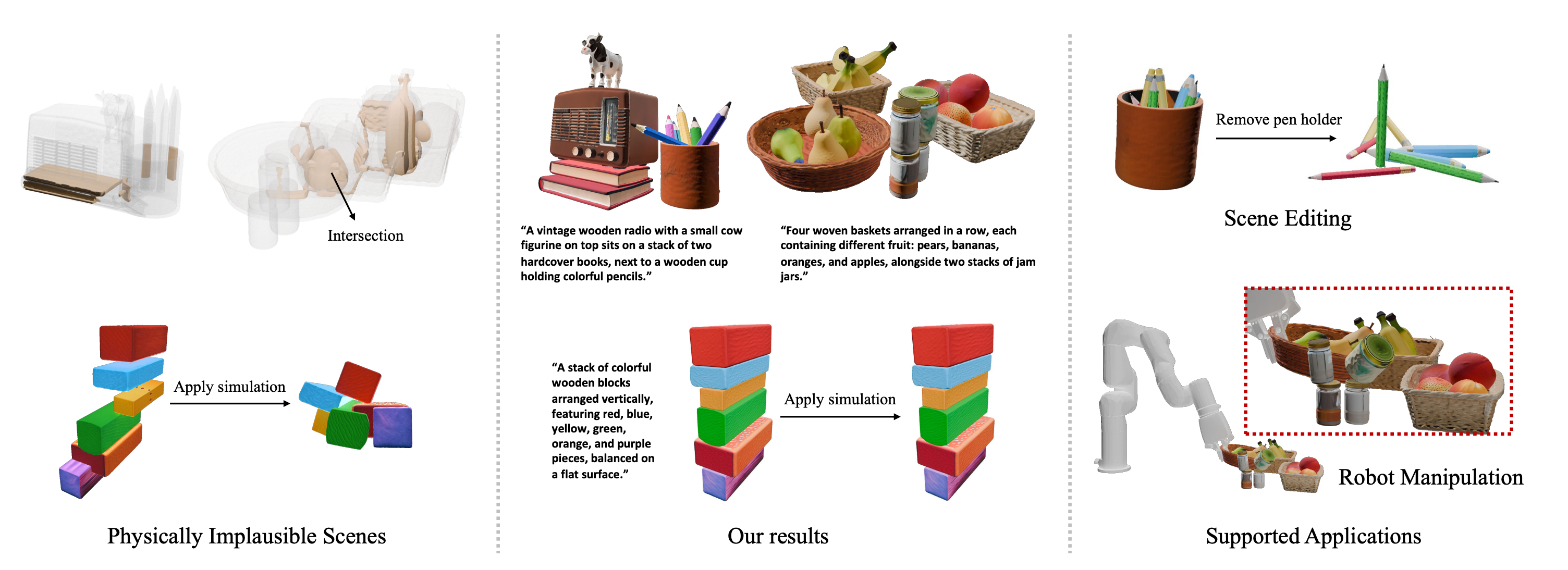
PAT3D generates physically grounded simulation-ready 3D scenes from text prompts. The release code is organized around the dashboard pipeline: a web UI launches a staged Python worker, the worker calls provider modules for each stage, and outputs are written as structured runtime JSON plus mesh, rendered image, and metric.
The dashboard website provides one place to configure a text-to-3D scene run, launch the staged pipeline, monitor live progress, inspect intermediate artifacts, view the final scene, and compute metrics.
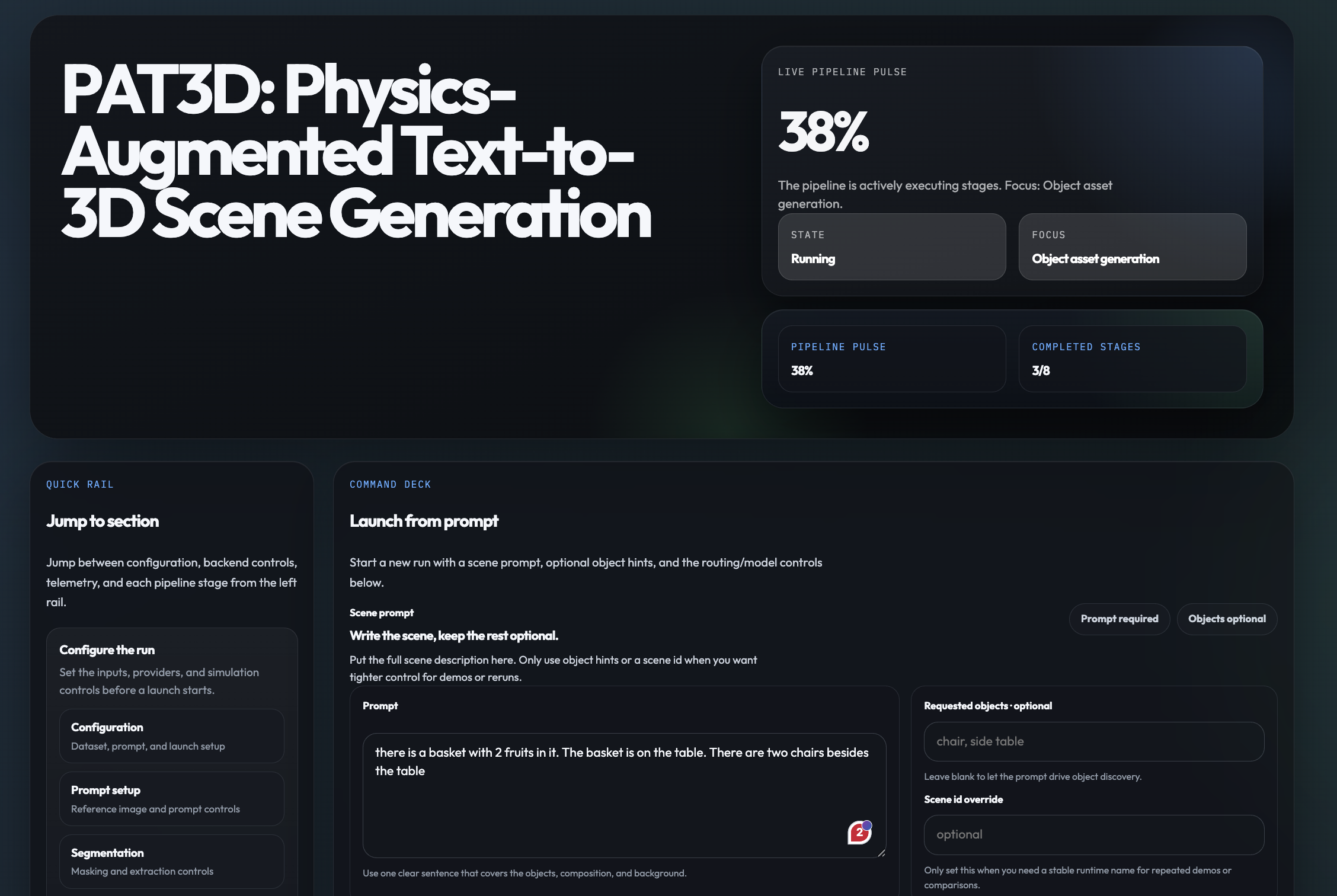
The dashboard runs the paper-core pipeline stage by stage:
Most dashboard stages use a single release backend. The useful routing summary is:
| Module | Backbone / upstream |
|---|---|
| Reference image | OpenAI image model, gpt-image-1.5 |
| Object/relation text reasoning | OpenAI structured LLM, gpt-5.4 |
| Depth | DepthPro through apple/ml-depth-pro |
| Segmentation | SAM 3 text segmentation through facebookresearch/sam3 |
| Object assets | Hunyuan3D 2 through Tencent-Hunyuan/Hunyuan3D-2 |
| Simulation mesh prep | fTetWild through wildmeshing/fTetWild |
| Semantic metrics | CLIPScore with openai/clip-vit-base-patch16; VQAScore with clip-flant5-xl through linzhiqiu/t2v_metrics; GPT-based physical-plausibility score through OpenAI vision model |
PAT3D is maintained around two supported install paths:
| Path | Host requirements | Notes |
|---|---|---|
| Native install | Ubuntu 24.04 x86_64, Python 3.10, NVIDIA GPU, CUDA 13, local Linux filesystem | Best choice when you want repo-local virtual environments and direct host execution. The bundled private physics wheel targets this ABI. |
| Docker install | Linux host with Docker Engine, NVIDIA Container Toolkit, and a working docker run --gpus all ... path | PAT3D runs inside the bundled CUDA 13 / Ubuntu 24.04 image |
Install these host tools before setting up PAT3D:
Additional components used by the full PAT3D workflow:
| Component | Required for | Expected setup |
|---|---|---|
apple/ml-depth-pro | Depth estimation | Installed by pat3d.yml as depth-pro @ git+https://github.com/apple/ml-depth-pro.git |
extern/Hunyuan3Dv2 | Textured object asset generation | Local checkout under extern/Hunyuan3Dv2, plus Hugging Face model access/cache for Tencent-Hunyuan/HunyuanDiT-v1.2-Diffusers-Distilled, tencent/Hunyuan3D-2mini, and tencent/Hunyuan3D-2 |
extern/fTetWild | Low-poly and tet-ready simulation mesh prep | Build FloatTetwild_bin under extern/fTetWild/build, or set PAT3D_FTETWILD_BIN / FTETWILD_BIN |
extern/sam3 | SAM 3 text-prompt segmentation | Local checkout plus Hugging Face access to facebook/sam3 and facebook/sam3.1; set PAT3D_SAM3_PYTHON |
extern/t2v_metrics | VQAScore metrics only | Local checkout plus a compatible VQAScore Python; set PAT3D_T2V_METRICS_ROOT and PAT3D_VQA_PYTHON |
| Prebuilt Diff_GIPC / libuipc wheel | Differentiable physics backend | Required for PAT3D. This repo ships a prebuilt pyuipc wheel with Diff_GIPC support under private_wheels/, and the setup scripts use it by default. |
DepthPro expects the pretrained checkpoint at extern/ml-depth-pro/checkpoints/depth_pro.pt by default. You can override it with PAT3D_DEPTH_PRO_CHECKPOINT if the checkpoint lives elsewhere.
The bundled pyuipc-0.9.0-cp310-cp310-linux_x86_64.whl is built for the supported Ubuntu 24.04 target. On older glibc targets such as Ubuntu 22.04, the native launch path may fail to load the private physics backend. In that case, use the Docker path or provide a compatible replacement wheel through PAT3D_PRIVATE_PHYSICS_WHEEL.
Run all commands from the repository root.
The canonical installers are scripts/setup_install.py for native installs and scripts/setup_docker_install.sh for Docker installs. Both produce .env.install, which is consumed by the launch scripts.
git clone https://github.com/Simulation-Intelligence/PAT3D
cd PAT3D
If your release uses Git submodules, initialize them:
git submodule update --init --recursive
If the external repositories are distributed separately, place them under extern/ with these expected paths:
| Path | Upstream repository |
|---|---|
extern/Hunyuan3Dv2 | Tencent-Hunyuan/Hunyuan3D-2 |
extern/fTetWild | wildmeshing/fTetWild |
extern/sam3 | facebookresearch/sam3 |
extern/t2v_metrics | linzhiqiu/t2v_metrics |
Install these external repositories before running the full dashboard workflow. extern/t2v_metrics is only required when you want VQAScore metrics.
Create .env:
cp .env.example .env
Set these values before running either installer:
HF_TOKEN=<token with access to facebook/sam3 and facebook/sam3.1>
PAT3D includes a prebuilt Diff_GIPC / libuipc wheel at private_wheels/pyuipc-0.9.0-cp310-cp310-linux_x86_64.whl, and both setup scripts use that tracked wheel automatically.
You also need an OpenAI key before launching the dashboard:
OPENAI_API_KEY=<your_key>
Common optional overrides:
OPENAI_BASE_URL=https://api.openai.com/v1
OPENAI_MODEL=gpt-5.4
OPENAI_IMAGE_MODEL=gpt-image-1.5
BLENDER_BIN=/path/to/blender
PAT3D_HF_TOKEN_FILE=/absolute/path/to/hf_token.txt
PAT3D_PRIVATE_PHYSICS_WHEEL=/absolute/path/to/alternate/pyuipc-0.9.0-cp310-cp310-linux_x86_64.whl
Use this when the host already matches the supported Linux/NVIDIA target:
python3 scripts/setup_install.py
The native installer provisions:
.venv for the main PAT3D runtime.venv-sam3 for SAM 3extern/Hunyuan3Dv2 if the checkout is missingextern/fTetWild if the checkout is missingextern/sam3checkpoints/depth_pro.ptcheckpoints/sam3/config.json and checkpoints/sam3/sam3.ptextern/fTetWild/build-local/FloatTetwild_bincustom_rasterizer, custom_rasterizer_kernel, and mesh_processor).env.install with the derived PAT3D path variablesLaunch the dashboard:
bash scripts/run_dashboard.sh
Use this when you want the supported PAT3D runtime to live inside the bundled container image:
bash scripts/setup_docker_install.sh
Then launch the dashboard from the installed Docker environment:
bash scripts/run_docker_dashboard.sh
The Docker path:
docker/Dockerfile.install if needed--gpus allscripts/setup_install.py --skip-system-deps inside the container.venv, .venv-sam3, checkpoints, and caches when serving the dashboardIf you only want to build the reusable image first:
bash scripts/build_docker_image.sh
extern/t2v_metrics and set:PAT3D_T2V_METRICS_ROOT=/absolute/path/to/extern/t2v_metrics
PAT3D_VQA_PYTHON=/absolute/path/to/vqa/python
PAT3D_T2V_HF_CACHE_DIR=/absolute/path/to/data/metrics/hf_cache
.env.install file already records PAT3D_DASHBOARD_PYTHON, PAT3D_SAM3_PYTHON, PAT3D_SAM3_CHECKPOINT_PATH, and PAT3D_FTETWILD_BIN. You usually do not need to set them manually.results/workspaces/<scene_id>/..., with runtime metadata, job state, and metrics under results/runtime/, results/dashboard_jobs/, and results/metrics/.If you used the native install:
bash scripts/run_dashboard.sh
If you used the Docker install:
bash scripts/run_docker_dashboard.sh
For manual development wiring only, you can also start the dashboard server with:
npm --prefix dashboard run dev
Open:
http://127.0.0.1:4173
Typical dashboard flow:
A small wooden chair next to a round side table in a simple room.demo_chair_table.automatic or manual segmentation.Generate.| Metric | Description |
|---|---|
| CLIPScore | Measures overall image–text alignment between the rendered views and the scene prompt. |
| VQAScore | Measures how well the rendered views visually answer the scene prompt, using a stronger vision–language evaluator. |
| GPT Visual Physical-Plausibility Score | Measures whether the rendered scene looks physically plausible, including support, contact, gravity consistency, stability, and the absence of obvious interpenetration or floating objects. |
| Metric | Description |
|---|---|
| Ratio of Penetrating Triangle Pairs | Quantifies the extent of penetration between objects in the scene and serves as an indicator of geometric correctness. |
| Simulated Scene Displacement | Computes the normalized average displacement of object vertices before and after simulation. This metric is not directly provided in the release because it requires a special Ubuntu environment that is not the default runtime. Source code is available upon request. |
@inproceedings{
      lin2026patd,
      title={{PAT}3D: Physics-Augmented Text-to-3D Scene Generation},
      author={Guying Lin and Kemeng Huang and Michael Liu and Ruihan Gao and Hanke Chen and Lyuhao Chen and Beijia Lu and Taku Komura and Yuan Liu and Jun-Yan Zhu and Minchen Li},
      booktitle={The Fourteenth International Conference on Learning Representations},
      year={2026},
      url={https://openreview.net/forum?id=iIRxFkeCuY}
      }
The simulation part of this project is developed based on the open-source project libuipc. We sincerely thank all the authors of that project.
129 followers · starred Apr 2026
Guying Lin1, Kemeng Huang2,1, Michael Liu1, Ruihan Gao1, Hanke Chen1, Lyuhao Chen1, Beijia Lu1, Taku Komura2, Yuan Liu3, Jun-Yan Zhu1, Minchen Li1,4
1Carnegie Mellon University 2The University of Hong Kong 3The Hong Kong University of Science and Technology 4Genesis AI
International Conference on Learning Representations (ICLR), 2026
PAT3D generates physically grounded simulation-ready 3D scenes from text prompts. The release code is organized around the dashboard pipeline: a web UI launches a staged Python worker, the worker calls provider modules for each stage, and outputs are written as structured runtime JSON plus mesh, rendered image, and metric.
The dashboard website provides one place to configure a text-to-3D scene run, launch the staged pipeline, monitor live progress, inspect intermediate artifacts, view the final scene, and compute metrics.
The dashboard runs the paper-core pipeline stage by stage:
Most dashboard stages use a single release backend. The useful routing summary is:
| Module | Backbone / upstream |
|---|---|
| Reference image | OpenAI image model, gpt-image-1.5 |
| Object/relation text reasoning | OpenAI structured LLM, gpt-5.4 |
| Depth | DepthPro through apple/ml-depth-pro |
| Segmentation | SAM 3 text segmentation through facebookresearch/sam3 |
| Object assets | Hunyuan3D 2 through Tencent-Hunyuan/Hunyuan3D-2 |
| Simulation mesh prep | fTetWild through wildmeshing/fTetWild |
| Semantic metrics | CLIPScore with openai/clip-vit-base-patch16; VQAScore with clip-flant5-xl through linzhiqiu/t2v_metrics; GPT-based physical-plausibility score through OpenAI vision model |
PAT3D is maintained around two supported install paths:
| Path | Host requirements | Notes |
|---|---|---|
| Native install | Ubuntu 24.04 x86_64, Python 3.10, NVIDIA GPU, CUDA 13, local Linux filesystem | Best choice when you want repo-local virtual environments and direct host execution. The bundled private physics wheel targets this ABI. |
| Docker install | Linux host with Docker Engine, NVIDIA Container Toolkit, and a working docker run --gpus all ... path | PAT3D runs inside the bundled CUDA 13 / Ubuntu 24.04 image |
Install these host tools before setting up PAT3D:
Additional components used by the full PAT3D workflow:
| Component | Required for | Expected setup |
|---|---|---|
apple/ml-depth-pro | Depth estimation | Installed by pat3d.yml as depth-pro @ git+https://github.com/apple/ml-depth-pro.git |
extern/Hunyuan3Dv2 | Textured object asset generation | Local checkout under extern/Hunyuan3Dv2, plus Hugging Face model access/cache for Tencent-Hunyuan/HunyuanDiT-v1.2-Diffusers-Distilled, tencent/Hunyuan3D-2mini, and tencent/Hunyuan3D-2 |
extern/fTetWild | Low-poly and tet-ready simulation mesh prep | Build FloatTetwild_bin under extern/fTetWild/build, or set PAT3D_FTETWILD_BIN / FTETWILD_BIN |
extern/sam3 | SAM 3 text-prompt segmentation | Local checkout plus Hugging Face access to facebook/sam3 and facebook/sam3.1; set PAT3D_SAM3_PYTHON |
extern/t2v_metrics | VQAScore metrics only | Local checkout plus a compatible VQAScore Python; set PAT3D_T2V_METRICS_ROOT and PAT3D_VQA_PYTHON |
| Prebuilt Diff_GIPC / libuipc wheel | Differentiable physics backend | Required for PAT3D. This repo ships a prebuilt pyuipc wheel with Diff_GIPC support under private_wheels/, and the setup scripts use it by default. |
DepthPro expects the pretrained checkpoint at extern/ml-depth-pro/checkpoints/depth_pro.pt by default. You can override it with PAT3D_DEPTH_PRO_CHECKPOINT if the checkpoint lives elsewhere.
The bundled pyuipc-0.9.0-cp310-cp310-linux_x86_64.whl is built for the supported Ubuntu 24.04 target. On older glibc targets such as Ubuntu 22.04, the native launch path may fail to load the private physics backend. In that case, use the Docker path or provide a compatible replacement wheel through PAT3D_PRIVATE_PHYSICS_WHEEL.
Run all commands from the repository root.
The canonical installers are scripts/setup_install.py for native installs and scripts/setup_docker_install.sh for Docker installs. Both produce .env.install, which is consumed by the launch scripts.
git clone https://github.com/Simulation-Intelligence/PAT3D
cd PAT3D
If your release uses Git submodules, initialize them:
git submodule update --init --recursive
If the external repositories are distributed separately, place them under extern/ with these expected paths:
| Path | Upstream repository |
|---|---|
extern/Hunyuan3Dv2 | Tencent-Hunyuan/Hunyuan3D-2 |
extern/fTetWild | wildmeshing/fTetWild |
extern/sam3 | facebookresearch/sam3 |
extern/t2v_metrics | linzhiqiu/t2v_metrics |
Install these external repositories before running the full dashboard workflow. extern/t2v_metrics is only required when you want VQAScore metrics.
Create .env:
cp .env.example .env
Set these values before running either installer:
HF_TOKEN=<token with access to facebook/sam3 and facebook/sam3.1>
PAT3D includes a prebuilt Diff_GIPC / libuipc wheel at private_wheels/pyuipc-0.9.0-cp310-cp310-linux_x86_64.whl, and both setup scripts use that tracked wheel automatically.
You also need an OpenAI key before launching the dashboard:
OPENAI_API_KEY=<your_key>
Common optional overrides:
OPENAI_BASE_URL=https://api.openai.com/v1
OPENAI_MODEL=gpt-5.4
OPENAI_IMAGE_MODEL=gpt-image-1.5
BLENDER_BIN=/path/to/blender
PAT3D_HF_TOKEN_FILE=/absolute/path/to/hf_token.txt
PAT3D_PRIVATE_PHYSICS_WHEEL=/absolute/path/to/alternate/pyuipc-0.9.0-cp310-cp310-linux_x86_64.whl
Use this when the host already matches the supported Linux/NVIDIA target:
python3 scripts/setup_install.py
The native installer provisions:
.venv for the main PAT3D runtime.venv-sam3 for SAM 3extern/Hunyuan3Dv2 if the checkout is missingextern/fTetWild if the checkout is missingextern/sam3checkpoints/depth_pro.ptcheckpoints/sam3/config.json and checkpoints/sam3/sam3.ptextern/fTetWild/build-local/FloatTetwild_bincustom_rasterizer, custom_rasterizer_kernel, and mesh_processor).env.install with the derived PAT3D path variablesLaunch the dashboard:
bash scripts/run_dashboard.sh
Use this when you want the supported PAT3D runtime to live inside the bundled container image:
bash scripts/setup_docker_install.sh
Then launch the dashboard from the installed Docker environment:
bash scripts/run_docker_dashboard.sh
The Docker path:
docker/Dockerfile.install if needed--gpus allscripts/setup_install.py --skip-system-deps inside the container.venv, .venv-sam3, checkpoints, and caches when serving the dashboardIf you only want to build the reusable image first:
bash scripts/build_docker_image.sh
extern/t2v_metrics and set:PAT3D_T2V_METRICS_ROOT=/absolute/path/to/extern/t2v_metrics
PAT3D_VQA_PYTHON=/absolute/path/to/vqa/python
PAT3D_T2V_HF_CACHE_DIR=/absolute/path/to/data/metrics/hf_cache
.env.install file already records PAT3D_DASHBOARD_PYTHON, PAT3D_SAM3_PYTHON, PAT3D_SAM3_CHECKPOINT_PATH, and PAT3D_FTETWILD_BIN. You usually do not need to set them manually.results/workspaces/<scene_id>/..., with runtime metadata, job state, and metrics under results/runtime/, results/dashboard_jobs/, and results/metrics/.If you used the native install:
bash scripts/run_dashboard.sh
If you used the Docker install:
bash scripts/run_docker_dashboard.sh
For manual development wiring only, you can also start the dashboard server with:
npm --prefix dashboard run dev
Open:
http://127.0.0.1:4173
Typical dashboard flow:
A small wooden chair next to a round side table in a simple room.demo_chair_table.automatic or manual segmentation.Generate.| Metric | Description |
|---|---|
| CLIPScore | Measures overall image–text alignment between the rendered views and the scene prompt. |
| VQAScore | Measures how well the rendered views visually answer the scene prompt, using a stronger vision–language evaluator. |
| GPT Visual Physical-Plausibility Score | Measures whether the rendered scene looks physically plausible, including support, contact, gravity consistency, stability, and the absence of obvious interpenetration or floating objects. |
| Metric | Description |
|---|---|
| Ratio of Penetrating Triangle Pairs | Quantifies the extent of penetration between objects in the scene and serves as an indicator of geometric correctness. |
| Simulated Scene Displacement | Computes the normalized average displacement of object vertices before and after simulation. This metric is not directly provided in the release because it requires a special Ubuntu environment that is not the default runtime. Source code is available upon request. |
@inproceedings{
      lin2026patd,
      title={{PAT}3D: Physics-Augmented Text-to-3D Scene Generation},
      author={Guying Lin and Kemeng Huang and Michael Liu and Ruihan Gao and Hanke Chen and Lyuhao Chen and Beijia Lu and Taku Komura and Yuan Liu and Jun-Yan Zhu and Minchen Li},
      booktitle={The Fourteenth International Conference on Learning Representations},
      year={2026},
      url={https://openreview.net/forum?id=iIRxFkeCuY}
      }
The simulation part of this project is developed based on the open-source project libuipc. We sincerely thank all the authors of that project.
129 followers · starred Apr 2026



