This is the official repository of the paper "Towards Physically Executable 3D Gaussian for Embodied Navigation".
Python
203
20 commits
updated Jul 27, 2026





Renhan Wang2, Siliang Tang1, Jun Xiao2, Rui Tang2, Juncheng Li 1*
1Zhejiang University, 2Manycore Tech Inc., 3Huazhong University of Science and Technology
*Corresponding author: [email protected].
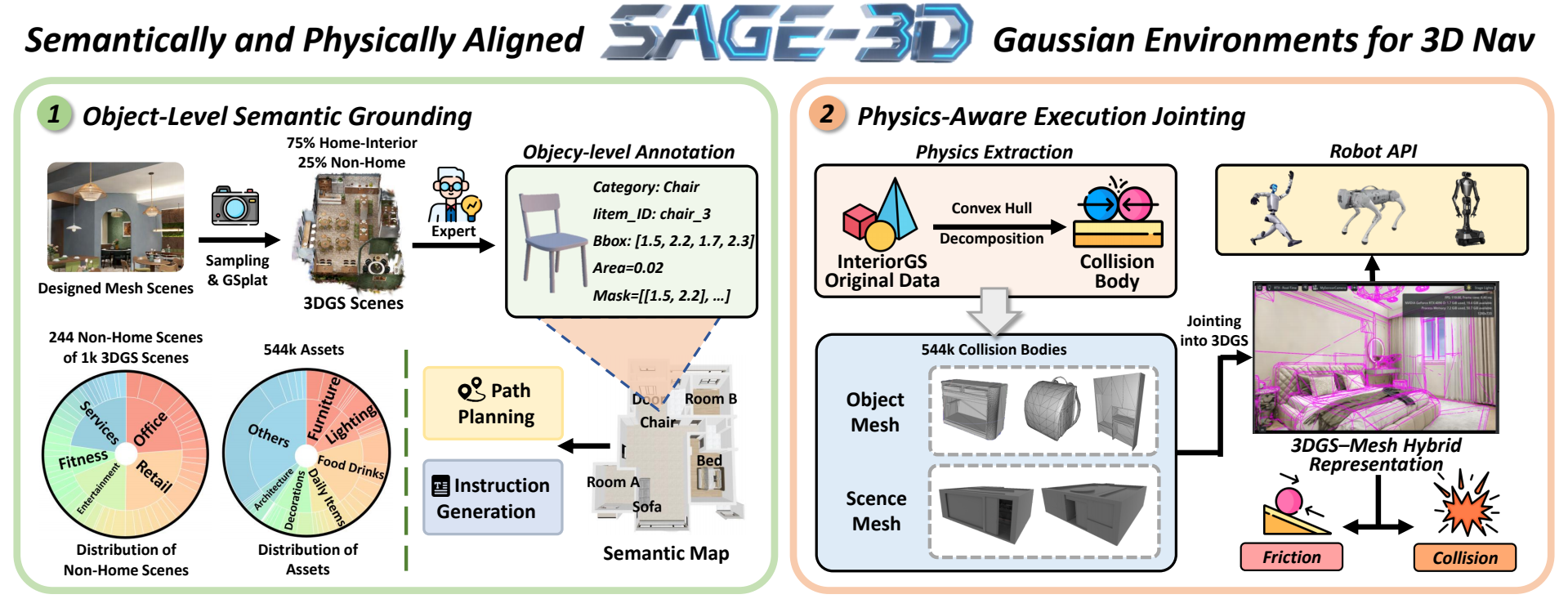
Welcome to the official repository for the paper "Towards Physically Executable 3D Gaussian for Embodied Navigation". In this work, we introduce SAGE-3D, a new paradigm that upgrades 3D Gaussian Splatting (3DGS) into an executable, semantically and physically aligned environment foundation for Vision-and-Language Navigation (VLN). While current VLN research primarily follows a sim-to-real paradigm and leverages 3DGS for photorealistic rendering, existing methods lack fine-grained semantics and physical executability. SAGE-3D addresses these limitations with two key components:
We also release two valuable resources to support research in this domain:
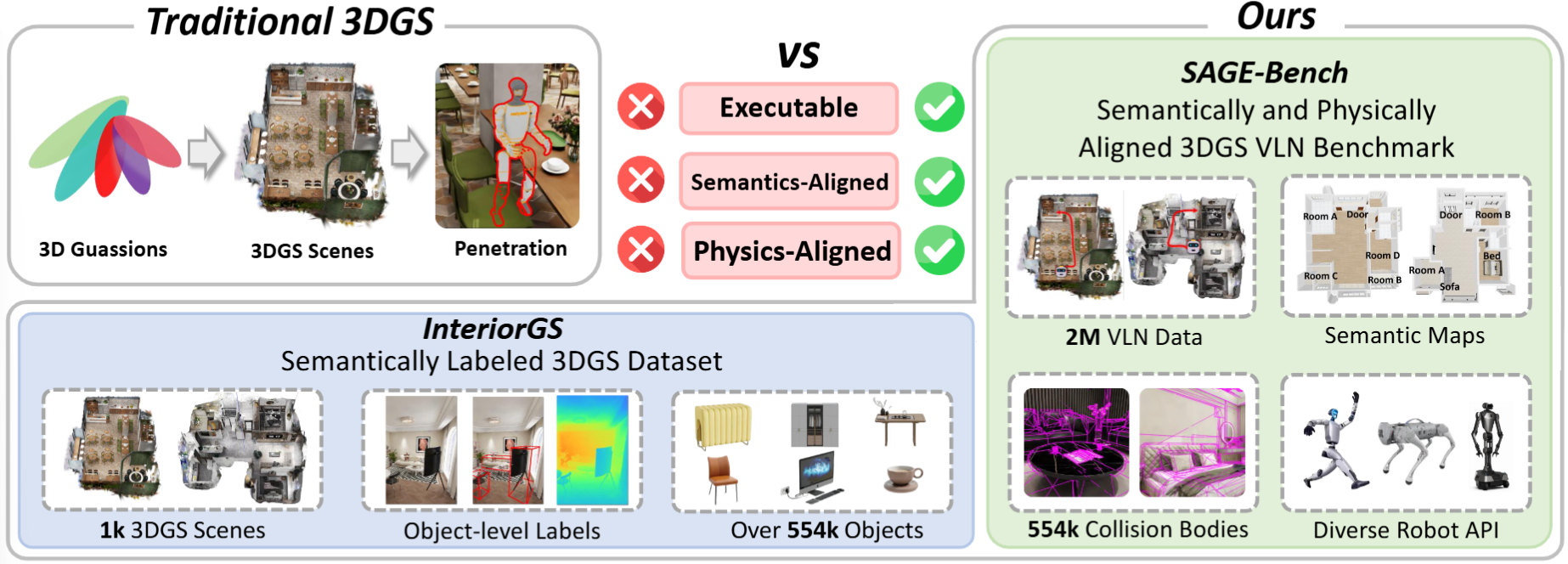
Current Vision-Language Navigation (VLN) follows the sim-to-real paradigm, where agents first learn navigation policies in simulation and then transfer them to the real world. 3D Gaussian Splatting (3DGS), a 3D representation method with photorealistic real-time rendering capability, has been regarded as a promising tool for narrowing the sim-to-real gap, yet it still lacks the fine-grained semantics and physical executability required for embodied navigation. To address this, we propose SAGE-3D (Semantical and Physical-Aligned Gaussian Environments for 3D Navigation), a new paradigm that upgrades 3DGS into an executable, semantically and physically aligned environment foundation SAGE-3D comprises two key components: 1) Object-Level Semantic Grounding, which augments 3DGS with fine-grained, object-level annotations; and 2) Physics-Aware Execution Jointing, which embeds collision bodies into 3DGS and provides rich physical interaction interfaces.
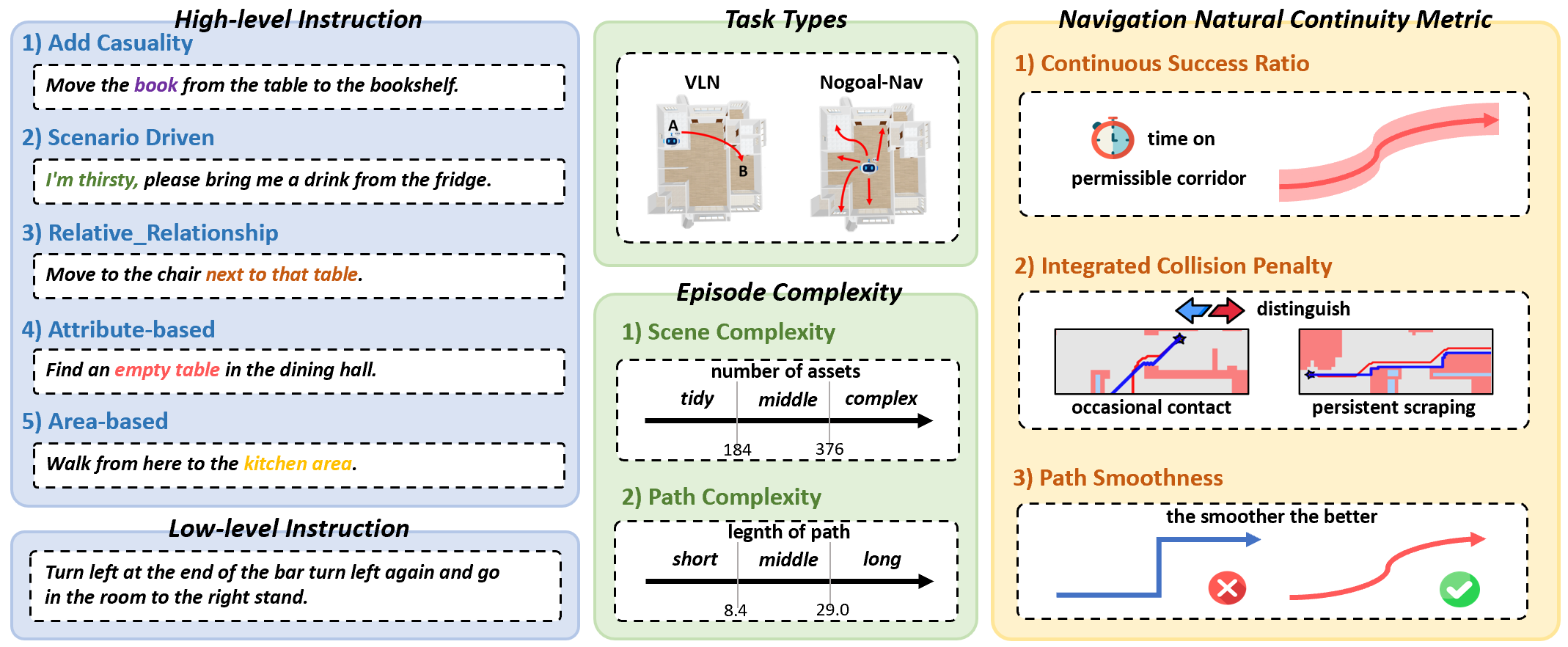
Our SAGE-Bench includes a hierarchical instruction generation scheme, two major task types, two episode complexity categories, and three newly designed natural continuity metrics for navigation.
Many components of SAGE-3D require NVIDIA Isaac Sim's Python environment, including image sampling, benchmark testing, and scene rendering. Setting up Isaac Sim correctly is essential for running our pipeline.
⚠️ Version Requirement: Isaac Sim 5.0+
SAGE-3D requires Isaac Sim version 5.0 or above as it is the first version to support USDZ format for 3D Gaussian Splatting rendering. Earlier versions are not compatible with our pipeline.
Follow these steps to set up Isaac Sim 5.0(Workstation):
Linux (Ubuntu)
# 1. Download the Isaac Sim 5.0
wget https://download.isaacsim.omniverse.nvidia.com/isaac-sim-standalone-5.0.0-linux-x86_64.zip

# 2. Extract to target directory
# We recommend installing to ~/isaacsim
mkdir -p ~/isaacsim
unzip isaac-sim-standalone-5.0.0-linux-x86_64.zip -d ~/isaacsim

# 3. Install dependencies and drivers
cd ~/isaacsim
./post_install.sh

# 4. Verify installation (Optional selector GUI)
./isaac-sim.selector.sh
Please ensure you have PowerShell or Command Prompt ready.
:: 1. Download the standalone package manually or via command line if available
:: URL: https://download.isaacsim.omniverse.nvidia.com/isaac-sim-standalone-5.0.0-windows-x86_64.zip

:: 2. Create installation directory
mkdir C:\isaacsim

:: 3. Extract the package (Assuming file is in Downloads)

cd %USERPROFILE%\Downloads
tar -xvzf "isaac-sim-standalone-5.0.0-windows-x86_64.zip" -C C:\isaacsim

:: 4. Install dependencies

cd C:\isaacsim
post_install.bat

:: 5. Verify installation
isaac-sim.selector.bat
Important Notes:
Throughout this repository, when we refer to running scripts with Isaac Sim's Python interpreter, use:
# Linux
~/isaacsim/python.sh your_script.py

# Windows
C:\isaacsim\python.bat your_script.py
For reproducibility, we provide the complete list of Python packages in our Isaac Sim environment:
Data/isaac_sim_requirements.txtData/Isaac_sim_requirements_README.md⚠️ Important: These requirements are for reference only. Do NOT install them directly into a standard Python environment. Isaac Sim comes with its own bundled Python environment with custom builds of PyTorch, USD, and other NVIDIA libraries. Please refer to the documentation file for detailed usage instructions.
Before constructing VLN data, you need to prepare the SAGE-3D scene data by converting InteriorGS 3D Gaussian Splatting scenes into USDZ format compatible with Isaac Sim. This section describes the complete pipeline from compressed PLY files to USDA scene files.
Additionally, we have prepared processed USDZ data for you, which can be immediately opened with IsaacSim 5.0 by generating the corresponding USDA data using our code.
InteriorGS Compressed PLY → Original PLY → USDZ → USDA (with collision bodies)
Install the required external tools:
# 1. Install splat-transform for PLY decompression
# Repository: https://github.com/playcanvas/splat-transform
npm install -g @playcanvas/splat-transform

# 2. Install 3DGRUT for PLY to USDZ conversion
# Repository: https://github.com/nv-tlabs/3dgrut
git clone https://github.com/nv-tlabs/3dgrut.git
cd 3dgrut
pip install -e .
Download InteriorGS compressed PLY files.
Each scene contains a compressed 3D Gaussian Splatting file:
InteriorGS/
├── 0001_839920/
│   └── 3dgs_compressed.ply
├── 0002_839921/
│   └── 3dgs_compressed.ply
└── ...
Use the splat-transform tool to decompress the PLY files:
# Convert a single scene
splat-transform /path/to/InteriorGS/0001_839920/3dgs_compressed.ply \
    /path/to/output/0001_839920.ply

# Batch convert all scenes (example script)
for scene_dir in /path/to/InteriorGS/*/; do
    scene_id=$(basename "$scene_dir")
    splat-transform "$scene_dir/3dgs_compressed.ply" \
        "/path/to/output/${scene_id}.ply"
done
Tool: playcanvas/splat-transform
Output: Decompressed PLY files with full 3D Gaussian data
Use the ply_to_usd.py script from 3DGRUT to convert PLY files to USDZ format:
# Convert a single scene
python -m threedgrut.export.scripts.ply_to_usd \
    /path/to/ply/0001_839920.ply \
    --output_file /path/to/usdz/0001_839920.usdz

# Batch convert all scenes (example script)
for ply_file in /path/to/ply/*.ply; do
    scene_id=$(basename "$ply_file" .ply)
    python -m threedgrut.export.scripts.ply_to_usd \
        "$ply_file" \
        --output_file "/path/to/usdz/${scene_id}.usdz"
done
Tool: nv-tlabs/3dgrut
Output: USDZ files compatible with Omniverse and Isaac Sim 5.0+
Alternatively, you can use the processed USDZ data we provide.
Download SAGE-3D Collision Mesh Dataset for each scene.
The collision meshes are organized by scene ID:
Collision_Mesh/
├── 839873/                    # Scene-specific collision data
│   └── 839873_collision.usd   # Collision mesh in USD format
├── 839874/
│   └── 839874_collision.usd
├── 839875/
│   └── 839875_collision.usd
└── ...
These collision meshes enable accurate physics simulation and collision detection.
Convert USDZ files to USDA format and integrate collision bodies using our builder script:
python Code/benchmark/scene_data/sage3d_usda_builder.py \
    --usdz-dir /path/to/usdz \
    --out-dir /path/to/output/usda \
    --template Data/template.usda \
    --usdz-placeholder "@usdz_root[gauss.usda]@" \
    --collision-placeholder "@collision_root@" \
    --usdz-path-template "/path/to/usdz/{scene_id}.usdz[gauss.usda]" \
    --collision-path-template "/path/to/collision/{scene_id}/{scene_id}_collision.usd" \
    --overwrite
Parameters:
--usdz-dir: Directory containing USDZ scene files--out-dir: Output directory for USDA files--template: Path to USDA template file--usdz-placeholder: Placeholder string in template for USDZ reference (default: @usdz_root[gauss.usda]@)--collision-placeholder: Placeholder string in template for collision payload (default: @collision_root@)--usdz-path-template: Template for USDZ reference path (use {scene_id} as placeholder)--collision-path-template: Template for collision payload path (use {scene_id} as placeholder)--overwrite: Overwrite existing USDA filesOutput:
{scene_id}.usda: Complete scene files ready for Isaac Sim with integrated collision bodiesThis section describes the complete pipeline for constructing VLN training and testing data from InteriorGS 3D Gaussian Splatting scenes. The pipeline transforms 3DGS scenes into a complete VLN dataset with trajectories, natural language instructions, and training data (RGB images + action sequences).
Prerequisites: Complete the SAGE-3D Scene Data Preparation first to generate USDA scene files. And download InteriorGS data to obtain manually annotated object level data (labels.json、occupancy.json、occupancy.png).
Install the required dependencies:
pip install -r requirements.txt
Convert InteriorGS 3D scenes into 2D semantic maps for navigation planning:
cd /path/to/SAGE-3D

python Code/data_pipeline/interiorgs_processing/semantic_map_builder.py \
    --input-root /path/to/InteriorGS \
    --output-root /path/to/output/semantic_maps
Parameters:
--input-root: Directory containing InteriorGS scene folders (each with labels.json, occupancy.json, occupancy.png)--output-root: Output directory for generated 2D semantic mapsOutput:
2D_Semantic_Map_{scene_id}_Complete.json: Semantic map with object labels and positions2D_Semantic_Map_{scene_id}_Complete.png: Visualization of the semantic mapConvert InteriorGS scenes into textual scene descriptions for instruction generation:
Step 1: Convert to Physical Map
python Code/data_pipeline/interiorgs_processing/physical_map_converter.py \
    --src-root /path/to/InteriorGS \
    --dst-root /path/to/output/physical_maps
Parameters:
--src-root: InteriorGS dataset root directory--dst-root: Output directory for physical mapsOutput:
{scene_id}/scene.json: Bounding box coordinates for each object in the sceneStep 2: Convert Physical Map to Scene Text
python Code/data_pipeline/interiorgs_processing/scene_text_generator.py \
    --physical-map-root /path/to/physical_maps \
    --output-root /path/to/output/scene_text \
    --prompt-file prompts/prompt_phy_to_sem.json \
    --api-base https://api.openai.com/v1 \
    --model gpt-4o \
    --api-key $OPENAI_API_KEY
Parameters:
--physical-map-root: Directory containing physical map files--output-root: Output directory for scene text descriptions--prompt-file: JSON file containing prompt template--api-base: OpenAI API endpoint URL--model: LLM model name--api-key: OpenAI API keyOutput:
{scene_id}_semantic.txt: Natural language description of scene layout and objectsGenerate navigation trajectories on 2D semantic maps with natural language instructions:
python Code/data_pipeline/trajectory_generation/vln_trajectory_generator.py \
    --api-type openai \
    --api-key YOUR_OPENAI_API_KEY \
    --api-base https://api.openai.com/v1 \
    --model gpt-4o \
    --min-trajs 100 \
    --label-root /path/to/InteriorGS \
    --scene-text-root /path/to/scene_text \
    --sem-map-root /path/to/semantic_maps \
    --endpoint-root /path/to/output/endpoints \
    --traj-root /path/to/output/trajectories \
    --prompt-pairwise prompts/trajectory_generation/prompt_pairwise_judgement.json \
    --prompt-pairwise-batch prompts/trajectory_generation/prompt_pairwise_judgement_batch.json \
    --prompt-traj-to-instr prompts/trajectory_generation/prompt_traj_to_instruction.json
Parameters:
--api-type: API client type--api-key: API key for LLM service--api-base: API endpoint URL--model: LLM model name--min-trajs: Minimum trajectories to generate per scene--label-root: InteriorGS dataset root (for scene metadata)--scene-text-root: Directory containing scene text descriptions--sem-map-root: Directory containing 2D semantic maps--endpoint-root: Output directory for endpoint samples--traj-root: Output directory for trajectory data--prompt-pairwise: Path to pairwise judgment prompt JSON--prompt-pairwise-batch: Path to batch pairwise judgment prompt JSON--prompt-traj-to-instr: Path to trajectory-to-instruction prompt JSONOutput:
endpoints_{scene_id}.json: Sampled start/end point pairstrajectories_{scene_id}.json: Navigation trajectories with 2D coordinates and instructionsTransform 2D trajectory coordinates to 3D world coordinates:
python Code/data_pipeline/trajectory_generation/trajectory_2d_to_3d.py \
    --traj-root /path/to/trajectories \
    --map-root /path/to/semantic_maps
Parameters:
--traj-root: Directory containing 2D trajectory files--map-root: Directory containing semantic map metadata (with coordinate bounds)Output:
If trajectories were generated in multiple parts, merge them:
python Code/data_pipeline/trajectory_generation/trajectory_merge.py \
    --source-dir /path/to/trajectories \
    --output-dir /path/to/trajectories_merged
Parameters:
--source-dir: Directory containing part-wise trajectory files--output-dir: Output directory for merged trajectoriesOutput:
{scene_id}/trajectories_overall_merged.json: Merged trajectory data per sceneAnalyze trajectory data and generate statistics:
python Code/data_pipeline/trajectory_generation/trajectory_statistics.py \
    --data-dir /path/to/trajectories_merged
Parameters:
--data-dir: Directory containing merged trajectory dataOutput:
Note: Our test data has undergone further manual screening to ensure data quality.
Step 1: Generate Domain-Aware Split Mapping
Create split mappings with domain awareness (scene type, trajectory complexity):
python Code/data_pipeline/data_split/trajectory_split_domain_aware.py \
    --traj-root /path/to/trajectories_merged \
    --scene-type-file Data/scene_type.json \
    --output-dir /path/to/output/split_mappings
Parameters:
--traj-root: Directory containing merged trajectories--scene-type-file: JSON file mapping scene IDs to scene types--output-dir: Output directory for split mapping filesOutput:
GSNav-Bench_Train_Split_Domain.json: Training set mappingGSNav-Bench_Val_Split_Domain.json: Validation set mappingGSNav-Bench_Test_Scene_Unseen_Split_Domain.json: Scene-unseen test mappingGSNav-Bench_Test_Trajectory_Unseen_Split_Domain.json: Trajectory-unseen test mappingGSNav-Bench_Test_Instruction_Unseen_Split_Domain.json: Instruction-unseen test mappingStep 2: Extract Split Data Based on Mapping
python Code/data_pipeline/data_split/benchmark_data_splitter.py \
    --original-data-dir /path/to/trajectories_merged \
    --mapping-dir /path/to/split_mappings \
    --train-dir /path/to/output/train \
    --val-dir /path/to/output/val \
    --scene-unseen-dir /path/to/output/test_scene_unseen \
    --trajectory-unseen-dir /path/to/output/test_trajectory_unseen \
    --instruction-unseen-dir /path/to/output/test_instruction_unseen
Parameters:
--original-data-dir: Directory containing original merged trajectories--mapping-dir: Directory containing split mapping JSON files (from Step 1)--train-dir: Output directory for training set--val-dir: Output directory for validation set--scene-unseen-dir: Output directory for scene-unseen test set--trajectory-unseen-dir: Output directory for trajectory-unseen test set--instruction-unseen-dir: Output directory for instruction-unseen test setOutput:
Generate action sequences from trajectories:
python Code/data_pipeline/training_data_construction/generate_actions.py \
    --input-dir /path/to/train/trajectories \
    --output-dir /path/to/output/actions \
Parameters:
--input-dir: Directory containing training trajectory files--output-dir: Output directory for action groundtruthOutput:
{scene_id}/{trajectory_id}_action.json: Action sequences with sampled waypointsRender RGB images at trajectory waypoints using Isaac Sim. This step requires Isaac Sim (5.0+) to be installed.
Important: Use Isaac Sim's (5.0+) Python interpreter to run this script:
# Single instance
/path/to/isaac-sim/python.sh \
    Code/data_pipeline/training_data_construction/generate_images.py \
    --input-dir /path/to/train/trajectories \
    --usd-root /path/to/InteriorGS_usda \
    --output-dir /path/to/output/images \
    --action-root /path/to/actions \
    --max-trajectories 50

# For distributed processing (4 instances example):
# Instance 0
/path/to/isaac-sim/python.sh \
    Code/data_pipeline/training_data_construction/generate_images.py \
    --input-dir /path/to/train/trajectories \
    --usd-root /path/to/InteriorGS_usda \
    --output-dir /path/to/output/images \
    --action-root /path/to/actions \
    --max-trajectories 50 \
    --instance-id 0 \
    --total-instances 4

# Instance 1
/path/to/isaac-sim/python.sh ... --instance-id 1 --total-instances 4

# Instance 2
/path/to/isaac-sim/python.sh ... --instance-id 2 --total-instances 4

# Instance 3
/path/to/isaac-sim/python.sh ... --instance-id 3 --total-instances 4
Parameters:
--input-dir: Directory containing training trajectories--usd-root: Directory containing USD/USDA scene files--output-dir: Output directory for rendered images--action-root: Directory containing action groundtruth (for waypoint synchronization)--max-trajectories: (Optional) Limit trajectories per scene--instance-id: (Optional) Instance ID for distributed processing (0-indexed)--total-instances: (Optional) Total number of instances for distributed processingNotes:
Output:
{scene_id}/{trajectory_id}/frames/: RGB images at each waypoint{scene_id}/{trajectory_id}/metadata.json: Image metadata and camera parametersThis section describes how to set up the SAGE-Bench evaluation environment and run benchmark tests on VLN models and various MLLMs.
Download SAGE-3D VLN test data.
Requirements:
SAGE-Bench supports multiple VLN models through a server-client architecture. You need to start a model server before running the benchmark.
Please download the model weights and configuration related environment libraries from the NaVILA repository and NaVILA-Bench repository.
Activate Environment and Start Server:
# Activate NaVILA environment
conda activate navila-eval

# Start NaVILA server
cd /path/to/NaVILA
python scripts/vlm_server_multigpu.py \
    --model_path /path/to/navila-model \
    --port 54321 \
Parameters:
--model_path: Path to NaVILA model checkpoint--port: Port number for server (default: 54321)Start an MLLM server for general vision-language models:
# Start Qwen2.5-VL server (example)
python Code/benchmark/environment_evaluation/evaluation_model/MLLM/mllm_server.py \
    --model_type qwen-vl \
    --model_path /path/to/Qwen2.5-VL-7B-Instruct \
    --port 7777 \

# Start LLaVA server (example)
python Code/benchmark/environment_evaluation/evaluation_model/MLLM/mllm_server.py \
    --model_type llava \
    --model_path /path/to/llava-1.5-7b-hf \
    --port 7778 \

# Start InternVL server (example)
python Code/benchmark/environment_evaluation/evaluation_model/MLLM/mllm_server.py \
    --model_type internvl \
    --model_path /path/to/InternVL2-8B \
    --port 7779 \
Parameters:
--model_type: Model type (qwen-vl, llava, internvland so on)--model_path: Path to model checkpoint or HuggingFace model ID--port: Port number for serverSAGE-Bench supports three types of navigation tasks:
Test models on high-level vision-language navigation with instruction following:
Important: Use Isaac Sim's (5.0+) Python interpreter to run this script
# Use Isaac Sim's Python interpreter
/path/to/isaac-sim/python.sh \
    Code/benchmark/environment_evaluation/run_benchmark.py \
    --scene_usd_path /path/to/InteriorGS_usda \
    --batch_test_dir /path/to/test_data/vln \
    --map_path /path/to/semantic_maps \
    --output_root /path/to/output/results \
    --task-type vln \
    --input-type rgb \
    --protocol socket \
    --vlm-port 54321
Test Splits:
Test models on low-level control and kinematic evaluation:
Important: Use Isaac Sim's (5.0+) Python interpreter to run this script
/path/to/isaac-sim/python.sh \
    Code/benchmark/environment_evaluation/run_benchmark.py \
    --scene_usd_path /path/to/InteriorGS_usda \
    --batch_test_dir /path/to/test_data/low_level \
    --map_path /path/to/semantic_maps \
    --output_root /path/to/output/results_low_level \
    --task-type vln \
    --input-type rgb \
    --protocol socket \
    --vlm-port 54321
Test exploration and collision avoidance without explicit goals:
Important: Use Isaac Sim's (5.0+) Python interpreter to run this script
/path/to/isaac-sim/python.sh \
    Code/benchmark/environment_evaluation/run_benchmark.py \
    --scene_usd_path /path/to/InteriorGS_usda \
    --batch_test_dir /path/to/test_data/no_goal \
    --map_path /path/to/semantic_maps \
    --output_root /path/to/output/results_nogoal \
    --task-type nogoalnav \
    --input-type rgb \
    --protocol socket \
    --vlm-port 54321
Common Parameters:
--scene_usd_path: Directory containing USDA scene files--batch_test_dir: Directory containing test trajectory data--map_path: Directory containing 2D semantic maps (for collision detection)--output_root: Output directory for results--task-type: Task type (vln, objectnav, pointnav, imgnav, nogoalnav)--input-type: Input modality (rgb, rgbd, depth)--protocol: Communication protocol (socket or http)--vlm-port: VLM server port number--vlm-host: (Optional) VLM server host (default: localhost)Optional Parameters:
--instance-id: (Optional) Instance ID for distributed testing--total-instances: (Optional) Total number of instances for distributed testing--max-episodes: (Optional) Maximum episodes to test (for quick testing)--headless: (Optional) Run in headless mode (default: True)--silent-logging: (Optional) Enable silent logging modeOutput Files:
{scene_id}/{episode_id}/measurements/{episode_id}.json: Episode metrics{scene_id}/{episode_id}/trajectory_visualization_{scene_id}_{episode_id}.png: Trajectory visualizationaggregate_results.json: Aggregated metrics across all episodesIf you find this work useful for your research, please cite our paper:
@inproceedings{miao2026towards,
  title = {Towards Physically Executable {3D} Gaussian for Embodied Navigation},
  author = {Miao, Bingchen and Wei, Rong and Ge, Zhiqi and Sun, Xiaoquan and Gao, Shiqi and Zhu, Jingzhe and Wang, Renhan and Tang, Siliang and Xiao, Jun and Tang, Rui and Li, Juncheng},
  booktitle = {The Fourteenth International Conference on Learning Representations},
  year = {2026},
  url = {https://openreview.net/forum?id=HB6KvsqcAn}
}
Please also cite the InteriorGS dataset:
@misc{InteriorGS2025,
  title={InteriorGS: A 3D Gaussian Splatting Dataset of Semantically Labeled Indoor Scenes},
  author={SpatialVerse Research Team, Manycore Tech Inc.},
  year={2025},
  howpublished={\url{https://huggingface.co/datasets/spatialverse/InteriorGS}}
}
We would like to thank the following open-source projects that made SAGE-3D possible:
NVIDIA Isaac Sim: For providing a powerful physics simulation and rendering platform that enables our benchmark evaluation and image generation pipeline.
nv-tlabs/3dgrut: For the excellent PLY to USDZ conversion tools that enable 3D Gaussian Splatting rendering in Isaac Sim. We thank the NVIDIA Toronto AI Lab for developing and open-sourcing this tool.
playcanvas/splat-transform: For the compressed PLY decompression utility that allows us to process InteriorGS scenes efficiently.
These tools are essential components of our data processing and evaluation pipeline.
This is the official repository of the paper "Towards Physically Executable 3D Gaussian for Embodied Navigation".
Python
203
20 commits
updated Jul 27, 2026
Renhan Wang2, Siliang Tang1, Jun Xiao2, Rui Tang2, Juncheng Li 1*
1Zhejiang University, 2Manycore Tech Inc., 3Huazhong University of Science and Technology
*Corresponding author: [email protected].
Welcome to the official repository for the paper "Towards Physically Executable 3D Gaussian for Embodied Navigation". In this work, we introduce SAGE-3D, a new paradigm that upgrades 3D Gaussian Splatting (3DGS) into an executable, semantically and physically aligned environment foundation for Vision-and-Language Navigation (VLN). While current VLN research primarily follows a sim-to-real paradigm and leverages 3DGS for photorealistic rendering, existing methods lack fine-grained semantics and physical executability. SAGE-3D addresses these limitations with two key components:
We also release two valuable resources to support research in this domain:
Current Vision-Language Navigation (VLN) follows the sim-to-real paradigm, where agents first learn navigation policies in simulation and then transfer them to the real world. 3D Gaussian Splatting (3DGS), a 3D representation method with photorealistic real-time rendering capability, has been regarded as a promising tool for narrowing the sim-to-real gap, yet it still lacks the fine-grained semantics and physical executability required for embodied navigation. To address this, we propose SAGE-3D (Semantical and Physical-Aligned Gaussian Environments for 3D Navigation), a new paradigm that upgrades 3DGS into an executable, semantically and physically aligned environment foundation SAGE-3D comprises two key components: 1) Object-Level Semantic Grounding, which augments 3DGS with fine-grained, object-level annotations; and 2) Physics-Aware Execution Jointing, which embeds collision bodies into 3DGS and provides rich physical interaction interfaces.
Our SAGE-Bench includes a hierarchical instruction generation scheme, two major task types, two episode complexity categories, and three newly designed natural continuity metrics for navigation.
Many components of SAGE-3D require NVIDIA Isaac Sim's Python environment, including image sampling, benchmark testing, and scene rendering. Setting up Isaac Sim correctly is essential for running our pipeline.
⚠️ Version Requirement: Isaac Sim 5.0+
SAGE-3D requires Isaac Sim version 5.0 or above as it is the first version to support USDZ format for 3D Gaussian Splatting rendering. Earlier versions are not compatible with our pipeline.
Follow these steps to set up Isaac Sim 5.0(Workstation):
Linux (Ubuntu)
# 1. Download the Isaac Sim 5.0
wget https://download.isaacsim.omniverse.nvidia.com/isaac-sim-standalone-5.0.0-linux-x86_64.zip

# 2. Extract to target directory
# We recommend installing to ~/isaacsim
mkdir -p ~/isaacsim
unzip isaac-sim-standalone-5.0.0-linux-x86_64.zip -d ~/isaacsim

# 3. Install dependencies and drivers
cd ~/isaacsim
./post_install.sh

# 4. Verify installation (Optional selector GUI)
./isaac-sim.selector.sh
Please ensure you have PowerShell or Command Prompt ready.
:: 1. Download the standalone package manually or via command line if available
:: URL: https://download.isaacsim.omniverse.nvidia.com/isaac-sim-standalone-5.0.0-windows-x86_64.zip

:: 2. Create installation directory
mkdir C:\isaacsim

:: 3. Extract the package (Assuming file is in Downloads)

cd %USERPROFILE%\Downloads
tar -xvzf "isaac-sim-standalone-5.0.0-windows-x86_64.zip" -C C:\isaacsim

:: 4. Install dependencies

cd C:\isaacsim
post_install.bat

:: 5. Verify installation
isaac-sim.selector.bat
Important Notes:
Throughout this repository, when we refer to running scripts with Isaac Sim's Python interpreter, use:
# Linux
~/isaacsim/python.sh your_script.py

# Windows
C:\isaacsim\python.bat your_script.py
For reproducibility, we provide the complete list of Python packages in our Isaac Sim environment:
Data/isaac_sim_requirements.txtData/Isaac_sim_requirements_README.md⚠️ Important: These requirements are for reference only. Do NOT install them directly into a standard Python environment. Isaac Sim comes with its own bundled Python environment with custom builds of PyTorch, USD, and other NVIDIA libraries. Please refer to the documentation file for detailed usage instructions.
Before constructing VLN data, you need to prepare the SAGE-3D scene data by converting InteriorGS 3D Gaussian Splatting scenes into USDZ format compatible with Isaac Sim. This section describes the complete pipeline from compressed PLY files to USDA scene files.
Additionally, we have prepared processed USDZ data for you, which can be immediately opened with IsaacSim 5.0 by generating the corresponding USDA data using our code.
InteriorGS Compressed PLY → Original PLY → USDZ → USDA (with collision bodies)
Install the required external tools:
# 1. Install splat-transform for PLY decompression
# Repository: https://github.com/playcanvas/splat-transform
npm install -g @playcanvas/splat-transform

# 2. Install 3DGRUT for PLY to USDZ conversion
# Repository: https://github.com/nv-tlabs/3dgrut
git clone https://github.com/nv-tlabs/3dgrut.git
cd 3dgrut
pip install -e .
Download InteriorGS compressed PLY files.
Each scene contains a compressed 3D Gaussian Splatting file:
InteriorGS/
├── 0001_839920/
│   └── 3dgs_compressed.ply
├── 0002_839921/
│   └── 3dgs_compressed.ply
└── ...
Use the splat-transform tool to decompress the PLY files:
# Convert a single scene
splat-transform /path/to/InteriorGS/0001_839920/3dgs_compressed.ply \
    /path/to/output/0001_839920.ply

# Batch convert all scenes (example script)
for scene_dir in /path/to/InteriorGS/*/; do
    scene_id=$(basename "$scene_dir")
    splat-transform "$scene_dir/3dgs_compressed.ply" \
        "/path/to/output/${scene_id}.ply"
done
Tool: playcanvas/splat-transform
Output: Decompressed PLY files with full 3D Gaussian data
Use the ply_to_usd.py script from 3DGRUT to convert PLY files to USDZ format:
# Convert a single scene
python -m threedgrut.export.scripts.ply_to_usd \
    /path/to/ply/0001_839920.ply \
    --output_file /path/to/usdz/0001_839920.usdz

# Batch convert all scenes (example script)
for ply_file in /path/to/ply/*.ply; do
    scene_id=$(basename "$ply_file" .ply)
    python -m threedgrut.export.scripts.ply_to_usd \
        "$ply_file" \
        --output_file "/path/to/usdz/${scene_id}.usdz"
done
Tool: nv-tlabs/3dgrut
Output: USDZ files compatible with Omniverse and Isaac Sim 5.0+
Alternatively, you can use the processed USDZ data we provide.
Download SAGE-3D Collision Mesh Dataset for each scene.
The collision meshes are organized by scene ID:
Collision_Mesh/
├── 839873/                    # Scene-specific collision data
│   └── 839873_collision.usd   # Collision mesh in USD format
├── 839874/
│   └── 839874_collision.usd
├── 839875/
│   └── 839875_collision.usd
└── ...
These collision meshes enable accurate physics simulation and collision detection.
Convert USDZ files to USDA format and integrate collision bodies using our builder script:
python Code/benchmark/scene_data/sage3d_usda_builder.py \
    --usdz-dir /path/to/usdz \
    --out-dir /path/to/output/usda \
    --template Data/template.usda \
    --usdz-placeholder "@usdz_root[gauss.usda]@" \
    --collision-placeholder "@collision_root@" \
    --usdz-path-template "/path/to/usdz/{scene_id}.usdz[gauss.usda]" \
    --collision-path-template "/path/to/collision/{scene_id}/{scene_id}_collision.usd" \
    --overwrite
Parameters:
--usdz-dir: Directory containing USDZ scene files--out-dir: Output directory for USDA files--template: Path to USDA template file--usdz-placeholder: Placeholder string in template for USDZ reference (default: @usdz_root[gauss.usda]@)--collision-placeholder: Placeholder string in template for collision payload (default: @collision_root@)--usdz-path-template: Template for USDZ reference path (use {scene_id} as placeholder)--collision-path-template: Template for collision payload path (use {scene_id} as placeholder)--overwrite: Overwrite existing USDA filesOutput:
{scene_id}.usda: Complete scene files ready for Isaac Sim with integrated collision bodiesThis section describes the complete pipeline for constructing VLN training and testing data from InteriorGS 3D Gaussian Splatting scenes. The pipeline transforms 3DGS scenes into a complete VLN dataset with trajectories, natural language instructions, and training data (RGB images + action sequences).
Prerequisites: Complete the SAGE-3D Scene Data Preparation first to generate USDA scene files. And download InteriorGS data to obtain manually annotated object level data (labels.json、occupancy.json、occupancy.png).
Install the required dependencies:
pip install -r requirements.txt
Convert InteriorGS 3D scenes into 2D semantic maps for navigation planning:
cd /path/to/SAGE-3D

python Code/data_pipeline/interiorgs_processing/semantic_map_builder.py \
    --input-root /path/to/InteriorGS \
    --output-root /path/to/output/semantic_maps
Parameters:
--input-root: Directory containing InteriorGS scene folders (each with labels.json, occupancy.json, occupancy.png)--output-root: Output directory for generated 2D semantic mapsOutput:
2D_Semantic_Map_{scene_id}_Complete.json: Semantic map with object labels and positions2D_Semantic_Map_{scene_id}_Complete.png: Visualization of the semantic mapConvert InteriorGS scenes into textual scene descriptions for instruction generation:
Step 1: Convert to Physical Map
python Code/data_pipeline/interiorgs_processing/physical_map_converter.py \
    --src-root /path/to/InteriorGS \
    --dst-root /path/to/output/physical_maps
Parameters:
--src-root: InteriorGS dataset root directory--dst-root: Output directory for physical mapsOutput:
{scene_id}/scene.json: Bounding box coordinates for each object in the sceneStep 2: Convert Physical Map to Scene Text
python Code/data_pipeline/interiorgs_processing/scene_text_generator.py \
    --physical-map-root /path/to/physical_maps \
    --output-root /path/to/output/scene_text \
    --prompt-file prompts/prompt_phy_to_sem.json \
    --api-base https://api.openai.com/v1 \
    --model gpt-4o \
    --api-key $OPENAI_API_KEY
Parameters:
--physical-map-root: Directory containing physical map files--output-root: Output directory for scene text descriptions--prompt-file: JSON file containing prompt template--api-base: OpenAI API endpoint URL--model: LLM model name--api-key: OpenAI API keyOutput:
{scene_id}_semantic.txt: Natural language description of scene layout and objectsGenerate navigation trajectories on 2D semantic maps with natural language instructions:
python Code/data_pipeline/trajectory_generation/vln_trajectory_generator.py \
    --api-type openai \
    --api-key YOUR_OPENAI_API_KEY \
    --api-base https://api.openai.com/v1 \
    --model gpt-4o \
    --min-trajs 100 \
    --label-root /path/to/InteriorGS \
    --scene-text-root /path/to/scene_text \
    --sem-map-root /path/to/semantic_maps \
    --endpoint-root /path/to/output/endpoints \
    --traj-root /path/to/output/trajectories \
    --prompt-pairwise prompts/trajectory_generation/prompt_pairwise_judgement.json \
    --prompt-pairwise-batch prompts/trajectory_generation/prompt_pairwise_judgement_batch.json \
    --prompt-traj-to-instr prompts/trajectory_generation/prompt_traj_to_instruction.json
Parameters:
--api-type: API client type--api-key: API key for LLM service--api-base: API endpoint URL--model: LLM model name--min-trajs: Minimum trajectories to generate per scene--label-root: InteriorGS dataset root (for scene metadata)--scene-text-root: Directory containing scene text descriptions--sem-map-root: Directory containing 2D semantic maps--endpoint-root: Output directory for endpoint samples--traj-root: Output directory for trajectory data--prompt-pairwise: Path to pairwise judgment prompt JSON--prompt-pairwise-batch: Path to batch pairwise judgment prompt JSON--prompt-traj-to-instr: Path to trajectory-to-instruction prompt JSONOutput:
endpoints_{scene_id}.json: Sampled start/end point pairstrajectories_{scene_id}.json: Navigation trajectories with 2D coordinates and instructionsTransform 2D trajectory coordinates to 3D world coordinates:
python Code/data_pipeline/trajectory_generation/trajectory_2d_to_3d.py \
    --traj-root /path/to/trajectories \
    --map-root /path/to/semantic_maps
Parameters:
--traj-root: Directory containing 2D trajectory files--map-root: Directory containing semantic map metadata (with coordinate bounds)Output:
If trajectories were generated in multiple parts, merge them:
python Code/data_pipeline/trajectory_generation/trajectory_merge.py \
    --source-dir /path/to/trajectories \
    --output-dir /path/to/trajectories_merged
Parameters:
--source-dir: Directory containing part-wise trajectory files--output-dir: Output directory for merged trajectoriesOutput:
{scene_id}/trajectories_overall_merged.json: Merged trajectory data per sceneAnalyze trajectory data and generate statistics:
python Code/data_pipeline/trajectory_generation/trajectory_statistics.py \
    --data-dir /path/to/trajectories_merged
Parameters:
--data-dir: Directory containing merged trajectory dataOutput:
Note: Our test data has undergone further manual screening to ensure data quality.
Step 1: Generate Domain-Aware Split Mapping
Create split mappings with domain awareness (scene type, trajectory complexity):
python Code/data_pipeline/data_split/trajectory_split_domain_aware.py \
    --traj-root /path/to/trajectories_merged \
    --scene-type-file Data/scene_type.json \
    --output-dir /path/to/output/split_mappings
Parameters:
--traj-root: Directory containing merged trajectories--scene-type-file: JSON file mapping scene IDs to scene types--output-dir: Output directory for split mapping filesOutput:
GSNav-Bench_Train_Split_Domain.json: Training set mappingGSNav-Bench_Val_Split_Domain.json: Validation set mappingGSNav-Bench_Test_Scene_Unseen_Split_Domain.json: Scene-unseen test mappingGSNav-Bench_Test_Trajectory_Unseen_Split_Domain.json: Trajectory-unseen test mappingGSNav-Bench_Test_Instruction_Unseen_Split_Domain.json: Instruction-unseen test mappingStep 2: Extract Split Data Based on Mapping
python Code/data_pipeline/data_split/benchmark_data_splitter.py \
    --original-data-dir /path/to/trajectories_merged \
    --mapping-dir /path/to/split_mappings \
    --train-dir /path/to/output/train \
    --val-dir /path/to/output/val \
    --scene-unseen-dir /path/to/output/test_scene_unseen \
    --trajectory-unseen-dir /path/to/output/test_trajectory_unseen \
    --instruction-unseen-dir /path/to/output/test_instruction_unseen
Parameters:
--original-data-dir: Directory containing original merged trajectories--mapping-dir: Directory containing split mapping JSON files (from Step 1)--train-dir: Output directory for training set--val-dir: Output directory for validation set--scene-unseen-dir: Output directory for scene-unseen test set--trajectory-unseen-dir: Output directory for trajectory-unseen test set--instruction-unseen-dir: Output directory for instruction-unseen test setOutput:
Generate action sequences from trajectories:
python Code/data_pipeline/training_data_construction/generate_actions.py \
    --input-dir /path/to/train/trajectories \
    --output-dir /path/to/output/actions \
Parameters:
--input-dir: Directory containing training trajectory files--output-dir: Output directory for action groundtruthOutput:
{scene_id}/{trajectory_id}_action.json: Action sequences with sampled waypointsRender RGB images at trajectory waypoints using Isaac Sim. This step requires Isaac Sim (5.0+) to be installed.
Important: Use Isaac Sim's (5.0+) Python interpreter to run this script:
# Single instance
/path/to/isaac-sim/python.sh \
    Code/data_pipeline/training_data_construction/generate_images.py \
    --input-dir /path/to/train/trajectories \
    --usd-root /path/to/InteriorGS_usda \
    --output-dir /path/to/output/images \
    --action-root /path/to/actions \
    --max-trajectories 50

# For distributed processing (4 instances example):
# Instance 0
/path/to/isaac-sim/python.sh \
    Code/data_pipeline/training_data_construction/generate_images.py \
    --input-dir /path/to/train/trajectories \
    --usd-root /path/to/InteriorGS_usda \
    --output-dir /path/to/output/images \
    --action-root /path/to/actions \
    --max-trajectories 50 \
    --instance-id 0 \
    --total-instances 4

# Instance 1
/path/to/isaac-sim/python.sh ... --instance-id 1 --total-instances 4

# Instance 2
/path/to/isaac-sim/python.sh ... --instance-id 2 --total-instances 4

# Instance 3
/path/to/isaac-sim/python.sh ... --instance-id 3 --total-instances 4
Parameters:
--input-dir: Directory containing training trajectories--usd-root: Directory containing USD/USDA scene files--output-dir: Output directory for rendered images--action-root: Directory containing action groundtruth (for waypoint synchronization)--max-trajectories: (Optional) Limit trajectories per scene--instance-id: (Optional) Instance ID for distributed processing (0-indexed)--total-instances: (Optional) Total number of instances for distributed processingNotes:
Output:
{scene_id}/{trajectory_id}/frames/: RGB images at each waypoint{scene_id}/{trajectory_id}/metadata.json: Image metadata and camera parametersThis section describes how to set up the SAGE-Bench evaluation environment and run benchmark tests on VLN models and various MLLMs.
Download SAGE-3D VLN test data.
Requirements:
SAGE-Bench supports multiple VLN models through a server-client architecture. You need to start a model server before running the benchmark.
Please download the model weights and configuration related environment libraries from the NaVILA repository and NaVILA-Bench repository.
Activate Environment and Start Server:
# Activate NaVILA environment
conda activate navila-eval

# Start NaVILA server
cd /path/to/NaVILA
python scripts/vlm_server_multigpu.py \
    --model_path /path/to/navila-model \
    --port 54321 \
Parameters:
--model_path: Path to NaVILA model checkpoint--port: Port number for server (default: 54321)Start an MLLM server for general vision-language models:
# Start Qwen2.5-VL server (example)
python Code/benchmark/environment_evaluation/evaluation_model/MLLM/mllm_server.py \
    --model_type qwen-vl \
    --model_path /path/to/Qwen2.5-VL-7B-Instruct \
    --port 7777 \

# Start LLaVA server (example)
python Code/benchmark/environment_evaluation/evaluation_model/MLLM/mllm_server.py \
    --model_type llava \
    --model_path /path/to/llava-1.5-7b-hf \
    --port 7778 \

# Start InternVL server (example)
python Code/benchmark/environment_evaluation/evaluation_model/MLLM/mllm_server.py \
    --model_type internvl \
    --model_path /path/to/InternVL2-8B \
    --port 7779 \
Parameters:
--model_type: Model type (qwen-vl, llava, internvland so on)--model_path: Path to model checkpoint or HuggingFace model ID--port: Port number for serverSAGE-Bench supports three types of navigation tasks:
Test models on high-level vision-language navigation with instruction following:
Important: Use Isaac Sim's (5.0+) Python interpreter to run this script
# Use Isaac Sim's Python interpreter
/path/to/isaac-sim/python.sh \
    Code/benchmark/environment_evaluation/run_benchmark.py \
    --scene_usd_path /path/to/InteriorGS_usda \
    --batch_test_dir /path/to/test_data/vln \
    --map_path /path/to/semantic_maps \
    --output_root /path/to/output/results \
    --task-type vln \
    --input-type rgb \
    --protocol socket \
    --vlm-port 54321
Test Splits:
Test models on low-level control and kinematic evaluation:
Important: Use Isaac Sim's (5.0+) Python interpreter to run this script
/path/to/isaac-sim/python.sh \
    Code/benchmark/environment_evaluation/run_benchmark.py \
    --scene_usd_path /path/to/InteriorGS_usda \
    --batch_test_dir /path/to/test_data/low_level \
    --map_path /path/to/semantic_maps \
    --output_root /path/to/output/results_low_level \
    --task-type vln \
    --input-type rgb \
    --protocol socket \
    --vlm-port 54321
Test exploration and collision avoidance without explicit goals:
Important: Use Isaac Sim's (5.0+) Python interpreter to run this script
/path/to/isaac-sim/python.sh \
    Code/benchmark/environment_evaluation/run_benchmark.py \
    --scene_usd_path /path/to/InteriorGS_usda \
    --batch_test_dir /path/to/test_data/no_goal \
    --map_path /path/to/semantic_maps \
    --output_root /path/to/output/results_nogoal \
    --task-type nogoalnav \
    --input-type rgb \
    --protocol socket \
    --vlm-port 54321
Common Parameters:
--scene_usd_path: Directory containing USDA scene files--batch_test_dir: Directory containing test trajectory data--map_path: Directory containing 2D semantic maps (for collision detection)--output_root: Output directory for results--task-type: Task type (vln, objectnav, pointnav, imgnav, nogoalnav)--input-type: Input modality (rgb, rgbd, depth)--protocol: Communication protocol (socket or http)--vlm-port: VLM server port number--vlm-host: (Optional) VLM server host (default: localhost)Optional Parameters:
--instance-id: (Optional) Instance ID for distributed testing--total-instances: (Optional) Total number of instances for distributed testing--max-episodes: (Optional) Maximum episodes to test (for quick testing)--headless: (Optional) Run in headless mode (default: True)--silent-logging: (Optional) Enable silent logging modeOutput Files:
{scene_id}/{episode_id}/measurements/{episode_id}.json: Episode metrics{scene_id}/{episode_id}/trajectory_visualization_{scene_id}_{episode_id}.png: Trajectory visualizationaggregate_results.json: Aggregated metrics across all episodesIf you find this work useful for your research, please cite our paper:
@inproceedings{miao2026towards,
  title = {Towards Physically Executable {3D} Gaussian for Embodied Navigation},
  author = {Miao, Bingchen and Wei, Rong and Ge, Zhiqi and Sun, Xiaoquan and Gao, Shiqi and Zhu, Jingzhe and Wang, Renhan and Tang, Siliang and Xiao, Jun and Tang, Rui and Li, Juncheng},
  booktitle = {The Fourteenth International Conference on Learning Representations},
  year = {2026},
  url = {https://openreview.net/forum?id=HB6KvsqcAn}
}
Please also cite the InteriorGS dataset:
@misc{InteriorGS2025,
  title={InteriorGS: A 3D Gaussian Splatting Dataset of Semantically Labeled Indoor Scenes},
  author={SpatialVerse Research Team, Manycore Tech Inc.},
  year={2025},
  howpublished={\url{https://huggingface.co/datasets/spatialverse/InteriorGS}}
}
We would like to thank the following open-source projects that made SAGE-3D possible:
NVIDIA Isaac Sim: For providing a powerful physics simulation and rendering platform that enables our benchmark evaluation and image generation pipeline.
nv-tlabs/3dgrut: For the excellent PLY to USDZ conversion tools that enable 3D Gaussian Splatting rendering in Isaac Sim. We thank the NVIDIA Toronto AI Lab for developing and open-sourcing this tool.
playcanvas/splat-transform: For the compressed PLY decompression utility that allows us to process InteriorGS scenes efficiently.
These tools are essential components of our data processing and evaluation pipeline.