PhiRIE: From Photorealistic Reconstruction to Interactive Environments. Complete codebase and project page.
See the codeProject page · Paper · Citation · Demo video · PhiView code
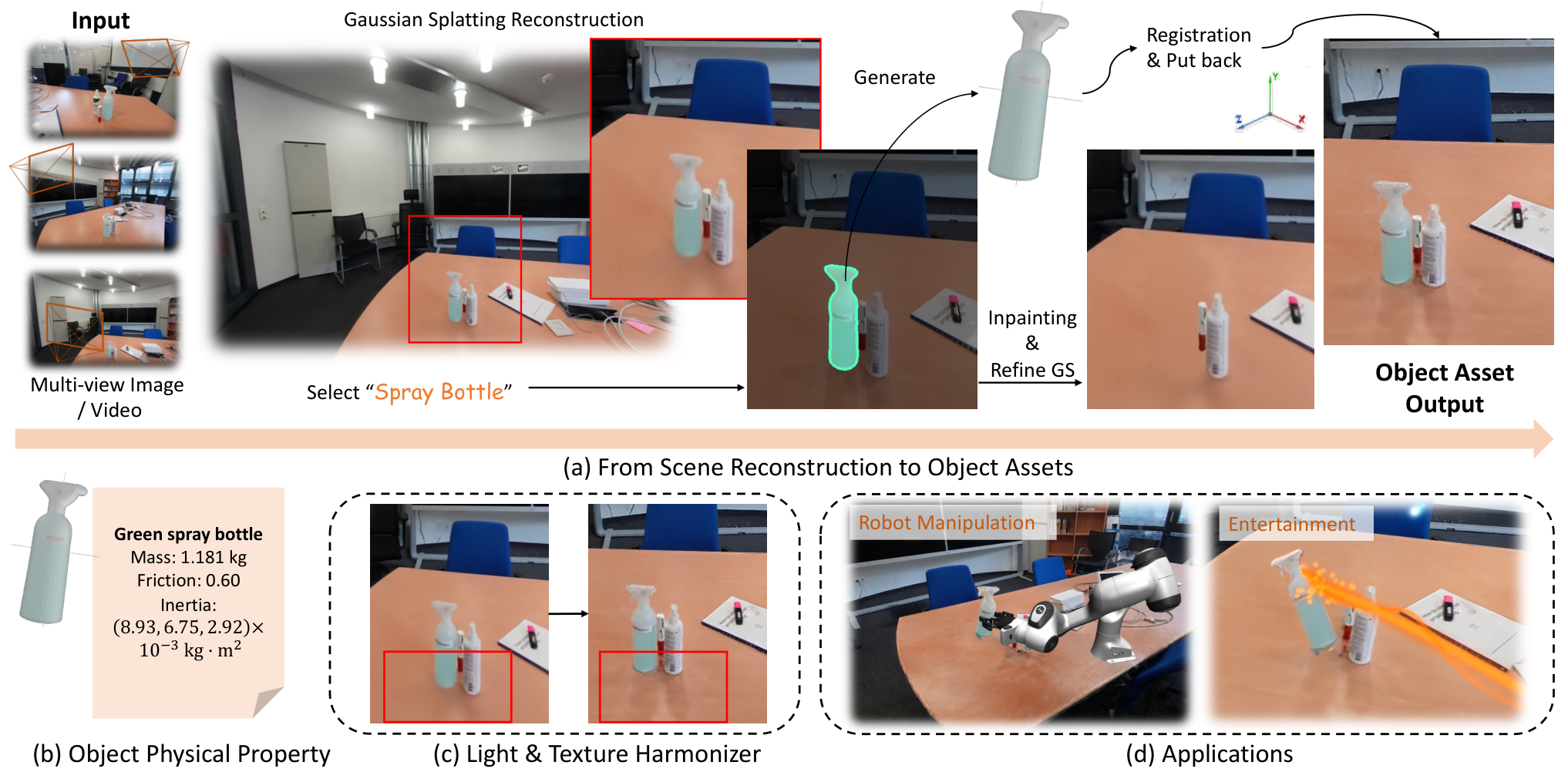
ϕ-RIE turns captured rooms into editable environments. It connects object discovery, 3D asset generation, metric registration, background completion, and physics. PhiView lets you explore the result, change object parameters, shoot projectiles, and run robot interactions.
Runyi Yang, Deheng Zhang, Xiaoye Wang, Kanzhi Wu, Lei Sun, Ajad Chhatkuli, Kunyu Peng*, Luc Van Gool, Danda Paudel
INSAIT, Sofia University “St. Kliment Ohridski” · vivo Mobile Communication Co., Ltd. · Karlsruhe Institute of Technology
Contact: [email protected]
*Corresponding author
| Shooting and physical parameters | Grasp and place |
|---|---|
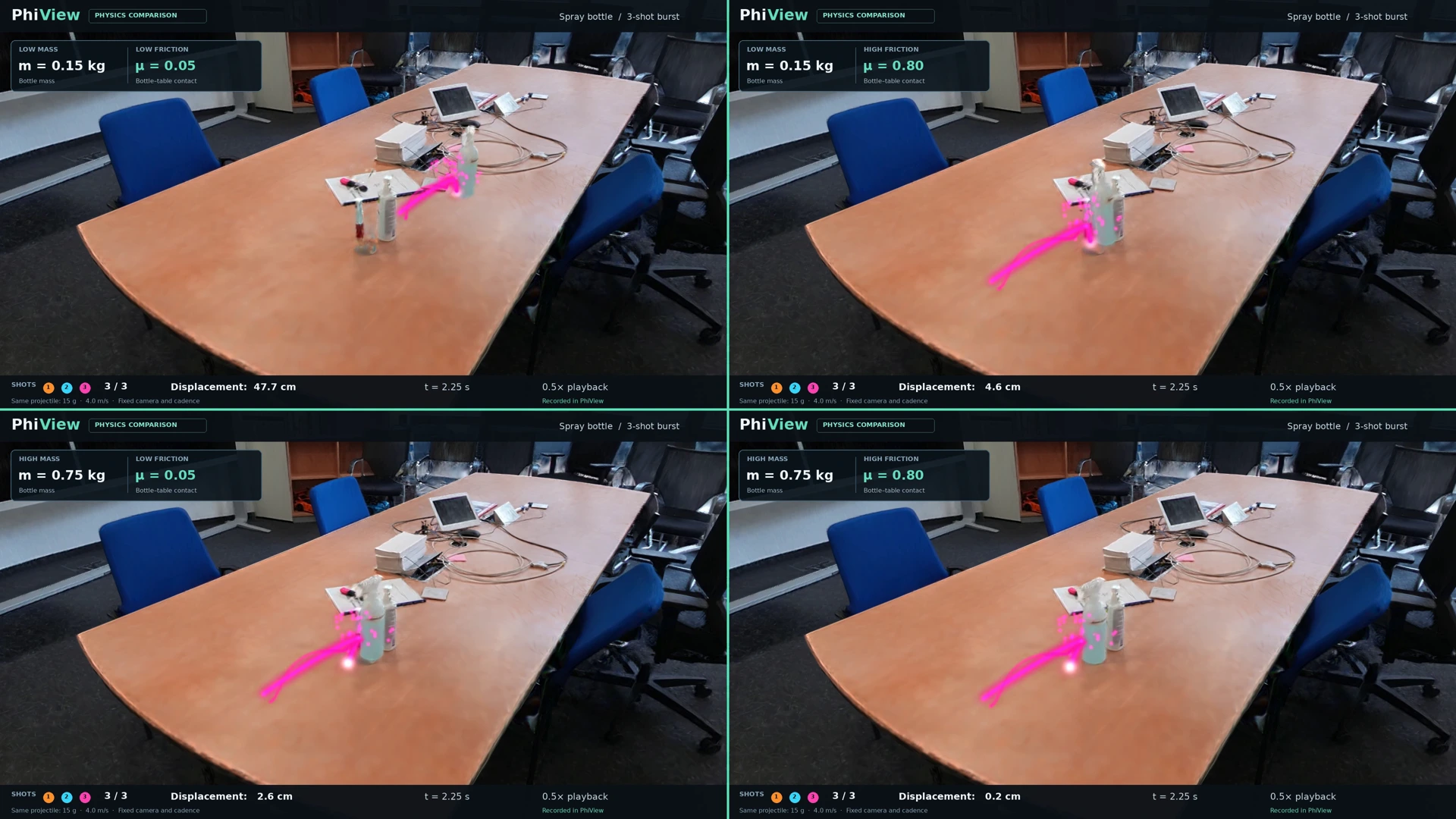 | 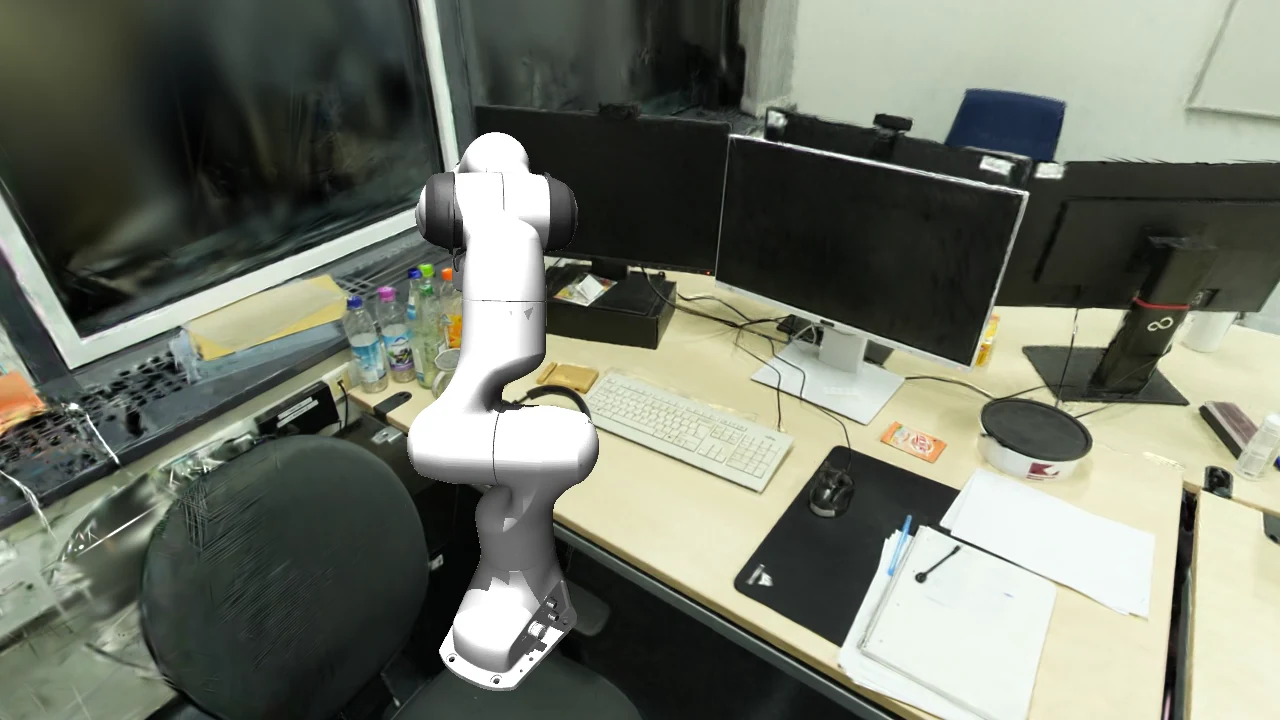 |
| Three colorful shots per setting | Lift the bottle and move it to the target |
Watch the full demo or explore all nine recordings on the project page.
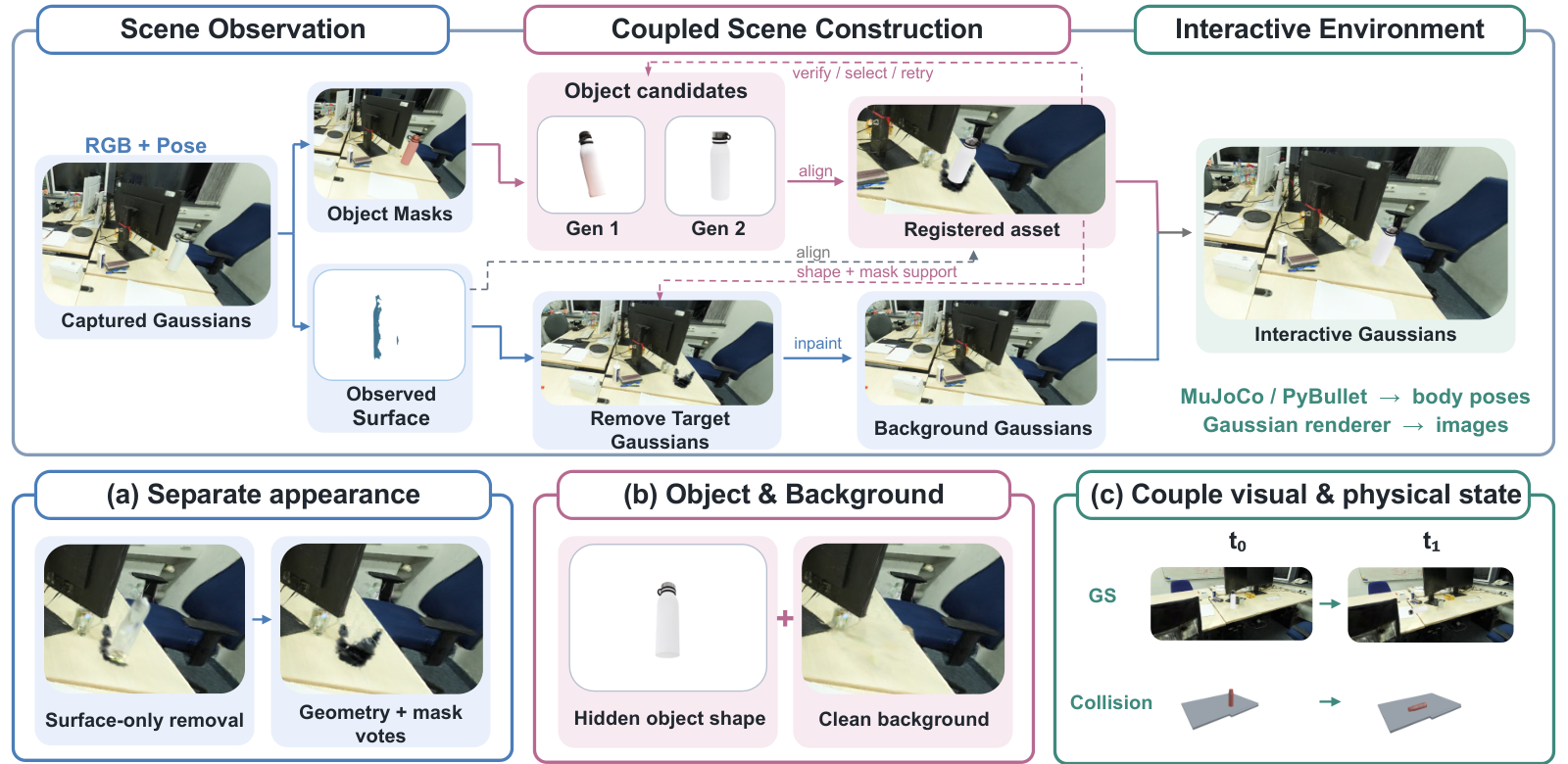
The pipeline connects captured Gaussian scenes to complete object assets and backgrounds, then keeps rendered appearance aligned with simulated body poses.
Install uv, then:
git clone https://github.com/insait-institute/PhiRIE.git
cd PhiRIE
uv sync --project envs/control --locked
bash run/phiroom.sh modules
The control environment lists components, prepares commands, and runs CPU tools.
The checkout includes the PhiView source in tools/phiview/.
GPU reconstruction and rendering require an NVIDIA GPU and the runtime for the selected model. Prepare the environments, data, and weights with these guides:
| Setup | Guide |
|---|---|
| Python, CUDA, and model environments | Environment setup |
| Captured views, camera poses, reconstructions, and weights | Data and weights |
| PhiView rendering and interaction | PhiView setup |
| Independent component commands | Module interfaces |
Datasets live under data/, run products under outputs/, vendored checkouts
under third_party/, and downloaded weights under weights/ and checkpoints/;
all of them are gitignored. Every location is resolved by run/env.sh and
agents/core/common.py and can be overridden with an environment variable.
The GPU stages need separate interpreters because their torch builds are
mutually incompatible. run/env.sh resolves them and exposes one helper per
environment (run <package>.<module> [args]):
| Helper | Variable | Default | Runs |
|---|---|---|---|
run | SIMANY_PY | .venv/bin/python | everything not listed below (torch 2.4.1+cu124) |
run_sam3 | SIMANY_SAM3_PY | .envs/sam3/bin/python | SAM3 discovery and masks, Qwen-Image-Edit (torch >= 2.5) |
run_gs | SIMANY_GSPLAT_PY | .envs/mini-viewer/bin/python | gsplat CUDA renders and 3DGS training (Python 3.10 wheel) |
run_qwen | QWEN_PY | same as SIMANY_PY | agents.edit.inpaint_qwen; set QWEN_PY=$SIMANY_SAM3_PY for the Qwen backend |
run_sam3d | SIMANY_SAM3D_PY | .envs/sam3d-objects/bin/python | optional SAM 3D Objects generator |
.venv/ (Python 3.11) and run bash run/setup_env.sh. It installs
torch 2.4.1+cu124, open3d, trimesh, coacd, pybullet, transformers, xformers,
spconv, gsplat, Depth Anything 3 and simple-lama-inpainting, clones
third_party/TRELLIS, and ends with an import smoke test.sam3
package) and the gsplat environment (Python 3.10, prebuilt gsplat CUDA
wheel); point SIMANY_SAM3_PY and SIMANY_GSPLAT_PY at them.run/phiroom.sh is locked:
uv sync --project envs/control --locked. The phiroom CLI reads the same
variables, or explicit paths from configs/runtime.local.json (copy
configs/runtime.example.json).run/env.sh sets HF_HUB_OFFLINE=1 and TORCH_CUDA_ARCH_LIST="8.6;9.0+PTX"
unless they are exported first, and honours HF_HOME and TORCH_HOME.
Environment setup explains why the environments cannot
be merged and lists the optional ones.
| Dataset | Variable | Default | Layout |
|---|---|---|---|
| ScanNet++ v2 | SIMANY_SCANNETPP_ROOT | /data/ScanNetpp | data/<scene_id>/dslr/resized_undistorted_images/, dslr/colmap/images.txt, dslr/nerfstudio/transforms_undistorted.json, scans/mesh_aligned_0.05.ply; scans/segments*.json only for the GT-driven mode |
| Prebuilt 3DGS splats | SIMANY_SPLATS_ROOT | /data/ScanNetppv2_gsplat/splats | one Inria-format <scene_id>.ply per scene, in the scan-mesh frame |
data/ is an empty mount point. Select a scene with SIMANY_SCENE; outputs go
to SIMANY_OUT (default outputs/<scene> plus a mode suffix). Scenes
reconstructed from a phone video by run/run_video2sim.sh are written in the
same layout under data/recon_scenes/, so no dataset is needed for them.
Hugging Face models load offline at run time; prefetch them once with
HF_HUB_OFFLINE=0 (HF_HOME relocates the cache):
| Model | Used by |
|---|---|
facebook/sam3 | agents.models.s1_segment, agents.discover.auto_segment, agents.edit.inpaint_masks (sam3 env); the checkpoint is looked up under $HF_HOME/hub/models--facebook--sam3/snapshots/<rev>/sam3.pt or given by SIMANY_SAM3_CKPT |
Qwen/Qwen-Image-Edit-2509 | agents.edit.inpaint_qwen (object erasure) |
Qwen/Qwen2.5-7B-Instruct | agents.assets.s6_physics (physical-parameter annotation) |
microsoft/TRELLIS-image-large | agents.models.s4_trellis (SIMANY_TRELLIS_MODEL overrides) |
depth-anything/DA3METRIC-LARGE | agents.models.s2_depth |
Stable-X/trellis-vggt-v0-2 | agents.models.s4_reconviagen (optional multi-view generator) |
facebook/VGGT-1B | agents.models.vggt_scene (feed-forward poses for video input) |
Other weights: the LaMa fallback big-lama.pt goes to
~/.cache/torch/hub/checkpoints/ (run/run_inpaint.sh exports LAMA_MODEL);
DreamSim (a ReconViaGen dependency) downloads about 1.9 GB into weights/;
VGGT-Omega weights go to checkpoints/vggt-omega/ (gated, see
agents/models/vggt_scene.py); SAM 3D Objects reads
third_party/sam-3d-objects/checkpoints/hf/pipeline.yaml (SIMANY_SAM3D_CONFIG).
For pi0.5, set OPENPI_ROOT to a checkout of
xuningy/openpi with its uv environment;
OPENPI_DATA_HOME (default checkpoints/openpi_cache/) holds
openpi-assets-simeval/<name>, SIMANY_PI05_CKPT selects the checkpoint
subpath and SIMANY_PI05_CONFIG=pi05_droid_jointpos_sim the sim-co-trained
variant. Run bash run/pi05_serve.sh on a GPU machine with generous host RAM.
third_party/ is gitignored: TRELLIS/ (cloned by run/setup_env.sh;
SIMANY_TRELLIS_DIR), mujoco_menagerie/
(git clone https://github.com/google-deepmind/mujoco_menagerie third_party/mujoco_menagerie;
SIMANY_MUJOCO_MENAGERIE_ROOT), ReconViaGen/ (SIMANY_RVG_DIR),
MaskClustering/ and FlashSplat/ (baselines), sam-3d-objects/ and
vggt-omega/ (optional generators and pose backends), and BEHAVIOR-1K/
(OmniGibson export; robo/sim/omnigibson_bridge/install_omnigibson.sh). See
third_party/README.md.
bash run/smoke_imports.sh
bash run/phiroom.sh modules
bash run/phiroom.sh plan generation trellis -- --help
The recordings are stored in media/; the demo gallery
on the project page plays the same files in the browser.
| Demo | Interaction |
|---|---|
| 01 — Spray bottle | Six shots with colorful trails |
| 02 — Bottle to paper | Grasp, lift, and place |
| 03 — LIBERO bottle | Grasp and move |
| 04 — Kitchen / 05 — Kitchen, harmonized | Matched camera walk, harmonizer off / on |
| 06 — Office / 07 — Office, harmonized | Matched camera walk, harmonizer off / on |
| 08 — Office bottles | Eighteen shots across nine bottles, with harmonization |
| 09 — Bottle to mouse pad | Grasp, lift, and place |
| Mass × friction | Four settings, three shots per setting |
The project page hosts scene editing, a physics sandbox, and a recorded robot replay. It runs in a WebGPU-capable browser; the recordings above remain available everywhere.
bash run/phiroom.sh describe generation
bash run/phiroom.sh plan generation trellis -- --help
bash run/phiroom.sh describe phiview
plan shows the command and required runtime. Replace plan with run when
the model environment, input data, and weights are ready.
After completing PhiView setup, initialize your configuration and launch a prepared scene:
bash run/phiview.sh init --config configs/phiview.local.yaml \
  --simany-root "$PWD/tools/phiview/backends/simany" \
  --outputs-root "$PWD/outputs" \
  --data-root /path/to/scannetpp --splats-root /path/to/splats

bash run/phiview.sh run viewer --action demo \
  --config configs/phiview.local.yaml --scene ROOM_factory
Select an object, make it simulatable, then use the viewer's shooting, friction, and movement controls. The harmonizer can be enabled separately.
Build the scene representation from captured views, camera geometry, meshes, and 3D Gaussian splats. See reconstruction.
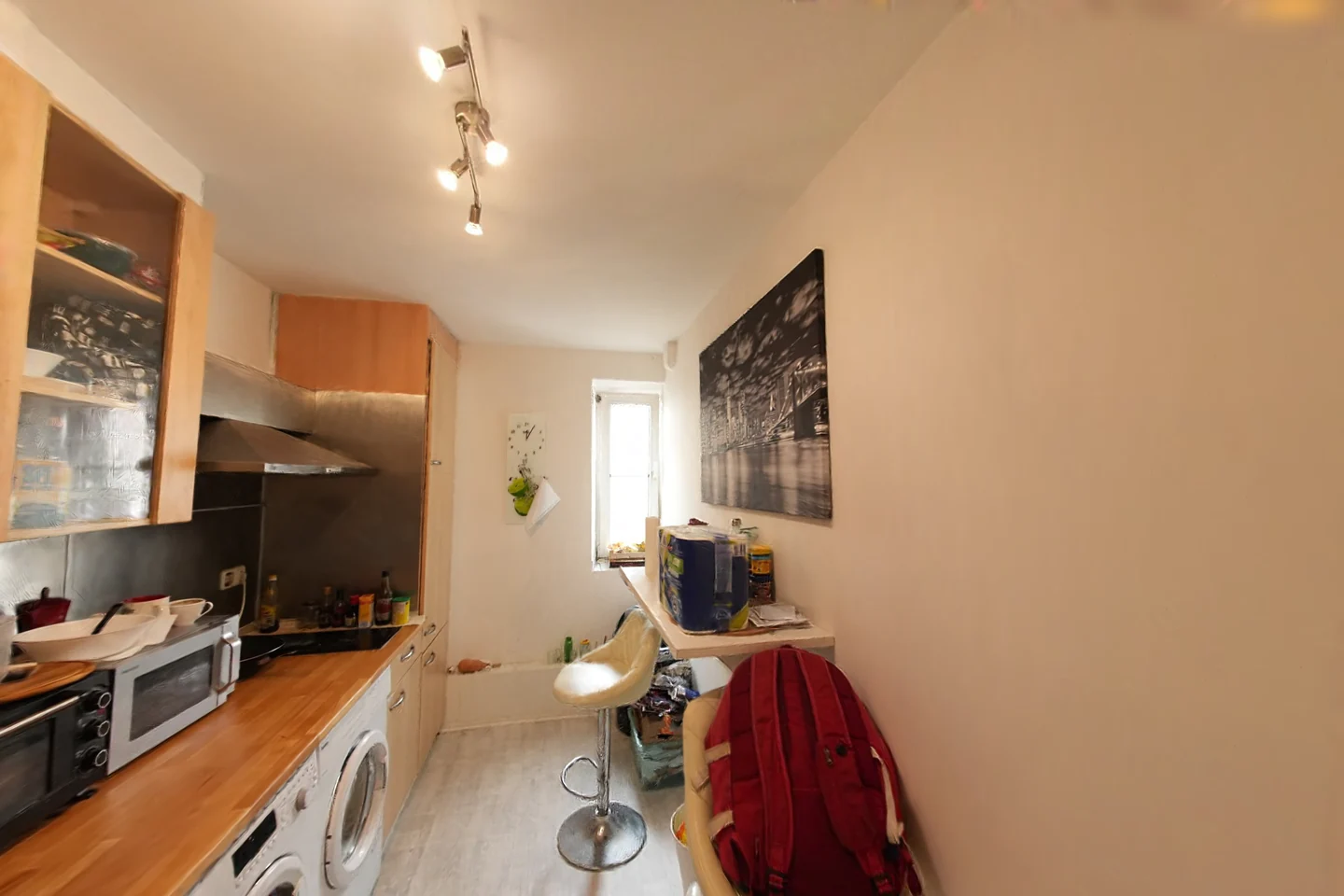
Find objects in the captured scene and generate complete asset candidates with the available model adapters. See discovery and generation.
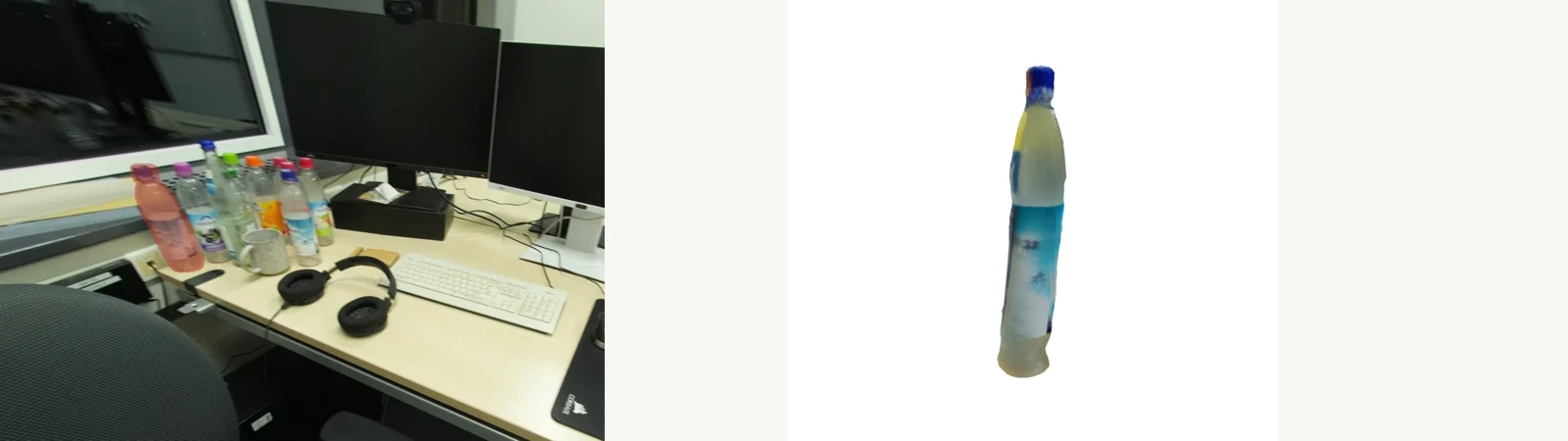
Align each candidate with its observed object so position, orientation, and scale agree with the scene. See registration.

Remove the selected object's original appearance and fill its exposed background before moving the replacement. See inpainting.
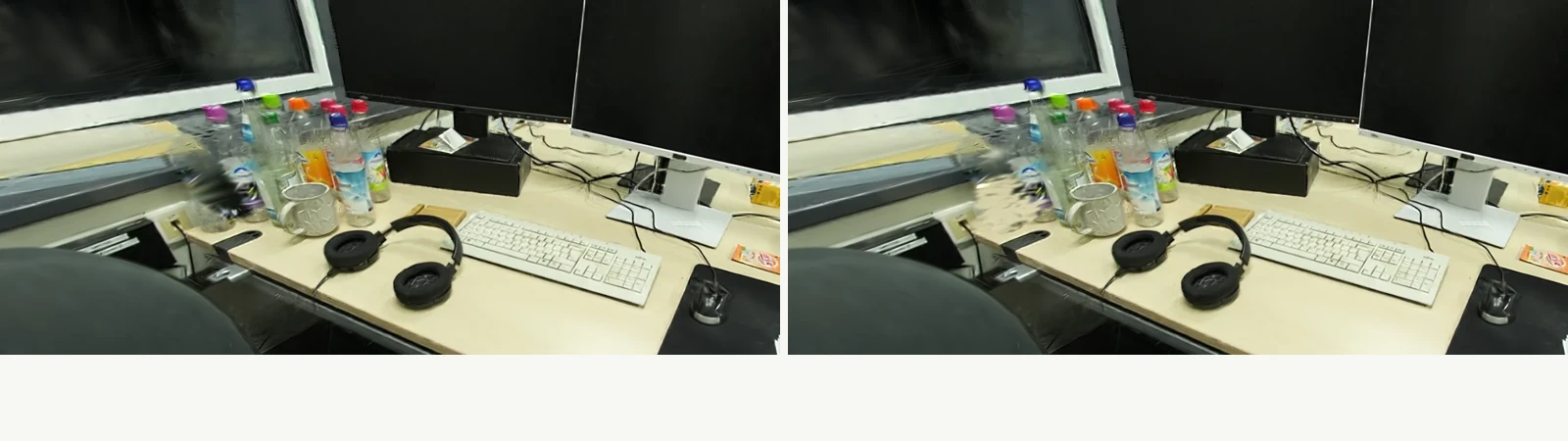
Connect collision geometry, mass, friction, and Gaussian appearance. The example below compares masses of 0.15 and 0.75 kg with friction coefficients of 0.05 and 0.80. See physics and PhiView.
Render the robot alongside reconstructed objects and use the simulation interfaces for interaction. The recordings above show scripted grasp-and-place sequences. Policy integration and evaluation tools are documented in robotics.
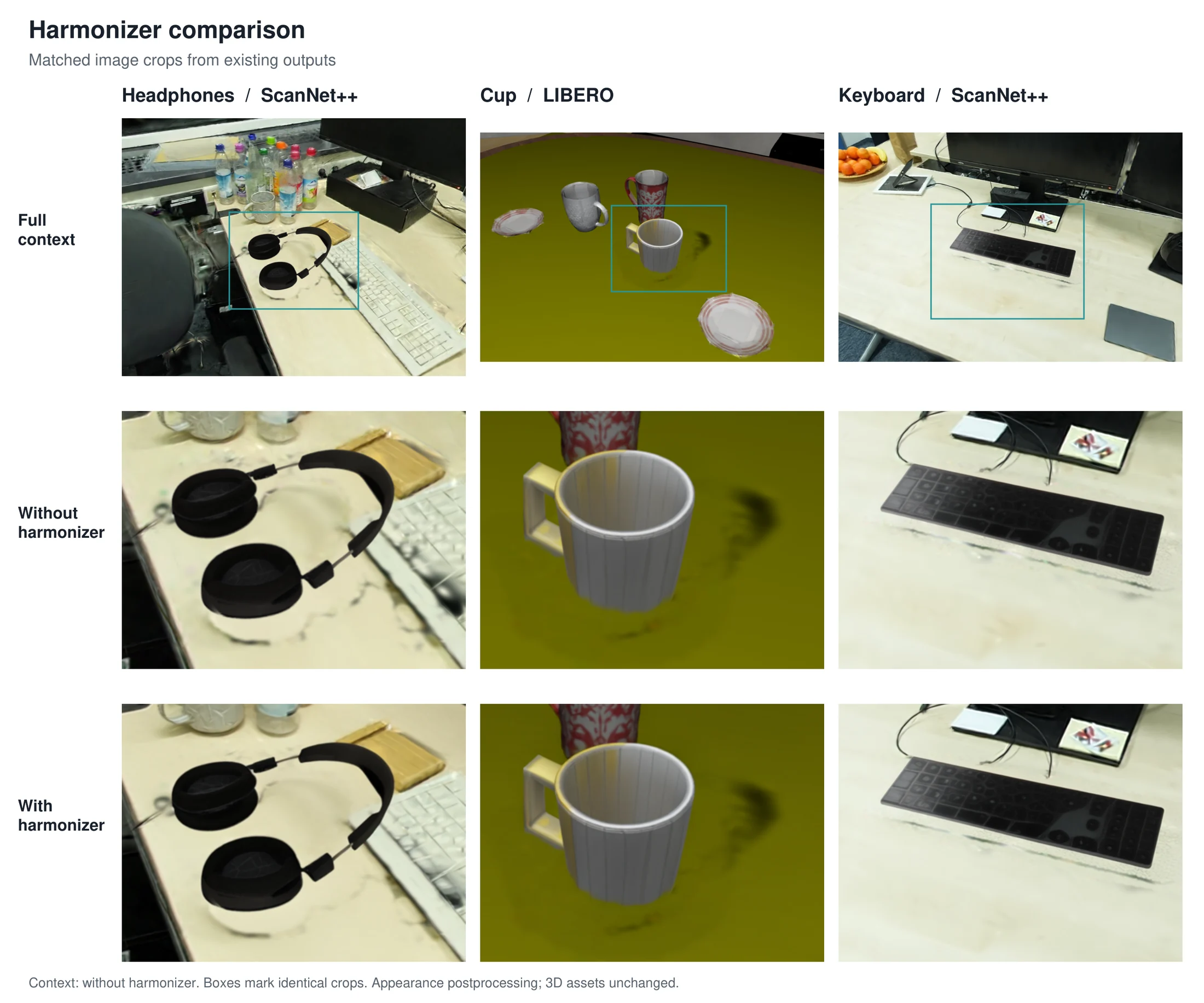
Apply optional harmonization to the rendered view while preserving the recorded camera path and physical state. See the harmonizer integration and matched-view comparison.
Prepare posed images, the scene mesh, and a Gaussian reconstruction using the data guide. Configure the paths in your environment, then run the automatic construction pipeline:
export SIMANY_SCENE=YOUR_SCENE_ID
export SIMANY_OUT="$PWD/outputs/${SIMANY_SCENE}_auto"
bash run/run_auto.sh
This runs object discovery, crop preparation, asset generation, registration, collision construction, and simulator export. For background editing, run:
bash run/run_inpaint.sh
See the pipeline guide for inputs, stage outputs, and the separate benchmark and single-image workflows.
| Directory | Purpose |
|---|---|
phiroom/ | Control CLI (phiroom/cli.py, phiroom/core/), the 15 module contracts in phiroom/modules/*.json, and one guide per module in phiroom/pipelines/<module>/README.md |
agents/ | Pipeline stages: discovery, registration and physics (assets/), editing, rendering, evaluation, reconstruction, baselines and the single-image variant; agents/models/ holds the adapters for SAM3, metric depth, TRELLIS, TRELLIS.2, SAM 3D Objects, ReconViaGen and VGGT |
robo/ | Robot layer: MuJoCo environment and rig, task suites, composite observations, policy clients and manifests, simulator export (robo/sim/), evaluation, and the SimFactory YAML runner (robo/simfactory/) |
interface/, capture/ | Browser viewers and the demo-movie tool; phone-capture metadata and validation |
tools/ | tools/phiview/ (bundled PhiView source, upstream at PhysicalView), tools/harmonizer/ (optional appearance harmonization service), tools/release/ (verification and source archives) |
run/ | Launchers: env.sh, setup_env.sh, run_auto.sh, run_factory.sh, run_inpaint.sh, run_video2sim.sh, run_simfoundry.sh, phiroom.sh, phiview.sh, pi05_serve.sh, smoke_imports.sh |
configs/, envs/ | Runtime paths, capture, calibration, policy and evaluation configurations; the locked CPU control environment |
docs/ | Guides: architecture, pipeline, modules, PhiView, robot layer, data and weights, environments |
media/ | Images and recordings used in this README |
data/, videos/, third_party/ | Dataset mount point, drop folder for phone videos, vendored checkouts (gitignored except their READMEs) |
The Python package and command remain named phiroom for compatibility with
earlier versions. Development uses main.
| Status | Item |
|---|---|
| Released | Pipeline code, v2.0.0 stable (this repository, tag v2.0.0): reconstruction, object discovery, asset generation, registration, background completion, physics, simulator export, PhiView, and pi0.5 robot evaluation. |
| Coming soon | Phone scan walkthrough: capture a room with a phone, reconstruct it with run/run_video2sim.sh, and open it in PhiView, with a recorded example scan. |
Releases are tagged on main; changes are listed in CHANGELOG.md.
PhiRIE is released under the MIT License. PhiView
(tools/phiview/) is a separate MIT-licensed project bundled here with
its license and provenance, and the model checkouts under third_party/ keep
their own upstream licenses.
@misc{yang2026phirie,
  title = {{$\phi$-RIE}: From Photorealistic Reconstruction to Interactive Environments},
  author = {Runyi Yang and Deheng Zhang and Xiaoye Wang and Kanzhi Wu and Lei Sun and Ajad Chhatkuli and Kunyu Peng and Luc Van Gool and Danda Pani Paudel},
  year = {2026},
  eprint = {2609.26795},
  archivePrefix = {arXiv},
  primaryClass = {cs.RO},
  url = {https://arxiv.org/abs/2609.26795}
}
PhiRIE: From Photorealistic Reconstruction to Interactive Environments. Complete codebase and project page.
See the codeProject page · Paper · Citation · Demo video · PhiView code
ϕ-RIE turns captured rooms into editable environments. It connects object discovery, 3D asset generation, metric registration, background completion, and physics. PhiView lets you explore the result, change object parameters, shoot projectiles, and run robot interactions.
Runyi Yang, Deheng Zhang, Xiaoye Wang, Kanzhi Wu, Lei Sun, Ajad Chhatkuli, Kunyu Peng*, Luc Van Gool, Danda Paudel
INSAIT, Sofia University “St. Kliment Ohridski” · vivo Mobile Communication Co., Ltd. · Karlsruhe Institute of Technology
Contact: [email protected]
*Corresponding author
| Shooting and physical parameters | Grasp and place |
|---|---|
| |
| Three colorful shots per setting | Lift the bottle and move it to the target |
Watch the full demo or explore all nine recordings on the project page.
The pipeline connects captured Gaussian scenes to complete object assets and backgrounds, then keeps rendered appearance aligned with simulated body poses.
Install uv, then:
git clone https://github.com/insait-institute/PhiRIE.git
cd PhiRIE
uv sync --project envs/control --locked
bash run/phiroom.sh modules
The control environment lists components, prepares commands, and runs CPU tools.
The checkout includes the PhiView source in tools/phiview/.
GPU reconstruction and rendering require an NVIDIA GPU and the runtime for the selected model. Prepare the environments, data, and weights with these guides:
| Setup | Guide |
|---|---|
| Python, CUDA, and model environments | Environment setup |
| Captured views, camera poses, reconstructions, and weights | Data and weights |
| PhiView rendering and interaction | PhiView setup |
| Independent component commands | Module interfaces |
Datasets live under data/, run products under outputs/, vendored checkouts
under third_party/, and downloaded weights under weights/ and checkpoints/;
all of them are gitignored. Every location is resolved by run/env.sh and
agents/core/common.py and can be overridden with an environment variable.
The GPU stages need separate interpreters because their torch builds are
mutually incompatible. run/env.sh resolves them and exposes one helper per
environment (run <package>.<module> [args]):
| Helper | Variable | Default | Runs |
|---|---|---|---|
run | SIMANY_PY | .venv/bin/python | everything not listed below (torch 2.4.1+cu124) |
run_sam3 | SIMANY_SAM3_PY | .envs/sam3/bin/python | SAM3 discovery and masks, Qwen-Image-Edit (torch >= 2.5) |
run_gs | SIMANY_GSPLAT_PY | .envs/mini-viewer/bin/python | gsplat CUDA renders and 3DGS training (Python 3.10 wheel) |
run_qwen | QWEN_PY | same as SIMANY_PY | agents.edit.inpaint_qwen; set QWEN_PY=$SIMANY_SAM3_PY for the Qwen backend |
run_sam3d | SIMANY_SAM3D_PY | .envs/sam3d-objects/bin/python | optional SAM 3D Objects generator |
.venv/ (Python 3.11) and run bash run/setup_env.sh. It installs
torch 2.4.1+cu124, open3d, trimesh, coacd, pybullet, transformers, xformers,
spconv, gsplat, Depth Anything 3 and simple-lama-inpainting, clones
third_party/TRELLIS, and ends with an import smoke test.sam3
package) and the gsplat environment (Python 3.10, prebuilt gsplat CUDA
wheel); point SIMANY_SAM3_PY and SIMANY_GSPLAT_PY at them.run/phiroom.sh is locked:
uv sync --project envs/control --locked. The phiroom CLI reads the same
variables, or explicit paths from configs/runtime.local.json (copy
configs/runtime.example.json).run/env.sh sets HF_HUB_OFFLINE=1 and TORCH_CUDA_ARCH_LIST="8.6;9.0+PTX"
unless they are exported first, and honours HF_HOME and TORCH_HOME.
Environment setup explains why the environments cannot
be merged and lists the optional ones.
| Dataset | Variable | Default | Layout |
|---|---|---|---|
| ScanNet++ v2 | SIMANY_SCANNETPP_ROOT | /data/ScanNetpp | data/<scene_id>/dslr/resized_undistorted_images/, dslr/colmap/images.txt, dslr/nerfstudio/transforms_undistorted.json, scans/mesh_aligned_0.05.ply; scans/segments*.json only for the GT-driven mode |
| Prebuilt 3DGS splats | SIMANY_SPLATS_ROOT | /data/ScanNetppv2_gsplat/splats | one Inria-format <scene_id>.ply per scene, in the scan-mesh frame |
data/ is an empty mount point. Select a scene with SIMANY_SCENE; outputs go
to SIMANY_OUT (default outputs/<scene> plus a mode suffix). Scenes
reconstructed from a phone video by run/run_video2sim.sh are written in the
same layout under data/recon_scenes/, so no dataset is needed for them.
Hugging Face models load offline at run time; prefetch them once with
HF_HUB_OFFLINE=0 (HF_HOME relocates the cache):
| Model | Used by |
|---|---|
facebook/sam3 | agents.models.s1_segment, agents.discover.auto_segment, agents.edit.inpaint_masks (sam3 env); the checkpoint is looked up under $HF_HOME/hub/models--facebook--sam3/snapshots/<rev>/sam3.pt or given by SIMANY_SAM3_CKPT |
Qwen/Qwen-Image-Edit-2509 | agents.edit.inpaint_qwen (object erasure) |
Qwen/Qwen2.5-7B-Instruct | agents.assets.s6_physics (physical-parameter annotation) |
microsoft/TRELLIS-image-large | agents.models.s4_trellis (SIMANY_TRELLIS_MODEL overrides) |
depth-anything/DA3METRIC-LARGE | agents.models.s2_depth |
Stable-X/trellis-vggt-v0-2 | agents.models.s4_reconviagen (optional multi-view generator) |
facebook/VGGT-1B | agents.models.vggt_scene (feed-forward poses for video input) |
Other weights: the LaMa fallback big-lama.pt goes to
~/.cache/torch/hub/checkpoints/ (run/run_inpaint.sh exports LAMA_MODEL);
DreamSim (a ReconViaGen dependency) downloads about 1.9 GB into weights/;
VGGT-Omega weights go to checkpoints/vggt-omega/ (gated, see
agents/models/vggt_scene.py); SAM 3D Objects reads
third_party/sam-3d-objects/checkpoints/hf/pipeline.yaml (SIMANY_SAM3D_CONFIG).
For pi0.5, set OPENPI_ROOT to a checkout of
xuningy/openpi with its uv environment;
OPENPI_DATA_HOME (default checkpoints/openpi_cache/) holds
openpi-assets-simeval/<name>, SIMANY_PI05_CKPT selects the checkpoint
subpath and SIMANY_PI05_CONFIG=pi05_droid_jointpos_sim the sim-co-trained
variant. Run bash run/pi05_serve.sh on a GPU machine with generous host RAM.
third_party/ is gitignored: TRELLIS/ (cloned by run/setup_env.sh;
SIMANY_TRELLIS_DIR), mujoco_menagerie/
(git clone https://github.com/google-deepmind/mujoco_menagerie third_party/mujoco_menagerie;
SIMANY_MUJOCO_MENAGERIE_ROOT), ReconViaGen/ (SIMANY_RVG_DIR),
MaskClustering/ and FlashSplat/ (baselines), sam-3d-objects/ and
vggt-omega/ (optional generators and pose backends), and BEHAVIOR-1K/
(OmniGibson export; robo/sim/omnigibson_bridge/install_omnigibson.sh). See
third_party/README.md.
bash run/smoke_imports.sh
bash run/phiroom.sh modules
bash run/phiroom.sh plan generation trellis -- --help
The recordings are stored in media/; the demo gallery
on the project page plays the same files in the browser.
| Demo | Interaction |
|---|---|
| 01 — Spray bottle | Six shots with colorful trails |
| 02 — Bottle to paper | Grasp, lift, and place |
| 03 — LIBERO bottle | Grasp and move |
| 04 — Kitchen / 05 — Kitchen, harmonized | Matched camera walk, harmonizer off / on |
| 06 — Office / 07 — Office, harmonized | Matched camera walk, harmonizer off / on |
| 08 — Office bottles | Eighteen shots across nine bottles, with harmonization |
| 09 — Bottle to mouse pad | Grasp, lift, and place |
| Mass × friction | Four settings, three shots per setting |
The project page hosts scene editing, a physics sandbox, and a recorded robot replay. It runs in a WebGPU-capable browser; the recordings above remain available everywhere.
bash run/phiroom.sh describe generation
bash run/phiroom.sh plan generation trellis -- --help
bash run/phiroom.sh describe phiview
plan shows the command and required runtime. Replace plan with run when
the model environment, input data, and weights are ready.
After completing PhiView setup, initialize your configuration and launch a prepared scene:
bash run/phiview.sh init --config configs/phiview.local.yaml \
  --simany-root "$PWD/tools/phiview/backends/simany" \
  --outputs-root "$PWD/outputs" \
  --data-root /path/to/scannetpp --splats-root /path/to/splats

bash run/phiview.sh run viewer --action demo \
  --config configs/phiview.local.yaml --scene ROOM_factory
Select an object, make it simulatable, then use the viewer's shooting, friction, and movement controls. The harmonizer can be enabled separately.
Build the scene representation from captured views, camera geometry, meshes, and 3D Gaussian splats. See reconstruction.
Find objects in the captured scene and generate complete asset candidates with the available model adapters. See discovery and generation.
Align each candidate with its observed object so position, orientation, and scale agree with the scene. See registration.
Remove the selected object's original appearance and fill its exposed background before moving the replacement. See inpainting.
Connect collision geometry, mass, friction, and Gaussian appearance. The example below compares masses of 0.15 and 0.75 kg with friction coefficients of 0.05 and 0.80. See physics and PhiView.
Render the robot alongside reconstructed objects and use the simulation interfaces for interaction. The recordings above show scripted grasp-and-place sequences. Policy integration and evaluation tools are documented in robotics.
Apply optional harmonization to the rendered view while preserving the recorded camera path and physical state. See the harmonizer integration and matched-view comparison.
Prepare posed images, the scene mesh, and a Gaussian reconstruction using the data guide. Configure the paths in your environment, then run the automatic construction pipeline:
export SIMANY_SCENE=YOUR_SCENE_ID
export SIMANY_OUT="$PWD/outputs/${SIMANY_SCENE}_auto"
bash run/run_auto.sh
This runs object discovery, crop preparation, asset generation, registration, collision construction, and simulator export. For background editing, run:
bash run/run_inpaint.sh
See the pipeline guide for inputs, stage outputs, and the separate benchmark and single-image workflows.
| Directory | Purpose |
|---|---|
phiroom/ | Control CLI (phiroom/cli.py, phiroom/core/), the 15 module contracts in phiroom/modules/*.json, and one guide per module in phiroom/pipelines/<module>/README.md |
agents/ | Pipeline stages: discovery, registration and physics (assets/), editing, rendering, evaluation, reconstruction, baselines and the single-image variant; agents/models/ holds the adapters for SAM3, metric depth, TRELLIS, TRELLIS.2, SAM 3D Objects, ReconViaGen and VGGT |
robo/ | Robot layer: MuJoCo environment and rig, task suites, composite observations, policy clients and manifests, simulator export (robo/sim/), evaluation, and the SimFactory YAML runner (robo/simfactory/) |
interface/, capture/ | Browser viewers and the demo-movie tool; phone-capture metadata and validation |
tools/ | tools/phiview/ (bundled PhiView source, upstream at PhysicalView), tools/harmonizer/ (optional appearance harmonization service), tools/release/ (verification and source archives) |
run/ | Launchers: env.sh, setup_env.sh, run_auto.sh, run_factory.sh, run_inpaint.sh, run_video2sim.sh, run_simfoundry.sh, phiroom.sh, phiview.sh, pi05_serve.sh, smoke_imports.sh |
configs/, envs/ | Runtime paths, capture, calibration, policy and evaluation configurations; the locked CPU control environment |
docs/ | Guides: architecture, pipeline, modules, PhiView, robot layer, data and weights, environments |
media/ | Images and recordings used in this README |
data/, videos/, third_party/ | Dataset mount point, drop folder for phone videos, vendored checkouts (gitignored except their READMEs) |
The Python package and command remain named phiroom for compatibility with
earlier versions. Development uses main.
| Status | Item |
|---|---|
| Released | Pipeline code, v2.0.0 stable (this repository, tag v2.0.0): reconstruction, object discovery, asset generation, registration, background completion, physics, simulator export, PhiView, and pi0.5 robot evaluation. |
| Coming soon | Phone scan walkthrough: capture a room with a phone, reconstruct it with run/run_video2sim.sh, and open it in PhiView, with a recorded example scan. |
Releases are tagged on main; changes are listed in CHANGELOG.md.
PhiRIE is released under the MIT License. PhiView
(tools/phiview/) is a separate MIT-licensed project bundled here with
its license and provenance, and the model checkouts under third_party/ keep
their own upstream licenses.
@misc{yang2026phirie,
  title = {{$\phi$-RIE}: From Photorealistic Reconstruction to Interactive Environments},
  author = {Runyi Yang and Deheng Zhang and Xiaoye Wang and Kanzhi Wu and Lei Sun and Ajad Chhatkuli and Kunyu Peng and Luc Van Gool and Danda Pani Paudel},
  year = {2026},
  eprint = {2609.26795},
  archivePrefix = {arXiv},
  primaryClass = {cs.RO},
  url = {https://arxiv.org/abs/2609.26795}
}



