
See what people are saying
README
Sqlaris Studio
A database browser for PostgreSQL and MySQL/MariaDB that runs on your own machine. Browse and edit tables, draw a whole database as a diagram, run SQL, and keep the databases in shape.
It is plain PHP and plain JavaScript: no Composer, no npm, no build step. Put the folder behind any PHP server and open it in the browser.
It is meant for local development. It only answers on localhost and should not be
deployed to a server.
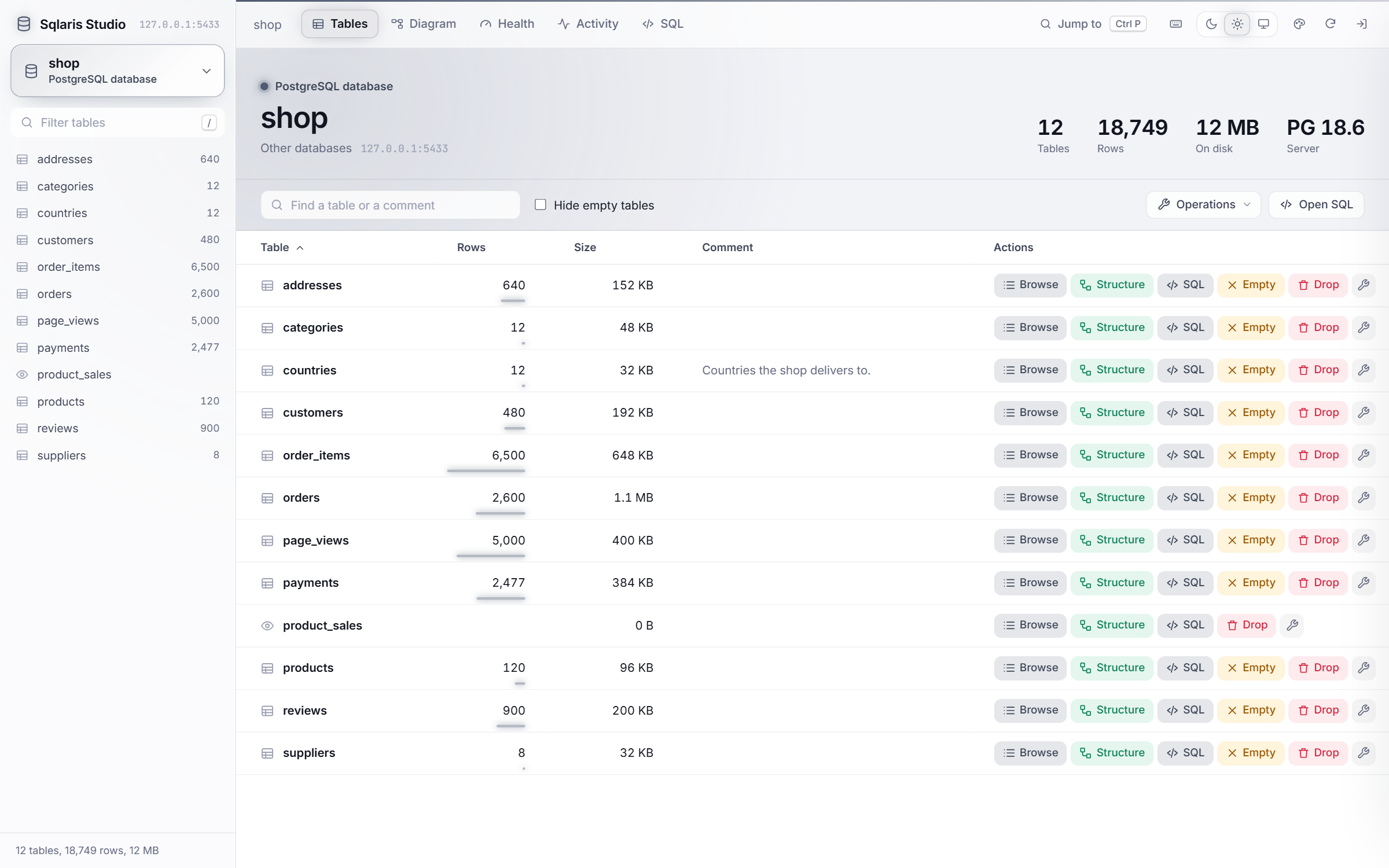
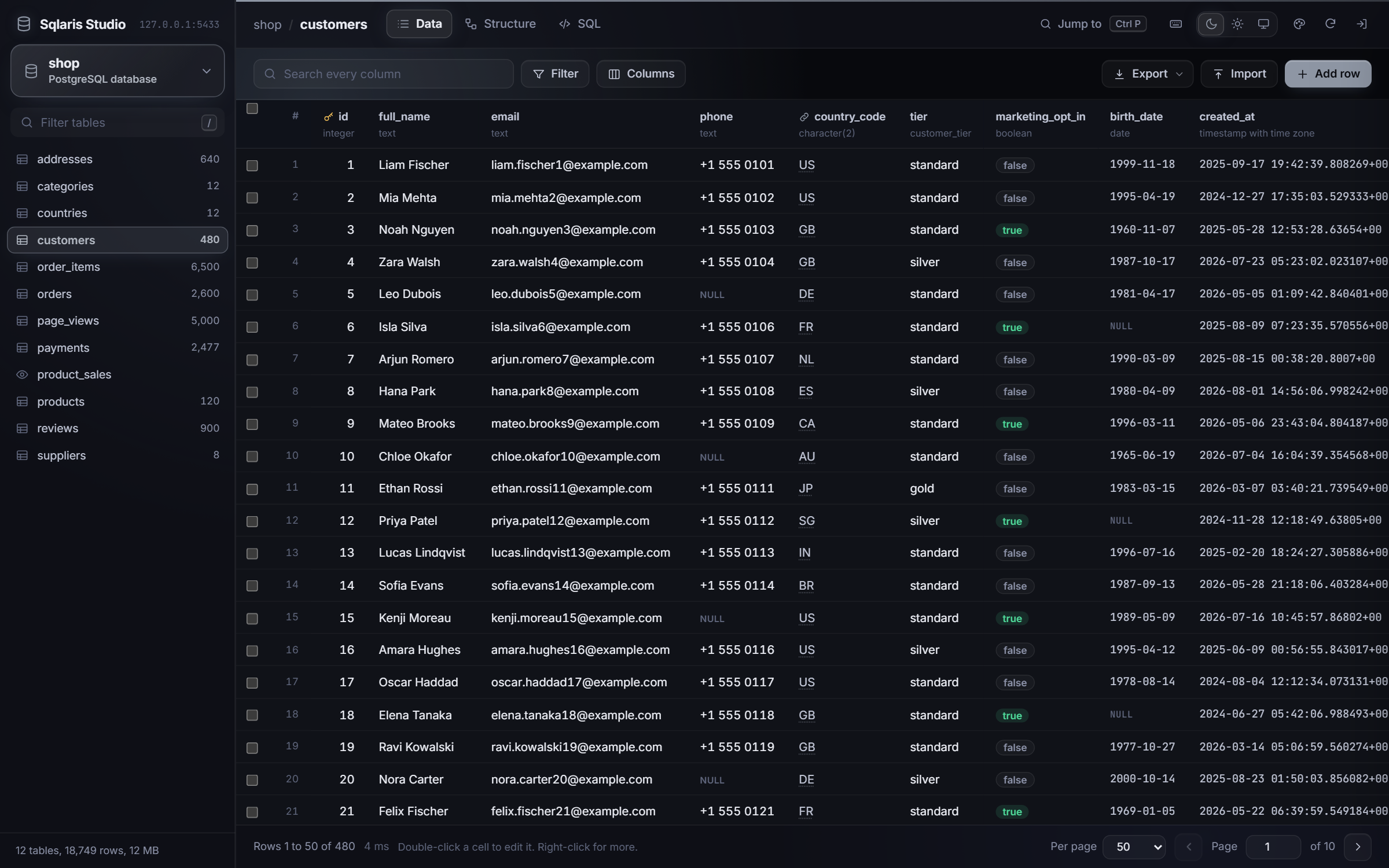
The screenshots are of shop, a small sample store database with 12 tables and about
19,000 rows.
Quick start
git clone https://github.com/Shivam7414/Sqlaris-Studio.git
cd Sqlaris-Studio
cp .env.example .env
cp config.example.php config.php
php -S 127.0.0.1:8765 router.php
Fill in .env first (see Setup), then open http://127.0.0.1:8765/.
What it does
Browse and edit rows
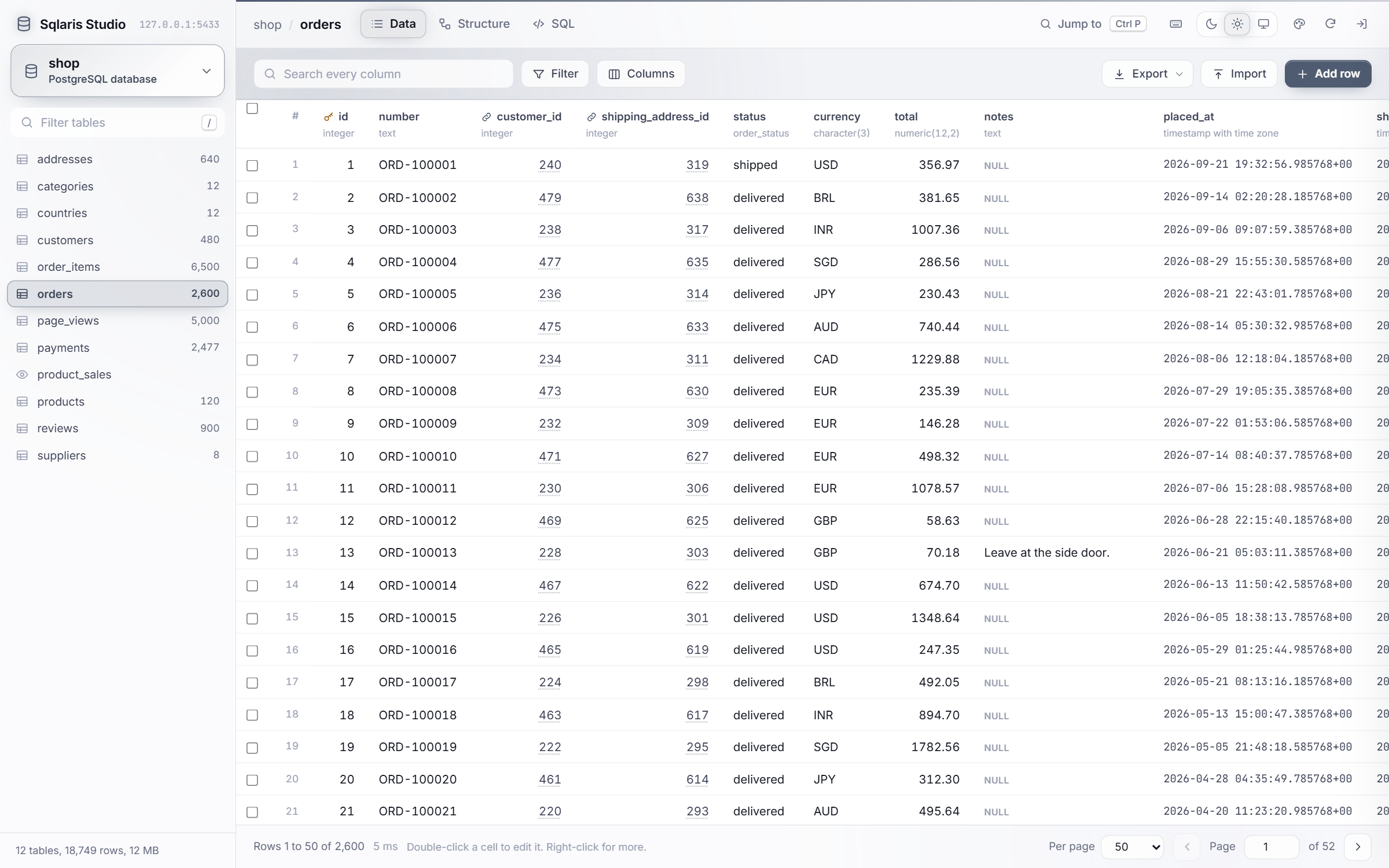
- Exact row counts, sorting, a search across every column and per-column filters (equals, contains, greater than, is NULL and more).
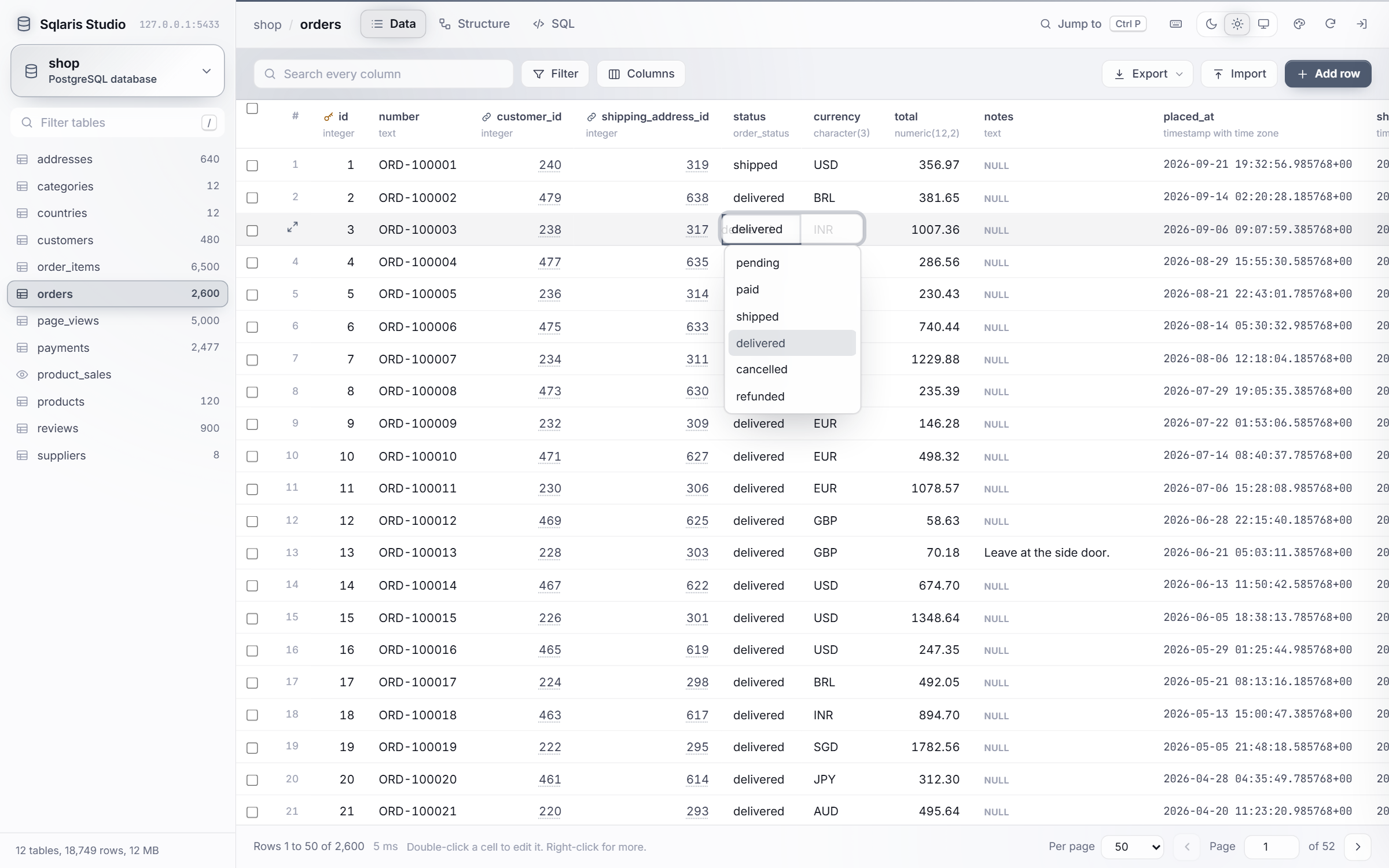
- Edit cells in place like a spreadsheet. Dates get a calendar, enums and CHECK lists get a dropdown, and a foreign key gets a search of the table it points to. Every edit can be undone from the toast.
- Paste a block of cells from Excel or Google Sheets straight into the grid.
- Import a CSV file or pasted rows, with column matching and an optional update of rows whose primary key already exists.
- Export the matching rows as CSV, JSON or SQL INSERT statements.
- Select many rows to copy them, set one value on all of them, or delete them.
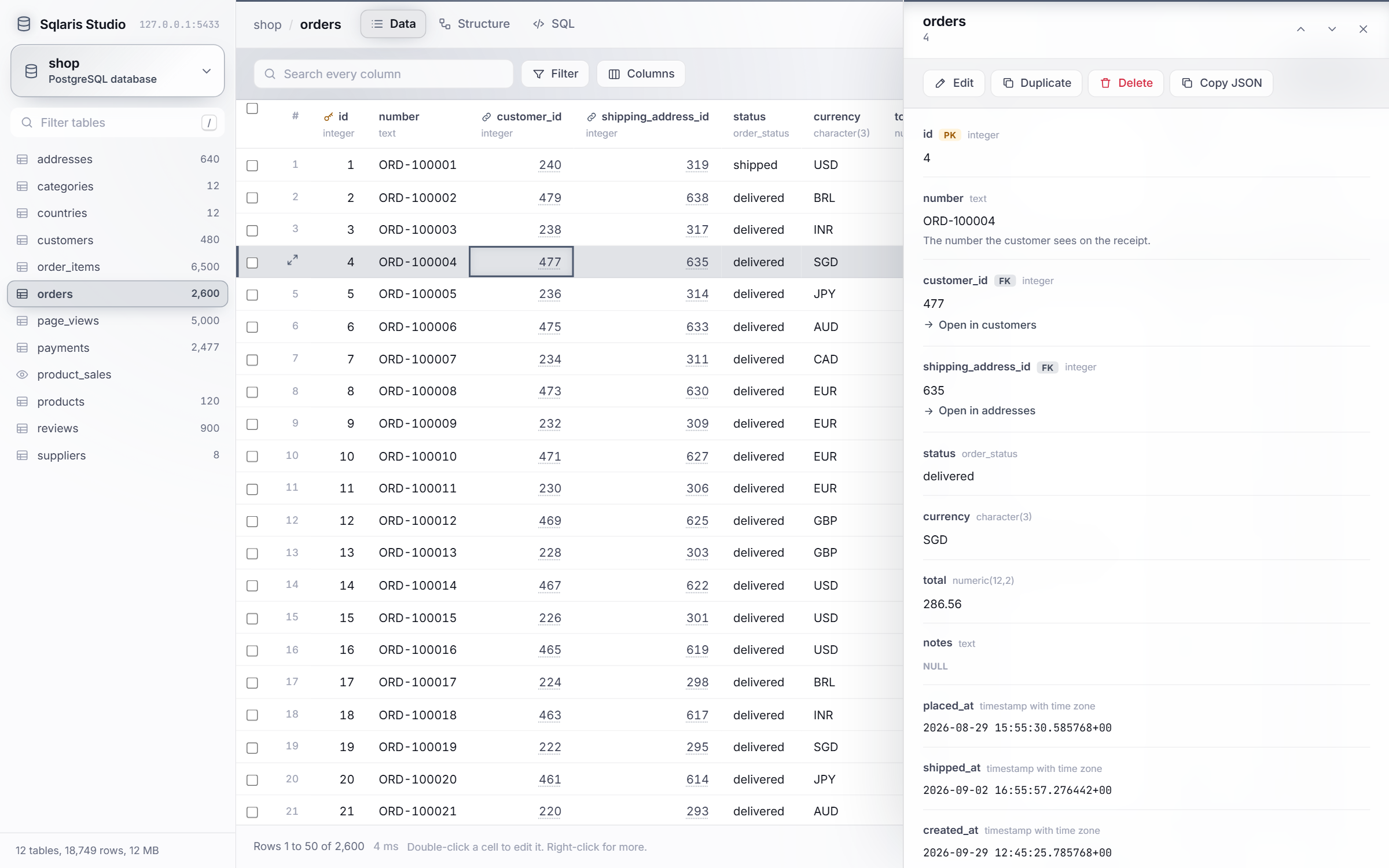
- Open a row to see every field with its type and comment, follow its foreign keys, and count the rows in other tables that point to it.
| Editing an enum column | Row details |
|---|---|
 |  |
Every write to many rows (a paste, an import, a bulk update) runs in one transaction. If one row fails, nothing is kept and the error names the row.
Structure
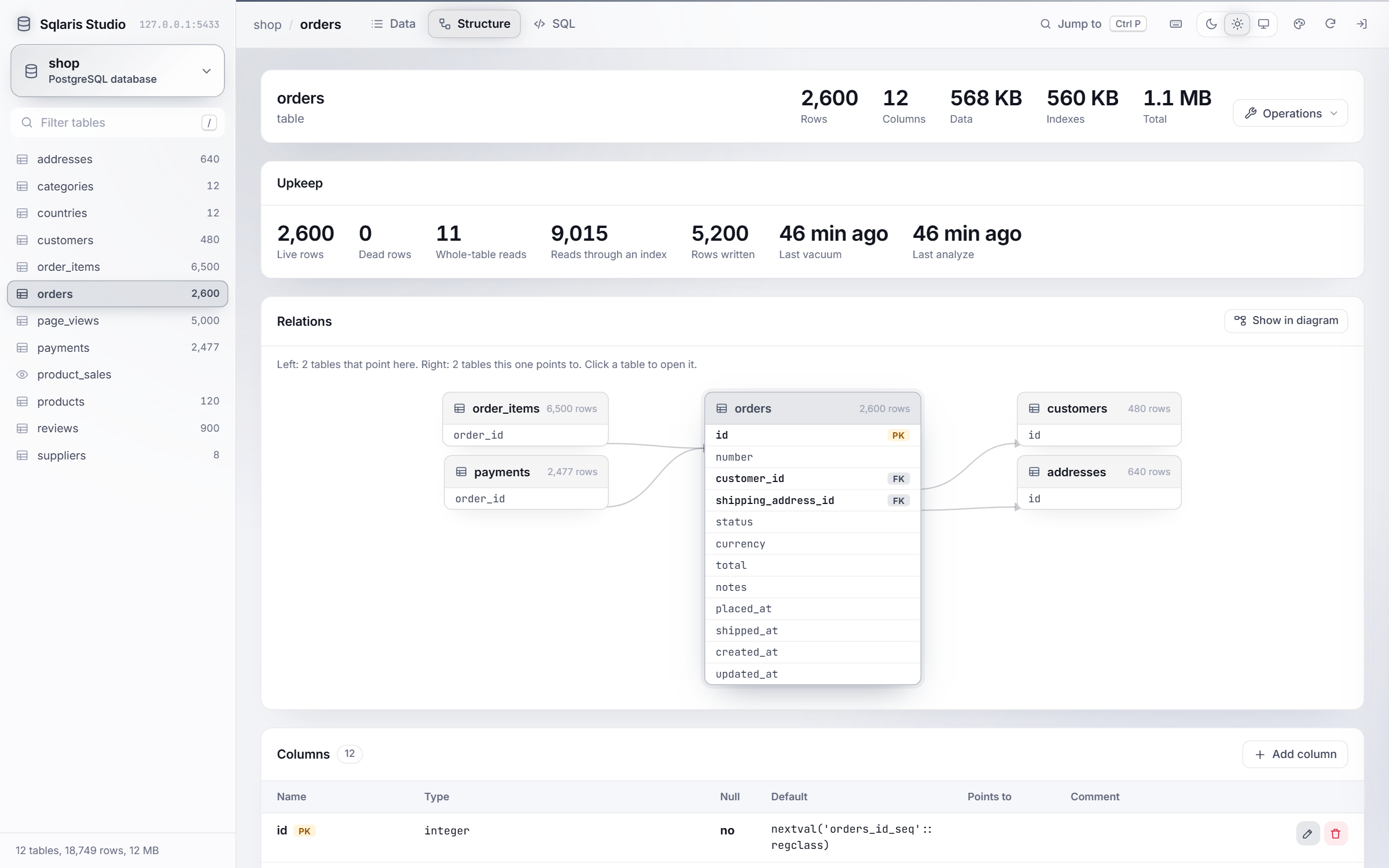
- A structure view with a relations diagram, columns, indexes, constraints, triggers and sizes. "Show in diagram" finds the table among all the others.
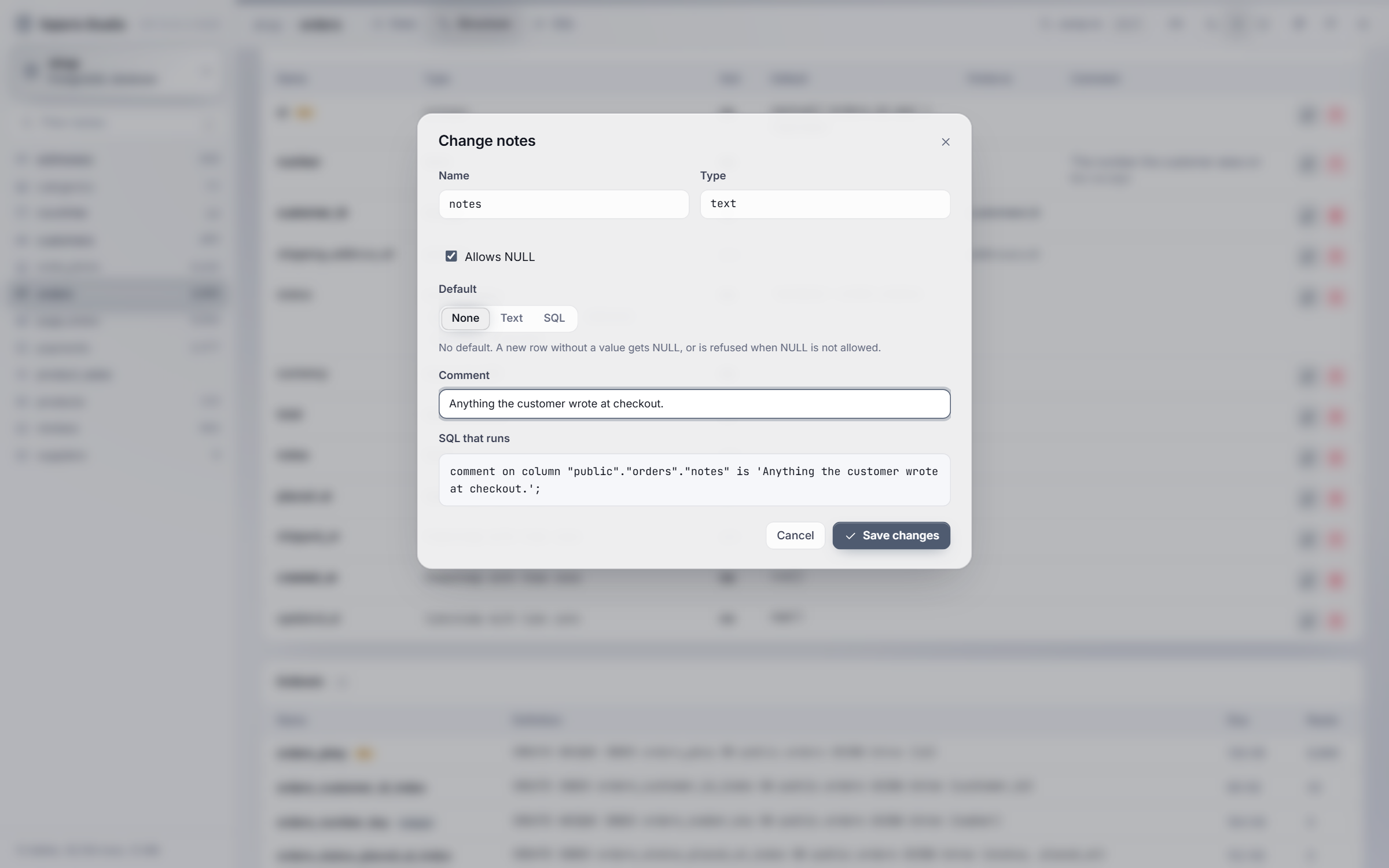
- Add, change and drop columns: name, type, NULL, default and comment. The form shows the exact SQL as you type, and Save runs that SQL and nothing else.
Diagram
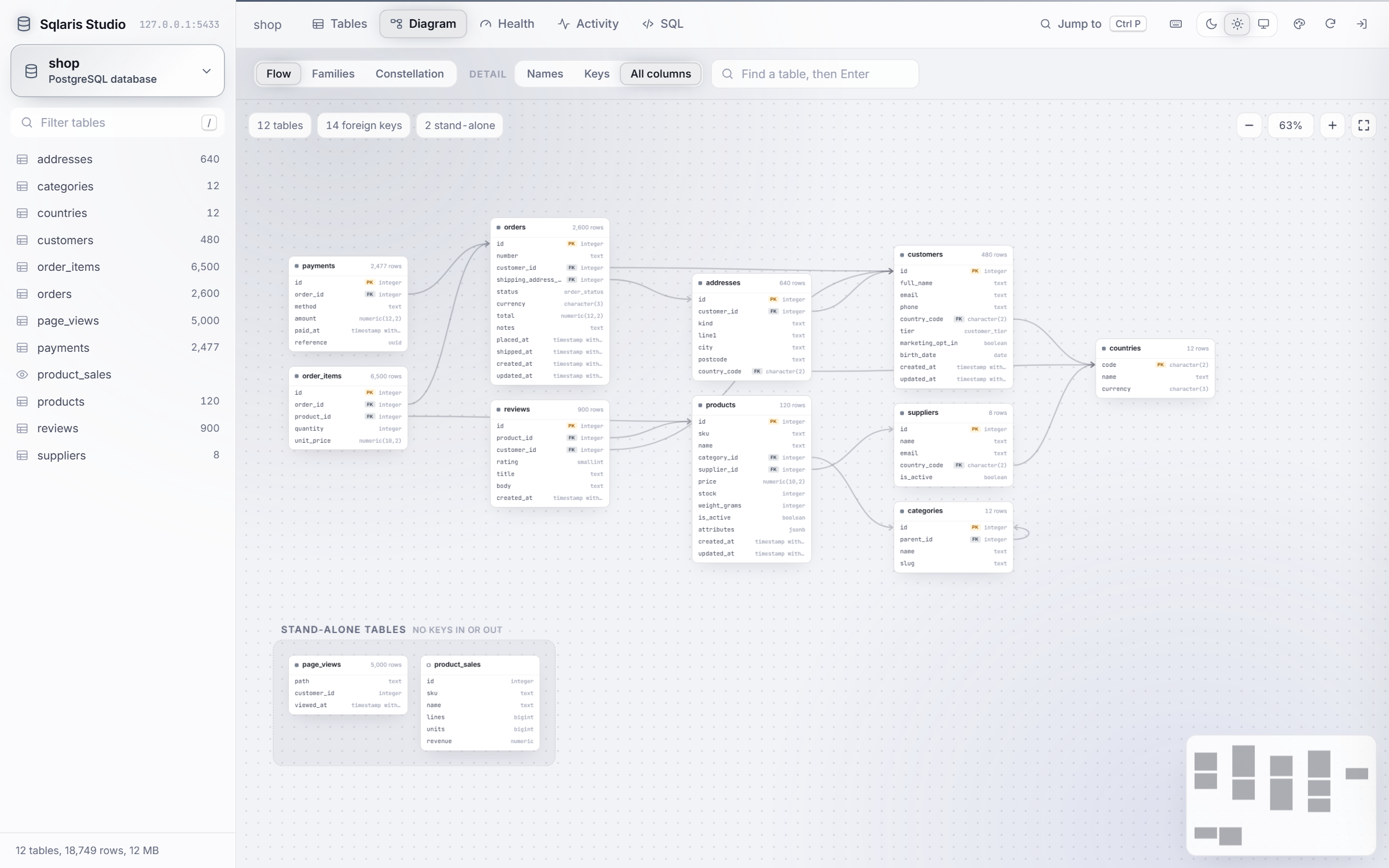
A diagram of every table and foreign key in the database, in three layouts: Flow, Families (grouped by the first word of the table name) and Constellation (linked tables pull together). Zoom, pan, drag tables where you want them, and use the minimap to move around a big database. The browser remembers where you put each table.
SQL
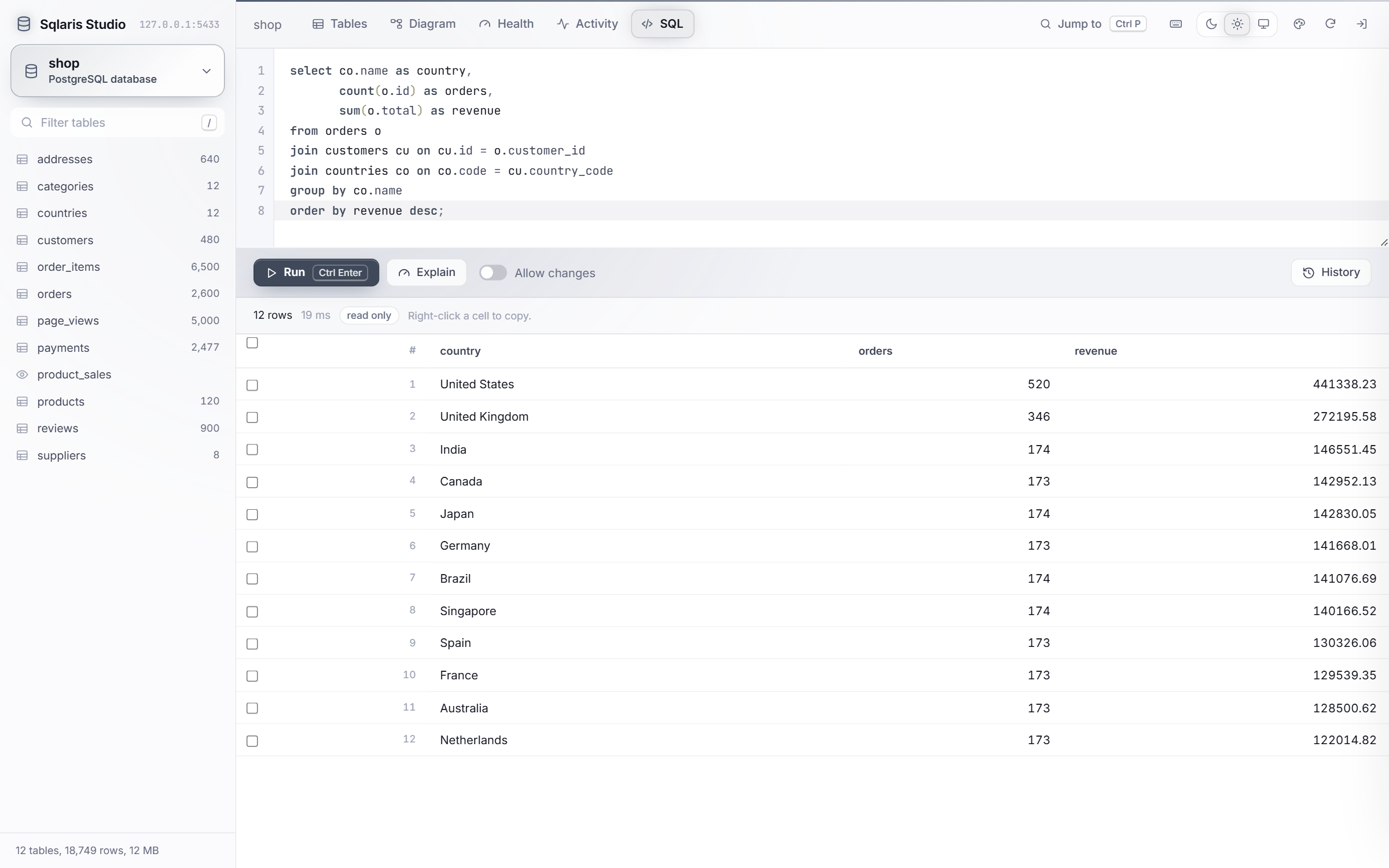
A SQL editor (CodeMirror) with autocomplete for tables, columns and aliases, EXPLAIN and a history of the last 50 queries. It runs read only unless you turn on "Allow changes".
Health and activity
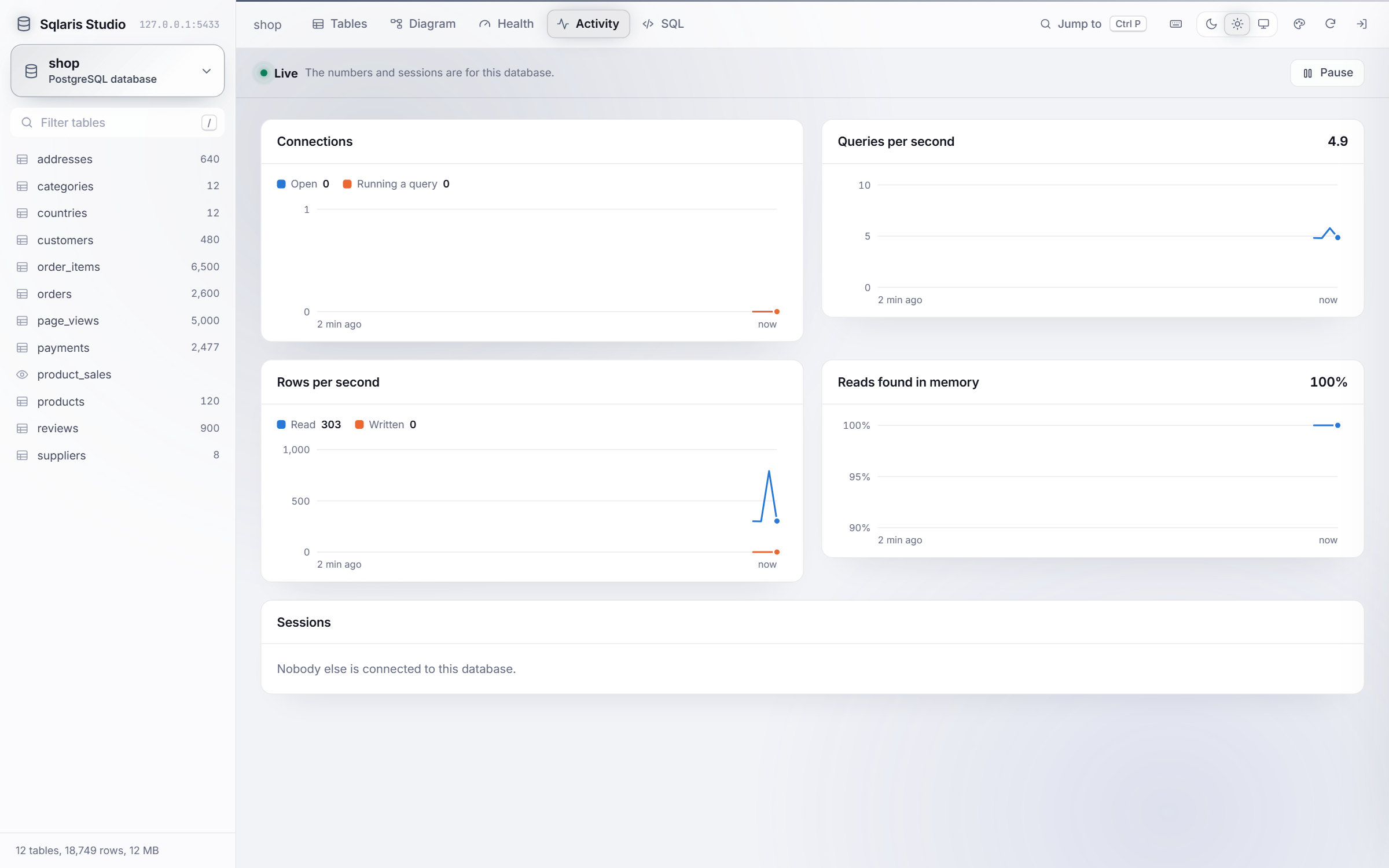
| Health | Live activity |
|---|---|
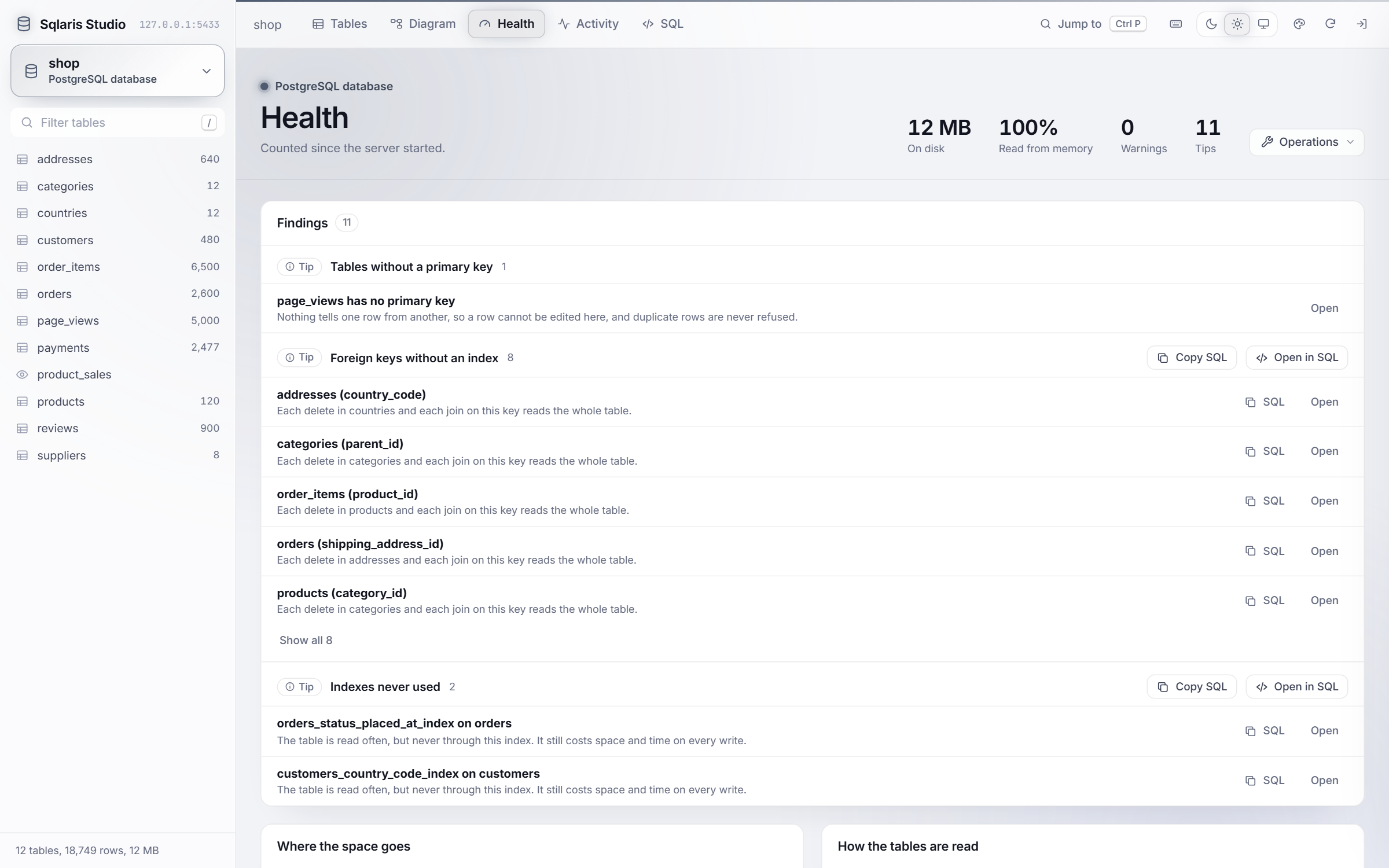 |  |
- A health tab that flags dead rows, foreign keys without an index, unused indexes, tables without a primary key and free space on MySQL, with the SQL to fix each one.
- Live charts of connections, queries, rows and cache hits, plus the open sessions, with buttons to cancel a query or end a session.
Everything else
- Table and database operations: vacuum, analyze, reindex and vacuum full on PostgreSQL; optimize, analyze and check on MySQL. Copy, rename, empty or drop a table. Copy, create or drop a database. Each table in a database's list has Browse, Structure, SQL, Empty and Drop buttons, and a menu for the rest.
- Group, reorder and hide databases in the sidebar. Each database can have its own accent colour, so you can tell at a glance which one you are about to change.
- Dark, light and Follow Windows themes, page colour palettes, and keyboard shortcuts you can remap.
Requirements
- PHP 8.1 or later, with
pdo_pgsql,pdo_mysql, or both. - PostgreSQL 12+, MySQL 5.7+ or MariaDB 10.2+.
Setup
-
Copy
.env.exampleto.envand fill it in: a username and password for the viewer itself, and the host, port and login of your database servers. Leave a server's host empty to leave it out. -
Copy
config.example.phptoconfig.php. It works as it is, and it is where you can group and colour your databases later. -
Start PHP's built-in server from this folder:
php -S 127.0.0.1:8765 router.phpand open
http://127.0.0.1:8765/. Under XAMPP or any Apache with PHP, a copy insidehtdocsworks without the router.
The viewer refuses every sign-in until both the username and password are set. Changing either one signs everyone out.
Configuration
config.php builds the list of servers from .env. It holds no passwords, but it does
name your databases, so git ignores it. Each option is described in config.example.php.
| Option | What it does |
|---|---|
only, hide | Show only some of a server's databases, or hide some. * is a wildcard. |
databases | Rules that put databases into groups and give each a note and a colour. |
color | The accent colour for every database on a server. |
label_columns | Which columns a foreign key search shows to identify a row. |
audit_columns | The columns that "Hide audit columns" hides. |
edit_warning | A message of your own shown above every edit form. |
sql_row_limit, export_row_limit, import_row_limit | Row limits for the SQL tab, exports and imports. |
Your own arrangement of the sidebar (custom groups, order, hidden databases) is saved in
layout.json next to config.php. It is ignored by git too.
Themes and colours
The page is dark by default. The switch in the top bar picks Dark, Light or Follow Windows. The palette button next to it picks the page colours, each in dark and light. Database, the default, paints the whole page in the colour of the database you are in, so you can see at a glance which one you are about to change. Midnight, Graphite, Ocean, Forest, Plum and Sand paint it in their own colour instead, and the database button, its label and a line along the top keep the database colour. When the system asks for reduced motion, nothing animates.
Keyboard shortcuts
Press ? or F1 to see them all. Click one in that list and press new keys to change it.
The change is kept in your browser, and Reset brings back the defaults. Ctrl also means
Cmd on a Mac.
| Keys | Action |
|---|---|
Ctrl+P, Ctrl+K | Jump to a table, a database or an action |
/ | Filter the table list |
Ctrl+F | Search the rows, or find a table in the diagram |
F | Fit the diagram to the screen |
Enter, F2 | Edit the cell |
Shift+Enter | Open the row details |
Ctrl+C | Copy the cell, or the selected rows |
Delete | Set the cell to NULL |
Space | Select the row |
Ctrl+A | Select every row on the page |
Ctrl+S, Ctrl+Enter | Save the row form |
Ctrl+Enter, F5 | Run the SQL, or only the selected part |
Ctrl+Space | Suggest a table or column in SQL |
Ctrl+/ | Comment out a SQL line |
The grid moves like Excel: arrow keys, Tab, Home/End, Ctrl+Home/Ctrl+End and
Page Up/Page Down. Shift+click selects a range of rows and Ctrl+click adds or removes
one.
MySQL and MariaDB
Everything works on both systems, with a few differences:
- A database is also its schema, so table names have no schema prefix.
- Emptying or dropping a table cannot cascade to the tables that point to it. Do those first.
- Copying a database copies the tables with their indexes and rows. Foreign keys, views, triggers and routines are not copied.
- The viewer turns on strict mode for its own connection, so an invalid value (an unknown enum value, for example) is rejected instead of silently changed.
tinyint(1)is shown as true or false. Binary and spatial columns are shown but cannot be edited.- When a new row's key comes from a DEFAULT expression such as
uuid(), MySQL cannot say which row was created, so the form closes and the row shows up in the list. - Changing a column rewrites its whole definition. The viewer keeps its collation,
ON UPDATEandAUTO_INCREMENT. A generated column's expression is changed in the SQL tab.
Good to know
Edits go straight to the table, so none of your application's own logic runs: no events, no audit entries, no validation that only lives in code. That is fine for local and test data, which is what this is for.
A column change here is made on this one database only. If your project keeps its schema in migrations, the next migration run will not know about it, so put the same change in a migration too. The copy, rename and drop operations are meant for local data you can rebuild.
When a column's type changes, every value is converted. If one cannot be, the database refuses and nothing changes. On PostgreSQL the whole change, rename and comment included, runs in one transaction.
On PostgreSQL, copying or dropping a database first closes every other connection to it,
because PostgreSQL will not copy or drop a database that is in use. The database named in
the server's database setting is used to read the list, so it cannot be dropped from
here.
Security
- Requests are only accepted from
localhost, and the Host header is checked, so a web page cannot reach the viewer by pointing its own domain at 127.0.0.1. .envandlayout.jsonare never served..htaccessblocks them under Apache, androuter.phpserves only the page, the API andassets/under PHP's built-in server.- Every request needs a signed-in session, and the API only accepts calls from its own page.
- Table and column names in queries come from the database catalog, never straight from the request, and every value is bound as a parameter. New names for a copy, a new database or a column may only contain letters, digits and underscores.
- A column's type, and a default given as SQL, go into the statement as you write them, the same as a query in the SQL tab. The form shows that statement before it runs.
- Dropping or emptying anything requires typing its name, and system databases such as
postgresormysqlcan never be dropped.
If you find a way around any of this, please report it privately through GitHub's security advisories rather than in a public issue.
Project layout
index.php            the page and the sign-in form
api.php              every call the page makes
router.php           for PHP's built-in server
src/lib.php          sign-in, the localhost check and config loading
src/actions.php      what the API does, written once for every database
src/drivers/         what differs between PostgreSQL and MySQL
src/libraries.php    downloads the bundled libraries
assets/app.js        the whole front end
assets/diagram.js    the diagram layouts, also loaded by the tests
assets/app.css
tests/               tests for the diagram layouts
Tests
The diagram layouts have tests that use Node's own runner, so there is nothing to install. From the project folder:
node --test
Contributing
Issues and pull requests are welcome. A few things that keep the project the way it is:
- No build step and no package manager. The page loads
assets/app.jsas it is. - New libraries go in
assets/vendorthroughsrc/libraries.php, with their license file. - Anything that changes data should work on both PostgreSQL and MySQL, or say clearly where it does not.
- If you change
assets/diagram.js, runnode --testbefore sending it.
Bundled libraries
These are kept in assets/vendor, each with its license file:
| Library | Version | License | Used for |
|---|---|---|---|
| Tom Select | 2.6.2 | Apache-2.0 | Searchable dropdowns |
| flatpickr | 4.6.13 | MIT | Date and time picker |
| CodeMirror 5 | 5.65.21 | MIT | SQL editor and autocomplete |
| Inter | 5.3.0 | OFL-1.1 | Interface font |
| JetBrains Mono | 5.3.0 | OFL-1.1 | Values, ids and SQL |
To change a version, edit it in src/libraries.php and run this from the viewer's folder:
php src/libraries.php
License
Similar repos


Languages
JavaScript
52.8%
PHP
29.0%
CSS
18.3%
See what people are saying
README
Sqlaris Studio
A database browser for PostgreSQL and MySQL/MariaDB that runs on your own machine. Browse and edit tables, draw a whole database as a diagram, run SQL, and keep the databases in shape.
It is plain PHP and plain JavaScript: no Composer, no npm, no build step. Put the folder behind any PHP server and open it in the browser.
It is meant for local development. It only answers on localhost and should not be
deployed to a server.
The screenshots are of shop, a small sample store database with 12 tables and about
19,000 rows.
Quick start
git clone https://github.com/Shivam7414/Sqlaris-Studio.git
cd Sqlaris-Studio
cp .env.example .env
cp config.example.php config.php
php -S 127.0.0.1:8765 router.php
Fill in .env first (see Setup), then open http://127.0.0.1:8765/.
What it does
Browse and edit rows
- Exact row counts, sorting, a search across every column and per-column filters (equals, contains, greater than, is NULL and more).
- Edit cells in place like a spreadsheet. Dates get a calendar, enums and CHECK lists get a dropdown, and a foreign key gets a search of the table it points to. Every edit can be undone from the toast.
- Paste a block of cells from Excel or Google Sheets straight into the grid.
- Import a CSV file or pasted rows, with column matching and an optional update of rows whose primary key already exists.
- Export the matching rows as CSV, JSON or SQL INSERT statements.
- Select many rows to copy them, set one value on all of them, or delete them.
- Open a row to see every field with its type and comment, follow its foreign keys, and count the rows in other tables that point to it.
| Editing an enum column | Row details |
|---|---|
| |
Every write to many rows (a paste, an import, a bulk update) runs in one transaction. If one row fails, nothing is kept and the error names the row.
Structure
- A structure view with a relations diagram, columns, indexes, constraints, triggers and sizes. "Show in diagram" finds the table among all the others.
- Add, change and drop columns: name, type, NULL, default and comment. The form shows the exact SQL as you type, and Save runs that SQL and nothing else.
Diagram
A diagram of every table and foreign key in the database, in three layouts: Flow, Families (grouped by the first word of the table name) and Constellation (linked tables pull together). Zoom, pan, drag tables where you want them, and use the minimap to move around a big database. The browser remembers where you put each table.
SQL
A SQL editor (CodeMirror) with autocomplete for tables, columns and aliases, EXPLAIN and a history of the last 50 queries. It runs read only unless you turn on "Allow changes".
Health and activity
| Health | Live activity |
|---|---|
| |
- A health tab that flags dead rows, foreign keys without an index, unused indexes, tables without a primary key and free space on MySQL, with the SQL to fix each one.
- Live charts of connections, queries, rows and cache hits, plus the open sessions, with buttons to cancel a query or end a session.
Everything else
- Table and database operations: vacuum, analyze, reindex and vacuum full on PostgreSQL; optimize, analyze and check on MySQL. Copy, rename, empty or drop a table. Copy, create or drop a database. Each table in a database's list has Browse, Structure, SQL, Empty and Drop buttons, and a menu for the rest.
- Group, reorder and hide databases in the sidebar. Each database can have its own accent colour, so you can tell at a glance which one you are about to change.
- Dark, light and Follow Windows themes, page colour palettes, and keyboard shortcuts you can remap.
Requirements
- PHP 8.1 or later, with
pdo_pgsql,pdo_mysql, or both. - PostgreSQL 12+, MySQL 5.7+ or MariaDB 10.2+.
Setup
-
Copy
.env.exampleto.envand fill it in: a username and password for the viewer itself, and the host, port and login of your database servers. Leave a server's host empty to leave it out. -
Copy
config.example.phptoconfig.php. It works as it is, and it is where you can group and colour your databases later. -
Start PHP's built-in server from this folder:
php -S 127.0.0.1:8765 router.phpand open
http://127.0.0.1:8765/. Under XAMPP or any Apache with PHP, a copy insidehtdocsworks without the router.
The viewer refuses every sign-in until both the username and password are set. Changing either one signs everyone out.
Configuration
config.php builds the list of servers from .env. It holds no passwords, but it does
name your databases, so git ignores it. Each option is described in config.example.php.
| Option | What it does |
|---|---|
only, hide | Show only some of a server's databases, or hide some. * is a wildcard. |
databases | Rules that put databases into groups and give each a note and a colour. |
color | The accent colour for every database on a server. |
label_columns | Which columns a foreign key search shows to identify a row. |
audit_columns | The columns that "Hide audit columns" hides. |
edit_warning | A message of your own shown above every edit form. |
sql_row_limit, export_row_limit, import_row_limit | Row limits for the SQL tab, exports and imports. |
Your own arrangement of the sidebar (custom groups, order, hidden databases) is saved in
layout.json next to config.php. It is ignored by git too.
Themes and colours
The page is dark by default. The switch in the top bar picks Dark, Light or Follow Windows. The palette button next to it picks the page colours, each in dark and light. Database, the default, paints the whole page in the colour of the database you are in, so you can see at a glance which one you are about to change. Midnight, Graphite, Ocean, Forest, Plum and Sand paint it in their own colour instead, and the database button, its label and a line along the top keep the database colour. When the system asks for reduced motion, nothing animates.
Keyboard shortcuts
Press ? or F1 to see them all. Click one in that list and press new keys to change it.
The change is kept in your browser, and Reset brings back the defaults. Ctrl also means
Cmd on a Mac.
| Keys | Action |
|---|---|
Ctrl+P, Ctrl+K | Jump to a table, a database or an action |
/ | Filter the table list |
Ctrl+F | Search the rows, or find a table in the diagram |
F | Fit the diagram to the screen |
Enter, F2 | Edit the cell |
Shift+Enter | Open the row details |
Ctrl+C | Copy the cell, or the selected rows |
Delete | Set the cell to NULL |
Space | Select the row |
Ctrl+A | Select every row on the page |
Ctrl+S, Ctrl+Enter | Save the row form |
Ctrl+Enter, F5 | Run the SQL, or only the selected part |
Ctrl+Space | Suggest a table or column in SQL |
Ctrl+/ | Comment out a SQL line |
The grid moves like Excel: arrow keys, Tab, Home/End, Ctrl+Home/Ctrl+End and
Page Up/Page Down. Shift+click selects a range of rows and Ctrl+click adds or removes
one.
MySQL and MariaDB
Everything works on both systems, with a few differences:
- A database is also its schema, so table names have no schema prefix.
- Emptying or dropping a table cannot cascade to the tables that point to it. Do those first.
- Copying a database copies the tables with their indexes and rows. Foreign keys, views, triggers and routines are not copied.
- The viewer turns on strict mode for its own connection, so an invalid value (an unknown enum value, for example) is rejected instead of silently changed.
tinyint(1)is shown as true or false. Binary and spatial columns are shown but cannot be edited.- When a new row's key comes from a DEFAULT expression such as
uuid(), MySQL cannot say which row was created, so the form closes and the row shows up in the list. - Changing a column rewrites its whole definition. The viewer keeps its collation,
ON UPDATEandAUTO_INCREMENT. A generated column's expression is changed in the SQL tab.
Good to know
Edits go straight to the table, so none of your application's own logic runs: no events, no audit entries, no validation that only lives in code. That is fine for local and test data, which is what this is for.
A column change here is made on this one database only. If your project keeps its schema in migrations, the next migration run will not know about it, so put the same change in a migration too. The copy, rename and drop operations are meant for local data you can rebuild.
When a column's type changes, every value is converted. If one cannot be, the database refuses and nothing changes. On PostgreSQL the whole change, rename and comment included, runs in one transaction.
On PostgreSQL, copying or dropping a database first closes every other connection to it,
because PostgreSQL will not copy or drop a database that is in use. The database named in
the server's database setting is used to read the list, so it cannot be dropped from
here.
Security
- Requests are only accepted from
localhost, and the Host header is checked, so a web page cannot reach the viewer by pointing its own domain at 127.0.0.1. .envandlayout.jsonare never served..htaccessblocks them under Apache, androuter.phpserves only the page, the API andassets/under PHP's built-in server.- Every request needs a signed-in session, and the API only accepts calls from its own page.
- Table and column names in queries come from the database catalog, never straight from the request, and every value is bound as a parameter. New names for a copy, a new database or a column may only contain letters, digits and underscores.
- A column's type, and a default given as SQL, go into the statement as you write them, the same as a query in the SQL tab. The form shows that statement before it runs.
- Dropping or emptying anything requires typing its name, and system databases such as
postgresormysqlcan never be dropped.
If you find a way around any of this, please report it privately through GitHub's security advisories rather than in a public issue.
Project layout
index.php            the page and the sign-in form
api.php              every call the page makes
router.php           for PHP's built-in server
src/lib.php          sign-in, the localhost check and config loading
src/actions.php      what the API does, written once for every database
src/drivers/         what differs between PostgreSQL and MySQL
src/libraries.php    downloads the bundled libraries
assets/app.js        the whole front end
assets/diagram.js    the diagram layouts, also loaded by the tests
assets/app.css
tests/               tests for the diagram layouts
Tests
The diagram layouts have tests that use Node's own runner, so there is nothing to install. From the project folder:
node --test
Contributing
Issues and pull requests are welcome. A few things that keep the project the way it is:
- No build step and no package manager. The page loads
assets/app.jsas it is. - New libraries go in
assets/vendorthroughsrc/libraries.php, with their license file. - Anything that changes data should work on both PostgreSQL and MySQL, or say clearly where it does not.
- If you change
assets/diagram.js, runnode --testbefore sending it.
Bundled libraries
These are kept in assets/vendor, each with its license file:
| Library | Version | License | Used for |
|---|---|---|---|
| Tom Select | 2.6.2 | Apache-2.0 | Searchable dropdowns |
| flatpickr | 4.6.13 | MIT | Date and time picker |
| CodeMirror 5 | 5.65.21 | MIT | SQL editor and autocomplete |
| Inter | 5.3.0 | OFL-1.1 | Interface font |
| JetBrains Mono | 5.3.0 | OFL-1.1 | Values, ids and SQL |
To change a version, edit it in src/libraries.php and run this from the viewer's folder:
php src/libraries.php
License
Similar repos
Languages
JavaScript
52.8%
PHP
29.0%
CSS
18.3%