Official Implementation of "EVA: Aligning Video World Models with Executable Robot Actions via Inverse Dynamics Rewards"
See the code



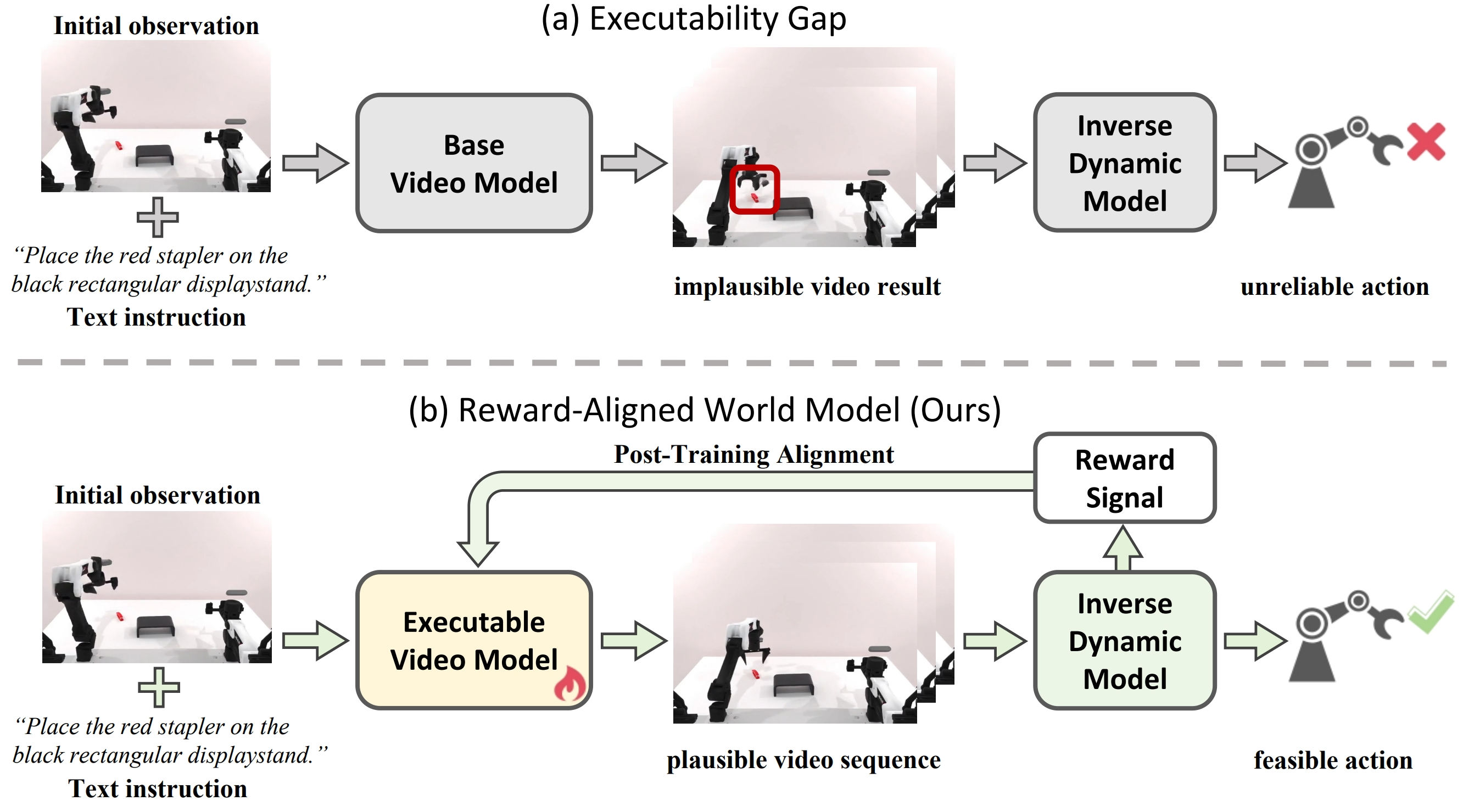
EVA is a post-training framework for aligning video world models with physically executable robot actions.
Recent work explores video generative models as visual planners for robotic manipulation. However, these models often produce rollouts that violate rigid-body and kinematic consistency, producing unstable or infeasible control commands when decoded by an inverse dynamics model. We refer to this mismatch between visual generation and physically executable control as the executability gap.
We introduce Executable Video Alignment (EVA), a reinforcement-learning post-training framework for aligning video world models. EVA trains an inverse dynamics model on real robot trajectories and repurposes it as a reward model that evaluates generated videos through the action sequences they induce, encouraging smooth motions measured by velocity, acceleration, and jerk while penalizing actions that violate embodiment constraints.
You can download the EVA checkpoint fine-tuned on RoboTwin with:
huggingface-cli download RobbinWang123/EVA \
  --include "eva_i2v_14B.ckpt" \
  --local-dir ./data/ckpts
You can also download the IDM checkpoint used for inverse-dynamics reward modeling with:
huggingface-cli download RobbinWang123/EVA \
  --include "IDM_singleview.pt" \
  --local-dir ./data/ckpts
This codebase uses the Wan 2.1 Image-to-Video 14B model as the base model.
Please follow the official Wan release for the latest instructions:
Example download command:
huggingface-cli download Wan-AI/Wan2.1-I2V-14B-480P \
  --local-dir ./data/ckpts/Wan2.1-I2V-14B-480P
The downloaded directory should include the diffusion model, VAE, text encoder, and CLIP encoder.
# Clone the repository
git clone https://github.com/RobbinW/EVA.git
cd EVA

# Create conda environment
conda create -n eva python=3.10
conda activate eva

# Install dependencies
pip install -r requirements.txt

# Install Flash Attention
# This may take several minutes to compile
pip install flash-attn --no-build-isolation
CUDA_VISIBLE_DEVICES=0 python -m main \
  +name=demo_infer \
  experiment=exp_inference \
  algorithm=wan_i2v \
  dataset=image_csv \
  dataset.data_root=data/test_images \
  dataset.metadata_path=metadata.csv \
  dataset.height=480 \
  dataset.width=640 \
  algorithm.model.tuned_ckpt_path=/path/to/EVA/data/ckpts/eva_i2v_14B.ckpt \
  algorithm.hist_guidance=1.5 \
  algorithm.lang_guidance=2.5 \
  algorithm.logging.video_type=single
Generated videos will be saved to:
outputs/<date>/<time>/videos/
algorithm.model.tuned_ckpt_path should point to the EVA fine-tuned checkpoint.configurations/algorithm/wan_i2v.yaml.algorithm.hist_guidance and algorithm.lang_guidance control the classifier-free guidance (CFG) scales for image (history) and language conditioning during inference.We recommend placing RoboTwin and EVA under the same workspace:
$WORKSPACE
├── RoboTwin
│   └── data
└── EVA
    └── data/ckpts
Before SFT, first prepare RoboTwin data by following the official RoboTwin installation and data collection documentation:
https://robotwin-platform.github.io/doc/usage/robotwin-install.htmlhttps://robotwin-platform.github.io/doc/usage/index.htmlIn our setting, we move the camera backward to obtain a wider view of the workspace. You may refer to https://github.com/thu-ml/vidar-robotwin for an example of modifying the embodiment camera position.
After collection, your dataset should live under:
$WORKSPACE/RoboTwin/data
Then switch back to $WORKSPACE/EVA. The commands below assume your current
directory is this repository root.
robotwin_videos.csv from RoboTwin videos and instruction files:python datasets/generate_robotwin_csv.py \
--root-dir $WORKSPACE/RoboTwin/data \
--output-csv $WORKSPACE/RoboTwin/data/robotwin_videos.csv
robotwin_videos.csv:CUDA_VISIBLE_DEVICES=0 python main.py \
+name=process_robotwin_embeds \
experiment=process_data \
dataset=robotwin \
dataset.data_root=$WORKSPACE/RoboTwin/data \
dataset.metadata_path=robotwin_videos.csv \
algorithm=wan_i2v \
algorithm.text_encoder.ckpt_path=./data/ckpts/Wan2.1-I2V-14B-480P/models_t5_umt5-xxl-enc-bf16.pth \
experiment.tasks=[cache_prompt_embed] \
experiment.new_data_root=$WORKSPACE/RoboTwin/data \
experiment.cache_prompt_embed.batch_size=16
This command saves prompt embeddings as *.pt files alongside each RoboTwin video, and updates robotwin_videos.csv in place with the prompt_embed_path column used by training.
mkdir -p ./data/ckpts

aria2c -x 16 -s 16 -c -k 1M \
  -d ./data/ckpts \
  -o lvp_14B.ckpt \
  https://hf-mirror.com/KempnerInstituteAI/LVP/resolve/main/checkpoints/lvp_14B.ckpt
This produces:
./data/ckpts/lvp_14B.ckpt
accelerate launch main.py \
  +name=final_i2v \
  experiment=exp_video \
  algorithm=wan_i2v \
  dataset=robotwin \
  dataset.data_root=$WORKSPACE/RoboTwin/data \
  dataset.metadata_path=robotwin_videos.csv \
  experiment.num_nodes=1 \
  algorithm.lang_guidance=0 \
  algorithm.hist_guidance=0 \
  experiment.training.batch_size=1 \
  algorithm.gradient_checkpointing_rate=1.0 \
  algorithm.model.tuned_ckpt_path=./data/ckpts/lvp_14B.ckpt
Checkpoints will be saved under:
outputs/<date>/<time>/checkpoints/
EVA includes IDM training. The IDM dataset reads raw RoboTwin HDF5 trajectories
from the configured RoboTwin task variant:
$WORKSPACE/RoboTwin/data/<task>/<task_config>/data/*.hdf5
IDM training uses the head camera view (observation/head_camera/rgb). The default config is at configurations/dataset/robotwin_idm.yaml.
Example command:
CUDA_VISIBLE_DEVICES=0 accelerate launch main.py \
  +name=idm_train \
  experiment=exp_idm \
  algorithm=idm_resnet_plus \
  dataset=robotwin_idm \
  dataset.data_root=$WORKSPACE/RoboTwin/data
IDM checkpoints are saved to:
outputs/<date>/<time>/checkpoints/
Each checkpoint keeps the legacy-compatible structure:
model_state_dictoptimizer_state_dictstepEVA also includes the Flow-GRPO post-training path used for executable video
alignment.
The RL experiment is configured by:
configurations/experiment/exp_flow_grpo.yamlRL post-training uses the inverse-dynamics smoothness reward and requires an explicit IDM checkpoint:
experiment.training.reward_model_path=./outputs/<date>/<time>/checkpoints/best.ptExample command:
accelerate launch main.py \
  +name=rl_debug_test \
  experiment=exp_flow_grpo \
  algorithm=wan_i2v \
  dataset=robotwin \
  dataset.data_root=$WORKSPACE/RoboTwin/data \
  dataset.metadata_path=robotwin_videos.csv \
  experiment.num_nodes=1 \
  experiment.training.batch_size=1 \
  experiment.training.reward_model_path=./outputs/<date>/<time>/checkpoints/best.pt \
  algorithm.model.use_lora=True \
  algorithm.model.lora_rank=32 \
  algorithm.lang_guidance=0 \
  algorithm.hist_guidance=0 \
  algorithm.gradient_checkpointing_rate=1.0
The RL experiment saves:
outputs/<date>/<time>/checkpoints/outputs/<date>/<time>/checkpoints/<epoch-step>/lora_adapter/outputs/<date>/<time>/idm_plots/We thank the authors of the following open-source projects for their valuable contributions:
If you find our work helpful, please cite:
@misc{wang2026evaaligningvideoworld,
  title={EVA: Aligning Video World Models with Executable Robot Actions via Inverse Dynamics Rewards},
  author={Ruixiang Wang and Qingming Liu and Yueci Deng and Guiliang Liu and Zhen Liu and Kui Jia},
  year={2026},
  eprint={2603.17808},
  archivePrefix={arXiv},
  primaryClass={cs.RO},
  url={https://arxiv.org/abs/2603.17808}
}
Official Implementation of "EVA: Aligning Video World Models with Executable Robot Actions via Inverse Dynamics Rewards"
See the code
EVA is a post-training framework for aligning video world models with physically executable robot actions.
Recent work explores video generative models as visual planners for robotic manipulation. However, these models often produce rollouts that violate rigid-body and kinematic consistency, producing unstable or infeasible control commands when decoded by an inverse dynamics model. We refer to this mismatch between visual generation and physically executable control as the executability gap.
We introduce Executable Video Alignment (EVA), a reinforcement-learning post-training framework for aligning video world models. EVA trains an inverse dynamics model on real robot trajectories and repurposes it as a reward model that evaluates generated videos through the action sequences they induce, encouraging smooth motions measured by velocity, acceleration, and jerk while penalizing actions that violate embodiment constraints.
You can download the EVA checkpoint fine-tuned on RoboTwin with:
huggingface-cli download RobbinWang123/EVA \
  --include "eva_i2v_14B.ckpt" \
  --local-dir ./data/ckpts
You can also download the IDM checkpoint used for inverse-dynamics reward modeling with:
huggingface-cli download RobbinWang123/EVA \
  --include "IDM_singleview.pt" \
  --local-dir ./data/ckpts
This codebase uses the Wan 2.1 Image-to-Video 14B model as the base model.
Please follow the official Wan release for the latest instructions:
Example download command:
huggingface-cli download Wan-AI/Wan2.1-I2V-14B-480P \
  --local-dir ./data/ckpts/Wan2.1-I2V-14B-480P
The downloaded directory should include the diffusion model, VAE, text encoder, and CLIP encoder.
# Clone the repository
git clone https://github.com/RobbinW/EVA.git
cd EVA

# Create conda environment
conda create -n eva python=3.10
conda activate eva

# Install dependencies
pip install -r requirements.txt

# Install Flash Attention
# This may take several minutes to compile
pip install flash-attn --no-build-isolation
CUDA_VISIBLE_DEVICES=0 python -m main \
  +name=demo_infer \
  experiment=exp_inference \
  algorithm=wan_i2v \
  dataset=image_csv \
  dataset.data_root=data/test_images \
  dataset.metadata_path=metadata.csv \
  dataset.height=480 \
  dataset.width=640 \
  algorithm.model.tuned_ckpt_path=/path/to/EVA/data/ckpts/eva_i2v_14B.ckpt \
  algorithm.hist_guidance=1.5 \
  algorithm.lang_guidance=2.5 \
  algorithm.logging.video_type=single
Generated videos will be saved to:
outputs/<date>/<time>/videos/
algorithm.model.tuned_ckpt_path should point to the EVA fine-tuned checkpoint.configurations/algorithm/wan_i2v.yaml.algorithm.hist_guidance and algorithm.lang_guidance control the classifier-free guidance (CFG) scales for image (history) and language conditioning during inference.We recommend placing RoboTwin and EVA under the same workspace:
$WORKSPACE
├── RoboTwin
│   └── data
└── EVA
    └── data/ckpts
Before SFT, first prepare RoboTwin data by following the official RoboTwin installation and data collection documentation:
https://robotwin-platform.github.io/doc/usage/robotwin-install.htmlhttps://robotwin-platform.github.io/doc/usage/index.htmlIn our setting, we move the camera backward to obtain a wider view of the workspace. You may refer to https://github.com/thu-ml/vidar-robotwin for an example of modifying the embodiment camera position.
After collection, your dataset should live under:
$WORKSPACE/RoboTwin/data
Then switch back to $WORKSPACE/EVA. The commands below assume your current
directory is this repository root.
robotwin_videos.csv from RoboTwin videos and instruction files:python datasets/generate_robotwin_csv.py \
--root-dir $WORKSPACE/RoboTwin/data \
--output-csv $WORKSPACE/RoboTwin/data/robotwin_videos.csv
robotwin_videos.csv:CUDA_VISIBLE_DEVICES=0 python main.py \
+name=process_robotwin_embeds \
experiment=process_data \
dataset=robotwin \
dataset.data_root=$WORKSPACE/RoboTwin/data \
dataset.metadata_path=robotwin_videos.csv \
algorithm=wan_i2v \
algorithm.text_encoder.ckpt_path=./data/ckpts/Wan2.1-I2V-14B-480P/models_t5_umt5-xxl-enc-bf16.pth \
experiment.tasks=[cache_prompt_embed] \
experiment.new_data_root=$WORKSPACE/RoboTwin/data \
experiment.cache_prompt_embed.batch_size=16
This command saves prompt embeddings as *.pt files alongside each RoboTwin video, and updates robotwin_videos.csv in place with the prompt_embed_path column used by training.
mkdir -p ./data/ckpts

aria2c -x 16 -s 16 -c -k 1M \
  -d ./data/ckpts \
  -o lvp_14B.ckpt \
  https://hf-mirror.com/KempnerInstituteAI/LVP/resolve/main/checkpoints/lvp_14B.ckpt
This produces:
./data/ckpts/lvp_14B.ckpt
accelerate launch main.py \
  +name=final_i2v \
  experiment=exp_video \
  algorithm=wan_i2v \
  dataset=robotwin \
  dataset.data_root=$WORKSPACE/RoboTwin/data \
  dataset.metadata_path=robotwin_videos.csv \
  experiment.num_nodes=1 \
  algorithm.lang_guidance=0 \
  algorithm.hist_guidance=0 \
  experiment.training.batch_size=1 \
  algorithm.gradient_checkpointing_rate=1.0 \
  algorithm.model.tuned_ckpt_path=./data/ckpts/lvp_14B.ckpt
Checkpoints will be saved under:
outputs/<date>/<time>/checkpoints/
EVA includes IDM training. The IDM dataset reads raw RoboTwin HDF5 trajectories
from the configured RoboTwin task variant:
$WORKSPACE/RoboTwin/data/<task>/<task_config>/data/*.hdf5
IDM training uses the head camera view (observation/head_camera/rgb). The default config is at configurations/dataset/robotwin_idm.yaml.
Example command:
CUDA_VISIBLE_DEVICES=0 accelerate launch main.py \
  +name=idm_train \
  experiment=exp_idm \
  algorithm=idm_resnet_plus \
  dataset=robotwin_idm \
  dataset.data_root=$WORKSPACE/RoboTwin/data
IDM checkpoints are saved to:
outputs/<date>/<time>/checkpoints/
Each checkpoint keeps the legacy-compatible structure:
model_state_dictoptimizer_state_dictstepEVA also includes the Flow-GRPO post-training path used for executable video
alignment.
The RL experiment is configured by:
configurations/experiment/exp_flow_grpo.yamlRL post-training uses the inverse-dynamics smoothness reward and requires an explicit IDM checkpoint:
experiment.training.reward_model_path=./outputs/<date>/<time>/checkpoints/best.ptExample command:
accelerate launch main.py \
  +name=rl_debug_test \
  experiment=exp_flow_grpo \
  algorithm=wan_i2v \
  dataset=robotwin \
  dataset.data_root=$WORKSPACE/RoboTwin/data \
  dataset.metadata_path=robotwin_videos.csv \
  experiment.num_nodes=1 \
  experiment.training.batch_size=1 \
  experiment.training.reward_model_path=./outputs/<date>/<time>/checkpoints/best.pt \
  algorithm.model.use_lora=True \
  algorithm.model.lora_rank=32 \
  algorithm.lang_guidance=0 \
  algorithm.hist_guidance=0 \
  algorithm.gradient_checkpointing_rate=1.0
The RL experiment saves:
outputs/<date>/<time>/checkpoints/outputs/<date>/<time>/checkpoints/<epoch-step>/lora_adapter/outputs/<date>/<time>/idm_plots/We thank the authors of the following open-source projects for their valuable contributions:
If you find our work helpful, please cite:
@misc{wang2026evaaligningvideoworld,
  title={EVA: Aligning Video World Models with Executable Robot Actions via Inverse Dynamics Rewards},
  author={Ruixiang Wang and Qingming Liu and Yueci Deng and Guiliang Liu and Zhen Liu and Kui Jia},
  year={2026},
  eprint={2603.17808},
  archivePrefix={arXiv},
  primaryClass={cs.RO},
  url={https://arxiv.org/abs/2603.17808}
}



