See what matters while AI writes the code. A narrow live HUD for Claude Code, Codex and Antigravity sessions.
See the codeSee what matters while AI writes the code.
A narrow, live heads-up display for your Claude Code, Codex and Antigravity sessions, read straight from the transcript files these tools already write to your disk.
It shows context fill, session and turn time, subagents, tokens, tools and skills at a glance, wherever the agent records them.
Free · Costs no tokens · No login · Runs locally — aihud reads the transcript files your agent already writes to disk. It never calls a model or a remote API, needs no account or API key, and its server listens on 127.0.0.1 only.
npx aihud
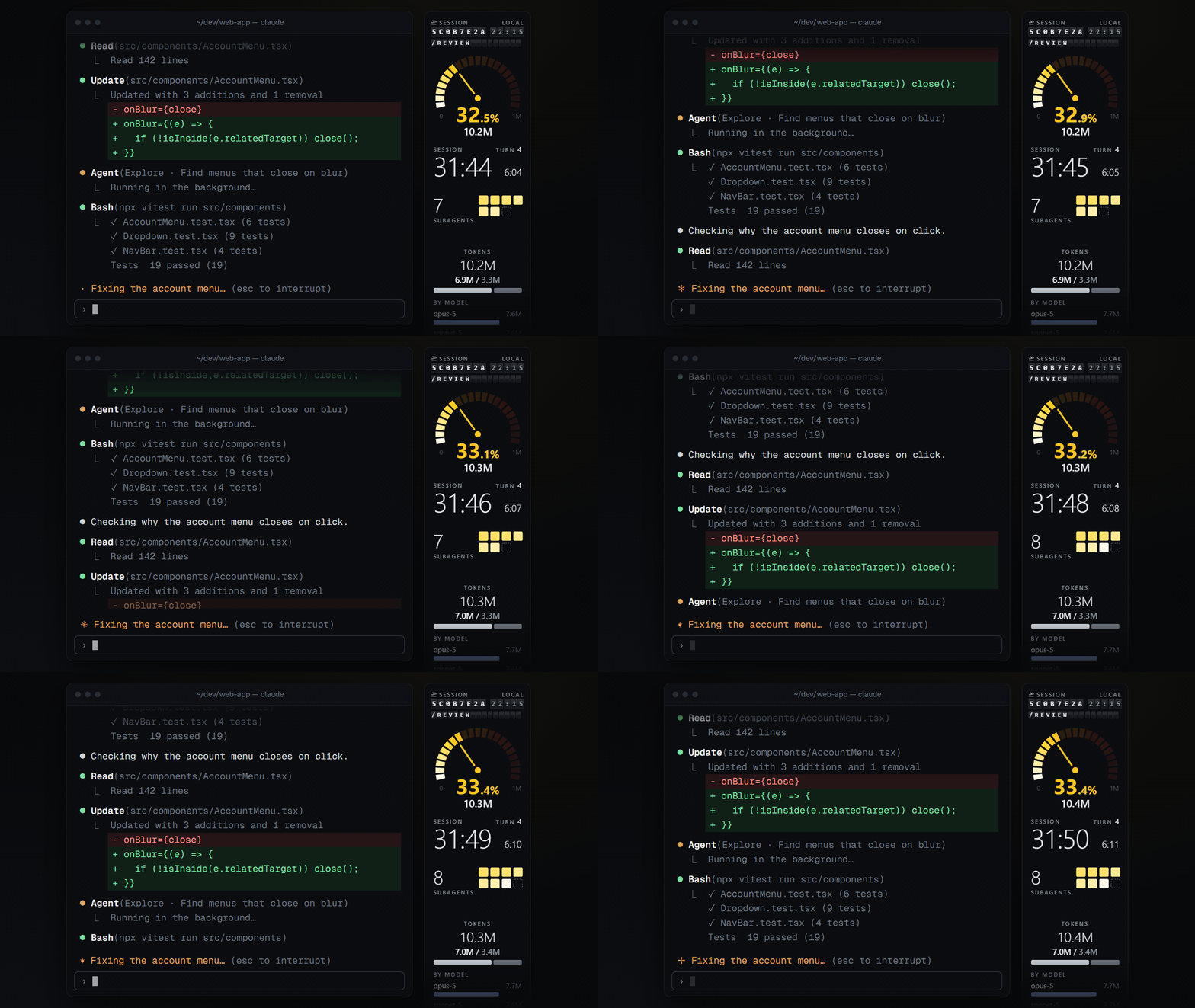
The terminal shows the stream: every line the agent writes, as it writes it. What it does not show is the state: how full the context is, how long the session runs, how many subagents are at work, where the tokens go.
aihud is a slim strip next to your terminal that keeps that state in view. It only reads; nothing in the tools it reads is changed. With the shipped tiles, nothing leaves your machine: they make no network calls, and a test enforces it. Tiles you write yourself are yours to check (the skill warns you before it writes a network call).
npx aihud new-tile (or the /new-tile skill in Claude Code) gives Claude
everything it needs to build a tile for you.check (are my tiles and layouts valid?), add-tile (place a tile in
the active layout), layout show (what travels with a layout), close (mark a session as
closed).
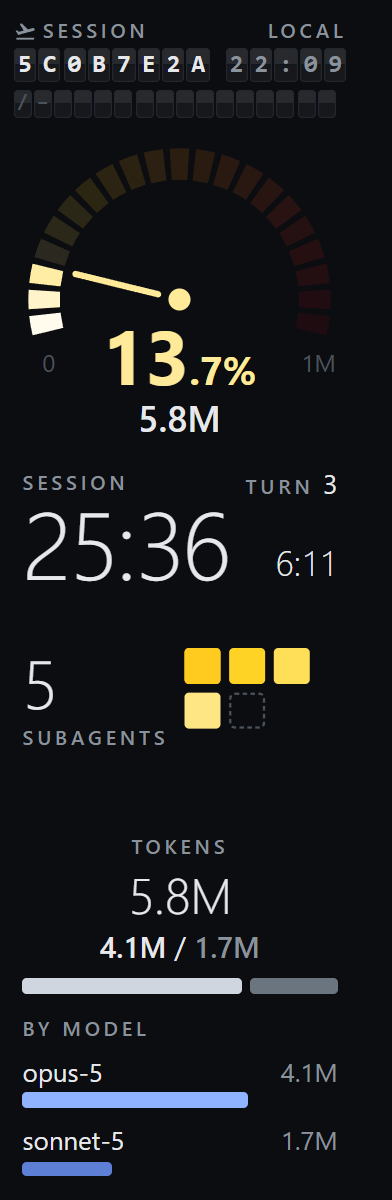
The shipped tiles come in five style families. One strip per family, all on the same sample session that ships with the tests:
| quiet | instrument | drafting | material | classic |
|---|---|---|---|---|
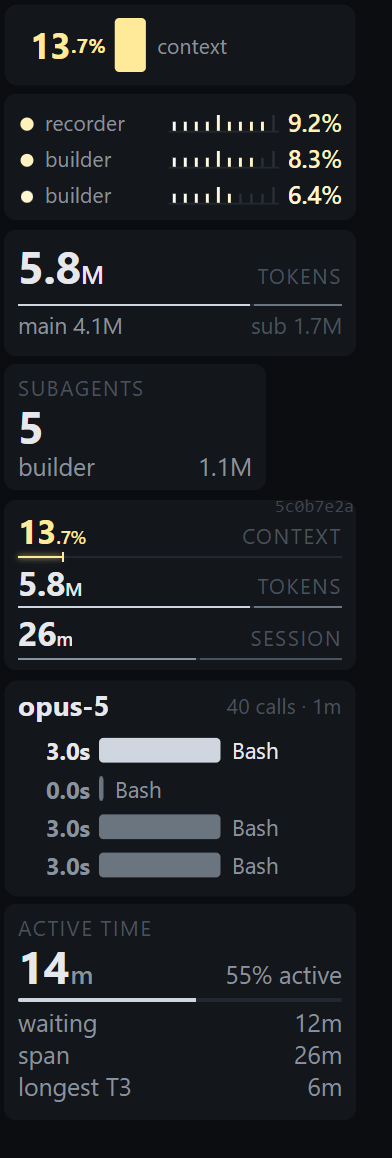 | 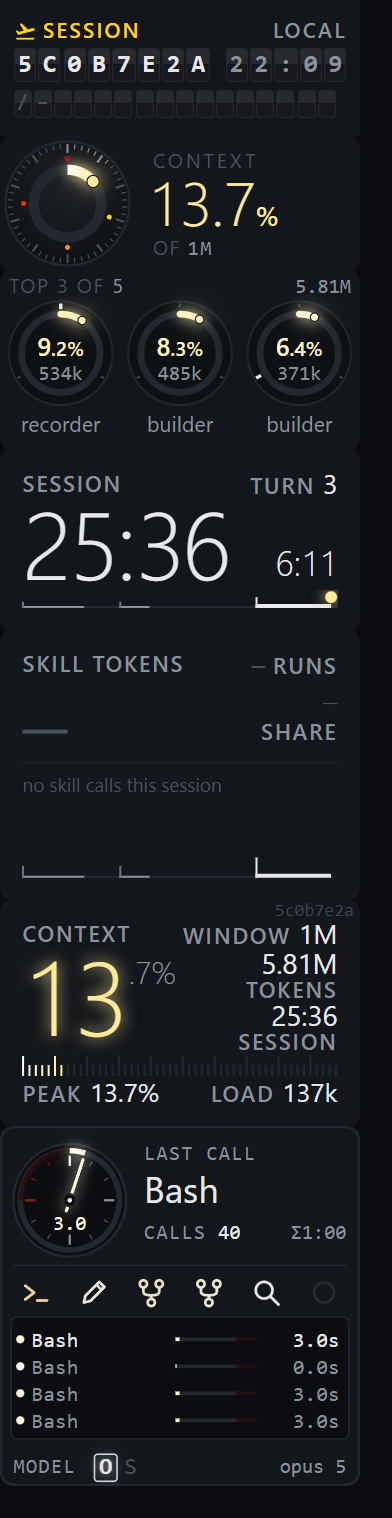 | 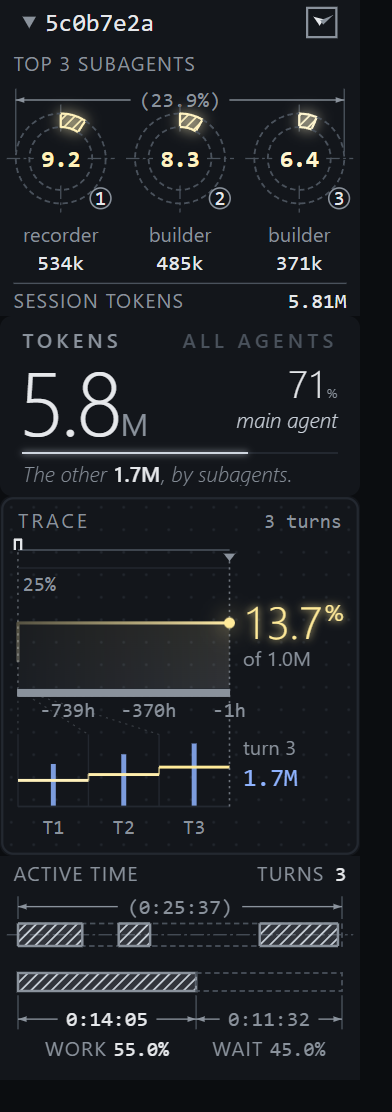 | 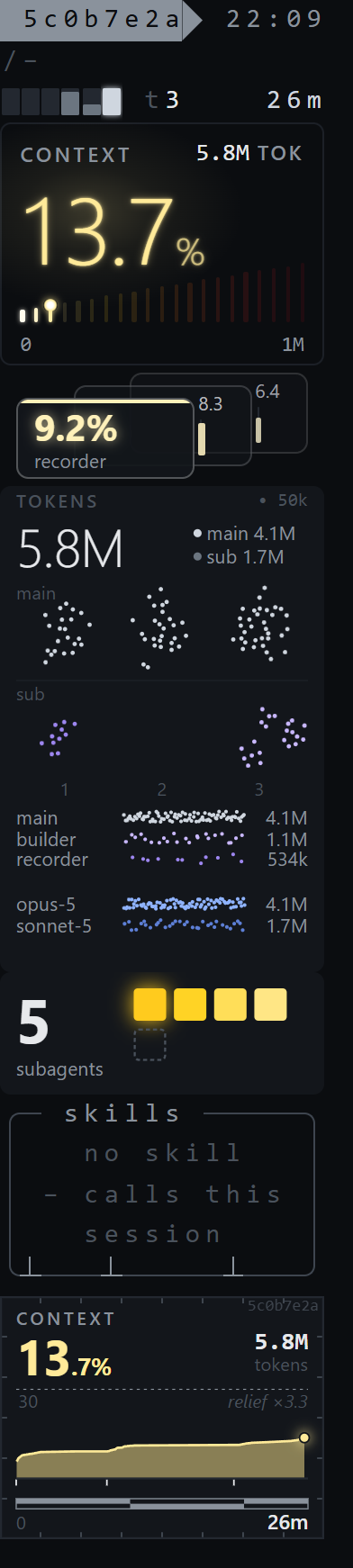 | 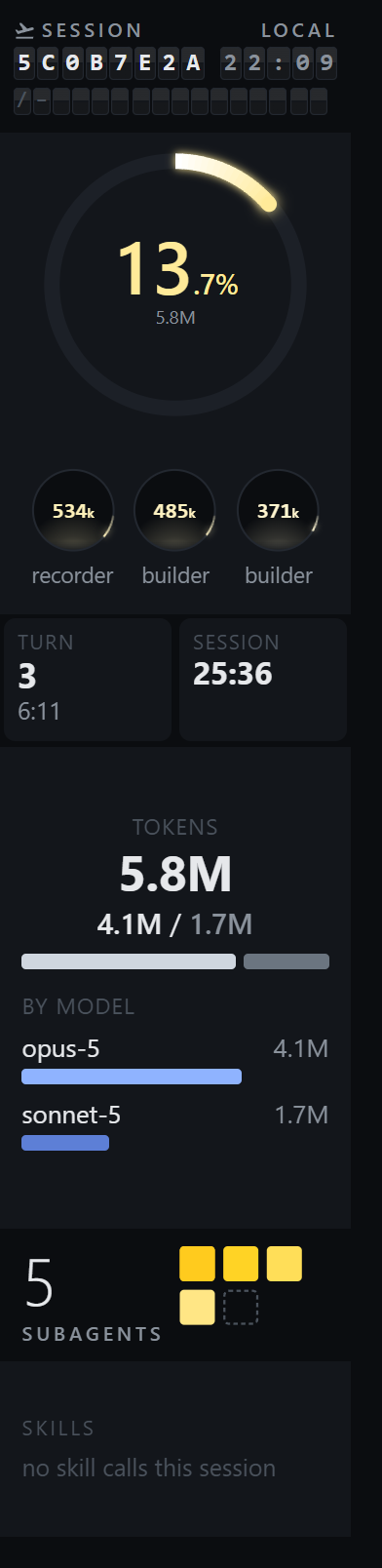 |
| hairline · ledger · register · slab | numeral · calibre · redline · splitflap | blueprint · seismograph · column · bauhaus | backlight · relief · particle · mosaic · strata · cellwork | standard · minimal · fancy-a · fancy-b · essentials |
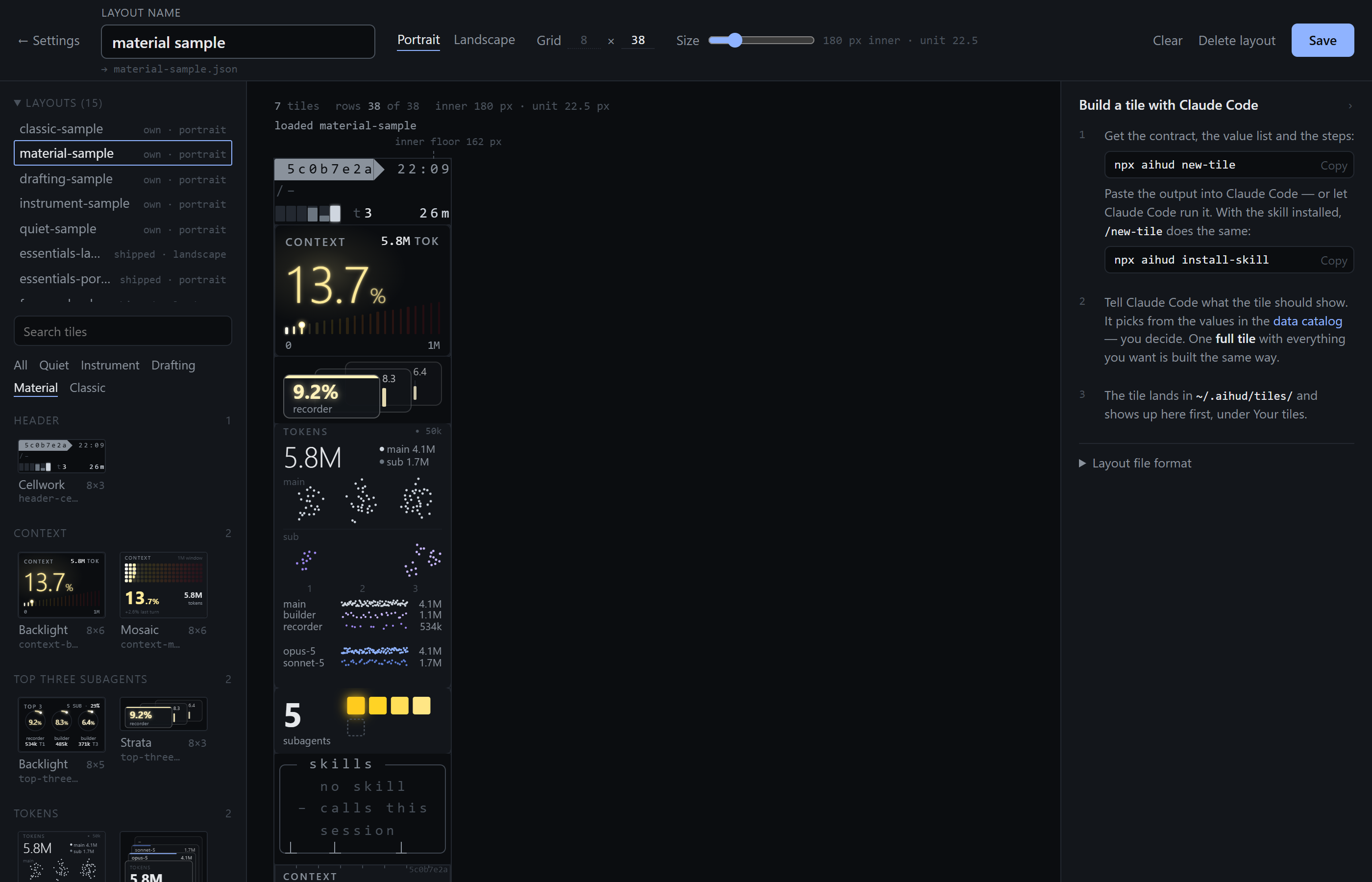
The Composer, with the family filter set to material and a layout loaded:
Requirements: Node.js 22 or newer, and Chrome, Edge or Chromium for the app window (without one, aihud opens a normal browser tab).
npx aihud
This starts a small local server and opens the HUD as a narrow app window. It reads the
transcripts under ~/.claude/projects (and, read only, Codex sessions under ~/.codex and
Antigravity sessions under ~/.gemini/antigravity-cli). Start it from your project folder: the
HUD follows the youngest session of that folder. If the folder has no session yet, it shows the
newest session overall and says so.
To stop, press Ctrl+C in the terminal where aihud runs. Closing the window alone leaves the
server running; npx aihud again reuses it and only opens the window. That also holds after an
update: stop the old server with Ctrl+C first, otherwise npx aihud@latest reuses the old one.
| Option | What it does |
|---|---|
--tab | open a normal browser tab instead of the app window (a tab never gets narrower than 500 px) |
--port N | port of the local server (default 4747, or "port" in ~/.aihud/settings.json) |
--projects <dir> | the transcript folder to read (default ~/.claude/projects) |
--home <dir> | where aihud keeps settings, your tiles and layouts (default ~/.aihud, or AIHUD_HOME) |
--poll <ms> | switch the file watch off and scan every <ms> instead (or AIHUD_POLL_MS) |
--version | print the version and exit |
AIHUD_BROWSER=<path> | the browser binary for the app window |
npx aihud serve starts only the server, without a window. aihud writes only under ~/.aihud/,
never under ~/.claude/. Routes and file formats: node/README.md.
Arrange. With aihud running, open http://localhost:4747/composer. Pick portrait or
landscape, drag tiles from the panel onto the grid, name the layout and save it. It lands in
~/.aihud/layouts/; choose it in the window under Layouts.
Build a tile. Every tile follows one contract: tiles/CONTRACT.md
(machine-readable: tiles/contract.json, contract version 1.1).
Claude Code can write a tile for you:
npx aihud new-tile prints the contract, the value list and the instructions as text.
Paste it into Claude Code, or let Claude run it.npx aihud install-skill copies the /new-tile skill to ~/.claude/skills/new-tile/, so
/new-tile works in every project. (Claude Code does not load skills from inside an npm
package, hence the copy. It overwrites an existing copy only with --force.)Writing a tile runs in your own Claude Code session and uses its tokens; aihud itself spends none.
Your tiles live in ~/.aihud/tiles/ and show up first in the Composer. To see a new tile, run
npx aihud check, then npx aihud add-tile <id>, and reload the HUD page: portrait shows it at the
very top, landscape at the right end; the Composer lists it first under "Your tiles".
Place and check.
npx aihud add-tile <id> [--orientation portrait|landscape|both] places a tile in your active
layout. A shipped layout is copied to your own first; the command prints how to undo.npx aihud check checks your tiles, your layouts and the layout names in your settings,
without a server: one line per problem, ok when clean, exit code 1 on problems.npx aihud layout show <slug> lists what travels with one of your layouts: its file, whether
it is active, its own tiles, and any tile it names that is missing on this machine.The shipped tiles make no network calls; a test enforces it. Your own tiles are not checked — the skill warns you before it writes a network call or a foreign import, and you decide.
Close sessions. npx aihud close <sessionId> marks a session as closed through the running
server. You can hook it to Claude Code's SessionEnd event; the recipe is in
node/README.md. aihud never edits Claude Code's settings. Without the hook,
aihud judges a session by how recently its transcript was written.
| Agent | What is read | Coverage | Measured against |
|---|---|---|---|
| Claude Code | ~/.claude/projects/<project>/<session>.jsonl and its subagent transcripts | full | 2.1.294 |
| Codex | ~/.codex/sessions/**/rollout-*.jsonl and session_index.jsonl | full | 0.160.1 |
| Antigravity | ~/.gemini/antigravity-cli/brain/<id>/.system_generated/logs/transcript.jsonl | reduced: turns, tools, errors, durations; no model, no title; tokens since CLI 1.2.17; context window taken from settings | 1.2.17 |
Codex and Antigravity sessions are read when aihud uses the default transcript folder. Where an agent records no value, the tile marks it in its own colour, and the tooltip says not provided by Antigravity.
aihud reads files that are internal to these tools. Their formats are not documented and not a
public interface. aihud is measured against Claude Code 2.1.294 (the test fixtures were
recorded with Claude Code 2.1.241 and 2.1.247), Codex 0.160.1 (fixtures: 0.160.0) and Antigravity CLI
1.2.17 (fixtures: 1.2.14 and 1.2.17).
Any update of these tools may change a format and break aihud without warning.
If it breaks, please open an issue and name the version of the tool (for example
claude --version).
Two version numbers live in tiles/contract.json, kept apart: contractVersion (the tile
contract) and readerVersion (follows the transcript format). The npm version is the release
number.
While aihud is at 0.x, the tile contract itself may change between minor releases. aihud does not
check a tile's contractVersion at load time yet: a tile built against an older contract still loads
and may misbehave after a contract change. Contract changes are listed in the CHANGELOG.
No sessions found. aihud reads ~/.claude/projects by default. If your transcripts live
elsewhere, pass the folder: npx aihud --projects <dir>. Claude Code deletes sessions after
30 days by default (cleanupPeriodDays in its settings).
Port already in use. Another program holds port 4747. Start on another one:
npx aihud --port 4800, or set "port" in ~/.aihud/settings.json.
git clone fails on Windows with "Filename too long". Allow long paths once:
git config --global core.longpaths true
Line endings on Windows. The repository ships a .gitattributes that keeps every text file
on LF, whatever your core.autocrlf says. Nothing to configure.
A tooltip says "not provided by <agent>". That agent does not record the value in its transcript. It is not an error; see the coverage column above.
aihud is one piece of a longer path in working with AI agents: Observe → Understand → Structure → Orchestrate. This is the first step — seeing clearly what the agent is doing. It is the first publicly released piece of a broader exploration into agentic software engineering: observability first, then structured and orchestrated workflows. More about the author: GitHub · LinkedIn.
Issues and pull requests are welcome. Please read CONTRIBUTING.md first.
See SECURITY.md for what aihud reads and how to report a vulnerability.
aihud is an independent open-source project. It is not affiliated with, endorsed by or sponsored by Anthropic, OpenAI or Google. Claude Code, Codex and Antigravity are trademarks of their respective holders; their names are used here only to describe compatibility.
MIT — see LICENSE. Copyright (c) 2026 Richard Ertl.
See what matters while AI writes the code. A narrow live HUD for Claude Code, Codex and Antigravity sessions.
See the codeSee what matters while AI writes the code.
A narrow, live heads-up display for your Claude Code, Codex and Antigravity sessions, read straight from the transcript files these tools already write to your disk.
It shows context fill, session and turn time, subagents, tokens, tools and skills at a glance, wherever the agent records them.
Free · Costs no tokens · No login · Runs locally — aihud reads the transcript files your agent already writes to disk. It never calls a model or a remote API, needs no account or API key, and its server listens on 127.0.0.1 only.
npx aihud
The terminal shows the stream: every line the agent writes, as it writes it. What it does not show is the state: how full the context is, how long the session runs, how many subagents are at work, where the tokens go.
aihud is a slim strip next to your terminal that keeps that state in view. It only reads; nothing in the tools it reads is changed. With the shipped tiles, nothing leaves your machine: they make no network calls, and a test enforces it. Tiles you write yourself are yours to check (the skill warns you before it writes a network call).
npx aihud new-tile (or the /new-tile skill in Claude Code) gives Claude
everything it needs to build a tile for you.check (are my tiles and layouts valid?), add-tile (place a tile in
the active layout), layout show (what travels with a layout), close (mark a session as
closed).
The shipped tiles come in five style families. One strip per family, all on the same sample session that ships with the tests:
| quiet | instrument | drafting | material | classic |
|---|---|---|---|---|
| | | | |
| hairline · ledger · register · slab | numeral · calibre · redline · splitflap | blueprint · seismograph · column · bauhaus | backlight · relief · particle · mosaic · strata · cellwork | standard · minimal · fancy-a · fancy-b · essentials |
The Composer, with the family filter set to material and a layout loaded:
Requirements: Node.js 22 or newer, and Chrome, Edge or Chromium for the app window (without one, aihud opens a normal browser tab).
npx aihud
This starts a small local server and opens the HUD as a narrow app window. It reads the
transcripts under ~/.claude/projects (and, read only, Codex sessions under ~/.codex and
Antigravity sessions under ~/.gemini/antigravity-cli). Start it from your project folder: the
HUD follows the youngest session of that folder. If the folder has no session yet, it shows the
newest session overall and says so.
To stop, press Ctrl+C in the terminal where aihud runs. Closing the window alone leaves the
server running; npx aihud again reuses it and only opens the window. That also holds after an
update: stop the old server with Ctrl+C first, otherwise npx aihud@latest reuses the old one.
| Option | What it does |
|---|---|
--tab | open a normal browser tab instead of the app window (a tab never gets narrower than 500 px) |
--port N | port of the local server (default 4747, or "port" in ~/.aihud/settings.json) |
--projects <dir> | the transcript folder to read (default ~/.claude/projects) |
--home <dir> | where aihud keeps settings, your tiles and layouts (default ~/.aihud, or AIHUD_HOME) |
--poll <ms> | switch the file watch off and scan every <ms> instead (or AIHUD_POLL_MS) |
--version | print the version and exit |
AIHUD_BROWSER=<path> | the browser binary for the app window |
npx aihud serve starts only the server, without a window. aihud writes only under ~/.aihud/,
never under ~/.claude/. Routes and file formats: node/README.md.
Arrange. With aihud running, open http://localhost:4747/composer. Pick portrait or
landscape, drag tiles from the panel onto the grid, name the layout and save it. It lands in
~/.aihud/layouts/; choose it in the window under Layouts.
Build a tile. Every tile follows one contract: tiles/CONTRACT.md
(machine-readable: tiles/contract.json, contract version 1.1).
Claude Code can write a tile for you:
npx aihud new-tile prints the contract, the value list and the instructions as text.
Paste it into Claude Code, or let Claude run it.npx aihud install-skill copies the /new-tile skill to ~/.claude/skills/new-tile/, so
/new-tile works in every project. (Claude Code does not load skills from inside an npm
package, hence the copy. It overwrites an existing copy only with --force.)Writing a tile runs in your own Claude Code session and uses its tokens; aihud itself spends none.
Your tiles live in ~/.aihud/tiles/ and show up first in the Composer. To see a new tile, run
npx aihud check, then npx aihud add-tile <id>, and reload the HUD page: portrait shows it at the
very top, landscape at the right end; the Composer lists it first under "Your tiles".
Place and check.
npx aihud add-tile <id> [--orientation portrait|landscape|both] places a tile in your active
layout. A shipped layout is copied to your own first; the command prints how to undo.npx aihud check checks your tiles, your layouts and the layout names in your settings,
without a server: one line per problem, ok when clean, exit code 1 on problems.npx aihud layout show <slug> lists what travels with one of your layouts: its file, whether
it is active, its own tiles, and any tile it names that is missing on this machine.The shipped tiles make no network calls; a test enforces it. Your own tiles are not checked — the skill warns you before it writes a network call or a foreign import, and you decide.
Close sessions. npx aihud close <sessionId> marks a session as closed through the running
server. You can hook it to Claude Code's SessionEnd event; the recipe is in
node/README.md. aihud never edits Claude Code's settings. Without the hook,
aihud judges a session by how recently its transcript was written.
| Agent | What is read | Coverage | Measured against |
|---|---|---|---|
| Claude Code | ~/.claude/projects/<project>/<session>.jsonl and its subagent transcripts | full | 2.1.294 |
| Codex | ~/.codex/sessions/**/rollout-*.jsonl and session_index.jsonl | full | 0.160.1 |
| Antigravity | ~/.gemini/antigravity-cli/brain/<id>/.system_generated/logs/transcript.jsonl | reduced: turns, tools, errors, durations; no model, no title; tokens since CLI 1.2.17; context window taken from settings | 1.2.17 |
Codex and Antigravity sessions are read when aihud uses the default transcript folder. Where an agent records no value, the tile marks it in its own colour, and the tooltip says not provided by Antigravity.
aihud reads files that are internal to these tools. Their formats are not documented and not a
public interface. aihud is measured against Claude Code 2.1.294 (the test fixtures were
recorded with Claude Code 2.1.241 and 2.1.247), Codex 0.160.1 (fixtures: 0.160.0) and Antigravity CLI
1.2.17 (fixtures: 1.2.14 and 1.2.17).
Any update of these tools may change a format and break aihud without warning.
If it breaks, please open an issue and name the version of the tool (for example
claude --version).
Two version numbers live in tiles/contract.json, kept apart: contractVersion (the tile
contract) and readerVersion (follows the transcript format). The npm version is the release
number.
While aihud is at 0.x, the tile contract itself may change between minor releases. aihud does not
check a tile's contractVersion at load time yet: a tile built against an older contract still loads
and may misbehave after a contract change. Contract changes are listed in the CHANGELOG.
No sessions found. aihud reads ~/.claude/projects by default. If your transcripts live
elsewhere, pass the folder: npx aihud --projects <dir>. Claude Code deletes sessions after
30 days by default (cleanupPeriodDays in its settings).
Port already in use. Another program holds port 4747. Start on another one:
npx aihud --port 4800, or set "port" in ~/.aihud/settings.json.
git clone fails on Windows with "Filename too long". Allow long paths once:
git config --global core.longpaths true
Line endings on Windows. The repository ships a .gitattributes that keeps every text file
on LF, whatever your core.autocrlf says. Nothing to configure.
A tooltip says "not provided by <agent>". That agent does not record the value in its transcript. It is not an error; see the coverage column above.
aihud is one piece of a longer path in working with AI agents: Observe → Understand → Structure → Orchestrate. This is the first step — seeing clearly what the agent is doing. It is the first publicly released piece of a broader exploration into agentic software engineering: observability first, then structured and orchestrated workflows. More about the author: GitHub · LinkedIn.
Issues and pull requests are welcome. Please read CONTRIBUTING.md first.
See SECURITY.md for what aihud reads and how to report a vulnerability.
aihud is an independent open-source project. It is not affiliated with, endorsed by or sponsored by Anthropic, OpenAI or Google. Claude Code, Codex and Antigravity are trademarks of their respective holders; their names are used here only to describe compatibility.
MIT — see LICENSE. Copyright (c) 2026 Richard Ertl.



