Real-time gamified dashboard for monitoring Claude Code and Codex AI agents in a medieval fantasy village: context-window gauges, skill & plugin telemetry, subagent families and one-click exports for AI review
See the code
A fantasy village dashboard for monitoring your Claude Code CLI and Codex agents.



Use Claude Code CLI or Codex as usual — each agent session auto-spawns a hero on the dashboard, live.
Agent Quest is a browser-based monitoring dashboard that visualizes active Claude Code and Codex agent sessions as fantasy heroes in a 2D village. Each running agent becomes a hero who walks between buildings based on what it's doing: Read sends it to the Library, Edit to the Forge, Bash to the Arena, and so on. Every hero also shows how much of its context window it has used, which skills and plugins it is running under, and which subagents are working for it — with a one-click export you can hand to another AI to review the session.
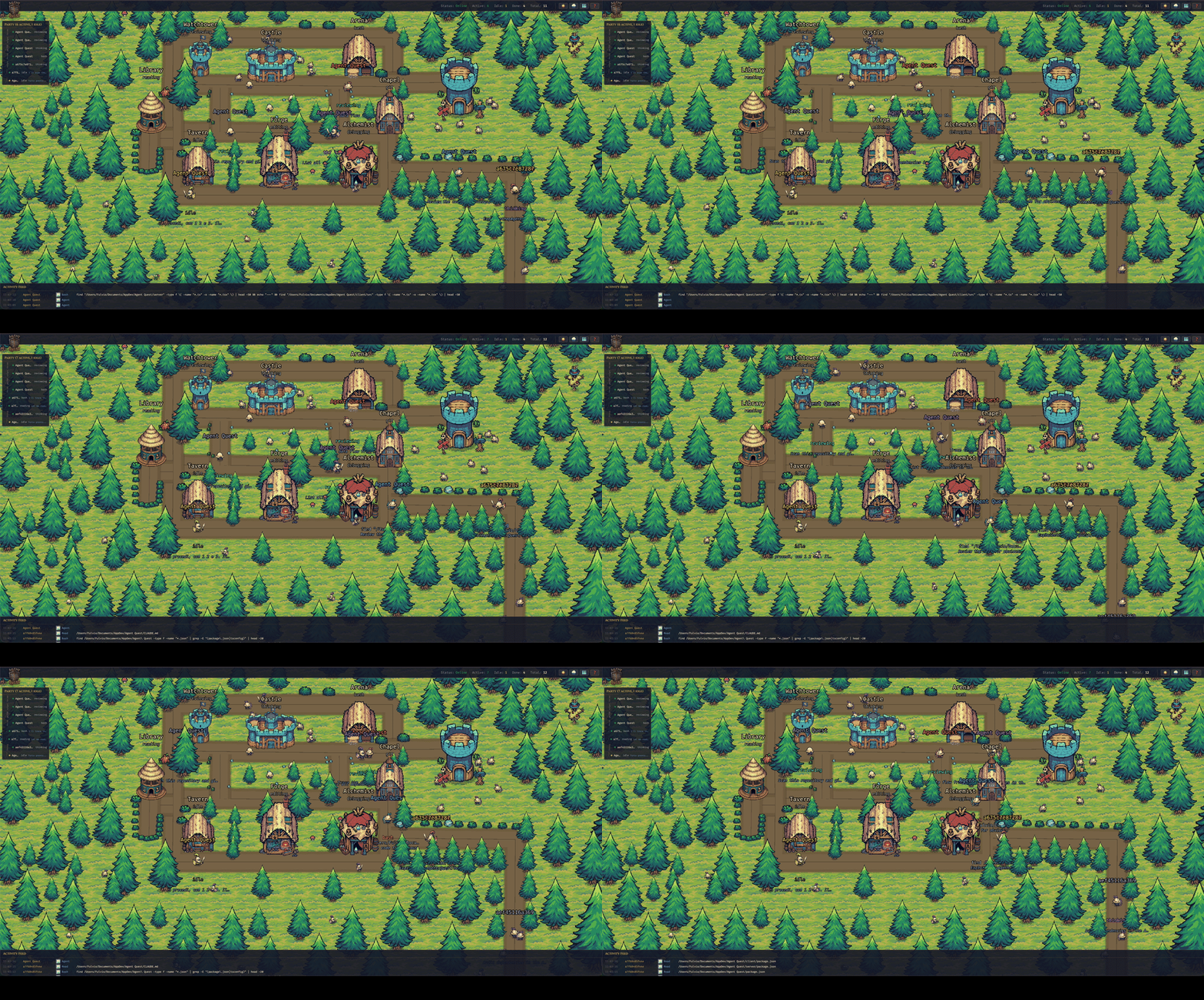
Every hero is an agent — the building it visits tells you what it's doing.
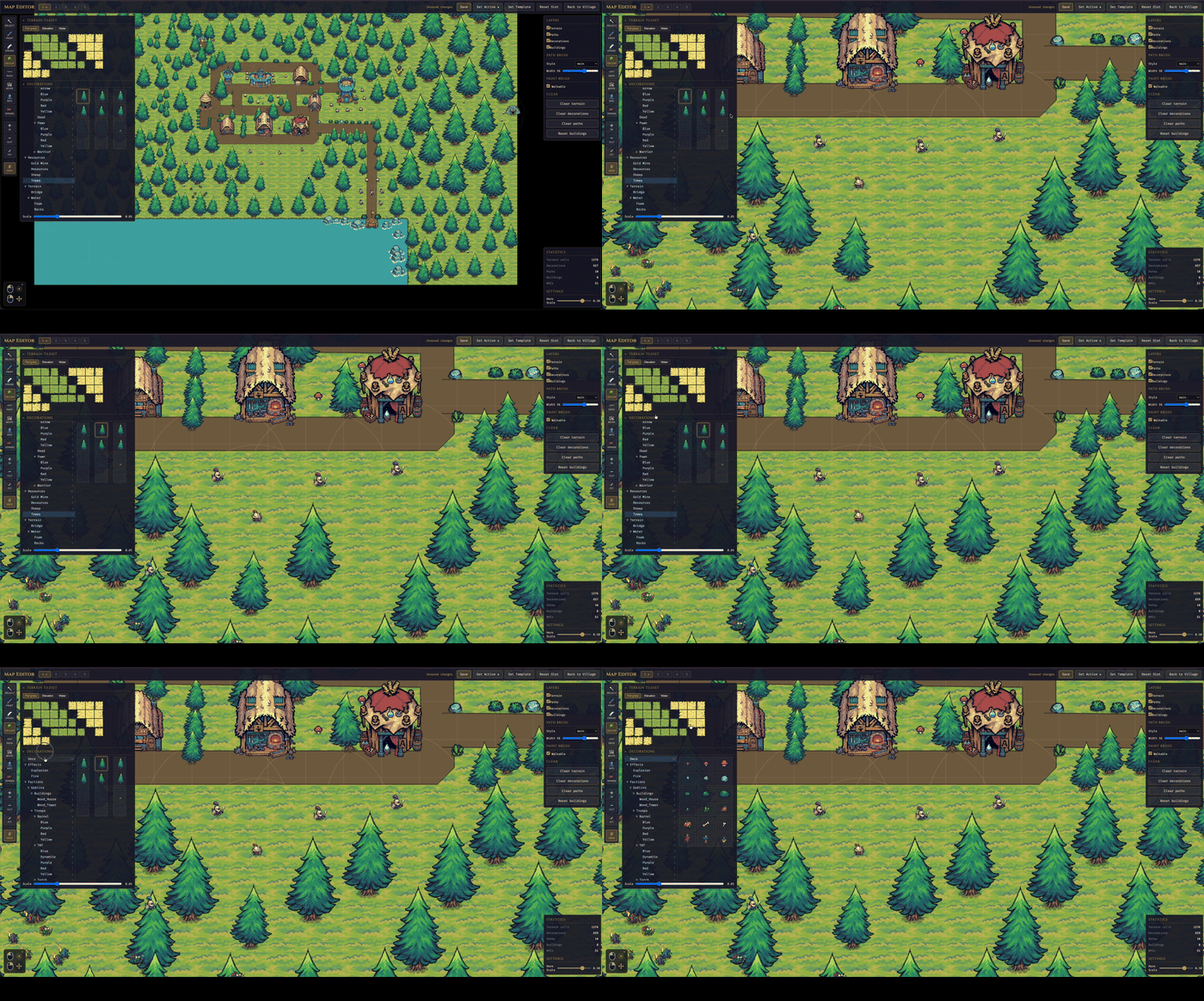
Integrated Tile Map Editor |
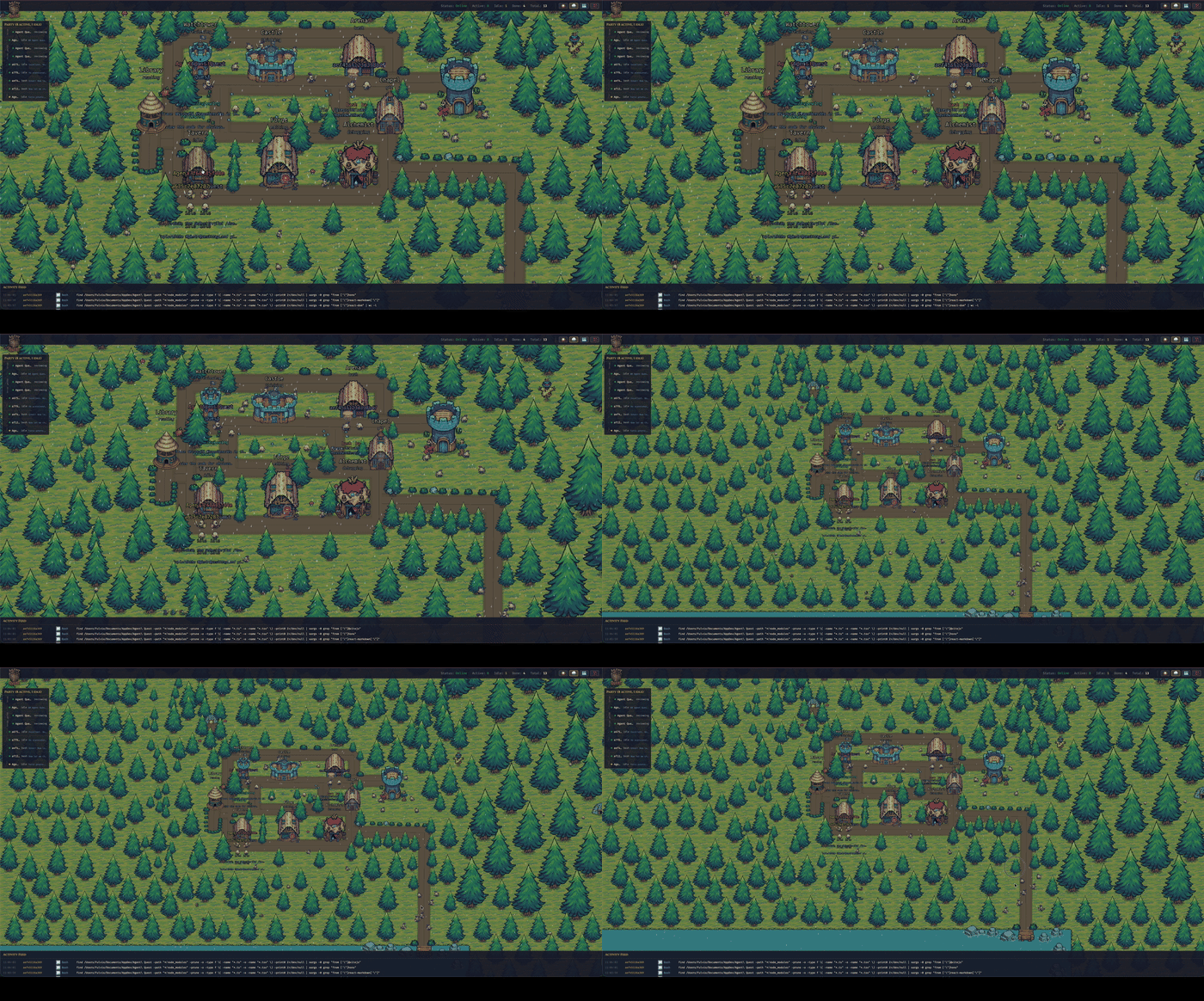
Weather effects |
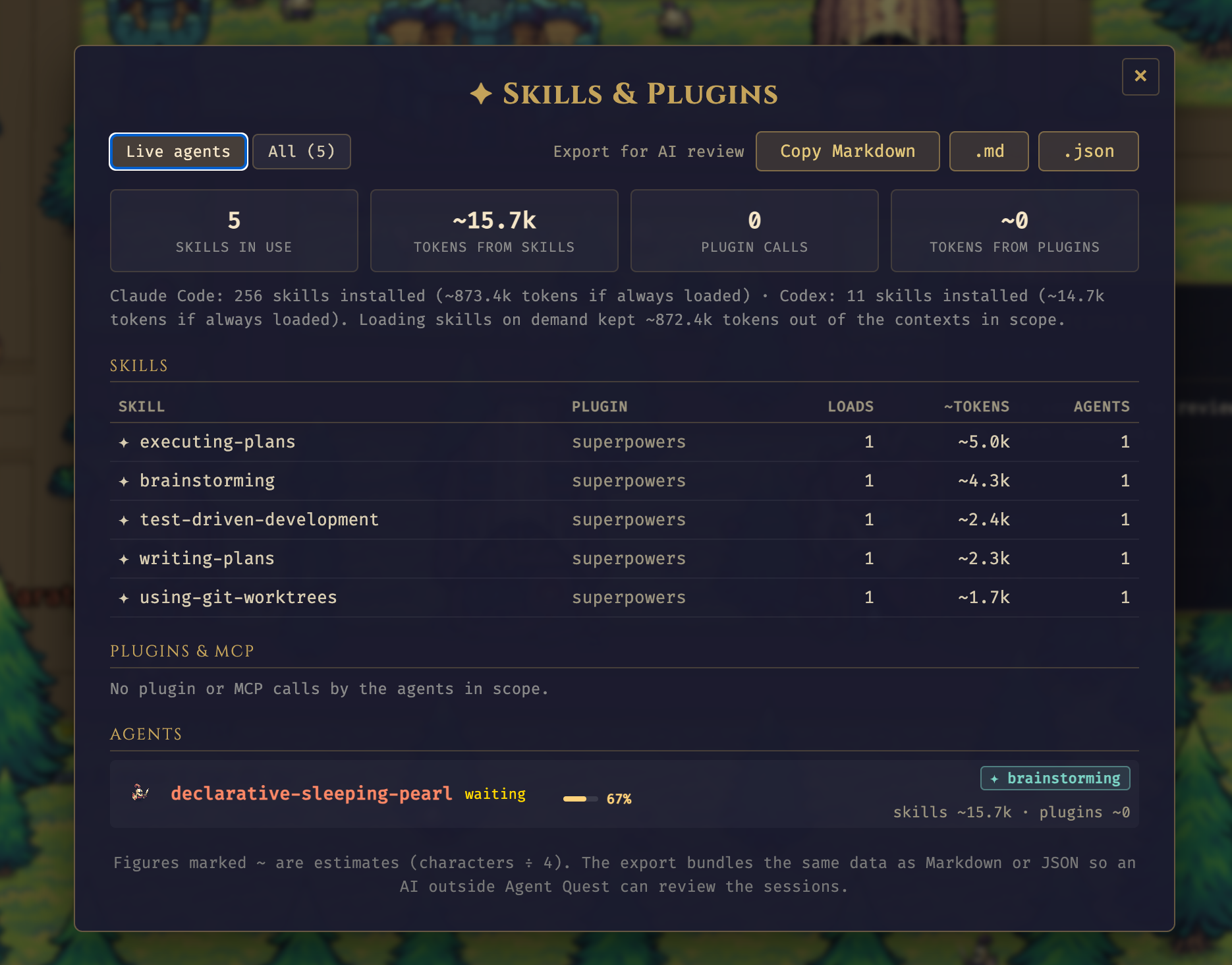
Skills & Plugins — fleet view and AI-review export |
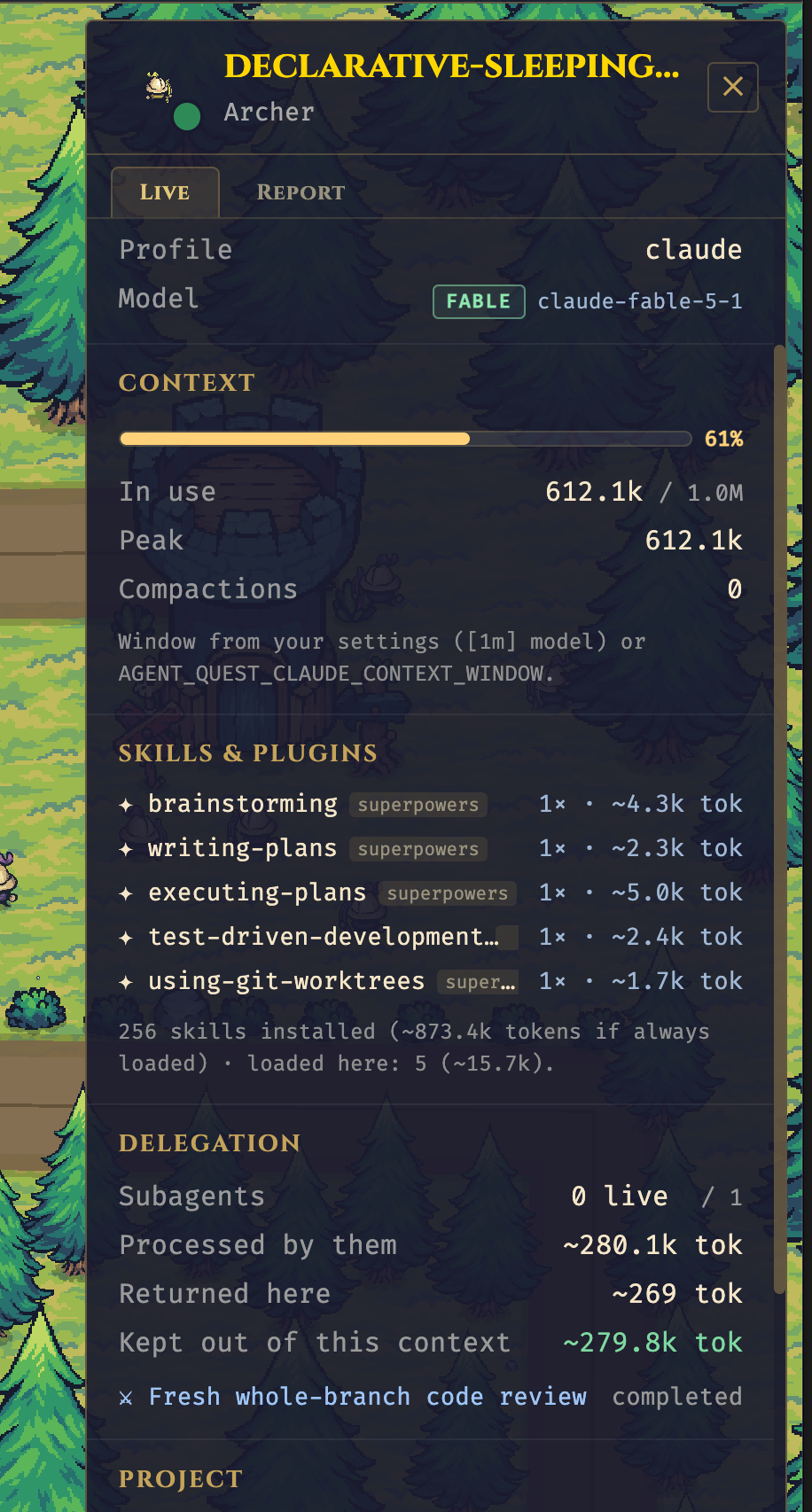
Main agent — context, skills, delegation |
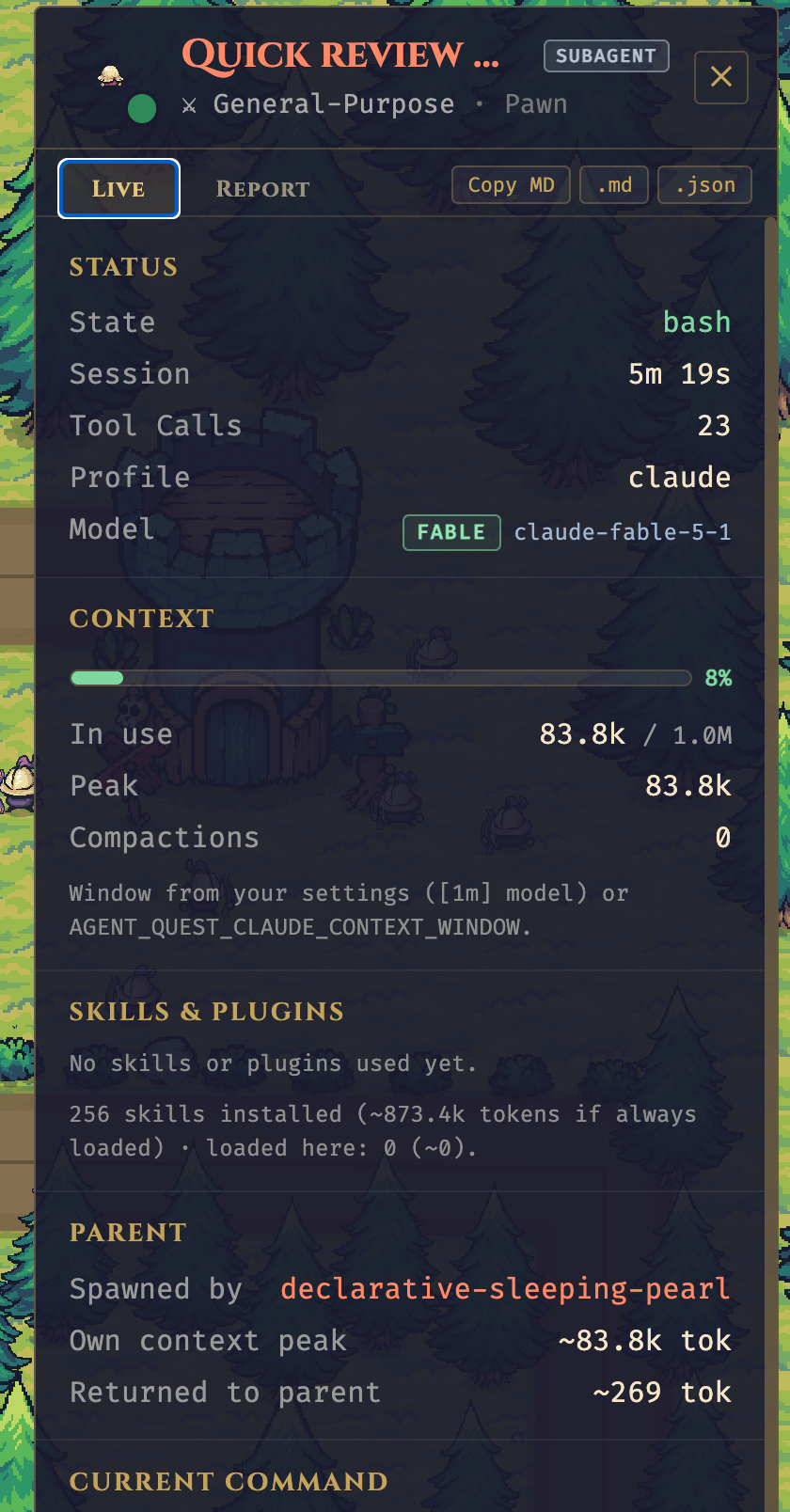
Subagent — role badge, parent, context kept out |
Claude Code and Codex sessions happen in a terminal — useful, but not very alive. When you run several agents at once (across projects, across ~/.claude* installations and ~/.codex), it's hard to feel what they're actually doing. Agent Quest turns that invisible activity into something you can glance at: a little village where every hero is an agent, and where they walk tells you what they're up to.
~/.claude* directory (supports multiple installations like ~/.claude-work, ~/.claude-personale) and of ~/.codex if presentSUBAGENT · role badge; they nest under the parent in the party bar, and the parent's panel shows how much context delegation kept out of the main conversationpostToolUse hooks — Claude Code only; Codex doesn't expose hooks)item_completed format of Codex ≥ 0.160, including Codex subagents spawned with spawn_agentRequired
curl -fsSL https://bun.sh/install | bash~/.claude* directories, and/or ~/.codex, with session logs). Without either, the dashboard still starts, but the village stays empty and a banner tells you so.Optional
npm run … command form. If you only have Bun installed, every npm run X in this README has an equivalent bun run X.Agent Quest can be set up in two equivalent ways — pick the one that matches your platform:
git clone + bun install + bun start. Three commands, full control, works everywhere (macOS, Linux, Windows via WSL2).curl | bash that installs Bun if missing, clones the repo, installs dependencies, creates a global agentquest command, and launches the app.They do the same work under the hood. Every daily command has an equivalent:
| With the CLI | Without (classic) |
|---|---|
agentquest | bun start |
agentquest update | git pull --ff-only && bun install |
agentquest update is a convenience command for end users running an installed copy that tracks origin/main. It is not the contributor workflow for feature branches.
Three commands — works on macOS, Linux, and Windows via WSL2:
git clone https://github.com/FulAppiOS/Agent-Quest.git
cd Agent-Quest
bun install
bun start
That's it: your browser opens on http://localhost:4445 and the village appears.
Optional — create an agentquest shortcut so you can launch from any directory:
mkdir -p ~/.local/bin
ln -s "$PWD/bin/agentquest" ~/.local/bin/agentquest
After the symlink you can run agentquest (alias of bun start) and agentquest update (alias of git pull --ff-only && bun install) from anywhere.
Agent Quest ships with a bundled CC0 pixel-art sprite pack (under client/public/assets/themes/tiny-swords-cc0/), so there's nothing else to download.
The one-line installer script is macOS-only; Agent Quest itself runs on macOS and Linux, and via WSL2 on Windows — see the manual install above.
curl -fsSL https://raw.githubusercontent.com/FulAppiOS/Agent-Quest/main/install.sh | bash
The installer prints exactly what it's going to do and asks before touching anything. It checks/installs Bun, clones into ~/agent-quest (override with --dir <path>), runs bun install, creates an agentquest shortcut in ~/.local/bin/, and offers to launch right away. When it finishes, your browser opens on http://localhost:4445 and the village appears.
From the next session onwards:
agentquest            # same as `agentquest start` — launches and opens the browser
agentquest update     # git pull + bun install (preserves local map edits)
Every hero carries three extra layers of telemetry, all read from the same local logs:
| Layer | What you see | Where it comes from |
|---|---|---|
| Context window | A bar above the hero (green → amber → orange → red, pulsing from 90%), a Ctx stat in the top bar showing the hottest main conversation (click it to open a dropdown comparing every live main agent), and a Context section in the detail panel with usage, peak and compaction count | Claude Code: message.usage of every assistant line. Codex: token_count events, which also report the window size |
| Skills & plugins | A ✦ skill tag above the hero while a skill's instructions apply; a Skills & Plugins section listing every skill loaded (how many times, ~tokens injected) and every plugin / MCP server called (calls, ~tokens of results) | Claude Code: attributionSkill, the Skill tool and the injected skill body; MCP tool names and result sizes. Codex: SKILL.md reads and McpToolCall items |
| Subagents | Knights are always main sessions; subagents are pawns (archers for ultra-mode workflow squads), drawn smaller in the parent's color with a dimmer italic name and a SUBAGENT · role badge, while the parent wears a ⚑ N badge. They nest in the party bar, and the parent's Delegation section shows the context processed by the subagents vs. what they returned | Claude Code: transcript location + meta.json. Codex: parent_thread_id in the rollout header |
| Fleet view & export | The ✦ button in the top bar opens Skills & Plugins: fleet-wide skill and plugin tables, every agent's context, and Export for AI review (Markdown or JSON). Each hero's panel has the same export for one session | Aggregated client-side from the same data |
The export is meant to be pasted into another AI session (outside Agent Quest) so it can review how an agent spent its context: it contains the session facts, context and token figures, activity breakdown, skills, plugins, delegation, the last message and a list of review questions. Prompt text and file paths are included.
Token figures marked ~ are estimates (characters ÷ 4). Claude Code never writes the context
window size to its logs, so Agent Quest reads the model configured in your settings.json
(a [1m] suffix means the 1M window), infers 1M once a session exceeds 200k tokens, and
otherwise assumes 200k. Override it with AGENT_QUEST_CLAUDE_CONTEXT_WINDOW=<tokens> when
starting the server. Context bars and the context alert can be toggled in
Settings.
bun: command not found — install Bun first, then re-run the Quick start:
curl -fsSL https://bun.sh/install | bash
Cannot find module … on startup — dependencies weren't installed. From the repo root:
bun install
EADDRINUSE on port 4444 or 4445 — another process holds the port. Either free it or override the port via env (see Configuration). To see what is holding it and kill it:
lsof -ti:4444,4445 | xargs kill -9
agentquest: command not found after install — ~/.local/bin is not in your $PATH. Add it:
echo 'export PATH="$HOME/.local/bin:$PATH"' >> ~/.zshrc && source ~/.zshrc
Empty village with a "No Claude Code or Codex installation detected" banner — expected when no ~/.claude* or ~/.codex directory with session logs exists. Start a Claude Code or Codex session and heroes appear automatically (the banner disappears on its own).
Assets look broken or the app blocks at boot with "missing asset" screens — see Missing assets.
AGENT_QUEST_CLAUDE_CONTEXT_WINDOW — force the Claude context window size in tokens (e.g. 1000000) when the [1m] hint in settings.json doesn't apply to your setup. Codex reports its own window and ignores this.Defaults work out of the box. To customize ports or URLs, copy the example env files:
cp server/.env.example server/.env
cp client/.env.example client/.env
| Variable | Where | Default | Purpose |
|---|---|---|---|
PORT | server | 4444 | HTTP + WebSocket port |
CLIENT_URL | server | http://localhost:4445 | CORS origin |
CLIENT_PORT | client | 4445 | Vite dev server port |
VITE_SERVER_URL | client | http://localhost:4444 | Server HTTP base |
VITE_WS_URL | client | ws://localhost:4444/ws | Server WebSocket URL |
npm start              # server + client concurrently   (or: bun start)
npm run dev:server     # server only (:4444)            (or: bun run dev:server)
npm run dev:client     # client only (:4445)            (or: bun run dev:client)
npm run check:assets   # verify every bundled sprite is on disk (or: bun run check:assets)
cd server && bun test  # run server tests
For installed end-user copies that follow main, agentquest update runs the equivalent of git pull --ff-only && bun install while preserving local map edits. Contributors on feature branches should use normal Git commands instead.
If you accidentally delete or move files under client/public/assets/themes/tiny-swords-cc0/ (hero spritesheets, building PNGs, terrain, decorations), Agent Quest will tell you:
bun run check:assets any time to verify the whole bundled pack ahead of starting the app. Exits non-zero with a detailed list if anything is missing — good for CI or pre-commit.Restore with:
git checkout -- client/public/assets/themes/tiny-swords-cc0/
By default the dev servers only listen on localhost for security. To share the village with other devices on the same Wi-Fi (phone, tablet, another laptop), opt in with a single env flag:
# macOS / Linux — one-off, for this run only
AGENT_QUEST_LAN=1 agentquest          # (or: AGENT_QUEST_LAN=1 bun start)

# Permanent — decide once, then just run `agentquest`
echo "AGENT_QUEST_LAN=1" >> ~/agent-quest/server/.env
echo "AGENT_QUEST_LAN=1" >> ~/agent-quest/client/.env
agentquest
Any env var documented in this README works identically with agentquest — just prefix it on the command line, or add it to the two .env files for a persistent choice.
At startup the server prints reachable LAN URLs, for example:
[Server] LAN mode enabled — reachable from other devices at:
[Server]   http://192.168.1.42:4444 (API)  |  http://192.168.1.42:4445 (UI)
Open the UI URL on the other device. The client auto-detects the host so API and WebSocket calls go to the same Mac. The first time, macOS asks to allow incoming connections — click Allow.
Security note. LAN mode exposes your agents' tool calls, file paths and command output to anyone on the same network. Fine at home; think twice on office / café / conference Wi-Fi.
| macOS | Windows | Linux | |
|---|---|---|---|
| Claude Code | ✓ | ✓ (WSL2 recommended) | ✓ |
| Codex | ✓ | not yet verified | not yet verified |
Claude Code is exercised on macOS and Windows (via WSL2). Codex has been tested on macOS only so far — it should work on Windows/Linux the same way (the provider watches ~/.codex/sessions/), but we haven't confirmed it yet.
Bun officially supports Windows (1.1+), but we don't exercise this project on native Windows and a few dev-tool edge cases exist (file watching under certain paths, spawn semantics). For a frictionless experience on Windows, run Agent Quest inside WSL2:
Install WSL2 following Microsoft's guide (one command: wsl --install in an admin PowerShell).
Open your WSL2 shell (Ubuntu by default) and install Bun:
curl -fsSL https://bun.sh/install | bash
Follow the Manual install steps above, inside the WSL2 shell. The one-line installer is macOS-only.
Native Windows (PowerShell / cmd.exe) should also work after this project's cross-platform shell fixes, but isn't routinely tested. If you hit a Windows-only issue, please open a ticket — pull requests welcome.
Issues and pull requests are welcome — bug reports, feature ideas, new building sprites, extra hero classes, anything. See CONTRIBUTING.md for the short version.
If Agent Quest makes your agents feel a little more alive, a beer is always welcome 🍺 — every one helps keep the updates flowing.

client/public/assets/themes/tiny-swords-cc0/.Real-time gamified dashboard for monitoring Claude Code and Codex AI agents in a medieval fantasy village: context-window gauges, skill & plugin telemetry, subagent families and one-click exports for AI review
See the code
A fantasy village dashboard for monitoring your Claude Code CLI and Codex agents.
Use Claude Code CLI or Codex as usual — each agent session auto-spawns a hero on the dashboard, live.
Agent Quest is a browser-based monitoring dashboard that visualizes active Claude Code and Codex agent sessions as fantasy heroes in a 2D village. Each running agent becomes a hero who walks between buildings based on what it's doing: Read sends it to the Library, Edit to the Forge, Bash to the Arena, and so on. Every hero also shows how much of its context window it has used, which skills and plugins it is running under, and which subagents are working for it — with a one-click export you can hand to another AI to review the session.
Every hero is an agent — the building it visits tells you what it's doing.
|
Integrated Tile Map Editor |
Weather effects |
|
Skills & Plugins — fleet view and AI-review export |
Main agent — context, skills, delegation |
Subagent — role badge, parent, context kept out |
Claude Code and Codex sessions happen in a terminal — useful, but not very alive. When you run several agents at once (across projects, across ~/.claude* installations and ~/.codex), it's hard to feel what they're actually doing. Agent Quest turns that invisible activity into something you can glance at: a little village where every hero is an agent, and where they walk tells you what they're up to.
~/.claude* directory (supports multiple installations like ~/.claude-work, ~/.claude-personale) and of ~/.codex if presentSUBAGENT · role badge; they nest under the parent in the party bar, and the parent's panel shows how much context delegation kept out of the main conversationpostToolUse hooks — Claude Code only; Codex doesn't expose hooks)item_completed format of Codex ≥ 0.160, including Codex subagents spawned with spawn_agentRequired
curl -fsSL https://bun.sh/install | bash~/.claude* directories, and/or ~/.codex, with session logs). Without either, the dashboard still starts, but the village stays empty and a banner tells you so.Optional
npm run … command form. If you only have Bun installed, every npm run X in this README has an equivalent bun run X.Agent Quest can be set up in two equivalent ways — pick the one that matches your platform:
git clone + bun install + bun start. Three commands, full control, works everywhere (macOS, Linux, Windows via WSL2).curl | bash that installs Bun if missing, clones the repo, installs dependencies, creates a global agentquest command, and launches the app.They do the same work under the hood. Every daily command has an equivalent:
| With the CLI | Without (classic) |
|---|---|
agentquest | bun start |
agentquest update | git pull --ff-only && bun install |
agentquest update is a convenience command for end users running an installed copy that tracks origin/main. It is not the contributor workflow for feature branches.
Three commands — works on macOS, Linux, and Windows via WSL2:
git clone https://github.com/FulAppiOS/Agent-Quest.git
cd Agent-Quest
bun install
bun start
That's it: your browser opens on http://localhost:4445 and the village appears.
Optional — create an agentquest shortcut so you can launch from any directory:
mkdir -p ~/.local/bin
ln -s "$PWD/bin/agentquest" ~/.local/bin/agentquest
After the symlink you can run agentquest (alias of bun start) and agentquest update (alias of git pull --ff-only && bun install) from anywhere.
Agent Quest ships with a bundled CC0 pixel-art sprite pack (under client/public/assets/themes/tiny-swords-cc0/), so there's nothing else to download.
The one-line installer script is macOS-only; Agent Quest itself runs on macOS and Linux, and via WSL2 on Windows — see the manual install above.
curl -fsSL https://raw.githubusercontent.com/FulAppiOS/Agent-Quest/main/install.sh | bash
The installer prints exactly what it's going to do and asks before touching anything. It checks/installs Bun, clones into ~/agent-quest (override with --dir <path>), runs bun install, creates an agentquest shortcut in ~/.local/bin/, and offers to launch right away. When it finishes, your browser opens on http://localhost:4445 and the village appears.
From the next session onwards:
agentquest            # same as `agentquest start` — launches and opens the browser
agentquest update     # git pull + bun install (preserves local map edits)
Every hero carries three extra layers of telemetry, all read from the same local logs:
| Layer | What you see | Where it comes from |
|---|---|---|
| Context window | A bar above the hero (green → amber → orange → red, pulsing from 90%), a Ctx stat in the top bar showing the hottest main conversation (click it to open a dropdown comparing every live main agent), and a Context section in the detail panel with usage, peak and compaction count | Claude Code: message.usage of every assistant line. Codex: token_count events, which also report the window size |
| Skills & plugins | A ✦ skill tag above the hero while a skill's instructions apply; a Skills & Plugins section listing every skill loaded (how many times, ~tokens injected) and every plugin / MCP server called (calls, ~tokens of results) | Claude Code: attributionSkill, the Skill tool and the injected skill body; MCP tool names and result sizes. Codex: SKILL.md reads and McpToolCall items |
| Subagents | Knights are always main sessions; subagents are pawns (archers for ultra-mode workflow squads), drawn smaller in the parent's color with a dimmer italic name and a SUBAGENT · role badge, while the parent wears a ⚑ N badge. They nest in the party bar, and the parent's Delegation section shows the context processed by the subagents vs. what they returned | Claude Code: transcript location + meta.json. Codex: parent_thread_id in the rollout header |
| Fleet view & export | The ✦ button in the top bar opens Skills & Plugins: fleet-wide skill and plugin tables, every agent's context, and Export for AI review (Markdown or JSON). Each hero's panel has the same export for one session | Aggregated client-side from the same data |
The export is meant to be pasted into another AI session (outside Agent Quest) so it can review how an agent spent its context: it contains the session facts, context and token figures, activity breakdown, skills, plugins, delegation, the last message and a list of review questions. Prompt text and file paths are included.
Token figures marked ~ are estimates (characters ÷ 4). Claude Code never writes the context
window size to its logs, so Agent Quest reads the model configured in your settings.json
(a [1m] suffix means the 1M window), infers 1M once a session exceeds 200k tokens, and
otherwise assumes 200k. Override it with AGENT_QUEST_CLAUDE_CONTEXT_WINDOW=<tokens> when
starting the server. Context bars and the context alert can be toggled in
Settings.
bun: command not found — install Bun first, then re-run the Quick start:
curl -fsSL https://bun.sh/install | bash
Cannot find module … on startup — dependencies weren't installed. From the repo root:
bun install
EADDRINUSE on port 4444 or 4445 — another process holds the port. Either free it or override the port via env (see Configuration). To see what is holding it and kill it:
lsof -ti:4444,4445 | xargs kill -9
agentquest: command not found after install — ~/.local/bin is not in your $PATH. Add it:
echo 'export PATH="$HOME/.local/bin:$PATH"' >> ~/.zshrc && source ~/.zshrc
Empty village with a "No Claude Code or Codex installation detected" banner — expected when no ~/.claude* or ~/.codex directory with session logs exists. Start a Claude Code or Codex session and heroes appear automatically (the banner disappears on its own).
Assets look broken or the app blocks at boot with "missing asset" screens — see Missing assets.
AGENT_QUEST_CLAUDE_CONTEXT_WINDOW — force the Claude context window size in tokens (e.g. 1000000) when the [1m] hint in settings.json doesn't apply to your setup. Codex reports its own window and ignores this.Defaults work out of the box. To customize ports or URLs, copy the example env files:
cp server/.env.example server/.env
cp client/.env.example client/.env
| Variable | Where | Default | Purpose |
|---|---|---|---|
PORT | server | 4444 | HTTP + WebSocket port |
CLIENT_URL | server | http://localhost:4445 | CORS origin |
CLIENT_PORT | client | 4445 | Vite dev server port |
VITE_SERVER_URL | client | http://localhost:4444 | Server HTTP base |
VITE_WS_URL | client | ws://localhost:4444/ws | Server WebSocket URL |
npm start              # server + client concurrently   (or: bun start)
npm run dev:server     # server only (:4444)            (or: bun run dev:server)
npm run dev:client     # client only (:4445)            (or: bun run dev:client)
npm run check:assets   # verify every bundled sprite is on disk (or: bun run check:assets)
cd server && bun test  # run server tests
For installed end-user copies that follow main, agentquest update runs the equivalent of git pull --ff-only && bun install while preserving local map edits. Contributors on feature branches should use normal Git commands instead.
If you accidentally delete or move files under client/public/assets/themes/tiny-swords-cc0/ (hero spritesheets, building PNGs, terrain, decorations), Agent Quest will tell you:
bun run check:assets any time to verify the whole bundled pack ahead of starting the app. Exits non-zero with a detailed list if anything is missing — good for CI or pre-commit.Restore with:
git checkout -- client/public/assets/themes/tiny-swords-cc0/
By default the dev servers only listen on localhost for security. To share the village with other devices on the same Wi-Fi (phone, tablet, another laptop), opt in with a single env flag:
# macOS / Linux — one-off, for this run only
AGENT_QUEST_LAN=1 agentquest          # (or: AGENT_QUEST_LAN=1 bun start)

# Permanent — decide once, then just run `agentquest`
echo "AGENT_QUEST_LAN=1" >> ~/agent-quest/server/.env
echo "AGENT_QUEST_LAN=1" >> ~/agent-quest/client/.env
agentquest
Any env var documented in this README works identically with agentquest — just prefix it on the command line, or add it to the two .env files for a persistent choice.
At startup the server prints reachable LAN URLs, for example:
[Server] LAN mode enabled — reachable from other devices at:
[Server]   http://192.168.1.42:4444 (API)  |  http://192.168.1.42:4445 (UI)
Open the UI URL on the other device. The client auto-detects the host so API and WebSocket calls go to the same Mac. The first time, macOS asks to allow incoming connections — click Allow.
Security note. LAN mode exposes your agents' tool calls, file paths and command output to anyone on the same network. Fine at home; think twice on office / café / conference Wi-Fi.
| macOS | Windows | Linux | |
|---|---|---|---|
| Claude Code | ✓ | ✓ (WSL2 recommended) | ✓ |
| Codex | ✓ | not yet verified | not yet verified |
Claude Code is exercised on macOS and Windows (via WSL2). Codex has been tested on macOS only so far — it should work on Windows/Linux the same way (the provider watches ~/.codex/sessions/), but we haven't confirmed it yet.
Bun officially supports Windows (1.1+), but we don't exercise this project on native Windows and a few dev-tool edge cases exist (file watching under certain paths, spawn semantics). For a frictionless experience on Windows, run Agent Quest inside WSL2:
Install WSL2 following Microsoft's guide (one command: wsl --install in an admin PowerShell).
Open your WSL2 shell (Ubuntu by default) and install Bun:
curl -fsSL https://bun.sh/install | bash
Follow the Manual install steps above, inside the WSL2 shell. The one-line installer is macOS-only.
Native Windows (PowerShell / cmd.exe) should also work after this project's cross-platform shell fixes, but isn't routinely tested. If you hit a Windows-only issue, please open a ticket — pull requests welcome.
Issues and pull requests are welcome — bug reports, feature ideas, new building sprites, extra hero classes, anything. See CONTRIBUTING.md for the short version.
If Agent Quest makes your agents feel a little more alive, a beer is always welcome 🍺 — every one helps keep the updates flowing.
client/public/assets/themes/tiny-swords-cc0/.


