QuangHPV/dl-week-2025

Jupyter Notebook

0

80 commits

updated Mar 1, 2025

See the code

README

CONAN - Can Outsmart Nonsense and Nonsense

Overview

This project is a comprehensive solution for detecting AI-generated content and fact-checking information on the web. It consists of two main components:

  1. FastAPI Backend: A robust API service that provides endpoints for AI-generated text detection, fact-checking, and deepfake image detection.
  2. Browser Extension: A Chrome extension that allows users to interact with the backend directly from their browser, analyzing selected text and images.

The system is designed to help users identify potentially misleading or AI-generated content while browsing the web, providing an additional layer of verification in an era of increasing synthetic media and misinformation.
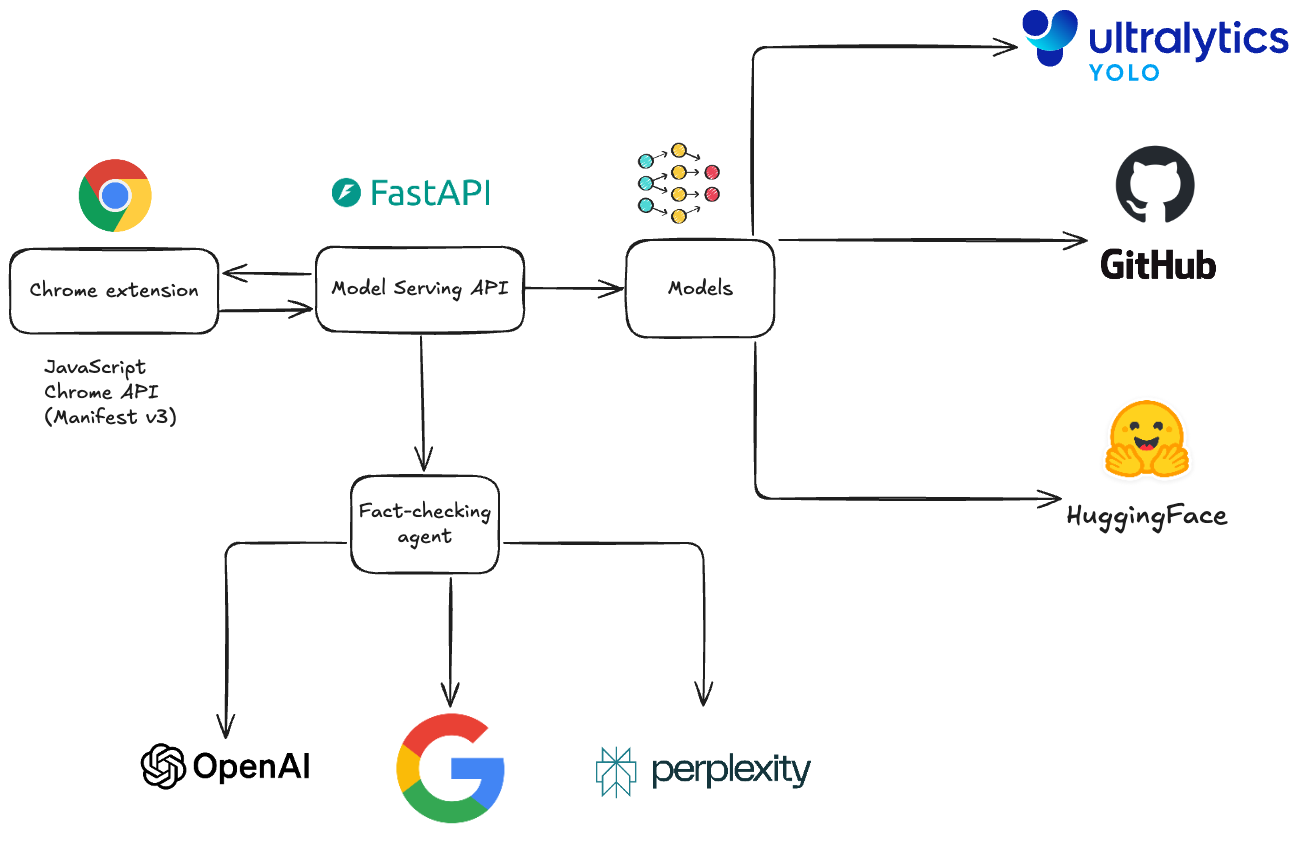
Architecture

System Architecture

Backend Components

The FastAPI backend is organized into several modules:

  • AI-Generated Text Detection: Uses a RoBERTa-based model to identify text likely generated by AI systems.
  • Fact-Checking: Leverages search engines and LLMs to verify factual claims against reliable sources.
  • Deepfake Detection: Employs multiple models to identify manipulated images and videos.

Extension Components

The browser extension provides a user-friendly interface:

  • Context Menu Integration: Right-click options for analyzing selected text or images.
  • Floating Widget: Appears when text is selected, offering analysis options.
  • Results Display: Shows analysis results in an overlay without leaving the current page.

Datasets

The models are pre-trained on these two Deepfake Detection datasets

Technologies Used

Backend

  • FastAPI: High-performance Python web framework for building APIs
  • Transformers: Hugging Face library for state-of-the-art NLP models
  • LangChain: Framework for developing applications powered by language models
  • YOLO: Object detection for identifying people in images
  • Roboflow: Cloud-based computer vision platform
  • DIRE & DFDC Models: Specialized SOTA deepfake detection models

Frontend (Extension)

  • Chrome Extension API: For browser integration
  • JavaScript: For extension functionality
  • CSS: For styling the extension UI

Why This Approach?

Multi-Model Ensemble for Deepfake Detection

We implemented multiple deepfake detection models (Roboflow, DIRE, and DFDC) and ensemble their predictions to improve accuracy. Different models excel at detecting different types of manipulations, so combining them provides more robust detection.

Two-Tier Fact-Checking

Our fact-checking system uses a two-tier approach:

  1. Generate effective search queries based on the claim
  2. Retrieve information from reliable sources and analyze it against the claim

This approach allows for more nuanced fact-checking than simple keyword matching, as it considers context and can identify partial truths or misleading statements.

Browser Extension Integration

We chose a browser extension as the frontend because:

  • It provides seamless integration with users' browsing experience
  • It allows for contextual analysis without leaving the current page
  • It can access and analyze content directly from the DOM

Setup Instructions

Backend Setup

  1. Clone the repository:

    git clone <repository-url>
    cd dl-week-2025
    
  2. Create a virtual environment and activate it:

    conda create -n venv
    conda activate venv
    
  3. Install the required dependencies:

    pip install -r fastapi-ai-agent/requirements.txt
    
  4. Set up environment variables: Create a .env file in the project root with the following variables:

    OPENAI_API_KEY=your_openai_api_key
    GOOGLE_API_KEY=your_google_api_key
    GOOGLE_CSE_ID=your_google_custom_search_engine_id
    PERPLEXITY_API_KEY=your_perplexity_api_key
    
  5. Run the FastAPI server:

    cd fastapi-ai-agent
    uvicorn src.main:app --reload
    

    The server will start at http://127.0.0.1:8000.

Extension Setup

  1. Open Chrome and navigate to chrome://extensions/
  2. Enable "Developer mode" (toggle in the top-right corner)
  3. Click "Load unpacked" and select the extension directory from the project
  4. The extension should now be installed and visible in your browser toolbar

Usage Guide

Text Analysis

  1. Select text on any webpage
  2. Either:
    • Click on the magnifying glass icon that appears and select an analysis option, or
    • Right-click and select "Detect misinformed text" or "Fact check information"
  3. View the analysis results in the overlay that appears

Image Analysis

  1. Right-click on any image on a webpage
  2. Select "Detect deepfake" from the context menu
  3. View the analysis results in the overlay that appears

API Endpoints

The backend provides the following endpoints:

  • POST /check-ai-generated/: Checks if text is AI-generated

    • Request body: {"text": "Text to analyze"}
    • Response: {"generated_score": 0.75} (score between 0-1, higher means more likely AI-generated)
  • POST /fact-check/: Checks the factual accuracy of a statement

    • Request body: {"fact": "Fact to check"}
    • Response: {"result": "TRUE/FALSE/UNVERIFIABLE with explanation and sources"}
  • POST /get_links/: Gets relevant sources for a given text

    • Request body: {"text": "Text to find sources for"}
    • Response: {"result": "List of sources with titles and URLs"}

Relevant source searching

Our system employs a dual-approach strategy for finding relevant sources to verify information:

  1. Google Search Integration: Using the Google Custom Search API, we:

    • Generate optimized search queries based on the claim using LLM-powered query formulation
    • Extract key claims from user statements to create targeted search queries
    • Retrieve multiple search results for comprehensive coverage
    • Process and analyze search results to extract relevant information
  2. Perplexity API Integration: As an alternative search method, we:

    • Leverage Perplexity's AI-powered search capabilities
    • Request specific numbers of sources from credible publications
    • Extract titles, summaries, and links from each source
    • Present organized source information to users

The system intelligently combines these approaches to provide robust source verification. When a user submits text for fact-checking:

  1. The claim is analyzed to identify key verifiable statements
  2. Multiple search queries are automatically generated to target different aspects of the claim
  3. Search results are retrieved from reliable sources
  4. The information is synthesized and compared against the original claim
  5. Sources are presented alongside the verification result, allowing users to explore the evidence

This approach ensures that users receive not just a verification result, but also the supporting evidence and sources they can review themselves.

Future Improvements

  • Add support for video deepfake detection
  • Implement user feedback mechanism to improve model accuracy
  • Add more language support for non-English content
  • Develop a dashboard for tracking misinformation trends
  • Integrate with social media platforms for wider reach

Contributing

Contributions are welcome! Please feel free to submit a Pull Request.

License

This project is licensed under the MIT License - see the LICENSE file for details.

QuangHPV/dl-week-2025

Jupyter Notebook

0

80 commits

updated Mar 1, 2025

See the code

README

CONAN - Can Outsmart Nonsense and Nonsense

Overview

This project is a comprehensive solution for detecting AI-generated content and fact-checking information on the web. It consists of two main components:

  1. FastAPI Backend: A robust API service that provides endpoints for AI-generated text detection, fact-checking, and deepfake image detection.
  2. Browser Extension: A Chrome extension that allows users to interact with the backend directly from their browser, analyzing selected text and images.

The system is designed to help users identify potentially misleading or AI-generated content while browsing the web, providing an additional layer of verification in an era of increasing synthetic media and misinformation.

Architecture

System Architecture

Backend Components

The FastAPI backend is organized into several modules:

  • AI-Generated Text Detection: Uses a RoBERTa-based model to identify text likely generated by AI systems.
  • Fact-Checking: Leverages search engines and LLMs to verify factual claims against reliable sources.
  • Deepfake Detection: Employs multiple models to identify manipulated images and videos.

Extension Components

The browser extension provides a user-friendly interface:

  • Context Menu Integration: Right-click options for analyzing selected text or images.
  • Floating Widget: Appears when text is selected, offering analysis options.
  • Results Display: Shows analysis results in an overlay without leaving the current page.

Datasets

The models are pre-trained on these two Deepfake Detection datasets

Technologies Used

Backend

  • FastAPI: High-performance Python web framework for building APIs
  • Transformers: Hugging Face library for state-of-the-art NLP models
  • LangChain: Framework for developing applications powered by language models
  • YOLO: Object detection for identifying people in images
  • Roboflow: Cloud-based computer vision platform
  • DIRE & DFDC Models: Specialized SOTA deepfake detection models

Frontend (Extension)

  • Chrome Extension API: For browser integration
  • JavaScript: For extension functionality
  • CSS: For styling the extension UI

Why This Approach?

Multi-Model Ensemble for Deepfake Detection

We implemented multiple deepfake detection models (Roboflow, DIRE, and DFDC) and ensemble their predictions to improve accuracy. Different models excel at detecting different types of manipulations, so combining them provides more robust detection.

Two-Tier Fact-Checking

Our fact-checking system uses a two-tier approach:

  1. Generate effective search queries based on the claim
  2. Retrieve information from reliable sources and analyze it against the claim

This approach allows for more nuanced fact-checking than simple keyword matching, as it considers context and can identify partial truths or misleading statements.

Browser Extension Integration

We chose a browser extension as the frontend because:

  • It provides seamless integration with users' browsing experience
  • It allows for contextual analysis without leaving the current page
  • It can access and analyze content directly from the DOM

Setup Instructions

Backend Setup

  1. Clone the repository:

    git clone <repository-url>
    cd dl-week-2025
    
  2. Create a virtual environment and activate it:

    conda create -n venv
    conda activate venv
    
  3. Install the required dependencies:

    pip install -r fastapi-ai-agent/requirements.txt
    
  4. Set up environment variables: Create a .env file in the project root with the following variables:

    OPENAI_API_KEY=your_openai_api_key
    GOOGLE_API_KEY=your_google_api_key
    GOOGLE_CSE_ID=your_google_custom_search_engine_id
    PERPLEXITY_API_KEY=your_perplexity_api_key
    
  5. Run the FastAPI server:

    cd fastapi-ai-agent
    uvicorn src.main:app --reload
    

    The server will start at http://127.0.0.1:8000.

Extension Setup

  1. Open Chrome and navigate to chrome://extensions/
  2. Enable "Developer mode" (toggle in the top-right corner)
  3. Click "Load unpacked" and select the extension directory from the project
  4. The extension should now be installed and visible in your browser toolbar

Usage Guide

Text Analysis

  1. Select text on any webpage
  2. Either:
    • Click on the magnifying glass icon that appears and select an analysis option, or
    • Right-click and select "Detect misinformed text" or "Fact check information"
  3. View the analysis results in the overlay that appears

Image Analysis

  1. Right-click on any image on a webpage
  2. Select "Detect deepfake" from the context menu
  3. View the analysis results in the overlay that appears

API Endpoints

The backend provides the following endpoints:

  • POST /check-ai-generated/: Checks if text is AI-generated

    • Request body: {"text": "Text to analyze"}
    • Response: {"generated_score": 0.75} (score between 0-1, higher means more likely AI-generated)
  • POST /fact-check/: Checks the factual accuracy of a statement

    • Request body: {"fact": "Fact to check"}
    • Response: {"result": "TRUE/FALSE/UNVERIFIABLE with explanation and sources"}
  • POST /get_links/: Gets relevant sources for a given text

    • Request body: {"text": "Text to find sources for"}
    • Response: {"result": "List of sources with titles and URLs"}

Relevant source searching

Our system employs a dual-approach strategy for finding relevant sources to verify information:

  1. Google Search Integration: Using the Google Custom Search API, we:

    • Generate optimized search queries based on the claim using LLM-powered query formulation
    • Extract key claims from user statements to create targeted search queries
    • Retrieve multiple search results for comprehensive coverage
    • Process and analyze search results to extract relevant information
  2. Perplexity API Integration: As an alternative search method, we:

    • Leverage Perplexity's AI-powered search capabilities
    • Request specific numbers of sources from credible publications
    • Extract titles, summaries, and links from each source
    • Present organized source information to users

The system intelligently combines these approaches to provide robust source verification. When a user submits text for fact-checking:

  1. The claim is analyzed to identify key verifiable statements
  2. Multiple search queries are automatically generated to target different aspects of the claim
  3. Search results are retrieved from reliable sources
  4. The information is synthesized and compared against the original claim
  5. Sources are presented alongside the verification result, allowing users to explore the evidence

This approach ensures that users receive not just a verification result, but also the supporting evidence and sources they can review themselves.

Future Improvements

  • Add support for video deepfake detection
  • Implement user feedback mechanism to improve model accuracy
  • Add more language support for non-English content
  • Develop a dashboard for tracking misinformation trends
  • Integrate with social media platforms for wider reach

Contributing

Contributions are welcome! Please feel free to submit a Pull Request.

License

This project is licensed under the MIT License - see the LICENSE file for details.