Chrome extension that helps verify misinformation instantly without having to leave your tab. Built for Techfest 2025 hackathon.
JavaScript
0
121 commits
updated Mar 9, 2025
With this Chrome extension, you can verify information online in just a few clicks, without even needing to leave your tab.
Limitations: It is important to note that AI detection is not correct 100% of the time, and due diligence is still required by the user. This is especially the case for the deepfake detection function, whose models are trained on specific datasets. While they may detect images generated by Stable Diffusion, MidJourneyV6 or Flux with a high accuracy, images generated through other models may not be flagged.
Issues: The user may experience 'cold start' delays in the deepfake detection feature, as Google Cloud Run needs to re-instantiate the FastAPI service when handling a request after a period of inactivity.
Note that the deepfake models are hosted on Google Cloud Run, which is free only until 8 June 2025. If you'd like to use this extension yourself, build a Docker image from the backend folder, push the image to Google Cloud Run, and deploy your own FastAPI instance (or simply host it locally).
git clone https://github.com/niclee1803/Verify-AI-Chrome-Extension
const apiKey = "<PERPLEXITY_API_KEY>";
Open Chrome -> Manage Extensions. Make sure developer mode is enabled. Click "Load unpacked" (at the top left).
Load the "extension" directory.
Right click on any highlighted text/image in your browser. You should see a "Verify Claim"/"Detect Deepfake" option in the menu.

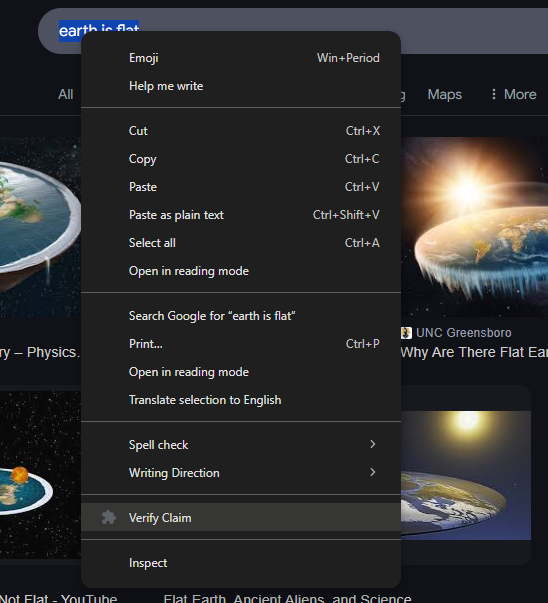
Right click on highlighted text
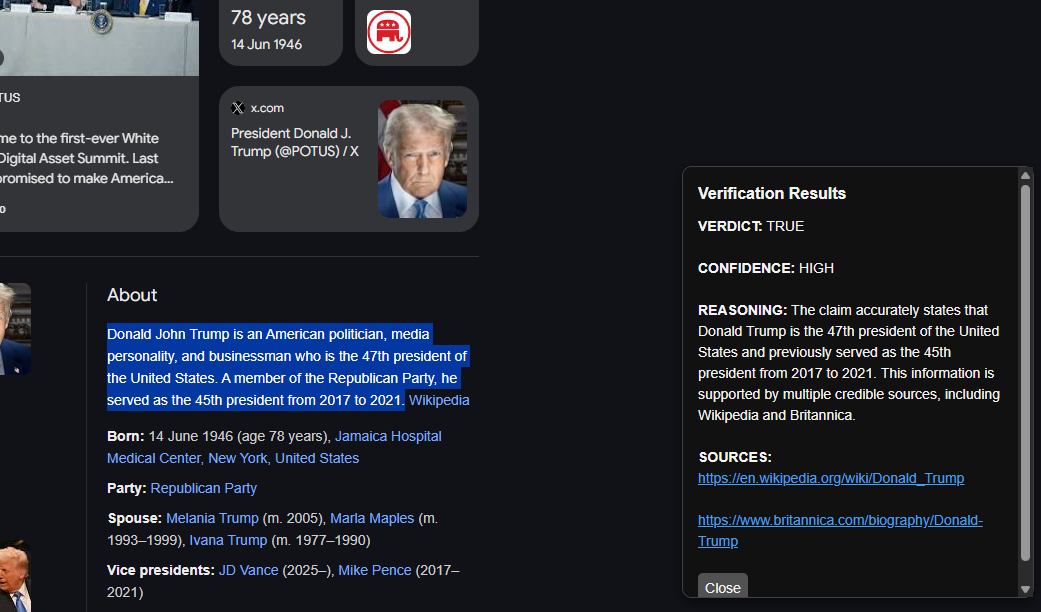
Fake news detection feature
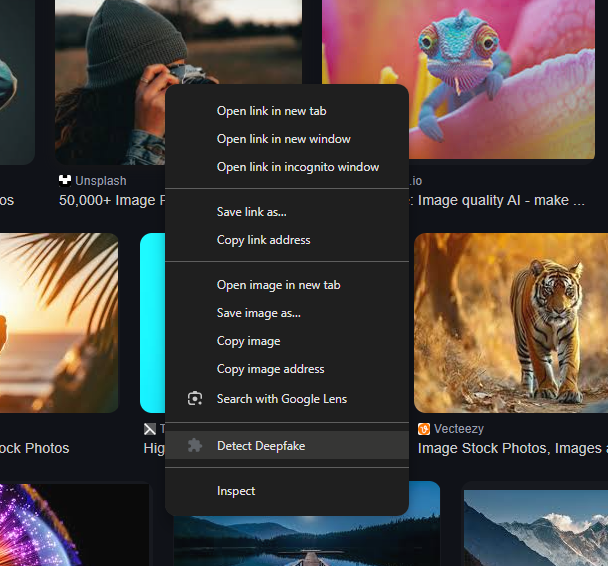
Right click on image
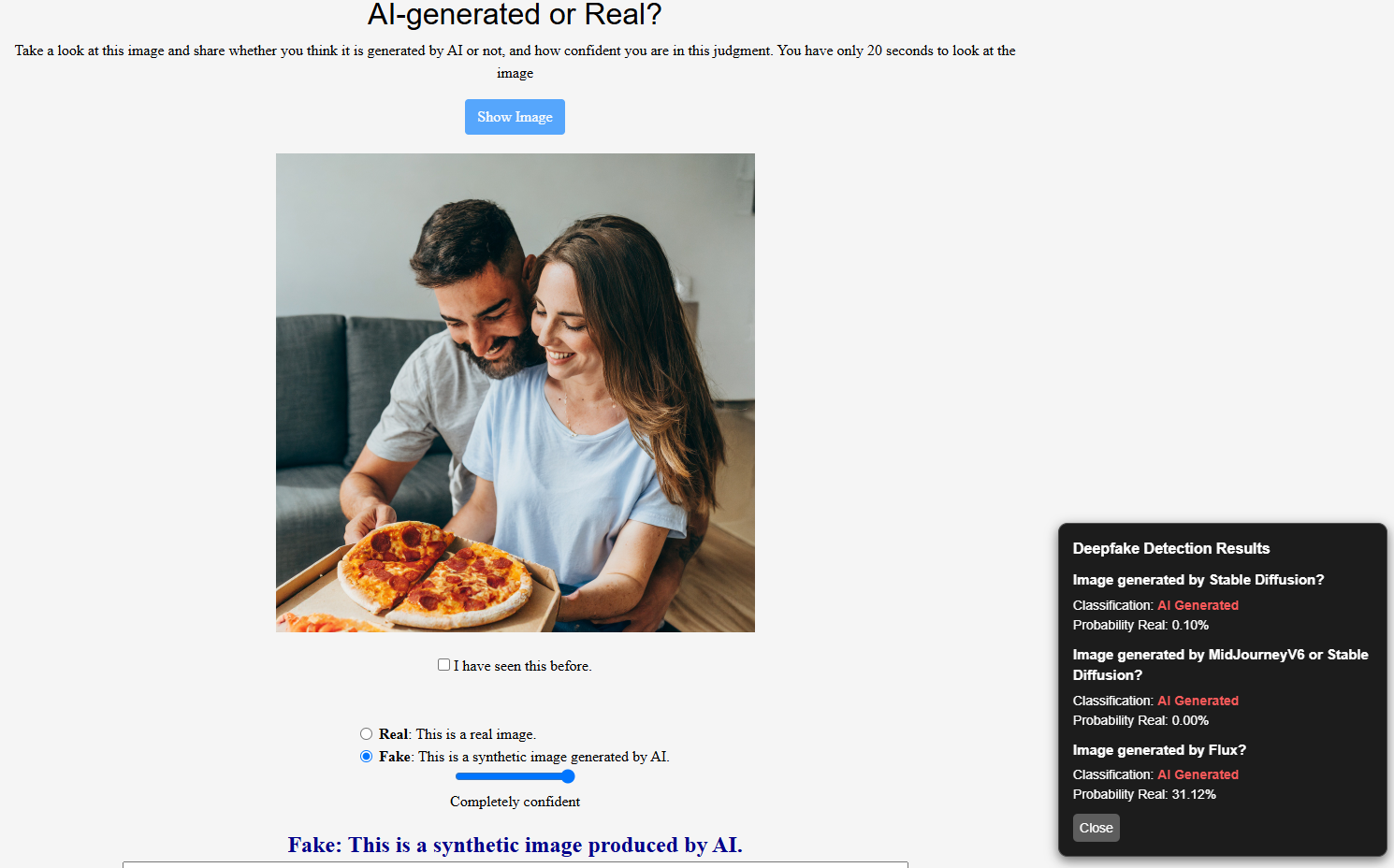
Deepfake detection feature
Chrome extension that helps verify misinformation instantly without having to leave your tab. Built for Techfest 2025 hackathon.
JavaScript
0
121 commits
updated Mar 9, 2025
With this Chrome extension, you can verify information online in just a few clicks, without even needing to leave your tab.
Limitations: It is important to note that AI detection is not correct 100% of the time, and due diligence is still required by the user. This is especially the case for the deepfake detection function, whose models are trained on specific datasets. While they may detect images generated by Stable Diffusion, MidJourneyV6 or Flux with a high accuracy, images generated through other models may not be flagged.
Issues: The user may experience 'cold start' delays in the deepfake detection feature, as Google Cloud Run needs to re-instantiate the FastAPI service when handling a request after a period of inactivity.
Note that the deepfake models are hosted on Google Cloud Run, which is free only until 8 June 2025. If you'd like to use this extension yourself, build a Docker image from the backend folder, push the image to Google Cloud Run, and deploy your own FastAPI instance (or simply host it locally).
git clone https://github.com/niclee1803/Verify-AI-Chrome-Extension
const apiKey = "<PERPLEXITY_API_KEY>";
Open Chrome -> Manage Extensions. Make sure developer mode is enabled. Click "Load unpacked" (at the top left).
Load the "extension" directory.
Right click on any highlighted text/image in your browser. You should see a "Verify Claim"/"Detect Deepfake" option in the menu.
Right click on highlighted text
Fake news detection feature
Right click on image
Deepfake detection feature



