An importable Extension for Browsers that scans and categorizes web page content into ai generated and not ai generated content. Models run in the browser or you can bring your own model :)
JavaScript
1
104 commits
updated Oct 14, 2026
Browser extension that checks paragraphs of text on web pages for signs of AI – right in your browser, without your texts ever leaving your computer.
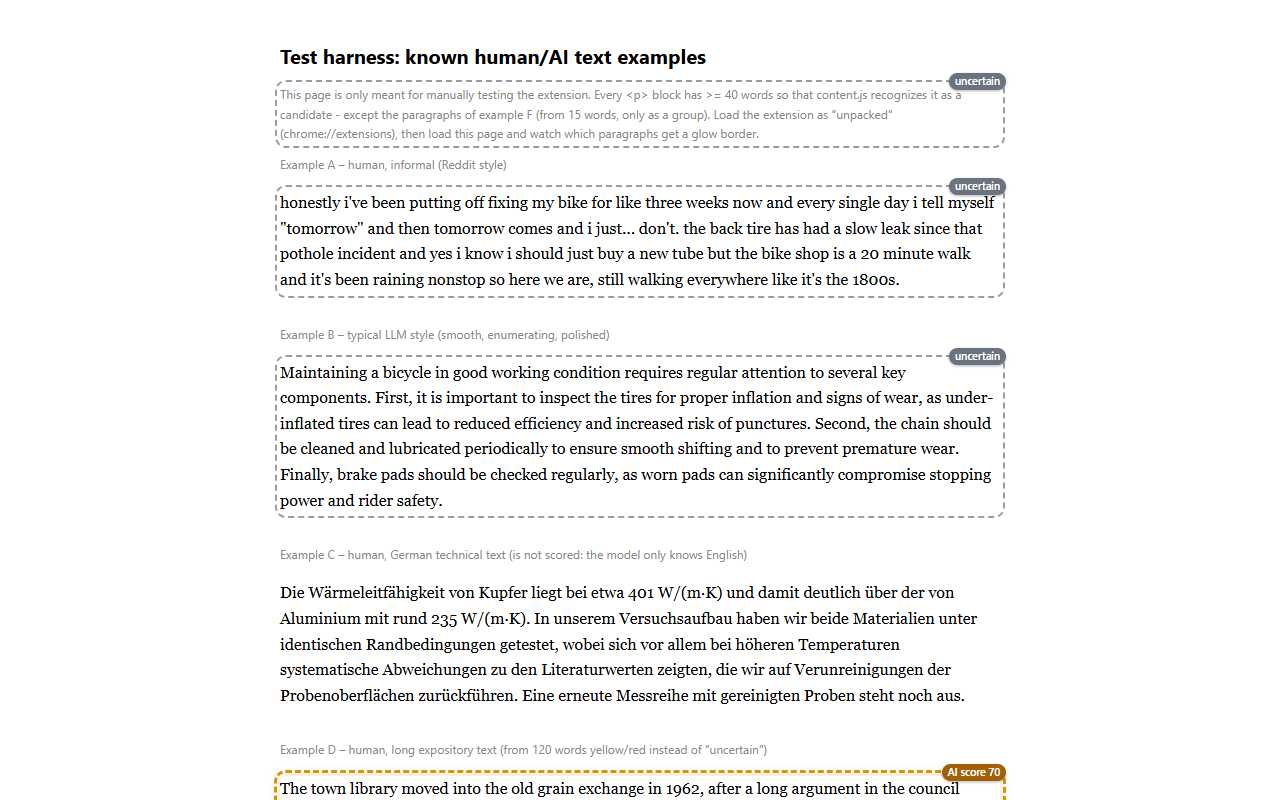
Longer paragraphs are scored with an AI-text classifier and marked with a traffic light:
| Marker | Meaning |
|---|---|
| 🟢 green, thin border | not flagged – checked, not detected as AI |
| 🟡 yellow, dashed | unclear |
| 🔴 red, heavy border | flagged – resembles AI text |
| ⚪ gray, "uncertain" | too short for a reliable verdict |
Plus an AI score from 0–100. The borders are distinguishable even without color perception.
[!IMPORTANT] A hint, not proof. The score is not a probability. Texts written by humans are also sometimes marked red – especially short, translated or heavily edited ones. Please do not accuse anyone of using AI based on this marker alone.
The extension was built from the start so that you do not have to give anything away:
Alt+Shift+A stops all processing.Optionally, instead of the browser model you can use your own server, a cloud service or the Hugging Face Inference API. Only then are paragraphs (up to 2000 characters) sent to that service – the settings show this clearly before anything is sent.
Full privacy policy: extension/privacy.html (also linked in
the extension's settings).
The extension is offered only here via GitHub, not via the Chrome Web Store. It runs in Chrome, Edge, Brave and other Chromium browsers.
ai-content-flag-<version>.zip.Documents\AI Content Flag).
Do not delete it – the browser loads the extension from this folder.chrome://extensions (Edge: edge://extensions) in the
address bar.manifest.json).Afterwards the guided setup page opens (choose a model, when to scan, try it on two sample texts).
[!NOTE] Because the extension does not come from a store, the browser shows the words "Developer mode" and does not update it automatically. This is normal for installations from GitHub.
In the settings, choose a model and click "Download". It is loaded once from Hugging Face (no account, no token needed) and then stays stored in the browser.
| Model | Download | What for |
|---|---|---|
| Accurate (desklib) – default | 1.7 GB, reduced to ~475 MB in the browser | best accuracy, fewest false alarms, ~1 s per paragraph |
| Balanced (fakespot) | 125 MB | good compromise |
| Fast (TMR) | 126 MB | very fast, but significantly more false alarms |
Tip: With a slow connection or little disk space, start with "Balanced".
chrome://extensions, click the reload arrow ↻ on AI Content Flag.Settings, the downloaded model and stored scores are kept as long as the folder stays the same. Anyone who removes the extension and reloads it from a different folder starts from scratch.
Approve a page: On a web page, click the extension icon and turn on the switch "Scan this site automatically". From then on the page is checked when you visit it. Alternatively, "Scan page now" once.
Check a single passage: Select text → right-click → "Check selected text for AI"
(or Alt+Shift+C). Without a selection: right-click a paragraph → "Check this paragraph for
AI". This works everywhere, even on pages that have not been approved.
View details: Click the score badge of a marked paragraph.
Find marked paragraphs on a long page: Open the popup and click the "flagged" or "unclear" tile – each click jumps to the next paragraph of that level (shown as "2 / 5") and highlights it briefly.
Keyboard shortcuts
| Shortcut | Action |
|---|---|
Alt+Shift+A | extension on / off |
Alt+Shift+S | scan the current page now |
Alt+Shift+C | check selected text |
Changeable under chrome://extensions/shortcuts.
Scan mode (in the settings): only on button press, on selected sites (default) or on all sites. The blocklist for sensitive sites applies in every mode; your own entries and exceptions can be set in the settings or via "Never scan here" in the popup.
Why not in the Chrome Web Store? The extension is deliberately distributed directly as an open-source project. The code you install is exactly the code in this repository.
Is Developer mode dangerous? It only allows loading extensions from a folder. Install extensions this way only from sources you trust – with this project you can check the source code yourself.
How do I get rid of the extension and all data again?
Click "Remove" under chrome://extensions. The browser deletes all locally
stored data of the extension, including the model. Afterwards you can delete the folder.
Can I use my own model or my own server?
Yes – see DEVELOPMENT.md and server/README.md.
Please report false alarms or problems as an issue.
Build, tests, architecture and measurement results: DEVELOPMENT.md.
Open items: TODO.md.
The code is under the MIT license. Excluded are the bundled blocklist
(extension/generated/blocklist.js) and the reference set (extension/bg/reference-set.js), which
are under CC BY-SA 4.0. Sources and licenses of all third-party components:
extension/THIRD_PARTY_NOTICES.md.
An importable Extension for Browsers that scans and categorizes web page content into ai generated and not ai generated content. Models run in the browser or you can bring your own model :)
JavaScript
1
104 commits
updated Oct 14, 2026
Browser extension that checks paragraphs of text on web pages for signs of AI – right in your browser, without your texts ever leaving your computer.
Longer paragraphs are scored with an AI-text classifier and marked with a traffic light:
| Marker | Meaning |
|---|---|
| 🟢 green, thin border | not flagged – checked, not detected as AI |
| 🟡 yellow, dashed | unclear |
| 🔴 red, heavy border | flagged – resembles AI text |
| ⚪ gray, "uncertain" | too short for a reliable verdict |
Plus an AI score from 0–100. The borders are distinguishable even without color perception.
[!IMPORTANT] A hint, not proof. The score is not a probability. Texts written by humans are also sometimes marked red – especially short, translated or heavily edited ones. Please do not accuse anyone of using AI based on this marker alone.
The extension was built from the start so that you do not have to give anything away:
Alt+Shift+A stops all processing.Optionally, instead of the browser model you can use your own server, a cloud service or the Hugging Face Inference API. Only then are paragraphs (up to 2000 characters) sent to that service – the settings show this clearly before anything is sent.
Full privacy policy: extension/privacy.html (also linked in
the extension's settings).
The extension is offered only here via GitHub, not via the Chrome Web Store. It runs in Chrome, Edge, Brave and other Chromium browsers.
ai-content-flag-<version>.zip.Documents\AI Content Flag).
Do not delete it – the browser loads the extension from this folder.chrome://extensions (Edge: edge://extensions) in the
address bar.manifest.json).Afterwards the guided setup page opens (choose a model, when to scan, try it on two sample texts).
[!NOTE] Because the extension does not come from a store, the browser shows the words "Developer mode" and does not update it automatically. This is normal for installations from GitHub.
In the settings, choose a model and click "Download". It is loaded once from Hugging Face (no account, no token needed) and then stays stored in the browser.
| Model | Download | What for |
|---|---|---|
| Accurate (desklib) – default | 1.7 GB, reduced to ~475 MB in the browser | best accuracy, fewest false alarms, ~1 s per paragraph |
| Balanced (fakespot) | 125 MB | good compromise |
| Fast (TMR) | 126 MB | very fast, but significantly more false alarms |
Tip: With a slow connection or little disk space, start with "Balanced".
chrome://extensions, click the reload arrow ↻ on AI Content Flag.Settings, the downloaded model and stored scores are kept as long as the folder stays the same. Anyone who removes the extension and reloads it from a different folder starts from scratch.
Approve a page: On a web page, click the extension icon and turn on the switch "Scan this site automatically". From then on the page is checked when you visit it. Alternatively, "Scan page now" once.
Check a single passage: Select text → right-click → "Check selected text for AI"
(or Alt+Shift+C). Without a selection: right-click a paragraph → "Check this paragraph for
AI". This works everywhere, even on pages that have not been approved.
View details: Click the score badge of a marked paragraph.
Find marked paragraphs on a long page: Open the popup and click the "flagged" or "unclear" tile – each click jumps to the next paragraph of that level (shown as "2 / 5") and highlights it briefly.
Keyboard shortcuts
| Shortcut | Action |
|---|---|
Alt+Shift+A | extension on / off |
Alt+Shift+S | scan the current page now |
Alt+Shift+C | check selected text |
Changeable under chrome://extensions/shortcuts.
Scan mode (in the settings): only on button press, on selected sites (default) or on all sites. The blocklist for sensitive sites applies in every mode; your own entries and exceptions can be set in the settings or via "Never scan here" in the popup.
Why not in the Chrome Web Store? The extension is deliberately distributed directly as an open-source project. The code you install is exactly the code in this repository.
Is Developer mode dangerous? It only allows loading extensions from a folder. Install extensions this way only from sources you trust – with this project you can check the source code yourself.
How do I get rid of the extension and all data again?
Click "Remove" under chrome://extensions. The browser deletes all locally
stored data of the extension, including the model. Afterwards you can delete the folder.
Can I use my own model or my own server?
Yes – see DEVELOPMENT.md and server/README.md.
Please report false alarms or problems as an issue.
Build, tests, architecture and measurement results: DEVELOPMENT.md.
Open items: TODO.md.
The code is under the MIT license. Excluded are the bundled blocklist
(extension/generated/blocklist.js) and the reference set (extension/bg/reference-set.js), which
are under CC BY-SA 4.0. Sources and licenses of all third-party components:
extension/THIRD_PARTY_NOTICES.md.



