A free, local AI image generation studio for Apple Silicon Macs. Run FLUX.2, Krea 2, Z-Image-Turbo, Qwen-Image-2.1-Turbo and SDXL offline on your Mac .
See the code
Beta — v0.3.8 · a local-first image generation studio for Apple Silicon
https://www.diffusionbear.com --- https://www.diffusionbear.com/discord
DiffusionBear runs open-weight diffusion models on your own Mac. Generation,
prompt enhancement, LoRA management and the gallery all happen on the machine in
front of you: the API listens on 127.0.0.1 (8001, stepping up by 1024 if
something else already owns it), model weights are fetched once
into a local store, and nothing is uploaded anywhere. No account, no cloud, no
per-image billing.
It is built on Apple's MLX framework, so it is Apple Silicon only. There is no CUDA or CPU path, and there is not going to be one — MLX is macOS/Metal exclusive.
Formerly called MLX-Diffusion; renamed in October 2026. The old repository URL still redirects, and old search traffic still lands here.
Beta, honestly. This is the public beta of a one-person project. The core path — FLUX.2-klein and the SDXL engines — is the most used and the most tested. Engines marked experimental in the app (Qwen-Image 2.1) are unsupported previews: they can be slow, and Qwen needs roughly 5 GB of free memory before it starts, so it fails on a busy 16 GB machine. Bug reports and issues are welcome.
Made by Ouinche — heavily coded by AI (Gemini, 0xAlpha, Big Pickle) — released under the MIT licence.
The compiled macOS app is the main thing this project produces. DiffusionBear.app
is self-contained: it bundles the FastAPI backend, two relocatable Python runtimes
and the compiled single-page UI, and serves both the API and the interface from
127.0.0.1. There is nothing to install — no Python, no Node, no virtual
environments on your side.
| Detail | |
|---|---|
| Requires | An Apple Silicon Mac, macOS 26.2 or later, 16 GB unified memory recommended. The floor is derived from the minos of the Mach-O binaries in the bundle (libmlx.dylib, core.cpython-310-darwin.so) rather than hardcoded, so the plist can no longer understate it. |
| First launch | The app is ad-hoc signed, not notarised with an Apple Developer ID. macOS will therefore block a plain double-click the first time — right-click the app → Open to get past Gatekeeper. |
| Your files | Settings, gallery, LoRA registry and model store live in ~/Library/Application Support/DiffusionBear, never inside the app bundle. To put the store on another volume, write an absolute path into ~/Library/Application Support/DiffusionBear/store_path; a store path can be shared by several installs. |
| Model weights | Not bundled. They are downloaded on first use from Hugging Face or Civitai into that store — a few GB for the first model. After that the app works fully offline. |

⬇ Download DiffusionBear 0.3.8 for macOS (Apple Silicon) — 482 MB, from the v0.3.8 release.
DiffusionBear.app into /Applications.shasum -a 256 DiffusionBear-0.3.8-arm64.zip, compared
against the ALL_SHA256SUMS
published beside it.Prefer to build it yourself? Build it from packaging/ — it
is three scripts and no decisions to make.
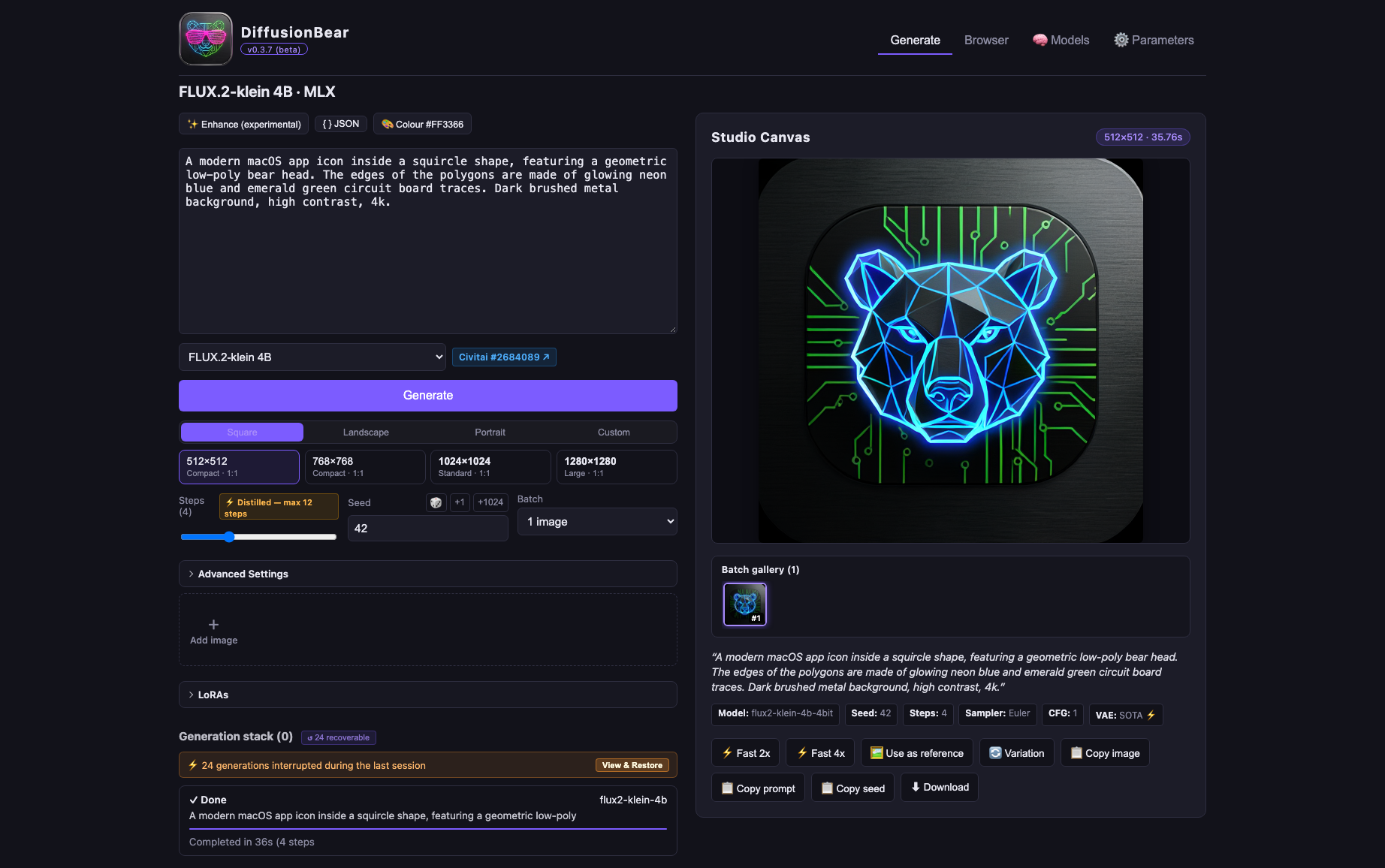
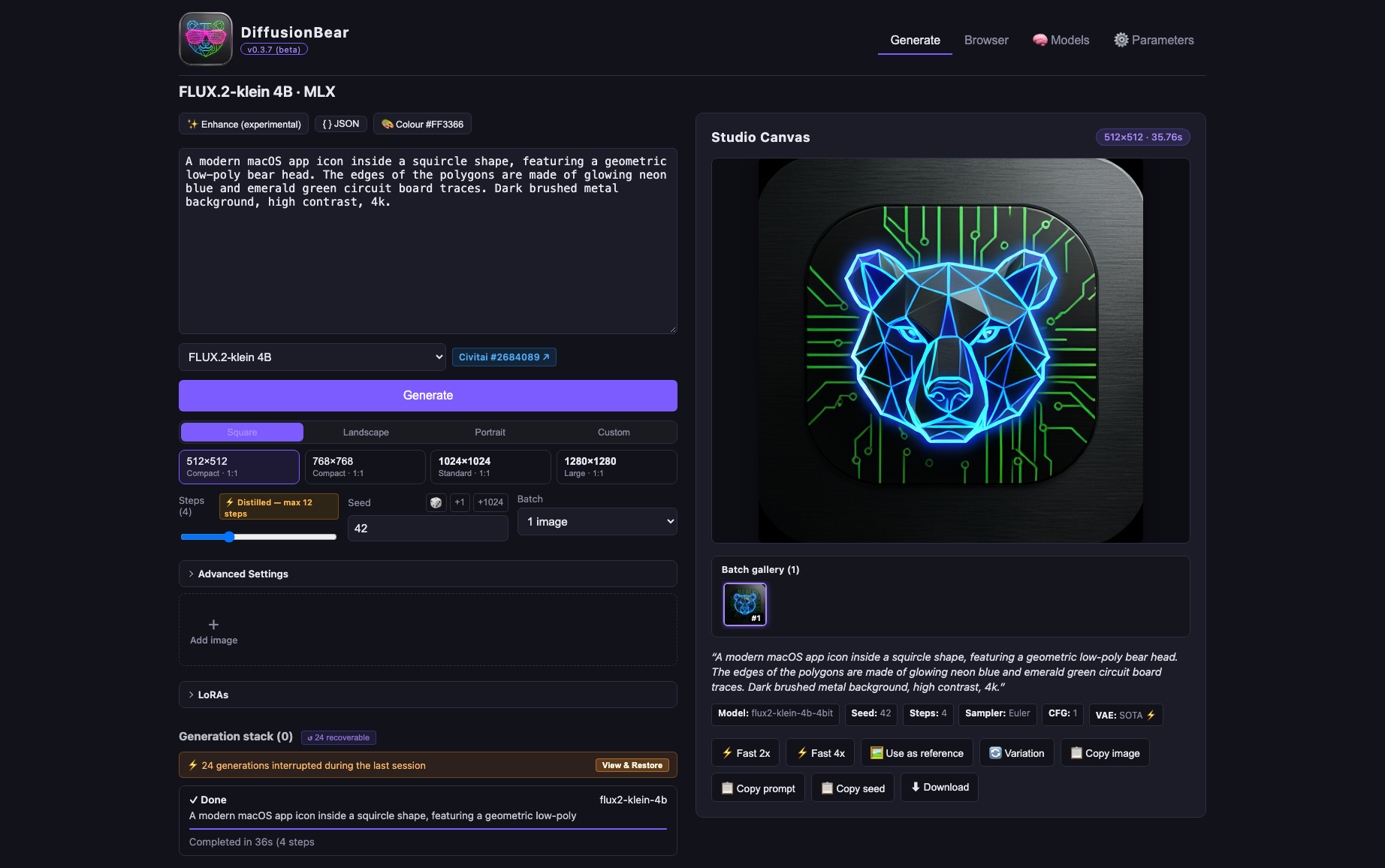
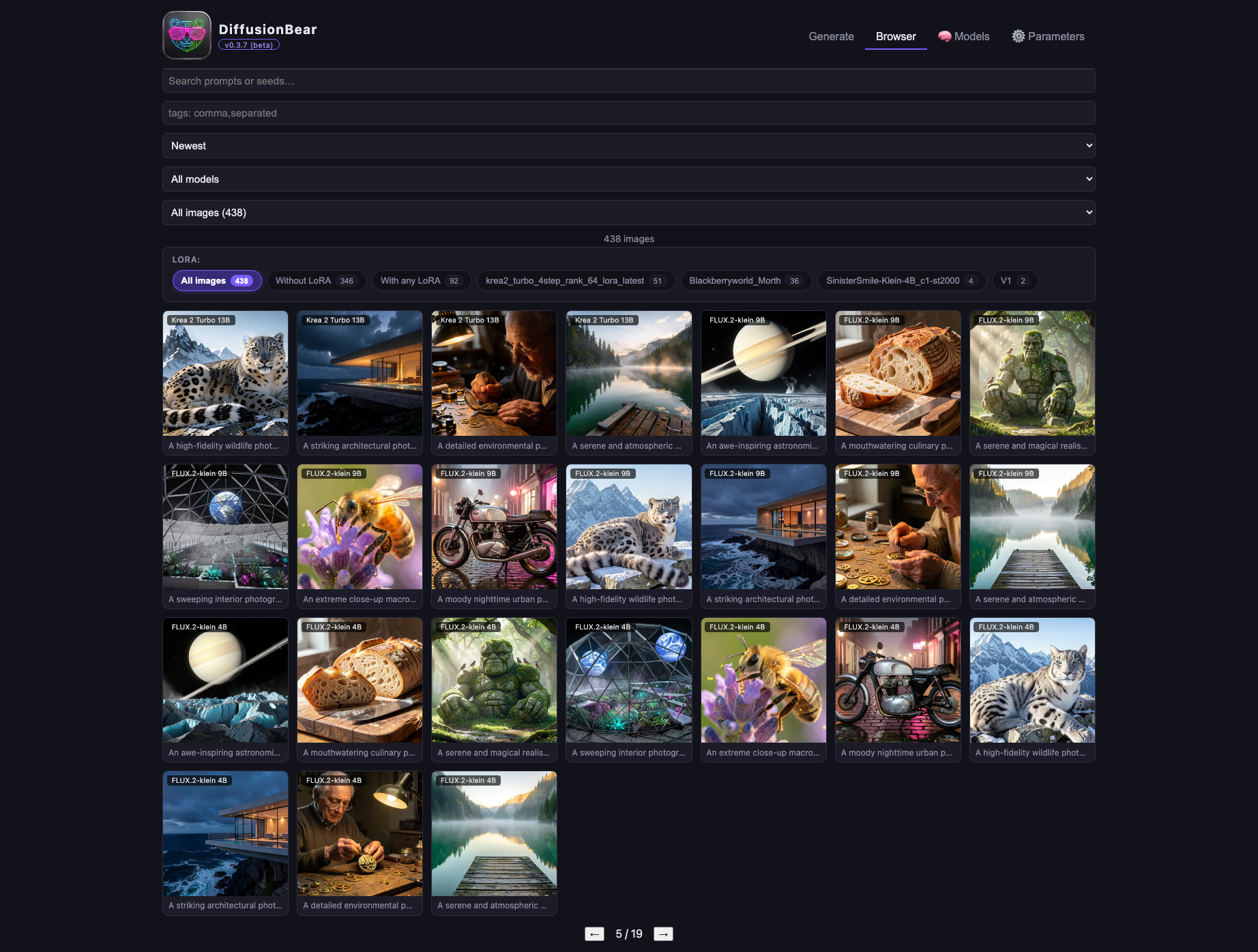
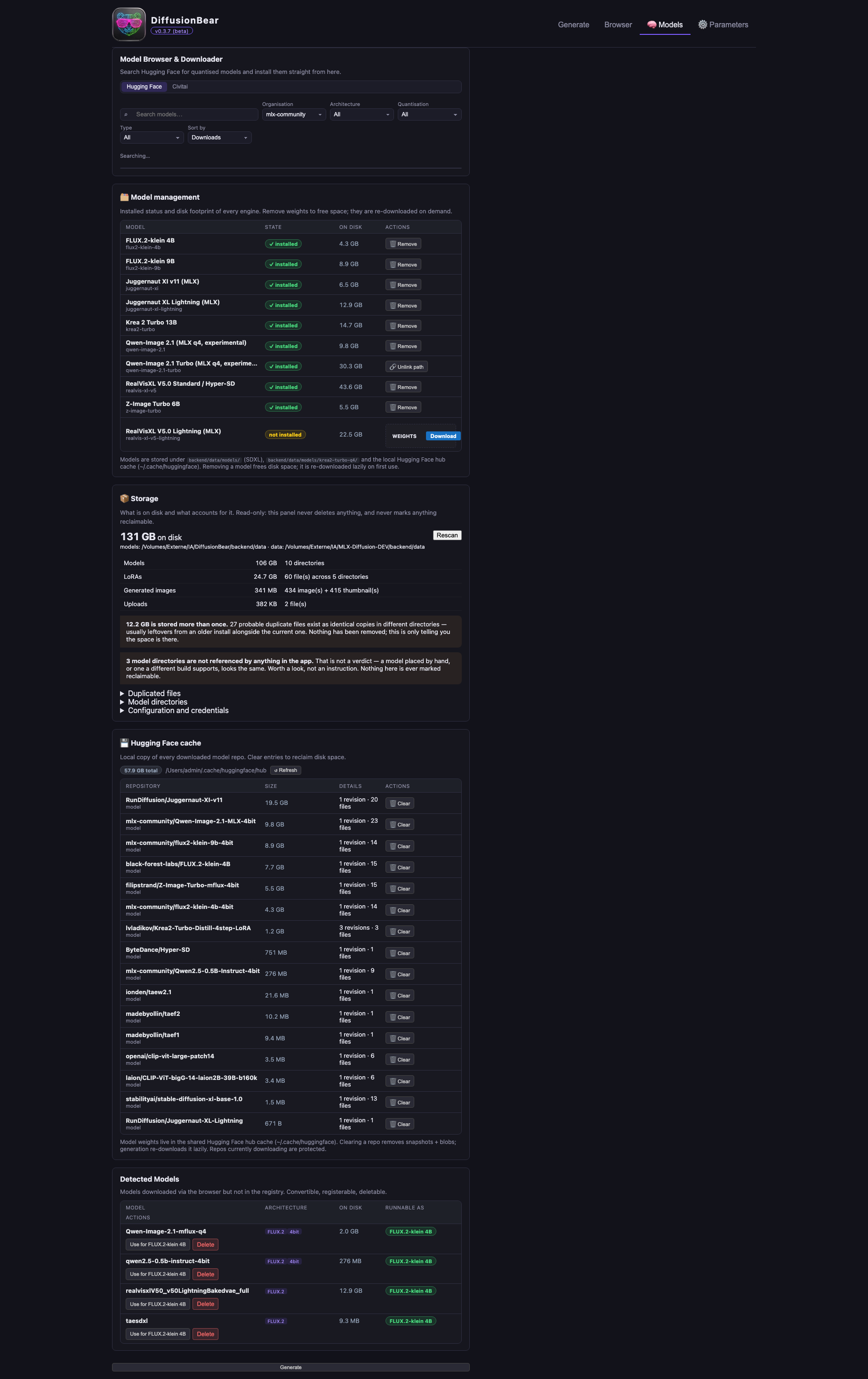
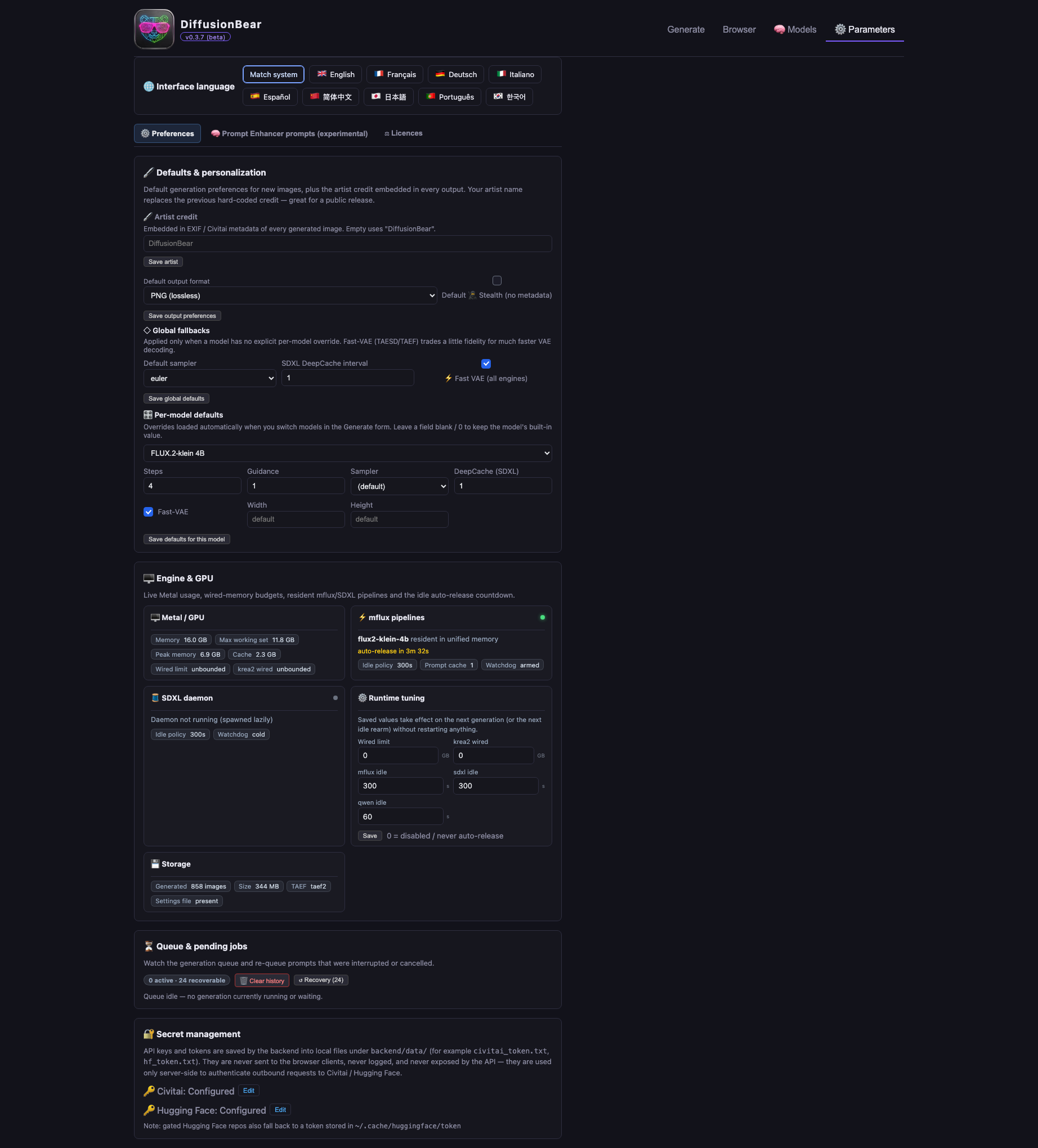
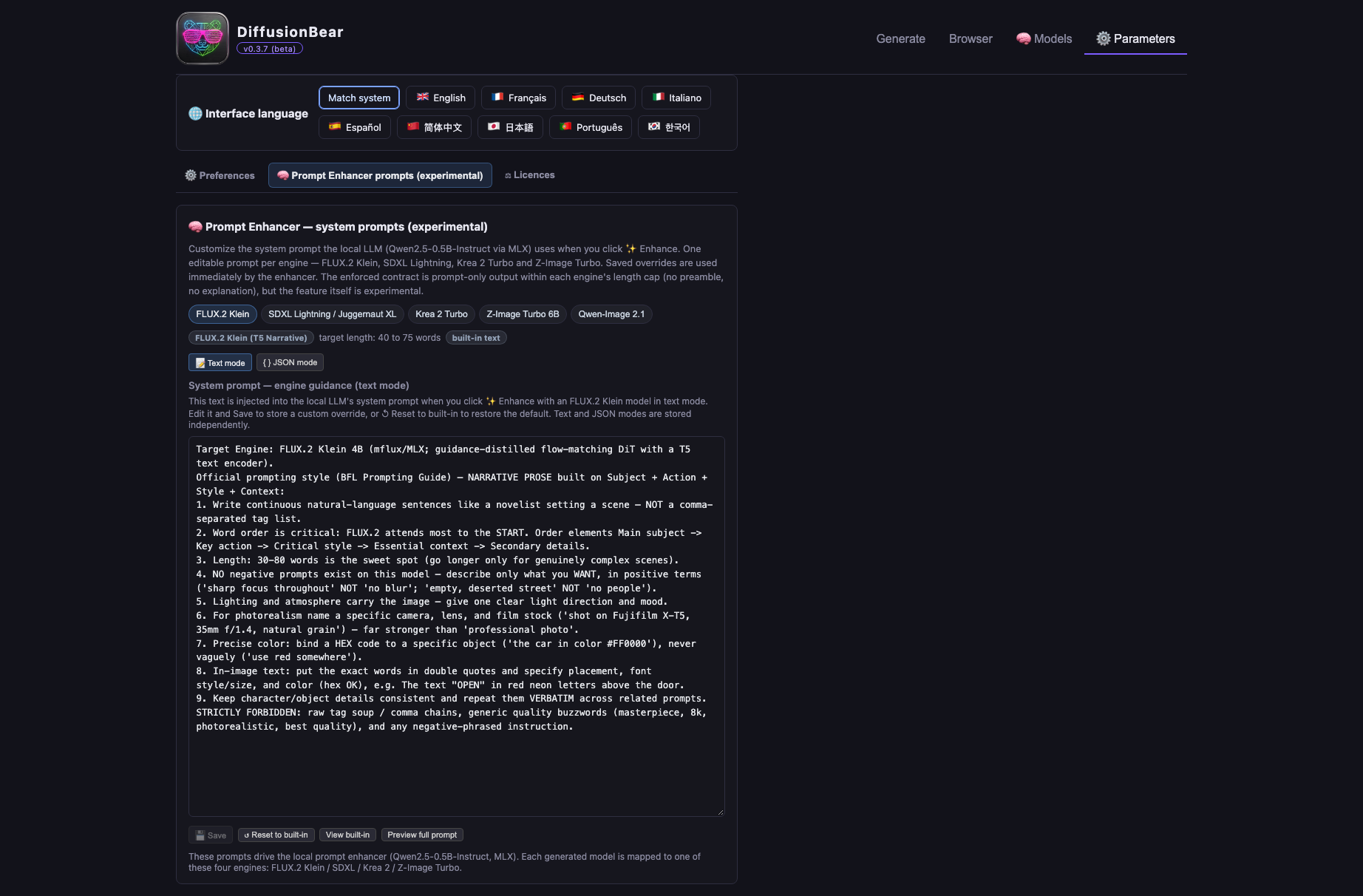
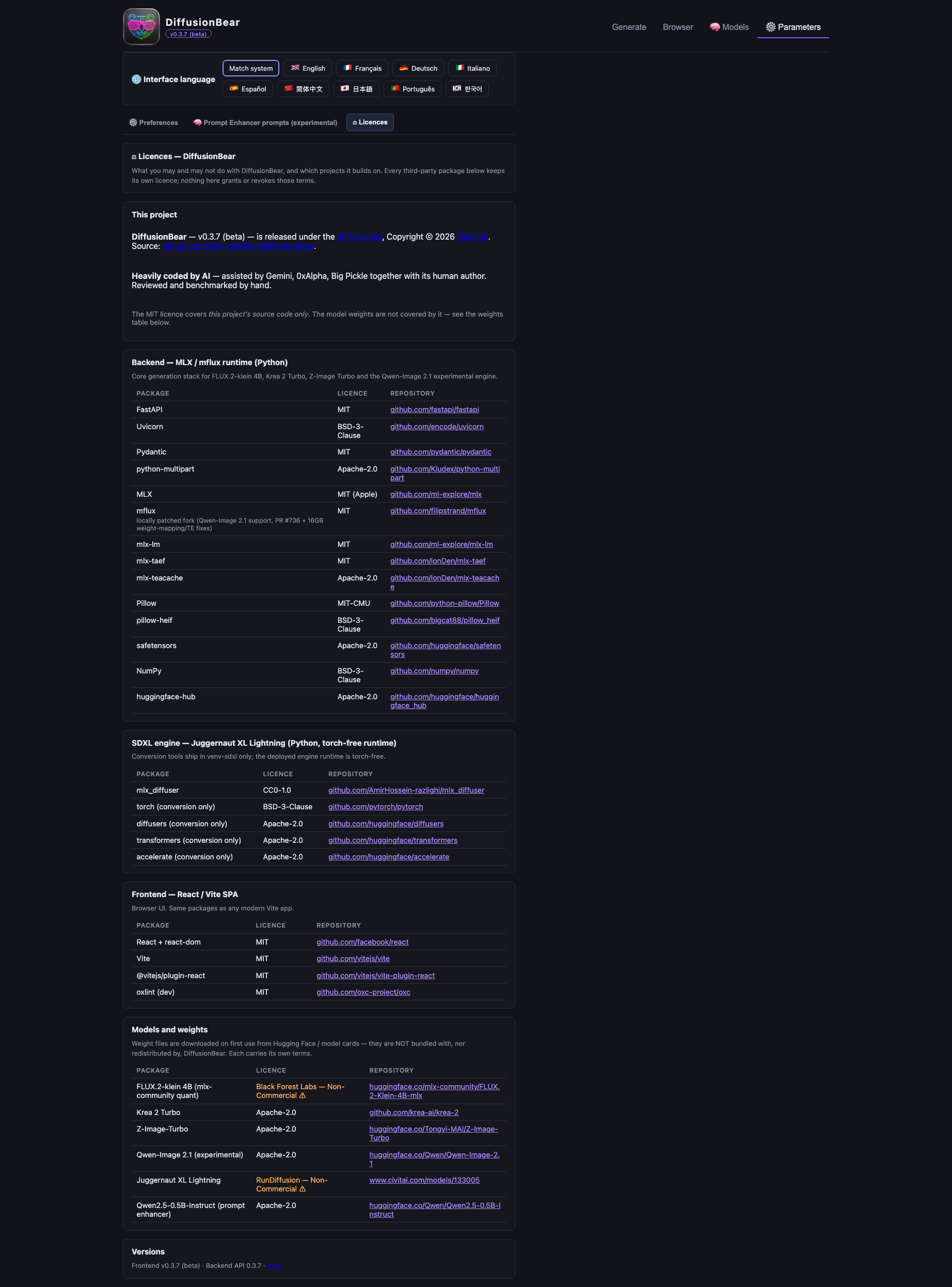
Captured from v0.3.8 on a MacBook Pro (Apple M1, 16 GB), running against a live backend — not mock-ups.
| Generate | Browser |
|---|---|
 |  |
| Models | Parameters |
|---|---|
 |  |
| Prompt enhancer | Licences |
|---|---|
 |  |
Models — find them, get them, make them runnable
text_model.* key naming and the slow tokenizer's missing vocab.json /
merges.txt.model_index, a stale .incomplete download) is reported as not runnable
rather than as ready.Generating
Image 1, Image 2, … ; Z-Image, Krea 2 and Qwen take one.Prompt enhancement
LoRAs
.safetensors in, or import from Civitai
with progress and cancel. FLUX.2 and SDXL formats are both supported, and SDXL
adapters stack by rank-concat. Trigger words become clickable chips in the
prompt box.Your library
tEXt + EXIF, so the exact checkpoint and
LoRAs are recognised automatically if you upload the image. A stealth mode
omits all of it.Nine checkpoints across five families, all quantised to 4-bit and memory-tuned for 16 GB of unified memory. Switching engine swaps weights on demand rather than keeping everything resident.
| Model | Family | Default steps | Notes |
|---|---|---|---|
| FLUX.2-klein 4B | FLUX.2 | 4 | Up to 10 reference images, LoRA, guidance. No negative prompt (guidance-distilled). |
| FLUX.2-klein 9B | FLUX.2 | 4 | Same capabilities, roughly twice the cost per image. |
| Z-Image Turbo 6B | Z-Image | 6 | One reference image, LoRA. No guidance or negative prompt. |
| Krea 2 Turbo 13B | Krea 2 | 8 | One reference image, LoRA. At 4 steps the app auto-loads the Krea distilled 4-step LoRA, so 4 and 8 steps are two different pipelines, not one model at two budgets. |
| Qwen-Image 2.1 | Qwen-Image | 25 | Experimental. One reference image, negative prompts supported, no LoRA. Needs ~5 GB free memory; its bf16 VAE decode can exhaust Metal on a busy 16 GB machine. |
| Juggernaut XL Lightning | SDXL | 4 | Distilled 4-step + TAESD decode — the fastest combo here. Sampler picker, negative prompts, DeepCache. |
| RealVisXL V5.0 Lightning | SDXL | 6 | As above, distilled 6-step. |
| RealVisXL V5.0 (Hyper-SD) | SDXL | 25 | Base checkpoint with an 8-step Hyper-SD draft preset. |
| Juggernaut XI v11 (Hyper-SD) | SDXL | 25 | Base checkpoint with an 8-step Hyper-SD draft preset. |
Every part of the pipeline runs from your Mac's own memory:
mflux for the flow-matching
models, a native MLX SDXL daemon for the SDXL checkpoints). Weights are 4-bit so
a 4–13 B parameter model fits the 16 GB unified memory of an M1 MacBook Pro.Unified memory is why this works at all on a 16 GB machine: the CPU and GPU share one pool, so a quantised model stays resident with no CPU↔GPU copying — which is exactly what MLX is built to exploit.
No account is needed to generate. Two optional tokens make downloads smoother:
| Token | Why it helps | Where |
|---|---|---|
| Civitai API key | Resumable LoRA and checkpoint downloads; some model versions are auth-gated | Settings → Tokens, or env CIVITAI_API_KEY |
| Hugging Face token | Unlocks gated and private models, and avoids first-download rate limits | Settings → Tokens, or env HF_TOKEN (or huggingface-cli login) |
Measured on a 2021 MacBook Pro M1 (16 GB) — the reference machine this project is tuned for. This table is a September 2026 snapshot (293 timed studio generations plus an 18-run repeatability suite). Defaults have moved since — Z-Image Turbo in particular now starts at 6 steps instead of 8 — so read it as a record of that build, not as a promise about the current one.
Methodology — removing load spikes: within each model × resolution bucket the 5% fastest and 5% slowest times are excluded before computing mean and median (other Metal work on the machine routinely inflates outliers). Aborted records (<2 s) are dropped; single-sample buckets are kept as indicative only.
| Model | Resolution | Steps | n (trim) | Mean | Median | Trimmed range |
|---|---|---|---|---|---|---|
| FLUX.2-klein 4B | 512×512 | 4 | 5/7 | 45 s | 48 s | 38 – 51 s |
| FLUX.2-klein 4B | 512×768 | 4 | 2/2 | 55 s | 55 s | 54 – 56 s |
| FLUX.2-klein 4B | 768×768 | 4 | 2/2 | 1:16 min | 1:16 min | 1:14 – 1:19 min |
| FLUX.2-klein 4B | 768×1152 | 4 | 2/4 | 5:02 min | 5:02 min | 4:53 – 5:11 min |
| FLUX.2-klein 4B | 1024×1024 | 4 | 1/1 | 2:03 min | 2:03 min | — |
| FLUX.2-klein 9B | 512×768 | 4 | 1/1 | 1:51 min | 1:51 min | — |
| FLUX.2-klein 9B | 768×1152 | 4 | 4/6 | 7:14 min | 6:46 min | 4:17 – 11:04 min |
| Juggernaut XL Lightning (SDXL) | 512×512 | 4 | 2/4 | 22 s | 22 s | 10 – 33 s |
| Juggernaut XL Lightning (SDXL) | 512×768 | 4 | 25/27 | 9 s | 9 s | 9 – 11 s |
| Juggernaut XL Lightning (SDXL) | 832×1216 | 4 | 14/16 | 2:08 min | 1:57 min | 1:21 – 3:13 min |
| Juggernaut XL Lightning (SDXL) | 1024×1024 | 4 | 1/1 | 1:06 min | 1:06 min | — |
| Juggernaut XI v11 (SDXL) | 512×768 | 8 | 10/12 | 50 s | 49 s | 42 s – 1:11 min |
| Krea 2 Turbo 13B | 512×512 | 8 | 7/9 | 2:44 min | 2:44 min | 1:38 – 3:36 min |
| Krea 2 Turbo 13B | 512×768 | 4* | 41/45 | 3:41 min | 2:51 min | 1:22 – 6:40 min |
| RealVisXL V5.0 (SDXL) | 512×768 | 8 | 10/12 | 1:00 min | 55 s | 46 s – 1:21 min |
| RealVisXL V5.0 Lightning (SDXL) | 512×512 | 6 | 23/25 | 23 s | 22 s | 20 – 27 s |
| RealVisXL V5.0 Lightning (SDXL) | 512×768 | 6 | 27/29 | 33 s | 31 s | 30 – 51 s |
| RealVisXL V5.0 Lightning (SDXL) | 768×768 | 6 | 2/4 | 2:48 min | 2:48 min | 2:44 – 2:53 min |
| RealVisXL V5.0 Lightning (SDXL) | 832×1216 | 6 | 2/4 | 3:31 min | 3:31 min | 3:17 – 3:45 min |
| RealVisXL V5.0 Lightning (SDXL) | 1024×1024 | 6 | 2/2 | 1:55 min | 1:55 min | 1:53 – 1:57 min |
| Z-Image Turbo 6B | 512×512 | 8 | 46/52 | 1:42 min | 1:43 min | 1:15 – 2:13 min |
| Z-Image Turbo 6B | 512×768 | 8 | 16/18 | 2:22 min | 2:22 min | 1:57 – 2:43 min |
| Z-Image Turbo 6B | 768×768 | 8 | 3/5 | 3:49 min | 3:44 min | 3:44 – 3:59 min |
| Qwen-Image 2.1 | 512×768 | 20 | 10/10 | 7:38 min | 7:36 min | 7:10 – 8:05 min |
n (trim) = samples kept after removing the fastest/slowest 5% out of the raw
count. * 4-step Krea runs use the Krea 2 distilled 4-step LoRA. — = single-sample
bucket.
Repeatability suite (Sep 20, run under elevated system load up to ~9):
| Model | Resolution | n | Mean | Median |
|---|---|---|---|---|
| FLUX.2-klein 4B | 768×768 | 11 (9) | 1:15 min | 1:14 min |
| FLUX.2-klein 4B | 1024×1024 | 2 | 2:02 min | 2:02 min |
| Z-Image Turbo 6B | 768×768 | 2 | 2:54 min | 2:54 min |
| Juggernaut XL Lightning (SDXL) | 1024×1024 | 1 | 1:07 min | 1:07 min |
| Krea 2 Turbo 13B | 1024×1024 | 2 | 12:16 min | 12:16 min |
How to read it: Juggernaut XL Lightning at 512×768 is by far the fastest combo (median 9 s — distilled 4 steps plus a TAESD decode); Z-Image Turbo costs more than an order of magnitude as much at the same size (2:22 median), and FLUX.2-klein sits in between with the most resolution flexibility. The wide trimmed ranges on the 512×768 buckets (Krea, Z-Image, Juggernaut at 832×1216) are exactly the load spikes this methodology filters — treat medians, not means, as the stable number. The Qwen-Image 2.1 row comes from a separate controlled sweep (10 scenes, seeds 1001–1010, 20-step linear, guidance 1.0) which also confirmed its 64-channel RGBA VAE handles 512×768 on a 16 GB M1 without running out of memory.
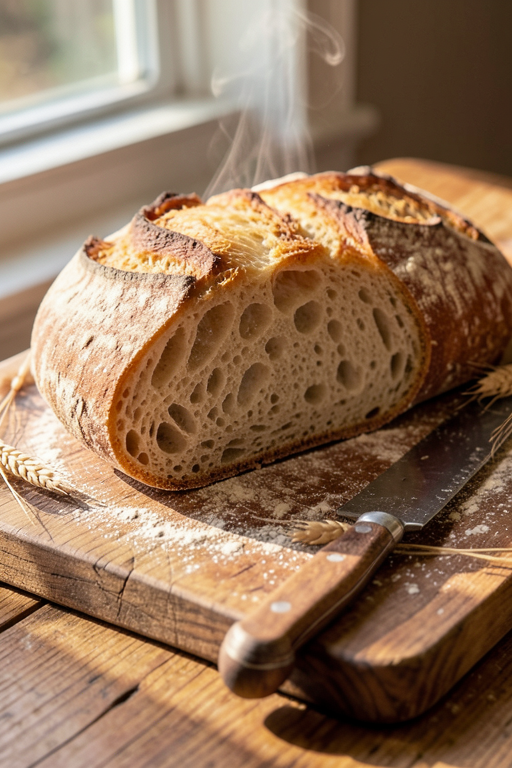
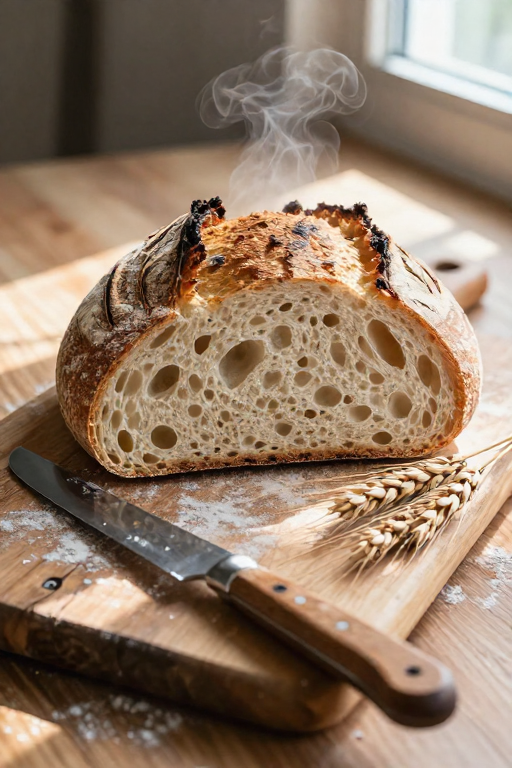
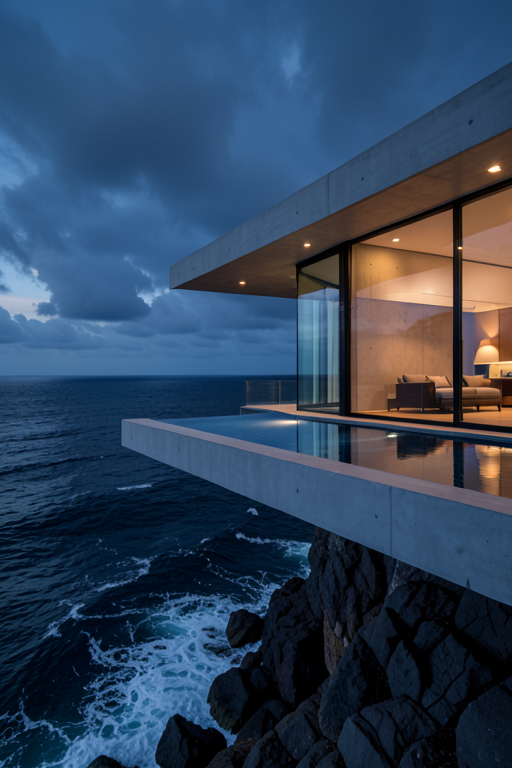
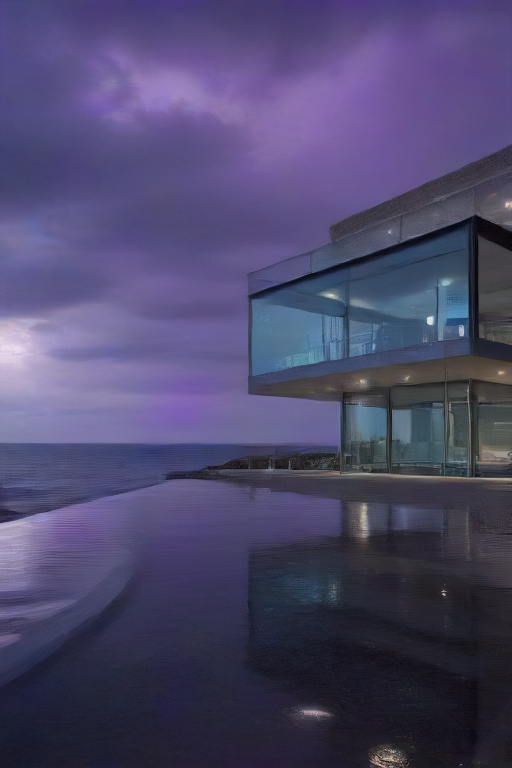
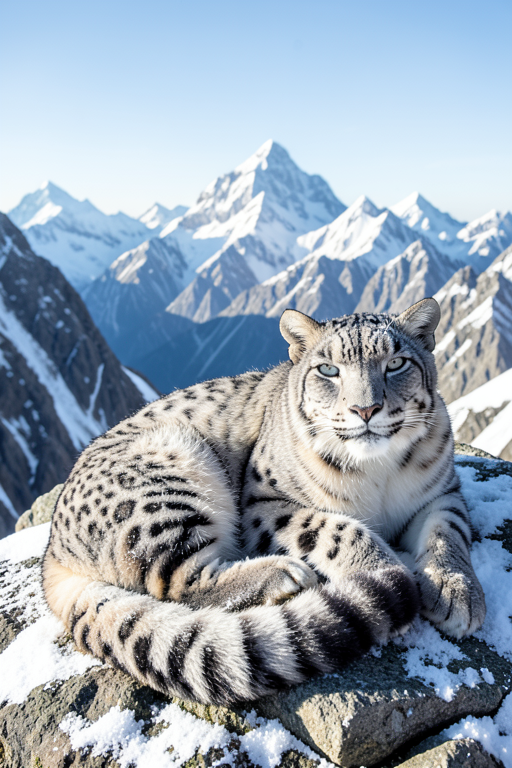
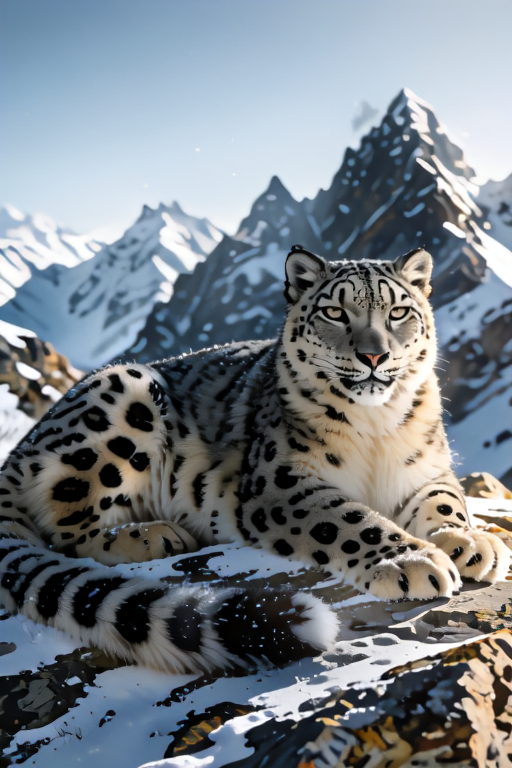
Head-to-head repeatability comparisons on original, royalty-free scenes — a sourdough loaf, a cliff villa, a snow leopard, no copyrighted characters. Each duel plays right here in the README as a muted auto-wiping divider video; for the draggable version, open ouinche.com/mlx-diffusion-yet-another-open-source-image-generator-on-apple-silicon in a browser. GitHub strips JavaScript from READMEs, so a slider cannot render on the repo page — the moving divider is the closest thing that does.
| FLUX.2-klein 4B | Z-Image Turbo 6B |
|---|---|
 |  |
| FLUX.2-klein 4B | Juggernaut XL Lightning |
|---|---|
 |  |
| FLUX.2-klein 4B | Krea 2 Turbo 13B |
|---|---|
 |  |
The bundle is assembled by three scripts, in this order:
packaging/build_runtime_venv.sh   # main runtime: Python 3.10 + mflux
packaging/build_sdxl_venv.sh      # SDXL engine runtime: Python 3.14 + mlx_diffuser
packaging/build_app.sh            # assembles and ad-hoc signs DiffusionBear.app
They write to packaging/dist/DiffusionBear.app. Install it with a copy, not
ditto (see the note at the end of build_app.sh):
rm -rf /Applications/DiffusionBear.app
cp -R packaging/dist/DiffusionBear.app /Applications/
Two things worth knowing before you touch these scripts. The runtimes are
python-build-standalone
interpreters, not a copy of venv/ — a repo venv points at a Homebrew install
and is not relocatable, which is precisely what breaks inside a bundle. And
build_app.sh audits the result and fails the build if it finds model weights,
credential-shaped files, or unexpected large files outside the runtimes; if it
complains, do not ship the bundle.
If you would rather run it from a checkout than install the app — for development, or to read it — the source is the whole thing and there are two ways to launch it.
Requirements: an Apple Silicon Mac (16 GB+ recommended), Python 3.10 and Python 3.14, Node.js 18+.
git clone https://github.com/OuincheWinch/DiffusionBear.git
cd DiffusionBear
Both virtual environments are required: venv/ for the main engine,
venv-sdxl/ for the isolated SDXL engine.
python3 -m venv venv
python3 -m venv venv-sdxl

./venv/bin/python -m pip install -r backend/requirements.txt
./venv-sdxl/bin/python -m pip install -r backend/requirements-sdxl.txt

cd frontend && npm install && cd ..
Then launch everything — backend, frontend and browser:
./run.sh
run.sh starts FastAPI on 8001, Vite on 5174, opens the UI, and keeps the
Mac awake with caffeinate during long renders. CTRL+C stops everything. The
first generation downloads the model weights once (a few GB into the Hugging Face
cache); after that it runs offline.
Ports 8001 and 5174 are deliberate. 8000 and 5173 belong to other tools on the author's machine. Do not "fix" them.
Launch the backend with
./venv/bin/python -m uvicorn …, never./venv/bin/uvicorn— the venv console-script shebangs can point at a stale interpreter after the project folder is renamed, and the app then silently boots with the wrongmflux.run.shalready resolves the right one.
./dev-backend.sh                   # FastAPI, port 8001, hot reload
cd frontend && npm run dev         # Vite, port 5174, hot reload
Free a stuck service with lsof -ti :8001,5174 | xargs kill -9.
Other frontend tasks: npm run lint (oxlint) and npm run build (production
bundle). The GitHub Actions workflow compiles the backend, runs its test suite, and
runs frontend lint plus build on every push to main and on every pull request.
Your first prompt — FLUX.2-klein 4B at 4 steps is a good first run:
A mischievous baby otter wearing a tiny yellow developer helmet, sitting in front of a futuristic glowing computer setup. The glowing computer screen clearly displays the words "HELLO WORLD" in vibrant neon text. Warm studio lighting, shallow depth of field, 8k resolution, cinematic photorealism.
Check the path twice, then:
cd /path/to/your/DiffusionBear
cd .. && rm -rf DiffusionBear
To leave nothing behind:
python3 -m pip cache purge     # downloaded wheels and packages
npm cache clean --force        # npm cache
| Path | What it is |
|---|---|
backend/ | FastAPI service (main.py), generation engines (generator.py, sdxl_engine.py, qwen_engine.py), model registry and the Hugging Face / Civitai / SDXL-conversion clients |
frontend/ | React 19 + Vite single-page UI |
packaging/ | Scripts and Swift shell that build and sign DiffusionBear.app |
docs/ | Assets used by this README, including the interactive benchmark arena |
test/ | Benchmark, A/B and repeatability harnesses, and the runs they recorded |
Longer guides: readme.txt (models, tuning rules, troubleshooting)
and USER_GUIDE.md.
DiffusionBear is written and maintained by Ouinche (https://github.com/OuincheWinch), and is heavily coded by AI — Gemini, 0xAlpha and Big Pickle do a large share of the writing. That is a deliberate choice, not an accident, and it is why the contribution rules ask for a human review and a measurement alongside every change.
Please do not open a public issue for a security problem. Use GitHub's
private vulnerability report,
or email the author with the subject [DiffusionBear security]. Acknowledgement
within 3 working days; treat proof-of-concepts as embargoed until the issue is
fixed or declined. Scope and the privacy posture are in SECURITY.md.
The app embeds no fonts. There is no @font-face anywhere in the frontend and
no web font in the bundle, so there is no font for anyone to redistribute and
nothing to license.
What the interface does is name fonts, which is what a native Mac app does:
| Kind | Examples | Why it is fine |
|---|---|---|
| CSS keyword | system-ui, ui-monospace, sans-serif, monospace | Resolved by the browser. No font is named or shipped. |
| macOS system font | -apple-system, Menlo, SFMono-Regular | macOS provides these. The app ships no copy — naming one is not redistribution. |
| Open font | DejaVu Sans Mono, Liberation Mono | Free and open (Bitstream Vera / SIL OFL 1.1), named only as fallbacks. |
38 TTF files do appear inside venv/ — DejaVu, STIX and Computer Modern, all
arriving with matplotlib, which is a transitive dependency and is not imported by
any backend module. All three are free (DejaVu: Bitstream Vera plus public-domain
changes; STIX: SIL OFL 1.1; Computer Modern: Knuth, public-domain lineage) and
LICENSE_DEJAVU and LICENSE_STIX ship beside them so the claim is checkable
rather than asserted.
This is enforced by a test rather than by good intentions.
backend/test_font_licensing.py fails on any font-family name that is not a
CSS keyword, a macOS system font, or a known open font — it is default-deny, so a
font nobody has classified yet stops the build rather than passing unnoticed. It
found Consolas in the stylesheet: a Microsoft font, and one that could only ever
resolve on a Mac that already had Office installed. It was removed.
MIT — Copyright © 2026 Ouinche. This covers the project's source code only. Model weights carry their own terms (FLUX.2 is Black Forest Labs non-commercial; the Juggernaut and RealVisXL checkpoints are non-commercial too), and none of them are redistributed here — they are downloaded from Hugging Face or Civitai on first use. The app shows the full per-package and per-model licences in its ⚖ Licences tab.
A free, local AI image generation studio for Apple Silicon Macs. Run FLUX.2, Krea 2, Z-Image-Turbo, Qwen-Image-2.1-Turbo and SDXL offline on your Mac .
See the code
Beta — v0.3.8 · a local-first image generation studio for Apple Silicon
https://www.diffusionbear.com --- https://www.diffusionbear.com/discord
DiffusionBear runs open-weight diffusion models on your own Mac. Generation,
prompt enhancement, LoRA management and the gallery all happen on the machine in
front of you: the API listens on 127.0.0.1 (8001, stepping up by 1024 if
something else already owns it), model weights are fetched once
into a local store, and nothing is uploaded anywhere. No account, no cloud, no
per-image billing.
It is built on Apple's MLX framework, so it is Apple Silicon only. There is no CUDA or CPU path, and there is not going to be one — MLX is macOS/Metal exclusive.
Formerly called MLX-Diffusion; renamed in October 2026. The old repository URL still redirects, and old search traffic still lands here.
Beta, honestly. This is the public beta of a one-person project. The core path — FLUX.2-klein and the SDXL engines — is the most used and the most tested. Engines marked experimental in the app (Qwen-Image 2.1) are unsupported previews: they can be slow, and Qwen needs roughly 5 GB of free memory before it starts, so it fails on a busy 16 GB machine. Bug reports and issues are welcome.
Made by Ouinche — heavily coded by AI (Gemini, 0xAlpha, Big Pickle) — released under the MIT licence.
The compiled macOS app is the main thing this project produces. DiffusionBear.app
is self-contained: it bundles the FastAPI backend, two relocatable Python runtimes
and the compiled single-page UI, and serves both the API and the interface from
127.0.0.1. There is nothing to install — no Python, no Node, no virtual
environments on your side.
| Detail | |
|---|---|
| Requires | An Apple Silicon Mac, macOS 26.2 or later, 16 GB unified memory recommended. The floor is derived from the minos of the Mach-O binaries in the bundle (libmlx.dylib, core.cpython-310-darwin.so) rather than hardcoded, so the plist can no longer understate it. |
| First launch | The app is ad-hoc signed, not notarised with an Apple Developer ID. macOS will therefore block a plain double-click the first time — right-click the app → Open to get past Gatekeeper. |
| Your files | Settings, gallery, LoRA registry and model store live in ~/Library/Application Support/DiffusionBear, never inside the app bundle. To put the store on another volume, write an absolute path into ~/Library/Application Support/DiffusionBear/store_path; a store path can be shared by several installs. |
| Model weights | Not bundled. They are downloaded on first use from Hugging Face or Civitai into that store — a few GB for the first model. After that the app works fully offline. |
⬇ Download DiffusionBear 0.3.8 for macOS (Apple Silicon) — 482 MB, from the v0.3.8 release.
DiffusionBear.app into /Applications.shasum -a 256 DiffusionBear-0.3.8-arm64.zip, compared
against the ALL_SHA256SUMS
published beside it.Prefer to build it yourself? Build it from packaging/ — it
is three scripts and no decisions to make.
Captured from v0.3.8 on a MacBook Pro (Apple M1, 16 GB), running against a live backend — not mock-ups.
| Generate | Browser |
|---|---|
| |
| Models | Parameters |
|---|---|
| |
| Prompt enhancer | Licences |
|---|---|
| |
Models — find them, get them, make them runnable
text_model.* key naming and the slow tokenizer's missing vocab.json /
merges.txt.model_index, a stale .incomplete download) is reported as not runnable
rather than as ready.Generating
Image 1, Image 2, … ; Z-Image, Krea 2 and Qwen take one.Prompt enhancement
LoRAs
.safetensors in, or import from Civitai
with progress and cancel. FLUX.2 and SDXL formats are both supported, and SDXL
adapters stack by rank-concat. Trigger words become clickable chips in the
prompt box.Your library
tEXt + EXIF, so the exact checkpoint and
LoRAs are recognised automatically if you upload the image. A stealth mode
omits all of it.Nine checkpoints across five families, all quantised to 4-bit and memory-tuned for 16 GB of unified memory. Switching engine swaps weights on demand rather than keeping everything resident.
| Model | Family | Default steps | Notes |
|---|---|---|---|
| FLUX.2-klein 4B | FLUX.2 | 4 | Up to 10 reference images, LoRA, guidance. No negative prompt (guidance-distilled). |
| FLUX.2-klein 9B | FLUX.2 | 4 | Same capabilities, roughly twice the cost per image. |
| Z-Image Turbo 6B | Z-Image | 6 | One reference image, LoRA. No guidance or negative prompt. |
| Krea 2 Turbo 13B | Krea 2 | 8 | One reference image, LoRA. At 4 steps the app auto-loads the Krea distilled 4-step LoRA, so 4 and 8 steps are two different pipelines, not one model at two budgets. |
| Qwen-Image 2.1 | Qwen-Image | 25 | Experimental. One reference image, negative prompts supported, no LoRA. Needs ~5 GB free memory; its bf16 VAE decode can exhaust Metal on a busy 16 GB machine. |
| Juggernaut XL Lightning | SDXL | 4 | Distilled 4-step + TAESD decode — the fastest combo here. Sampler picker, negative prompts, DeepCache. |
| RealVisXL V5.0 Lightning | SDXL | 6 | As above, distilled 6-step. |
| RealVisXL V5.0 (Hyper-SD) | SDXL | 25 | Base checkpoint with an 8-step Hyper-SD draft preset. |
| Juggernaut XI v11 (Hyper-SD) | SDXL | 25 | Base checkpoint with an 8-step Hyper-SD draft preset. |
Every part of the pipeline runs from your Mac's own memory:
mflux for the flow-matching
models, a native MLX SDXL daemon for the SDXL checkpoints). Weights are 4-bit so
a 4–13 B parameter model fits the 16 GB unified memory of an M1 MacBook Pro.Unified memory is why this works at all on a 16 GB machine: the CPU and GPU share one pool, so a quantised model stays resident with no CPU↔GPU copying — which is exactly what MLX is built to exploit.
No account is needed to generate. Two optional tokens make downloads smoother:
| Token | Why it helps | Where |
|---|---|---|
| Civitai API key | Resumable LoRA and checkpoint downloads; some model versions are auth-gated | Settings → Tokens, or env CIVITAI_API_KEY |
| Hugging Face token | Unlocks gated and private models, and avoids first-download rate limits | Settings → Tokens, or env HF_TOKEN (or huggingface-cli login) |
Measured on a 2021 MacBook Pro M1 (16 GB) — the reference machine this project is tuned for. This table is a September 2026 snapshot (293 timed studio generations plus an 18-run repeatability suite). Defaults have moved since — Z-Image Turbo in particular now starts at 6 steps instead of 8 — so read it as a record of that build, not as a promise about the current one.
Methodology — removing load spikes: within each model × resolution bucket the 5% fastest and 5% slowest times are excluded before computing mean and median (other Metal work on the machine routinely inflates outliers). Aborted records (<2 s) are dropped; single-sample buckets are kept as indicative only.
| Model | Resolution | Steps | n (trim) | Mean | Median | Trimmed range |
|---|---|---|---|---|---|---|
| FLUX.2-klein 4B | 512×512 | 4 | 5/7 | 45 s | 48 s | 38 – 51 s |
| FLUX.2-klein 4B | 512×768 | 4 | 2/2 | 55 s | 55 s | 54 – 56 s |
| FLUX.2-klein 4B | 768×768 | 4 | 2/2 | 1:16 min | 1:16 min | 1:14 – 1:19 min |
| FLUX.2-klein 4B | 768×1152 | 4 | 2/4 | 5:02 min | 5:02 min | 4:53 – 5:11 min |
| FLUX.2-klein 4B | 1024×1024 | 4 | 1/1 | 2:03 min | 2:03 min | — |
| FLUX.2-klein 9B | 512×768 | 4 | 1/1 | 1:51 min | 1:51 min | — |
| FLUX.2-klein 9B | 768×1152 | 4 | 4/6 | 7:14 min | 6:46 min | 4:17 – 11:04 min |
| Juggernaut XL Lightning (SDXL) | 512×512 | 4 | 2/4 | 22 s | 22 s | 10 – 33 s |
| Juggernaut XL Lightning (SDXL) | 512×768 | 4 | 25/27 | 9 s | 9 s | 9 – 11 s |
| Juggernaut XL Lightning (SDXL) | 832×1216 | 4 | 14/16 | 2:08 min | 1:57 min | 1:21 – 3:13 min |
| Juggernaut XL Lightning (SDXL) | 1024×1024 | 4 | 1/1 | 1:06 min | 1:06 min | — |
| Juggernaut XI v11 (SDXL) | 512×768 | 8 | 10/12 | 50 s | 49 s | 42 s – 1:11 min |
| Krea 2 Turbo 13B | 512×512 | 8 | 7/9 | 2:44 min | 2:44 min | 1:38 – 3:36 min |
| Krea 2 Turbo 13B | 512×768 | 4* | 41/45 | 3:41 min | 2:51 min | 1:22 – 6:40 min |
| RealVisXL V5.0 (SDXL) | 512×768 | 8 | 10/12 | 1:00 min | 55 s | 46 s – 1:21 min |
| RealVisXL V5.0 Lightning (SDXL) | 512×512 | 6 | 23/25 | 23 s | 22 s | 20 – 27 s |
| RealVisXL V5.0 Lightning (SDXL) | 512×768 | 6 | 27/29 | 33 s | 31 s | 30 – 51 s |
| RealVisXL V5.0 Lightning (SDXL) | 768×768 | 6 | 2/4 | 2:48 min | 2:48 min | 2:44 – 2:53 min |
| RealVisXL V5.0 Lightning (SDXL) | 832×1216 | 6 | 2/4 | 3:31 min | 3:31 min | 3:17 – 3:45 min |
| RealVisXL V5.0 Lightning (SDXL) | 1024×1024 | 6 | 2/2 | 1:55 min | 1:55 min | 1:53 – 1:57 min |
| Z-Image Turbo 6B | 512×512 | 8 | 46/52 | 1:42 min | 1:43 min | 1:15 – 2:13 min |
| Z-Image Turbo 6B | 512×768 | 8 | 16/18 | 2:22 min | 2:22 min | 1:57 – 2:43 min |
| Z-Image Turbo 6B | 768×768 | 8 | 3/5 | 3:49 min | 3:44 min | 3:44 – 3:59 min |
| Qwen-Image 2.1 | 512×768 | 20 | 10/10 | 7:38 min | 7:36 min | 7:10 – 8:05 min |
n (trim) = samples kept after removing the fastest/slowest 5% out of the raw
count. * 4-step Krea runs use the Krea 2 distilled 4-step LoRA. — = single-sample
bucket.
Repeatability suite (Sep 20, run under elevated system load up to ~9):
| Model | Resolution | n | Mean | Median |
|---|---|---|---|---|
| FLUX.2-klein 4B | 768×768 | 11 (9) | 1:15 min | 1:14 min |
| FLUX.2-klein 4B | 1024×1024 | 2 | 2:02 min | 2:02 min |
| Z-Image Turbo 6B | 768×768 | 2 | 2:54 min | 2:54 min |
| Juggernaut XL Lightning (SDXL) | 1024×1024 | 1 | 1:07 min | 1:07 min |
| Krea 2 Turbo 13B | 1024×1024 | 2 | 12:16 min | 12:16 min |
How to read it: Juggernaut XL Lightning at 512×768 is by far the fastest combo (median 9 s — distilled 4 steps plus a TAESD decode); Z-Image Turbo costs more than an order of magnitude as much at the same size (2:22 median), and FLUX.2-klein sits in between with the most resolution flexibility. The wide trimmed ranges on the 512×768 buckets (Krea, Z-Image, Juggernaut at 832×1216) are exactly the load spikes this methodology filters — treat medians, not means, as the stable number. The Qwen-Image 2.1 row comes from a separate controlled sweep (10 scenes, seeds 1001–1010, 20-step linear, guidance 1.0) which also confirmed its 64-channel RGBA VAE handles 512×768 on a 16 GB M1 without running out of memory.
Head-to-head repeatability comparisons on original, royalty-free scenes — a sourdough loaf, a cliff villa, a snow leopard, no copyrighted characters. Each duel plays right here in the README as a muted auto-wiping divider video; for the draggable version, open ouinche.com/mlx-diffusion-yet-another-open-source-image-generator-on-apple-silicon in a browser. GitHub strips JavaScript from READMEs, so a slider cannot render on the repo page — the moving divider is the closest thing that does.
| FLUX.2-klein 4B | Z-Image Turbo 6B |
|---|---|
| |
| FLUX.2-klein 4B | Juggernaut XL Lightning |
|---|---|
| |
| FLUX.2-klein 4B | Krea 2 Turbo 13B |
|---|---|
| |
The bundle is assembled by three scripts, in this order:
packaging/build_runtime_venv.sh   # main runtime: Python 3.10 + mflux
packaging/build_sdxl_venv.sh      # SDXL engine runtime: Python 3.14 + mlx_diffuser
packaging/build_app.sh            # assembles and ad-hoc signs DiffusionBear.app
They write to packaging/dist/DiffusionBear.app. Install it with a copy, not
ditto (see the note at the end of build_app.sh):
rm -rf /Applications/DiffusionBear.app
cp -R packaging/dist/DiffusionBear.app /Applications/
Two things worth knowing before you touch these scripts. The runtimes are
python-build-standalone
interpreters, not a copy of venv/ — a repo venv points at a Homebrew install
and is not relocatable, which is precisely what breaks inside a bundle. And
build_app.sh audits the result and fails the build if it finds model weights,
credential-shaped files, or unexpected large files outside the runtimes; if it
complains, do not ship the bundle.
If you would rather run it from a checkout than install the app — for development, or to read it — the source is the whole thing and there are two ways to launch it.
Requirements: an Apple Silicon Mac (16 GB+ recommended), Python 3.10 and Python 3.14, Node.js 18+.
git clone https://github.com/OuincheWinch/DiffusionBear.git
cd DiffusionBear
Both virtual environments are required: venv/ for the main engine,
venv-sdxl/ for the isolated SDXL engine.
python3 -m venv venv
python3 -m venv venv-sdxl

./venv/bin/python -m pip install -r backend/requirements.txt
./venv-sdxl/bin/python -m pip install -r backend/requirements-sdxl.txt

cd frontend && npm install && cd ..
Then launch everything — backend, frontend and browser:
./run.sh
run.sh starts FastAPI on 8001, Vite on 5174, opens the UI, and keeps the
Mac awake with caffeinate during long renders. CTRL+C stops everything. The
first generation downloads the model weights once (a few GB into the Hugging Face
cache); after that it runs offline.
Ports 8001 and 5174 are deliberate. 8000 and 5173 belong to other tools on the author's machine. Do not "fix" them.
Launch the backend with
./venv/bin/python -m uvicorn …, never./venv/bin/uvicorn— the venv console-script shebangs can point at a stale interpreter after the project folder is renamed, and the app then silently boots with the wrongmflux.run.shalready resolves the right one.
./dev-backend.sh                   # FastAPI, port 8001, hot reload
cd frontend && npm run dev         # Vite, port 5174, hot reload
Free a stuck service with lsof -ti :8001,5174 | xargs kill -9.
Other frontend tasks: npm run lint (oxlint) and npm run build (production
bundle). The GitHub Actions workflow compiles the backend, runs its test suite, and
runs frontend lint plus build on every push to main and on every pull request.
Your first prompt — FLUX.2-klein 4B at 4 steps is a good first run:
A mischievous baby otter wearing a tiny yellow developer helmet, sitting in front of a futuristic glowing computer setup. The glowing computer screen clearly displays the words "HELLO WORLD" in vibrant neon text. Warm studio lighting, shallow depth of field, 8k resolution, cinematic photorealism.
Check the path twice, then:
cd /path/to/your/DiffusionBear
cd .. && rm -rf DiffusionBear
To leave nothing behind:
python3 -m pip cache purge     # downloaded wheels and packages
npm cache clean --force        # npm cache
| Path | What it is |
|---|---|
backend/ | FastAPI service (main.py), generation engines (generator.py, sdxl_engine.py, qwen_engine.py), model registry and the Hugging Face / Civitai / SDXL-conversion clients |
frontend/ | React 19 + Vite single-page UI |
packaging/ | Scripts and Swift shell that build and sign DiffusionBear.app |
docs/ | Assets used by this README, including the interactive benchmark arena |
test/ | Benchmark, A/B and repeatability harnesses, and the runs they recorded |
Longer guides: readme.txt (models, tuning rules, troubleshooting)
and USER_GUIDE.md.
DiffusionBear is written and maintained by Ouinche (https://github.com/OuincheWinch), and is heavily coded by AI — Gemini, 0xAlpha and Big Pickle do a large share of the writing. That is a deliberate choice, not an accident, and it is why the contribution rules ask for a human review and a measurement alongside every change.
Please do not open a public issue for a security problem. Use GitHub's
private vulnerability report,
or email the author with the subject [DiffusionBear security]. Acknowledgement
within 3 working days; treat proof-of-concepts as embargoed until the issue is
fixed or declined. Scope and the privacy posture are in SECURITY.md.
The app embeds no fonts. There is no @font-face anywhere in the frontend and
no web font in the bundle, so there is no font for anyone to redistribute and
nothing to license.
What the interface does is name fonts, which is what a native Mac app does:
| Kind | Examples | Why it is fine |
|---|---|---|
| CSS keyword | system-ui, ui-monospace, sans-serif, monospace | Resolved by the browser. No font is named or shipped. |
| macOS system font | -apple-system, Menlo, SFMono-Regular | macOS provides these. The app ships no copy — naming one is not redistribution. |
| Open font | DejaVu Sans Mono, Liberation Mono | Free and open (Bitstream Vera / SIL OFL 1.1), named only as fallbacks. |
38 TTF files do appear inside venv/ — DejaVu, STIX and Computer Modern, all
arriving with matplotlib, which is a transitive dependency and is not imported by
any backend module. All three are free (DejaVu: Bitstream Vera plus public-domain
changes; STIX: SIL OFL 1.1; Computer Modern: Knuth, public-domain lineage) and
LICENSE_DEJAVU and LICENSE_STIX ship beside them so the claim is checkable
rather than asserted.
This is enforced by a test rather than by good intentions.
backend/test_font_licensing.py fails on any font-family name that is not a
CSS keyword, a macOS system font, or a known open font — it is default-deny, so a
font nobody has classified yet stops the build rather than passing unnoticed. It
found Consolas in the stylesheet: a Microsoft font, and one that could only ever
resolve on a Mac that already had Office installed. It was removed.
MIT — Copyright © 2026 Ouinche. This covers the project's source code only. Model weights carry their own terms (FLUX.2 is Black Forest Labs non-commercial; the Juggernaut and RealVisXL checkpoints are non-commercial too), and none of them are redistributed here — they are downloaded from Hugging Face or Civitai on first use. The app shows the full per-package and per-model licences in its ⚖ Licences tab.



