
Apple MLX native implementations of state-of-the-art generative image & video models
Python
2,381
655 commits
updated Sep 23, 2026
README




About
Run the latest state-of-the-art generative image models locally on your Mac in native MLX!
Table of contents
- 💡 Philosophy
- 💿 Installation
- 🎨 Models
- ✨ Features
- 🦄 Contributors
- 🌱 Related projects
- 🙏 Acknowledgements
- ⚖️ License
💡 Philosophy
MFLUX is a line-by-line MLX port of several state-of-the-art generative image models from the Huggingface Diffusers and Huggingface Transformers libraries. All models are implemented from scratch in MLX, using only tokenizers from the Huggingface Transformers library. MFLUX is purposefully kept minimal and explicit, @karpathy style.
💿 Installation
If you haven't already, install uv, then run:
uv tool install --upgrade mflux
After installation, the following command shows all available MFLUX CLI commands:
uv tool list
To generate your first image using, for example, the z-image-turbo model, run
mflux-generate-z-image-turbo \
  --prompt "A puffin standing on a cliff" \
  --width 1280 \
  --height 500 \
  --seed 42 \
  --steps 9 \
  -q 8
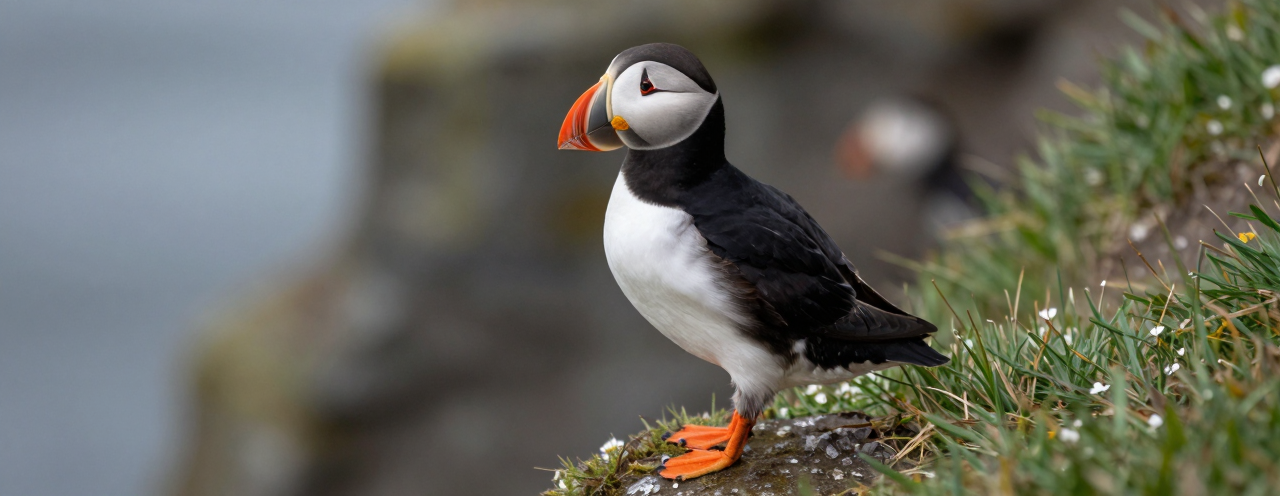
The first time you run this, the model will automatically download which can take some time. See the model section for the different options and features, and the common README for shared CLI patterns and examples.
Python API
Create a standalone generate.py script with inline uv dependencies:
#!/usr/bin/env -S uv run --script
# /// script
# requires-python = ">=3.10"
# dependencies = [
#   "mflux",
# ]
# ///
from mflux.models.z_image import ZImageTurbo

model = ZImageTurbo(quantize=8)
image = model.generate_image(
    prompt="A puffin standing on a cliff",
    seed=42,
    num_inference_steps=9,
    width=1280,
    height=500,
)
image.save("puffin.png")
Run it with:
uv run generate.py
For more Python API inspiration, look at the CLI entry points for the respective models.
⚠️ Troubleshooting: hf_transfer error
If you encounter a ValueError: Fast download using 'hf_transfer' is enabled (HF_HUB_ENABLE_HF_TRANSFER=1) but 'hf_transfer' package is not available, you can install MFLUX with the hf_transfer package included:
uv tool install --upgrade mflux --with hf_transfer
This will enable faster model downloads from Hugging Face.
DGX / NVIDIA (uv tool install)
uv tool install --python 3.13 mflux
🎨 Models
MFLUX supports the following model families. They have different strengths and weaknesses; see each model’s README for full usage details.
| Model | Release date | Size | Type | Training | Description |
|---|---|---|---|---|---|
| Z-Image | Nov 2025 | 6B | Distilled & Base | Yes | Fast, small, very good quality and realism. |
| Krea 2 | Jun 2026 | 12B | Turbo (distilled) | No | Very good quality with a wide range of styles; good for creative exploration. |
| FLUX.2 | Jan 2026 | 4B & 9B | Distilled & Base | Yes | Fastest + smallest with very good quality and edit capabilities. |
| Ideogram 4 | Jun 2026 | 9B | Base | No | JSON-caption-native, typography-focused text-to-image generation. |
| ERNIE-Image | Apr 2026 | 8B | Distilled & Base | No | Single-stream DiT from Baidu. Vivid, high-contrast output. |
| Lens | May 2026 | 3.8B (+20B TE) | Turbo (distilled) | No | Dual-stream MMDiT from Microsoft with a GPT-OSS text encoder. Strong prompt adherence in 4 steps. |
| Boogu Image | Jun 2026 | 10B | Turbo (distilled) | No | DMD-distilled 4-step model with a photographic look and bilingual (EN/ZH) text rendering. |
| FIBO | Oct 2025+ | 8B | Distilled & Base | No | Very good JSON-based prompt understanding. Has edit capabilities. |
| SeedVR2 | Jun 2025 | 3B & 7B | — | No | Best upscaling model. |
| Qwen Image | Aug 2025+ | 20B | Base | No | Large model (slower); strong prompt understanding and world knowledge. Has edit capabilities |
| Qwen Image 2.1 | Sep 2026 | 7.1B (+8B TE) | Base | No | Single-stream block-causal DiT with a Qwen3-VL text encoder; 40-step guidance-free sampling. |
| Depth Pro | Oct 2024 | — | — | No | Very fast and accurate depth estimation model from Apple. |
| FLUX.1 | Aug 2024 | 12B | Distilled & Base | No (legacy) | Legacy option with decent quality. Has edit capabilities with 'Kontext' model and upscaling support via ControlNet |
✨ Features
General
- Quantization and local model loading
- LoRA support (multi-LoRA, scales, library lookup), including LyCORIS LoKr on FLUX.1 and FLUX.2
- Metadata export + reuse, plus prompt file support
Model-specific highlights
- Text-to-image and image-to-image generation.
- LoRA finetuning
- In-context editing, multi-image editing, and virtual try-on
- ControlNet (Canny), depth conditioning, fill/inpainting, and Redux
- Upscaling (SeedVR2 and Flux ControlNet)
- Depth map extraction and FIBO prompt tooling (VLM inspire/refine)
See the common README for detailed usage and examples, and use the model section above to browse specific models and capabilities.
[!NOTE] As MFLUX supports a wide variety of CLI tools and options, the easiest way to navigate the CLI in 2026 is to use a coding agent (like Cursor, Claude Code, or similar). Ask questions like: “Can you help me generate an image using z-image?”
🦄 Contributors
MFlux was originally created by Filip Strand
🌱 Related projects
- MindCraft Studio — macOS app built on mflux by @shaoju
- mflux-paint — native macOS inpaint/edit app (pywebview), 16 models across edit/inpaint/text-to-image, mask painting, multi-seed batch, by @Amo643
- Mflux-ComfyUI by @raysers
- MFLUX-WEBUI by @CharafChnioune
- mflux-fasthtml by @anthonywu
- mflux-streamlit by @elitexp
- mlx-taef — TAESD/TAEF tiny-autoencoder live previews and low-memory FLUX decode for mflux, by @IonDen
- mlx-teacache — TeaCache step-skipping to speed up FLUX generation in mflux, by @IonDen
- MLXBits Image Studio - A native macOS Swift app for FLUX, Krea 2, Z-Image and more!
🙏 Acknowledgements
MFLUX would not be possible without the great work of:
- The MLX Team for MLX and MLX examples
- Black Forest Labs for the FLUX project
- Bria for the FIBO project
- Tongyi Lab for the Z-Image project
- Baidu for the ERNIE-Image project
- Ideogram for the Ideogram 4 project
- Krea.ai for the Krea 2 project
- Qwen Team for the Qwen Image project
- Microsoft for the Lens (Turbo) model, and Comfy-Org for the weights repackage
- The Boogu team for the Boogu Image project
- ByteDance, @numz and @adrientoupet for the SeedVR2 project
- Hugging Face for the Diffusers library implementations
- Depth Pro authors for the Depth Pro model
- The MLX community and all contributors and testers
⚖️ License
This project is licensed under the MIT License.
Contributors
(top 30 of 40)


Similar repos


Languages
Python
99.8%
Apple MLX native implementations of state-of-the-art generative image & video models
Python
2,381
655 commits
updated Sep 23, 2026
README
About
Run the latest state-of-the-art generative image models locally on your Mac in native MLX!
Table of contents
- 💡 Philosophy
- 💿 Installation
- 🎨 Models
- ✨ Features
- 🦄 Contributors
- 🌱 Related projects
- 🙏 Acknowledgements
- ⚖️ License
💡 Philosophy
MFLUX is a line-by-line MLX port of several state-of-the-art generative image models from the Huggingface Diffusers and Huggingface Transformers libraries. All models are implemented from scratch in MLX, using only tokenizers from the Huggingface Transformers library. MFLUX is purposefully kept minimal and explicit, @karpathy style.
💿 Installation
If you haven't already, install uv, then run:
uv tool install --upgrade mflux
After installation, the following command shows all available MFLUX CLI commands:
uv tool list
To generate your first image using, for example, the z-image-turbo model, run
mflux-generate-z-image-turbo \
  --prompt "A puffin standing on a cliff" \
  --width 1280 \
  --height 500 \
  --seed 42 \
  --steps 9 \
  -q 8
The first time you run this, the model will automatically download which can take some time. See the model section for the different options and features, and the common README for shared CLI patterns and examples.
Python API
Create a standalone generate.py script with inline uv dependencies:
#!/usr/bin/env -S uv run --script
# /// script
# requires-python = ">=3.10"
# dependencies = [
#   "mflux",
# ]
# ///
from mflux.models.z_image import ZImageTurbo

model = ZImageTurbo(quantize=8)
image = model.generate_image(
    prompt="A puffin standing on a cliff",
    seed=42,
    num_inference_steps=9,
    width=1280,
    height=500,
)
image.save("puffin.png")
Run it with:
uv run generate.py
For more Python API inspiration, look at the CLI entry points for the respective models.
⚠️ Troubleshooting: hf_transfer error
If you encounter a ValueError: Fast download using 'hf_transfer' is enabled (HF_HUB_ENABLE_HF_TRANSFER=1) but 'hf_transfer' package is not available, you can install MFLUX with the hf_transfer package included:
uv tool install --upgrade mflux --with hf_transfer
This will enable faster model downloads from Hugging Face.
DGX / NVIDIA (uv tool install)
uv tool install --python 3.13 mflux
🎨 Models
MFLUX supports the following model families. They have different strengths and weaknesses; see each model’s README for full usage details.
| Model | Release date | Size | Type | Training | Description |
|---|---|---|---|---|---|
| Z-Image | Nov 2025 | 6B | Distilled & Base | Yes | Fast, small, very good quality and realism. |
| Krea 2 | Jun 2026 | 12B | Turbo (distilled) | No | Very good quality with a wide range of styles; good for creative exploration. |
| FLUX.2 | Jan 2026 | 4B & 9B | Distilled & Base | Yes | Fastest + smallest with very good quality and edit capabilities. |
| Ideogram 4 | Jun 2026 | 9B | Base | No | JSON-caption-native, typography-focused text-to-image generation. |
| ERNIE-Image | Apr 2026 | 8B | Distilled & Base | No | Single-stream DiT from Baidu. Vivid, high-contrast output. |
| Lens | May 2026 | 3.8B (+20B TE) | Turbo (distilled) | No | Dual-stream MMDiT from Microsoft with a GPT-OSS text encoder. Strong prompt adherence in 4 steps. |
| Boogu Image | Jun 2026 | 10B | Turbo (distilled) | No | DMD-distilled 4-step model with a photographic look and bilingual (EN/ZH) text rendering. |
| FIBO | Oct 2025+ | 8B | Distilled & Base | No | Very good JSON-based prompt understanding. Has edit capabilities. |
| SeedVR2 | Jun 2025 | 3B & 7B | — | No | Best upscaling model. |
| Qwen Image | Aug 2025+ | 20B | Base | No | Large model (slower); strong prompt understanding and world knowledge. Has edit capabilities |
| Qwen Image 2.1 | Sep 2026 | 7.1B (+8B TE) | Base | No | Single-stream block-causal DiT with a Qwen3-VL text encoder; 40-step guidance-free sampling. |
| Depth Pro | Oct 2024 | — | — | No | Very fast and accurate depth estimation model from Apple. |
| FLUX.1 | Aug 2024 | 12B | Distilled & Base | No (legacy) | Legacy option with decent quality. Has edit capabilities with 'Kontext' model and upscaling support via ControlNet |
✨ Features
General
- Quantization and local model loading
- LoRA support (multi-LoRA, scales, library lookup), including LyCORIS LoKr on FLUX.1 and FLUX.2
- Metadata export + reuse, plus prompt file support
Model-specific highlights
- Text-to-image and image-to-image generation.
- LoRA finetuning
- In-context editing, multi-image editing, and virtual try-on
- ControlNet (Canny), depth conditioning, fill/inpainting, and Redux
- Upscaling (SeedVR2 and Flux ControlNet)
- Depth map extraction and FIBO prompt tooling (VLM inspire/refine)
See the common README for detailed usage and examples, and use the model section above to browse specific models and capabilities.
[!NOTE] As MFLUX supports a wide variety of CLI tools and options, the easiest way to navigate the CLI in 2026 is to use a coding agent (like Cursor, Claude Code, or similar). Ask questions like: “Can you help me generate an image using z-image?”
🦄 Contributors
MFlux was originally created by Filip Strand
🌱 Related projects
- MindCraft Studio — macOS app built on mflux by @shaoju
- mflux-paint — native macOS inpaint/edit app (pywebview), 16 models across edit/inpaint/text-to-image, mask painting, multi-seed batch, by @Amo643
- Mflux-ComfyUI by @raysers
- MFLUX-WEBUI by @CharafChnioune
- mflux-fasthtml by @anthonywu
- mflux-streamlit by @elitexp
- mlx-taef — TAESD/TAEF tiny-autoencoder live previews and low-memory FLUX decode for mflux, by @IonDen
- mlx-teacache — TeaCache step-skipping to speed up FLUX generation in mflux, by @IonDen
- MLXBits Image Studio - A native macOS Swift app for FLUX, Krea 2, Z-Image and more!
🙏 Acknowledgements
MFLUX would not be possible without the great work of:
- The MLX Team for MLX and MLX examples
- Black Forest Labs for the FLUX project
- Bria for the FIBO project
- Tongyi Lab for the Z-Image project
- Baidu for the ERNIE-Image project
- Ideogram for the Ideogram 4 project
- Krea.ai for the Krea 2 project
- Qwen Team for the Qwen Image project
- Microsoft for the Lens (Turbo) model, and Comfy-Org for the weights repackage
- The Boogu team for the Boogu Image project
- ByteDance, @numz and @adrientoupet for the SeedVR2 project
- Hugging Face for the Diffusers library implementations
- Depth Pro authors for the Depth Pro model
- The MLX community and all contributors and testers
⚖️ License
This project is licensed under the MIT License.
Similar repos
Contributors
(top 30 of 40)
Languages
Python
99.8%