Spend fewer tokens in long Claude Code sessions—without changing how you work.
Jev-powered context compaction, model routing, and skill selection in one Claude Code plugin.






Get started · Documentation · Architecture · Contributing
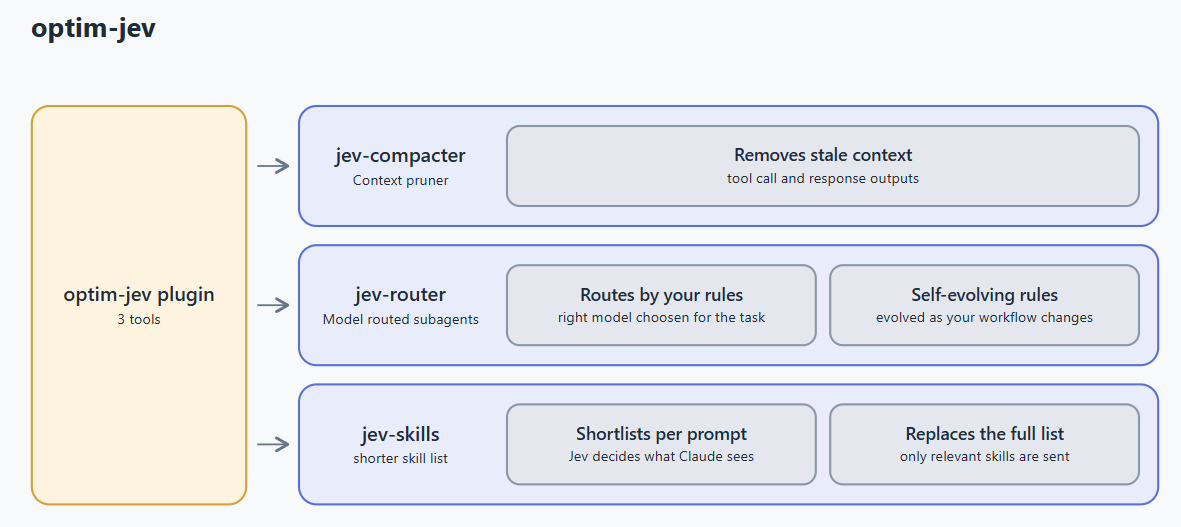
Long agent sessions accumulate stale tool output, send oversized skill catalogs, and use the main model for work a smaller model could handle. optim-jev reduces that overhead at three points while keeping Claude Code's normal workflow intact.
Each tool works independently, fails open if unavailable, and includes a stats command that reports session-level cost and savings in US dollars.
| Tool | What it does | Default | Learn more |
|---|---|---|---|
| jev-compacter | Removes stale tool calls and outputs instead of summarizing away the whole conversation | On | Guide |
| jev-router | Routes file changes to the right model using project-specific rules that evolve with your workflow | Off | Guide |
| jev-skills | Sends a short, relevant skill list for each prompt instead of the entire catalog | Off | Guide |
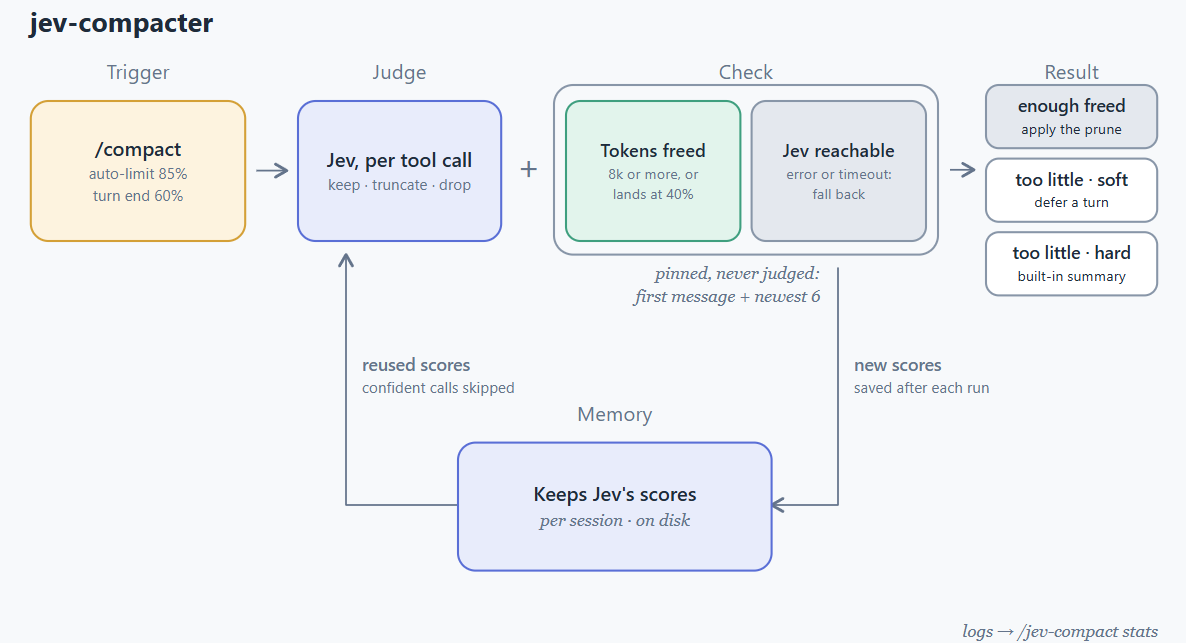
It works automatically with /compact and auto-compaction. Inspect the current session with:
/jev-compact stats
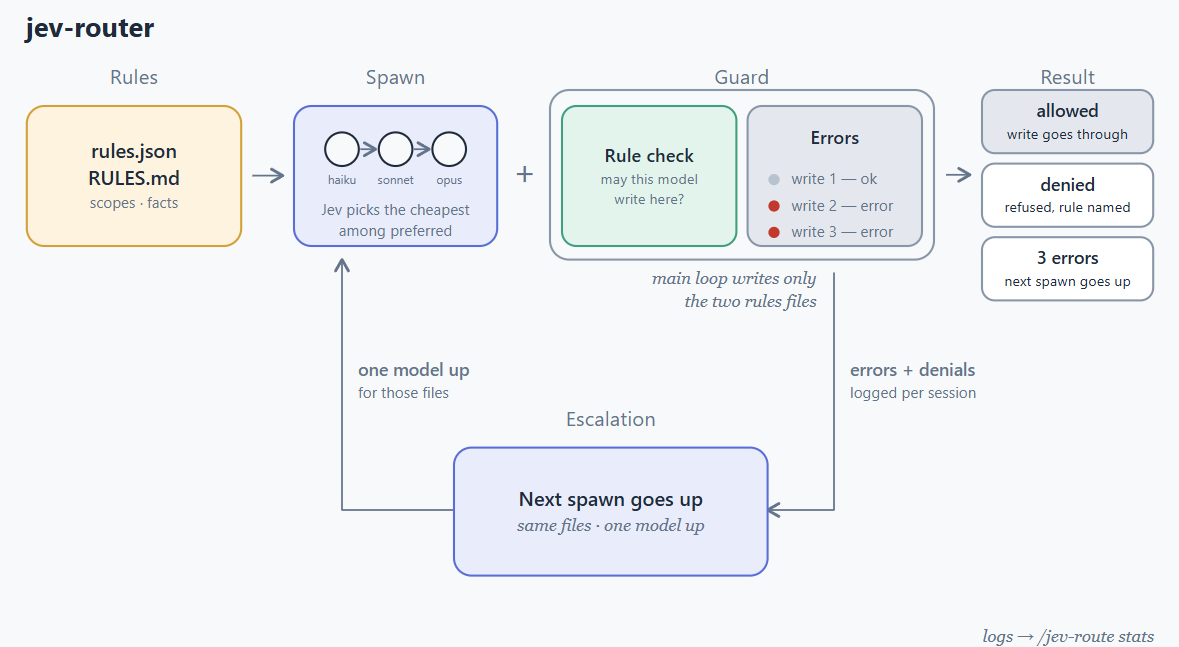
/jev-route init "what matters in this project"
/jev-route on | off
/jev-route why | stats
Tell Claude to change a preference later—for example, “let haiku edit the tests”—and the project rules update with your workflow.
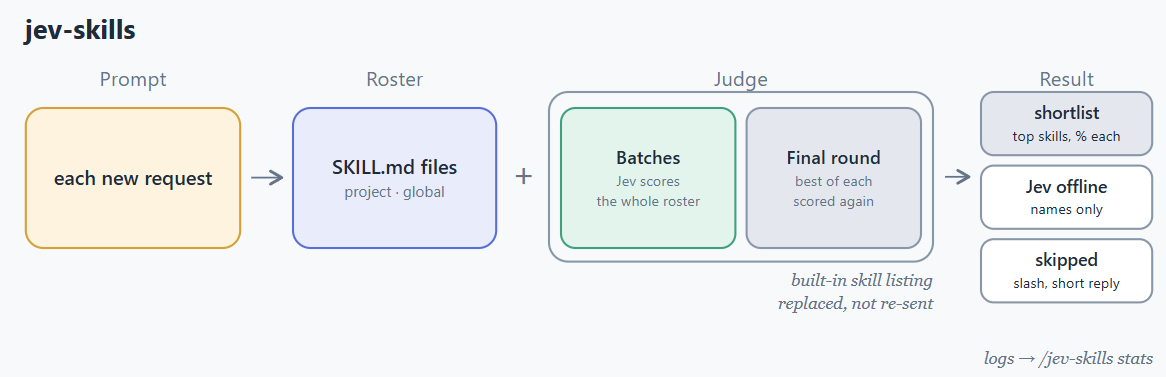
/jev-skills on | off
/jev-skills scope project | global
/jev-skills why | stats | reindex
git clone https://github.com/Oqura-ai/optim-jev.git
claude plugin marketplace add ./optim-jev
claude plugin install optim-jev@optim-jev
Set the key in Claude Code under /config → TypeSafe API key, or export it before starting Claude Code:
export TYPESAFE_API_KEY="your-key"
Restart Claude Code. jev-compacter is ready immediately; enable the router and skill picker when you want them. See Getting started for every command, option, and troubleshooting step.
[!NOTE] The plugin uses only Python's standard library. Your API key is passed to child processes through the environment and is never written to project files or logs.
| Resource | What you will find |
|---|---|
| Getting started | Installation, configuration, commands, and troubleshooting |
| Performance metrics | How token usage, cost, and estimated savings are calculated |
| Architecture | The TypeScript-to-Python bridge, data flow, and session logs |
| Contributing | Local setup, tests, conventions, and pull requests |
optim-jev is released under the MIT License.
Built by Oqura.ai for more efficient Claude Code workflows.
Spend fewer tokens in long Claude Code sessions—without changing how you work.
Jev-powered context compaction, model routing, and skill selection in one Claude Code plugin.
Get started · Documentation · Architecture · Contributing
Long agent sessions accumulate stale tool output, send oversized skill catalogs, and use the main model for work a smaller model could handle. optim-jev reduces that overhead at three points while keeping Claude Code's normal workflow intact.
Each tool works independently, fails open if unavailable, and includes a stats command that reports session-level cost and savings in US dollars.
| Tool | What it does | Default | Learn more |
|---|---|---|---|
| jev-compacter | Removes stale tool calls and outputs instead of summarizing away the whole conversation | On | Guide |
| jev-router | Routes file changes to the right model using project-specific rules that evolve with your workflow | Off | Guide |
| jev-skills | Sends a short, relevant skill list for each prompt instead of the entire catalog | Off | Guide |
It works automatically with /compact and auto-compaction. Inspect the current session with:
/jev-compact stats
/jev-route init "what matters in this project"
/jev-route on | off
/jev-route why | stats
Tell Claude to change a preference later—for example, “let haiku edit the tests”—and the project rules update with your workflow.
/jev-skills on | off
/jev-skills scope project | global
/jev-skills why | stats | reindex
git clone https://github.com/Oqura-ai/optim-jev.git
claude plugin marketplace add ./optim-jev
claude plugin install optim-jev@optim-jev
Set the key in Claude Code under /config → TypeSafe API key, or export it before starting Claude Code:
export TYPESAFE_API_KEY="your-key"
Restart Claude Code. jev-compacter is ready immediately; enable the router and skill picker when you want them. See Getting started for every command, option, and troubleshooting step.
[!NOTE] The plugin uses only Python's standard library. Your API key is passed to child processes through the environment and is never written to project files or logs.
| Resource | What you will find |
|---|---|
| Getting started | Installation, configuration, commands, and troubleshooting |
| Performance metrics | How token usage, cost, and estimated savings are calculated |
| Architecture | The TypeScript-to-Python bridge, data flow, and session logs |
| Contributing | Local setup, tests, conventions, and pull requests |
optim-jev is released under the MIT License.
Built by Oqura.ai for more efficient Claude Code workflows.





