
See what people are saying
README

Chop Chop Splitter
Cut a clip out of a video, or split a whole video into parts, fast.
Frame-accurate, multicore, with audio export. For Ubuntu and Windows.
Download · Features · Install · Build
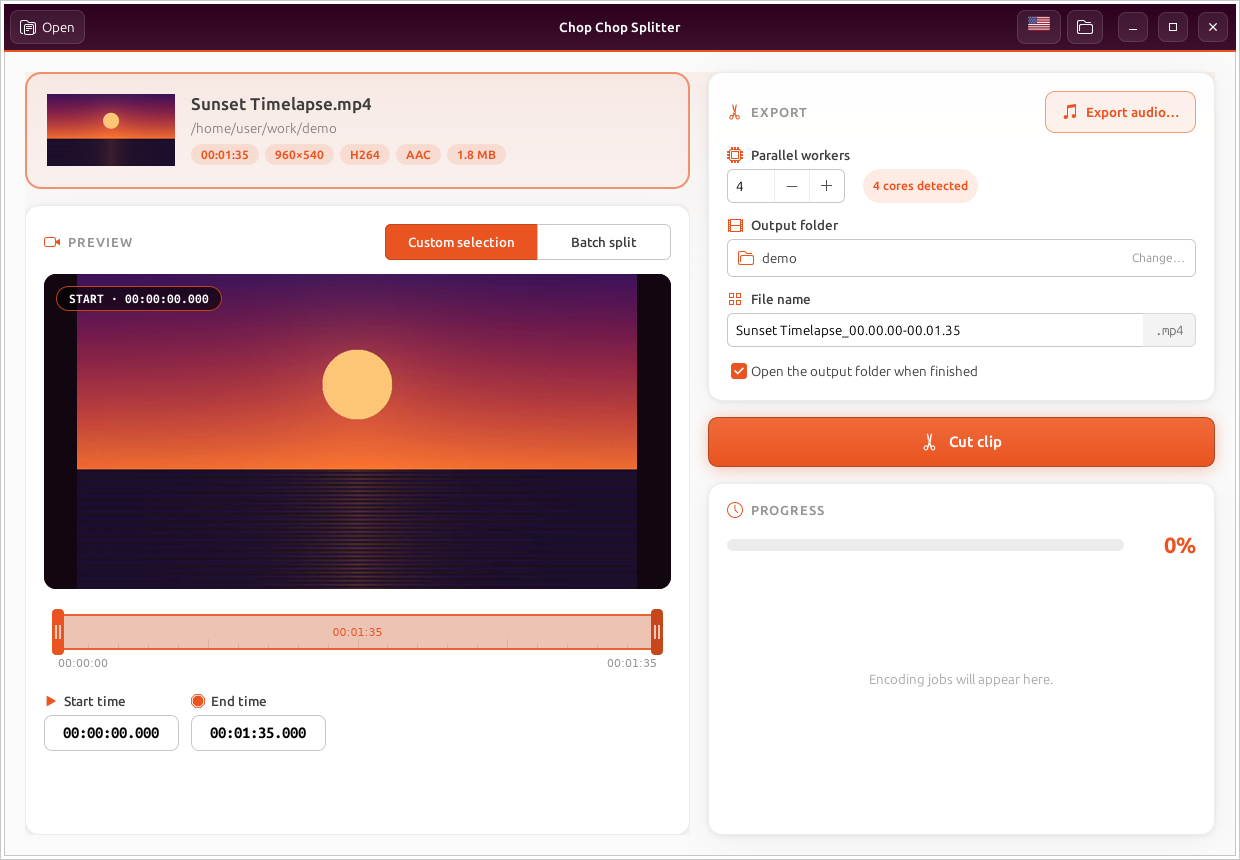
Chop Chop Splitter is a small, focused video cutter. Open a video, drag the two handles on the timeline (or type exact times), and press Cut clip. To split a long recording into pieces, switch to Batch split and choose "every 5 minutes" or "4 equal parts". Behind the scenes the work is split into chunks that FFmpeg encodes in parallel on every CPU core. The chunks are then joined without re-encoding, so long cuts finish in a fraction of the usual time and stay frame-accurate.
It is written in Rust. On Ubuntu it is a GTK 3 app with Ubuntu's Yaru icons. On Windows it is a native Win32 app built with windows-rs. Both use the same cutting engine and translations.
Features
- Two modes
- Custom selection: cut one clip between a start and an end time.
- Batch split: cut the whole video into parts, either every N minutes/seconds or into N equal parts. Each part is encoded in parallel.
- Precise start/end: drag the handles on the timeline, or type
HH:MM:SS.mmm,MM:SSor plain seconds. The selection follows as you type. - Live preview: a large frame preview of the start or end point that updates as you move, plus a thumbnail of the file.
- Frame-accurate, multicore cutting: the range is split into chunks that are encoded to H.264 at the same time, one FFmpeg per worker. The audio is encoded once and everything is joined losslessly. Chunk boundaries snap to frames, so no frame is duplicated or dropped.
- Export audio as WAV, MP3, OGG (Vorbis), FLAC, M4A (AAC) or OPUS: pick the format in the save dialog. In Batch split you get one audio file per part.
- Per-job progress with an ETA, Cancel (temporary files are cleaned up), overwrite confirmation, an editable file name filled in from the clip range, drag & drop, and Ctrl+O.
- Four languages: English, Português, Español and Ελληνικά. Switch with the flag button; the choice is remembered, and on first launch the system language is used.
Windows
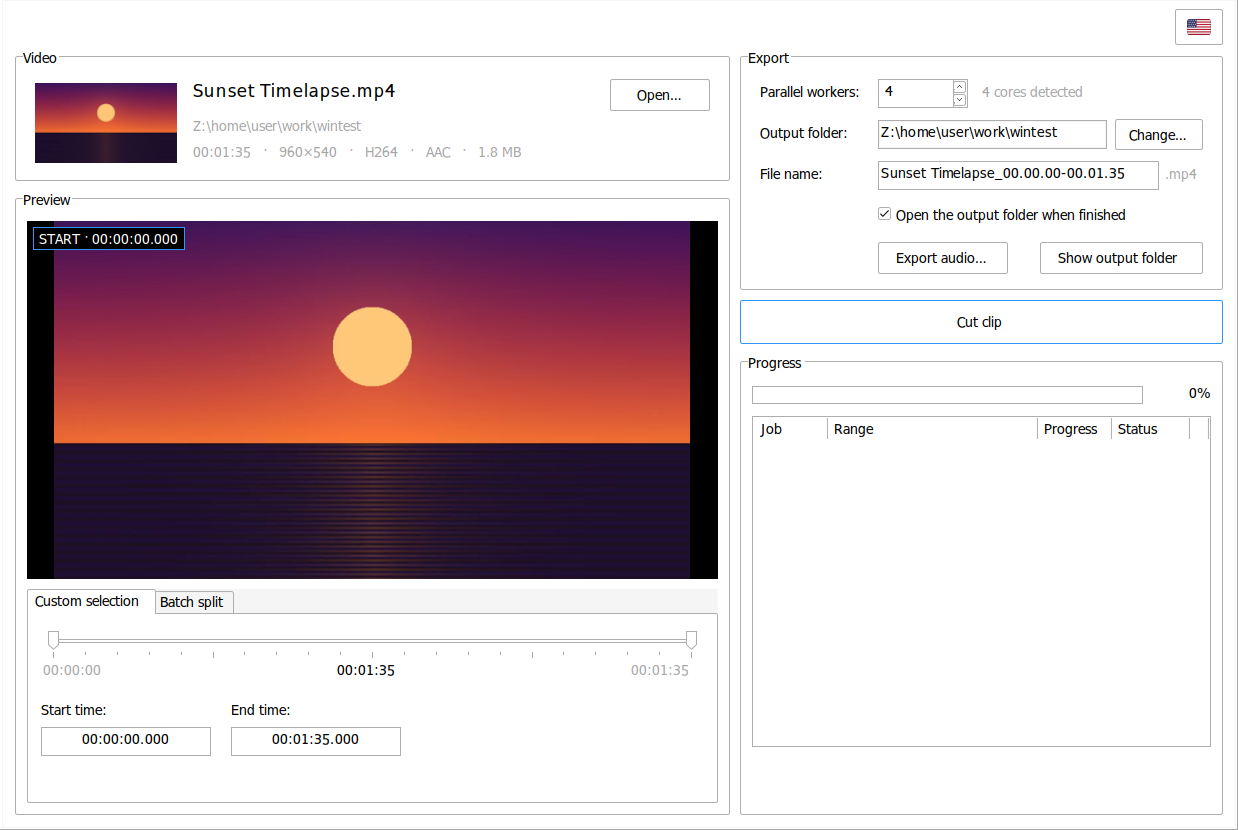
The Windows build is a native Win32 application with the same layout as the Ubuntu version. It uses the standard Windows controls (group boxes, tabs, spin boxes, a progress bar and a list view), the system font and theme, and the Windows file dialogs. It supports per-monitor DPI scaling.
Install
Get the files from the latest release.
Ubuntu 24.04 / 26.04
sudo apt install ./chop-chop_1.7.3_amd64.deb
This also installs ffmpeg if you don't have it. Launch Chop Chop Splitter from the app
grid, or run chop-chop [file]. It replaces the older chopchop and video-splitter
packages.
Windows 10 / 11 (64-bit)
Run chop-chop-1.7.3-windows-x64-setup.exe. FFmpeg is included, so there is nothing else
to install.
Build from source
Ubuntu
sudo apt install cargo libgtk-3-dev dpkg-dev ffmpeg
cargo build --release                 # binary: target/release/chop-chop
./packaging/build-deb.sh              # .deb:   target/deb/
Windows
With Rust (MSVC toolchain) installed:
cd windows
cargo build --release                 # binary: windows\target\release\chop-chop.exe
chop-chop.exe looks for ffmpeg.exe and ffprobe.exe next to itself, then on the
PATH. To build the installer, install NSIS and run:
cd windows\installer
makensis -DVERSION=1.7.3 -DAPPDIR=..\target\release -DFFMPEG=C:\path\to\ffmpeg\bin chop-chop.nsi
You can also cross-compile from Linux with rustup target add x86_64-pc-windows-gnu and
mingw-w64. Then build with cargo build --release --target x86_64-pc-windows-gnu in
windows/.
Releases
Pushing a tag such as v1.7.3, or running the Release workflow
by hand with that tag name, builds the .deb on Ubuntu 24.04 and the Windows installer and
publishes both to a GitHub release.
Project layout
src/
  main.rs        GTK 3 user interface (Ubuntu)
  splitter.rs    FFmpeg engine: probing, thumbnails, parallel chunked encoding (shared)
  i18n.rs        English / Português / Español / Ελληνικά strings (shared)
windows/
  src/           Native Win32 user interface (windows-rs)
  installer/     NSIS installer script
data/            Icons (Yaru), app icon and GTK stylesheet
packaging/       .deb build script and desktop entry
License
Chop Chop Splitter is released under the MIT License.
The icons in data/icons/ come from Yaru by the Ubuntu
community and are licensed under CC BY-SA 4.0 (data/icons/LICENSE_CCBYSA). The app icon in
data/appicon/ is original artwork made for this project. The Windows installer includes an
FFmpeg build licensed under the GPL; its license is installed alongside
it.
Similar repos


Languages
Rust
92.5%
NSIS
3.2%
CSS
3.2%
Shell
1.1%
See what people are saying
README
Chop Chop Splitter
Cut a clip out of a video, or split a whole video into parts, fast.
Frame-accurate, multicore, with audio export. For Ubuntu and Windows.
Download · Features · Install · Build
Chop Chop Splitter is a small, focused video cutter. Open a video, drag the two handles on the timeline (or type exact times), and press Cut clip. To split a long recording into pieces, switch to Batch split and choose "every 5 minutes" or "4 equal parts". Behind the scenes the work is split into chunks that FFmpeg encodes in parallel on every CPU core. The chunks are then joined without re-encoding, so long cuts finish in a fraction of the usual time and stay frame-accurate.
It is written in Rust. On Ubuntu it is a GTK 3 app with Ubuntu's Yaru icons. On Windows it is a native Win32 app built with windows-rs. Both use the same cutting engine and translations.
Features
- Two modes
- Custom selection: cut one clip between a start and an end time.
- Batch split: cut the whole video into parts, either every N minutes/seconds or into N equal parts. Each part is encoded in parallel.
- Precise start/end: drag the handles on the timeline, or type
HH:MM:SS.mmm,MM:SSor plain seconds. The selection follows as you type. - Live preview: a large frame preview of the start or end point that updates as you move, plus a thumbnail of the file.
- Frame-accurate, multicore cutting: the range is split into chunks that are encoded to H.264 at the same time, one FFmpeg per worker. The audio is encoded once and everything is joined losslessly. Chunk boundaries snap to frames, so no frame is duplicated or dropped.
- Export audio as WAV, MP3, OGG (Vorbis), FLAC, M4A (AAC) or OPUS: pick the format in the save dialog. In Batch split you get one audio file per part.
- Per-job progress with an ETA, Cancel (temporary files are cleaned up), overwrite confirmation, an editable file name filled in from the clip range, drag & drop, and Ctrl+O.
- Four languages: English, Português, Español and Ελληνικά. Switch with the flag button; the choice is remembered, and on first launch the system language is used.
Windows
The Windows build is a native Win32 application with the same layout as the Ubuntu version. It uses the standard Windows controls (group boxes, tabs, spin boxes, a progress bar and a list view), the system font and theme, and the Windows file dialogs. It supports per-monitor DPI scaling.
Install
Get the files from the latest release.
Ubuntu 24.04 / 26.04
sudo apt install ./chop-chop_1.7.3_amd64.deb
This also installs ffmpeg if you don't have it. Launch Chop Chop Splitter from the app
grid, or run chop-chop [file]. It replaces the older chopchop and video-splitter
packages.
Windows 10 / 11 (64-bit)
Run chop-chop-1.7.3-windows-x64-setup.exe. FFmpeg is included, so there is nothing else
to install.
Build from source
Ubuntu
sudo apt install cargo libgtk-3-dev dpkg-dev ffmpeg
cargo build --release                 # binary: target/release/chop-chop
./packaging/build-deb.sh              # .deb:   target/deb/
Windows
With Rust (MSVC toolchain) installed:
cd windows
cargo build --release                 # binary: windows\target\release\chop-chop.exe
chop-chop.exe looks for ffmpeg.exe and ffprobe.exe next to itself, then on the
PATH. To build the installer, install NSIS and run:
cd windows\installer
makensis -DVERSION=1.7.3 -DAPPDIR=..\target\release -DFFMPEG=C:\path\to\ffmpeg\bin chop-chop.nsi
You can also cross-compile from Linux with rustup target add x86_64-pc-windows-gnu and
mingw-w64. Then build with cargo build --release --target x86_64-pc-windows-gnu in
windows/.
Releases
Pushing a tag such as v1.7.3, or running the Release workflow
by hand with that tag name, builds the .deb on Ubuntu 24.04 and the Windows installer and
publishes both to a GitHub release.
Project layout
src/
  main.rs        GTK 3 user interface (Ubuntu)
  splitter.rs    FFmpeg engine: probing, thumbnails, parallel chunked encoding (shared)
  i18n.rs        English / Português / Español / Ελληνικά strings (shared)
windows/
  src/           Native Win32 user interface (windows-rs)
  installer/     NSIS installer script
data/            Icons (Yaru), app icon and GTK stylesheet
packaging/       .deb build script and desktop entry
License
Chop Chop Splitter is released under the MIT License.
The icons in data/icons/ come from Yaru by the Ubuntu
community and are licensed under CC BY-SA 4.0 (data/icons/LICENSE_CCBYSA). The app icon in
data/appicon/ is original artwork made for this project. The Windows installer includes an
FFmpeg build licensed under the GPL; its license is installed alongside
it.
Similar repos
Languages
Rust
92.5%
NSIS
3.2%
CSS
3.2%
Shell
1.1%