
See what people are saying
README

YouTube Downloader
Download just the part of a YouTube video you actually need.
Pick one or more time ranges in a built-in player, press Download, and get a clean MP4 – optionally with MP3 audio and subtitles. Free, no ads, no account, for macOS, Windows and Linux.
⬇ Download: macOS (M1 and newer) · macOS (Intel) · Windows · Linux
Which Mac do I have? Apple menu → About This Mac: “Chip: Apple M…” = M1 and newer, “Processor: Intel” = Intel.
Why?
You want the 40-second clip from a two-hour stream, the three good parts of a tutorial, or just the song from a live set. Usually that means downloading the whole thing and cutting it yourself. This app does both in one step – and only fetches what it needs.
Features
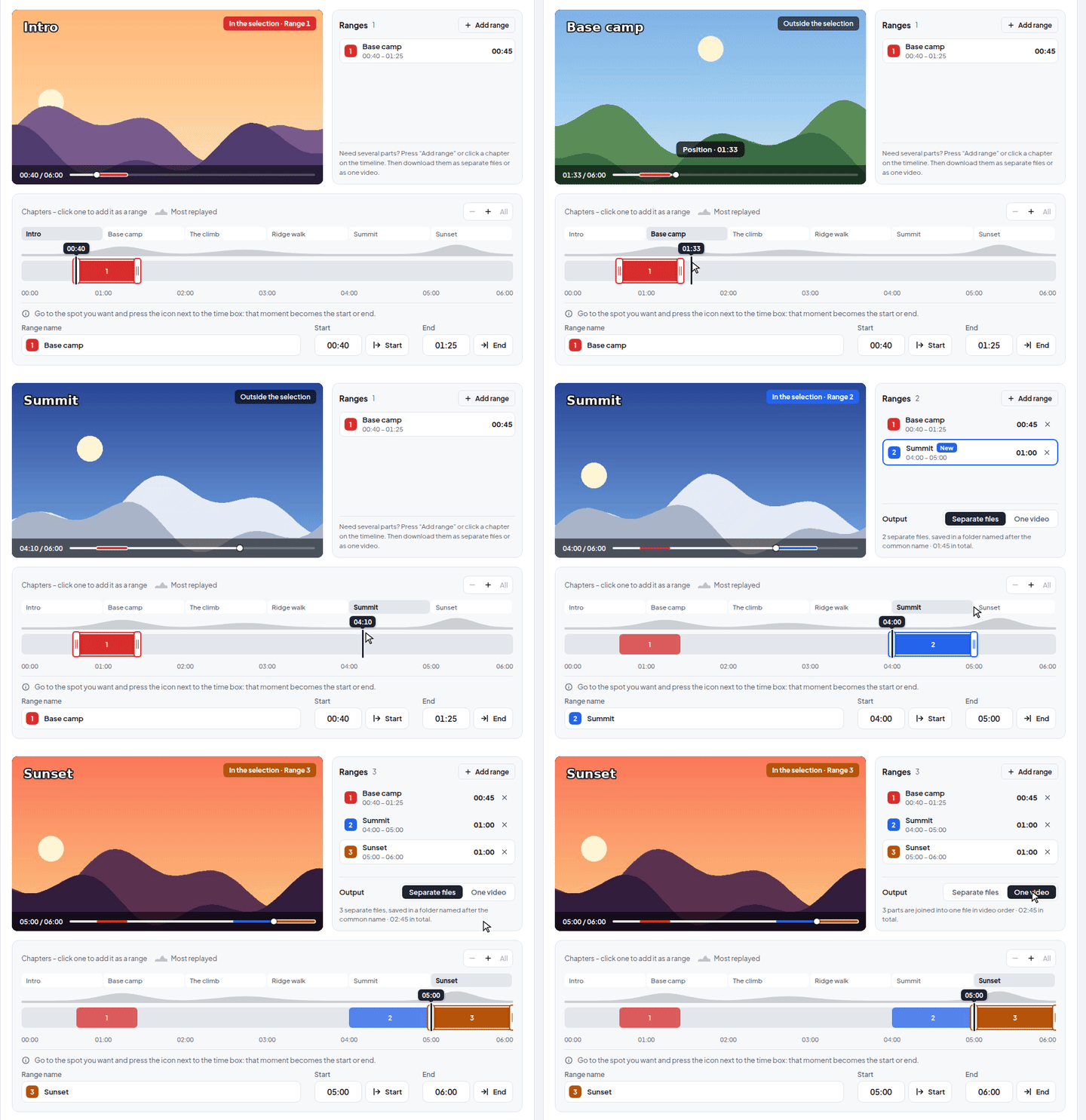
- 🎬 Watch while you select – the video plays inside the app. Scrub the timeline and preview frames appear instantly, so you can find the right moment without guessing.
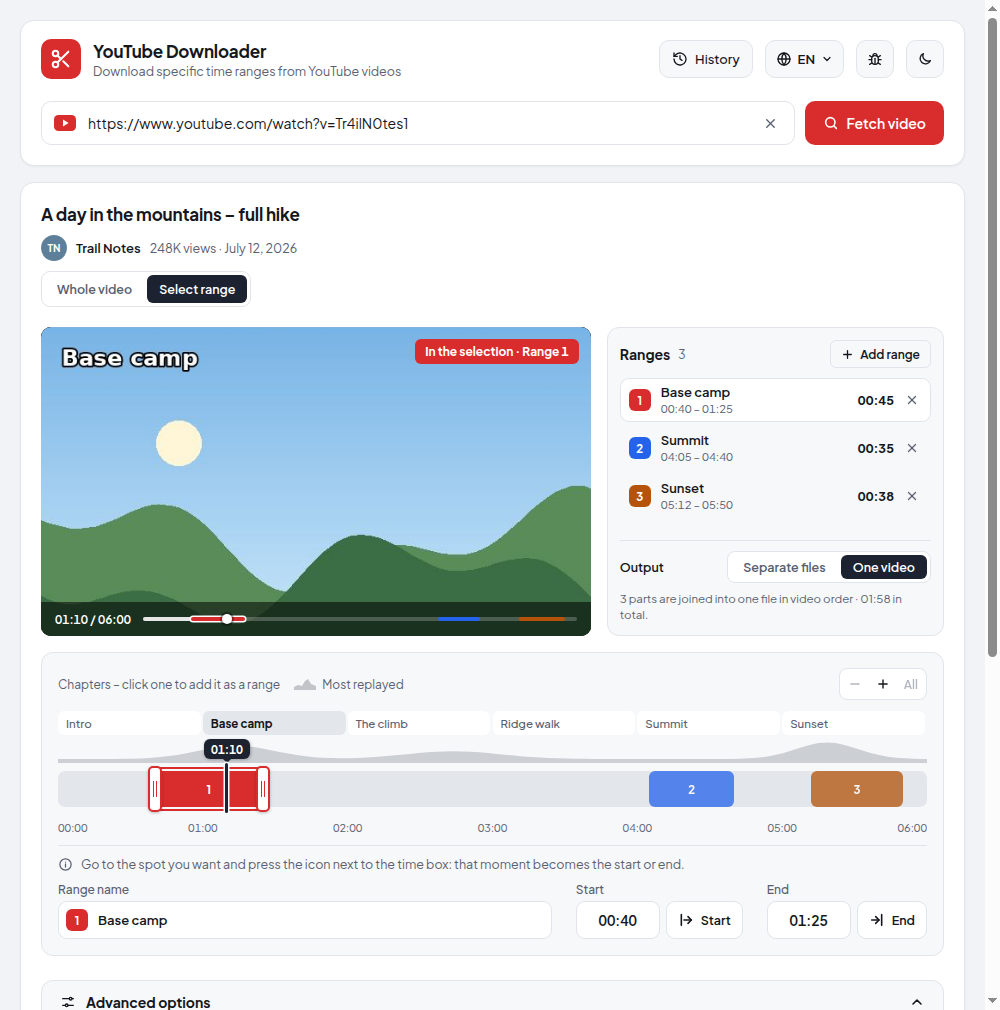
- ✂️ Several ranges at once – mark as many parts as you like, give them names, drag them around. Click a chapter to turn it into a range; the Most replayed graph shows where the interesting bits are.
- 🧩 Separate files or one video – save every range as its own file, or join them into a single video with chapter markers named after your ranges.
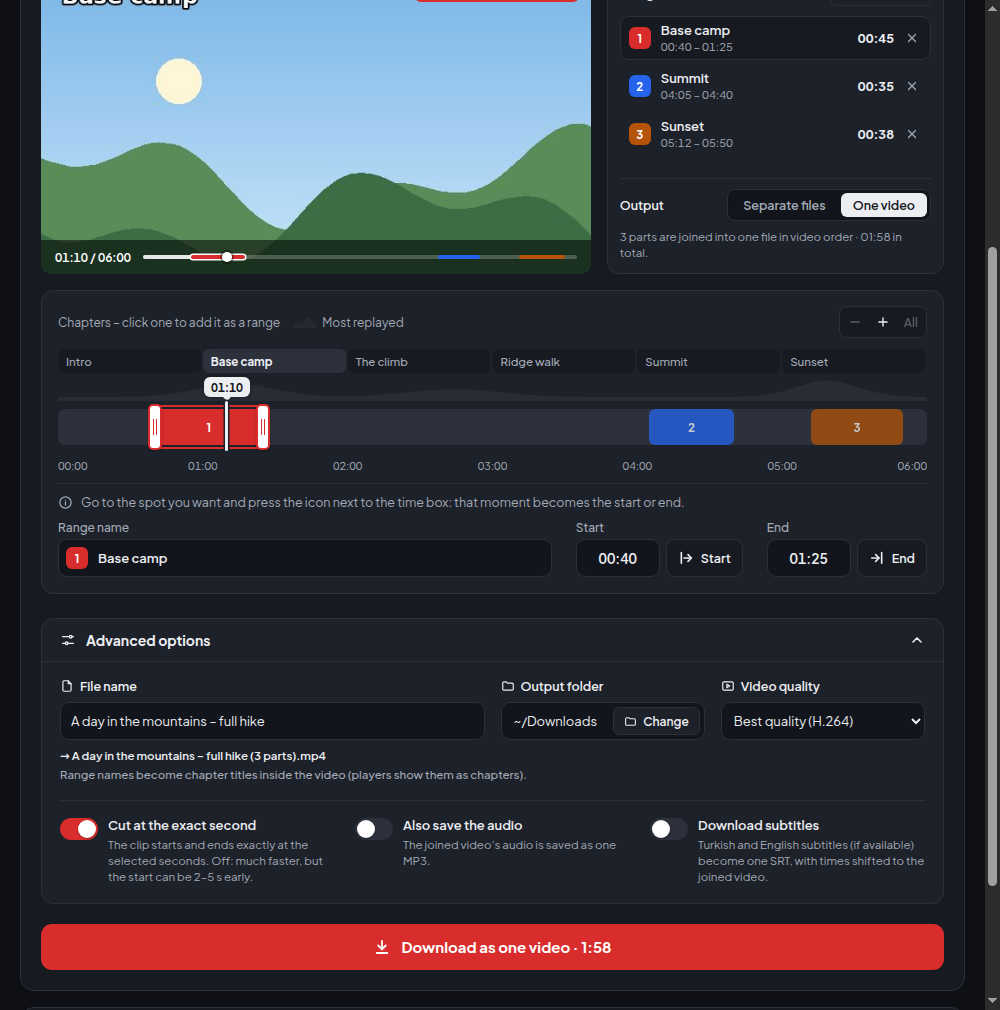
- 🎯 Frame-accurate cuts – clips start and end at exactly the second you picked (or turn it off for an even faster, keyframe-based cut).
- 🎵 MP3 and subtitles – get the audio as MP3 and subtitles as SRT, already trimmed to your clip.
- ⚡ Fast – the app measures your connection and picks the quickest way to get each clip. On a Mac it can cut using the built-in video chip.
- 📋 Download queue – add more videos while one is downloading; they run one after another.
- 🕘 History – find earlier downloads, open the files, or download the same range again.
- 🌗 Light and dark theme, English, German and Turkish interface.
- 🔄 Stays up to date – the app updates itself and keeps its download engine current, so it keeps working when YouTube changes things.
Download
| System | Download |
|---|---|
| macOS – Apple Silicon (M1 and newer) | YouTube-Downloader-mac-arm64.dmg |
| macOS – Intel | YouTube-Downloader-mac-x64.dmg |
| Windows 10 / 11 | YouTube-Downloader-Setup.exe – or Portable, no install needed |
| Linux | AppImage or .deb |
Not sure which Mac you have? Open the Apple menu → About This Mac. “Chip: Apple M1/M2/…” means Apple Silicon, “Processor: Intel” means Intel.
Older versions and release notes: all releases. Everything the app needs (yt-dlp, ffmpeg, …) is included – there is nothing else to install.
First launch
The app is not signed with a paid developer certificate, so your system will warn you once:
- macOS: open the DMG and drag the app into Applications. When macOS says it cannot verify the developer, open System Settings → Privacy & Security and click Open Anyway.
- Windows: if SmartScreen shows Windows protected your PC, click More info → Run anyway.
How to use it
- Copy a YouTube link and paste it into the app – the video loads automatically.
- Keep Whole video, or switch to Select range and mark the parts you want (play the video, then press Start / End, or drag on the timeline).
- Choose Separate files or One video, open Advanced options for quality, MP3 and subtitles if you like, and press Download.
Support the project
This app is completely free. If you find it useful, you can optionally support its development:

Support is entirely voluntary and does not provide any additional features, services or benefits.
Good to know
- Please only download videos you have the right to download, and respect the creators' rights and YouTube's Terms of Service.
- Found a bug or have an idea? Open an issue.
- Built with yt-dlp, FFmpeg and Electron. Not affiliated with YouTube or Google.


Similar repos


See what people are saying
README
YouTube Downloader
Download just the part of a YouTube video you actually need.
Pick one or more time ranges in a built-in player, press Download, and get a clean MP4 – optionally with MP3 audio and subtitles. Free, no ads, no account, for macOS, Windows and Linux.
⬇ Download: macOS (M1 and newer) · macOS (Intel) · Windows · Linux
Which Mac do I have? Apple menu → About This Mac: “Chip: Apple M…” = M1 and newer, “Processor: Intel” = Intel.
Why?
You want the 40-second clip from a two-hour stream, the three good parts of a tutorial, or just the song from a live set. Usually that means downloading the whole thing and cutting it yourself. This app does both in one step – and only fetches what it needs.
Features
- 🎬 Watch while you select – the video plays inside the app. Scrub the timeline and preview frames appear instantly, so you can find the right moment without guessing.
- ✂️ Several ranges at once – mark as many parts as you like, give them names, drag them around. Click a chapter to turn it into a range; the Most replayed graph shows where the interesting bits are.
- 🧩 Separate files or one video – save every range as its own file, or join them into a single video with chapter markers named after your ranges.
- 🎯 Frame-accurate cuts – clips start and end at exactly the second you picked (or turn it off for an even faster, keyframe-based cut).
- 🎵 MP3 and subtitles – get the audio as MP3 and subtitles as SRT, already trimmed to your clip.
- ⚡ Fast – the app measures your connection and picks the quickest way to get each clip. On a Mac it can cut using the built-in video chip.
- 📋 Download queue – add more videos while one is downloading; they run one after another.
- 🕘 History – find earlier downloads, open the files, or download the same range again.
- 🌗 Light and dark theme, English, German and Turkish interface.
- 🔄 Stays up to date – the app updates itself and keeps its download engine current, so it keeps working when YouTube changes things.
Download
| System | Download |
|---|---|
| macOS – Apple Silicon (M1 and newer) | YouTube-Downloader-mac-arm64.dmg |
| macOS – Intel | YouTube-Downloader-mac-x64.dmg |
| Windows 10 / 11 | YouTube-Downloader-Setup.exe – or Portable, no install needed |
| Linux | AppImage or .deb |
Not sure which Mac you have? Open the Apple menu → About This Mac. “Chip: Apple M1/M2/…” means Apple Silicon, “Processor: Intel” means Intel.
Older versions and release notes: all releases. Everything the app needs (yt-dlp, ffmpeg, …) is included – there is nothing else to install.
First launch
The app is not signed with a paid developer certificate, so your system will warn you once:
- macOS: open the DMG and drag the app into Applications. When macOS says it cannot verify the developer, open System Settings → Privacy & Security and click Open Anyway.
- Windows: if SmartScreen shows Windows protected your PC, click More info → Run anyway.
How to use it
- Copy a YouTube link and paste it into the app – the video loads automatically.
- Keep Whole video, or switch to Select range and mark the parts you want (play the video, then press Start / End, or drag on the timeline).
- Choose Separate files or One video, open Advanced options for quality, MP3 and subtitles if you like, and press Download.
Support the project
This app is completely free. If you find it useful, you can optionally support its development:
Support is entirely voluntary and does not provide any additional features, services or benefits.
Good to know
- Please only download videos you have the right to download, and respect the creators' rights and YouTube's Terms of Service.
- Found a bug or have an idea? Open an issue.
- Built with yt-dlp, FFmpeg and Electron. Not affiliated with YouTube or Google.