
README
Visual Relay
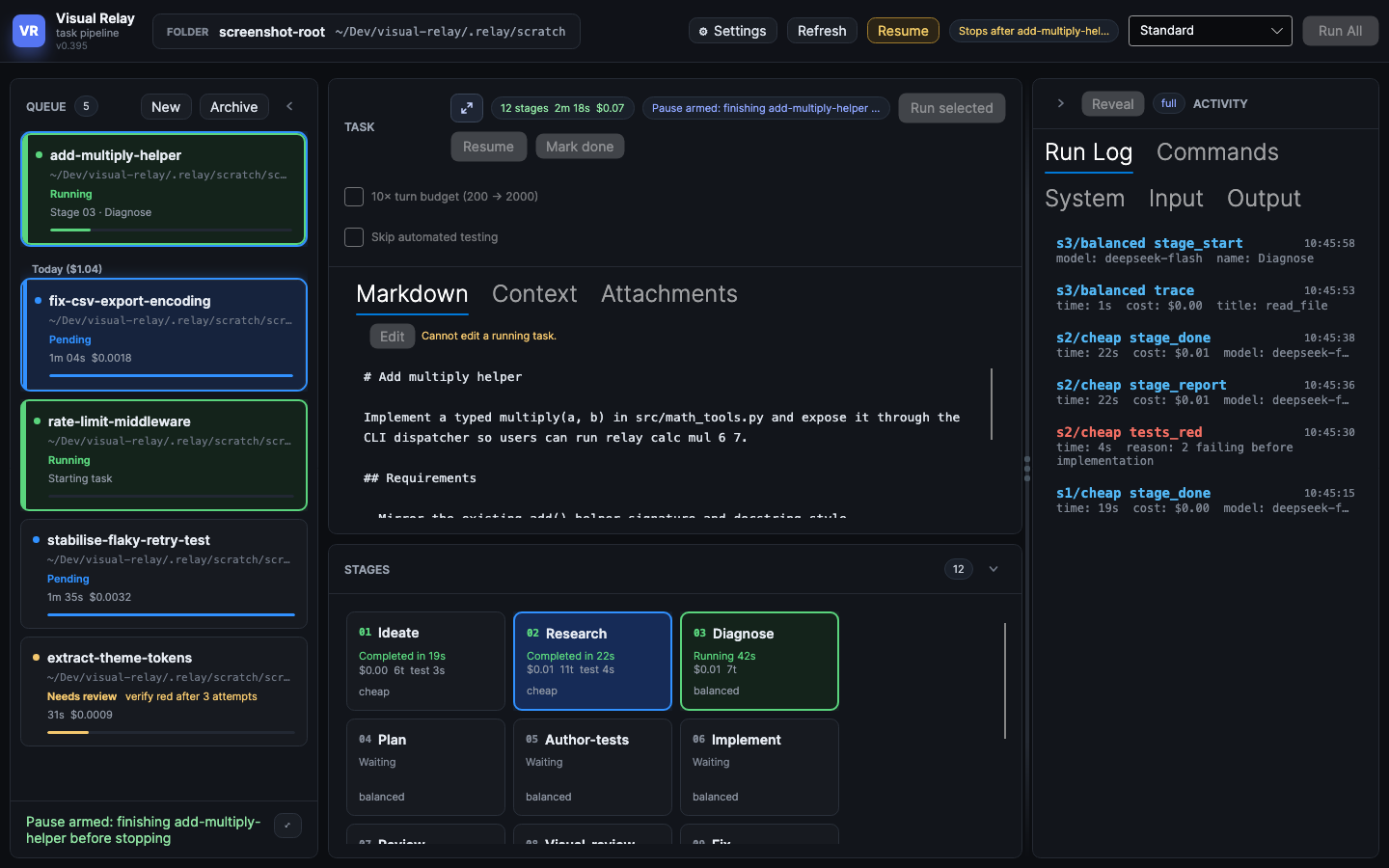
Visual Relay is a cross-platform desktop app that helps you build software by processing tasks with LLMs using a relay-like pipeline, with each stage passing its output to the following stage. You create markdown files as specs, and Visual Relay implements them via the pipeline.
- Mistakes are avoided by enforcing a strict set of steps the LLM can't bypass (e.g., red/green TDD).
- Costs are optimized by choosing an appropriate LLM model tier per stage (and by enforcing a budget).
- It also gives you easy ways to observe each step via the activity panel.
- All LLM interactions are sandboxed (nono on macOS, Linux and Windows (inside WSL2)) to avoid destructive file system changes.
Install (macOS)
The recommended way to run Visual Relay is to clone the repo and launch it with the
./visual-relay wrapper (one command bootstraps everything else):
cd ~/repositories # or wherever you keep your repos
git clone --depth 1 https://github.com/Nicholas-Westby/visual-relay.git
cd visual-relay
./visual-relay launch
--depth 1 does a shallow clone (latest commit only) for a faster, smaller
download; omit it to fetch the full history.
./visual-relay is a tiny launcher that provisions its own toolchain via
Nix (this avoids global installs).
You can then run ./visual-relay in that folder the next time you want to launch it.
Install (Windows)
Clone the repo and launch it with the visual-relay.cmd wrapper (cloning needs Git, which
winget install Git.Git installs):
cd ~/repositories # or wherever you keep your repos
git clone --depth 1 https://github.com/Nicholas-Westby/visual-relay.git
cd visual-relay
.\visual-relay.cmd launch
The first launch offers to install anything that is missing: the .NET 10 SDK, then WSL with
an Ubuntu distro, which is where Visual Relay runs your project's commands. If WSL itself has
to be installed, Windows asks you to approve it and then to restart; run .\visual-relay.cmd
again after the restart to finish.
You can then run .\visual-relay.cmd in that folder the next time you want to launch it.
Keep the repositories you work on inside the distro, open them as
\\wsl.localhost\Ubuntu\home\<user>\..., and install their toolchains there too. If
something goes wrong, see TROUBLESHOOTING.md.
What Visual Relay Does
- Runs
llm-tasks/one task at a time through the staged relay pipeline, writing ledger, manifest, seal, event, report, and trace artifacts. These help keep the pipeline honest. - Presents a command center GUI: select your project folder, queue/archive controls, per-stage status, structured run logs, and stage cards that double as log filters.
- Streams model output live into the GUI as assistant text, tool calls, tool results, and thinking records, while the stage is still running.
- Reports time and measured token cost per task and per stage.
Tests
To run the main test suite:
./visual-relay test
Or for the more involved checks (runs the file-size guard, format verification, build, test suite, and the screenshot determinism check):
./visual-relay check
Tech Stack
The code is mostly C# and the UI is built with Avalonia.
Commands
./visual-relay- launches the app../visual-relay launchalso launches the app../visual-relay build- builds the app (the launcher also does this)../visual-relay install-hooks- installs pre-commit hooks../visual-relay test- runs the test suite../visual-relay test serial- runs the test suite, one test at a time../visual-relay check- runs the file-size guard, format verification, build, the test suite, and the screenshot determinism check.
Learn more
- docs/OPERATIONS.md - provider keys, model routing, the nono sandbox,
and the
authorTests/testPathsconfig keys that decide how test files are gated. - TROUBLESHOOTING.md - diagnosing the dev loop and test hangs.
- AGENTS.md - contributing, the control API, and dev-only tooling.
- docs/DESIGN.md for the full architecture and the 12-stage mapping.
Similar repos


Languages
C#
99.7%
README
Visual Relay
Visual Relay is a cross-platform desktop app that helps you build software by processing tasks with LLMs using a relay-like pipeline, with each stage passing its output to the following stage. You create markdown files as specs, and Visual Relay implements them via the pipeline.
- Mistakes are avoided by enforcing a strict set of steps the LLM can't bypass (e.g., red/green TDD).
- Costs are optimized by choosing an appropriate LLM model tier per stage (and by enforcing a budget).
- It also gives you easy ways to observe each step via the activity panel.
- All LLM interactions are sandboxed (nono on macOS, Linux and Windows (inside WSL2)) to avoid destructive file system changes.
Install (macOS)
The recommended way to run Visual Relay is to clone the repo and launch it with the
./visual-relay wrapper (one command bootstraps everything else):
cd ~/repositories # or wherever you keep your repos
git clone --depth 1 https://github.com/Nicholas-Westby/visual-relay.git
cd visual-relay
./visual-relay launch
--depth 1 does a shallow clone (latest commit only) for a faster, smaller
download; omit it to fetch the full history.
./visual-relay is a tiny launcher that provisions its own toolchain via
Nix (this avoids global installs).
You can then run ./visual-relay in that folder the next time you want to launch it.
Install (Windows)
Clone the repo and launch it with the visual-relay.cmd wrapper (cloning needs Git, which
winget install Git.Git installs):
cd ~/repositories # or wherever you keep your repos
git clone --depth 1 https://github.com/Nicholas-Westby/visual-relay.git
cd visual-relay
.\visual-relay.cmd launch
The first launch offers to install anything that is missing: the .NET 10 SDK, then WSL with
an Ubuntu distro, which is where Visual Relay runs your project's commands. If WSL itself has
to be installed, Windows asks you to approve it and then to restart; run .\visual-relay.cmd
again after the restart to finish.
You can then run .\visual-relay.cmd in that folder the next time you want to launch it.
Keep the repositories you work on inside the distro, open them as
\\wsl.localhost\Ubuntu\home\<user>\..., and install their toolchains there too. If
something goes wrong, see TROUBLESHOOTING.md.
What Visual Relay Does
- Runs
llm-tasks/one task at a time through the staged relay pipeline, writing ledger, manifest, seal, event, report, and trace artifacts. These help keep the pipeline honest. - Presents a command center GUI: select your project folder, queue/archive controls, per-stage status, structured run logs, and stage cards that double as log filters.
- Streams model output live into the GUI as assistant text, tool calls, tool results, and thinking records, while the stage is still running.
- Reports time and measured token cost per task and per stage.
Tests
To run the main test suite:
./visual-relay test
Or for the more involved checks (runs the file-size guard, format verification, build, test suite, and the screenshot determinism check):
./visual-relay check
Tech Stack
The code is mostly C# and the UI is built with Avalonia.
Commands
./visual-relay- launches the app../visual-relay launchalso launches the app../visual-relay build- builds the app (the launcher also does this)../visual-relay install-hooks- installs pre-commit hooks../visual-relay test- runs the test suite../visual-relay test serial- runs the test suite, one test at a time../visual-relay check- runs the file-size guard, format verification, build, the test suite, and the screenshot determinism check.
Learn more
- docs/OPERATIONS.md - provider keys, model routing, the nono sandbox,
and the
authorTests/testPathsconfig keys that decide how test files are gated. - TROUBLESHOOTING.md - diagnosing the dev loop and test hangs.
- AGENTS.md - contributing, the control API, and dev-only tooling.
- docs/DESIGN.md for the full architecture and the 12-stage mapping.
Similar repos
Languages
C#
99.7%