
Build locally and take your apps with you. Coding agents, local models, live previews, and testing across devices.
See the codeSee what people are saying (1)
README

Lyre Studio
Build locally. Take it with you.
Build, test, and preview apps with coding agents and local models, then take your workspace across devices.
Download Latest Release · Website · Documentation
Windows & Linux desktop · Early access · macOS preview status

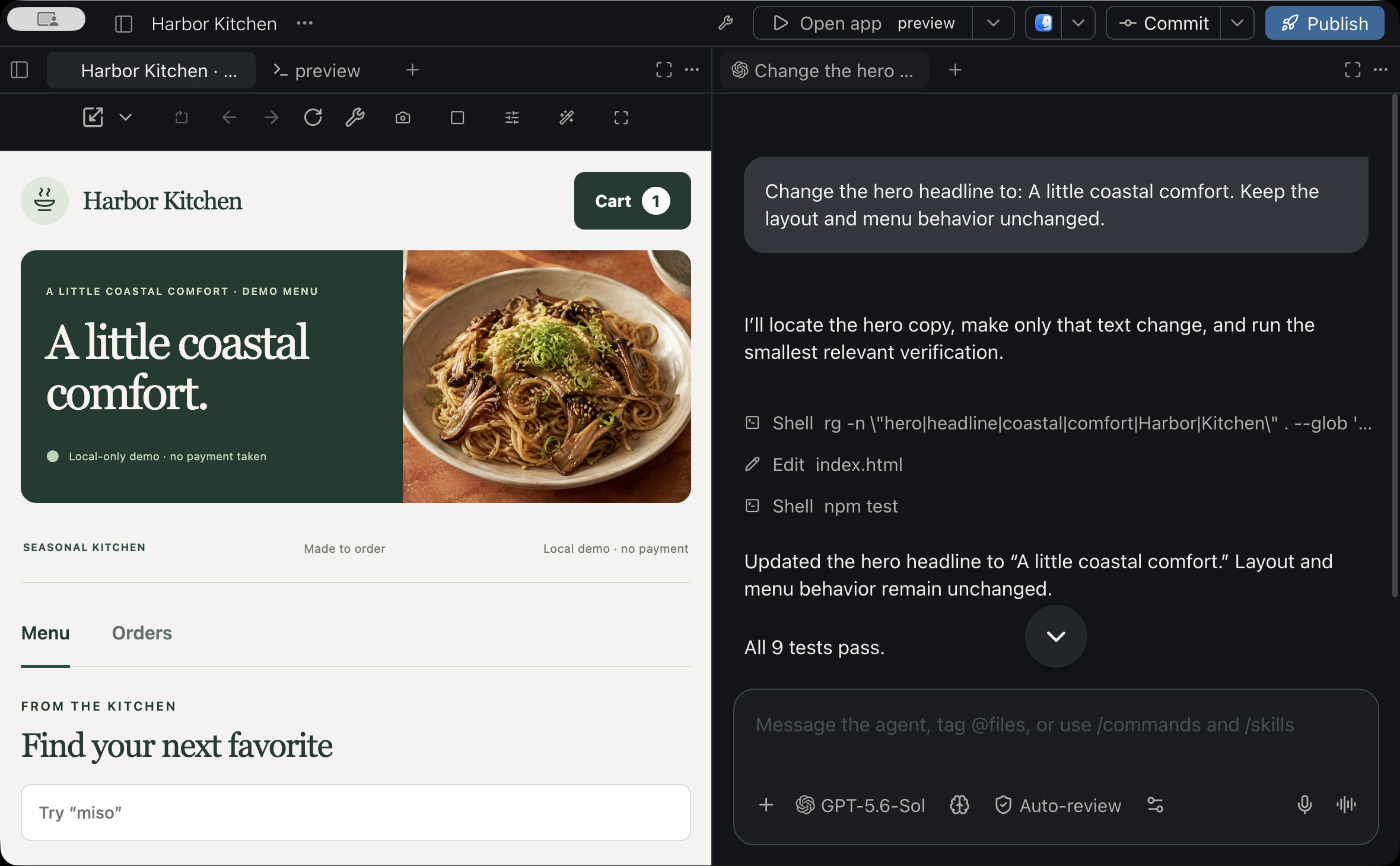
Your agent and your working app, together. Actual Lyre interface with a sample project.
Download and install
| Your computer | Choose this download |
|---|---|
| Windows · 64-bit Intel or AMD | Setup .exe installer |
| Linux · 64-bit Intel or AMD | AppImage, or .deb / .rpm for your distribution |
- Open the latest release and choose the download for your computer.
- Run the Windows installer, or install/open your Linux package.
- Launch Lyre Studio and open a project folder.
Windows builds are currently unsigned and may show a SmartScreen warning. Installation, macOS status, and updates · What's changed
Built around your development environment
Local projects. Local models. Your tools. Work with your existing repositories, terminals, services, and Git workflows. Connect Ollama, LM Studio, llama.cpp, or a compatible model server alongside your chosen cloud providers. Local projects and local-network workflows work without a Lyre cloud account.
Orchestration across models and devices. Use supported coding agents in parallel, with separate worktrees for independent tasks. Lyre keeps agent sessions, authorized host connections, projects, local-model setup, and interactive app previews together.
Model routing built in. Connect a self-hosted model gateway's catalog to Lyre's agent workflow. Choose models and use your gateway's configured routing and fallbacks from one workspace.
Test the result as you build. Review diffs, run your project's tests, inspect terminal output, and interact with the live app beside the agent. Try a change on another device and bring what you find straight back into the conversation.
Carry the release workflow through. Integrated mobile-publishing tools bring signing, screenshots, beta distribution, and Android publishing into the project workflow, using your configured platform tools and store accounts. Desktop and custom projects can use their own publishing setup.
Keep the development loop connected
Turn device feedback into the next change. Attach a live-preview screenshot to an agent draft, or explicitly send bounded diagnostics and client error reports to an agent with access to that project. Lyre keeps raw source, credentials, and unrestricted logs out of those reports.
Get agents and models ready in one place. Discover supported models already running on your computer, save the ones you want to use, and follow guided installation, sign-in, and model-setup steps for supported coding agents. Lyre checks readiness before presenting a provider as available.
Reconnect to the right computer. Lyre remembers authorized hosts and lets you choose which computers and projects appear on a client. When a paired host is reachable on the local network, Lyre can use that direct route on connection or reconnection. A host with Wake-on-LAN configured and explicitly granted can also receive a wake request from its paired client.
Share the app, not the development environment. Create revocable, app-scoped access for someone who only needs the running app. Viewer access does not expose source files, agent sessions, terminals, or host settings.
Take your apps with you
A website, dashboard, personal tool, or browser game: open the real app running on your computer from a paired device. Steer an agent, try the result, and keep improving it from the screen in your hand.
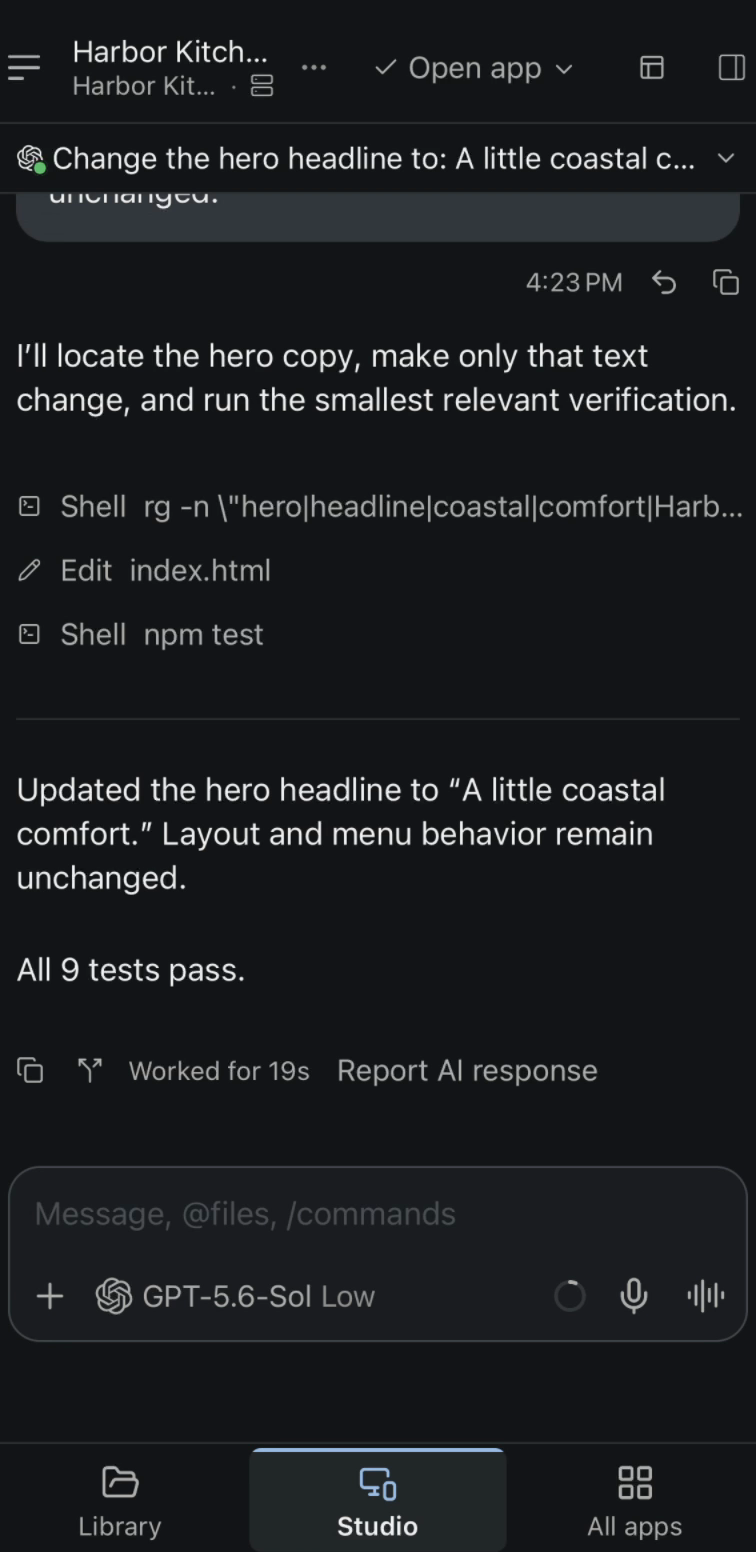
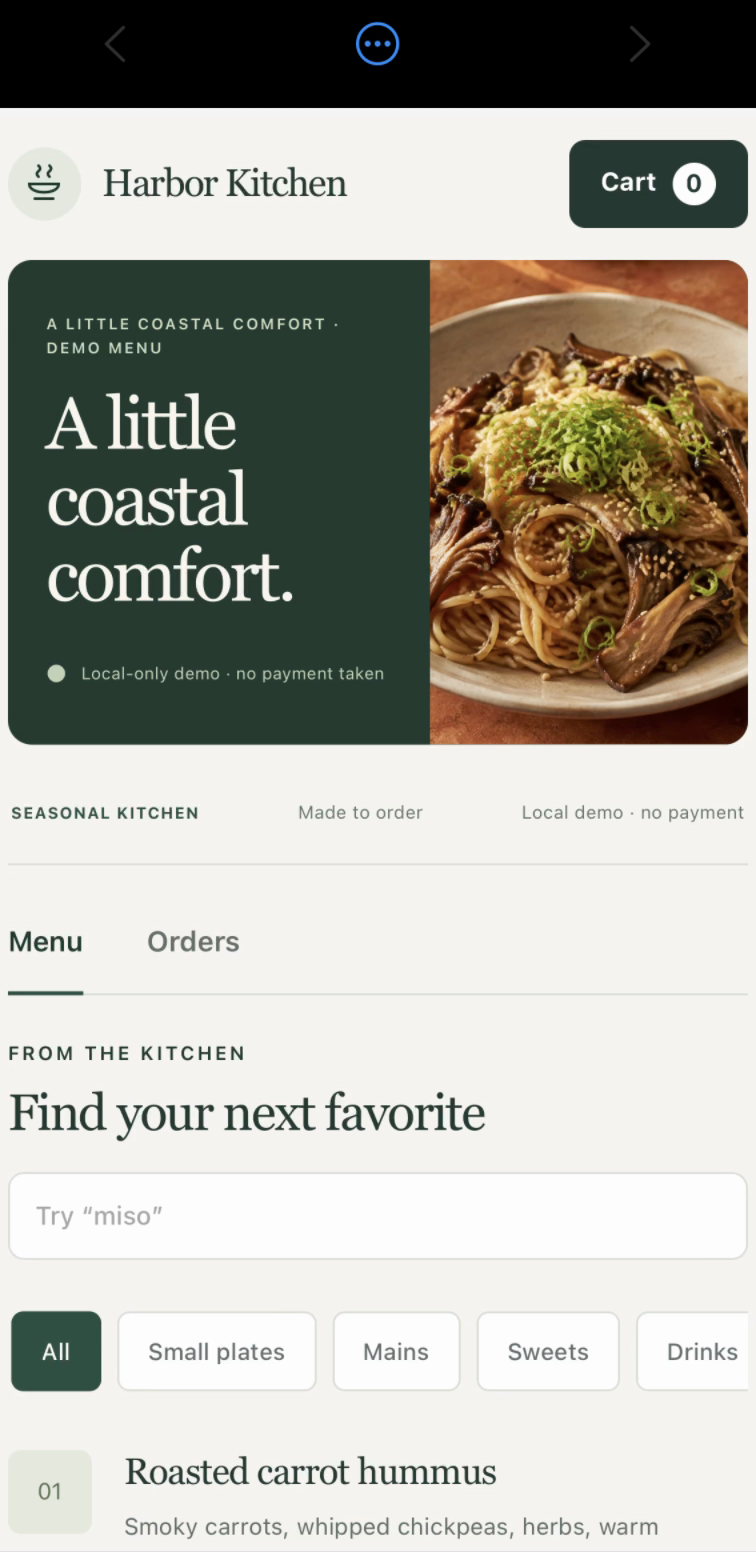

Direct the work. Try the website. Play the game. Actual iPhone testing-build captures.
Your host runs the project and stays awake while you connect locally or remotely. Pro adds live app previews outside your local network and app-scoped sharing. Compare plans.
Lyre is in early access; features depend on your installed build. iOS and Android clients are in testing. Follow mobile availability for distribution updates.
Start building
Open a project, choose your coding provider or local model, and configure the app's preview command. Run the app, give your agent a task, and validate the result. Use Pair Device to connect another supported client to your host.
First-project guide · Connect an existing project · App recipes
Help and releases
- Something broke? Report a bug.
- Have an idea? Request a feature.
- Need a hand? Join the Discord community or read the documentation.
- Following updates? Browse release notes and previous downloads.
- Found a security issue? Report it privately.
This is Lyre Studio's official public hub for downloads, release notes, and feedback. Lyre Studio is proprietary and is not currently open source. Application source is maintained privately. Use of the app is governed by the End User License Agreement; see the license notice and third-party licenses.
© 2026 Jonathan Bakhit · Lyre Studio · Privacy
Contributors

12 commits
Similar repos


Build locally and take your apps with you. Coding agents, local models, live previews, and testing across devices.
See the codeSee what people are saying (1)
README
Lyre Studio
Build locally. Take it with you.
Build, test, and preview apps with coding agents and local models, then take your workspace across devices.
Download Latest Release · Website · Documentation
Windows & Linux desktop · Early access · macOS preview status
Your agent and your working app, together. Actual Lyre interface with a sample project.
Download and install
| Your computer | Choose this download |
|---|---|
| Windows · 64-bit Intel or AMD | Setup .exe installer |
| Linux · 64-bit Intel or AMD | AppImage, or .deb / .rpm for your distribution |
- Open the latest release and choose the download for your computer.
- Run the Windows installer, or install/open your Linux package.
- Launch Lyre Studio and open a project folder.
Windows builds are currently unsigned and may show a SmartScreen warning. Installation, macOS status, and updates · What's changed
Built around your development environment
Local projects. Local models. Your tools. Work with your existing repositories, terminals, services, and Git workflows. Connect Ollama, LM Studio, llama.cpp, or a compatible model server alongside your chosen cloud providers. Local projects and local-network workflows work without a Lyre cloud account.
Orchestration across models and devices. Use supported coding agents in parallel, with separate worktrees for independent tasks. Lyre keeps agent sessions, authorized host connections, projects, local-model setup, and interactive app previews together.
Model routing built in. Connect a self-hosted model gateway's catalog to Lyre's agent workflow. Choose models and use your gateway's configured routing and fallbacks from one workspace.
Test the result as you build. Review diffs, run your project's tests, inspect terminal output, and interact with the live app beside the agent. Try a change on another device and bring what you find straight back into the conversation.
Carry the release workflow through. Integrated mobile-publishing tools bring signing, screenshots, beta distribution, and Android publishing into the project workflow, using your configured platform tools and store accounts. Desktop and custom projects can use their own publishing setup.
Keep the development loop connected
Turn device feedback into the next change. Attach a live-preview screenshot to an agent draft, or explicitly send bounded diagnostics and client error reports to an agent with access to that project. Lyre keeps raw source, credentials, and unrestricted logs out of those reports.
Get agents and models ready in one place. Discover supported models already running on your computer, save the ones you want to use, and follow guided installation, sign-in, and model-setup steps for supported coding agents. Lyre checks readiness before presenting a provider as available.
Reconnect to the right computer. Lyre remembers authorized hosts and lets you choose which computers and projects appear on a client. When a paired host is reachable on the local network, Lyre can use that direct route on connection or reconnection. A host with Wake-on-LAN configured and explicitly granted can also receive a wake request from its paired client.
Share the app, not the development environment. Create revocable, app-scoped access for someone who only needs the running app. Viewer access does not expose source files, agent sessions, terminals, or host settings.
Take your apps with you
A website, dashboard, personal tool, or browser game: open the real app running on your computer from a paired device. Steer an agent, try the result, and keep improving it from the screen in your hand.
Direct the work. Try the website. Play the game. Actual iPhone testing-build captures.
Your host runs the project and stays awake while you connect locally or remotely. Pro adds live app previews outside your local network and app-scoped sharing. Compare plans.
Lyre is in early access; features depend on your installed build. iOS and Android clients are in testing. Follow mobile availability for distribution updates.
Start building
Open a project, choose your coding provider or local model, and configure the app's preview command. Run the app, give your agent a task, and validate the result. Use Pair Device to connect another supported client to your host.
First-project guide · Connect an existing project · App recipes
Help and releases
- Something broke? Report a bug.
- Have an idea? Request a feature.
- Need a hand? Join the Discord community or read the documentation.
- Following updates? Browse release notes and previous downloads.
- Found a security issue? Report it privately.
This is Lyre Studio's official public hub for downloads, release notes, and feedback. Lyre Studio is proprietary and is not currently open source. Application source is maintained privately. Use of the app is governed by the End User License Agreement; see the license notice and third-party licenses.
© 2026 Jonathan Bakhit · Lyre Studio · Privacy
Similar repos
Contributors
12 commits