Watch ternary Bonsai models read a prompt and paint it, live in the browser with WebGPU
TypeScript
0
35 commits
updated Oct 6, 2026
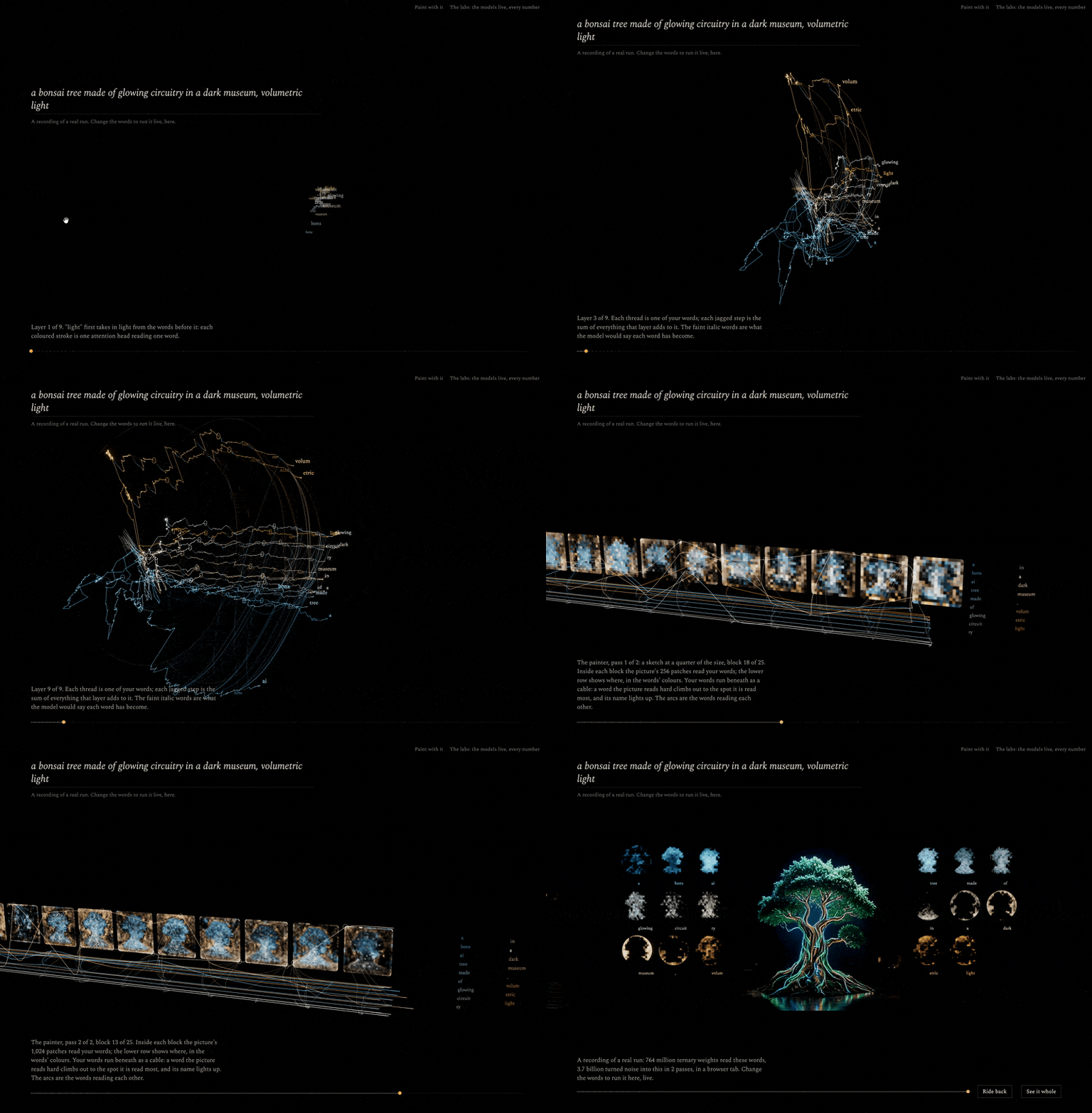
mindview is an art installation that runs two neural networks in your browser and shows them working. A language model reads your words and a diffusion model paints them, and you watch every layer do it: each word travels as a thread through the reader's layers, then the painter reads the words, block by block, as the picture forms. Nothing on screen is illustration. Every line, map and picture is drawn from numbers the models computed.
Both networks are ternary: nearly all of their weights are −1, 0 or +1. To make the piece open fast and paint in a few seconds, we packed the whole text-to-image pipeline into one file of about a gigabyte, mindview-t2i-turbo, and trained small side branches so that it paints in one, two or four steps. On a MacBook Air (M4) a picture takes about 4, 6 or 15 seconds.
Live: neovand.github.io/mindview · paint · the labs · the model · its Space
The landing asks for a prompt and waits for you to start. Then it follows your words through both models, in the order the computation happens.
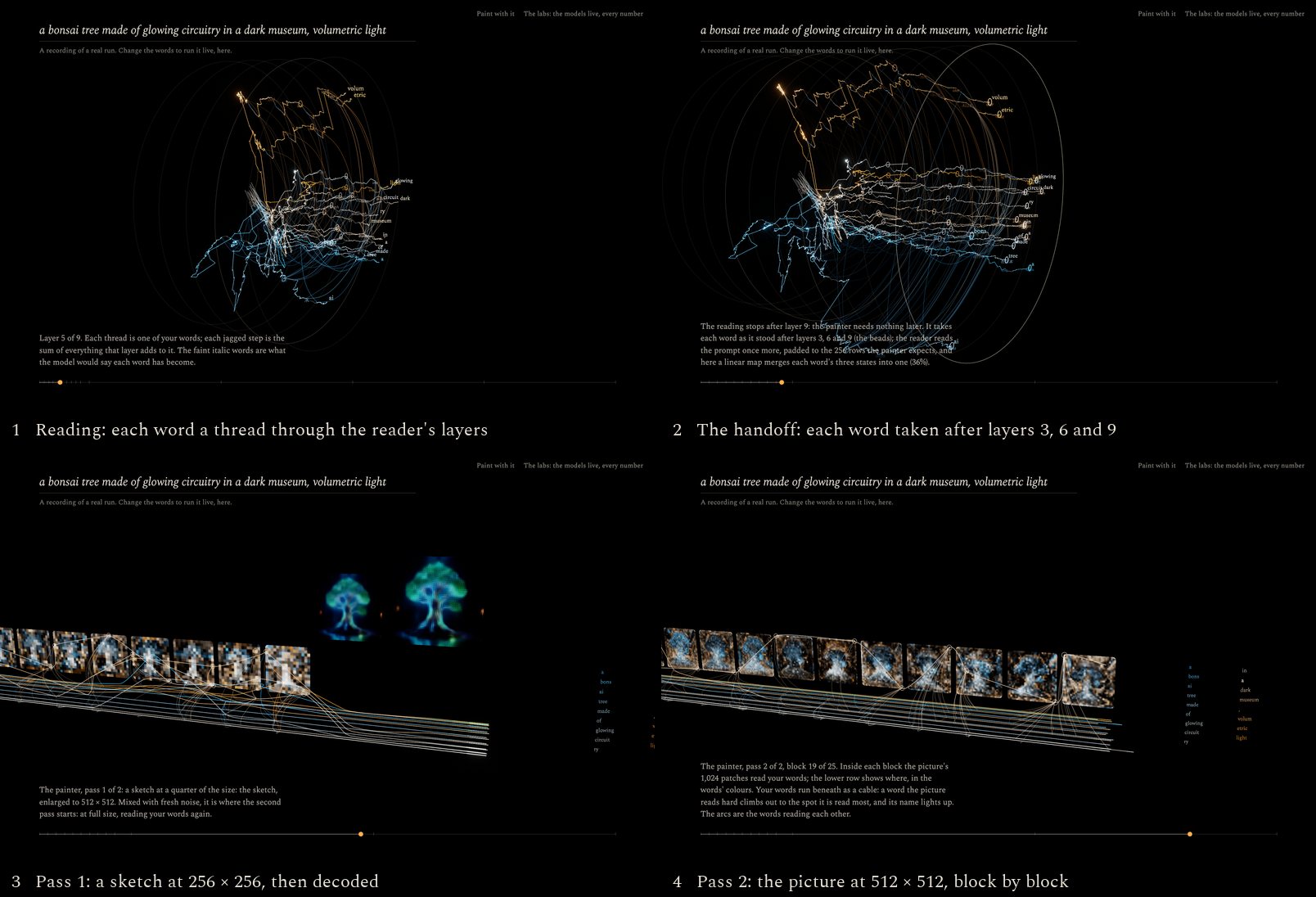
You can drag to turn, scroll to come closer, ride back along the timeline, or type a new prompt at any time.
The opening prompt plays a recording of a real run: what the models computed, read back from the GPU during a live run and stored as numbers (about 5 MB). It is drawn exactly as a live run is, and the page says that it is a recording. Change the words and the models download once (1.2 GB, kept by the browser) and run live in your tab.
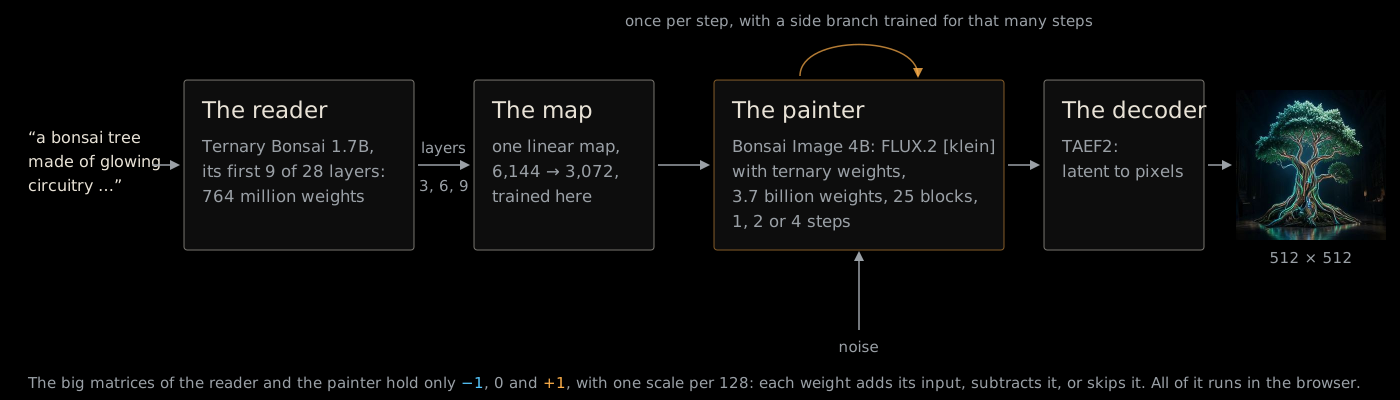
A ternary weight is −1, 0 or +1, with one scale shared by 128 weights. So the models never multiply by their weights: each weight adds its input, subtracts it or skips it. All of it runs in the browser, on WebGPU, with no server. The painter in the browser matches PyTorch block for block, with cosine 1.000000.
The landing and /paint run the one-file model: the reader cut to 9 layers, the map from layers 3, 6 and 9, and the
trained side branches. The labs run the full pipeline, because they show all of it: the whole reader, a ternary
adapter from layers 7, 14 and 21, and the painter in four steps. Both show the picture each block has in mind through
a per-block lens, a small readout fitted to the painter (20 MB, read from the painter's repository beside the one-file
model).
The labs' pipeline downloads about 1.6 GB and paints in four steps. Most of the work below went into the one-file
model, so that the landing and /paint start quickly and paint in seconds.
Fewer layers. A sweep over which reader layers to tap (research/scripts/adapter_layers.py) found that shallow
layers condition the painter about as well as deep ones. A map from layers 3, 6 and 9 scores a per-token cosine of
0.959 against the stock text encoder, measured in the painter's input space on held-out prompts; the labs' adapter,
which reads layers 7, 14 and 21, scores 0.952. Every layer the map does not read is a layer the file does not carry, so
the file keeps 9 of the reader's 28 layers. The map and the painter's context embedder are both linear, so they are
stored as one matrix (6,144 → 3,072).
Fewer steps. Two fine-tunes of the original klein carry over to the ternary painter as small side branches,
y = W x + B (A x), on its 100 big matrices. radames'
SANA-Sprint LoRA paints in two steps, and its best rank-8
approximation paints like the full rank 256 (lora_steps.py, lora_compress.py). EPFL's
RDM paints in one step; its change to klein carries over at
rank 4, with the modulation recomputed at σ = 1 (rdm_delta.py, rdm_test.py, rdm_rank.py).
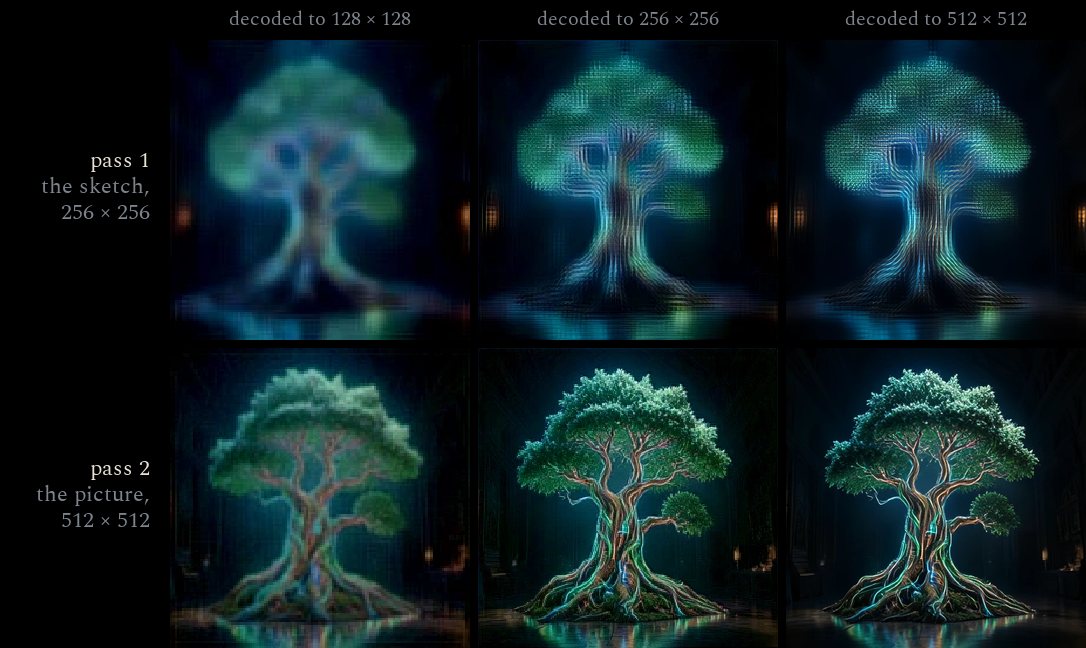
A sketch first. With two steps, the picture is still 88% noise after the first, so the first step only has to
place things. Fast runs it at 256 × 256 on the first 128 text rows, enlarges its guess of the clean picture in latent
space, noises it back and paints the second step at 512 × 512. That takes a third less time, and the pictures are as
good (progressive.py, progressive_rows.py). The decoder's stages of both passes, from the landing's recording:
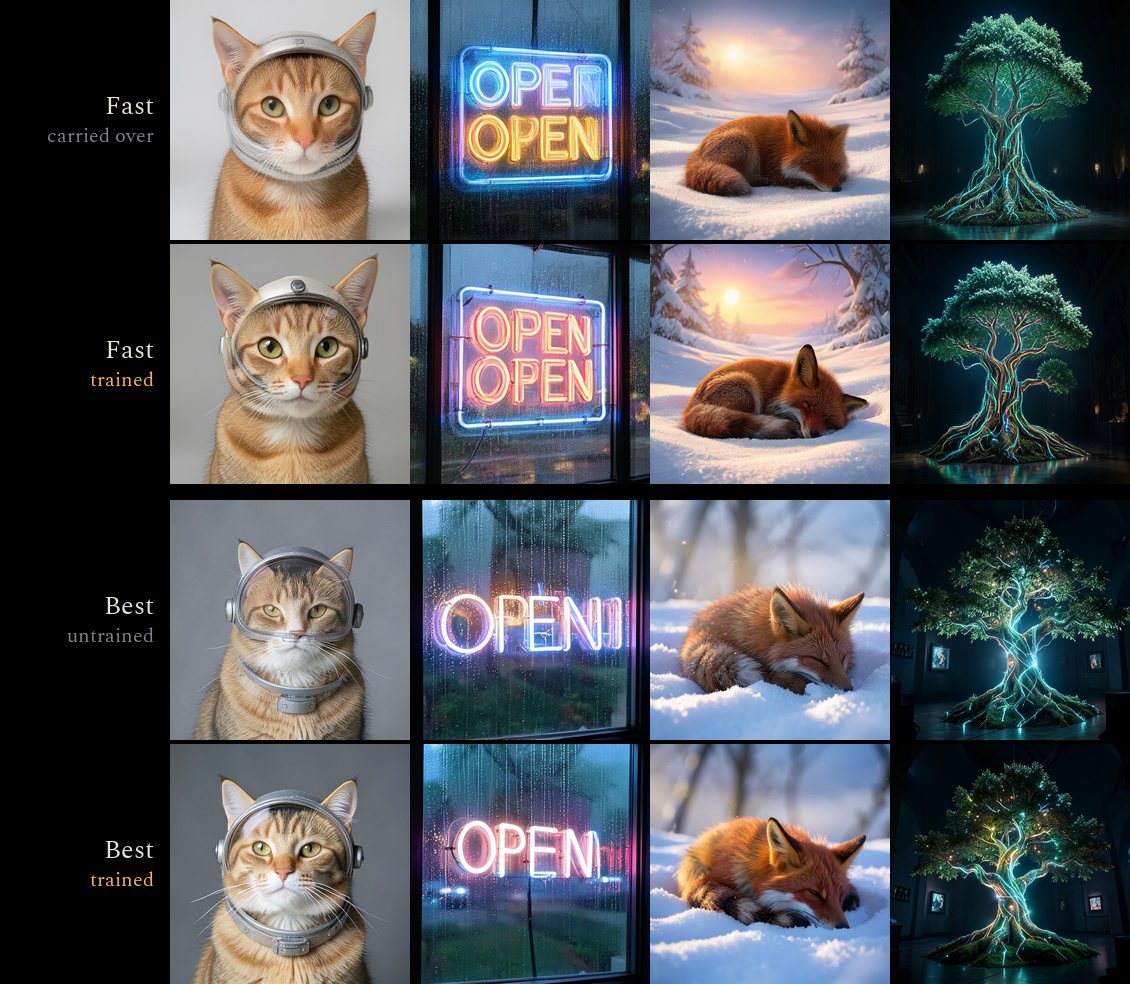
Training the shortcuts on the ternary painter. Carried over, the side branches painted softly and with defects (in one step, a cat's face came out doubled), and even four plain steps of the ternary painter drifted from klein's (a sign read "OPENI"). RDM on the full-precision klein paints sharply from the same conditioning, so the gap is the ternary weights. So we trained a branch for each mode on the ternary painter itself, with a full-precision teacher:
distill_1step.py, distill_steps.py, research/cloud/distill_modal.py).| Mode | Teacher | Held-out LPIPS to the teacher, before → after |
|---|---|---|
| Instant | RDM on klein, 1 step | 0.454 → 0.381 |
| Fast | klein + LoRA, 2 steps | 0.496 → 0.419 |
| Best | klein, 4 steps | 0.448 → 0.370 |
Fast in the browser. An f16 ternary matrix multiply (tiles staged and multiplied in f16, summed in f32), attention
in f16, the text stream cut to what the prompt needs, a register-tiled decoder, and one GPU scheduler that feeds the
work a few milliseconds per frame, so the page stays smooth while the models run. /dev/gemm, /dev/profile and
/dev/rows (development only) measure them.
One file. Ternary weights are stored 5 to a byte (1.6 bits each). Tensors are deflated wherever that saves anything, and the browser inflates them. The file is read with range requests, in parts, so it is never all in memory at once, and the reader (the first part) starts reading while the painter is still downloading.
| Part | Stored |
|---|---|
| The reader: 9 layers and tokenizer | 158.4 MB |
| The map | 35.3 MB |
| The painter | 761.3 MB |
| The decoder | 2.5 MB |
| The 1-step branch (rank 32) | 82.7 MB |
| The 2-step branch (rank 32) | 82.6 MB |
| The 4-step branch (rank 32) | 82.6 MB |
| Schedules for 1–4 steps | 2.1 MB |
| Total | 1,208 MB |
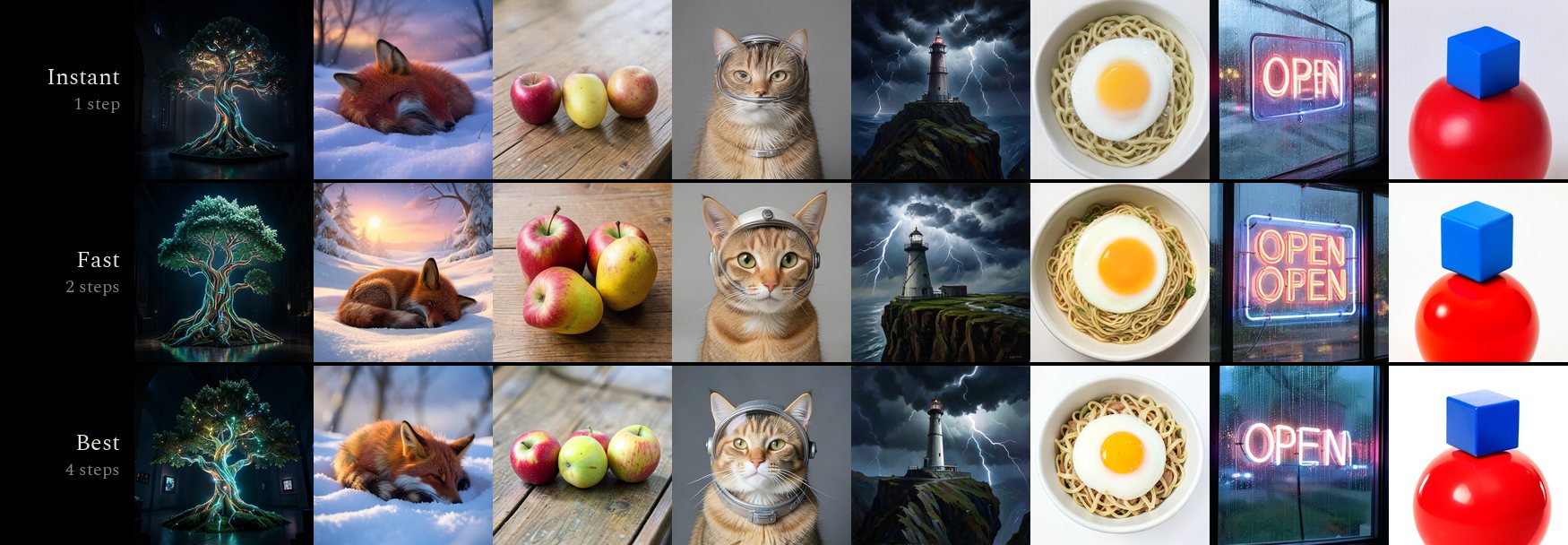
The result, the same prompts and seed in each mode, painted in the browser:
| Mode | Steps | Time for a first picture (MacBook Air M4, Chrome) |
|---|---|---|
| Instant | 1 | about 4 s |
| Fast | 2 | about 6 s |
| Best | 4 | about 15 s |
Best is the most faithful to the prompt. Fast has the most detail but sometimes repeats things. Instant is a little softer. The Air has no fan and slows by about a third after minutes of painting.
| Page | What it is |
|---|---|
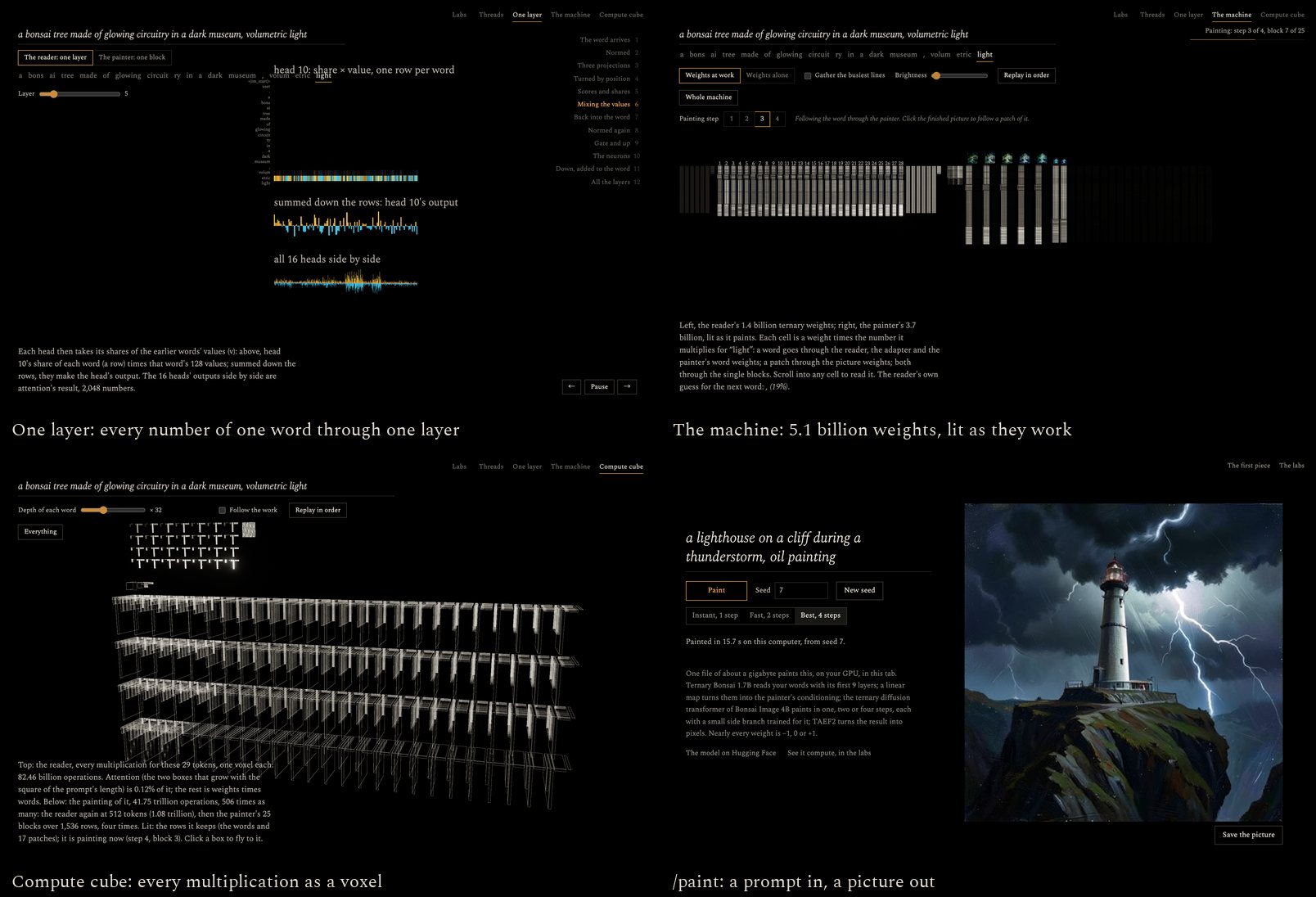
/ | The landing: your words as threads through the reader's layers, then into the painter, a sketch and then the picture. The opening prompt plays a recording of a real run; any other prompt runs the one-file model live in your tab. |
/paint | Type a prompt and get a picture, in one, two or four steps, from the one-file model. The same page is the model's Space on Hugging Face. |
/lab/threads | The landing's piece on the full pipeline: the reader's layers up to 21, then the painter in four steps, with the picture each block has in mind. |
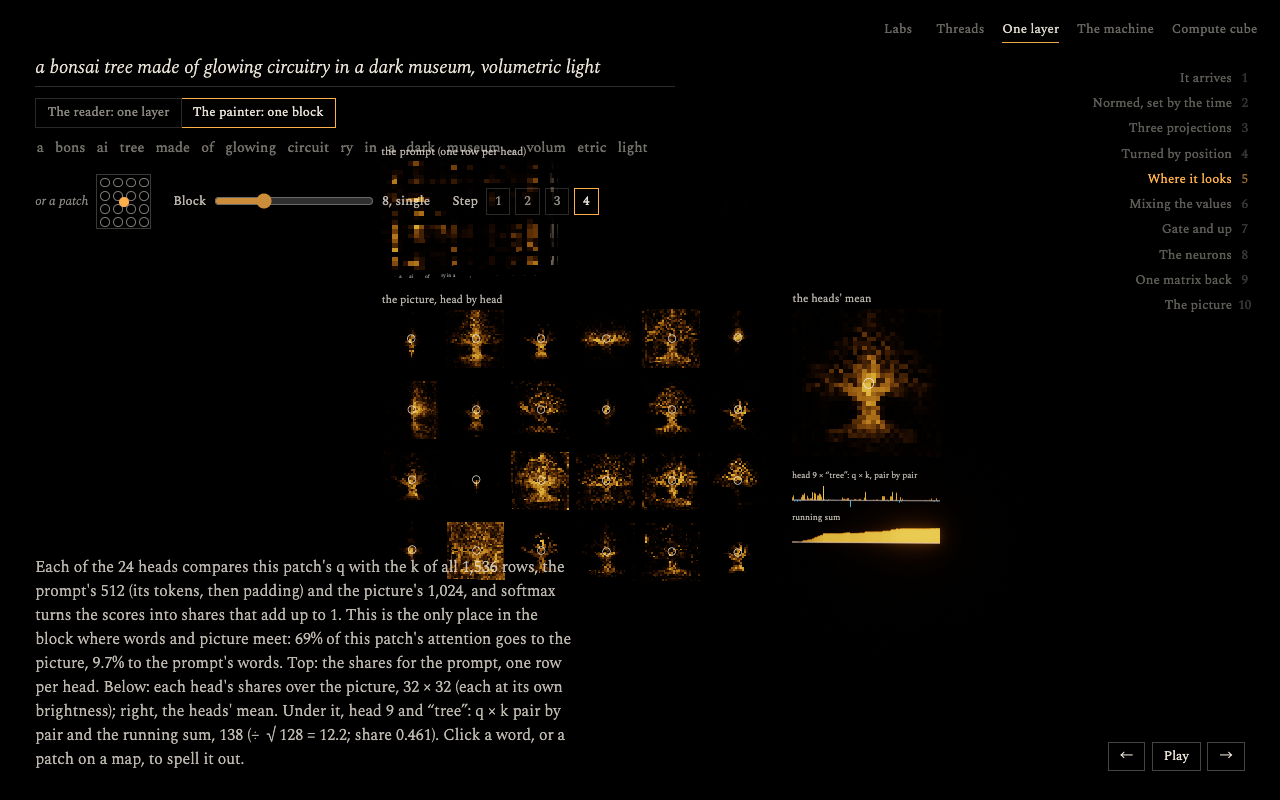
/lab/layer | Operation by operation, every number readable. Pick one layer of the reader, or one block of the painter (for a word or a patch of the picture). You see the norms, the projections with their running sums, the rotary turns, attention (in the painter, 24 heads over the prompt and all 1,024 patches), the neurons, and the gated residual adds. |
/lab/machine | All 5.1 billion weights (the reader's 1.4 billion, the painter's 3.7 billion) on one wall, one cell each, lit by what they multiply for the word or patch you follow. The picture each block has in mind sits above it, filling in as it paints. |
/lab/cube | Every multiplication as a voxel: the reading, then the painting below it, which takes hundreds of times more operations. |
You need:
/paint
about 2.7 GB. A phone gives a web page less (Safari on an iPhone reloads a tab at about 1.5 to 3 GB), so on a phone
the painter holds its memory tightly, with the same arithmetic in smaller pieces: attention four heads at a time,
the largest projections 256 rows at a time, one side branch on the GPU (swapped from the browser's copy of the file
when the speed changes) and no buffer over 256 MB. That brings a live run to about 2.1 GB and /paint to 2.0 GB,
with the same pictures to the pixel. The recorded run plays anywhere; the live pages ask a phone before they load./paint, about 1.6 GB for
the labs. The browser keeps them in Cache Storage for later visits.To run it locally:
pnpm install
pnpm dev
By default the models come from Hugging Face, the same as on the live site. To work from local copies (faster reloads,
no network), put them in static/models and they are used instead:
hf download prism-ml/Ternary-Bonsai-1.7B-gguf Ternary-Bonsai-1.7B-Q2_0.gguf --local-dir /tmp/reader
mkdir -p static/models/ternary-bonsai-1.7b
mv /tmp/reader/Ternary-Bonsai-1.7B-Q2_0.gguf static/models/ternary-bonsai-1.7b/model.gguf
hf download mohsenvand/mindview-painter --local-dir static/models/bonsai-image-4b
hf download mohsenvand/mindview-t2i-turbo mindview-t2i-turbo.gguf --local-dir /tmp/t2i
mkdir -p static/models/mindview-t2i
mv /tmp/t2i/mindview-t2i-turbo.gguf static/models/mindview-t2i/model.gguf
MODELS=hub or MODELS=local forces one or the other (see vite.config.ts and src/lib/models.ts).
Other commands:
pnpm check: type-check.pnpm lint: formatting and lint.pnpm build: build the static site into build/. Set BASE_PATH=/mindview to serve it from a folder.pnpm space:paint: build the Paint page on its own into spaces/paint/dist, for the Hugging Face Space (a static
Space; its card is spaces/paint/public/README.md). Upload it with
hf upload mohsenvand/mindview-t2i-turbo spaces/paint/dist . --repo-type space.After research/scripts/adapter.py targets, which runs the stock encoder over the prompts:
research/.venv/bin/python research/scripts/adapter_layers.py stats
research/.venv/bin/python research/scripts/adapter_layers.py fit
research/.venv/bin/python research/scripts/adapter_layers.py final 3 6 9
research/.venv/bin/python research/scripts/pack_model.py --fused research/data/adapter/fused_final_layers_3_6_9.pt --float \
  --lora research/data/distill/fast_trained_r32.safetensors --lora-rank 32 \
  --fast-offsets research/data/distill/fast_offsets.pt \
  --best research/data/distill/best_trained_r32.safetensors --best-rank 32 \
  --best-offsets research/data/distill/best_offsets.pt \
  --rdm research/data/distill/rdm_trained_r32.safetensors --rdm-rank 32
The 1-step branch needs, first: research/scripts/rdm_delta.py (RDM minus klein, as rank-256 SVDs), the training
(distill_1step.py prepare, then modal run research/cloud/distill_modal.py --step upload|fetch|targets|train|pull,
then distill_1step.py export 32), and RDM_STUDENT=research/data/distill/student_r32.pt export_painter_schedules.py (the 1r schedule with the trained offsets). The 2- and 4-step branches: modal run research/cloud/distill_modal.py --script steps --mode fast|best --step targets|train, then --step pull --only fast_
(or best_) and distill_steps.py export fast|best 32.
The landing's recorded run is made with node research/scripts/record_threads.mjs (with pnpm dev running): it runs
the opening prompt live on the local file in headless Chrome and writes static/recordings/bonsai-museum.
The pages /lab/pack and /lab/pack/grid compare the file's pictures with the reader's and painter's own files.
src/lib/runtime/: the WebGPU runtime. It holds a GGUF reader, the ternary matrix kernels, the reader, the
painter, TAEF2, and one GPU scheduler that feeds work to the GPU a few milliseconds per frame.src/lib/viz/: the threads piece (threads.ts for the reader, painting.ts for the painter, recording.ts for
recorded runs). src/lib/landing/ loads the one-file model for it.src/lib/lab/: the labs. They share one stage (camera, bloom) and one panel renderer that draws matrices and
vectors straight from GPU buffers at any zoom, down to a single printed number. They also share one painting,
which keeps every matrix input for the prompt's words and 17 patches.src/lib/engine/: shared drawing: the GPU setup, bloom, text and words.research/: the Python side, which:
export_painter.py, export_painter_schedules.py, export_painter_viz2.py);adapter.py, adapter_ternarize.py);adapter_layers.py, pack_model.py);distill_1step.py, distill_steps.py, on Modal with cloud/distill_modal.py);tuned_lens.py);painter_reference.py, painter_truth.py)..github/workflows/deploy.yml builds the site on every push to main and publishes it on GitHub Pages
(Settings → Pages → Source: GitHub Actions). The site is static; the models are fetched from Hugging Face.
Watch ternary Bonsai models read a prompt and paint it, live in the browser with WebGPU
TypeScript
0
35 commits
updated Oct 6, 2026
mindview is an art installation that runs two neural networks in your browser and shows them working. A language model reads your words and a diffusion model paints them, and you watch every layer do it: each word travels as a thread through the reader's layers, then the painter reads the words, block by block, as the picture forms. Nothing on screen is illustration. Every line, map and picture is drawn from numbers the models computed.
Both networks are ternary: nearly all of their weights are −1, 0 or +1. To make the piece open fast and paint in a few seconds, we packed the whole text-to-image pipeline into one file of about a gigabyte, mindview-t2i-turbo, and trained small side branches so that it paints in one, two or four steps. On a MacBook Air (M4) a picture takes about 4, 6 or 15 seconds.
Live: neovand.github.io/mindview · paint · the labs · the model · its Space
The landing asks for a prompt and waits for you to start. Then it follows your words through both models, in the order the computation happens.
You can drag to turn, scroll to come closer, ride back along the timeline, or type a new prompt at any time.
The opening prompt plays a recording of a real run: what the models computed, read back from the GPU during a live run and stored as numbers (about 5 MB). It is drawn exactly as a live run is, and the page says that it is a recording. Change the words and the models download once (1.2 GB, kept by the browser) and run live in your tab.
A ternary weight is −1, 0 or +1, with one scale shared by 128 weights. So the models never multiply by their weights: each weight adds its input, subtracts it or skips it. All of it runs in the browser, on WebGPU, with no server. The painter in the browser matches PyTorch block for block, with cosine 1.000000.
The landing and /paint run the one-file model: the reader cut to 9 layers, the map from layers 3, 6 and 9, and the
trained side branches. The labs run the full pipeline, because they show all of it: the whole reader, a ternary
adapter from layers 7, 14 and 21, and the painter in four steps. Both show the picture each block has in mind through
a per-block lens, a small readout fitted to the painter (20 MB, read from the painter's repository beside the one-file
model).
The labs' pipeline downloads about 1.6 GB and paints in four steps. Most of the work below went into the one-file
model, so that the landing and /paint start quickly and paint in seconds.
Fewer layers. A sweep over which reader layers to tap (research/scripts/adapter_layers.py) found that shallow
layers condition the painter about as well as deep ones. A map from layers 3, 6 and 9 scores a per-token cosine of
0.959 against the stock text encoder, measured in the painter's input space on held-out prompts; the labs' adapter,
which reads layers 7, 14 and 21, scores 0.952. Every layer the map does not read is a layer the file does not carry, so
the file keeps 9 of the reader's 28 layers. The map and the painter's context embedder are both linear, so they are
stored as one matrix (6,144 → 3,072).
Fewer steps. Two fine-tunes of the original klein carry over to the ternary painter as small side branches,
y = W x + B (A x), on its 100 big matrices. radames'
SANA-Sprint LoRA paints in two steps, and its best rank-8
approximation paints like the full rank 256 (lora_steps.py, lora_compress.py). EPFL's
RDM paints in one step; its change to klein carries over at
rank 4, with the modulation recomputed at σ = 1 (rdm_delta.py, rdm_test.py, rdm_rank.py).
A sketch first. With two steps, the picture is still 88% noise after the first, so the first step only has to
place things. Fast runs it at 256 × 256 on the first 128 text rows, enlarges its guess of the clean picture in latent
space, noises it back and paints the second step at 512 × 512. That takes a third less time, and the pictures are as
good (progressive.py, progressive_rows.py). The decoder's stages of both passes, from the landing's recording:
Training the shortcuts on the ternary painter. Carried over, the side branches painted softly and with defects (in one step, a cat's face came out doubled), and even four plain steps of the ternary painter drifted from klein's (a sign read "OPENI"). RDM on the full-precision klein paints sharply from the same conditioning, so the gap is the ternary weights. So we trained a branch for each mode on the ternary painter itself, with a full-precision teacher:
distill_1step.py, distill_steps.py, research/cloud/distill_modal.py).| Mode | Teacher | Held-out LPIPS to the teacher, before → after |
|---|---|---|
| Instant | RDM on klein, 1 step | 0.454 → 0.381 |
| Fast | klein + LoRA, 2 steps | 0.496 → 0.419 |
| Best | klein, 4 steps | 0.448 → 0.370 |
Fast in the browser. An f16 ternary matrix multiply (tiles staged and multiplied in f16, summed in f32), attention
in f16, the text stream cut to what the prompt needs, a register-tiled decoder, and one GPU scheduler that feeds the
work a few milliseconds per frame, so the page stays smooth while the models run. /dev/gemm, /dev/profile and
/dev/rows (development only) measure them.
One file. Ternary weights are stored 5 to a byte (1.6 bits each). Tensors are deflated wherever that saves anything, and the browser inflates them. The file is read with range requests, in parts, so it is never all in memory at once, and the reader (the first part) starts reading while the painter is still downloading.
| Part | Stored |
|---|---|
| The reader: 9 layers and tokenizer | 158.4 MB |
| The map | 35.3 MB |
| The painter | 761.3 MB |
| The decoder | 2.5 MB |
| The 1-step branch (rank 32) | 82.7 MB |
| The 2-step branch (rank 32) | 82.6 MB |
| The 4-step branch (rank 32) | 82.6 MB |
| Schedules for 1–4 steps | 2.1 MB |
| Total | 1,208 MB |
The result, the same prompts and seed in each mode, painted in the browser:
| Mode | Steps | Time for a first picture (MacBook Air M4, Chrome) |
|---|---|---|
| Instant | 1 | about 4 s |
| Fast | 2 | about 6 s |
| Best | 4 | about 15 s |
Best is the most faithful to the prompt. Fast has the most detail but sometimes repeats things. Instant is a little softer. The Air has no fan and slows by about a third after minutes of painting.
| Page | What it is |
|---|---|
/ | The landing: your words as threads through the reader's layers, then into the painter, a sketch and then the picture. The opening prompt plays a recording of a real run; any other prompt runs the one-file model live in your tab. |
/paint | Type a prompt and get a picture, in one, two or four steps, from the one-file model. The same page is the model's Space on Hugging Face. |
/lab/threads | The landing's piece on the full pipeline: the reader's layers up to 21, then the painter in four steps, with the picture each block has in mind. |
/lab/layer | Operation by operation, every number readable. Pick one layer of the reader, or one block of the painter (for a word or a patch of the picture). You see the norms, the projections with their running sums, the rotary turns, attention (in the painter, 24 heads over the prompt and all 1,024 patches), the neurons, and the gated residual adds. |
/lab/machine | All 5.1 billion weights (the reader's 1.4 billion, the painter's 3.7 billion) on one wall, one cell each, lit by what they multiply for the word or patch you follow. The picture each block has in mind sits above it, filling in as it paints. |
/lab/cube | Every multiplication as a voxel: the reading, then the painting below it, which takes hundreds of times more operations. |
You need:
/paint
about 2.7 GB. A phone gives a web page less (Safari on an iPhone reloads a tab at about 1.5 to 3 GB), so on a phone
the painter holds its memory tightly, with the same arithmetic in smaller pieces: attention four heads at a time,
the largest projections 256 rows at a time, one side branch on the GPU (swapped from the browser's copy of the file
when the speed changes) and no buffer over 256 MB. That brings a live run to about 2.1 GB and /paint to 2.0 GB,
with the same pictures to the pixel. The recorded run plays anywhere; the live pages ask a phone before they load./paint, about 1.6 GB for
the labs. The browser keeps them in Cache Storage for later visits.To run it locally:
pnpm install
pnpm dev
By default the models come from Hugging Face, the same as on the live site. To work from local copies (faster reloads,
no network), put them in static/models and they are used instead:
hf download prism-ml/Ternary-Bonsai-1.7B-gguf Ternary-Bonsai-1.7B-Q2_0.gguf --local-dir /tmp/reader
mkdir -p static/models/ternary-bonsai-1.7b
mv /tmp/reader/Ternary-Bonsai-1.7B-Q2_0.gguf static/models/ternary-bonsai-1.7b/model.gguf
hf download mohsenvand/mindview-painter --local-dir static/models/bonsai-image-4b
hf download mohsenvand/mindview-t2i-turbo mindview-t2i-turbo.gguf --local-dir /tmp/t2i
mkdir -p static/models/mindview-t2i
mv /tmp/t2i/mindview-t2i-turbo.gguf static/models/mindview-t2i/model.gguf
MODELS=hub or MODELS=local forces one or the other (see vite.config.ts and src/lib/models.ts).
Other commands:
pnpm check: type-check.pnpm lint: formatting and lint.pnpm build: build the static site into build/. Set BASE_PATH=/mindview to serve it from a folder.pnpm space:paint: build the Paint page on its own into spaces/paint/dist, for the Hugging Face Space (a static
Space; its card is spaces/paint/public/README.md). Upload it with
hf upload mohsenvand/mindview-t2i-turbo spaces/paint/dist . --repo-type space.After research/scripts/adapter.py targets, which runs the stock encoder over the prompts:
research/.venv/bin/python research/scripts/adapter_layers.py stats
research/.venv/bin/python research/scripts/adapter_layers.py fit
research/.venv/bin/python research/scripts/adapter_layers.py final 3 6 9
research/.venv/bin/python research/scripts/pack_model.py --fused research/data/adapter/fused_final_layers_3_6_9.pt --float \
  --lora research/data/distill/fast_trained_r32.safetensors --lora-rank 32 \
  --fast-offsets research/data/distill/fast_offsets.pt \
  --best research/data/distill/best_trained_r32.safetensors --best-rank 32 \
  --best-offsets research/data/distill/best_offsets.pt \
  --rdm research/data/distill/rdm_trained_r32.safetensors --rdm-rank 32
The 1-step branch needs, first: research/scripts/rdm_delta.py (RDM minus klein, as rank-256 SVDs), the training
(distill_1step.py prepare, then modal run research/cloud/distill_modal.py --step upload|fetch|targets|train|pull,
then distill_1step.py export 32), and RDM_STUDENT=research/data/distill/student_r32.pt export_painter_schedules.py (the 1r schedule with the trained offsets). The 2- and 4-step branches: modal run research/cloud/distill_modal.py --script steps --mode fast|best --step targets|train, then --step pull --only fast_
(or best_) and distill_steps.py export fast|best 32.
The landing's recorded run is made with node research/scripts/record_threads.mjs (with pnpm dev running): it runs
the opening prompt live on the local file in headless Chrome and writes static/recordings/bonsai-museum.
The pages /lab/pack and /lab/pack/grid compare the file's pictures with the reader's and painter's own files.
src/lib/runtime/: the WebGPU runtime. It holds a GGUF reader, the ternary matrix kernels, the reader, the
painter, TAEF2, and one GPU scheduler that feeds work to the GPU a few milliseconds per frame.src/lib/viz/: the threads piece (threads.ts for the reader, painting.ts for the painter, recording.ts for
recorded runs). src/lib/landing/ loads the one-file model for it.src/lib/lab/: the labs. They share one stage (camera, bloom) and one panel renderer that draws matrices and
vectors straight from GPU buffers at any zoom, down to a single printed number. They also share one painting,
which keeps every matrix input for the prompt's words and 17 patches.src/lib/engine/: shared drawing: the GPU setup, bloom, text and words.research/: the Python side, which:
export_painter.py, export_painter_schedules.py, export_painter_viz2.py);adapter.py, adapter_ternarize.py);adapter_layers.py, pack_model.py);distill_1step.py, distill_steps.py, on Modal with cloud/distill_modal.py);tuned_lens.py);painter_reference.py, painter_truth.py)..github/workflows/deploy.yml builds the site on every push to main and publishes it on GitHub Pages
(Settings → Pages → Source: GitHub Actions). The site is static; the models are fetched from Hugging Face.



