A local AI image editor: generate, select and edit pictures on your own GPU with FLUX.2 Klein. No cloud, no account.
Python
0
49 commits
updated Oct 11, 2026

A local AI image editor. Your GPU, your pictures, no cloud.
Generate pictures, edit them with plain-language instructions, select objects with a click,
and keep every result as a layer you can move, mask or undo.






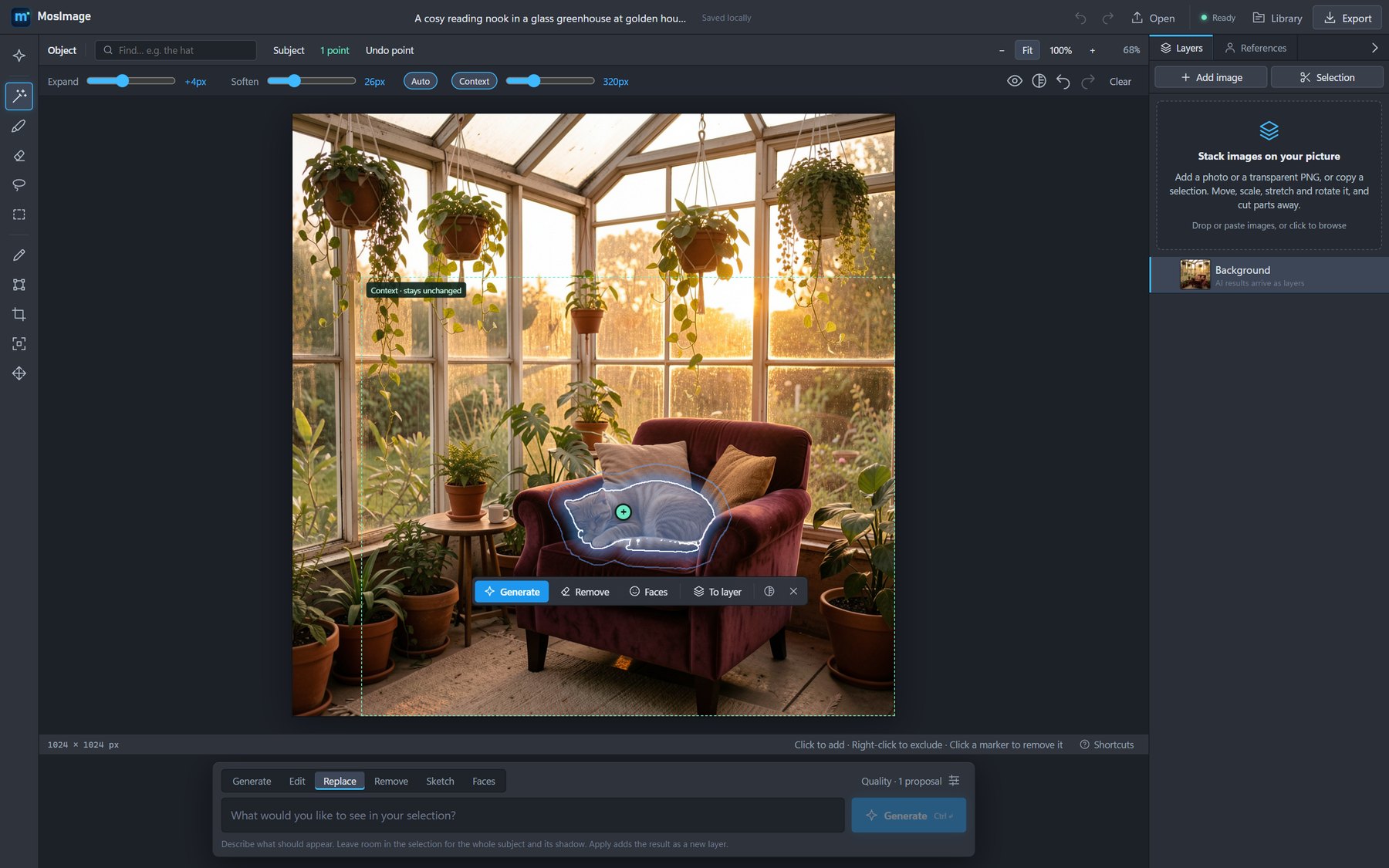
One click on the cat selects it with SAM 2.1. Type what should appear instead and press Generate.
Three steps on one picture, each about 3–10 seconds on an RTX 5070 Ti (7–15 seconds on an M5 Max), straight from the app:
| 1 · Generate | 2 · Replace a selection | 3 · Edit with an instruction |
|---|---|---|
 |  |  |
| "A cosy reading nook in a glass greenhouse at golden hour, an orange cat asleep on a velvet armchair" | Click the cat, then "A fluffy golden retriever puppy curled up asleep". Everything outside the selection stays pixel-exact. | "Make it a snowy winter night … a warm glowing floor lamp beside the armchair" |
Create
Edit
Select
Work with layers
| Windows (tested profile) | macOS (tested profile) | |
|---|---|---|
| OS | Windows 11 | macOS 27; macOS 14 or newer on Apple silicon |
| GPU | NVIDIA RTX 5070 Ti 16 GB; NVFP4 needs a Blackwell GPU and CUDA 13 | Apple M5 Max, 40-core GPU, through Metal (MPS) |
| Memory | 32 GB RAM (the 9B text encoder keeps about 6 GB in RAM) | 128 GB unified memory; Quality uses about 30 GB in BF16, 19 GB in 8-bit and 13 GB in 4-bit |
| Python | 3.13 or 3.12 | 3.13 or 3.12, from Homebrew or uv |
| Node.js | A current LTS release | A current LTS release |
| Optional | Rust and the Tauri prerequisites, for the desktop app | Rust (brew install rust) and the Xcode command-line tools, for the desktop app |
Other NVIDIA GPUs can use FLUX.2 Klein 4B (BF16) under Generation settings → Advanced controls. A Mac runs the BF16 weights the NVFP4 builds come from, or quantizes them to 8 or 4 bits in MLX: from 64 GB of memory it uses BF16, from 48 GB 8-bit, below that 4-bit (MOSIMAGE_APPLE_WEIGHTS overrides this). Below 36 GB the engine warms up Fast, the editor starts on Fast, and the VAE works in 512 px tiles to save memory.
From the repository root, on Windows:
.\start.cmd
or on a Mac:
./start.sh
The first run creates backend/.venv, installs PyTorch (the CUDA build on Windows, the Metal build on a Mac) and the backend requirements, creates backend/.env and installs the frontend dependencies. It then starts:
http://127.0.0.1:8000http://localhost:5173Models download from Hugging Face on first use. FLUX.2 Klein 9B, the Quality model, is gated: accept its licence on its model page and log in once with hf auth login, or set MOSIMAGE_HF_TOKEN in backend/.env. The other models need no token. On later runs, .\start.cmd -NoInstall or ./start.sh --no-install skips the install checks.
For manual setup, troubleshooting a CPU-only PyTorch install and every runtime option, see the guide.
| Model | Used for | Notes |
|---|---|---|
| FLUX.2 Klein 9B NVFP4 | Quality preset on Windows: every AI tool | Non-commercial licence |
| FLUX.2 Klein 4B NVFP4 | Fast preset on Windows: generation and editing, quicker and lighter | Commercially licensed; Enhance runs without the detail enhancer |
| FLUX.2 Klein 9B (BF16, 8-bit or 4-bit) | Quality preset on a Mac | Non-commercial licence |
| FLUX.2 Klein 4B (BF16, 8-bit or 4-bit) | Fast preset on a Mac | Commercially licensed |
| FLUX.2 Klein 4B BF16 | On Windows for GPUs without NVFP4 support | Advanced controls |
| SAM 2.1 Tiny | Click selection and layer cut-outs | Runs on the CPU |
| Grounding DINO tiny | Find, Subject and face detection | Runs on the CPU |
| ViTMatte small | Soft edges for Subject and Remove background | Runs on the CPU |
FLUX.2 Klein does all the AI work: generate, edit, replace, remove, sketch, fix faces, enhance and expand. Enhance on Quality 9B adds its non-commercial detail-enhancer adapter; on Fast it redraws without it. The CPU models handle selection. With the model loaded on the target GPU, a 1024 × 1024 generation takes about 3 s, a full-frame edit about 8 s, and widening a 1254 px photo by half about 10 s. Enhance takes about ten seconds per tile. On an M5 Max, Quality takes about 7 s to generate, 11 s to replace a selection and 15 s for a full-frame edit; Fast about half that. The engine warms up the Quality model in the background at start-up; downloads and loading add time. See the model comparison and Enhance evaluation for measurements.
cd frontend
npm run tauri:build
This builds frontend/src-tauri/target/release/mosimage.exe plus MSI and NSIS installers. The app starts and stops the engine itself, or reuses one that start.cmd already started. Close a running mosimage.exe before rebuilding, because Windows locks the file.
On a Mac, after ./start.sh has set up the engine once:
cd frontend
npm run tauri:build:mac
This builds MosImage.app and installs it in /Applications, so it opens from Launchpad, Spotlight or the Dock like any other app.
backend/
  app/
    routes/     API routers: generation, selection, jobs, documents, references
    models/     Model providers behind one ImageModelProvider interface
    ...         Job queue, compositing, selection, documents, storage
  tests/        unittest suite
  tools/        Benchmark and fixture scripts
frontend/
  src/
    hooks/      Engine, jobs, picture, selection, layers, references
    generation/ Submission and command logic
    canvas/     Editor canvas, masks, sketch, expansion
    components/ Panels, dialogs, tool rail, library
  src-tauri/    Desktop shell
benchmarks/     Versioned fixtures and benchmark reports
docs/           Guide, architecture, roadmap and research notes
data/           Local database and images (not in Git)
models/         Optional local checkpoints (not in Git)
# Backend tests and syntax check (on a Mac: .venv/bin/python)
cd backend
.\.venv\Scripts\python.exe -m unittest discover -s tests -t .
.\.venv\Scripts\python.exe -m compileall app

# Frontend tests, type check and build
cd ..\frontend
npm test
npm run build
Contributor conventions live in AGENTS.md. For how the pieces fit together, read the architecture overview.
| Guide | Setup, runtime modes and a reference for every tool |
| Architecture | Engine, job queue, providers and UI structure |
| Roadmap | Implementation status and next steps |
| Benchmarks | Fixtures, protocol and results |
| All docs | Index, including the dated research notes |
The MosImage source code is released under the MIT License.
Model weights are not part of this repository. They download from Hugging Face under their own licences: FLUX.2 Klein 9B is non-commercial, while FLUX.2 Klein 4B, SAM 2.1, Grounding DINO and ViTMatte permit commercial use. Check each model card before you use results commercially.
The screenshots and example images in docs/images were generated with MosImage itself.
A local AI image editor: generate, select and edit pictures on your own GPU with FLUX.2 Klein. No cloud, no account.
Python
0
49 commits
updated Oct 11, 2026
A local AI image editor. Your GPU, your pictures, no cloud.
Generate pictures, edit them with plain-language instructions, select objects with a click,
and keep every result as a layer you can move, mask or undo.
One click on the cat selects it with SAM 2.1. Type what should appear instead and press Generate.
Three steps on one picture, each about 3–10 seconds on an RTX 5070 Ti (7–15 seconds on an M5 Max), straight from the app:
| 1 · Generate | 2 · Replace a selection | 3 · Edit with an instruction |
|---|---|---|
| | |
| "A cosy reading nook in a glass greenhouse at golden hour, an orange cat asleep on a velvet armchair" | Click the cat, then "A fluffy golden retriever puppy curled up asleep". Everything outside the selection stays pixel-exact. | "Make it a snowy winter night … a warm glowing floor lamp beside the armchair" |
Create
Edit
Select
Work with layers
| Windows (tested profile) | macOS (tested profile) | |
|---|---|---|
| OS | Windows 11 | macOS 27; macOS 14 or newer on Apple silicon |
| GPU | NVIDIA RTX 5070 Ti 16 GB; NVFP4 needs a Blackwell GPU and CUDA 13 | Apple M5 Max, 40-core GPU, through Metal (MPS) |
| Memory | 32 GB RAM (the 9B text encoder keeps about 6 GB in RAM) | 128 GB unified memory; Quality uses about 30 GB in BF16, 19 GB in 8-bit and 13 GB in 4-bit |
| Python | 3.13 or 3.12 | 3.13 or 3.12, from Homebrew or uv |
| Node.js | A current LTS release | A current LTS release |
| Optional | Rust and the Tauri prerequisites, for the desktop app | Rust (brew install rust) and the Xcode command-line tools, for the desktop app |
Other NVIDIA GPUs can use FLUX.2 Klein 4B (BF16) under Generation settings → Advanced controls. A Mac runs the BF16 weights the NVFP4 builds come from, or quantizes them to 8 or 4 bits in MLX: from 64 GB of memory it uses BF16, from 48 GB 8-bit, below that 4-bit (MOSIMAGE_APPLE_WEIGHTS overrides this). Below 36 GB the engine warms up Fast, the editor starts on Fast, and the VAE works in 512 px tiles to save memory.
From the repository root, on Windows:
.\start.cmd
or on a Mac:
./start.sh
The first run creates backend/.venv, installs PyTorch (the CUDA build on Windows, the Metal build on a Mac) and the backend requirements, creates backend/.env and installs the frontend dependencies. It then starts:
http://127.0.0.1:8000http://localhost:5173Models download from Hugging Face on first use. FLUX.2 Klein 9B, the Quality model, is gated: accept its licence on its model page and log in once with hf auth login, or set MOSIMAGE_HF_TOKEN in backend/.env. The other models need no token. On later runs, .\start.cmd -NoInstall or ./start.sh --no-install skips the install checks.
For manual setup, troubleshooting a CPU-only PyTorch install and every runtime option, see the guide.
| Model | Used for | Notes |
|---|---|---|
| FLUX.2 Klein 9B NVFP4 | Quality preset on Windows: every AI tool | Non-commercial licence |
| FLUX.2 Klein 4B NVFP4 | Fast preset on Windows: generation and editing, quicker and lighter | Commercially licensed; Enhance runs without the detail enhancer |
| FLUX.2 Klein 9B (BF16, 8-bit or 4-bit) | Quality preset on a Mac | Non-commercial licence |
| FLUX.2 Klein 4B (BF16, 8-bit or 4-bit) | Fast preset on a Mac | Commercially licensed |
| FLUX.2 Klein 4B BF16 | On Windows for GPUs without NVFP4 support | Advanced controls |
| SAM 2.1 Tiny | Click selection and layer cut-outs | Runs on the CPU |
| Grounding DINO tiny | Find, Subject and face detection | Runs on the CPU |
| ViTMatte small | Soft edges for Subject and Remove background | Runs on the CPU |
FLUX.2 Klein does all the AI work: generate, edit, replace, remove, sketch, fix faces, enhance and expand. Enhance on Quality 9B adds its non-commercial detail-enhancer adapter; on Fast it redraws without it. The CPU models handle selection. With the model loaded on the target GPU, a 1024 × 1024 generation takes about 3 s, a full-frame edit about 8 s, and widening a 1254 px photo by half about 10 s. Enhance takes about ten seconds per tile. On an M5 Max, Quality takes about 7 s to generate, 11 s to replace a selection and 15 s for a full-frame edit; Fast about half that. The engine warms up the Quality model in the background at start-up; downloads and loading add time. See the model comparison and Enhance evaluation for measurements.
cd frontend
npm run tauri:build
This builds frontend/src-tauri/target/release/mosimage.exe plus MSI and NSIS installers. The app starts and stops the engine itself, or reuses one that start.cmd already started. Close a running mosimage.exe before rebuilding, because Windows locks the file.
On a Mac, after ./start.sh has set up the engine once:
cd frontend
npm run tauri:build:mac
This builds MosImage.app and installs it in /Applications, so it opens from Launchpad, Spotlight or the Dock like any other app.
backend/
  app/
    routes/     API routers: generation, selection, jobs, documents, references
    models/     Model providers behind one ImageModelProvider interface
    ...         Job queue, compositing, selection, documents, storage
  tests/        unittest suite
  tools/        Benchmark and fixture scripts
frontend/
  src/
    hooks/      Engine, jobs, picture, selection, layers, references
    generation/ Submission and command logic
    canvas/     Editor canvas, masks, sketch, expansion
    components/ Panels, dialogs, tool rail, library
  src-tauri/    Desktop shell
benchmarks/     Versioned fixtures and benchmark reports
docs/           Guide, architecture, roadmap and research notes
data/           Local database and images (not in Git)
models/         Optional local checkpoints (not in Git)
# Backend tests and syntax check (on a Mac: .venv/bin/python)
cd backend
.\.venv\Scripts\python.exe -m unittest discover -s tests -t .
.\.venv\Scripts\python.exe -m compileall app

# Frontend tests, type check and build
cd ..\frontend
npm test
npm run build
Contributor conventions live in AGENTS.md. For how the pieces fit together, read the architecture overview.
| Guide | Setup, runtime modes and a reference for every tool |
| Architecture | Engine, job queue, providers and UI structure |
| Roadmap | Implementation status and next steps |
| Benchmarks | Fixtures, protocol and results |
| All docs | Index, including the dated research notes |
The MosImage source code is released under the MIT License.
Model weights are not part of this repository. They download from Hugging Face under their own licences: FLUX.2 Klein 9B is non-commercial, while FLUX.2 Klein 4B, SAM 2.1, Grounding DINO and ViTMatte permit commercial use. Check each model card before you use results commercially.
The screenshots and example images in docs/images were generated with MosImage itself.





