
Local-first agent harness (Windows + Ollama) for 2–9B models. Same 2B model: 0.017 → 0.821 across four agent harnesses — 48×. 288-cell benchmark, every cell public. One-click zero-outbound mode. 本地优先,一键断网,零遥测。鸣鸟
Python
1
45 commits
updated Sep 23, 2026
See what people are saying
README
🐦 Mingbird
A local-first agent harness that finishes real tasks on the laptop you already own — 2–9B models on integrated graphics.
中文版 · Apache-2.0 · Windows 10/11 · Linux & macOS (experimental) · Offline-first
Same 2B model: 0.017 → 0.821. The harness was the problem.
You've been told local models need a big discrete GPU. On an ordinary laptop — integrated graphics, 16–32 GB of RAM — the same 2–9B models that stall in cloud-style frameworks deliver finished artifacts here, because the failures you have seen are harness defects, not model defects. Measured end to end; all 288 cells public.
Current release v1.8.2 · actively maintained (CHANGELOG) · one-click offline mode · CI builds Linux/macOS artifacts · 461 tests
What makes it different
Every mechanism comes from "small models can't do X, so the harness does it for them":
| Small models can't… | Mingbird does it for them |
|---|---|
| …self-debug | the harness runs the tests itself and feeds back exact failures (file:line + the original error text) |
| …edit code safely | every change is auto-backed up (.bak); rollback is one command |
| …escape tool-demo loops | Q&A/task layering (chat answers once and stops) + signature-level anti-loop with an escalating ladder: nudge → hard reset → graceful exit |
| …fit all tools in context | flat prefill loads by category; factory prefill is exactly 797 tokens, and CI fails any change that grows it by a single byte |
| …emit a large file in one call | per-call output cap is 8192 (was 2048); when truncation still bites, the model gets "write the skeleton, then append" chunked feedback instead of an empty-turn spiral |
| …stop crawling through huge files | crawl guard v2 works on a byte budget (2× file size, clamped to 64KB–512KB) — it never refuses |
| …stay on target in long tasks | delivery self-check gate: before claiming done, it re-reads the original task and verifies its work |
| …resist destructive impulses | a five-ring safety net catches them (see Safety) |
Nothing is hardcoded: the Ollama address, executable, GPU environment variables, and model aliases are detected at runtime or configured in ~/.ollama_agent/config.json (see AGENTS.md). The quality floor is held up by a 461-test regression suite — 435 unit tests plus 26 integration tests, the prefill zero-growth assertion among them. The suite contains no live-Ollama end-to-end test: nothing in it needs a running backend or a network. The benchmark runners under bench/ and benchmarks/ are separate programs and are not part of the pytest suite.
The problem we set out to solve
Mainstream agent frameworks are designed for large cloud models. Feed them a 2B local model and everything from the demo videos falls apart: full-tool prefill blows the context, the model cannot self-correct, it loops on tool calls, or quietly gives up halfway through. Our claim: these are harness defects, not model defects — small models usually know what to do; what they cannot do is reliably output and execute it, step by step.
This is not a lonely observation. Recent public work points the same way — guardrail-first harnesses on the front page ("guardrails take an 8B model from 53% to 99%"), the "why your local LLM feels dumber than it is" discussions, local-inference talk shifting from can it run to can it ship. What was missing was someone finishing the 2–9B tier end to end. That is this project.
What it can do
- Real tasks: write code and run the tests, organize files, web research, analyze data, call MCP tools.
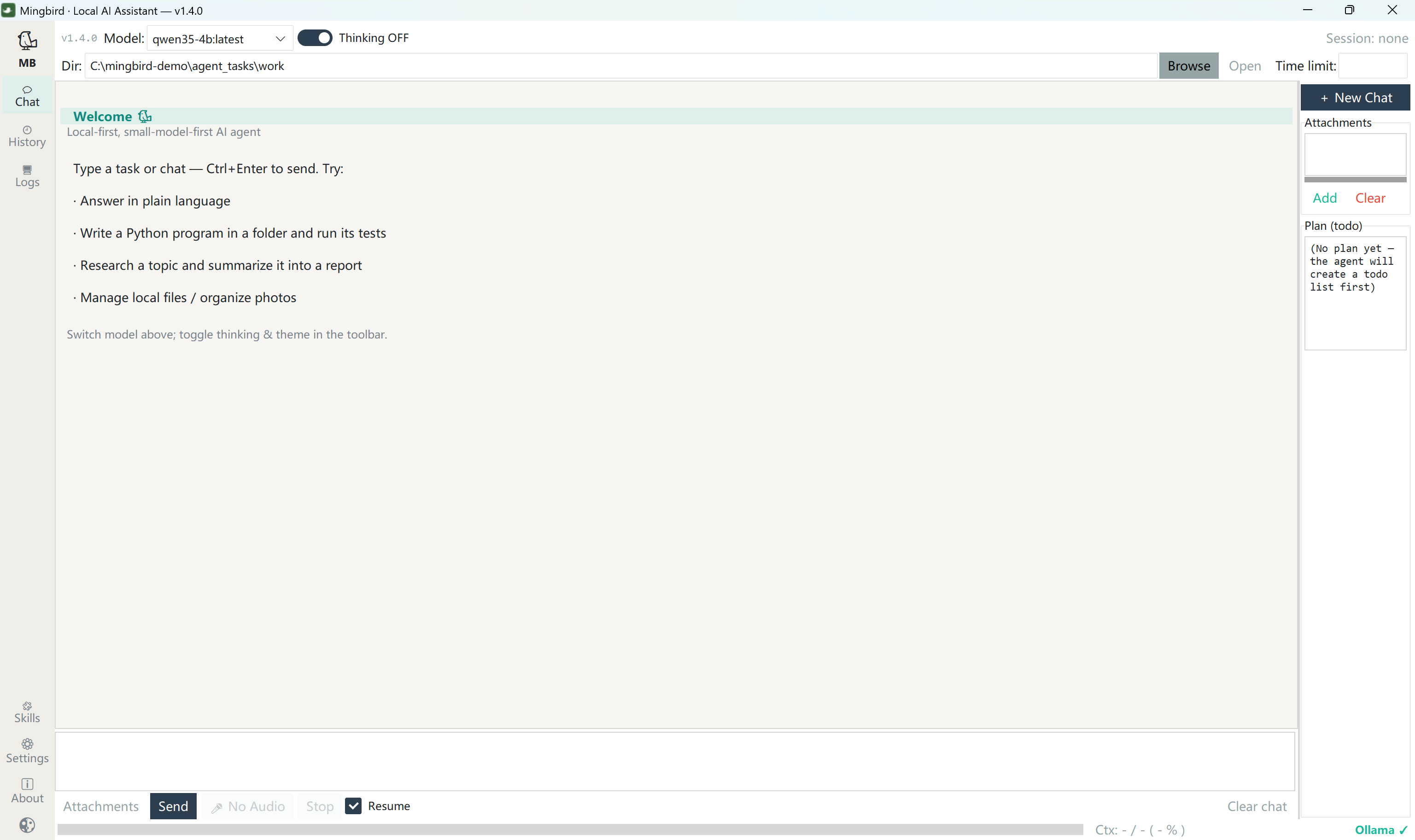
- One-click offline mode (v1.8.0) — 🔒 in the toolbar: local model only, web tools not even assembled into the prompt, zero outbound by construction (see Where your data lives).
- Streaming output + visible thinking — the delivery streams; the thinking folds away once the run is done.
- Drag-and-drop / paste attachments — drop a file into the chat or press Ctrl+V: clipboard files and screenshots become attachments on the spot, sent along with your instruction.
- Voice input out of the box — the installer bundles a local STT model (pure CPU, ~20× real time) that stops automatically when you stop talking.
- Task time-box (off by default) — type
40/1.5h/half an hourinto the box, or write "限时 40 分钟" (or "timebox 40 minutes") right in the task description (auto-detected, highest priority); the harness nudges the run to wind down as the deadline approaches. Local-model users care about wall-clock time. - Session memory — history persists locally; searchable and replayable.
- Model auto-detection — whatever you pulled in Ollama is what you use, up to 256K context.
- Skills & MCP — markdown skills load on demand; MCP servers are plain JSON config.
- Bilingual UI (English / 中文).
- Web UI (experimental) — the same agent in your browser, local-only, 127.0.0.1 only (guide).
- One-click installer, or run from source.
Measured: same model, different harness
Four harnesses × four open models (2B–35B) × 18 real tasks = 288 cells, one machine, deterministic artifact scoring, every cell published.
| Benchmark | Run by | Result in one line |
|---|---|---|
| LRAB-288 | us (self-built) | overall 0.886 vs goose 0.631 / opencode 0.479 / agent-mini 0.405 |
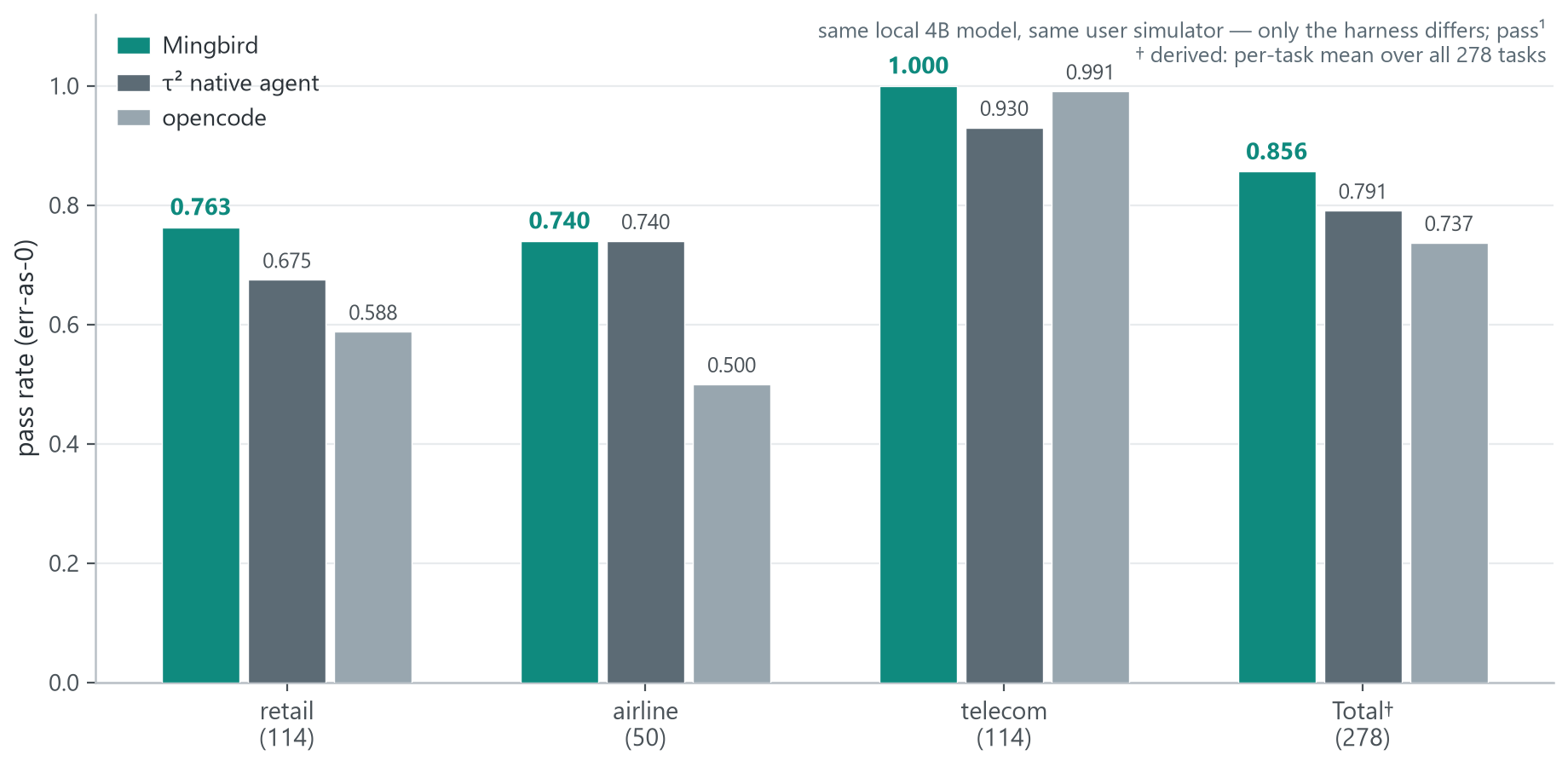
| τ²-bench, 3 domains | benchmark by Sierra Research; run by the authors | retail 0.763 / airline 0.740 / telecom 1.000 — first or tied-first in every domain |
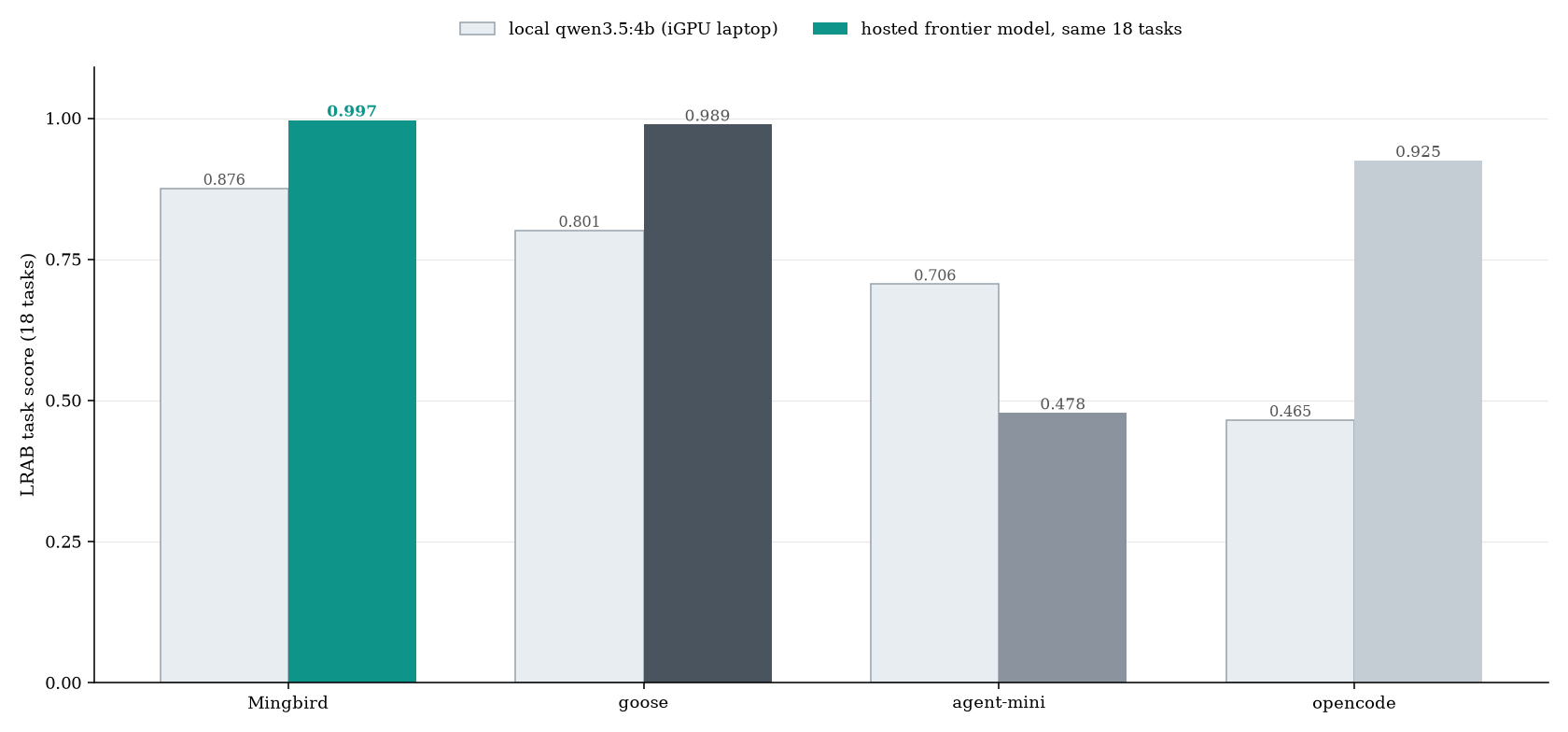
| Frontier-model probe | us | same hosted model in all four harnesses: 0.997 vs 0.989 / 0.925 / 0.478 |
| Ablations (v1.5.0 code) | us | directional only — single-execution cell variance exceeds every per-mechanism delta |
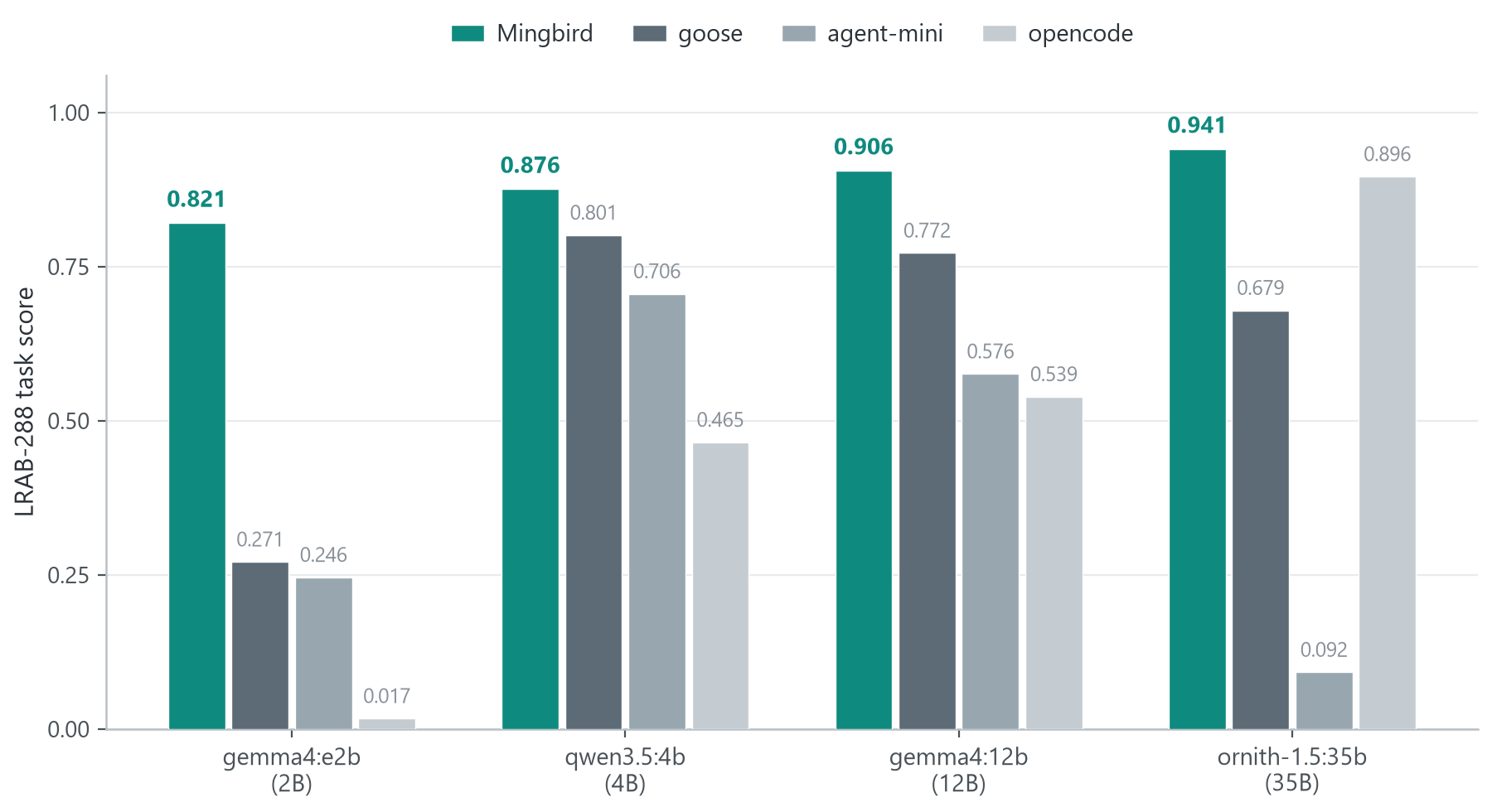
- The 2B column is the story: 0.821 vs 0.017–0.271 — the only harness of the four with no small-model cliff, and 2B is the size an iGPU laptop runs comfortably. The edge over all three competitors is significant on 2B and 12B (Holm-corrected Wilcoxon); where it is not (4B vs goose, 35B vs opencode), we say so.
- Not one model family: one model per tier confounds tier with family, so the whole four-harness matrix was re-run on a second small-tier model (
qwen3.5:2b) — the cliff reproduces, 0.779 vs 0.017 / 0.096 / 0.239 on the same 18 tasks with the same scorer (family_qwen352b_2609.csv). - On the external τ²-bench, telecom is near-saturated (1.000 / 0.991 / 0.930): its task family is repetitive, and the repeat-call guardrail disclosed in our τ² adapter absorbs exactly that failure mode.
- Pin the model, swap the harness: all four harnesses ran the same 18 tasks against one hosted frontier model (temperature 0, thinking off, through a local shim — no harness modified). Result: 0.997 / 0.989 / 0.925 / 0.478 — a defective scaffold buries more than half of a frontier model's measured capability. Read that narrowly, though: the three well-formed scaffolds sit within 0.07 of each other, and between intact harnesses the model is still the bigger lever. Per-cell scores: benchmarks/frontier_probe/.
- Thinking on/off is itself a harness-level lever and moves rival arms by up to +0.69 — details in benchmarks/README.md.
Full tables, significance tests, and per-cell raw data are public in benchmarks/ — including all 288 cells as CSV (lrab_scores.csv) and τ² per-trial manifests (tau2/). Reproduce any single cell in ~30 minutes on one machine: benchmarks/reproduce_one.md.
Hardware
Measured on real machines, not estimated:
| Tier | Hardware | Models | Experience |
|---|---|---|---|
| Entry | any iGPU · 16 GB RAM | 2–4B | streaming, near raw-Ollama speed |
| Base | iGPU or entry-level dGPU · 32 GB RAM | 2–35B | 35B long tasks run end-to-end |
If it runs Ollama, it runs Mingbird. The only thing Mingbird adds to the model is its own static prefill text. And local is not just a speed or cost choice — it is what decides whether your working directory can ever leave this machine.
Getting started
Mingbird runs in four ways — same engine everywhere, pick what fits:
| You want | How |
|---|---|
| Windows desktop client | Mingbird-…-EN-Setup.exe / -CN-Setup.exe from the latest release |
| Linux / macOS desktop client (experimental) | CI-built tarballs from Releases → sh install-unix.sh |
| From source (desktop GUI) | pip install -r requirements.txt → python agent_gui.py |
| Web UI in your browser (experimental) | pip install -r requirements.txt → python webui/server.py → open http://127.0.0.1:8765 — guide |
All of them share sessions, skills, MCP servers and settings.
- Install Ollama and pull a model:
ollama pull gemma4:e2b # small and fast ollama pull qwen3.5:4b # 4B, the benchmark workhorse - Grab the
-EN-Setup.exe(or-CNfor the Chinese UI) from the latest release, install → desktop shortcut. Windows may show SmartScreen for an unsigned installer — "More info" → "Run anyway". - Launch, pick a model, hand it work.
Linux & macOS (experimental, CI-built): download the linux-x64 / macos-arm64 tarball from Releases, extract, run sh install-unix.sh, launch ~/.local/share/Mingbird/LocalAgent. Ollama must be installed on that machine.
From source: python agent_gui.py (GUI) or python ollama_agent.py --help (CLI). Python 3.12 recommended.
Where your data lives
The model runs on your machine, so there is nothing to upload. That is an architectural statement, not a promise: no account system (nothing to tie you to), no telemetry, no crash reports, no update checks, no analytics. We audited every network call in the source, and a purely local task shows zero non-loopback connections while it runs — check it yourself below.
Your working directory is not just your current code. It is your .git
history — deleted keys, abandoned branches, things you forgot were ever
committed. Whether that directory can leave your machine is an
architectural question, not a settings question. Here it cannot: inference
is local, and rollbacks (.bak, .mingbird_trash/) never leave the disk.
There is no workspace packaging, no background snapshot, no upload
mechanism of any kind in the code — nothing that could ship your directory
somewhere even by accident.
v1.8.0: one-click offline mode. The toolbar has a 🔒 toggle. In offline mode the agent runs the local model only; web tools and URL-based MCP servers are not even assembled into the prompt (the model cannot call what it cannot see), and the optional cloud provider is disabled. Zero outbound by construction — not by policy.
Cloud model (optional)
v1.8.2: cloud model picker. Next to the 🔒 toggle there is a cloud-model
box (with a ? for guidance). It is only selectable when you are online
and a cloud model is configured; picking it clears the local-model box
(and vice versa — one model per conversation). In offline mode the box is
disabled and the cloud path is architecturally dead, not just hidden.
Configuration is deliberately minimal — edit config.json (default
~/.ollama_agent/; portable/isolated installs use the MINGBIRD_HOME
directory) and add a cloud section for any OpenAI-compatible endpoint:
"cloud": {
  "enabled": true,
  "base_url": "https://api.example.com/v1",
  "api_key": "your-key",
  "model": "model-name"
}
The api_key lives only in the local config.json — never in the repo,
logs, or telemetry (there is no telemetry). Restart the GUI and pick the
model in the cloud box to use it.
Check it yourself. Run a purely local task and watch the connections:
netstat -ano | findstr <pid> # <pid> = the agent's python process
You should see loopback (127.0.0.1) connections to Ollama, and nothing else. The Web UI binds 127.0.0.1 only.
Honest edges. In normal (online) mode Mingbird does reach the network
in exactly two places, both visible in the code: (1) when the model decides
to search the web — default backends are Bing and Baidu (configurable), and
the query words go to that engine; (2) any MCP servers you configure
yourself. No preconfigured servers, no bundled keys, nothing else. Sessions
and settings stay in ~/.ollama_agent.
Safety
[!WARNING] Mingbird reads and writes files on your disk and runs commands. Choose a working directory with care.
Mingbird ships a five-ring safety net, because impulsive uninstalls and blanket deletes are observed small-model failure modes, not hypotheticals:
| Ring | What it does |
|---|---|
| 0 · Sub-agent sandbox | parallel sub-agents are default-deny and always hold strictly fewer permissions than the main agent |
| 1 · Irreversible ops refused | format, diskpart, vssadmin delete shadows, dd to raw devices, wsl --unregister, dism, driver uninstall, userdel — refused outright |
| 2 · Behavior tiering | software uninstalls / system environment changes: confirm each while attended, deny by default when unattended (AGENT_ALLOW_ENV_MUTATION=1 to opt in) |
| 3 · Boundary confirmation | recursive deletes stay inside the working directory; out-of-bounds refusals come with a per-file way out |
| 4 · Rollback everywhere | .bak before writes; delete_file lands in .mingbird_trash/; overwriting a large existing file with much shorter content needs an explicit replace=true |
Escape hatch: AGENT_UNSAFE=1 turns the whole net off — at your own risk.
Honest limits
- A 2B model will not rewrite your entire codebase in one shot — but it handles the bulk of everyday agent work, and when it cannot, it fails loudly instead of failing silently.
- 35B on an iGPU runs end-to-end but is not fast (~26 tok/s at 128K context).
- Linux and macOS packages are experimental CI builds; Windows is the primary platform.
- LRAB is a benchmark we designed ourselves — which is exactly why the tasks, the scoring code and the raw per-cell data are public: rerun it yourself instead of taking our word for it.
Version map & reproduction window
The published numbers are reproducible only against the code base, backend, and collection windows that produced them. This is the map.
| What | Pinned to |
|---|---|
| Code base for the published LRAB numbers | git tag v1.5.0, commit 1ee92d1 |
| Data release commit | 61fc6aa |
| Commit where the numbers first appear | 7c99941 |
| Backend | Ollama 0.33.2 — unchanged since 2026-08-28 (binary name, version, and SHA-256 are pinned in benchmarks/models.lock) |
| Collection windows | 09-01…04 · 09-13…14 · 09-18…20 · 09-22 |
Some components were produced on later working trees than the v1.5.0 code
base. All of them are disclosed in the paper's appendix and repeated here:
- Frontier-model probe — 2026-09-20, a post-
v1.7.0tree:benchmarks/frontier_probe/. - Static prefill cost curve — 2026-09-20, the same post-
v1.7.0tree:benchmarks/failure_forms/(cost_curve_data_2609.csv,make_fig9_costcurve.py,fig9_caption.md). - Mechanism ablation re-run — 2026-09-22, a
v1.8.2-era tree:benchmarks/ablation/.
Reproduction window. The competitor harnesses are live targets, not fixed artifacts — the versions behind the published numbers are goose 1.48.0, opencode 1.18.23, and agent-mini 0.3.1. The numbers correspond to the frozen collection windows above. A later upstream release of any of those harnesses is a different experiment: reproducing these numbers requires the versions named here, on the protocol described in benchmarks/README.md.
License
Apache-2.0 — free to use, modify, and distribute.
Code is Apache-2.0 (see LICENSE); the benchmark data published in
this repository is licensed separately under CC BY 4.0 (see
LICENSE-DATA). Third-party components and benchmarks are
listed in THIRD_PARTY_NOTICES.
Similar repos


Languages
Python
97.3%
HTML
2.6%
Local-first agent harness (Windows + Ollama) for 2–9B models. Same 2B model: 0.017 → 0.821 across four agent harnesses — 48×. 288-cell benchmark, every cell public. One-click zero-outbound mode. 本地优先,一键断网,零遥测。鸣鸟
Python
1
45 commits
updated Sep 23, 2026
See what people are saying
README
🐦 Mingbird
A local-first agent harness that finishes real tasks on the laptop you already own — 2–9B models on integrated graphics.
中文版 · Apache-2.0 · Windows 10/11 · Linux & macOS (experimental) · Offline-first
Same 2B model: 0.017 → 0.821. The harness was the problem.
You've been told local models need a big discrete GPU. On an ordinary laptop — integrated graphics, 16–32 GB of RAM — the same 2–9B models that stall in cloud-style frameworks deliver finished artifacts here, because the failures you have seen are harness defects, not model defects. Measured end to end; all 288 cells public.
Current release v1.8.2 · actively maintained (CHANGELOG) · one-click offline mode · CI builds Linux/macOS artifacts · 461 tests
What makes it different
Every mechanism comes from "small models can't do X, so the harness does it for them":
| Small models can't… | Mingbird does it for them |
|---|---|
| …self-debug | the harness runs the tests itself and feeds back exact failures (file:line + the original error text) |
| …edit code safely | every change is auto-backed up (.bak); rollback is one command |
| …escape tool-demo loops | Q&A/task layering (chat answers once and stops) + signature-level anti-loop with an escalating ladder: nudge → hard reset → graceful exit |
| …fit all tools in context | flat prefill loads by category; factory prefill is exactly 797 tokens, and CI fails any change that grows it by a single byte |
| …emit a large file in one call | per-call output cap is 8192 (was 2048); when truncation still bites, the model gets "write the skeleton, then append" chunked feedback instead of an empty-turn spiral |
| …stop crawling through huge files | crawl guard v2 works on a byte budget (2× file size, clamped to 64KB–512KB) — it never refuses |
| …stay on target in long tasks | delivery self-check gate: before claiming done, it re-reads the original task and verifies its work |
| …resist destructive impulses | a five-ring safety net catches them (see Safety) |
Nothing is hardcoded: the Ollama address, executable, GPU environment variables, and model aliases are detected at runtime or configured in ~/.ollama_agent/config.json (see AGENTS.md). The quality floor is held up by a 461-test regression suite — 435 unit tests plus 26 integration tests, the prefill zero-growth assertion among them. The suite contains no live-Ollama end-to-end test: nothing in it needs a running backend or a network. The benchmark runners under bench/ and benchmarks/ are separate programs and are not part of the pytest suite.
The problem we set out to solve
Mainstream agent frameworks are designed for large cloud models. Feed them a 2B local model and everything from the demo videos falls apart: full-tool prefill blows the context, the model cannot self-correct, it loops on tool calls, or quietly gives up halfway through. Our claim: these are harness defects, not model defects — small models usually know what to do; what they cannot do is reliably output and execute it, step by step.
This is not a lonely observation. Recent public work points the same way — guardrail-first harnesses on the front page ("guardrails take an 8B model from 53% to 99%"), the "why your local LLM feels dumber than it is" discussions, local-inference talk shifting from can it run to can it ship. What was missing was someone finishing the 2–9B tier end to end. That is this project.
What it can do
- Real tasks: write code and run the tests, organize files, web research, analyze data, call MCP tools.
- One-click offline mode (v1.8.0) — 🔒 in the toolbar: local model only, web tools not even assembled into the prompt, zero outbound by construction (see Where your data lives).
- Streaming output + visible thinking — the delivery streams; the thinking folds away once the run is done.
- Drag-and-drop / paste attachments — drop a file into the chat or press Ctrl+V: clipboard files and screenshots become attachments on the spot, sent along with your instruction.
- Voice input out of the box — the installer bundles a local STT model (pure CPU, ~20× real time) that stops automatically when you stop talking.
- Task time-box (off by default) — type
40/1.5h/half an hourinto the box, or write "限时 40 分钟" (or "timebox 40 minutes") right in the task description (auto-detected, highest priority); the harness nudges the run to wind down as the deadline approaches. Local-model users care about wall-clock time. - Session memory — history persists locally; searchable and replayable.
- Model auto-detection — whatever you pulled in Ollama is what you use, up to 256K context.
- Skills & MCP — markdown skills load on demand; MCP servers are plain JSON config.
- Bilingual UI (English / 中文).
- Web UI (experimental) — the same agent in your browser, local-only, 127.0.0.1 only (guide).
- One-click installer, or run from source.
Measured: same model, different harness
Four harnesses × four open models (2B–35B) × 18 real tasks = 288 cells, one machine, deterministic artifact scoring, every cell published.
| Benchmark | Run by | Result in one line |
|---|---|---|
| LRAB-288 | us (self-built) | overall 0.886 vs goose 0.631 / opencode 0.479 / agent-mini 0.405 |
| τ²-bench, 3 domains | benchmark by Sierra Research; run by the authors | retail 0.763 / airline 0.740 / telecom 1.000 — first or tied-first in every domain |
| Frontier-model probe | us | same hosted model in all four harnesses: 0.997 vs 0.989 / 0.925 / 0.478 |
| Ablations (v1.5.0 code) | us | directional only — single-execution cell variance exceeds every per-mechanism delta |
- The 2B column is the story: 0.821 vs 0.017–0.271 — the only harness of the four with no small-model cliff, and 2B is the size an iGPU laptop runs comfortably. The edge over all three competitors is significant on 2B and 12B (Holm-corrected Wilcoxon); where it is not (4B vs goose, 35B vs opencode), we say so.
- Not one model family: one model per tier confounds tier with family, so the whole four-harness matrix was re-run on a second small-tier model (
qwen3.5:2b) — the cliff reproduces, 0.779 vs 0.017 / 0.096 / 0.239 on the same 18 tasks with the same scorer (family_qwen352b_2609.csv). - On the external τ²-bench, telecom is near-saturated (1.000 / 0.991 / 0.930): its task family is repetitive, and the repeat-call guardrail disclosed in our τ² adapter absorbs exactly that failure mode.
- Pin the model, swap the harness: all four harnesses ran the same 18 tasks against one hosted frontier model (temperature 0, thinking off, through a local shim — no harness modified). Result: 0.997 / 0.989 / 0.925 / 0.478 — a defective scaffold buries more than half of a frontier model's measured capability. Read that narrowly, though: the three well-formed scaffolds sit within 0.07 of each other, and between intact harnesses the model is still the bigger lever. Per-cell scores: benchmarks/frontier_probe/.
- Thinking on/off is itself a harness-level lever and moves rival arms by up to +0.69 — details in benchmarks/README.md.
Full tables, significance tests, and per-cell raw data are public in benchmarks/ — including all 288 cells as CSV (lrab_scores.csv) and τ² per-trial manifests (tau2/). Reproduce any single cell in ~30 minutes on one machine: benchmarks/reproduce_one.md.
Hardware
Measured on real machines, not estimated:
| Tier | Hardware | Models | Experience |
|---|---|---|---|
| Entry | any iGPU · 16 GB RAM | 2–4B | streaming, near raw-Ollama speed |
| Base | iGPU or entry-level dGPU · 32 GB RAM | 2–35B | 35B long tasks run end-to-end |
If it runs Ollama, it runs Mingbird. The only thing Mingbird adds to the model is its own static prefill text. And local is not just a speed or cost choice — it is what decides whether your working directory can ever leave this machine.
Getting started
Mingbird runs in four ways — same engine everywhere, pick what fits:
| You want | How |
|---|---|
| Windows desktop client | Mingbird-…-EN-Setup.exe / -CN-Setup.exe from the latest release |
| Linux / macOS desktop client (experimental) | CI-built tarballs from Releases → sh install-unix.sh |
| From source (desktop GUI) | pip install -r requirements.txt → python agent_gui.py |
| Web UI in your browser (experimental) | pip install -r requirements.txt → python webui/server.py → open http://127.0.0.1:8765 — guide |
All of them share sessions, skills, MCP servers and settings.
- Install Ollama and pull a model:
ollama pull gemma4:e2b # small and fast ollama pull qwen3.5:4b # 4B, the benchmark workhorse - Grab the
-EN-Setup.exe(or-CNfor the Chinese UI) from the latest release, install → desktop shortcut. Windows may show SmartScreen for an unsigned installer — "More info" → "Run anyway". - Launch, pick a model, hand it work.
Linux & macOS (experimental, CI-built): download the linux-x64 / macos-arm64 tarball from Releases, extract, run sh install-unix.sh, launch ~/.local/share/Mingbird/LocalAgent. Ollama must be installed on that machine.
From source: python agent_gui.py (GUI) or python ollama_agent.py --help (CLI). Python 3.12 recommended.
Where your data lives
The model runs on your machine, so there is nothing to upload. That is an architectural statement, not a promise: no account system (nothing to tie you to), no telemetry, no crash reports, no update checks, no analytics. We audited every network call in the source, and a purely local task shows zero non-loopback connections while it runs — check it yourself below.
Your working directory is not just your current code. It is your .git
history — deleted keys, abandoned branches, things you forgot were ever
committed. Whether that directory can leave your machine is an
architectural question, not a settings question. Here it cannot: inference
is local, and rollbacks (.bak, .mingbird_trash/) never leave the disk.
There is no workspace packaging, no background snapshot, no upload
mechanism of any kind in the code — nothing that could ship your directory
somewhere even by accident.
v1.8.0: one-click offline mode. The toolbar has a 🔒 toggle. In offline mode the agent runs the local model only; web tools and URL-based MCP servers are not even assembled into the prompt (the model cannot call what it cannot see), and the optional cloud provider is disabled. Zero outbound by construction — not by policy.
Cloud model (optional)
v1.8.2: cloud model picker. Next to the 🔒 toggle there is a cloud-model
box (with a ? for guidance). It is only selectable when you are online
and a cloud model is configured; picking it clears the local-model box
(and vice versa — one model per conversation). In offline mode the box is
disabled and the cloud path is architecturally dead, not just hidden.
Configuration is deliberately minimal — edit config.json (default
~/.ollama_agent/; portable/isolated installs use the MINGBIRD_HOME
directory) and add a cloud section for any OpenAI-compatible endpoint:
"cloud": {
  "enabled": true,
  "base_url": "https://api.example.com/v1",
  "api_key": "your-key",
  "model": "model-name"
}
The api_key lives only in the local config.json — never in the repo,
logs, or telemetry (there is no telemetry). Restart the GUI and pick the
model in the cloud box to use it.
Check it yourself. Run a purely local task and watch the connections:
netstat -ano | findstr <pid> # <pid> = the agent's python process
You should see loopback (127.0.0.1) connections to Ollama, and nothing else. The Web UI binds 127.0.0.1 only.
Honest edges. In normal (online) mode Mingbird does reach the network
in exactly two places, both visible in the code: (1) when the model decides
to search the web — default backends are Bing and Baidu (configurable), and
the query words go to that engine; (2) any MCP servers you configure
yourself. No preconfigured servers, no bundled keys, nothing else. Sessions
and settings stay in ~/.ollama_agent.
Safety
[!WARNING] Mingbird reads and writes files on your disk and runs commands. Choose a working directory with care.
Mingbird ships a five-ring safety net, because impulsive uninstalls and blanket deletes are observed small-model failure modes, not hypotheticals:
| Ring | What it does |
|---|---|
| 0 · Sub-agent sandbox | parallel sub-agents are default-deny and always hold strictly fewer permissions than the main agent |
| 1 · Irreversible ops refused | format, diskpart, vssadmin delete shadows, dd to raw devices, wsl --unregister, dism, driver uninstall, userdel — refused outright |
| 2 · Behavior tiering | software uninstalls / system environment changes: confirm each while attended, deny by default when unattended (AGENT_ALLOW_ENV_MUTATION=1 to opt in) |
| 3 · Boundary confirmation | recursive deletes stay inside the working directory; out-of-bounds refusals come with a per-file way out |
| 4 · Rollback everywhere | .bak before writes; delete_file lands in .mingbird_trash/; overwriting a large existing file with much shorter content needs an explicit replace=true |
Escape hatch: AGENT_UNSAFE=1 turns the whole net off — at your own risk.
Honest limits
- A 2B model will not rewrite your entire codebase in one shot — but it handles the bulk of everyday agent work, and when it cannot, it fails loudly instead of failing silently.
- 35B on an iGPU runs end-to-end but is not fast (~26 tok/s at 128K context).
- Linux and macOS packages are experimental CI builds; Windows is the primary platform.
- LRAB is a benchmark we designed ourselves — which is exactly why the tasks, the scoring code and the raw per-cell data are public: rerun it yourself instead of taking our word for it.
Version map & reproduction window
The published numbers are reproducible only against the code base, backend, and collection windows that produced them. This is the map.
| What | Pinned to |
|---|---|
| Code base for the published LRAB numbers | git tag v1.5.0, commit 1ee92d1 |
| Data release commit | 61fc6aa |
| Commit where the numbers first appear | 7c99941 |
| Backend | Ollama 0.33.2 — unchanged since 2026-08-28 (binary name, version, and SHA-256 are pinned in benchmarks/models.lock) |
| Collection windows | 09-01…04 · 09-13…14 · 09-18…20 · 09-22 |
Some components were produced on later working trees than the v1.5.0 code
base. All of them are disclosed in the paper's appendix and repeated here:
- Frontier-model probe — 2026-09-20, a post-
v1.7.0tree:benchmarks/frontier_probe/. - Static prefill cost curve — 2026-09-20, the same post-
v1.7.0tree:benchmarks/failure_forms/(cost_curve_data_2609.csv,make_fig9_costcurve.py,fig9_caption.md). - Mechanism ablation re-run — 2026-09-22, a
v1.8.2-era tree:benchmarks/ablation/.
Reproduction window. The competitor harnesses are live targets, not fixed artifacts — the versions behind the published numbers are goose 1.48.0, opencode 1.18.23, and agent-mini 0.3.1. The numbers correspond to the frozen collection windows above. A later upstream release of any of those harnesses is a different experiment: reproducing these numbers requires the versions named here, on the protocol described in benchmarks/README.md.
License
Apache-2.0 — free to use, modify, and distribute.
Code is Apache-2.0 (see LICENSE); the benchmark data published in
this repository is licensed separately under CC BY 4.0 (see
LICENSE-DATA). Third-party components and benchmarks are
listed in THIRD_PARTY_NOTICES.
Similar repos
Languages
Python
97.3%
HTML
2.6%